2017 CHEVROLET MALIBU ESP
[x] Cancel search: ESPPage 229 of 419
Chevrolet Malibu Owner Manual (GMNA-Localizing-U.S./Canada/Mexico-10122664) - 2017 - crc - 5/23/16
228 Driving and Operating
If the RKE transmitter is not inthe vehicle, if there isinterference, or the RKEtransmitter battery is low, theDriver Information Center (DIC)will display a message. SeeDriver Information Center (DIC)(Base Level)0131orDriverInformation Center (DIC)(Uplevel)0134andRemoteKeyless Entry (RKE) SystemOperation032.
Caution
Cranking the engine for long
periods of time, by returning the
ignition to the START position
immediately after cranking has
ended, can overheat and damage
the cranking motor, and drain the
battery. Wait at least 15 seconds
between each try, to let the
cranking motor cool down.
2. If the engine does not startafter five to 10 seconds,especially in very cold weather(below✓18 °C or 0 °F), it couldbe flooded with too much
gasoline. Try pushing theaccelerator pedal all the way tothe floor and holding it there asyou hold ENGINE START/STOP, for up to a maximum of15 seconds. Wait at least15 seconds between each try,to allow the cranking motor tocool down. When the enginestarts, let go of the button andthe accelerator. If the vehiclestarts briefly but then stopsagain, do the same thing. Thisclears the extra gasoline fromthe engine. Do not race theengine immediately afterstarting it. Operate the engineand transmission gently untilthe oil warms up and lubricatesall moving parts.
Hybrid Operation
This vehicle combines gasoline andelectric propulsion. The gasolineengine will automatically start toprovide power and then shut off tosave fuel.
The engine may remainrunning when:
.Accelerating aggressively orclimbing hills.
.Vehicle speed is greater than88 km/h (55 mph).
.Charging the high voltagebattery.
.The heater is being used.
The engine and transmission worktogether to provide propulsionpower at the highest efficiency. Thismay result in higher engine speeds.
Stop/Start System
{Warning
Exiting the vehicle without first
shifting into P (Park) may cause
the vehicle to move. You or others
may be injured. Because the
vehicle has the auto engine stop/
start feature, the vehicle's engine
might seem to be shut off;
(Continued)
Page 230 of 419
Chevrolet Malibu Owner Manual (GMNA-Localizing-U.S./Canada/Mexico-10122664) - 2017 - crc - 5/23/16
Driving and Operating 229
Warning (Continued)
however, once the brake pedal is
released, the engine will start up
again.
Shift to P (Park) and turn the
ignition to LOCK/OFF, before
exiting the vehicle.
If equipped with the 1.5L L4 engine,the vehicle has a fuel saving stop/start system to shut off the engine tohelp conserve fuel.
Auto Engine Stop/Start
When the brakes are applied andthe vehicle is at a complete stop,the engine may turn off. Whenstopped, the tachometer displaysAUTO STOP. SeeTa c h o m e t e r(Non-Hybrid)011 7.Whenthebrakepedal is released or the acceleratorpedal pushed, the engine willrestart.
Auto Stop may be deactivated if:
.Aminimumvehiclespeedisnotreached.
.The engine or transmission isnot at the required operatingtemperature.
.The outside temperature is notin the required operating range,typically below✓10 °C (14 °F) orabove 50 °C (122 °F).
.The shift lever is in any gearother than D (Drive).
.The battery has been recentlydisconnected.
.The battery charge is low.
.The interior comfort level has notreached the required level forthe climate control system ordefog settings. Use the eco(green indicator on) airconditioning mode for betterefficiency. SeeClimate ControlSystems0205andDualAutomatic Climate ControlSystem0208.
.The Auto Stop time is greaterthan two minutes.
Engine Heater
The engine coolant heater,if available, can help in cold weatherconditions at or below✓18 °C (0 °F)for easier starting and better fueleconomy during engine warm-up.Plug in the coolant heater at leastfour hours before starting thevehicle. An internal thermostat inthe plug end of the cord will preventengine coolant heater operation attemperatures above✓18 °C (0 °F).
To Use the Engine Coolant
Heater
1. Turn off the engine.
2. Open the hood and unwrap theelectrical cord.
Page 236 of 419
Chevrolet Malibu Owner Manual (GMNA-Localizing-U.S./Canada/Mexico-10122664) - 2017 - crc - 5/23/16
Driving and Operating 235
is in N (Neutral). Only useN(Neutral) when required. If thehigh voltage battery state of chargeis low, the Driver Information Center(DIC) will display a message to shiftout of N (Neutral). Shift to P (Park),R(Reverse), D(Drive), or L(Low)depending on the situation. If thehigh voltage battery is depleted toofar, the vehicle will shut down,requiring a shift to P (Park) to restartthe vehicle.
D:This position is for normaldriving. It provides the best fueleconomy. If you need more powerfor passing, and you are:
.Accelerating slowly ormaintaining a constant speed,push the accelerator pedal abouthalfway down.
.Accelerating quickly or passing,push the accelerator all theway down.
L:This position allows you tochange gears similar to a manualtransmission. If the vehicle has thisfeature, seeManual Mode0235.
Operating Modes
The transmission may operate in alower gear than normal to improvevehicle performance. The enginespeed may be higher and there maybe an increase in noise during thefollowing conditions:
.When climbing a grade.
.When driving downhill.
.When driving in hottemperatures or at high altitude.
Manual Mode
Electronic Range Select
(ERS) Mode
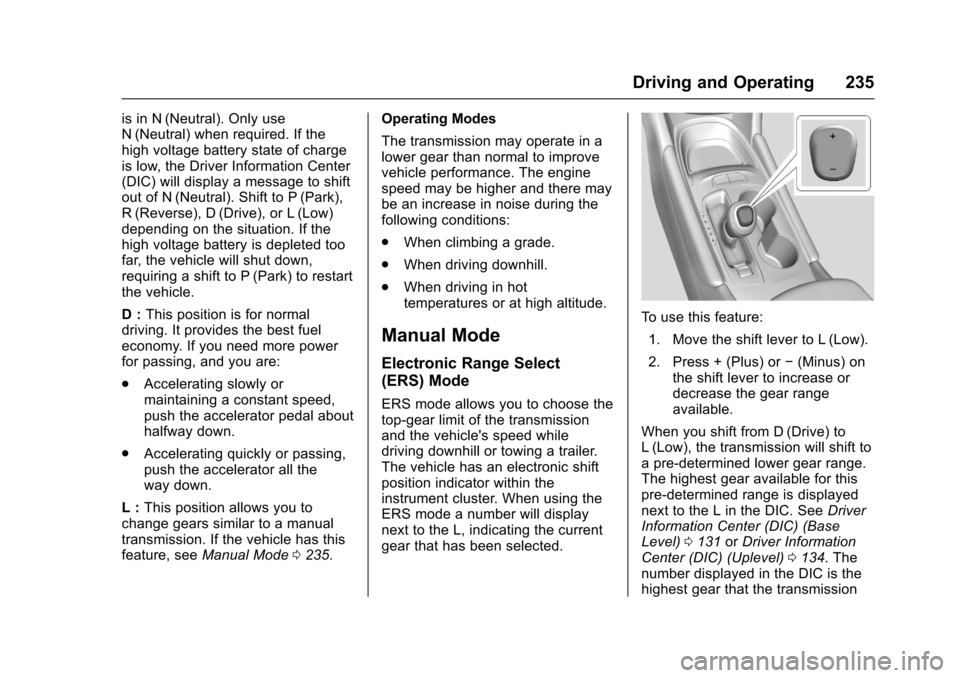
ERS mode allows you to choose thetop-gear limit of the transmissionand the vehicle's speed whiledriving downhill or towing a trailer.The vehicle has an electronic shiftposition indicator within theinstrument cluster. When using theERS mode a number will displaynext to the L, indicating the currentgear that has been selected.
To u s e t h i s f e a t u r e :
1. Move the shift lever to L (Low).
2. Press + (Plus) or✓(Minus) onthe shift lever to increase ordecrease the gear rangeavailable.
When you shift from D (Drive) toL(Low), the transmission will shift toapre-determinedlowergearrange.The highest gear available for thispre-determined range is displayednext to the L in the DIC. SeeDriverInformation Center (DIC) (BaseLevel)0131orDriver InformationCenter (DIC) (Uplevel)0134.Thenumber displayed in the DIC is thehighest gear that the transmission
Page 240 of 419
Chevrolet Malibu Owner Manual (GMNA-Localizing-U.S./Canada/Mexico-10122664) - 2017 - crc - 5/23/16
Driving and Operating 239
If the EPB fails to apply, the rearwheels should be blocked toprevent vehicle movement.
EPB Release
To r e l e a s e t h e E P B :
1. Place the ignition in the ACC/ACCESSORY or ON/RUNposition.
2. Apply and hold the brakepedal.
3. Push down momentarily on theEPB switch.
The EPB is released when the redparking brake status light is off.
If the amber parking brake warninglight is on, release the EPB bypushing down on the EPB switchand holding it down. Continue tohold the switch until the red parkingbrake status light is off. If either lightstays on after release is attempted,see your dealer.
Caution
Driving with the parking brake on
can overheat the brake system
and cause premature wear or
damage to brake system parts.
Make sure that the parking brake
is fully released and the brake
warning light is off before driving.
Automatic EPB Release
The EPB will automatically release ifthe vehicle is running, placed intogear, and an attempt is made todrive away. Avoid rapid accelerationwhen the EPB is applied, topreserve parking brake lining life.
If parking on a hill, or if the vehicleis pulling a trailer, seeDrivingCharacteristics and TowingTips0272.
Brake Assist
The Brake Assist feature isdesigned to assist the driver instopping or decreasing vehiclespeed in emergency drivingconditions. This feature uses thestability system hydraulic brakecontrol module to supplement thepower brake system underconditions where the driver hasquickly and forcefully applied thebrake pedal in an attempt to quicklystop or slow down the vehicle. Thestability system hydraulic brakecontrol module increases brakepressure at each corner of thevehicle until the ABS activates.Minor brake pedal pulsation orpedal movement during this time isnormal and the driver shouldcontinue to apply the brake pedal asthe driving situation dictates. TheBrake Assist feature willautomatically disengage when thebrake pedal is released or brakepedal pressure is quicklydecreased.
Page 242 of 419
Chevrolet Malibu Owner Manual (GMNA-Localizing-U.S./Canada/Mexico-10122664) - 2017 - crc - 5/23/16
Driving and Operating 241
SeeWarning Lights, Gauges, andIndicators0111andDriverInformation Center (DIC) (BaseLevel)0131orDriver InformationCenter (DIC) (Uplevel)0134.Intheevent of a controller problem, thebrake pedal may be harder to pushand the stopping distance may belonger.
Ride Control Systems
Traction Control/
Electronic Stability
Control
System Operation
The vehicle has a Traction ControlSystem (TCS) and StabiliTrak®,anelectronic stability control system.These systems help limit wheel slipand assist the driver in maintainingcontrol, especially on slippery roadconditions.
TCS activates if it senses that anyof the drive wheels are spinning orbeginning to lose traction. When thishappens, TCS applies the brakes tothe spinning wheels and reducesengine power to limit wheel spin.
StabiliTrak activates when thevehicle senses a difference betweenthe intended path and the directionthe vehicle is actually traveling.StabiliTrak selectively appliesbraking pressure to any one of the
vehicle wheel brakes to assist thedriver in keeping the vehicle on theintended path.
If cruise control is being used andtraction control or StabiliTrak beginsto limit wheel spin, cruise control willdisengage. Cruise control may beturned back on when roadconditions allow.
Both systems come onautomatically when the vehicle isstarted and begins to move. Thesystems may be heard or felt whilethey are operating or whileperforming diagnostic checks. Thisis normal and does not mean thereis a problem with the vehicle.
It is recommended to leave bothsystems on for normal drivingconditions, but it may be necessaryto turn TCS off if the vehicle getsstuck in sand, mud, ice, or snow.SeeIf the Vehicle Is Stuck0221and“Turning the Systems Off andOn”later in this section.
Page 245 of 419
Chevrolet Malibu Owner Manual (GMNA-Localizing-U.S./Canada/Mexico-10122664) - 2017 - crc - 5/23/16
244 Driving and Operating
*:Press to disengage cruisecontrol without erasing the setspeed from memory.
+RES :If there is a set speed inmemory, press to resume thatspeed or press and hold toaccelerate. If cruise control isalready active, use to increasevehicle speed.
✓SET :Press briefly to set thespeed and activate cruise control.If cruise control is already active,use to decrease vehicle speed.
Setting Cruise Control
If5is on when not in use, -SET or
+RES could get bumped and go into
cruise when not desired. Keep5
off when cruise is not being used.
To s e t a s p e e d :
1. Press5to turn the cruise
system on.
2. Get up to the desired speed.
3. Press and release -SET. Thedesired set speed brieflyappears in the instrumentcluster.
4. Remove your foot from theaccelerator pedal.
The cruise control indicator on theinstrument cluster turns green aftercruise control has been set to thedesired speed. SeeInstrumentCluster (Base Level)011 2orInstrument Cluster (Uplevel)011 4.
Resuming a Set Speed
If cruise control is set at a desiredspeed and then the brakes areapplied, cruise control isdisengaged without erasing the setspeed from memory.
Once the vehicle speed reachesabout 40 km/h (25 mph) or more,briefly press +RES. The vehiclereturns to the previous set speed.
Increasing Speed While UsingCruise Control
If the cruise control system isalready activated:
.Press and hold +RES until thevehicle accelerates to thedesired speed, then release it.
.To i n c r e a s e t h e s p e e d i n s m a l lincrements, briefly press +RES.For each press, the vehicle goesabout 1 km/h (1 mph) faster.
The speedometer reading can bedisplayed in either English or metricunits. SeeDriver Information Center(DIC) (Base Level)0131orDriverInformation Center (DIC) (Uplevel)0134.Theincrementvalueuseddepends on the units displayed.
Reducing Speed While UsingCruise Control
If the cruise control system isalready activated:
.Press and hold -SET until thedesired lower speed is reached,then release it.
.To s l o w d o w n i n s m a l lincrements, briefly press -SET.For each press, the vehicle goesabout 1 km/h (1 mph) slower.
Page 246 of 419
Chevrolet Malibu Owner Manual (GMNA-Localizing-U.S./Canada/Mexico-10122664) - 2017 - crc - 5/23/16
Driving and Operating 245
The speedometer reading can bedisplayed in either English or metricunits. SeeDriver Information Center(DIC) (Base Level)0131orDriverInformation Center (DIC) (Uplevel)0134.Theincrementvalueuseddepends on the units displayed.
Passing Another Vehicle WhileUsing Cruise Control
Use the accelerator pedal toincrease the vehicle speed. Whenyou take your foot off the pedal, thevehicle will slow down to theprevious set cruise speed. Whilepressing the accelerator pedal orshortly following the release tooverride cruise control, brieflypressing -SET will result in cruisecontrol set to the current vehiclespeed.
Using Cruise Control on Hills
How well the cruise control workson hills depends upon the vehiclespeed, load, and the steepness ofthe hills. When going up steep hills,you might have to step on theaccelerator pedal to maintain the
vehicle speed. When goingdownhill, you might have to brake orshift to a lower gear to keep yourspeed down. If the brake pedal isapplied, cruise control willdisengage.
Ending Cruise Control
There are four ways to end cruisecontrol:
.Step lightly on the brake pedal.
.Press*.
.Shift the transmission toN(Neutral).
.Press5to turn cruise control
system off completely.
Erasing Speed Memory
The cruise control set speed is
erased from memory if5is pressed
or if the vehicle is turned off.
Adaptive Cruise Control
If equipped with Adaptive CruiseControl (ACC), it allows you toselect the cruise control set speedand following gap. Read this entiresection before using this system.The following gap is the followingtime between your vehicle and avehicle detected directly ahead inyour path moving in the samedirection. If no vehicle is detected inyour path, ACC works like regularcruise control. ACC uses cameraand radar sensors. SeeRadioFrequency Statement0393.
If a vehicle is detected in your path,ACC can apply acceleration orlimited, moderate braking tomaintain the selected following gap.To d i s e n g a g e A C C , a p p l y t h e b r a k e .If ACC is controlling your vehiclespeed when the Traction ControlSystem (TCS) or StabiliTrak systemactivates, the ACC mayautomatically disengage. SeeTr a c t i o n C o n t r o l / E l e c t r o n i c S t a b i l i t yControl0241.Whenroad
Page 247 of 419
Chevrolet Malibu Owner Manual (GMNA-Localizing-U.S./Canada/Mexico-10122664) - 2017 - crc - 5/23/16
246 Driving and Operating
conditions allow ACC to be safelyused, the ACC can be turnedback on.
ACC will not engage if the TCS orStabiliTrak system is disabled.
{Warning
ACC has limited braking ability
and may not have time to slow
the vehicle down enough to avoid
acollisionwithanothervehicle
you are following. This can occur
when vehicles suddenly slow or
stop ahead, or enter your lane.
Also see“Alerting the Driver”in
this section. Complete attention is
always required while driving and
you should be ready to take
action and apply the brakes. See
Defensive Driving0216.
{Warning
ACC will not detect or brake for
children, pedestrians, animals,
or other objects.
Do not use ACC when:
.On winding and hilly roadsor when the sensors areblocked by snow, ice, or dirt.The system may not detectavehicleahead.Keeptheentire front of the vehicleclean.
.Visibility is low, such as infog, rain, or snowconditions. ACCperformance is limited underthese conditions.
.On slippery roads wherefast changes in tire tractioncan cause excessivewheel slip.
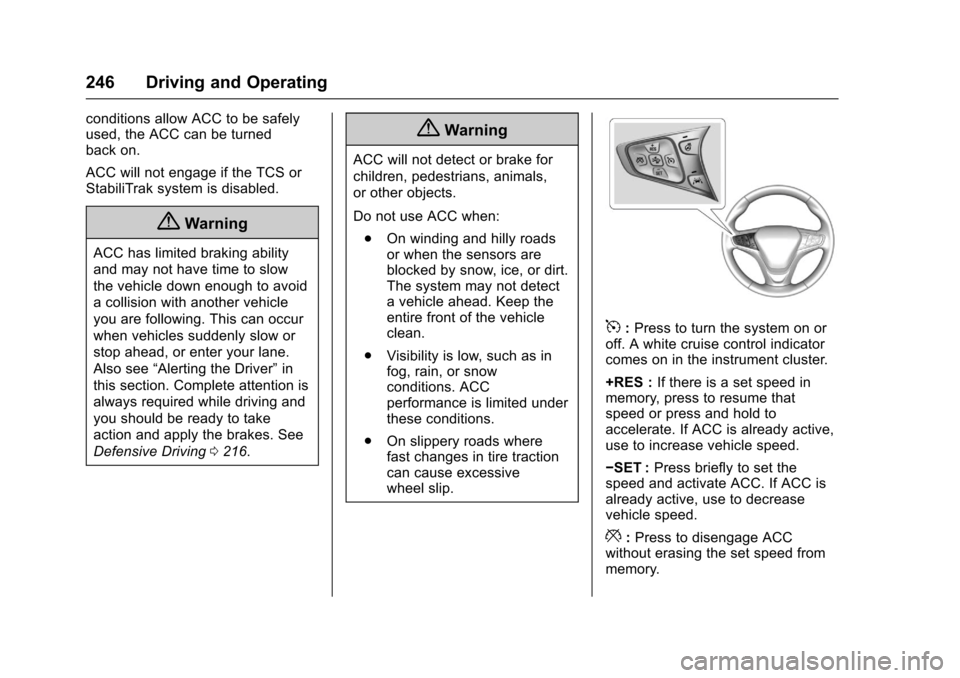
5:Press to turn the system on oroff. A white cruise control indicatorcomes on in the instrument cluster.
+RES :If there is a set speed inmemory, press to resume thatspeed or press and hold toaccelerate. If ACC is already active,use to increase vehicle speed.
✓SET :Press briefly to set thespeed and activate ACC. If ACC isalready active, use to decreasevehicle speed.
*:Press to disengage ACCwithout erasing the set speed frommemory.