2017 CHEVROLET EXPRESS CARGO VAN remote control
[x] Cancel search: remote controlPage 5 of 346
Chevrolet Express Owner Manual (GMNA-Localizing-U.S./Canada/Mexico-9967827) - 2017 - crc - 5/2/16
4 Introduction
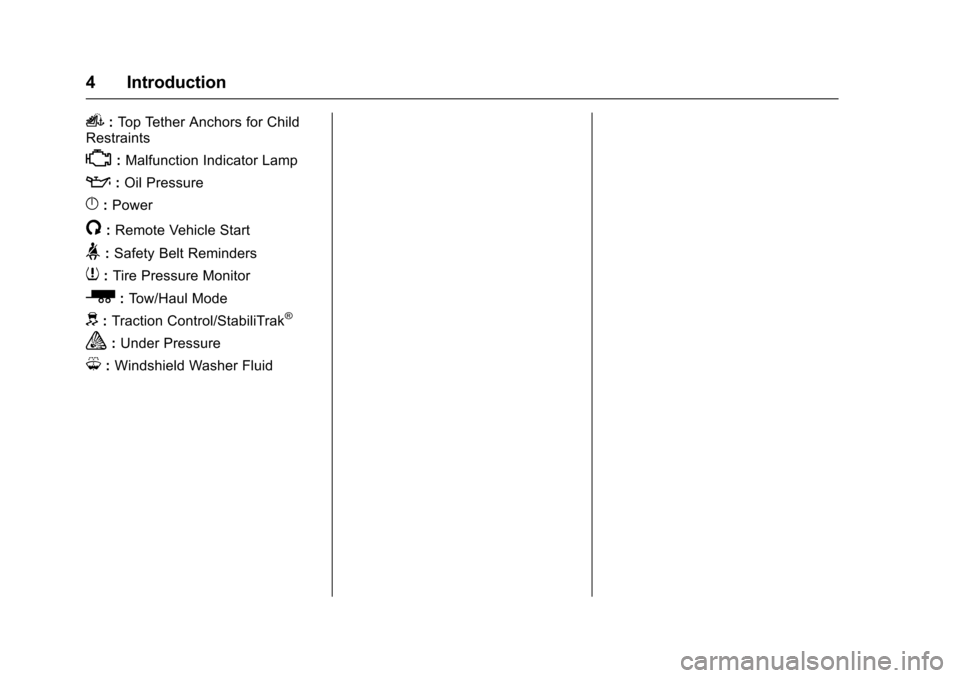
i:To p Te t h e r A n c h o r s f o r C h i l dRestraints
*:Malfunction Indicator Lamp
::Oil Pressure
}:Power
/:Remote Vehicle Start
>:Safety Belt Reminders
7:Tire Pressure Monitor
_:To w / H a u l M o d e
d:Traction Control/StabiliTrak®
a:Under Pressure
M:Windshield Washer Fluid
Page 6 of 346
Chevrolet Express Owner Manual (GMNA-Localizing-U.S./Canada/Mexico-9967827) - 2017 - crc - 5/2/16
In Brief 5
In Brief
Instrument Panel
Instrument Panel . . . . . . . . . . . . . . . . 6
Initial Drive Information
Initial Drive Information . . . . . . . . . . 8Remote Keyless Entry (RKE)System . . . . . . . . . . . . . . . . . . . . . . . . 8Remote Vehicle Start . . . . . . . . . . . 8Door Locks . . . . . . . . . . . . . . . . . . . . . 9Windows . . . . . . . . . . . . . . . . . . . . . . . . 9Seat Adjustment . . . . . . . . . . . . . . . 10Safety Belts . . . . . . . . . . . . . . . . . . . . 11Airbag On-Off Switch . . . . . . . . . . 11Mirror Adjustment . . . . . . . . . . . . . . 12Steering Wheel Adjustment . . . . 13Interior Lighting . . . . . . . . . . . . . . . . 13Exterior Lighting . . . . . . . . . . . . . . . 14Windshield Wiper/Washer . . . . . . 14Climate Controls . . . . . . . . . . . . . . . 15Transmission . . . . . . . . . . . . . . . . . . 16
Vehicle Features
Infotainment System . . . . . . . . . . . 17Radio(s) . . . . . . . . . . . . . . . . . . . . . . . 17Satellite Radio . . . . . . . . . . . . . . . . . 18Portable Audio Devices . . . . . . . . 18Bluetooth®..................... 19Steering Wheel Controls . . . . . . . 19
Cruise Control . . . . . . . . . . . . . . . . . 19Rear Vision Camera (RVC) . . . . 20Parking Assist . . . . . . . . . . . . . . . . . 20Power Outlets . . . . . . . . . . . . . . . . . 20
Performance and Maintenance
Traction Control/ElectronicStability Control . . . . . . . . . . . . . . 20Tire Pressure Monitor . . . . . . . . . . 21Fuel . . . . . . . . . . . . . . . . . . . . . . . . . . . 21E85 or FlexFuel . . . . . . . . . . . . . . . . 21Engine Oil Life System . . . . . . . . 22Driving for Better FuelEconomy . . . . . . . . . . . . . . . . . . . . . 22Roadside AssistanceProgram . . . . . . . . . . . . . . . . . . . . . . 22
Page 10 of 346
Chevrolet Express Owner Manual (GMNA-Localizing-U.S./Canada/Mexico-9967827) - 2017 - crc - 5/2/16
In Brief 9
Canceling a Remote Start
To c a n c e l a r e m o t e s t a r t , d o o n e o fthe following:
.Press and hold/until the
parking lamps turn off.
.Turn on the hazard warningflashers.
.Turn the vehicle on and then off.
SeeRemote Vehicle Start027.
Door Locks
Manual Door Locks
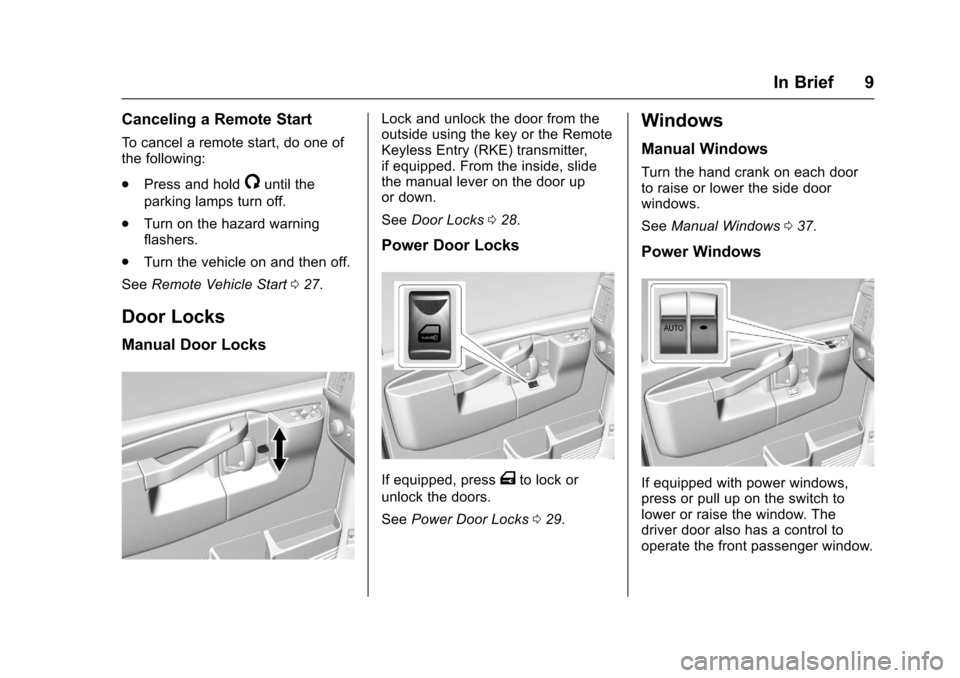
Lock and unlock the door from theoutside using the key or the RemoteKeyless Entry (RKE) transmitter,if equipped. From the inside, slidethe manual lever on the door upor down.
SeeDoor Locks028.
Power Door Locks
If equipped, pressTto lock or
unlock the doors.
SeePower Door Locks029.
Windows
Manual Windows
Turn the hand crank on each doorto raise or lower the side doorwindows.
SeeManual Windows037.
Power Windows
If equipped with power windows,press or pull up on the switch tolower or raise the window. Thedriver door also has a control tooperate the front passenger window.
Page 24 of 346

Chevrolet Express Owner Manual (GMNA-Localizing-U.S./Canada/Mexico-9967827) - 2017 - crc - 5/2/16
Keys, Doors, and Windows 23
Keys, Doors, and
Windows
Keys and Locks
Keys . . . . . . . . . . . . . . . . . . . . . . . . . . . 23Remote Keyless Entry (RKE)System . . . . . . . . . . . . . . . . . . . . . . . 25Remote Keyless Entry (RKE)System Operation . . . . . . . . . . . . 25Remote Vehicle Start . . . . . . . . . . 27Door Locks . . . . . . . . . . . . . . . . . . . . 28Power Door Locks . . . . . . . . . . . . . 29Cargo Door Relocking . . . . . . . . . 29Delayed Locking . . . . . . . . . . . . . . . 29Automatic Door Locks . . . . . . . . . 30Lockout Protection . . . . . . . . . . . . . 30Safety Locks . . . . . . . . . . . . . . . . . . . 30
Doors
Side Door (60/40Swing-Out) . . . . . . . . . . . . . . . . . . . 31Sliding Door . . . . . . . . . . . . . . . . . . . 32Rear Doors . . . . . . . . . . . . . . . . . . . . 32
Vehicle Security
Vehicle Security . . . . . . . . . . . . . . . . 33Immobilizer . . . . . . . . . . . . . . . . . . . . 33Immobilizer Operation . . . . . . . . . 33
Exterior Mirrors
Convex Mirrors . . . . . . . . . . . . . . . . 35Manual Mirrors . . . . . . . . . . . . . . . . . 35Trailer-Tow Mirrors . . . . . . . . . . . . . 35Power Mirrors . . . . . . . . . . . . . . . . . . 35Heated Mirrors . . . . . . . . . . . . . . . . . 36
Interior Mirrors
Interior Rearview Mirrors . . . . . . . 36Manual Rearview Mirror . . . . . . . . 36
Windows
Windows . . . . . . . . . . . . . . . . . . . . . . . 36Manual Windows . . . . . . . . . . . . . . 37Power Windows . . . . . . . . . . . . . . . 37Swing-Out Windows . . . . . . . . . . . 37Enhanced Technology Glass . . . 38Sun Visors . . . . . . . . . . . . . . . . . . . . . 39
Keys and Locks
Keys
{Warning
Leaving children in a vehicle with
the ignition key is dangerous and
children or others could be
seriously injured or killed. They
could operate the power windows
or other controls or make the
vehicle move. The windows will
function with the keys in the
ignition, and children or others
could be caught in the path of a
closing window. Do not leave
children in a vehicle with the
ignition key.
Page 28 of 346
Chevrolet Express Owner Manual (GMNA-Localizing-U.S./Canada/Mexico-9967827) - 2017 - crc - 5/2/16
Keys, Doors, and Windows 27
Caution
When replacing the battery, do
not touch any of the circuitry on
the transmitter. Static from your
body could damage the
transmitter.
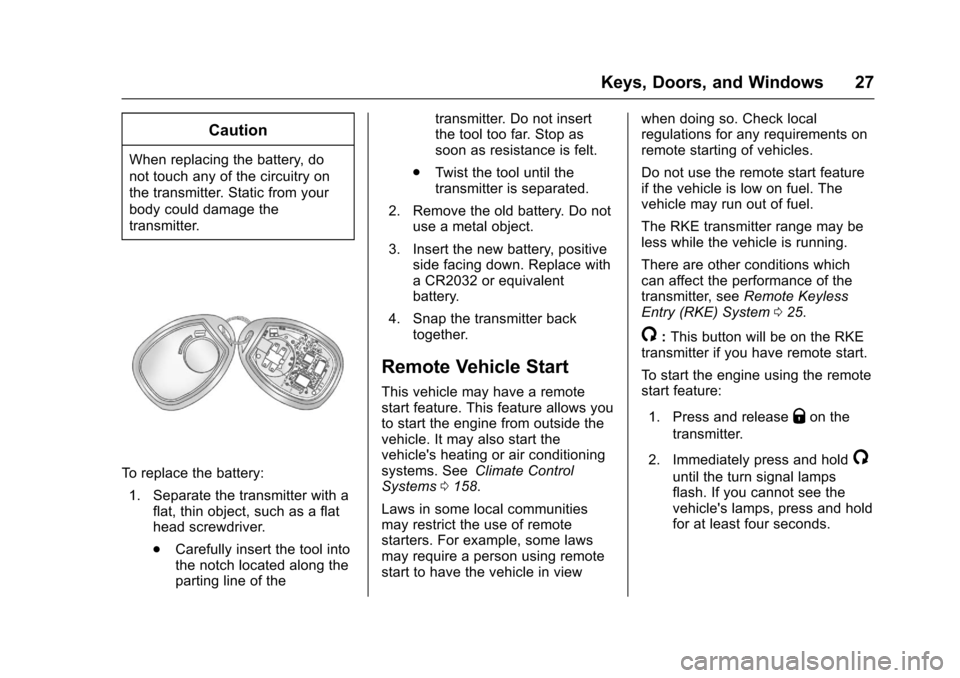
To r e p l a c e t h e b a t t e r y :
1. Separate the transmitter with aflat, thin object, such as a flathead screwdriver.
.Carefully insert the tool intothe notch located along theparting line of the
transmitter. Do not insertthe tool too far. Stop assoon as resistance is felt.
.Tw i s t t h e t o o l u n t i l t h etransmitter is separated.
2. Remove the old battery. Do notuse a metal object.
3. Insert the new battery, positiveside facing down. Replace withaCR2032orequivalentbattery.
4. Snap the transmitter backtogether.
Remote Vehicle Start
This vehicle may have a remotestart feature. This feature allows youto start the engine from outside thevehicle. It may also start thevehicle's heating or air conditioningsystems. SeeClimate ControlSystems0158.
Laws in some local communitiesmay restrict the use of remotestarters. For example, some lawsmay require a person using remotestart to have the vehicle in view
when doing so. Check localregulations for any requirements onremote starting of vehicles.
Do not use the remote start featureif the vehicle is low on fuel. Thevehicle may run out of fuel.
The RKE transmitter range may beless while the vehicle is running.
There are other conditions whichcan affect the performance of thetransmitter, seeRemote KeylessEntry (RKE) System025.
/:This button will be on the RKEtransmitter if you have remote start.
To s t a r t t h e e n g i n e u s i n g t h e r e m o t estart feature:
1. Press and releaseQon the
transmitter.
2. Immediately press and hold/
until the turn signal lampsflash. If you cannot see thevehicle's lamps, press and holdfor at least four seconds.
Page 29 of 346

Chevrolet Express Owner Manual (GMNA-Localizing-U.S./Canada/Mexico-9967827) - 2017 - crc - 5/2/16
28 Keys, Doors, and Windows
When the engine starts, theparking lamps will turn on andremain on while the engine isrunning. The doors will belocked.
The engine will continue to runfor 10 minutes. After30 seconds, repeat the steps ifa10-minuteextensionisdesired. Remote start can beextended only once.
After entering the vehicle during aremote start, insert and turn the keyto ON/RUN to drive the vehicle.
The maximum number of remotestarts between ignition cycles withthe key is two.
If the remote start procedure is usedagain before the first 10 minute timeframe has ended, the first10 minutes will immediately expireand the second 10 minute timeframe will start.
After the engine has been remotestarted two times, the ignition switchmust be turned to ON/RUN and then
back to LOCK/OFF using the keybefore the remote start procedurecan be used again.
To c a n c e l a r e m o t e s t a r t d o a n y o fthe following:
.Press and hold/until the
parking lamps turn off.
.Turn on the hazard warningflashers.
.Turn the ignition on and thenback off.
The remote vehicle start feature willnot operate if:
.The key is in the ignition.
.The hood is open.
.The hazard warning flashersare on.
.There is an emission controlsystem malfunction. SeeMalfunction Indicator Lamp(Check Engine Light)0102.
.The engine coolant temperatureis too high.
.The oil pressure is low.
.Tw o r e m o t e v e h i c l e s t a r t s h a v ealready been provided.
Door Locks
{Warning
Unlocked doors can be
dangerous.
.Passengers, especiallychildren, can easily openthe doors and fall out of amoving vehicle. When adoor is locked, the handlewill not open it. The chanceof being thrown out of thevehicle in a crash isincreased if the doors arenot locked. So, allpassengers should wearsafety belts properly and thedoors should be lockedwhenever the vehicle isdriven.
.Yo u n g c h i l d r e n w h o g e t i n t ounlocked vehicles may beunable to get out. A childcan be overcome by
(Continued)
Page 109 of 346

Chevrolet Express Owner Manual (GMNA-Localizing-U.S./Canada/Mexico-9967827) - 2017 - crc - 5/2/16
108 Instruments and Controls
Information Displays
Driver Information
Center (DIC)
This vehicle has a DIC.
All messages will appear in the DICdisplay at the bottom of theinstrument cluster.
The DIC comes on when the ignitionis on. After a short delay, the DICwill display the information that waslast displayed before the enginewas turned off.
The DIC displays trip, fuel, andvehicle system information, andwarning messages if a systemproblem is detected.
If the vehicle has these features, theDIC also displays the compassdirection and the outside airtemperature when viewing the tripand fuel information. The compassdirection appears on the top rightcorner of the DIC display. Theoutside air temperatureautomatically appears in the bottomright corner of the DIC display.
If there is a problem with the systemthat controls the temperaturedisplay, the numbers will bereplaced with dashes. If this occurs,have the vehicle serviced by yourdealer.
If the vehicle has a diesel engine,see the Duramax dieselsupplement.
DIC Operation and Displays
The DIC has different displayswhich can be accessed by pressingthe DIC buttons on the instrumentpanel, next to the instrument cluster.
DIC Buttons
The buttons are the trip/fuel, vehicleinformation, customization, and set/reset buttons. The button functionsare detailed in the following pages.
3:Press this button to displaythe odometer, trip odometers, fuelrange, average economy, fuel used,timer, average speed, and digitaltachometer.
T:Press this button to display theoil life, rear park assist, units, tirepressure readings for vehicles withthe Tire Pressure MonitorSystem (TPMS), engine hours, TirePressure Monitor System (TPMS)programming for vehicles with theTPMS and without a RemoteKeyless Entry (RKE) transmitter, andcompass zone and compasscalibration on vehicles with thisfeature.
U:Press this button to customizethe feature settings on the vehicle.SeeVehicle Personalization011 9for more information.
V:Press this button to set or resetcertain functions and to turn off oracknowledge messages on the DIC.
Page 116 of 346
Chevrolet Express Owner Manual (GMNA-Localizing-U.S./Canada/Mexico-9967827) - 2017 - crc - 5/2/16
Instruments and Controls 115
stays on, the vehicle should betaken to your dealer for service assoon as possible.
Fuel System Messages
FUEL LEVEL LOW
This message displays and a chimesounds if the fuel level is low. Refuelas soon as possible. SeeFuelGauge096andFuel0198formore information.
TIGHTEN GAS CAP
This message may display alongwith the check engine light on theinstrument cluster if the fuel cap isnot tightened properly. SeeMalfunction Indicator Lamp (CheckEngine Light)0102.Reinstallthefuel cap fully. SeeFilling the Tank0200.Thediagnosticsystemcandetermine if the fuel cap has beenleft off or improperly installed.Alooseormissingfuelcapallowsfuel to evaporate into theatmosphere. A few driving trips withthe cap properly installed shouldturn this light and message off.
Key and Lock Messages
REPLACE BATTERY IN
REMOTE KEY
This message displays if a RemoteKeyless Entry (RKE) transmitterbattery is low. The battery needs tobe replaced in the transmitter. See“Battery Replacement”underRemote Keyless Entry (RKE)System Operation025.
Lamp Messages
AUTOMATIC LIGHT
CONTROL OFF
This message displays when theautomatic headlamps are turned off.SeeExterior Lamp Controls0125.
AUTOMATIC LIGHT
CONTROL ON
This message displays when theautomatic headlamps are turned on.SeeExterior Lamp Controls0125.
TURN SIGNAL ON
This message displays and a chimesounds if a turn signal is left on for1.2 km (0.75 mi). Move the turnsignal lever to the off position.
Object Detection System
Messages
PARK ASST BLOCKED SEE
OWNERS MANUAL
This message displays if there issomething interfering with the RearParking Assist (RPA) system. SeeParking Assist0197.
PARK ASSIST OFF
After the vehicle has been started,this message displays to remind thedriver that the Rear Parking Assist(RPA) system has been turned off.Press the set/reset button or the tripodometer reset stem toacknowledge this message andclear it from the DIC display. To turnthe RPA system back on, seeParking Assist0197.