2017 CHEVROLET EXPRESS CARGO VAN headlamp
[x] Cancel search: headlampPage 4 of 346
Chevrolet Express Owner Manual (GMNA-Localizing-U.S./Canada/Mexico-9967827) - 2017 - crc - 5/2/16
Introduction 3
Danger, Warning, and
Caution
Warning messages found on vehiclelabels and in this manual describehazards and what to do to avoid orreduce them.
{Danger
Danger indicates a hazard with a
high level of risk which will result
in serious injury or death.
{Warning
Warning indicates a hazard that
could result in injury or death.
Caution
Caution indicates a hazard that
could result in property or vehicle
damage.
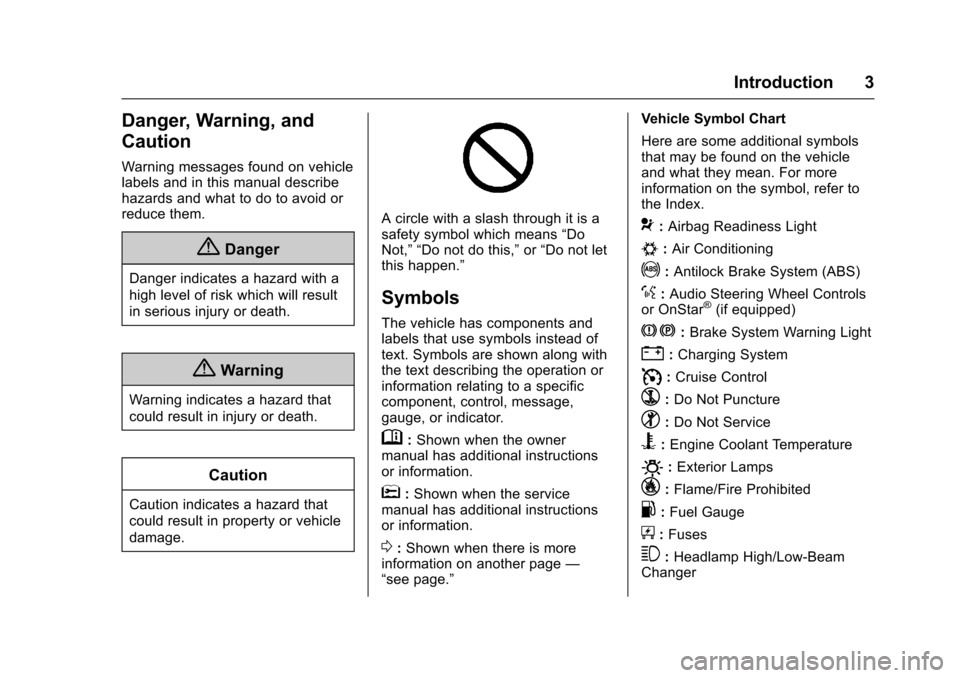
Acirclewithaslashthroughitisasafety symbol which means“DoNot,”“Do not do this,”or“Do not letthis happen.”
Symbols
The vehicle has components andlabels that use symbols instead oftext. Symbols are shown along withthe text describing the operation orinformation relating to a specificcomponent, control, message,gauge, or indicator.
M:Shown when the ownermanual has additional instructionsor information.
*:Shown when the servicemanual has additional instructionsor information.
0:Shown when there is moreinformation on another page—“see page.”
Vehicle Symbol Chart
Here are some additional symbolsthat may be found on the vehicleand what they mean. For moreinformation on the symbol, refer tothe Index.
9:Airbag Readiness Light
#:Air Conditioning
!:Antilock Brake System (ABS)
%:Audio Steering Wheel Controlsor OnStar®(if equipped)
J:Brake System Warning Light
":Charging System
I:Cruise Control
`:Do Not Puncture
^:Do Not Service
B:Engine Coolant Temperature
O:Exterior Lamps
_:Flame/Fire Prohibited
.:Fuel Gauge
+:Fuses
3:Headlamp High/Low-BeamChanger
Page 14 of 346

Chevrolet Express Owner Manual (GMNA-Localizing-U.S./Canada/Mexico-9967827) - 2017 - crc - 5/2/16
In Brief 13
Push the tab forward for daytimeuse and pull it rearward fornighttime use to avoid glare of theheadlamps from behind.
SeeManual Rearview Mirror036.
Steering Wheel
Adjustment
If equipped with a tilt steering wheel,the lever is on the left side of thesteering column.
To a d j u s t t h e s t e e r i n g w h e e l :
1. Pull the lever to move thesteering wheel up or down intoacomfortableposition.
2. Release the lever to lock thesteering wheel in place.
SeeSteering WheelAdjustment088.
Interior Lighting
Dome Lamps
The dome lamps come on when anydoor is opened. They turn off afterall the doors are closed.
The instrument panel brightness
knob extends whenDis pressed.
To m a n u a l l y t u r n o n t h e d o m e
lamps, pressDthen turn the knob
clockwise to the farthest position. In
this position, the dome lampsremain on whether a door is openedor closed.
EDOME OFF :This button islocated above the instrument panelbrightness knob.
Press the button in and the domelamps remain off when a door isopened. Press the button again sothat the dome lamps come on whenadoorisopened.
Reading Lamps
If equipped with reading lamps,press the button located next toeach lamp to turn it on or off.
The vehicle may also have readinglamps in other locations. The lampscannot be adjusted.
For more information on interiorlighting, see:
.Instrument Panel IlluminationControl0129.
.Entry/Exit Lighting0130.
Page 15 of 346
Chevrolet Express Owner Manual (GMNA-Localizing-U.S./Canada/Mexico-9967827) - 2017 - crc - 5/2/16
14 In Brief
Exterior Lighting
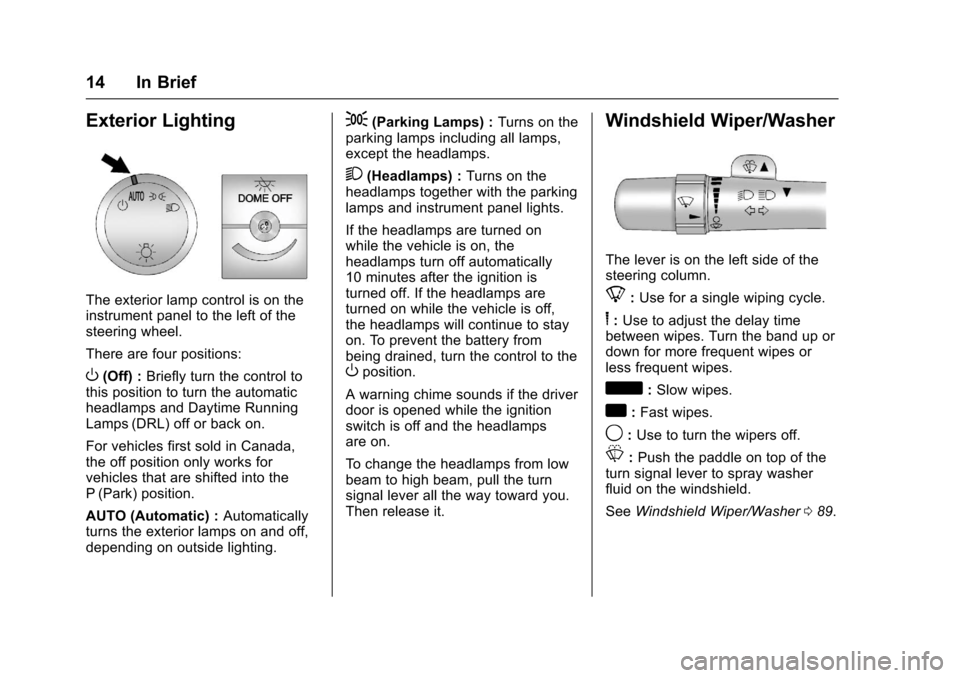
The exterior lamp control is on theinstrument panel to the left of thesteering wheel.
There are four positions:
O(Off) :Briefly turn the control tothis position to turn the automaticheadlamps and Daytime RunningLamps (DRL) off or back on.
For vehicles first sold in Canada,the off position only works forvehicles that are shifted into theP(Park) position.
AUTO (Automatic) :Automaticallyturns the exterior lamps on and off,depending on outside lighting.
;(Parking Lamps) :Turns on theparking lamps including all lamps,except the headlamps.
2(Headlamps) :Turns on theheadlamps together with the parkinglamps and instrument panel lights.
If the headlamps are turned onwhile the vehicle is on, theheadlamps turn off automatically10 minutes after the ignition isturned off. If the headlamps areturned on while the vehicle is off,the headlamps will continue to stayon. To prevent the battery frombeing drained, turn the control to theOposition.
Awarningchimesoundsifthedriverdoor is opened while the ignitionswitch is off and the headlampsare on.
To c h a n g e t h e h e a d l a m p s f r o m l o wbeam to high beam, pull the turnsignal lever all the way toward you.Then release it.
Windshield Wiper/Washer
The lever is on the left side of thesteering column.
8:Use for a single wiping cycle.
6:Use to adjust the delay timebetween wipes. Turn the band up ordown for more frequent wipes orless frequent wipes.
d:Slow wipes.
a:Fast wipes.
9:Use to turn the wipers off.
L:Push the paddle on top of theturn signal lever to spray washerfluid on the windshield.
SeeWindshield Wiper/Washer089.
Page 37 of 346

Chevrolet Express Owner Manual (GMNA-Localizing-U.S./Canada/Mexico-9967827) - 2017 - crc - 5/2/16
36 Keys, Doors, and Windows
Heated Mirrors
For vehicles with heated mirrors:
1:Press to heat the mirrors.
An indicator light in the button lightswhen the outside heated mirrors areactivated.
See“Rear Window Defogger”underClimate Control Systems0158.
Interior Mirrors
Interior Rearview Mirrors
Adjust the rearview mirror for a clearview of the area behind the vehicle.
Do not spray glass cleaner directlyon the mirror. Use a soft toweldampened with water.
Manual Rearview Mirror
Push the tab forward for daytimeuse and pull it rearward fornighttime use to avoid glare of theheadlamps from behind.
Cargo vans without rear door glassmay not have an inside rearviewmirror.
Windows
{Warning
Never leave a child, a helpless
adult, or a pet alone in a vehicle,
especially with the windows
closed in warm or hot weather.
They can be overcome by the
extreme heat and suffer
permanent injuries or even death
from heat stroke.
Page 91 of 346
Chevrolet Express Owner Manual (GMNA-Localizing-U.S./Canada/Mexico-9967827) - 2017 - crc - 5/2/16
90 Instruments and Controls
6:Use to adjust the delay timebetween wipes. Turn the band upfor more frequent wipes or down forless frequent wipes.
d:Slow wipes.
a:Fast wipes.
9:Use to turn the wipers off.
When driving during the day and thewipers are activated, the headlamps automatically turn on aftercompleting eight wipe cycles.
Clear ice and snow from the wiperblades before using them. If frozento the windshield, carefully loosen orthaw them. Damaged blades shouldbe replaced.
Windshield Washer
The windshield wiper paddle is ontop of the turn signal lever.
L:Push the paddle to spraywasher fluid on the windshield. Thewipers will clear the window andthen either stop or return to thepreset speed.
{Warning
In freezing weather, do not use
the washer until the windshield is
warmed. Otherwise the washer
fluid can form ice on the
windshield, blocking your vision.
Compass
This vehicle may have a compass inthe Driver Information Center (DIC).
Compass Zone
Yo u r d e a l e r w i l l s e t t h e c o r r e c t z o n efor your location.
Under certain circumstances, suchas during a long distancecross-country trip or moving to anew state or province, it will benecessary to compensate forcompass variance by resetting thezone through the DIC if the zone isnot set correctly.
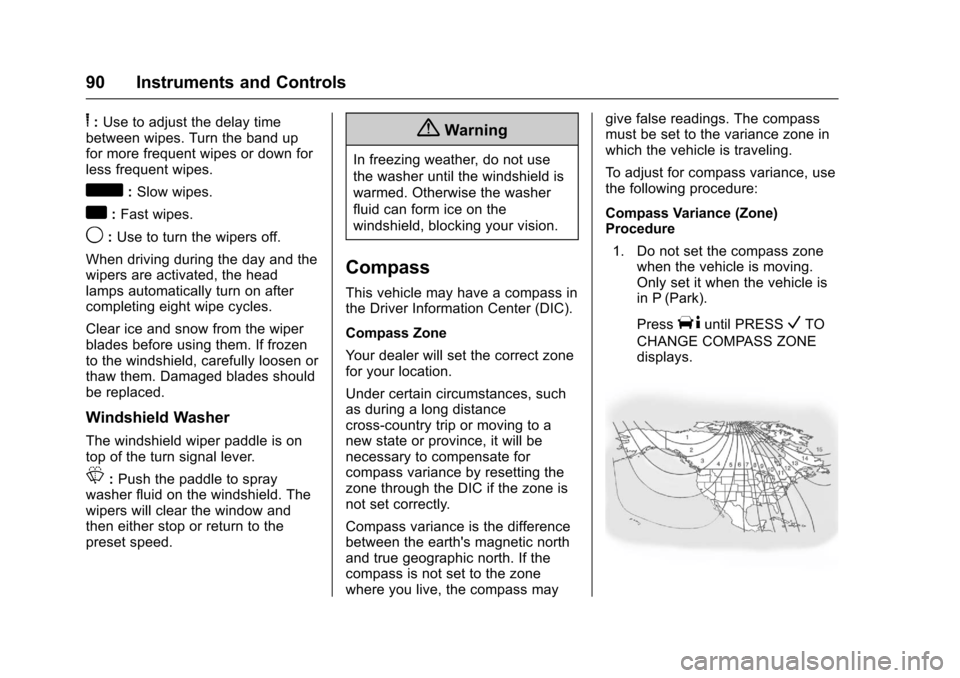
Compass variance is the differencebetween the earth's magnetic northand true geographic north. If thecompass is not set to the zonewhere you live, the compass may
give false readings. The compassmust be set to the variance zone inwhich the vehicle is traveling.
To a d j u s t f o r c o m p a s s v a r i a n c e , u s ethe following procedure:
Compass Variance (Zone)Procedure
1. Do not set the compass zonewhen the vehicle is moving.Only set it when the vehicle isin P (Park).
PressTuntil PRESSVTO
CHANGE COMPASS ZONEdisplays.
Page 108 of 346
Chevrolet Express Owner Manual (GMNA-Localizing-U.S./Canada/Mexico-9967827) - 2017 - crc - 5/2/16
Instruments and Controls 107
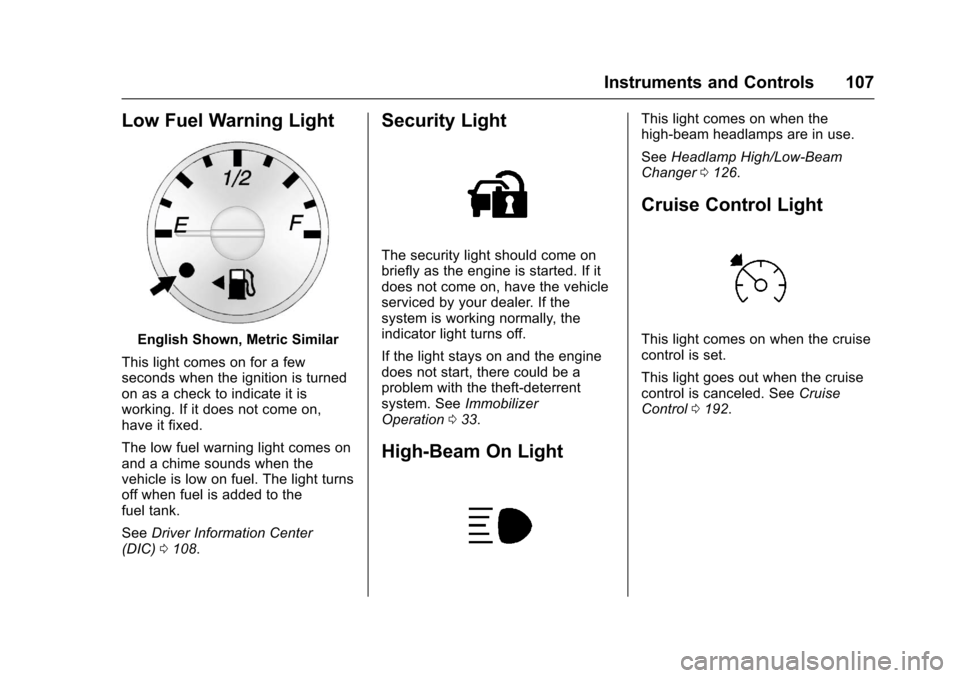
Low Fuel Warning Light
English Shown, Metric Similar
This light comes on for a fewseconds when the ignition is turnedon as a check to indicate it isworking. If it does not come on,have it fixed.
The low fuel warning light comes onand a chime sounds when thevehicle is low on fuel. The light turnsoff when fuel is added to thefuel tank.
SeeDriver Information Center(DIC)0108.
Security Light
The security light should come onbriefly as the engine is started. If itdoes not come on, have the vehicleserviced by your dealer. If thesystem is working normally, theindicator light turns off.
If the light stays on and the enginedoes not start, there could be aproblem with the theft-deterrentsystem. SeeImmobilizerOperation033.
High-Beam On Light
This light comes on when thehigh-beam headlamps are in use.
SeeHeadlamp High/Low-BeamChanger0126.
Cruise Control Light
This light comes on when the cruisecontrol is set.
This light goes out when the cruisecontrol is canceled. SeeCruiseControl0192.
Page 116 of 346
Chevrolet Express Owner Manual (GMNA-Localizing-U.S./Canada/Mexico-9967827) - 2017 - crc - 5/2/16
Instruments and Controls 115
stays on, the vehicle should betaken to your dealer for service assoon as possible.
Fuel System Messages
FUEL LEVEL LOW
This message displays and a chimesounds if the fuel level is low. Refuelas soon as possible. SeeFuelGauge096andFuel0198formore information.
TIGHTEN GAS CAP
This message may display alongwith the check engine light on theinstrument cluster if the fuel cap isnot tightened properly. SeeMalfunction Indicator Lamp (CheckEngine Light)0102.Reinstallthefuel cap fully. SeeFilling the Tank0200.Thediagnosticsystemcandetermine if the fuel cap has beenleft off or improperly installed.Alooseormissingfuelcapallowsfuel to evaporate into theatmosphere. A few driving trips withthe cap properly installed shouldturn this light and message off.
Key and Lock Messages
REPLACE BATTERY IN
REMOTE KEY
This message displays if a RemoteKeyless Entry (RKE) transmitterbattery is low. The battery needs tobe replaced in the transmitter. See“Battery Replacement”underRemote Keyless Entry (RKE)System Operation025.
Lamp Messages
AUTOMATIC LIGHT
CONTROL OFF
This message displays when theautomatic headlamps are turned off.SeeExterior Lamp Controls0125.
AUTOMATIC LIGHT
CONTROL ON
This message displays when theautomatic headlamps are turned on.SeeExterior Lamp Controls0125.
TURN SIGNAL ON
This message displays and a chimesounds if a turn signal is left on for1.2 km (0.75 mi). Move the turnsignal lever to the off position.
Object Detection System
Messages
PARK ASST BLOCKED SEE
OWNERS MANUAL
This message displays if there issomething interfering with the RearParking Assist (RPA) system. SeeParking Assist0197.
PARK ASSIST OFF
After the vehicle has been started,this message displays to remind thedriver that the Rear Parking Assist(RPA) system has been turned off.Press the set/reset button or the tripodometer reset stem toacknowledge this message andclear it from the DIC display. To turnthe RPA system back on, seeParking Assist0197.
Page 121 of 346
Chevrolet Express Owner Manual (GMNA-Localizing-U.S./Canada/Mexico-9967827) - 2017 - crc - 5/2/16
120 Instruments and Controls
Entering the Feature
Settings Menu
1. Turn the ignition on and placethe vehicle in P (Park).
To a v o i d e x c e s s i v e d r a i n o nthe battery, it is recommendedthat the headlamps areturned off.
2. PressUto enter the feature
settings menu.
If the menu is not available,FEATURE SETTINGSAVA I L A B L E I N PA R K w i l ldisplay. Before entering themenu, make sure the vehicle isin P (Park).
Feature Settings Menu Items
The following are customizationfeatures that allow you to programsettings to the vehicle:
DISPLAY IN ENGLISH
This feature will only display if alanguage other than English hasbeen set. This feature allows you tochange the language in which theDIC messages appear to English.
PressUuntil the PRESSVTO
DISPLAY IN ENGLISH screenappears on the DIC display. Pressthe set/reset button once to displayall DIC messages in English.
LANGUAGE
This feature allows you to select thelanguage in which the DICmessages will appear.
PressUuntil the LANGUAGE
screen appears on the DIC display.
PressVonce to access the settings
for this feature. Then pressUto
scroll through the following settings:
ENGLISH (default) :All messageswill appear in English.
FRANCAIS :All messages willappear in French.
ESPANOL :All messages willappear in Spanish.
ARABIC :All messages will appearin Arabic.
NO CHANGE :No change will bemade to this feature. The currentsetting will remain.
To s e l e c t a s e t t i n g , p r e s sVwhile
the desired setting is displayed onthe DIC. A beep will sound once alanguage has been selected.
AUTO DOOR LOCK
This feature allows you to selectwhen the doors willautomatically lock.
PressUuntil AUTO DOOR LOCK
appears on the DIC display.
PressVonce to access the settings
for this feature. Then pressUto
scroll through the following settings:
SHIFT OUT OF PARK (default) :The doors will automatically lockwhen the vehicle is shifted out ofP(Park).
AT V E H I C L E S P E E D :The doorswill automatically lock when thevehicle speed is above 13 km/h(8 mph) for three seconds.
NO CHANGE :No change will bemade to this feature. The currentsetting will remain.