2017 CHEVROLET EXPRESS CARGO VAN door lock
[x] Cancel search: door lockPage 51 of 346
Chevrolet Express Owner Manual (GMNA-Localizing-U.S./Canada/Mexico-9967827) - 2017 - crc - 5/2/16
50 Seats and Restraints
pulled out. If this happens, pull thesafety belt straight out firmly tounlock the webbing, and thenrelease it. If the webbing is stilllocked in the retractor, see yourdealer.
Before a door is closed, be sure thesafety belt is out of the way. If adoor is slammed against a safetybelt, damage can occur to both thesafety belt and the vehicle.
Safety Belt Height Adjuster
The vehicle has a safety belt heightadjuster for the driver and frontoutboard passenger positions.
Adjust the height so the shoulderportion of the belt is on the shoulderand not falling off of it. The beltshould be close to, but notcontacting, the neck. Impropershoulder belt height adjustmentcould reduce the effectiveness ofthe safety belt in a crash. SeeHowto Wear Safety Belts Properly047.
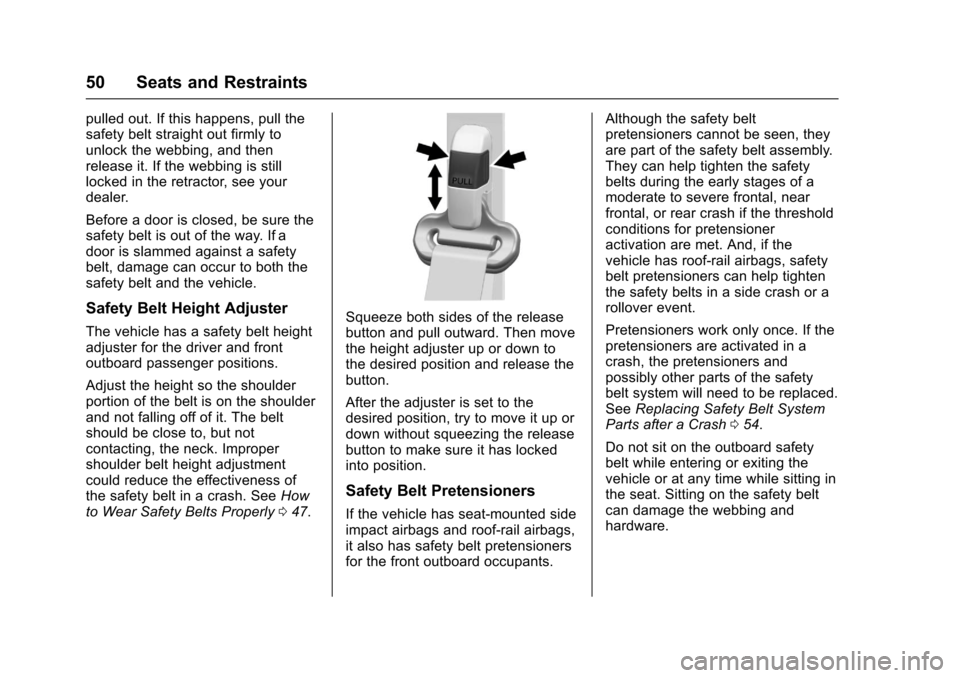
Squeeze both sides of the releasebutton and pull outward. Then movethe height adjuster up or down tothe desired position and release thebutton.
After the adjuster is set to thedesired position, try to move it up ordown without squeezing the releasebutton to make sure it has lockedinto position.
Safety Belt Pretensioners
If the vehicle has seat-mounted sideimpact airbags and roof-rail airbags,it also has safety belt pretensionersfor the front outboard occupants.
Although the safety beltpretensioners cannot be seen, theyare part of the safety belt assembly.They can help tighten the safetybelts during the early stages of amoderate to severe frontal, nearfrontal, or rear crash if the thresholdconditions for pretensioneractivation are met. And, if thevehicle has roof-rail airbags, safetybelt pretensioners can help tightenthe safety belts in a side crash or arollover event.
Pretensioners work only once. If thepretensioners are activated in acrash, the pretensioners andpossibly other parts of the safetybelt system will need to be replaced.SeeReplacing Safety Belt SystemParts after a Crash054.
Do not sit on the outboard safetybelt while entering or exiting thevehicle or at any time while sitting inthe seat. Sitting on the safety beltcan damage the webbing andhardware.
Page 60 of 346
Chevrolet Express Owner Manual (GMNA-Localizing-U.S./Canada/Mexico-9967827) - 2017 - crc - 5/2/16
Seats and Restraints 59
{Warning
If something is between an
occupant and an airbag, the
airbag might not inflate properly
or it might force the object into
that person causing severe injury
or even death. The path of an
inflating airbag must be kept
clear. Do not put anything
between an occupant and an
airbag, and do not attach or put
anything on the steering wheel
hub or on or near any other
airbag covering.
Do not use seat accessories that
block the inflation path of a
seat-mounted side impact airbag.
Never secure anything to the roof
of a vehicle with roof-rail airbags
by routing a rope or tie⇣down
through any door or window
opening. If you do, the path of an
inflating roof-rail airbag will be
blocked.
When Should an Airbag
Inflate?
This vehicle is equipped with one ormore airbags. SeeAirbag System055.Airbagsaredesignedtoinflateif the impact exceeds the specificairbag system's deploymentthreshold. Deployment thresholdsare used to predict how severe acrash is likely to be in time for theairbags to inflate and help restrainthe occupants. The vehicle haselectronic sensors which help theairbag system determine theseverity of the impact. Deploymentthresholds can vary with specificvehicle design.
Frontal airbags are designed toinflate in moderate to severe frontalor near-frontal crashes to helpreduce the potential for severeinjuries mainly to the driver or frontoutboard passenger head andchest.
Whether the frontal airbags will orshould deploy is not based primarilyon how fast the vehicle is traveling.
It depends largely on what you hit,the direction of the impact, and howquickly the vehicle slows down.
Frontal airbags may inflate atdifferent crash speeds depending onwhether the vehicle hits an objectstraight on or at an angle, andwhether the object is fixed ormoving, rigid or deformable, narrowor wide.
Frontal airbags are not intended toinflate during vehicle rollovers, rearimpacts, or in many side impacts.
Seat-mounted side impact airbags,if equipped, are designed to inflatein moderate to severe side crashesdepending on the location of theimpact. Seat-mounted side impactairbags are not designed to inflate infrontal impacts, near-frontal impacts,rollovers, or rear impacts.Aseat-mountedsideimpactairbagis intended to inflate on the side ofthe vehicle that is struck.
The vehicle may or may not beequipped with roof-rail airbags.Roof-rail airbags are designed toinflate in moderate to severe sidecrashes depending on the location
Page 62 of 346
Chevrolet Express Owner Manual (GMNA-Localizing-U.S./Canada/Mexico-9967827) - 2017 - crc - 5/2/16
Seats and Restraints 61
the windshield or being able to steerthe vehicle, nor does it preventpeople from leaving the vehicle.
{Warning
When an airbag inflates, there
may be dust in the air. This dust
could cause breathing problems
for people with a history of
asthma or other breathing trouble.
To a v o i d t h i s , e v e r y o n e i n t h e
vehicle should get out as soon as
it is safe to do so. If you have
breathing problems but cannot
get out of the vehicle after an
airbag inflates, then get fresh air
by opening a window or a door.
If you experience breathing
problems following an airbag
deployment, you should seek
medical attention.
The vehicle has a feature that mayautomatically unlock the doors(if equipped with power door locks),turn on the interior lamps andhazard warning flashers, and shutoff the fuel system after the airbags
inflate. The feature may alsoactivate, without airbag inflation,after an event that exceeds apredetermined threshold. You canlock the doors, and turn off theinterior lamps and the hazardwarning flashers by using thecontrols for those features.
{Warning
Acrashsevereenoughtoinflate
the airbags may have also
damaged important functions in
the vehicle, such as the fuel
system, brake and steering
systems, etc. Even if the vehicle
appears to be drivable after a
moderate crash, there may be
concealed damage that could
make it difficult to safely operate
the vehicle.
Use caution if you should attempt
to restart the engine after a crash
has occurred.
In many crashes severe enough toinflate the airbag, windshields arebroken by vehicle deformation.
Additional windshield breakage mayalso occur from the front outboardpassenger airbag.
.Airbags are designed to inflateonly once. After an airbaginflates, you will need some newparts for the airbag system.If you do not get them, the airbagsystem will not be there to helpprotect you in another crash.Anew system will include airbagmodules and possibly otherparts. The service manual forthe vehicle covers the need toreplace other parts.
.The vehicle has a crash sensingand diagnostic module whichrecords information after acrash. SeeVehicle DataRecording and Privacy0324andEvent DataRecorders0324.
.Let only qualified technicianswork on the airbag systems.Improper service can mean thatan airbag system will not workproperly. See your dealer forservice.
Page 88 of 346

Chevrolet Express Owner Manual (GMNA-Localizing-U.S./Canada/Mexico-9967827) - 2017 - crc - 5/2/16
Instruments and Controls 87
Instruments and
Controls
Controls
Steering Wheel Adjustment . . . . 88Steering Wheel Controls . . . . . . . 88Horn . . . . . . . . . . . . . . . . . . . . . . . . . . . 89Windshield Wiper/Washer . . . . . . 89Compass . . . . . . . . . . . . . . . . . . . . . . 90Clock . . . . . . . . . . . . . . . . . . . . . . . . . . 92Power Outlets . . . . . . . . . . . . . . . . . 93Cigarette Lighter . . . . . . . . . . . . . . . 94Ashtrays . . . . . . . . . . . . . . . . . . . . . . . 94
Warning Lights, Gauges, and
Indicators
Warning Lights, Gauges, andIndicators . . . . . . . . . . . . . . . . . . . . 94Instrument Cluster . . . . . . . . . . . . . 95Speedometer . . . . . . . . . . . . . . . . . . 96Odometer . . . . . . . . . . . . . . . . . . . . . . 96Trip Odometer . . . . . . . . . . . . . . . . . 96Fuel Gauge . . . . . . . . . . . . . . . . . . . . 96Engine Oil Pressure Gauge . . . . 97Engine Coolant TemperatureGauge . . . . . . . . . . . . . . . . . . . . . . . . 98Voltmeter Gauge . . . . . . . . . . . . . . . 99Safety Belt Reminders . . . . . . . . . 99Airbag Readiness Light . . . . . . . . 99
Airbag On-Off Light . . . . . . . . . . . 100Charging System Light . . . . . . . 101Malfunction Indicator Lamp(Check Engine Light) . . . . . . . . 102Brake System WarningLight . . . . . . . . . . . . . . . . . . . . . . . . 104Antilock Brake System (ABS)Warning Light . . . . . . . . . . . . . . . 104To w / H a u l M o d e L i g h t . . . . . . . . . 1 0 5StabiliTrak®OFF Light . . . . . . . . 105Traction Control System (TCS)/StabiliTrak®Light . . . . . . . . . . . 105Tire Pressure Light . . . . . . . . . . . 106Engine Oil Pressure Light . . . . 106Low Fuel Warning Light . . . . . . 107Security Light . . . . . . . . . . . . . . . . . 107High-Beam On Light . . . . . . . . . . 107Cruise Control Light . . . . . . . . . . 107
Information Displays
Driver InformationCenter (DIC) . . . . . . . . . . . . . . . . 108
Vehicle Messages
Vehicle Messages . . . . . . . . . . . . 112Battery Voltage and ChargingMessages . . . . . . . . . . . . . . . . . . . 112Brake System Messages . . . . . 112Compass Messages . . . . . . . . . . 113Door Ajar Messages . . . . . . . . . . 113
Engine Cooling SystemMessages . . . . . . . . . . . . . . . . . . . 113Engine Oil Messages . . . . . . . . . 114Engine Power Messages . . . . . 114Fuel System Messages . . . . . . . 115Key and Lock Messages . . . . . . 115Lamp Messages . . . . . . . . . . . . . . 115Object Detection SystemMessages . . . . . . . . . . . . . . . . . . . 115Ride Control SystemMessages . . . . . . . . . . . . . . . . . . . 116Airbag System Messages . . . . . 117Security Messages . . . . . . . . . . . 117Service Vehicle Messages . . . . 117Tire Messages . . . . . . . . . . . . . . . . 118Transmission Messages . . . . . . 118Vehicle ReminderMessages . . . . . . . . . . . . . . . . . . . 119
Vehicle Personalization
Vehicle Personalization . . . . . . . 119
Page 121 of 346
Chevrolet Express Owner Manual (GMNA-Localizing-U.S./Canada/Mexico-9967827) - 2017 - crc - 5/2/16
120 Instruments and Controls
Entering the Feature
Settings Menu
1. Turn the ignition on and placethe vehicle in P (Park).
To a v o i d e x c e s s i v e d r a i n o nthe battery, it is recommendedthat the headlamps areturned off.
2. PressUto enter the feature
settings menu.
If the menu is not available,FEATURE SETTINGSAVA I L A B L E I N PA R K w i l ldisplay. Before entering themenu, make sure the vehicle isin P (Park).
Feature Settings Menu Items
The following are customizationfeatures that allow you to programsettings to the vehicle:
DISPLAY IN ENGLISH
This feature will only display if alanguage other than English hasbeen set. This feature allows you tochange the language in which theDIC messages appear to English.
PressUuntil the PRESSVTO
DISPLAY IN ENGLISH screenappears on the DIC display. Pressthe set/reset button once to displayall DIC messages in English.
LANGUAGE
This feature allows you to select thelanguage in which the DICmessages will appear.
PressUuntil the LANGUAGE
screen appears on the DIC display.
PressVonce to access the settings
for this feature. Then pressUto
scroll through the following settings:
ENGLISH (default) :All messageswill appear in English.
FRANCAIS :All messages willappear in French.
ESPANOL :All messages willappear in Spanish.
ARABIC :All messages will appearin Arabic.
NO CHANGE :No change will bemade to this feature. The currentsetting will remain.
To s e l e c t a s e t t i n g , p r e s sVwhile
the desired setting is displayed onthe DIC. A beep will sound once alanguage has been selected.
AUTO DOOR LOCK
This feature allows you to selectwhen the doors willautomatically lock.
PressUuntil AUTO DOOR LOCK
appears on the DIC display.
PressVonce to access the settings
for this feature. Then pressUto
scroll through the following settings:
SHIFT OUT OF PARK (default) :The doors will automatically lockwhen the vehicle is shifted out ofP(Park).
AT V E H I C L E S P E E D :The doorswill automatically lock when thevehicle speed is above 13 km/h(8 mph) for three seconds.
NO CHANGE :No change will bemade to this feature. The currentsetting will remain.
Page 122 of 346
Chevrolet Express Owner Manual (GMNA-Localizing-U.S./Canada/Mexico-9967827) - 2017 - crc - 5/2/16
Instruments and Controls 121
To s e l e c t a s e t t i n g , p r e s sVwhile
the desired setting is displayed onthe DIC.
AUTO DOOR UNLOCK
This feature allows you to selectwhether or not to turn off theautomatic door unlocking feature.It also allows you to select whichdoors and when the doors willautomatically unlock.
PressUuntil AUTO DOOR
UNLOCK appears on the DIC
display. PressVonce to access the
settings for this feature. Then
pressUto scroll through the
following settings:
OFF :None of the doors willautomatically unlock.
DRIVER AT KEY OUT :Only thedriver door will unlock when the keyis taken out of the ignition.
DRIVER IN PARK :Only the driverdoor will unlock when the vehicle isshifted into P (Park).
ALL AT KEY OUT :All of the doorswill unlock when the key is takenout of the ignition.
ALL IN PARK (default) :All of thedoors will unlock when the vehicle isshifted into P (Park).
NO CHANGE :No change will bemade to this feature. The currentsetting will remain.
To s e l e c t a s e t t i n g , p r e s sVwhile
the desired setting is displayed onthe DIC.
REMOTE DOOR LOCK
This feature allows you to select thetype of feedback you will receivewhen locking the vehicle with theRemote Keyless Entry (RKE)transmitter. You will not receivefeedback when locking the vehiclewith the RKE transmitter if the doorsare open. SeeRemote KeylessEntry (RKE) System Operation025.
PressUuntil REMOTE DOOR
LOCK appears on the DIC display.
PressVonce to access the settings
for this feature. Then pressUto
scroll through the following settings:
OFF :There will be no feedback
when you pressQon the RKE
transmitter.
LIGHTS ONLY :The exterior lamps
will flash when you pressQon the
RKE transmitter.
HORN ONLY :The horn will sound
on the second press ofQon the
RKE transmitter.
HORN & LIGHTS (default) :Theexterior lamps will flash when you
pressQon the RKE transmitter, and
the horn will sound whenQis
pressed again within five seconds ofthe previous command.
NO CHANGE :No change will bemade to this feature. The currentsetting will remain.
To s e l e c t a s e t t i n g , p r e s sVwhile
the desired setting is displayed onthe DIC.
REMOTE DOOR UNLOCK
This feature allows you to select thetype of feedback you will receivewhen unlocking the vehicle with theRemote Keyless Entry (RKE)
Page 123 of 346
Chevrolet Express Owner Manual (GMNA-Localizing-U.S./Canada/Mexico-9967827) - 2017 - crc - 5/2/16
122 Instruments and Controls
transmitter. You will not receivefeedback when unlocking thevehicle with the RKE transmitter ifthe doors are open. SeeRemoteKeyless Entry (RKE) SystemOperation025.
PressUuntil REMOTE DOOR
UNLOCK appears on the DIC
display. PressVonce to access the
settings for this feature. Then
pressUto scroll through the
following settings:
LIGHTS OFF :The exterior lamps
will not flash when you pressKon
the RKE transmitter.
LIGHTS ON (default) :The exterior
lamps will flash when you pressK
on the RKE transmitter.
NO CHANGE :No change will bemade to this feature. The currentsetting will remain.
To s e l e c t a s e t t i n g , p r e s sVwhile
the desired setting is displayed onthe DIC.
DELAY DOOR LOCK
This feature allows you to selectwhether or not the locking of thedoors will be delayed. When lockingthe doors with the power door lockswitch and a door is open, thisfeature will delay locking the doorsuntil five seconds after the last dooris closed. You will hear three chimesto signal that the delayed lockingfeature is in use. The key must beout of the ignition for this feature towork. You can temporarily overridedelayed locking by pressing the
power door lock switch twice orQ
on the RKE transmitter twice. SeeDelayed Locking029.
PressUuntil DELAY DOOR LOCK
appears on the DIC display.
PressVonce to access the settings
for this feature. Then pressUto
scroll through the following settings:
OFF :There will be no delayedlocking of the vehicle's doors.
ON (default) :The doors will notlock until five seconds after the lastdoor is closed.
NO CHANGE :No change will bemade to this feature. The currentsetting will remain.
To s e l e c t a s e t t i n g , p r e s sVwhile
the desired setting is displayed onthe DIC.
EXIT LIGHTING
This feature allows you to select theamount of time you want theexterior lamps to remain on when itis dark enough outside. Thishappens after the key is turned fromON/RUN to LOCK/OFF.
PressUuntil EXIT LIGHTING
appears on the DIC display.
PressVonce to access the settings
for this feature. Then pressUto
scroll through the following settings:
OFF :The exterior lamps will notturn on.
10 SECONDS (default) :Theexterior lamps will stay on for10 seconds.
1MINUTE :The exterior lamps willstay on for one minute.
Page 127 of 346
Chevrolet Express Owner Manual (GMNA-Localizing-U.S./Canada/Mexico-9967827) - 2017 - crc - 5/2/16
126 Lighting
Exterior Lamps Off
Reminder
If a door is open, a reminder chimesounds when the headlamps orparking lamps are manually turnedon and the key is out of the ignition.To t u r n o f f t h e c h i m e , t u r n t h e
headlamp switch toOor AUTO and
then back on, or close and re⇣openthe door. In the auto mode, theheadlamps turn off once the ignitionis in LOCK/OFF or may remain onuntil the headlamp delay ends,if enabled in the Driver InformationCenter (DIC). See“Exit Lighting”underVehiclePersonalization011 9.
Headlamp High/
Low-Beam Changer
23(Headlamp High/Low-BeamChanger) :Pull the turn signal leverall the way toward you to changethe headlamps from low to highbeam. Then release it.
This instrument cluster light comeson when the high-beam headlampsare on.
Flash-to-Pass
This feature is used to signal to thevehicle ahead that you wantto pass.
If the headlamps are off or in thelow⇣beam position, pull the turnsignal lever toward you tomomentarily switch to high beams.
Release the lever to turn thehigh-beam headlamps off.
Daytime Running
Lamps (DRL)
DRL can make it easier for others tosee the front of the vehicle duringthe day. Fully functional DRL arerequired on all vehicles first sold inCanada.
The DRL system comes on indaylight when the followingconditions are met:
.The ignition is on.
.The exterior lamp control is inthe AUTO position.
.The shift lever is not in P (Park).
.The light sensor determines it isdaytime.
When the DRL are on, the taillamps,sidemarker, instrument panel lights,and other lamps will not be on.
The automatic headlamp systemautomatically switches from DRL tothe headlamps depending on thedarkness of the surroundings.
To t u r n o f f t h e D R L , t u r n t h e e x t e r i o r
lamp control toOand then release
it. For vehicles first sold in Canada,the transmission must be in theP(Park) position, before the DRLcan be turned off.