2017 CHEVROLET EXPRESS CARGO VAN mirror
[x] Cancel search: mirrorPage 169 of 346
Chevrolet Express Owner Manual (GMNA-Localizing-U.S./Canada/Mexico-9967827) - 2017 - crc - 5/6/16
168 Driving and Operating
The vehicle may straighten out.Be ready for a second skid if itoccurs.
.Slow down and adjust yourdriving according to weatherconditions. Stopping distancecan be longer and vehiclecontrol can be affected whentraction is reduced by water,snow, ice, gravel, or othermaterial on the road. Learn torecognize warning clues—suchas enough water, ice, or packedsnow on the road to make amirrored surface—and slowdown when you have any doubt.
.Try to avoid sudden steering,acceleration, or braking,including reducing vehicle speedby shifting to a lower gear. Anysudden changes could causethe tires to slide.
Remember: Antilock brakes helpavoid only the braking skid.
Driving on Wet Roads
Rain and wet roads can reducevehicle traction and affect yourability to stop and accelerate.Always drive slower in these typesof driving conditions and avoiddriving through large puddles anddeep-standing or flowing water.
{Warning
Wet brakes can cause crashes.
They might not work as well in a
quick stop and could cause
pulling to one side. You could
lose control of the vehicle.
After driving through a large
puddle of water or a car/vehicle
wash, lightly apply the brake
pedal until the brakes work
normally.
Flowing or rushing water creates
strong forces. Driving through
flowing water could cause the
vehicle to be carried away. If this
happens, you and other vehicle
(Continued)
Warning (Continued)
occupants could drown. Do not
ignore police warnings and be
very cautious about trying to drive
through flowing water.
Hydroplaning
Hydroplaning is dangerous. Watercan build up under the vehicle'stires so they actually ride on thewater. This can happen if the road iswet enough and you are going fastenough. When the vehicle ishydroplaning, it has little or nocontact with the road.
There is no hard and fast rule abouthydroplaning. The best advice is toslow down when the road is wet.
Other Rainy Weather Tips
Besides slowing down, other wetweather driving tips include:
.Allow extra following distance.
.Pass with caution.
.Keep windshield wipingequipment in good shape.
Page 171 of 346
Chevrolet Express Owner Manual (GMNA-Localizing-U.S./Canada/Mexico-9967827) - 2017 - crc - 5/6/16
170 Driving and Operating
when on dry pavement. SeeAntilock Brake System(ABS)0188.
.Allow greater following distanceand watch for slippery spots. Icypatches can occur on otherwiseclear roads in shaded areas.The surface of a curve or anoverpass can remain icy whenthe surrounding roads are clear.Avoid sudden steeringmaneuvers and braking whileon ice.
.Turn off cruise control.
Blizzard Conditions
Stop the vehicle in a safe place andsignal for help. Stay with the vehicleunless there is help nearby.If possible, use RoadsideAssistance. SeeRoadsideAssistance Program0316.Togethelp and keep everyone in thevehicle safe:
.Turn on the hazard warningflashers.
.Tie a red cloth to an outsidemirror.
{Warning
Snow can trap engine exhaust
under the vehicle. This may
cause exhaust gases to get
inside. Engine exhaust contains
carbon monoxide (CO), which
cannot be seen or smelled. It can
cause unconsciousness and even
death.
If the vehicle is stuck in snow:
.Clear snow from the base ofthe vehicle, especially anyblocking the exhaust pipe.
.Open a window about 5 cm(2 in) on the vehicle sidethat is away from the wind,to bring in fresh air.
.Fully open the air outlets onor under the instrumentpanel.
.Adjust the climate controlsystem to circulate the airinside the vehicle and set
(Continued)
Warning (Continued)
the fan speed to the highestsetting. See“ClimateControl Systems.”
For more information about CO,
seeEngine Exhaust0182.
To s a v e f u e l , r u n t h e e n g i n e f o rshort periods to warm the vehicleand then shut the engine off andpartially close the window. Movingabout to keep warm also helps.
If it takes time for help to arrive,when running the engine, push theaccelerator pedal slightly so theengine runs faster than the idlespeed. This keeps the batterycharged to restart the vehicle and tosignal for help with the headlamps.Do this as little as possible, tosave fuel.
Page 196 of 346

Chevrolet Express Owner Manual (GMNA-Localizing-U.S./Canada/Mexico-9967827) - 2017 - crc - 5/6/16
Driving and Operating 195
Vehicles without Navigation
System
When the vehicle is on and shiftedinto R (Reverse), the video imageappears on the inside rearviewmirror. The video image disappearsafter the vehicle is shifted out ofR(Reverse).
Vehicles with Navigation
System
When the vehicle is shifted intoR(Reverse), the video imageappears on the navigation screen.After a delay, the navigation screendisplays the previous screen afterthe vehicle is shifted out ofR(Reverse).
The delay that is received aftershifting out of R (Reverse) isapproximately 10 seconds. Return tothe previous screen sooner byperforming one of the following:
.Press a hard key on thenavigation system.
.Shift into P (Park).
.Reach a vehicle speed of8km/h (5mph).
Symbols and Guidelines
The navigation system may have afeature that allows for viewingparking assist symbols and/orguidelines on the navigation screenwhile using the RVC. The RearParking Assist (RPA) system mustnot be disabled to use the cautionsymbols. If RPA has been disabledand the symbols have been turnedon, the Rear Parking AssistSymbols Unavailable error messagemay display. SeeParkingAssist0197.
The symbols appear near objectsdetected by the RPA system. Thesymbol may cover the object whenviewing the navigation screen. Theguideline overlay can help the driveralign the vehicle when backing intoaparkingspot.
To t u r n t h e s y m b o l s o r g u i d e l i n e s o nor off:
1. Shift into P (Park).
2. Press MENU to enter theconfigure menu options. Turnthe Multifunction knob until theDisplay feature is highlighted
and press the Multifunctionknob; or press the Displayscreen button.
3. Select the Rear CameraOptions screen button. TheRear Camera Options screendisplays.
4. Touch the Symbols orGuidelines screen button. Thescreen button will behighlighted when the featureis on.
RVC Location
The camera is next to the licenseplate.
Page 197 of 346

Chevrolet Express Owner Manual (GMNA-Localizing-U.S./Canada/Mexico-9967827) - 2017 - crc - 5/6/16
196 Driving and Operating
This following shows the field ofview that the camera provides.
1. View displayed by thecamera
1. View displayed by thecamera
2. Corners of the rear bumper
Displayed images may be further orcloser than they appear. The areadisplayed is limited and objects thatare close to either corner of thebumper or under the bumper do notdisplay.
When the System Does Not
Seem To Work Properly
The RVC system might not workproperly or display a clear image if:
.It is dark.
.The sun or the beam ofheadlamps is shining directlyinto the camera lens.
.Ice, snow, mud, or anything elsebuilds up on the camera lens.Clean the lens, rinse it withwater, and wipe it with a softcloth.
.The back of the vehicle is in anaccident. The position andmounting angle of the cameracan change or the camera canbe affected. Be sure to have the
camera and its position andmounting angle checked at yourdealer.
The RVC system display in therearview mirror may turn off or notappear as expected due to one ofthe following conditions. If thisoccurs, the left indicator light on themirror will flash.
.Aslowflashmayindicatealossof video signal, or no videosignal present during the reversecycle.
.Afastflashmayindicatethatthedisplay has been on for themaximum allowable time duringareversecycle,orthedisplayhas reached an OverTe m p e r a t u r e l i m i t .
The fast flash conditions areused to protect the video devicefrom high temperatureconditions. Once conditionsreturn to normal, the device willreset and the indicator will stopflashing.
Page 198 of 346
Chevrolet Express Owner Manual (GMNA-Localizing-U.S./Canada/Mexico-9967827) - 2017 - crc - 5/6/16
Driving and Operating 197
During any of these fault conditions,the display will be blank and theindicator will flash while the vehicleis in R (Reverse) or until theconditions return to normal.
Parking Assist
If equipped, the Rear Parking Assist(RPA) system uses sensors on therear bumper to assist with parkingand avoiding objects while inR(Reverse).
{Warning
The parking assist system does
not detect children, pedestrians,
bicyclists, animals, or objects
below the bumper or that are too
close or too far from the vehicle.
It is not available at speeds
greater than 8 km/h (5 mph). To
prevent injury, death, or vehicle
damage, even with parking assist,
always check the area around the
vehicle and check all mirrors
before backing.
How the System Works
RPA comes on automatically whenthe shift lever is moved intoR(Reverse). A single beep soundsto indicate the system is working.
RPA operates only at speeds lessthan 8 km/h (5 mph).
An obstacle detection is indicatedby beeps. The time between beepsgets shorter as the vehicleapproaches the obstacle. Repeatedbeeps are heard when the distanceis less than 30 cm (12 in).
To b e d e t e c t e d , o b j e c t s m u s t b e a tleast 25 cm (10 in) off the groundand below rear door level. Objectsmust also be within 2.5 m (8 ft) fromthe rear bumper. This distance maybe less during warmer or humidweather.
Turning the System On and Off
The system can be disabled throughthe Driver Information Center (DIC).See“Park Assist”underDriverInformation Center (DIC)0108.
RPA defaults to the on setting eachtime the vehicle is started.
Turn RPA off when towing a trailer.
When the System Does Not
Seem to Work Properly
The following messages may bedisplayed on the DIC:
SERVICE PARK ASSIST :If thismessage occurs, take the vehicle toyour dealer for repair.
PA R K A S S I S T O F F :This messageoccurs if the driver disables thesystem or if the vehicle is drivenabove 8 km/h (5 mph) inR(Reverse).
PA R K A S S T B L O C K E D S E EOWNERS MANUAL :Thismessage can occur under thefollowing conditions:
.The sensors are not clean. Keepthe rear bumper free of mud,dirt, snow, ice, slush, and frost.The message may not clear untilfrost or ice has melted all aroundand inside the sensor.
Page 204 of 346
Chevrolet Express Owner Manual (GMNA-Localizing-U.S./Canada/Mexico-9967827) - 2017 - crc - 5/6/16
Driving and Operating 203
.The trailer must be equippedwith brakes adequate for theintended use. A loaded trailerweighing more than 680 kg(1,500 lb) must be equipped withits own brake system, withbrakes working on all axles.Trailer braking equipmentconforming to CanadianStandards Association (CSA)requirement CAN3-D313, or itsequivalent, is recommended.
.Do not tow a trailer during thefirst 800 km (500 mi) to preventdamage to the engine, axle,or other parts.
.Then during the first 800 km(500 mi) of trailer towing, do notdrive over 80 km/h (50 mph) anddo not make starts at full throttle.
.Vehicles can tow in D (Drive).The Tow/Haul Mode may beused if the transmission shiftstoo often. SeeTo w / H a u lMode0187.
.Turn off Park Assist whentowing.
{Warning
When towing a trailer, exhaust
gases may collect at the rear of
the vehicle and enter if the
liftgate, trunk/hatch, or rear-most
window is open.
When towing a trailer:
.Do not drive with theliftgate, trunk/hatch,or rear-most window open.
.Fully open the air outlets onor under the instrumentpanel.
.Also adjust the climatecontrol system to a settingthat brings in only outsideair. See“Climate ControlSystems”in the Index.
For more information about
carbon monoxide, seeEngine
Exhaust0182.
To w i n g a t r a i l e r r e q u i r e s a c e r t a i namount of experience. Thecombination you are driving islonger and not as responsive as the
vehicle itself. Get acquainted withthe handling and braking of the rigbefore setting out for the open road.
The structure, tires, and brakes ofthe trailer must be rated to carry theload. Inadequate trailer equipmentcan cause the combination tooperate in an unexpected or unsafemanner.
Before starting, check all trailer hitchparts and attachments, safetychains, electrical connectors, lamps,tires, and mirrors. Get familiar withthe handling and braking of the rig.If the trailer has electric brakes, startthe combination moving and thenapply the trailer brake controller byhand to be sure the brakes work.
During the trip, check occasionallyto be sure that the load is secureand the lamps and any trailerbrakes still work.
Following Distance
Stay at least twice as far behind thevehicle ahead as you would whendriving the vehicle without a trailer.This can help to avoid heavybraking and sudden turns.
Page 251 of 346

Chevrolet Express Owner Manual (GMNA-Localizing-U.S./Canada/Mexico-9967827) - 2017 - crc - 5/2/16
250 Vehicle Care
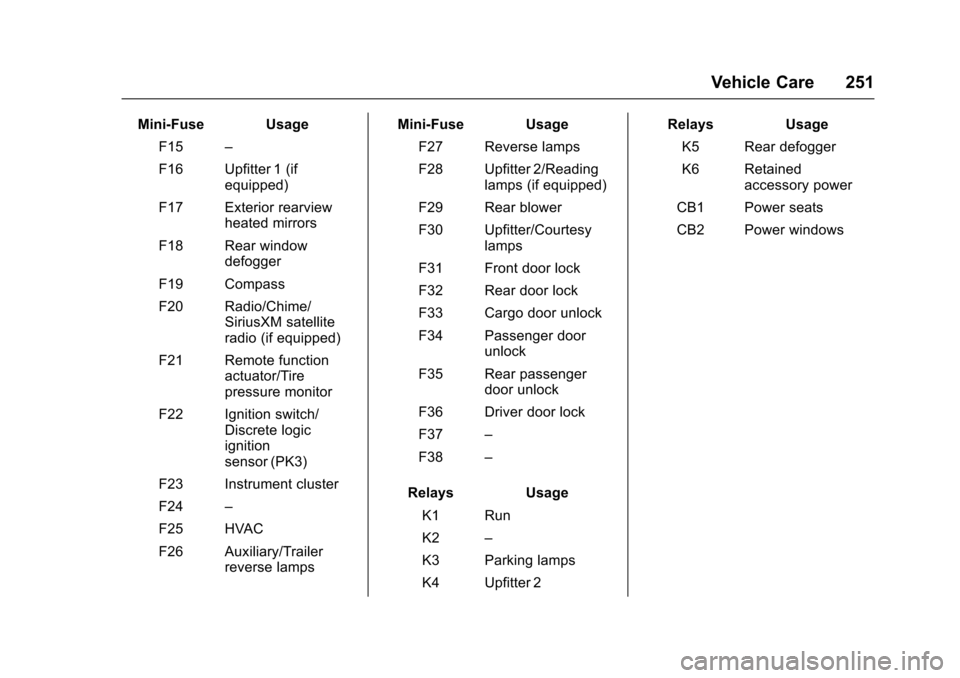
The vehicle may not be equippedwith all of the fuses, relays, andfeatures shown.
Mini-Fuse Usage
F1–
Mini-Fuse Usage
F2 Steering wheelsensor
F3 Auxiliary parkinglamps (cut-away)
F4 Front parkinglamps
F5 Trailer parkinglamps
F6 Upfitter/Parkinglamps
F7 Right rearparking lamp
F8 Left rearparking lamp
F9 Exterior rearviewmirror switch
F10 Airbag/Automaticoccupant sensing
F11 OnStar (ifequipped)
F12–
F13 HVAC 2
F14 HVAC 1
Page 252 of 346
Chevrolet Express Owner Manual (GMNA-Localizing-U.S./Canada/Mexico-9967827) - 2017 - crc - 5/2/16
Vehicle Care 251
Mini-Fuse Usage
F15–
F16 Upfitter 1 (ifequipped)
F17 Exterior rearviewheated mirrors
F18 Rear windowdefogger
F19 Compass
F20 Radio/Chime/SiriusXM satelliteradio (if equipped)
F21 Remote functionactuator/Tirepressure monitor
F22 Ignition switch/Discrete logicignitionsensor (PK3)
F23 Instrument cluster
F24–
F25 HVAC
F26 Auxiliary/Trailerreverse lamps
Mini-Fuse Usage
F27 Reverse lamps
F28 Upfitter 2/Readinglamps (if equipped)
F29 Rear blower
F30 Upfitter/Courtesylamps
F31 Front door lock
F32 Rear door lock
F33 Cargo door unlock
F34 Passenger doorunlock
F35 Rear passengerdoor unlock
F36 Driver door lock
F37–
F38–
Relays Usage
K1 Run
K2–
K3 Parking lamps
K4 Upfitter 2
Relays Usage
K5 Rear defogger
K6 Retainedaccessory power
CB1 Power seats
CB2 Power windows