2017 CHEVROLET EXPRESS CARGO VAN lock
[x] Cancel search: lockPage 19 of 346
Chevrolet Express Owner Manual (GMNA-Localizing-U.S./Canada/Mexico-9967827) - 2017 - crc - 5/2/16
18 In Brief
Achoiceofadditionalinformationsuch as Channel, Song, Artist, andCAT (category) can display.Continue pressing to highlight thedesired tab, or press the softkeylocated under any one of the tabsand the information about that tabdisplays.
For more information about theseand other radio features, seeInfotainment0132.
Storing a Favorite Station
Depending on which radio thevehicle has, radio stations arestored as either favorites or presets.
For vehicles with a FAV button, amaximum of 36 stations can bestored as favorites using the sixsoftkeys below the radio stationfrequency tabs and by using theradio FAV button. Press FAV to gothrough up to six pages of favorites,each having six favorite stationsavailable per page. Each page offavorites can contain anycombination of AM and FM stations.
For more information on storing afavorite station, seeOperation0136.
Setting the Clock
To s e t t h e t i m e a n d d a t e f o r t h eRadio with CD/MP3:
1. PressHand the HR, MIN, MM,
DD, and YYYY (hour, minute,month, day, and year) display.
2. Press the softkey under anyone of the tabs to be changed.
3. Press©SEEK or¨SEEK,s
REV or\FWD, or turnf
clockwise or counterclockwiseto increase or decrease thetime or date.
For detailed instructions on settingthe clock for your specific audiosystem, seeClock092.
Satellite Radio
SiriusXM®is a satellite radio servicebased in the 48 contiguous UnitedStates and 10 Canadian provinces.SiriusXM satellite radio has a wide
variety of programming andcommercial-free music, coast tocoast, and in digital-quality sound.
AfeeisrequiredtoreceivetheSiriusXM service.
For more information, refer to:
.www.siriusxm.com or call1-888-601-6296 (U.S.)
.www.siriusxm.ca or call1-877-438-9677 (Canada)
SeeSatellite Radio0139.
Portable Audio Devices
This vehicle may have an auxiliaryinput on the radio faceplate and aUSB port on the instrument panel.External devices such as an iPod®,laptop computer, MP3 player,or USB storage device can beconnected to the auxiliary port usinga3.5mm(1/8in)inputcableortheUSB port depending on the audiosystem.
See "Using the Auxiliary Input Jack"and "Using the USB Port" inAuxiliary Devices0146.
Page 23 of 346
Chevrolet Express Owner Manual (GMNA-Localizing-U.S./Canada/Mexico-9967827) - 2017 - crc - 5/2/16
22 In Brief
Engine Oil Life System
The engine oil life system calculatesengine oil life based on vehicle useand displays a DIC message whenit is necessary to change the engineoil and filter. The oil life systemshould be reset to 100% onlyfollowing an oil change.
Resetting the Oil Life System
1. Turn the ignition to ON/RUN,with the engine off.
2. Fully press and release theaccelerator pedal slowly threetimes within five seconds.
3. Turn the key to LOCK/OFF.
SeeEngine Oil Life System0221.
Driving for Better Fuel
Economy
Driving habits can affect fuelmileage. Here are some driving tipsto get the best fuel economypossible.
.Avoid fast starts and acceleratesmoothly.
.Brake gradually and avoidabrupt stops.
.Avoid idling the engine for longperiods of time.
.When road and weatherconditions are appropriate, usecruise control.
.Always follow posted speedlimits or drive more slowly whenconditions require.
.Keep vehicle tires properlyinflated.
.Combine several trips into asingle trip.
.Replace the vehicle's tires withthe same TPC Spec numbermolded into the tire's sidewallnear the size.
.Follow recommended scheduledmaintenance.
Roadside Assistance
Program
U.S.: 1-800-243-8872
TTY Users (U.S. Only):1-888-889-2438
Canada: 1-800-268-6800
New Chevrolet owners areautomatically enrolled in theRoadside Assistance Program.
SeeRoadside AssistanceProgram0316.
Page 24 of 346

Chevrolet Express Owner Manual (GMNA-Localizing-U.S./Canada/Mexico-9967827) - 2017 - crc - 5/2/16
Keys, Doors, and Windows 23
Keys, Doors, and
Windows
Keys and Locks
Keys . . . . . . . . . . . . . . . . . . . . . . . . . . . 23Remote Keyless Entry (RKE)System . . . . . . . . . . . . . . . . . . . . . . . 25Remote Keyless Entry (RKE)System Operation . . . . . . . . . . . . 25Remote Vehicle Start . . . . . . . . . . 27Door Locks . . . . . . . . . . . . . . . . . . . . 28Power Door Locks . . . . . . . . . . . . . 29Cargo Door Relocking . . . . . . . . . 29Delayed Locking . . . . . . . . . . . . . . . 29Automatic Door Locks . . . . . . . . . 30Lockout Protection . . . . . . . . . . . . . 30Safety Locks . . . . . . . . . . . . . . . . . . . 30
Doors
Side Door (60/40Swing-Out) . . . . . . . . . . . . . . . . . . . 31Sliding Door . . . . . . . . . . . . . . . . . . . 32Rear Doors . . . . . . . . . . . . . . . . . . . . 32
Vehicle Security
Vehicle Security . . . . . . . . . . . . . . . . 33Immobilizer . . . . . . . . . . . . . . . . . . . . 33Immobilizer Operation . . . . . . . . . 33
Exterior Mirrors
Convex Mirrors . . . . . . . . . . . . . . . . 35Manual Mirrors . . . . . . . . . . . . . . . . . 35Trailer-Tow Mirrors . . . . . . . . . . . . . 35Power Mirrors . . . . . . . . . . . . . . . . . . 35Heated Mirrors . . . . . . . . . . . . . . . . . 36
Interior Mirrors
Interior Rearview Mirrors . . . . . . . 36Manual Rearview Mirror . . . . . . . . 36
Windows
Windows . . . . . . . . . . . . . . . . . . . . . . . 36Manual Windows . . . . . . . . . . . . . . 37Power Windows . . . . . . . . . . . . . . . 37Swing-Out Windows . . . . . . . . . . . 37Enhanced Technology Glass . . . 38Sun Visors . . . . . . . . . . . . . . . . . . . . . 39
Keys and Locks
Keys
{Warning
Leaving children in a vehicle with
the ignition key is dangerous and
children or others could be
seriously injured or killed. They
could operate the power windows
or other controls or make the
vehicle move. The windows will
function with the keys in the
ignition, and children or others
could be caught in the path of a
closing window. Do not leave
children in a vehicle with the
ignition key.
Page 26 of 346
Chevrolet Express Owner Manual (GMNA-Localizing-U.S./Canada/Mexico-9967827) - 2017 - crc - 5/2/16
Keys, Doors, and Windows 25
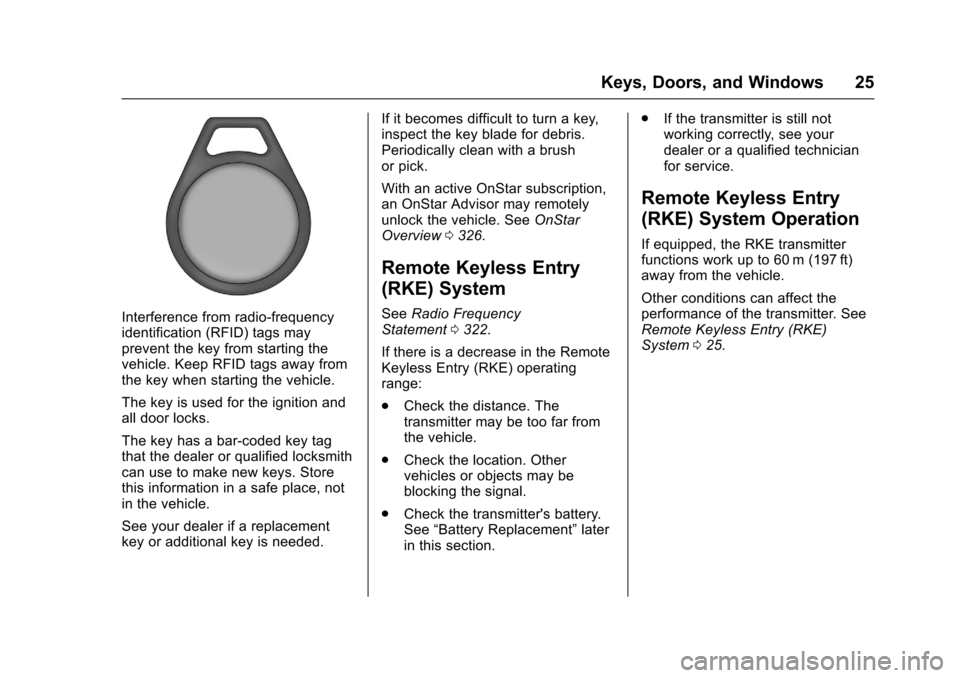
Interference from radio-frequencyidentification (RFID) tags mayprevent the key from starting thevehicle. Keep RFID tags away fromthe key when starting the vehicle.
The key is used for the ignition andall door locks.
The key has a bar-coded key tagthat the dealer or qualified locksmithcan use to make new keys. Storethis information in a safe place, notin the vehicle.
See your dealer if a replacementkey or additional key is needed.
If it becomes difficult to turn a key,inspect the key blade for debris.Periodically clean with a brushor pick.
With an active OnStar subscription,an OnStar Advisor may remotelyunlock the vehicle. SeeOnStarOverview0326.
Remote Keyless Entry
(RKE) System
SeeRadio FrequencyStatement0322.
If there is a decrease in the RemoteKeyless Entry (RKE) operatingrange:
.Check the distance. Thetransmitter may be too far fromthe vehicle.
.Check the location. Othervehicles or objects may beblocking the signal.
.Check the transmitter's battery.See“Battery Replacement”laterin this section.
.If the transmitter is still notworking correctly, see yourdealer or a qualified technicianfor service.
Remote Keyless Entry
(RKE) System Operation
If equipped, the RKE transmitterfunctions work up to 60 m (197 ft)away from the vehicle.
Other conditions can affect theperformance of the transmitter. SeeRemote Keyless Entry (RKE)System025.
Page 27 of 346
Chevrolet Express Owner Manual (GMNA-Localizing-U.S./Canada/Mexico-9967827) - 2017 - crc - 5/2/16
26 Keys, Doors, and Windows
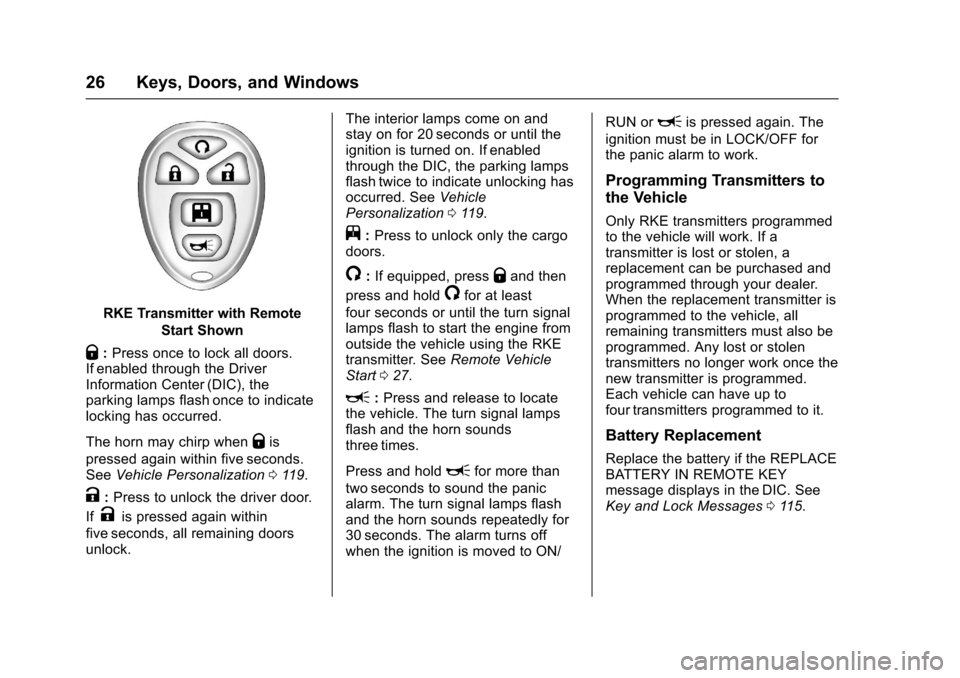
RKE Transmitter with Remote
Start Shown
Q:Press once to lock all doors.If enabled through the DriverInformation Center (DIC), theparking lamps flash once to indicatelocking has occurred.
The horn may chirp whenQis
pressed again within five seconds.SeeVehicle Personalization011 9.
K:Press to unlock the driver door.
IfKis pressed again within
five seconds, all remaining doorsunlock.
The interior lamps come on andstay on for 20 seconds or until theignition is turned on. If enabledthrough the DIC, the parking lampsflash twice to indicate unlocking hasoccurred. SeeVehiclePersonalization011 9.
j:Press to unlock only the cargodoors.
/:If equipped, pressQand then
press and hold/for at least
four seconds or until the turn signallamps flash to start the engine fromoutside the vehicle using the RKEtransmitter. SeeRemote VehicleStart027.
L:Press and release to locatethe vehicle. The turn signal lampsflash and the horn soundsthree times.
Press and holdLfor more than
two seconds to sound the panicalarm. The turn signal lamps flashand the horn sounds repeatedly for30 seconds. The alarm turns offwhen the ignition is moved to ON/
RUN orLis pressed again. The
ignition must be in LOCK/OFF forthe panic alarm to work.
Programming Transmitters to
the Vehicle
Only RKE transmitters programmedto the vehicle will work. If atransmitter is lost or stolen, areplacement can be purchased andprogrammed through your dealer.When the replacement transmitter isprogrammed to the vehicle, allremaining transmitters must also beprogrammed. Any lost or stolentransmitters no longer work once thenew transmitter is programmed.Each vehicle can have up tofour transmitters programmed to it.
Battery Replacement
Replace the battery if the REPLACEBATTERY IN REMOTE KEYmessage displays in the DIC. SeeKey and Lock Messages011 5.
Page 29 of 346

Chevrolet Express Owner Manual (GMNA-Localizing-U.S./Canada/Mexico-9967827) - 2017 - crc - 5/2/16
28 Keys, Doors, and Windows
When the engine starts, theparking lamps will turn on andremain on while the engine isrunning. The doors will belocked.
The engine will continue to runfor 10 minutes. After30 seconds, repeat the steps ifa10-minuteextensionisdesired. Remote start can beextended only once.
After entering the vehicle during aremote start, insert and turn the keyto ON/RUN to drive the vehicle.
The maximum number of remotestarts between ignition cycles withthe key is two.
If the remote start procedure is usedagain before the first 10 minute timeframe has ended, the first10 minutes will immediately expireand the second 10 minute timeframe will start.
After the engine has been remotestarted two times, the ignition switchmust be turned to ON/RUN and then
back to LOCK/OFF using the keybefore the remote start procedurecan be used again.
To c a n c e l a r e m o t e s t a r t d o a n y o fthe following:
.Press and hold/until the
parking lamps turn off.
.Turn on the hazard warningflashers.
.Turn the ignition on and thenback off.
The remote vehicle start feature willnot operate if:
.The key is in the ignition.
.The hood is open.
.The hazard warning flashersare on.
.There is an emission controlsystem malfunction. SeeMalfunction Indicator Lamp(Check Engine Light)0102.
.The engine coolant temperatureis too high.
.The oil pressure is low.
.Tw o r e m o t e v e h i c l e s t a r t s h a v ealready been provided.
Door Locks
{Warning
Unlocked doors can be
dangerous.
.Passengers, especiallychildren, can easily openthe doors and fall out of amoving vehicle. When adoor is locked, the handlewill not open it. The chanceof being thrown out of thevehicle in a crash isincreased if the doors arenot locked. So, allpassengers should wearsafety belts properly and thedoors should be lockedwhenever the vehicle isdriven.
.Yo u n g c h i l d r e n w h o g e t i n t ounlocked vehicles may beunable to get out. A childcan be overcome by
(Continued)
Page 30 of 346
Chevrolet Express Owner Manual (GMNA-Localizing-U.S./Canada/Mexico-9967827) - 2017 - crc - 5/2/16
Keys, Doors, and Windows 29
Warning (Continued)
extreme heat and can sufferpermanent injuries or evendeath from heat stroke.Always lock the vehiclewhenever leaving it.
.Outsiders can easily enterthrough an unlocked doorwhen you slow down or stopthe vehicle. Locking thedoors can help prevent thisfrom happening.
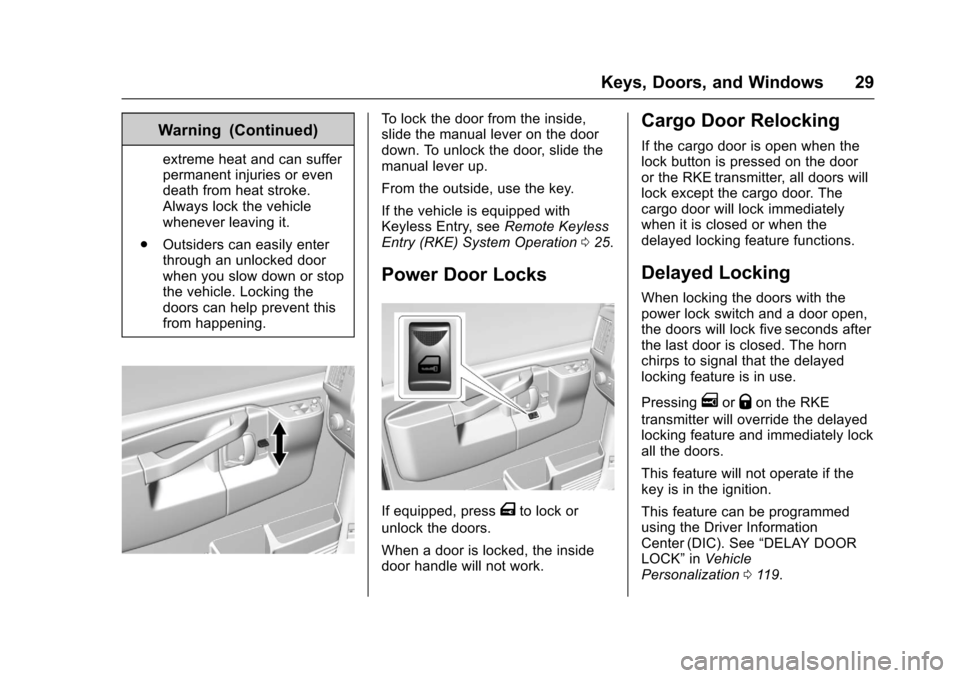
To l o c k t h e d o o r f r o m t h e i n s i d e ,slide the manual lever on the doordown. To unlock the door, slide themanual lever up.
From the outside, use the key.
If the vehicle is equipped withKeyless Entry, seeRemote KeylessEntry (RKE) System Operation025.
Power Door Locks
If equipped, pressTto lock or
unlock the doors.
When a door is locked, the insidedoor handle will not work.
Cargo Door Relocking
If the cargo door is open when thelock button is pressed on the dooror the RKE transmitter, all doors willlock except the cargo door. Thecargo door will lock immediatelywhen it is closed or when thedelayed locking feature functions.
Delayed Locking
When locking the doors with thepower lock switch and a door open,the doors will lock five seconds afterthe last door is closed. The hornchirps to signal that the delayedlocking feature is in use.
PressingeorQon the RKE
transmitter will override the delayedlocking feature and immediately lockall the doors.
This feature will not operate if thekey is in the ignition.
This feature can be programmedusing the Driver InformationCenter (DIC). See“DELAY DOORLOCK”inVehiclePersonalization011 9.
Page 31 of 346
Chevrolet Express Owner Manual (GMNA-Localizing-U.S./Canada/Mexico-9967827) - 2017 - crc - 5/2/16
30 Keys, Doors, and Windows
Automatic Door Locks
The vehicle may have an automaticlock/unlock feature. This feature canbe programmed using the DriverInformation Center (DIC). SeeVehicle Personalization011 9.
Lockout Protection
This feature protects you fromlocking the key in the vehicle whenthe key is in the ignition and a dooris open.
If the power lock switch is pressedwhen either the driver, passenger,or rear door is open, all the doorswill lock and then the driver door willunlock. This feature does notinclude the side cargo door.
If the vehicle has an ambulancepackage, this feature is disabled.
Safety Locks
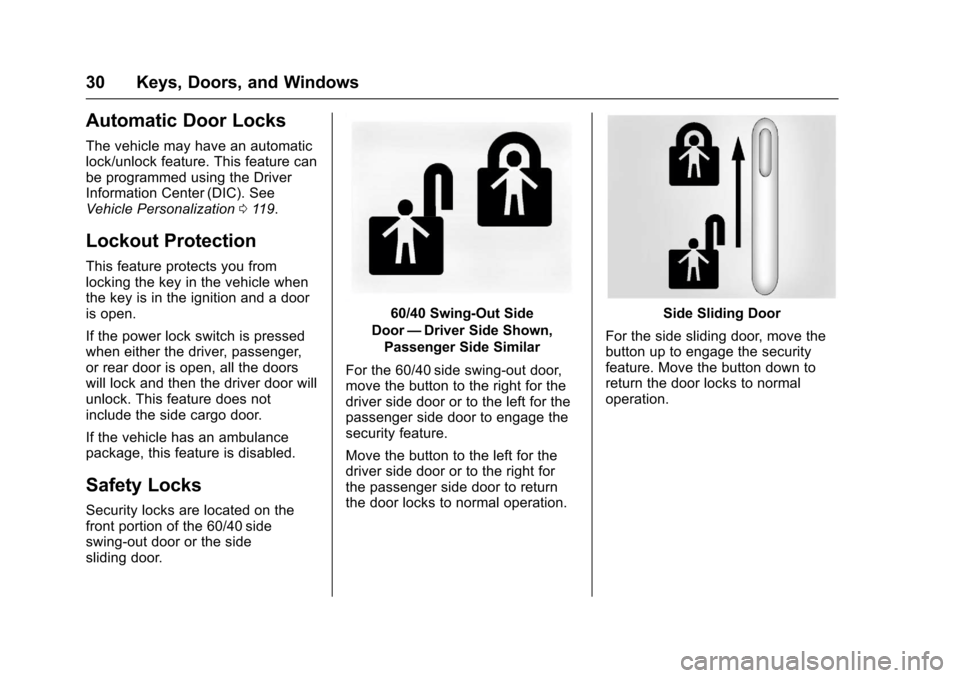
Security locks are located on thefront portion of the 60/40 sideswing-out door or the sidesliding door.
60/40 Swing-Out Side
Door—Driver Side Shown,
Passenger Side Similar
For the 60/40 side swing-out door,move the button to the right for thedriver side door or to the left for thepassenger side door to engage thesecurity feature.
Move the button to the left for thedriver side door or to the right forthe passenger side door to returnthe door locks to normal operation.
Side Sliding Door
For the side sliding door, move thebutton up to engage the securityfeature. Move the button down toreturn the door locks to normaloperation.