2017 CHEVROLET COLORADO key
[x] Cancel search: keyPage 2 of 419

Chevrolet Colorado Owner Manual (GMNA-Localizing-U.S./Canada/Mexico-10122675) - 2017 - crc - 8/22/16
ContentsIntroduction . . . . . . . . . . . . . . . . . . . . . . 2
In Brief . . . . . . . . . . . . . . . . . . . . . . . . . . . 5
Keys, Doors, and Windows . . . . . 27
Seats and Restraints . . . . . . . . . . . 44
Storage . . . . . . . . . . . . . . . . . . . . . . . 100
Instruments and Controls . . . . . . 102
Lighting . . . . . . . . . . . . . . . . . . . . . . . 146
Infotainment System . . . . . . . . . . 153
Climate Controls . . . . . . . . . . . . . . 208
Driving and Operating . . . . . . . . . 214
Vehicle Care . . . . . . . . . . . . . . . . . . 279
Service and Maintenance . . . . . 365
Te c h n i c a l D a t a . . . . . . . . . . . . . . . . 3 7 9
Customer Information . . . . . . . . . 383
Reporting Safety Defects . . . . . . 393
OnStar . . . . . . . . . . . . . . . . . . . . . . . . 397
Index . . . . . . . . . . . . . . . . . . . . 407
Page 6 of 419

Chevrolet Colorado Owner Manual (GMNA-Localizing-U.S./Canada/Mexico-10122675) - 2017 - crc - 8/22/16
In Brief 5
In Brief
Instrument Panel
Instrument Panel . . . . . . . . . . . . . . . . 6
Initial Drive Information
Initial Drive Information . . . . . . . . . . 8Remote Keyless Entry (RKE)System . . . . . . . . . . . . . . . . . . . . . . . . 8Remote Vehicle Start . . . . . . . . . . . 8Door Locks . . . . . . . . . . . . . . . . . . . . . 9Windows . . . . . . . . . . . . . . . . . . . . . . . . 9Seat Adjustment . . . . . . . . . . . . . . . . 9Heated Seats . . . . . . . . . . . . . . . . . . 11Head Restraint Adjustment . . . . 11Safety Belts . . . . . . . . . . . . . . . . . . . . 11Passenger Sensing System . . . 12Mirror Adjustment . . . . . . . . . . . . . . 12Steering Wheel Adjustment . . . . 13Interior Lighting . . . . . . . . . . . . . . . . 14Exterior Lighting . . . . . . . . . . . . . . . 14Windshield Wiper/Washer . . . . . . 15Climate Controls . . . . . . . . . . . . . . . 15Transmission . . . . . . . . . . . . . . . . . . 17Four-Wheel Drive . . . . . . . . . . . . . . 18
Vehicle Features
Infotainment System . . . . . . . . . . . 19Radio(s) . . . . . . . . . . . . . . . . . . . . . . . 19Satellite Radio . . . . . . . . . . . . . . . . . 19
Portable Audio Devices . . . . . . . . 20Bluetooth®..................... 20Steering Wheel Controls . . . . . . . 20Cruise Control . . . . . . . . . . . . . . . . . 21Driver Information Center (DIC)(Base Level) . . . . . . . . . . . . . . . . . 21Driver Information Center (DIC)(Uplevel) . . . . . . . . . . . . . . . . . . . . . 22Forward Collision Alert (FCA)System . . . . . . . . . . . . . . . . . . . . . . . 22Lane DepartureWarning (LDW) . . . . . . . . . . . . . . . 23Rear Vision Camera (RVC) . . . . 23Power Outlets . . . . . . . . . . . . . . . . . 23
Performance and Maintenance
Traction Control/ElectronicStability Control . . . . . . . . . . . . . . 23Tire Pressure Monitor . . . . . . . . . . 24Fuel (Gasoline) . . . . . . . . . . . . . . . . 24Fuel (Diesel) . . . . . . . . . . . . . . . . . . . 24E85 or FlexFuel . . . . . . . . . . . . . . . . 24Engine Oil Life System . . . . . . . . 25Driving for Better FuelEconomy . . . . . . . . . . . . . . . . . . . . . 25Roadside AssistanceProgram . . . . . . . . . . . . . . . . . . . . . . 26
Page 9 of 419
Chevrolet Colorado Owner Manual (GMNA-Localizing-U.S./Canada/Mexico-10122675) - 2017 - crc - 8/22/16
8 In Brief
Initial Drive
Information
This section provides a briefoverview about some of theimportant features that may or maynot be on your specific vehicle.
For more detailed information, referto each of the features which can befound later in this owner’smanual.
Remote Keyless Entry
(RKE) System
The Remote Keyless Entry (RKE)transmitter functions may work fromup to 60 m (197 ft) away from thevehicle.
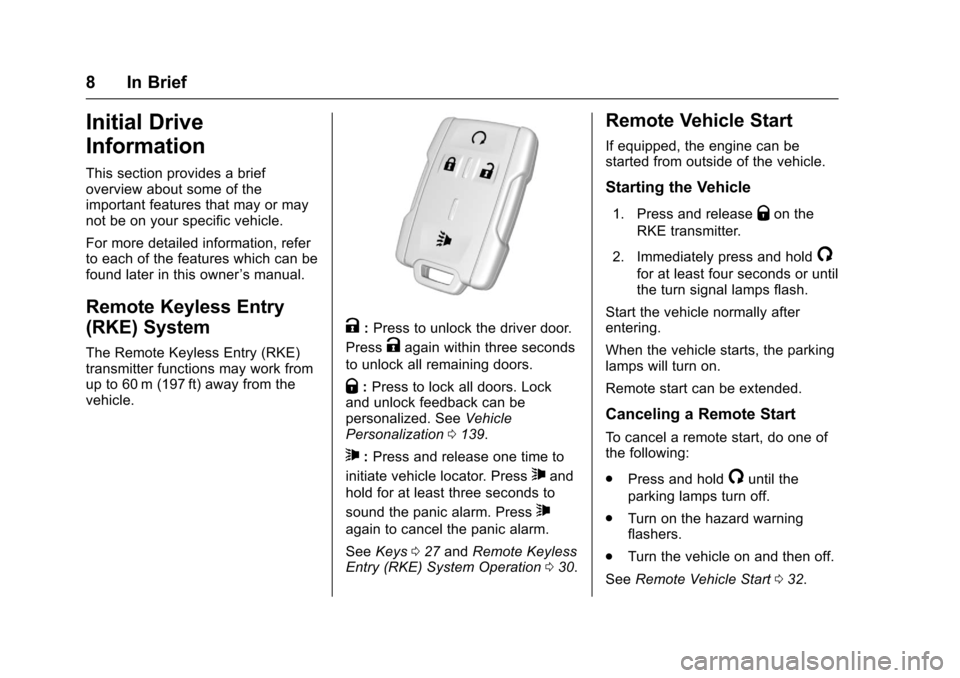
K:Press to unlock the driver door.
PressKagain within three seconds
to unlock all remaining doors.
Q:Press to lock all doors. Lockand unlock feedback can bepersonalized. SeeVehiclePersonalization0139.
7:Press and release one time to
initiate vehicle locator. Press7and
hold for at least three seconds to
sound the panic alarm. Press7
again to cancel the panic alarm.
SeeKeys027andRemote KeylessEntry (RKE) System Operation030.
Remote Vehicle Start
If equipped, the engine can bestarted from outside of the vehicle.
Starting the Vehicle
1. Press and releaseQon the
RKE transmitter.
2. Immediately press and hold/
for at least four seconds or untilthe turn signal lamps flash.
Start the vehicle normally afterentering.
When the vehicle starts, the parkinglamps will turn on.
Remote start can be extended.
Canceling a Remote Start
To c a n c e l a r e m o t e s t a r t , d o o n e o fthe following:
.Press and hold/until the
parking lamps turn off.
.Turn on the hazard warningflashers.
.Turn the vehicle on and then off.
SeeRemote Vehicle Start032.
Page 10 of 419
Chevrolet Colorado Owner Manual (GMNA-Localizing-U.S./Canada/Mexico-10122675) - 2017 - crc - 8/22/16
In Brief 9
Door Locks
To l o c k o r u n l o c k a d o o r f r o m t h e
outside pressQorKon the
Remote Keyless Entry (RKE)transmitter or use the key in thedriver door.
To l o c k a d o o r f r o m t h e i n s i d e , p u s hdown on the door lock knob. Tounlock, pull the door handle once tounlock the door and again tounlatch it.
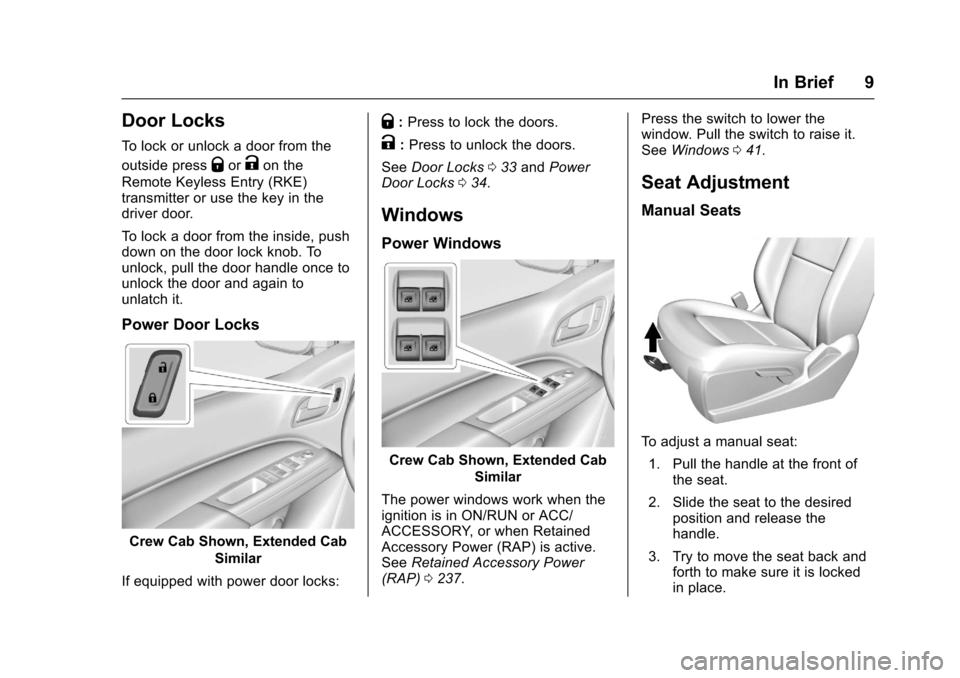
Power Door Locks
Crew Cab Shown, Extended Cab
Similar
If equipped with power door locks:
Q:Press to lock the doors.
K:Press to unlock the doors.
SeeDoor Locks033andPowerDoor Locks034.
Windows
Power Windows
Crew Cab Shown, Extended Cab
Similar
The power windows work when theignition is in ON/RUN or ACC/ACCESSORY, or when RetainedAccessory Power (RAP) is active.SeeRetained Accessory Power(RAP)0237.
Press the switch to lower thewindow. Pull the switch to raise it.SeeWindows041.
Seat Adjustment
Manual Seats
To a d j u s t a m a n u a l s e a t :
1. Pull the handle at the front ofthe seat.
2. Slide the seat to the desiredposition and release thehandle.
3. Try to move the seat back andforth to make sure it is lockedin place.
Page 20 of 419

Chevrolet Colorado Owner Manual (GMNA-Localizing-U.S./Canada/Mexico-10122675) - 2017 - crc - 8/22/16
In Brief 19
Vehicle Features
Infotainment System
The base radio and base radio withtouchscreen information is includedin this manual. See the infotainmentmanual for information on theuplevel radios, audio players,phone, navigation system, RearSeat Entertainment (RSE), andvoice or speech recognition,if equipped.
Radio(s)
O:Press to turn the system on.Press and hold to turn it off. Whenon, press to mute; press again tounmute. Turn to increase ordecrease the volume.
RADIO :Press to choose betweenFM, AM, and SXM, if equipped.
MEDIA :Press to change the audiosource between USB, AUX, andBluetooth®Audio, if equipped.
{:Press to go to the Home Page.
MENU :Press to select a menu.
g:Press to seek the previousstation.
l:Press to seek the next station.
SeeOverview (Base Radio)0155orOverview (Base Radio withTo u c h s c r e e n )0157about theseand other radio features.
Storing Radio Station Presets
Up to 25 preset stations from allbands can be stored in the favoritelists in any order. Up to five stationscan be stored in each favorite pageand the number of favorite pagescan be set.
To s t o r e t h e s t a t i o n t o a p o s i t i o n i nthe list, while on the active sourcemain page, such as AM, FM,or SXM (if equipped), press andhold a favorites/soft key button onthe faceplate.
See“Storing Radio Station Presets”underAM-FM Radio (Base Radio)0161orAM-FM Radio (Base Radiowith Touchscreen)0163.
Setting the Clock
SeeClock0106.
Satellite Radio
Vehicles with a SiriusXM®satelliteradio tuner and a valid SiriusXMsatellite radio subscription canreceive SiriusXM programming.
SiriusXM Satellite Radio
Service
SiriusXM is a satellite radio servicebased in the 48 contiguous UnitedStates and 10 Canadian provinces.SiriusXM satellite radio has a widevariety of programming andcommercial-free music, coast tocoast, and in digital-quality sound.AfeeisrequiredtoreceivetheSiriusXM service.
For more information refer to:
.www.siriusxm.com or call1-888-601-6296 (U.S.).
.www.siriusxm.ca or call1-877-438-9677 (Canada).
SeeSatellite Radio (Base Radio)0164orSatellite Radio (BaseRadio with Touchscreen)0165.
Page 28 of 419

Chevrolet Colorado Owner Manual (GMNA-Localizing-U.S./Canada/Mexico-10122675) - 2017 - crc - 8/22/16
Keys, Doors, and Windows 27
Keys, Doors, and
Windows
Keys and Locks
Keys . . . . . . . . . . . . . . . . . . . . . . . . . . . 27Remote Keyless Entry (RKE)System . . . . . . . . . . . . . . . . . . . . . . . 30Remote Keyless Entry (RKE)System Operation . . . . . . . . . . . . 30Remote Vehicle Start . . . . . . . . . . 32Door Locks . . . . . . . . . . . . . . . . . . . . 33Power Door Locks . . . . . . . . . . . . . 34Delayed Locking . . . . . . . . . . . . . . . 34Automatic Door Locks . . . . . . . . . 34Lockout Protection . . . . . . . . . . . . . 34Safety Locks . . . . . . . . . . . . . . . . . . . 35
Doors
Ta i l g a t e . . . . . . . . . . . . . . . . . . . . . . . . 3 5
Vehicle Security
Vehicle Security . . . . . . . . . . . . . . . . 36Vehicle Alarm System . . . . . . . . . 36Immobilizer . . . . . . . . . . . . . . . . . . . . 37Immobilizer Operation . . . . . . . . . 37
Exterior Mirrors
Convex Mirrors . . . . . . . . . . . . . . . . 38Manual Mirrors . . . . . . . . . . . . . . . . . 38
Power Mirrors . . . . . . . . . . . . . . . . . . 39Folding Mirrors . . . . . . . . . . . . . . . . . 39Heated Mirrors . . . . . . . . . . . . . . . . . 39Blind Spot Mirrors . . . . . . . . . . . . . . 39
Interior Mirrors
Interior Rearview Mirrors . . . . . . . 40Manual Rearview Mirror . . . . . . . . 40Automatic Dimming RearviewMirror . . . . . . . . . . . . . . . . . . . . . . . . . 41
Windows
Windows . . . . . . . . . . . . . . . . . . . . . . . 41Power Windows . . . . . . . . . . . . . . . 41Rear Windows . . . . . . . . . . . . . . . . . 43Sun Visors . . . . . . . . . . . . . . . . . . . . . 43
Keys and Locks
Keys
{Warning
Leaving children in a vehicle with
the ignition key is dangerous and
children or others could be
seriously injured or killed. They
could operate the power windows
or other controls or make the
vehicle move. The windows will
function with the keys in the
ignition, and children or others
could be caught in the path of a
closing window. Do not leave
children in a vehicle with the
ignition key.
Page 29 of 419
Chevrolet Colorado Owner Manual (GMNA-Localizing-U.S./Canada/Mexico-10122675) - 2017 - crc - 8/22/16
28 Keys, Doors, and Windows
{Warning
If the key is unintentionally
rotated while the vehicle is
running, the ignition could be
moved out of the RUN position.
This could be caused by heavy
items hanging from the key ring,
or by large or long items attached
to the key ring that could be
contacted by the driver or
steering wheel. If the ignition
moves out of the RUN position,
the engine will shut off, braking
and steering power assist may be
(Continued)
Warning (Continued)
impacted, and airbags may not
deploy. To reduce the risk of
unintentional rotation of the
ignition key, do not change the
way the ignition key and Remote
Keyless Entry (RKE) transmitter,
if equipped, are connected to the
provided key rings.
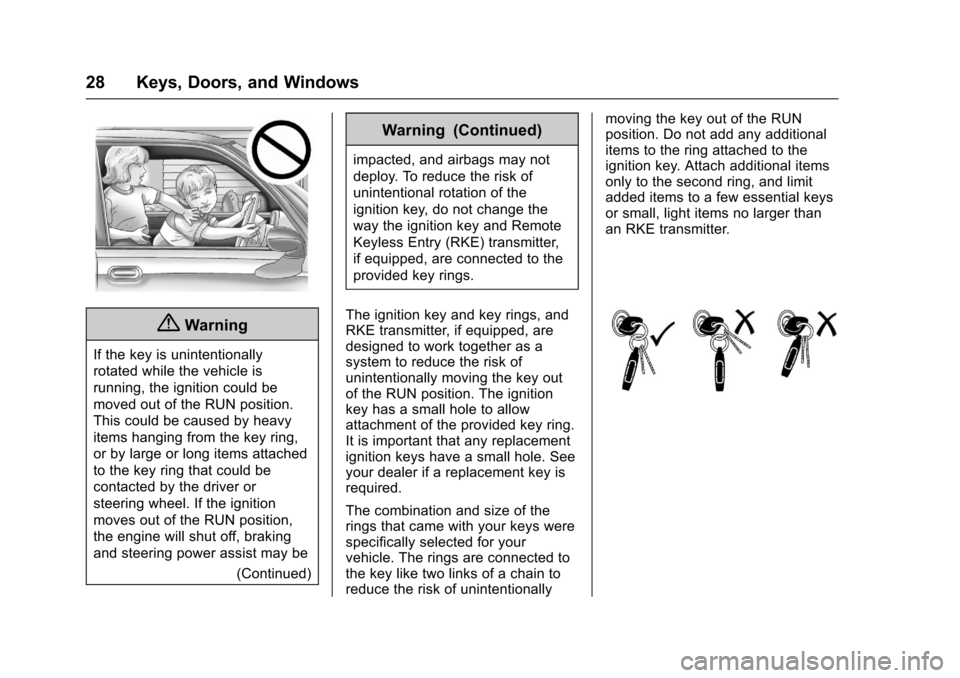
The ignition key and key rings, andRKE transmitter, if equipped, aredesigned to work together as asystem to reduce the risk ofunintentionally moving the key outof the RUN position. The ignitionkey has a small hole to allowattachment of the provided key ring.It is important that any replacementignition keys have a small hole. Seeyour dealer if a replacement key isrequired.
The combination and size of therings that came with your keys werespecifically selected for yourvehicle. The rings are connected tothe key like two links of a chain toreduce the risk of unintentionally
moving the key out of the RUNposition. Do not add any additionalitems to the ring attached to theignition key. Attach additional itemsonly to the second ring, and limitadded items to a few essential keysor small, light items no larger thanan RKE transmitter.
Page 30 of 419
Chevrolet Colorado Owner Manual (GMNA-Localizing-U.S./Canada/Mexico-10122675) - 2017 - crc - 8/22/16
Keys, Doors, and Windows 29
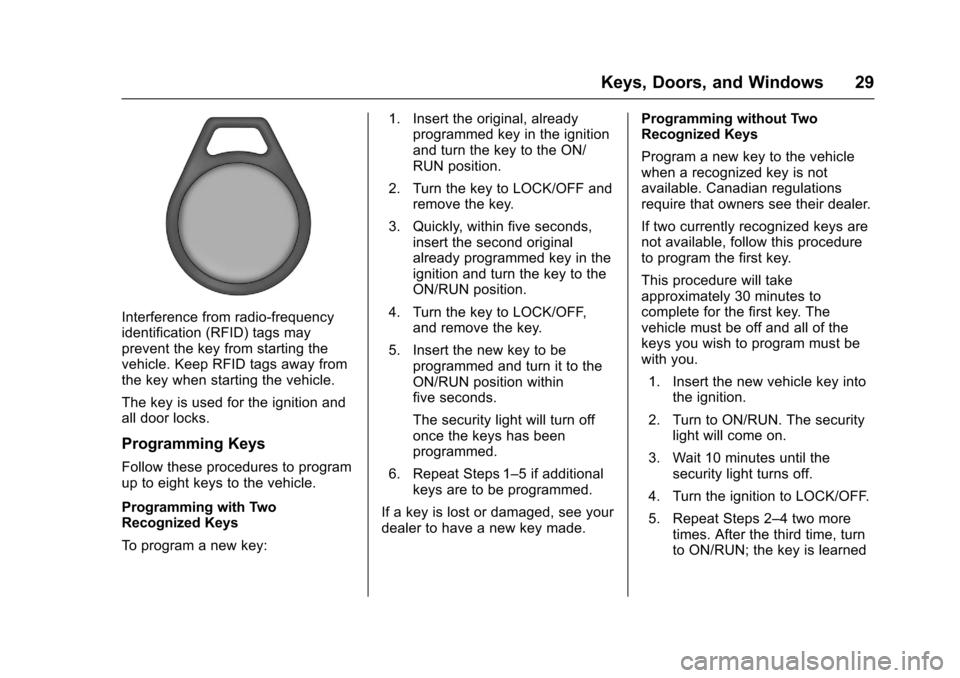
Interference from radio-frequencyidentification (RFID) tags mayprevent the key from starting thevehicle. Keep RFID tags away fromthe key when starting the vehicle.
The key is used for the ignition andall door locks.
Programming Keys
Follow these procedures to programup to eight keys to the vehicle.
Programming with TwoRecognized Keys
To p r o g r a m a n e w k e y :
1. Insert the original, alreadyprogrammed key in the ignitionand turn the key to the ON/RUN position.
2. Turn the key to LOCK/OFF andremove the key.
3. Quickly, within five seconds,insert the second originalalready programmed key in theignition and turn the key to theON/RUN position.
4. Turn the key to LOCK/OFF,and remove the key.
5. Insert the new key to beprogrammed and turn it to theON/RUN position withinfive seconds.
The security light will turn offonce the keys has beenprogrammed.
6. Repeat Steps 1–5ifadditionalkeys are to be programmed.
If a key is lost or damaged, see yourdealer to have a new key made.
Programming without TwoRecognized Keys
Program a new key to the vehiclewhen a recognized key is notavailable. Canadian regulationsrequire that owners see their dealer.
If two currently recognized keys arenot available, follow this procedureto program the first key.
This procedure will takeapproximately 30 minutes tocomplete for the first key. Thevehicle must be off and all of thekeys you wish to program must bewith you.
1. Insert the new vehicle key intothe ignition.
2. Turn to ON/RUN. The securitylight will come on.
3. Wait 10 minutes until thesecurity light turns off.
4. Turn the ignition to LOCK/OFF.
5. Repeat Steps 2–4twomoretimes. After the third time, turnto ON/RUN; the key is learned