2017 AUDI A3 SEDAN ABS
[x] Cancel search: ABSPage 348 of 400

Wheels
after switching the ignition on or while driving
and the
[tlJ indicator light in the instrument clus
ter blinks for approximately one minute and then
stays on, there is system malfunction. Check/cor rect the pressures on all four tires and store the
pressures
Q page 346 . If the indicator light does
turn off or turns on again after a short period of
time, drive to an authorized Audi dealer or au
thorized Audi Service Facility immediately to have
the malfunction corrected.
A WARNING
- If the tire pressure indicator appears in the
instrument cluster display, reduce your
speed immediately and avoid any hard
steering or braking maneuvers. Stop as soon
as possible and check the tires and their
pressures.
- The driver is responsible for maintaining the correct tire pressures. You must check the
tire pressures regularly.
- Under certain conditions (such as a sporty
driving style, winter conditions or unpaved
roads), the pressure monitor indicator may
be delayed.
- Do not use run-flat tires on your vehicle. Us
ing them when not permitted can lead to
vehicle damage or accidents.
@ Tips
- The tire pressure monitoring system can al
so stop working when there is an ESC/ABS
malfunction.
- Using snow chains may result in a system
malfunction.
- The tire pressure monitoring system in your
Audi was calibrated with "Audi Original
Tires"
¢ page 335. Using these tires is rec
ommended .
- The tire pressure monitoring system can on
ly monitor the tire pressure of the driving
tires. Check the tire pressure of the spare
wheel in the luggage compartment so that
if necessary it is ready for use.
346
· Storing tire pressures
Applies to: vehicles with Tire P ressure Monitoring System in
dicator
A change in tire pressure or a change in tires
must be stored in the system.
Before storing the tire pressures, make sure the
tire pressures of all four tires meet the specified
values and are adapted to the load¢
page 335.
.,. Select in the Infotainment system: IMENU ! but
ton
> Vehicle > Service & checks > Tire pres
sure monitoring
> Store tire pressure > Yes,
store now.
(D Tips
Do not store the tire pressures if snow chains
are installed.
Page 352 of 400

Care and cleaning
Component Situation Solution
C ont rols
Deposits Soft brush, then a soft cloth with a mild soap solution a)
Safet y belt s Deposits M
ild soap so lution a), allow to dry befo re letting them re-
tract
Te xt ile s Deposits adhering to Vacuum cleaner
artifi cial le athe r, the surface
Alcantara Water -based deposits Absorbent cloth and mild soap solutional
such as coffee, tea,
blood , etc.
Oi l-based deposits Apply a m ild soap so lution al, blot away the dissolved oi l or
such as oil, make-up , dye, treat afterward with water, if necessary
etc.
Special deposits such Special sta in remover, blot with absorbent material, treat
as ink, na il polish, la -afterward with mild soap solution, if necessary al
tex paint, shoe pol-
ish, etc.
N atu ral leath er Fresh stains Cotton cloth with a mild soap so lutiona )
Water-based deposits Fresh sta iins: absorbent cloth
such as coffee, tea , Dried st ains: stain remover suitable fo r leathe r
blood , etc.
Oil-based deposits Fresh
sta iin s: absorbent cloth and stain remover suitable
such as oil, make -up, for leather
etc. dried stains: Oil cleaning spray
Special deposits such Spot remover suitab
le for leather
as ink, nail polish, la-
tex paint, shoe pol-
ish, etc.
Care Regularly apply conditioning cream that protects from
light and penetrates into the materia l. Use specially-co l-
ored cond itioning cream, if necessary .
Carbon part s Deposits clean the same way as plastic parts
a) M ild soap so lution: maxim um two tabl espoo ns o f neu tral s oa p in 1 quart (l lite r) of water
8_ WARNING
-The windshie ld may not be treated with wa-
ter-repelling windshield coating agents. Un
favorable conditions such as wetness, dark ness, or low sun can result in increased glare.
Wiper blade chatter is also possible.
Q;) Note
- Headl ights /tail li ght s
- Never clean headlights or ta il lights with a
dry cloth or sponge .
350
-
-Do not use any clea ning product that con
tains alco ho l, because they could cause
crac ks to form.
-Whe els
- Never use any paint polish or other abra-
sive materials.
- Damage to the protect ive layer on the
rims such as stone chips or scratches must
be repaired immediately.
- Sensors /camera lenses
- Never use warm or hot water to remove
snow or ice from the camera lens . This
could cause the lens to crack.
Page 356 of 400

Emergency assistance
• To open the side pane l, turn the lock and re
move the
cover @*/ @ ¢ fig. 283.
• Lift the cargo floor using the plastic handle @
un til the cargo floor engages behind the tabs
© in both side panels¢ fig. 284 (upper im
age) .
• Fold the cargo floor back before closing the
luggage compartment lid.
Vehicle tool kit and cargo floor cover
App lies to: ve hicles w ith versio n 2
The vehicle too l kit, tire mobility kit* and com
pressor* are stored in the luggage compartment
under the cargo floor
cover @¢ fig. 283 .
• Engage the plastic hook® in the luggage com
partment
seal ¢ fig. 284.
• Fold the cargo floor back before closing the
luggage compartment lid .
.&_ WARNING
Improper use of the vehicle jack can cause se
r ious personal injuries.
- Never use the screw driver hex head to
tighten wheel bolts, since the bolts cannot
attain the necessary tightening torque if you
use the hex head, potentially causing an ac
cident.
- T he factory-supplied jack is intended only
for your vehicle model. Under no circum
stances should it be used to lift heavy
vehicles or other loads; you risk injuring
yourself.
- Never start the engine when the vehicle is
raised, which could cause an accident.
- Support the vehicle securely with appropri
ate stands if work is to be performed under
neath the vehicle; otherwise, there is a po
tent ial risk for injury.
- Never use the jack supplied with your Audi
on another vehicle, particularly on a heavier
one. The jack is only suitable for use on the
vehicle it came w ith.
@ Tips
The vehicle jack* in your vehicle is mainte
nance-free.
354
Tire mobility kit
Preparation
App lies to: vehicles with tire mobility kit
• Read and fo llow the important safety precau-
tions
in ¢ page 353.
• Set the parking brake.
• Move the selector lever into the P position.
• Check if a repair with the tire mobility kit is pos
sible
¢ page 354.
Using the tire mobility kit
Applies to: vehicles wit h tire mobility kit
Fig. 285
Tire: t ir e damage that cannot be repaired
The tire repair is only meant for temporary use .
Change the spare tire as soon as possible
c:;> .&..
If the tire is pierced by an object such as a nail ,
do not remove the object from the tire.
..... N
0
> 00 m
The tire repair set is able to be used at tempera
tures as low as -4 °F ( -20 °C).
The tire mobility kit may not be used :
-if the tire has cuts or punctures that are larger
than
0.16 in (4 mm) (!)¢ fig. 285.
-if the rim is damaged @.
- if you drove with very low tire pressure or with-
out air in the tire @.
In this case, see an authorized Aud i dea ler or au
thorized Audi Service Facility for assistance.
~ WARNING
-Please note that the tire mobility kit cannot
be used in all situations, and that it may on
ly be used temporarily.
-The tire sealant must not come in contact
with skin, eyes, or clothes.
Page 365 of 400
a, a, ..... N
" N ..... 0 N > 00
Removing the subwoofer
• Lift up the cargo floor ¢ page 362, fig. 295.
• Press the connector tabs CD¢ fig. 297 togeth
er.
• Remove the connector @and set the discon-
nected cab le aside.
• Remove the bolt@.
• Carefully remove the subwoofer .
Installing the subwoofer
• Carefully place the subwoofer in the rim wel l.
The word "FRONT" on the subwoofer must face
forward.
• Insert the connector that was removed .
• Secure the subwoofer with the bolt.
• Fold the cargo floor cover back into place .
@ Tips
The subwoofer can also be mounted when the
spare tire is not in the spare wheel wheel.
Removing the subwoofer (version 2)
App lies to: vehicles with subwoofer in the spare wheel well
The subwoofer must be removed before the
spore wheel* can be removed .
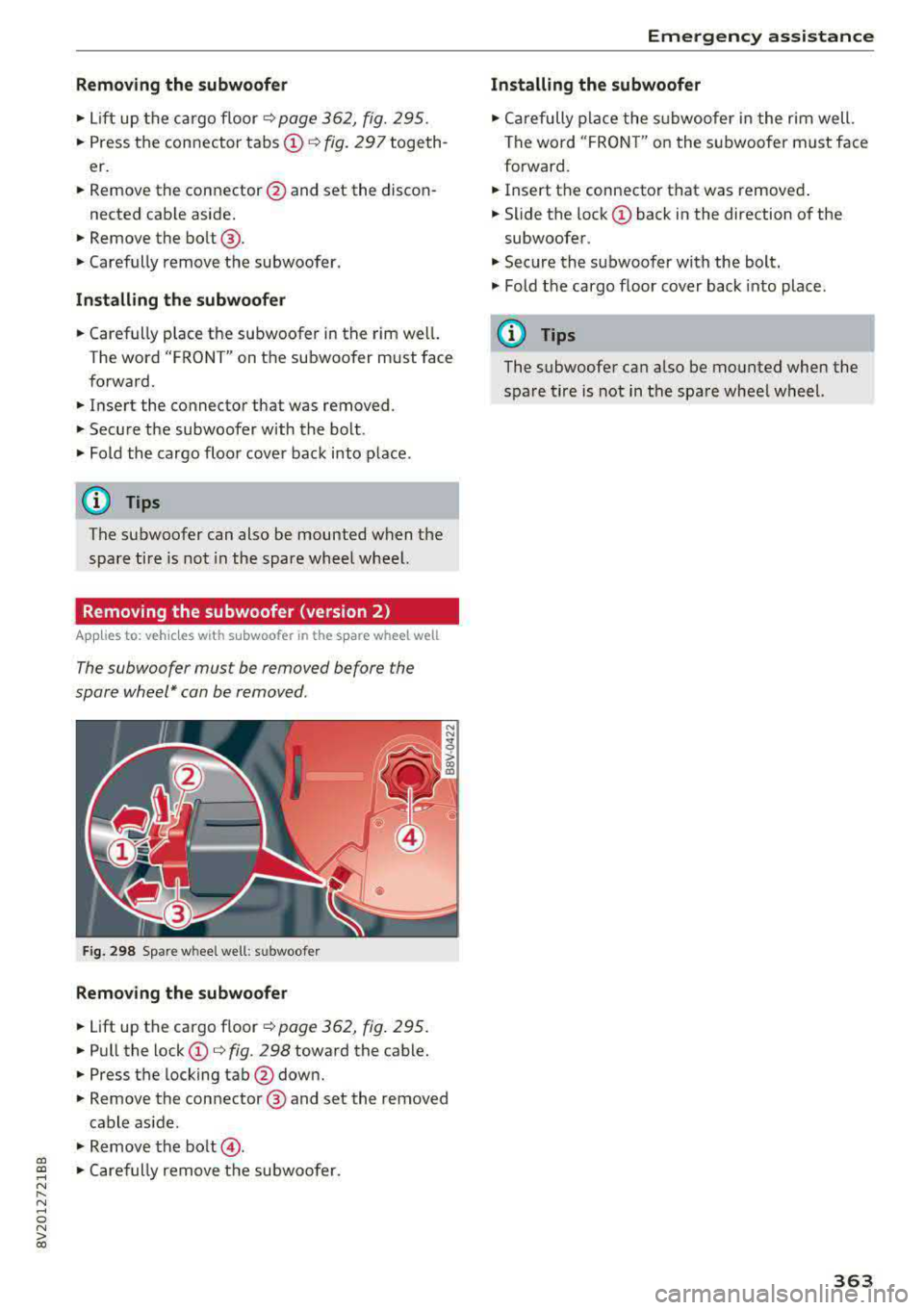
Fig. 298 Spare w heel well : su bwoofer
Removing the subwoofer
• Lift up the cargo floor ¢ page 362, fig . 295.
• Pull the lock CD¢ fig. 298 toward the cable.
• Press the locking tab@down.
• Remove the connector @ and set the removed
cable aside .
"' Remove the bolt@.
• Caref ully remove the subwoofer.
Emergency assistance
Installing the subwoofer
• Carefully place the subwoofer in the rim well.
The word "FRON T" on the subwoofer must face
forward.
• Insert the connector that was removed .
• Slide the lock CD back in the direction of the
subwoofer .
• Secure the subwoo fer with the bolt.
"' Fold the cargo floor cover back into place .
@ Tips
The subwoofer can also be mounted when the
spare tire is not in the spare wheel wheel.
363
Page 384 of 400

Index
A
A/C (automatic climate control system) . . . . 71
Accessories . . . . . . . . . . . . . . . . . . . . . . . 64, 380
Active lane assist
refer to Audi active lane assist . . . . . . . . . 136
Active rollover protection system . . . . . . . . 256
Retracting rollover protection.......... 257
Adaptive cruise control
refer to Audi adaptive cruise control . . . . 126
Adaptive light
refer to Audi adaptive light . . . . . . . . . . . . . 51
Adjusting the air distribution Automatic climate control system . . . . . . . 72
Adjusting the air vents . . . . . . . . . . . . . . . . . . 73 Automatic climate control system . . . . . . . 72
Adjusting the sound . . . . . . . . . . . . . . . . . . . 245
Advanced key
refer to Convenience key . . . . . . . . . . . . . . . 78
Airbag .... .. .. ............... .... ... 267
Airbag system .. .... .............. 267,287
Advanced Airbag System components . . . 274
Care . . . . . . . . . . . . . . . . . . . . . . . . . . . . . . 282
Ch ildren . . . . . . . . . . . . . . . . . . . . . . . . . . . 294
Ch ild restraints . . . . . . . . . . . . . . . . . . . . . 295
Components (front airbags) . . . . . . . . . . . 274
Danger of fitting a child safety seat on the
front passenger seat . . . . . . . . . . . . . . . . . 268
Disposal . . . . . . . . . . . . . . . . . . . . . . . . . . . 282
Front airbags . . . . . . . . . . . . . . . . . . . . . . . 272
How do the front airbags work? . . . . . . . . 277
How many airbags does my vehicle have? 274
How the Advanced Airbag System compo -
nents work together . . . . . . . . . . . . . . . . . 276
Important safety instructions on the knee
airbag system . . . . . . . . . . . . . . . . . . . . . . . 285
Knee airbags . . . . . . . . . . . . . . . . . . . . . . . . 283
Monitoring . . . . . . . . . . . . . . . . . . . . . . . . . 279
PASSENGER AIR BAG OFF light . . . . . . . . . 279
Repairs . . . . . . . . . . . . . . . . . . . . . . . . . . . . 282
Safety instructions . . . . . . . . . . . . . . . . . . . 281
Side airbags . . . . . . . . . . . . . . . . . . . . . . . . 285
Warning/Indicator lights . . . . . . . . . . . . . 279
When must the system be inspected? . . . 279
Air pressure (tires) . . . . . . . . . . . . . . . . 336, 345
A lignment pin (tire change) . . . . . . . . . . . . . 353
All-weather lights..... ......... .... .. .. 51
382
All season tires
All wheel drive 342
refer to quattro (all wheel drive) . . . . .
. . 154
AMI
refer to Audi music interface . . . . . . . 228, 229
Android Auto
refer to Audi smartphone interface . . . . . 239
Ant i-freeze
Windshield washer system . . . . . . . . . . . . 327
Anti -Lock Braking System (ABS) . . . . . . . . . 151
Anti-Slip Regulation (ASR) . . . . . . . . . . . . . . 151
Apple CarP lay
refer to Aud i smartphone interface . . . . . 239
Audi active lane assist . . . . . . . . . . . . . . . . . 136
Cleaning the camera area . . . . . . . . . . . . . 348
Messages . .. .. .. ... .... ....... .... .
Audi adaptive cruise control ........... . .
Cleaning the sensor . .. .. ........... . . 138
126
348
Distance display, distance warning ..... . 132
Messages . . . . . . . . . . . . . . . . . . . . . . . . . . 133
Audi adaptive light . . . . . . . . . . . . . . . . . 51, 143
Audi connect e-tron services . . . . . . . . . . . . 198
Doors and lights .. .. .. .. ........... .. 198
Audi connect (Infotainment) ........ 190,195
Data protection . . . . . . . . . . . . . . . . . . . . . 196
Services overview . . . . . . . . . . . . . . . . . . . . 191
Start ing . . . . . . . . . . . . . . . . . . . . . . . . . . . 191
Audi drive select . . . . . . . . . . . . . . . . . . . . . . 143
Audi magnetic ride
refer to Suspension control . . . . . . . . . . . . 143
Audi music interface . . . . . . . . . . . . . . . . . . . 228
Audi music stream
refer to Wi-Fi . . . . . . . . . . . . . . . . . . . . . . . 226
Audio files . . . . . . . . . . . . . . . . . . . . . . . . . . . 230
Audio player Bluetooth audio player . . . . . . . . . . . . . . . 225
Wi-Fi audio player . . . . . . . . . . . . . . . . . . . 226
Audio track . . . . . . . . . . . . . . . . . . . . . . . . . . 233
Audi pre sense . . . . . . . . . . . . . . . . . . . . . . . 133
Messages . . . . . . . . . . . . . . . . . . . . . . 133, 136
Settings . . . . . . . . . . . . . . . . . . . . . . . . . . . 136
Audi Service Repair Manuals and Literature 378
Audi side assist . . . . . . . . . . . . . . . . . . . . . . . 139
Cleaning the sensors . . . . . . . . . . . . . . . . . 348
Messages . ....... ... ..... .........
.
Rear cross-traffic assist ... ........... . 143
142
Page 391 of 400

CXl CXl .... N ,.__
N .... 0 N > 00
Making an emergency ca ll . . . . . . . . . . . . . . 182
Malfunction indicator lamp (MIL) . . . . . . . . . 23
Map Operating . . . . . . . . . . . . . . . . . . . . . . . . . . 209
Sett ings . ...................... ... . 211
Update .. ... ..................... .. 200
Map updat e . . . . . . . . . . . . . . . . . . . . . . . . . . 213
Massage function . . . . . . . . . . . . . . . . . . . . . . 61
Media . . . . . . . . . . . . . . . . . . . . . . . . . . 222, 230
Drives . . . . . . . . . . . . . . . . . . . . . . . . . . . . . 223
Supported formats . . . . . . . . . . . . . . . . . . 235
M edia center . . . . . . . . . . . . . . . . . . . . . . . . . 231
Memory capacity
Directory . . . . . . . . . . . . . . . . . . . . . . . . . . . 187
Jukebox . . . . . . . . . . . . . . . . . . . . . . . . . . . . 224
Memory card SD card reader (MMI). . . . . . . . . . . . . . . . . 223
Supported types/formats . . . . . . . . . . . . . 235
MENU button . . . . . . . . . . . . . . . . . . . . . . . . 158
M enu languag e
refer to Setting the language . . . . . . . . . . 241
Menus/symbols . . . . . . . . . . . . . . . . . . . . . . 167
Messages . . . . . . . . . . . . . . . . . . . . . . . . . . . 182
Mirror Compass ... .. ....................... 59
Mirrors . . . . . . . . . . . . . . . . . . . . . . . . . . . . . . 55
Dimming ... .. ............. .. .. .... .. 56
MMI
refer to Multi Media Interface . . . . . . . . . . 158
MMI search
refer to Free text search . . . . . . . . . . 166, 232
MMI touch . . . . . . . . . . . . . . . . . . . . . . . . . . . 161
MODE button . . . . . . . . . . . . . . . . . . . . . . . . . 16
Monitoring the Advanced Airbag System 279
MP3
refer to Jukebox . . . . . . . . . . . . . . . . . . . . . 224
Multifunction steering wheel
Changing views . . . . . . . . . . . . . . . . . . . . . . 13
Operating . . . . . . . . . . . . . . . . . . . . . . . . 13, 16
Switching tabs . . . . . . . . . . . . . . . . . . . . 13, 16
Voice recognition system . . . . . . . . . . . . . . 15
Multi Media Interface . . . . . . . . . . . . . . . . . . 158
Music collect ion
refer to Jukebox . . . . . . . . . . . . . . . . . . . . . 224
Mute
refer to Muting . . . . . . . . . . . . . . . . . . . . . . 245
Index
Muting..... .. .. .. .................. . 245
myAud i . . . . . . . . . . . . . . . . . . . . . . . . . 190, 204
Logging in in the vehicle . . . . . . . . . . . . . . 190
PIN . . . . . . . . . . . . . . . . . . . . . . . . . . . . . . . 190
N
NAV/MAP button . . . . . . . . . . . . . . . . . . . . . 200
Navigating (instrument cluster) . . . . . . . . . . 22
Nav igation . . . . . . . . . . . . . . . . . . . . . . . . . . . 200
Announcements . . . . . . . . . . . . . . . . . . . . . 209
Plug-in hybrid drive . . . . . . . . . . . . . . . . . . 216
also refer to Map . . . . . . . . . . . . . . . . . . . . 209
Nav igation (instrument cluster) . . . . . . . . . . 22
Network connection (Wi-Fi) . . . . . . . . . . . . . 195
NHTSA Contacting . . . . . . . . . . . . . . . . . . . . . . . . . 255
Number of seats . . . . . . . . . . . . . . . . . . . . . . 258
0
Occupant protection . . . . . . . . . . . . . . . . . . . 133
Occupant seating positions . . . . . . . . . . . . . 248
Octane rating (gasoline).............. .. 312
Odometer . . . . . . . . . . . . . . . . . . . . . . . . . . . . 12
Oil
refer to Engine oil ............... 319,321
On-Board-Diagnostic System (OBD)
Malfunction indicator lamp (MIL) . . . . . . . . 23
On-Board Diagnostic System (OBD) Data Link Connector (D LC) . . . . . . . . . . . . . . 23
E lectron ic speed lim iter . . . . . . . . . . . . . . . 123
On/Off knob (MMI) . . . . . . . . . . . . . . . . . . . . 158
Online destinations
refer to Point of interest search . . . . . . . . 203
Online map . . . . . . . . . . . . . . . . . . . . . . . . . . 212
Online map update. ................. .. 213
Online media . . . . . . . . . . . . . . . . . . . . . . . . . 227
Online services
refer to Aud i connect (Infotainment) . . . . 190
Opening..... ..... .. ................ .. 34
Doors . . . . . . . . . . . . . . . . . . . . . . . . . . . . . . 36
Fuel filler door . . . . . . . . . . . . . . . . . . . . . . 314
Luggage compartment lid . . . . . . . . . . . . . . 39
Panorama glass roof . . . . . . . . . . . . . . . . . . 43
Power top . . . . . . . . . . . . . . . . . . . . . . . . . . . 44
Windows . .. .. .. ............... .. .. . 41
389
Page 395 of 400

CXl CXl .... N ,.__
N .... 0 N > 00
Telephone. . . . . . . . . . . . . . . . . . . . . . . . . . 187
Voice recognition system . . . . . . . . . . . . . 241
Setting the language . . . . . . . . . . . . . . . . . . 241
Setting the temperature
Automatic climate control system . . . . . . . 71
Shift paddles (automatic transmission) . . . . 90
Shuffle . . . . . . . . . . . . . . . . . . . . . . . . . . . . . 233
Side airbags Description . . . . . . . . . . . . . . . . . . . . . . . . . 285
How they work . . . . . . . . . . . . . . . . . . . . . . 287
Side assist
refer to Audi side assist . . . . . . . . . . . . . . . 139
Side curtain airbags . . . . . . . . . . . . . . . . . . . 288
Description . . . . . . . . . . . . . . . . . . . . . . . . . 288
H ow they work . . . . . . . . . . . . . . . . . . . . . . 290
Safety instructions . . . . . . . . . . . . . . . . . . . 290
Sir iusXM alert notifications . . . . . . . . . . . . . 219
Sliding/tilting sunroof
refer to Panorama glass roof . . . . . . . . . . . 43
Snow chains . . . . . . . . . . . . . . . . . . . . . . . . . 342
Socket . . . . . . . . . . . . . . . . . . . . . . . . . . . . . . . 64
Software update
refer to Map update . . . . . . . . . . . . . . . . . . 193
refer to System update (MMI) . . . . . . . . . . 244
Software (MMI) License agreement . . . . . . . . . . . . . . . . . . . 246
Update .. .... ...................... 244
Version . . . . . . . . . . . . . . . . . . . . . . . . . . . . 244
Sources of information about child rest raints
and their use ... ................ ..... . 311
Space-saving spare tire (compact spare tire) 3 .62
Spare tire . . . . . . . . . . . . . . . . . . . . . . . . . . . 362
Spare whee l . . . . . . . . . . . . . . . . . . . . . . . . . 362
Speed dependent volume control . . . . . . . . 245
Index
Steering . . . . . . . . . . . . . . . . . . . . . . . . . . . . 154
Locking steering (ignition lock) . . . . . . . . . . 77
Locking the steering (button) . . . . . . . . . . . 79
also refer to Electromechanical steering 154
Steering wheel
Adjusting . . . . . . . . . . . . . . . . . . . . . . . . . . . 76
Shift paddles (automatic transmission) . . . 90
Steering wheel heating . . . . . . . . . . . . . . . . 73
also refer to Multifunction
steering wheel . . . . . . . . . . . . . . . . . 13, 15, 16
Steps for determining correct load limit . . . 341
Stopover (navigat ion) . . . . . . . . . . . . . . . . . . 204
Storage options . . . . . . . . . . . . . . . . . . . . . . . 65
Streaming
refer to Onl ine media . . . . . . . . . . . . . . . . . 227
Street View . . . . . . . . . . . . . . . . . . . . . . . . . . 212
S tronic (automatic transmission) . . . . . . . . . 85
Subtitles (DVD) . . . . . . . . . . . . . . . . . . . . . . . 233
Subwoofer .. .... .. .. ......... 245,362,363
Sun visors . . . . . . . . . . . . . . . . . . . . . . . . . . . . 56
Surround . . . . . . . . . . . . . . . . . . . . . . . . . . . . 245
Suspension control . . . . . . . . . . . . . . . . . . . . 143
Swap call . . . . . . . . . . . . . . . . . . . . . . . . . . . . 181
Switching tabs
refer to Multifunction
steering wheel . . . . . . . . . . . . . . . . . 13 , 15, 16
Symbols . . . . . . . . . . . . . . . . . . . . . . . . . . . . 167
Navigation . . . . . . . . . . . . . . . . . . . . . . . . . 209
Traffic ....... ... .. ................. 214
also refer to Indicator lights . . . . . . . . . . . . 24
System settings (MMI) . . . . . . . . . . . . . . . . . 241
System update (MMI) . . . . . . . . . . . . . . . . . . 244
System volume . . . . . . . . . . . . . . . . . . . . . . . 246
Speed limiter . . . . . . . . . . . . . . . . . . . . . . . . 123
T
Speedometer . . . . . . . . . . . . . . . . . . . . . . . . . 10
Speed warning system . . . . . . . . . . . . . . . . . 123
Speller . . . . . . . . . . . . . . . . . . . . . . . . . . . . . . 165
Sport view . . . . . . . . . . . . . . . . . . . . . . . . . . . . 15
Start/Stop system . . . . . . . . . . . . . . . . . . . . . 81
START ENGINE STOP (convenience key) . 78, 79
Station scanning (radio)
refer to Refresh station list (rad io) . . . . . . 221 Tachometer.
. . . . . . . . . . . . . . . . . . . . . . . 10, 12
T echn ica l data... .. .. ............... .. 374
Technical modifications . . . . . . . . . . . . . . . . 380
Telephone . . . . . . . . . . . . . . . . . . . . . . . . . . . 177
Connecting . . . . . . . . . . . . . . . . . . . . . . . . . 177
Dialing a number . . . . . . . . . . . . . . . . . . . . 180
Options during a phone call . . . . . . . . . . . 181
Playing music . . . . . . . . . . . . . . . . . . . . . . . 225
Settings . . . . . . . . . . . . . . . . . . . . . . . . . . . 187
393