2017 AUDI A3 SEDAN ABS
[x] Cancel search: ABSPage 86 of 400

Driving
"'To start driving and release the parking brake
automatically, press the accelerator pedal as
usual.
In addition to releasing the parking brake auto
matically, other convenience and safety functions
are available when you start driving
¢ page 85,
Starting from a stop.
Preventing the automatic parking brake
release
The vehicle could begin rolling unintentionally,
dep ending on the hill or if towing a trailer.
"'To prevent the parking brake from releasing au
tomatically, pull and hold
the®> switch and
press the accelerator pedal. The parking brake
remains set and prevents the vehicle from roll
ing backward.
"'You can release the(®) switch again once you
are sure that you are giving enough driving
force to the wheels by pressing the accelerator pedal.
Emergency braking function
You can use the emergency braking function in an emergency situation, or if the standard brake op
eration malfunctions or is disabled .
"'Pull and hold the(®) switch.
"' As soon as you release the ®> switch or acceler-
ate, the braking stops .
Pulling and holding
the®> switch while driving
the vehicle activates the emergency braking func
tion . The vehicle is braked at all four wheels by
activating the hydraulic brake system. The brak ing effect is similar to heavy
braking ¢,&. .
To reduce the risk of activating the emergency
braking by mistake, a warning tone (bu zzer)
sounds when
the(®) switch is pulled. Emergency
braking stops as soon as
the(®) switch is released
or the accelerator pedal is pressed .
Parking
"' Press the brake pedal to stop the vehicle.
"'Pull the®> switch to set the parking brake.
"'Place the selector lever in the P position.
"'Turn the engine off ¢,&. .
84
"'Turn the steering wheel when parking on in
clines so that the wheels will roll into the curb
if the vehicle starts moving.
A WARNING
- Do not press the accelerator pedal inadver
tently if a gear is selected when the vehicle
is stationary and the engine is running . Oth
erwise, the vehicle will start to move imme
diately and this could result in an accident.
- Emergency braking should only be used in
an emergency, when the normal brake pedal has failed or the brake pedal is obstructed.
During emergency braking, your vehicle will
brake similar to heavy braking. ESC and the
associated components (ABS, ASR, EDL)
cannot overcome the laws of physics. In cor
ners and when road or weather conditions
are bad, a full brake application can cause
the vehicle to skid or the rear end to swerve,
which increases the risk of an accident.
- If the power supply fails, you cannot set the
parking brake if it is released . In this case,
park the vehicle on level ground and secure
it by placing the selector lever in the P posi
tion. See an authorized Audi dealer or au
thorized Audi Service Facility for assistance.
-Always take the vehicle key with you when
leaving your vehicle, even for a short period
of time . This applies particularly when chil
dren remain in the vehicle. Otherwise chil
dren could start the engine, release the
parking brake or operate electrical equip
ment such as power windows, which in
creases the risk of an accident.
- No one should remain in the vehicle when it
is locked - especially children. Locked doors
make it more difficult for emergency work
ers to get into the vehicle, which puts lives
at risk .
(D Tips
When stopping at a traffic signal or stopping
in city traffic, you can set the parking brake
manually . The vehicle does not have to be
held with the brake pedal. The parking brake
eliminates the tendency to creep when a se lector lever position is engaged . As soon as
Page 112 of 400

e-tron
Charging dock
Applies to: vehicles with plug -in hybrid drive and charging
dock
F ig . 11 7 Opening/clos ing t he charg ing dock
®
F ig . 118 Cha rg in g dock : mount ing th e c harg ing sys te m
You can store the charg ing system in the charg
ing dock.
Opening /closing the charging dock
• If necessary, you can u nlock/ lock the charg ing
dock using the key provided by turning it to the
unlocked position @ or locked position @
¢fig. 117 .
• Opening/closing the door on the charging dock.
Mounting the cha rging system in the
charging dock
• Open the door on the charging dock.
• First insert the control unit in the bottom tabs
on the charging dock and then into the upper
tabs.
• Push the control un it toward the rea r and let it
lock into place .
• Guide the vehicle cable th rough the opening @
¢fig _ 118.
• Wrap the extra cab le length around the adapt
er @ .
• Plug the power cable into the socket in the
charging dock .
110
• Close the door.
• After charging, you can p lace the vehicle charg
ing
connector ©¢ page 108 , fig. 114 in the
holder on the charging dock
door ¢ fig. 117.
Removing th e charging system from th e
charging dock
• Open the door on the charging dock .
• Remove the power cable connector from the
socket in the charging dock.
• Unwrap the cable from the adapter @.
• To loosen the contro l unit from the holder,
press the re lease tabs above the cont rol un it @
r=:> fig. 118 .
(D Tips
-Always keep the door on the cha rging dock
closed.
- Do not place any objects on the door or the
charging dock .
Charging clip
Applies to: vehicles with plug-in hybrid drive and charging clip
Fig. 119 Cha rg in g cl ip: c harg ing sys tem co nnected
Connecting the char ging system to the
charging clip
• First insert the control unit in the bottom tabs
on the charging clip and then into the upper
tabs .
• Push the con trol uni t towa rd the rear -ar row
¢ fig. 119 and let i t lock into place .
• Wrap the extra cable length around the charg
ing connector mount
(D .
• Plug the power cable into the socket @.
• After charging, you can hook the vehicle charg
ing
connector ©¢ page 108, fig. 114 to the
charging connector mount
(D ¢ fig . 119. ..,.
Page 122 of 400

Trailer towing
Trailer towing
Driving with a trailer
General information
Your Audi was designed primarily for passenger
transportation.
If you plan to tow a trailer, please remember that
the additional load will affect durability, econo
my and performance.
Trailer towing not on ly places more stress on the
ve hicle, it also ca lls for more concentration from
the dr iver.
F or this reason, always follow the operating and
driving instructions provided and use common
sense.
Technical requirements
Trailer hitch
Use a weight-carrying hitch conforming to the
gross tra iler weight. The hitch must be suitab le
for your veh icle and tra iler and must be mounted
securely on the vehicle's chassis at a technically
sound
locat ion . Use on ly a trailer hitch with a re
movable ba ll mount . Always che ck with the t rail
er hitch man ufac tur er to make s ure t hat you are
using the co rrect hi tc h.
Do not use a bumper hitch.
The hitch must be installed in such a way that it
does not interfere with the impact -absorbing
bumper system. No mod ificat ions should be
made to the vehicle exhaust and b rake systems .
Fr om t ime to t ime, che ck tha t all hitch mo unti ng
bol ts rem ain securely f aste ned.
W hen you are not tow ing a tra iler, remove the
tra ile r hitc h ba ll mount . This prevents the hit ch
from caus ing damage s hou ld your veh icle be
s truck from be hind
c> ,&. .
Trailer brakes
If your trailer is equipped with a brak ing system,
check to be su re that it conforms to all regula
tions .
120
The t rai ler hydraulic bra ke system must not be
directly connected to the vehicle's hydraulic
bra ke system.
Safety chains
A lways use s afety chains between you r vehi cle
and t he tra ile r.
Trailer lights
Traile r lights must meet all regula tions . B e s ure
to check w ith your Aud i dea le r fo r cor rect wir ing,
switches and relays .
Mirrors
If you are unable to see t he traffic behind you us
i ng t he regular outs ide mir rors, then yo u
must in
stall extended mirro rs . It is impo rtant that you
always have clear vision to the rear.
&, WARNING
Afte r remov ing the tr ailer hi tch, do not s to re
i t i n yo ur vehicle. In case o f su d den braking,
the hitch could fly fo rwa rd and injure you or
your passengers .
Operating instructions
Maximum trailer weight
A tra iler f or yo ur vehicle is lim ite d to a typical
class 1 or class 2 trailer.
Trailer load distribution
Be sure the load in the t rai le r i s he ld se curely in
pla ce to p revent i t from shi fting forward, bac k
ward or si deways.
Never allow a passenger to ride in a trailer c> &.
in Driving instructions on page 121.
Engine cooling system
Towing a tra iler makes the engine work harder. It
is important that the cooling system's perform
ance is up to the additional load . Make sure tha t
the coo ling system has enoug h flu id.
Tire pressure
When towing a trailer, inf late the tires of your
vehicle to the tire pressure listed under "Full load" on the label
c> page 336. Inflate trailer
Page 124 of 400

Trailer towing
room to stop . To compensate fo r the trai ler, you
will need a larger than normal turning radius.
When pass ing, remembe r that you cannot accel
erate as fast as you norma lly would because of
the added load. Make s ure yo u have eno ugh room
to pass . After passing, allow plenty of room for
your tra ile r before chang ing lanes again.
Avoid jer ky s tar ts, sharp turns or rap id lane
changes .
{D) Tips
- Do not tow a trailer during t he b reak-in per i
od of yo ur vehicle.
- If you tow a trailer, your Aud i may require
more frequent m ain tenance d ue to the ex
tra load
r:!) page 3 78.
Parking on a slope
Do not park on a slope with a trailer. If it cannot
be avoided, do so only
a~er doing the following:
When parking:
.,. Apply the foot b rake .
.. Have someone place chocks under both t he ve
hicle and the trai le r wheels .
.. With chocks i n place, slowly release the brakes
u nt il the whee l cho cks absorb the load .
.. T urn the wheels towards the curb .
.. Apply the parking brake .
.. Select the P selector lever position.
When restarting after parking:
.,. Apply the foo t bra ke .
.. Start the engi ne .
.. Se lect the D/S selector lever position .
.. Release the parking brake and slowly pull out
and away from the wheel chocks .
.. Stop and have someone retrieve the wheel
chocks.
(D Tips
If you move the se lector lever of the a utomat
ic transm ission to P before apply ing t he park
ing brake and before block ing the wheels, you
may have to use more fo rce later to move the
lever ou t of the P position .
122
Page 153 of 400
CXl CXl .... N ,.__
N .... 0 N > 00
Intelligent Technology Electronic Stabilization
Control (ESC)
Description
Electronic Stabilization Control ( ESC) supports
driver safety . It reduces the risk of slipping and
improves dr iving stability. ESC detects critica l sit
uations such as the vehicle oversteering and un
dersteer ing or the wheels are spinning. The vehi
cle is stabilized by apply ing the brakes or reduc
ing engine torque . When the ESC engages, the
G1 indicato r light b links in the instrume nt clus
ter.
The follow ing systems are integrated in the ESC:
Anti-loc k bra king system (ABS)
ABS prevents the whee ls from locking when brak
ing. The vehicle can still be steered even during
hard brak ing. Apply steady pressure to the brake
pedal. Do not pump the pedal. A pulsing in the
b rake pedal indicates that the system is act ing to
stabilize the vehicle .
Brake a ssist system
The brake assist system can decrease braking dis
tance. It increases brak ing power when the driver
presses the brake pedal quick ly in emergency sit
uations . You must press and hold the brake pedal
u nti l the dangerous sit uat io n is ove r. In veh icles
with adaptive cr uise contro l*, the bra ke assist
s ys tem is more sensitive if t he d istance detec ted
to the veh icle dr iv ing ahe ad is too small.
Anti -slip regulation (ASR)
ASR reduces eng ine power when the drive wheels
begin spinning and adapts the force to the road
conditions . This makes i t eas ie r to sta rt, acceler
ate and dr ive up hill s.
Electronic differential lock (EDL )
The EDL applies the brakes to a wheel that starts
spinning and transfers t he drive power to the
other driving wheel or wheels ( if the veh icle is
eq uipped w ith all whee l dr ive*) . T his function is
n o t available at higher speeds.
Intellig ent Technology
In extreme cases, ED L automat ica lly switches off
to keep the brake o n the braked whee l from over
heating. The veh icle is still working correct ly. EDL
will switch on again automatically when condi
t ions have returned to normal.
Ste ering recommendation
The ESC he lps to s tabilize the vehicle by changing
the steering torque.
Select ive wheel torque control
Se lective wheel to rque cont rol is used w hen driv
i ng on curves. The fron t whee l on the inside of
the curve or bo th wheels on the i nside of the
c u rve are braked se lective ly as needed . This al
l ows more precise driving in c urves.
Automatic post-collision braking system
T he "automat ic pos t-collision braking system"
c an help to reduce the risk of sliding an d of addi
tiona l co llisions a fter an acciden t. If the ai rbag
contro l modu le detects a co llision above a certain
vehicle speed, the veh icle is bra ked by the ESC.
T he vehicle does not bra ke autorn,;1tically if;
- t he dr ive r presses the acce le rator pedal, or
- the ESC, the brake system or the veh icle elect ri-
cal system are not functioning .
A WARNING
-The ESC and its integ rated systems cannot
overcome the lim its imposed by natura l
phys ic al laws. This is especially important
on sli ppery or wet roads . If the sy stems be
gin acting to stabilize your vehicle, you
should immediately alter your speed to
match the road and traffic conditions. Do
not let the inc reased safety provided tempt
you into taking risks. This could increase
your r isk of a coll is ion.
- Please n ote the r isk of a coll is ion increases
when dr iv ing fast, especially t hrough curves
a nd on slippery or wet roads, and when dr iv
ing too close to objects ahead. The ESC and
its integrated systems ca nnot always pre
vent collisions
-there is st ill a ris k of ac ci-
dents!
..,.
151
Page 154 of 400
Intelligent Technology
- Press the accelerator pedal carefully when
acce le rating on even, slippery surfaces such
as ice and snow. The drive wheels can spin
even when these control systems are instal
led and th is can affect driving stability and
increase the risk of a co llision . condition
. Different tire sizes can lead to a
reduction in engine power.
- You may hear noises when the systems de
scribed are working .
@ Tips
-The ABS and ASR only function correctly
when all four whee ls have a s imilar wear
Switching on/off
ESC turns on automatically when you start the engine .
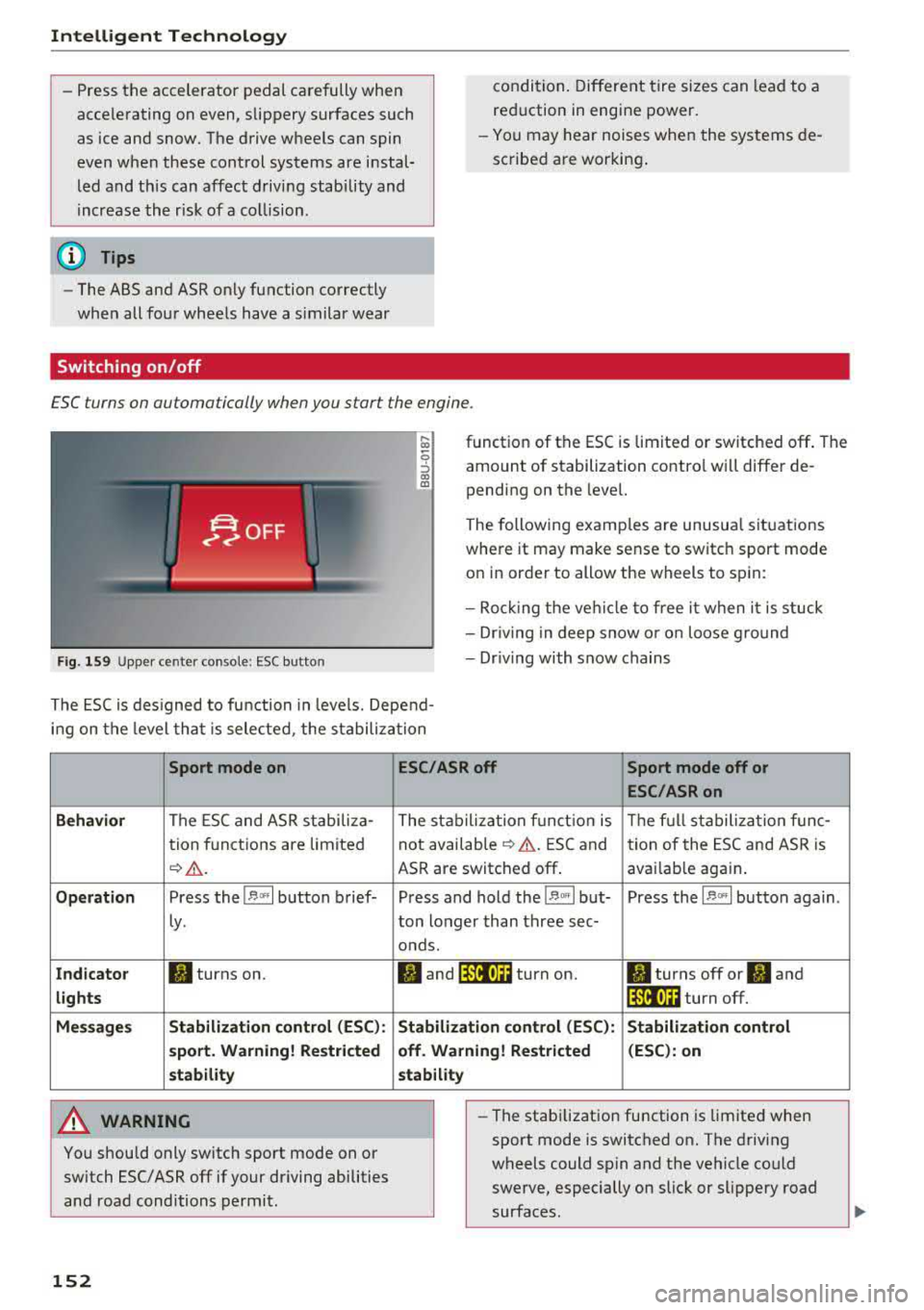
Fig . 1 59 Upper ce nter console: ESC butto n
function of the ESC is limited or switched off . The
amount of stabilization contro l will differ de
pending on the level.
The following examp les are unusua l situations
where it may make sense to switch sport mode
on in order to allow the wheels to sp in:
- Roc king the ve hicle to free it when it is stuck
- Dr iv ing in deep snow o r o n loose g round
- Dr iv ing with snow chains
The ESC is des igned to fu nction in levels. Depend
i n g on the level tha t is sele cted , the stabilization
Sport mode on
Behavior
The ESC and ASR stabiliza-
tion f unctions are limited
¢ .&. .
Op eration Press the l.$ ,., I button brief-
Ly .
Ind icator II turns on.
lights
Me ssage s Stabilizati
on cont rol (ESC ):
s port . Warning! Re st ric ted
s tability
A WARNING
You should only switch sport mode on or
switch ESC/ ASR
off if your driving abilities
and road conditions permit.
152
ESC /ASR off Sport mode off or
ESC /ASRon
The stabiliza tion f unct ion is The f ull stabiliza tion f unc-
not availab le
¢ .&. . ESC and
tion of the ESC and ASR is
ASR are switched
off . avai lab le again .
Press and hold the
1 .$ .. , I but- Press the l.$ ,., I button again .
ton longer than three sec-
onds.
fl and 14il•U~ turn on. II turns off or II and
1 4il•U~ turn off.
Stabi lization control (ESC): S tabilization control
off. Warning! Re stricted (
ESC ): on
stability
-
- The stabi lization function is limited when
sport mode is switched on. The driving
wheels could spin and the vehicle could
swerve, especially on slick or slippery road
surfaces.
Page 231 of 400
a, a, ..... N
" N ..... 0 N > 00
Audi music interface
Connect your mobile devices to the Audi music
interface in order to operate them through the
MMI and charge the battery.
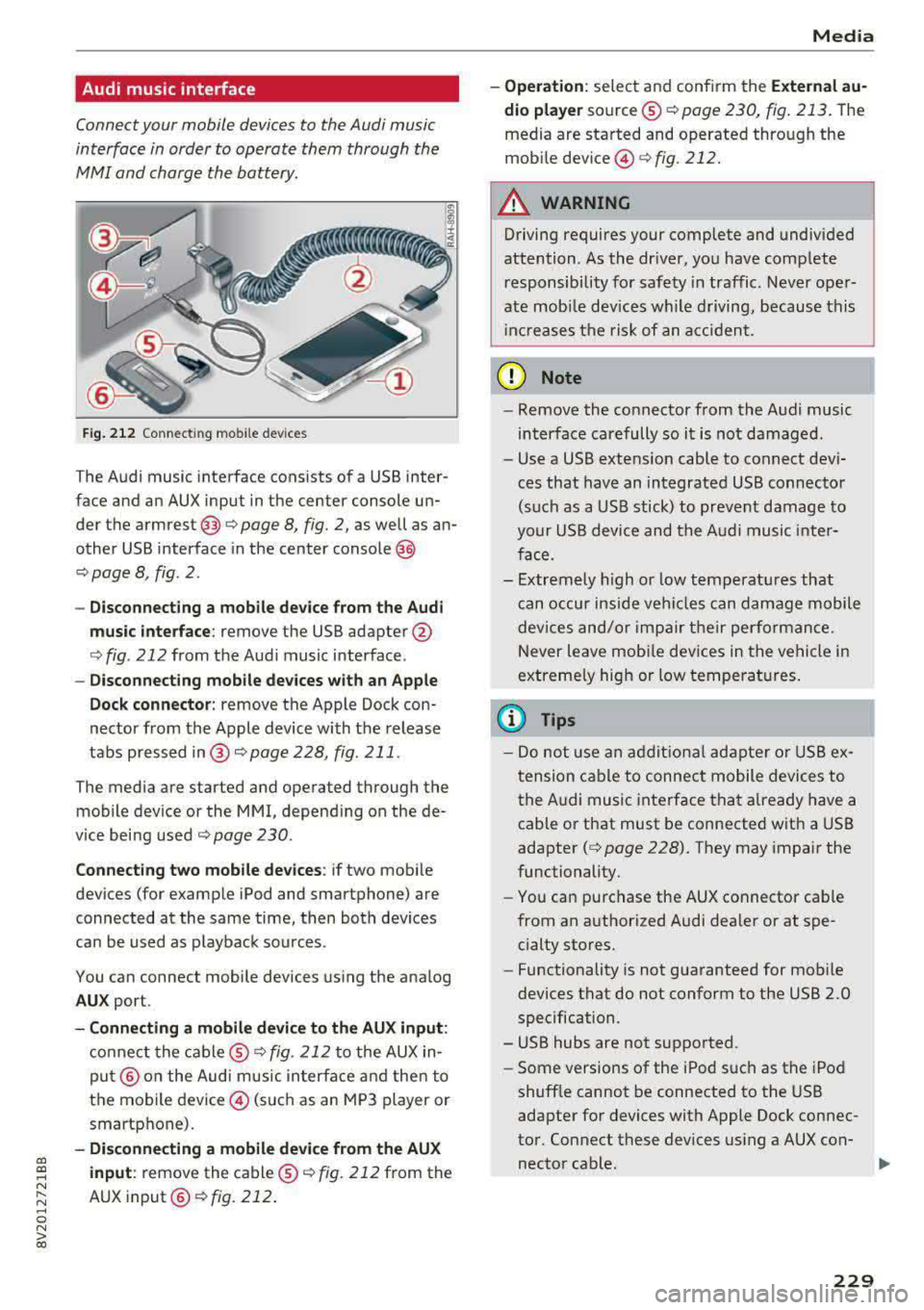
Fig. 212 Connecting mo bile dev ices
T he Audi music interface consists of a USB inter
face and an AUX input in the center console un
der the
armrest @Q page 8, fig. 2, as well as an
other USB interface in the center
console @
Q page 8, fig . 2 .
- Disconnecting a mobile device from the Audi
music interface:
remove the USB adapter @
Qfig . 212 from the Audi music interface .
-Disconnecting mobile devices with an Apple
Dock connector:
remove the Apple Dock con
nector from the Apple device with the release
tabs pressed in@ c:>page228, fig . 211.
The media are started and operated through the mobile device or the MMI, depending on the de
vice being used
c:> page 230 .
Connecting two mobile devices : if two mobi le
devices (for example iPod and smartphone) are
connected at the same time, then both devices
can be used as playback sources .
You can connect mobile devices using the analog
AUX port.
-Connecting a mobile device to the AUX input:
connect the cable ® Q fig. 212 to the AUX in
put@ on the Audi mus ic interface and then to
the mobile device© (such as an MP3 player or
smartphone).
- Disconnecting a mobile device from the AUX
input :
remove the cable ® c:> fig. 212 from the
AUX
input @Qfig. 212.
Media
-Operation : select and confirm the External au
dio player
source ® c:>page 230, fig. 213. The
media are started and operated through the
mobi le
dev ice @ c:>fig . 212.
A WARNING
Driving requires your complete and undivided
attention . As the dr iver, you have complete
re sponsibility for safety in traffic . Never oper
ate mob ile dev ices while driving, because this
i nc reases the risk of an accident.
(D Note
-Remove the connector from the Audi music
interface carefully so it is not damaged.
- Use a USB extens ion cable to connect dev i
ces that have an integrated USB connector
(such as a USB stick) to prevent damage to
your USB device and the Audi music inter
face .
- Extremely high or low temperatures that
can occur inside vehi cles can damage mobile
devices and/or impair the ir performance.
N ever leave mob ile devices in the vehicle in
extreme ly high or low temperat ures.
(D Tips
-Do not use an additional adapter or USB ex
tension cable to connect mobile devices to
the Audi music interface that already have a
cable or that must be connected w ith a USB
adapter
( c:> page 228). They may impair the
functionality.
- You can purchase the AUX connector cab le
from an authorized Audi dealer or at spe
cialty sto res.
- Functionality is not guaranteed for mobile
devices that do not conform to the USB 2.0
specification .
- USB hubs are not supported.
- Some versions of the iPod such as the iPod
shuff le cannot be connected to the USB
adapter for devices with Apple Dock connec
tor . Connect these devices using a AUX con-
nector cable .
liJ,,
229
Page 255 of 400
a, a, .... N
" N ..... 0 N > 00
-Never place or install floor mats or other
floor coverings on top of already installed
floor mats. Additional floor mats and other
coverings w ill reduce the size of the pedal
area and inte rfere with the pedals.
- Always properly reinstall and secure floor
mats that have been taken out for cleaning.
- Always make sure that objects cannot fall
into the driver footwell while the veh icle is
moving . Objects can become trapped under
the brake peda l and accelerator pedal caus
ing a loss of veh icle control.
Storing cargo correctly
Loading the luggage compartment
All luggage and other objects must be properly
stowed and secured in the luggage compart
ment.
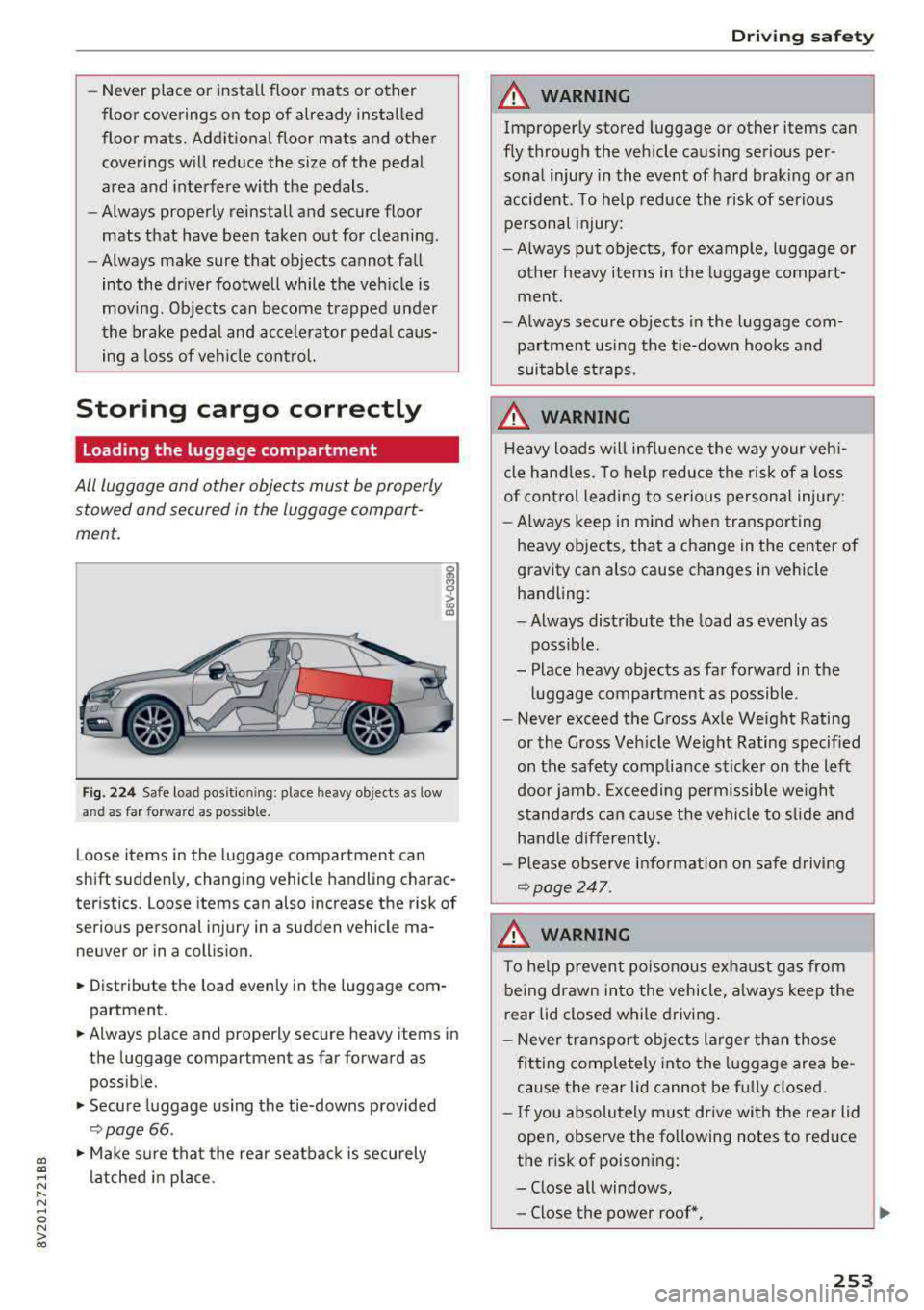
F ig. 22 4 Safe load position ing: place heavy objects as low
and as
far forward as possible.
L oose items in the luggage compartment can
shift sudden ly, changing vehicle handling charac
teristics. Loose items can also increase the risk of
serious personal injury in a sudden vehicle ma
neuver or in a coll ision.
• Distribute the load evenly in the luggage com
partment.
• Always place and properly secure heavy items in
the luggage compartment as far forward as
poss ib le.
• Secure luggage using the tie-downs provided
<:;> page 66 .
• Make sure that the rear seatbac k is securely
latched in place.
Dr iving safety
A WARNING
-
Improperly stored luggage or other items can
fly through the vehicle caus ing serious per
sonal injury in the event of hard brak ing or an
accident. To help reduce the risk of serio us
pe rsonal injury:
- Always put objects, for example, l uggage or
other heavy items in the luggage compa rt
men t.
- Always secure objects in the luggage com
partment using the tie-down hooks and
suitable st raps.
A WARNING
H eavy loads will influen ce the way your veh i
cle hand les. To help reduce the risk of a loss
of cont rol leading to serious personal injury:
- Always keep in m ind when transpo rting
heavy objects, that a change in the center of
gravity can also cause changes in vehicle
handling:
- Always distribute the load as evenly as
poss ible.
- Place heavy objects as far fo rwa rd in the
lu ggage compartment as possible.
- Never exceed the Gross Ax le Weight Rating
or the Gross Ve hicle Weight Rating specified
on the safety compliance s ticker on the left
door jamb. Exceeding permissible we ight
s tanda rds can cause the vehicle to slide and
h a ndle differen tly.
- Pl ease observe info rmat ion on safe driv ing
¢page 247.
A WARNING
To he lp prevent poiso nous ex ha ust gas from
being drawn into the vehicle, always keep the
r ear lid closed while driving .
- Never transport ob jects larger t han those
f itting completely into the luggage area be
cause the rear lid cannot be f ully closed .
- If you absolutely m ust dr ive wi th the rear lid
open, observe the following notes to reduce
the risk of poisoning:
- Close all windows,
- Close the power roof*,
253