Page 132 of 369
131
Changing Your RouteAdding Waypoints
Navigation
3.Rotate i to select a place. Press
u .
The waypoint is added to the
Destination List.
4. Rotate i to select a location and
move the order of destinations.
Press u.
5. Move r and rotate i to select
Start Route . Press u.
The route is automatically
recalculated and displayed on
the map screen.
Page 134 of 369
133
Changing Your RouteEditing the Destination List
Navigation
Editing the Destination List
HMENU button (when en route) Destination List
1.Move r and rotate i to select
Edit Order . Press u.
2. Rotate i to select a list item to
move. Press u.
3. Rotate i to select a new location.
Press u.
4. Move r and rotate i to select
Start Route . Press u.
The route is automatically
recalculated and displayed on
the map screen.
■Editing the Order of Waypoints1 Editing the Order of Waypoints
Move r to rotate i to select Show All on
Map to display the destin ation and waypoints on
the map screen.
Page 137 of 369
136
Navigation
Changing Your Destination
There are several methods you can use to change the route destination.
Find Nearest Place
HENTER button (on map) Search Nearby
Search for the nearest place/landmark on the map screen and set it as your
destination.
1.Rotate i to select Search
Nearby . Press u.
2. Rotate i to select a category
type. Press u.
3. Rotate i to select a place. Press
u .
4. Rotate i to select Set as
Destination . Press u.
5. Move r to select Clear Current
Route . Press u.
The route is automatically
recalculated and displayed on
the map screen.
Rotate i to edit the order to
set the location as a new
waypoint. Press u.
Page 138 of 369
137
Changing Your DestinationSelecting a Destination on the Map
Navigation
Selecting a Destination on the Map
Select a new destination when en route by selecting a location on the map.
1.Scroll the map to position the
cursor over your desired
destination, adjusting the map
scale as necessary. Press u.
If the address displayed is not
the desired location, press the
BACK button and repeat the
procedure.
2. Rotate i to select Set as
Destination . Press u.
2Calculating the Route P. 112
3. Move r to select Clear Current
Route. Press u.
The route is automatically
recalculated and displayed on
the map screen.
Rotate i to edit the order to
set the location as a new
waypoint. Press u.
1Selecting a Destination on the Map
If there is more than one icon or street under the
map cursor, you are prompted to select the item
from a list.
Rotate i to select an item. Press u.
Page 139 of 369
138
Changing Your DestinationEntering a New Destination
Navigation
Entering a New Destination
HMENU button (when en route) Destination
Enter a new destination using the Destinat ion Menu screen even when you are en
route.
1.Rotate i to select a method to
enter a new destination.
2 Entering a Destination P. 88
After entering a new
destination, the address is
displayed on the Calculate
Route screen.
2. Rotate i to select Set as
Destination . Press u.
3. Move r to select Clear Current
Route . Press u.
The route is automatically
recalculated and displayed on
the map screen.
Rotate i to edit the order to
set the location as a new
waypoint. Press u.
Page 177 of 369
176
Playing SiriusXM® RadioSiriusXM® Radio Service
Audio
SiriusXM® Radio Service
1.You need your radio ID ready before regist ering for subscription. To see the ID in
the display: Operate the On Demand Multi-Use DisplayTM until channel 0 appears.
2. Have your radio ID and credit card numbe r ready, and either call or visit the
SiriusXM
® website to subscribe.
Switch to the SiriusXM
® mode by pressing the SOURCE button repeatedly or
operating the On Demand Multi-Use DisplayTM, and stay in this mode for about 30
minutes until the service is ac tivated. Make sure your vehicle is in an open area with
good reception.
Loading:
SiriusXM
® is loading the audio or program information.
Channel off air:
The channel is not currently broadcasting.
Channel unsubscribed:
You are not subscribed to the channel selected.
No signal:
The signal is too weak in the current location.
Channel unavailable:
No such channel exists.
Check antenna, Antenna disc onnected, Antenna shorted:
There is a problem with the SiriusXM
® antenna. Contact a dealer.
1 Subscribing to SiriusXM® Radio
Contact Information for SiriusXM
® Radio:
SiriusXM® Canada at www.siriusxm.ca, or 1-877-
438-9677
■ Subscribing to SiriusXM® Radio
■Receiving SiriusXM® Radio
■SiriusXM® Radio Display Messages
1 Receiving SiriusXM® Radio
The SiriusXM
® satellites are in orbit over the
equator; therefore, objec ts south of the vehicle
may cause satellite re ception interruptions.
Satellite signals are more likely to be blocked by
tall buildings and mount ains the farther north
you travel from the equator.
You may experience re ception problems under
the following circumstances:
• In a location with an obstruction to the south
of your vehicle.
• In tunnels
• On the lower level of a multi-tiered road
• Large items carrie d on the roof rack
Page 210 of 369
209
Playing Internet RadioAhaTM Radio Menu
Audio
AhaTM Radio Menu
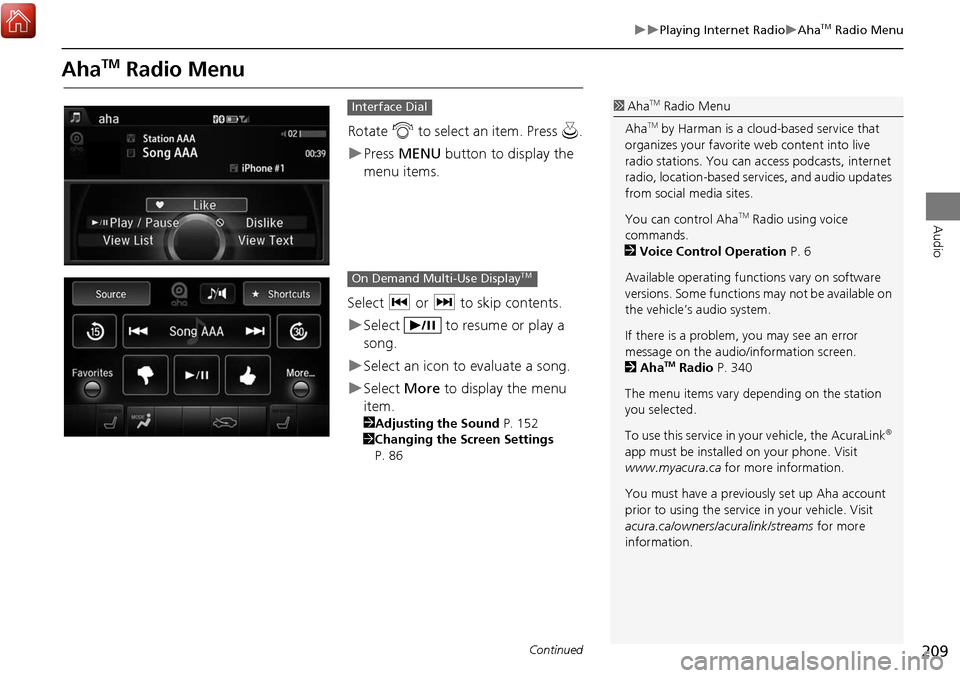
Rotate i to select an item. Press u.
Press MENU button to display the
menu items.
Select c or x to skip contents.
Select to resume or play a
song.
Select an icon to evaluate a song.
Select More to display the menu
item.
2 Adjusting the Sound P. 152
2 Changing the Screen Settings
P. 86
Interface Dial1 AhaTM Radio Menu
Aha
TM by Harman is a cloud-based service that
organizes your favorite web content into live
radio stations. You can access podcasts, internet
radio, location-based se rvices, and audio updates
from social media sites.
You can control Aha
TM Radio using voice
commands.
2 Voice Control Operation P. 6
Available operating functi ons vary on software
versions. Some functions may not be available on
the vehicle’s audio system.
If there is a problem, you may see an error
message on the audio/information screen.
2 Aha
TM Radio P. 340
The menu items vary depending on the station
you selected.
To use this service in your vehicle, the AcuraLink
®
app must be installed on your phone. Visit
www.myacura.ca for more information.
You must have a previously set up Aha account
prior to using the service in your vehicle. Visit
acura.ca/owners/acuralink/streams for more
information.
On Demand Multi-Use DisplayTM
Continued
Page 271 of 369
270
AcuraLink®Security Features
AcuraLink
®
Security Features
Your subscribed telematics service provider can track your vehicle’s location, remotely
lock or unlock doors, and help you find your vehicle.
To use these features, you need your user ID and personal identification number (PIN).
■ Stolen vehi cle tracking
This feature searches and tracks down your ve hicle position even if it is on the move.
If you believe that your vehicle has been stolen, contact the pol ice as well as the
provider.
■ Remote door lock/unlock
The provider can remotely lock or unlock doors upon your request.
■ Vehicle finder
This feature is convenient to use when try ing to locate your vehicle in large areas,
such as a crowded parking lot. If you ca nnot locate your vehicle after using the
remote transmitter’s answerback function , you can contact the provider which can
then flash your vehicle’s exterior lights and sound the horn.
■ Security ala rm notification
If the security system in your vehicle dete cts an abnormal condition, such as someone
tampering with the lock on your vehicle, the provider notifies you by your preferred
method.1 Security Features
The contact information of your provider, your
user ID and PIN will be given when you subscribe
to AcuraLink
®. If you forget any of the above,
contact a dealer or visit www.acura.ca/owners/
acuralink .
You can also activate the remote door lock/
unlock and vehicle finder features from the
Internet or using your smartphone app. Ask a
dealer or visit www.acura.ca/owners/acuralink .
1Vehicle finder
The lights will stop fl ashing and horn will stop
sounding under the following conditions:
•When 30 seconds have elapsed.•You unlock the doors using the remote
transmitter.
•You unlock the doors us ing the keyless access
system.
•You unlock the doors using the built-in key.
•The power mode is set to ACCESSORY or ON.


