Page 70 of 369
69
System Setup
Map
HSETTINGS button Navi Settings Map
Select the landmark icons to display on the map, change the orientation of the map,
display your current location, and learn the meaning of the icons, colors, and
symbols displayed on the map.
Rotate i to select an item. Press u.
The following items are available:
• Show Icon on Map : Selects the icons to display on the map.
2
Showing Icons on Map P. 71
• Color (Day) : Selects the color of the map for the Day mode.
2
Color P. 73
• Color (Night) : Selects the color of the map for the Night mode.
2
Color P. 73
• View : Selects the map orientation (No rth-up, Heading-up, or 3D map).
2
View (Map Orientation) P. 76
• 3D Angle Adjustment: Adjusts the viewing angle for the 3D map.
2
3D Angle Adjustment P. 77
• Straight Line Guide : Sets whether to display a straight guideline to the
destination or waypoint.
2
Straight Line Guide P. 77
Continued
Page 71 of 369
70
Map
System Setup
•Current Location : Displays and saves your current location.
2
Current Location P. 78
• Map Legend : Displays an overview of the map features.
2
Map Legend P. 79
• Display Tracking : Sets whether to display the tracking dots on the map.
2
Display Tracking P. 83
• Delete Tracking : Deletes the tracking dots on the map.
2
Deleting Tracking Dots P. 83
• Correct Vehicle Position : Adjusts the position of the vehicle on the map.
2
Correct Vehicle Position P. 84
• System Device Information : Views database, software, device, and vehicle
identification information.
2
System Device Information P. 302
• Map Data Update : Checks the map data update status when updating the map
database.
2
Map Data Update P. 302
Page 76 of 369
75
MapColor
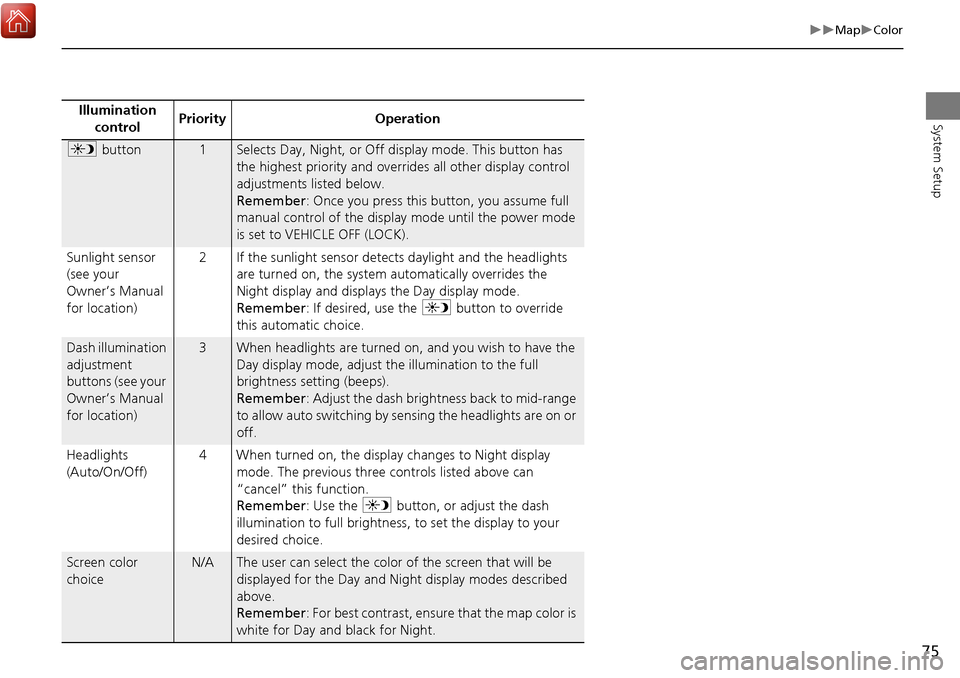
System SetupIllumination control Priority Operation
a
button1Selects Day, Night, or Off display mode. This button has
the highest priority and overrides all other display control
adjustments listed below.
Remember : Once you press this button, you assume full
manual control of the display mode until the power mode
is set to VEHICLE OFF (LOCK).
Sunlight sensor
(see your
Owner’s Manual
for location) 2 If the sunlight sensor detects daylight and the headlights
are turned on, the system automatically overrides the
Night display and displays the Day display mode.
Remember : If desired, use the a button to override
this automatic choice.
Dash illumination
adjustment
buttons (see your
Owner’s Manual
for location)3When headlights are turned on, and you wish to have the
Day display mode, adjust the illumination to the full
brightness setting (beeps).
Remember : Adjust the dash brightness back to mid-range
to allow auto switching by sensing the headlights are on or
off.
Headlights
(Auto/On/Off) 4 When turned on, the display changes to Night display
mode. The previous three controls listed above can
“cancel” this function.
Remember : Use the a button, or adjust the dash
illumination to full brightness, to set the display to your
desired choice.
Screen color
choiceN/AThe user can select the color of the screen that will be
displayed for the Day and Night display modes described
above.
Remember : For best contrast, ensure that the map color is
white for Day and black for Night.
Page 79 of 369
78
MapCurrent Location
System Setup
Current Location
HSETTINGS button Navi Settings Map Current Location
Display and save your current location for fu ture use as a destination. The address,
latitude, longitude, and elevation of your current location are displayed.
■ To save your current loca tion in the address book:
1.Press u to select Address Book.
Move w to scroll the map as
necessary.
2. Edit the name, phone number, and
category.
2
Address Book P. 40
3. Move r and rotate i to select
OK . Press u.
1Current Location
If you have PIN-protec ted your address book,
enter your PIN when prompted. Press u to
select OK. PINs are optional.
2 PIN Numbers P. 48
The elevation is not displayed if the system is
receiving insufficient GPS information. When
elevation is displayed, it may differ with roadside
elevation signs by ±100 feet or more.
Saving your current loca tion does not change or
cancel your current route.
Page 85 of 369
84
MapCorrect Vehicle Position
System Setup
Correct Vehicle Position
HSETTINGS button Navi Settings Map Correct Vehicle Position
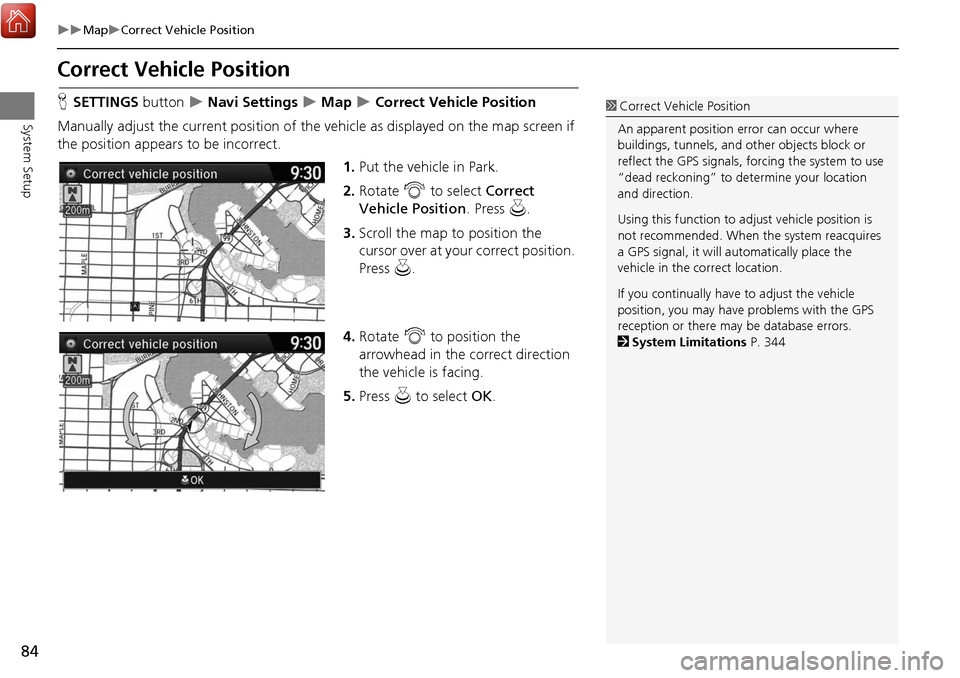
Manually adjust the current position of the vehicle as displayed on the map screen if
the position appear s to be incorrect.
1.Put the vehicle in Park.
2. Rotate i to select Correct
Vehicle Position . Press u.
3. Scroll the map to position the
cursor over at your correct position.
Press u.
4. Rotate i to position the
arrowhead in the correct direction
the vehicle is facing.
5. Press u to select OK.1Correct Vehicle Position
An apparent position error can occur where
buildings, tunnels, and ot her objects block or
reflect the GPS signals, forcing the system to use
“dead reckoning” to determine your location
and direction.
Using this function to ad just vehicle position is
not recommended. When the system reacquires
a GPS signal, it will automatically place the
vehicle in the correct location.
If you continually have to adjust the vehicle
position, you may have problems with the GPS
reception or there may be database errors.
2 System Limitations P. 344
Page 100 of 369
99
Entering a DestinationPlace Category
Navigation
3.Rotate i to select an item. Press
u .
The following items are available:
• Search by Name : Searches for a place in the subcategory by name. Enter a city
name when prompted.
• City Vicinity : Searches for a place in the subcategory within a 32km radius of a
specific city. Enter a city name and then a place name when prompted. Only the
first 1000 matching places/landmarks are displayed.
• Sort by Distance to Travel : Displays all the places in the subcategory sorted by
distance from your current location. The closest place is displayed at the top.
4.Rotate i to select a place name
from the list. Press u .
5. Set the route to your destination.
2 Calculating the Route P. 112
1Place Category
The straight line distance (as the crow flies, not
driving distance) and dire ction to the destination
are shown for the highlighted place.
Page 106 of 369
105
Entering a DestinationPlace Phone Number
Navigation
Place Phone Number
HMENU button More Search Methods Place Phone Number
Select a destination by phone number. On ly phone numbers in the database are
recognized.
1.Enter the area code and phone
number.
2. Rotate i to select OK. Press u.
3. Set the route to your destination.
2 Calculating the Route P. 112
1Place Phone Number
All 10 digits must be entered.
Phone numbers of private residences entered in
your address book are not stored in the database
and thus cannot be used to search for a
destination.
A list is displayed if there are multiple locations in
the database with the same phone number.
Rotate i to select a place from the list. Press
u .
Page 109 of 369
108
Entering a DestinationIntersection
Navigation
Intersection
HMENU button More Search Methods Intersection
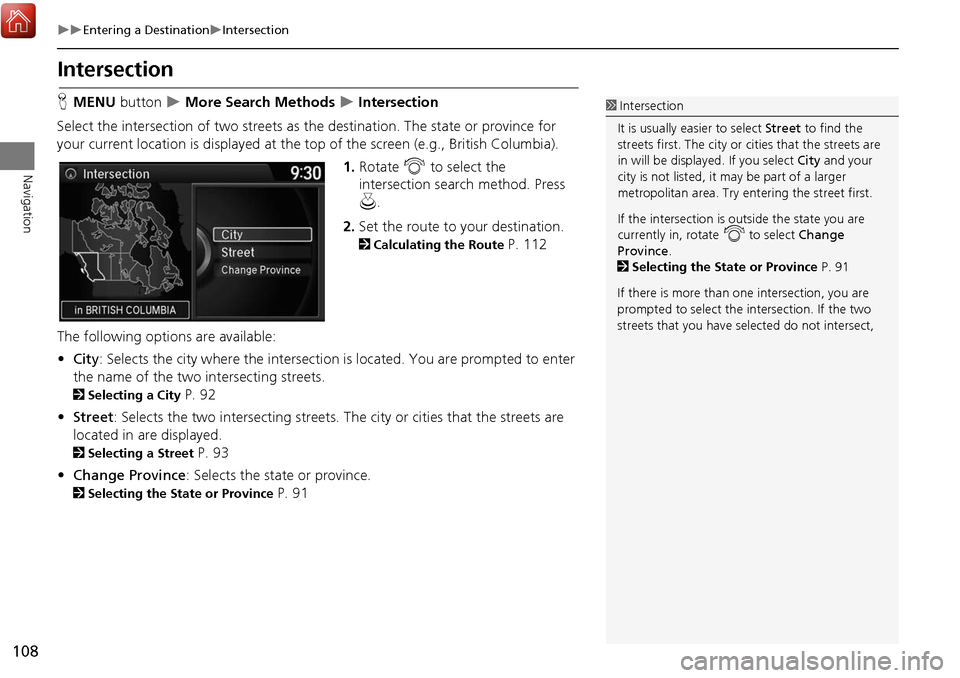
Select the intersection of two streets as th e destination. The state or province for
your current location is displayed at the top of the screen (e.g., British Columbia).
1.Rotate i to select the
intersection search method. Press
u .
2. Set the route to your destination.
2 Calculating the Route P. 112
The following options are available:
• City : Selects the city where the intersection is located. You are prompted to enter
the name of the two intersecting streets.
2 Selecting a City P. 92
• Street : Selects the two intersecting streets. Th e city or cities that the streets are
located in are displayed.
2 Selecting a Street P. 93
• Change Province : Selects the state or province.
2Selecting the State or Province P. 91
1Intersection
It is usually easier to select Street to find the
streets first. The city or cities that the streets are
in will be displayed. If you select City and your
city is not listed, it ma y be part of a larger
metropolitan area. Try entering the street first.
If the intersection is outside the state you are
currently in, rotate
i to select Change
Province .
2 Selecting the State or Province P. 91
If there is more than one intersection, you are
prompted to select the intersection. If the two
streets that you have selected do not intersect,


