Page 321 of 688
3213-2. Using the audio system (Entune Audio)
VENZA_OM_OM73030U_(U) 3
Interior features Operating the touch screen
By touching the screen with your finger, you can control the audio
system, etc.
■ Touch
Quickly touch and release once.
● Changing and selecting various settings
■ Drag
* Touch the screen with your finger, and move the screen to the
desired position.
● Scrolling the lists
■ Flick
* Touch the screen with your finger and quickly move the screen by
flicking your finger.
● Moving the list screen (list screen limit)
* : The above operations may not be performed on all screens.
■ When using the touch screen
● If the screen is cold, the display may be dark, or the system may seem to
be operating slightly slower than normal.
● The screen may seem dark and hard to see when viewed through sun-
glasses. Change your angle of viewing, adjust the display on the “Display
Settings” screen ( P. 333) or remove your sunglasses.
Page 323 of 688
3233-2. Using the audio system (Entune Audio)
VENZA_OM_OM73030U_(U) 3
Interior features
Steering wheel audio switches
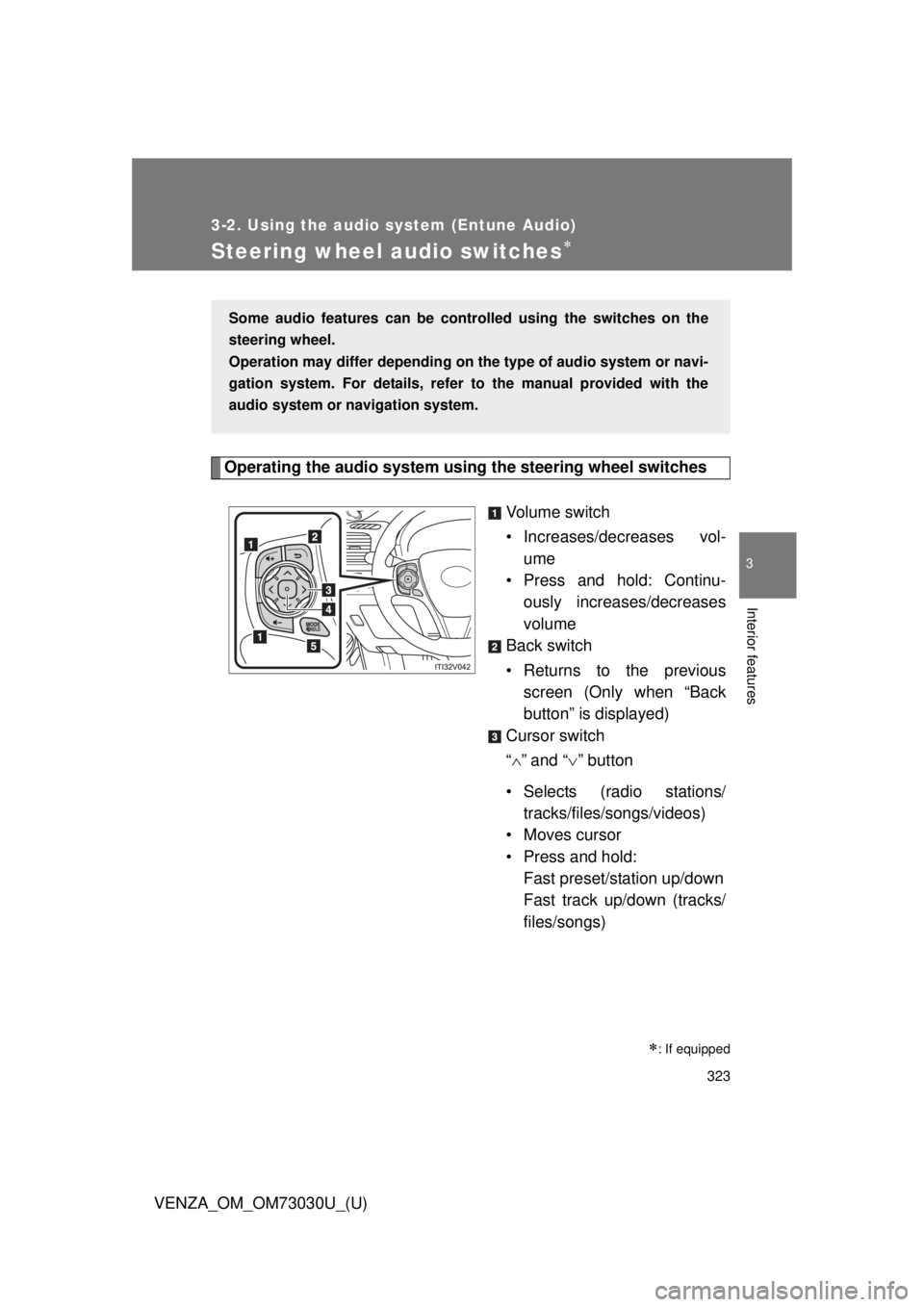
Operating the audio system using the steering wheel switches
Volume switch
• Increases/dec reases vol-
ume
• Press and hold: Continu-
ously increases/decreases
volume
Back switch
• Returns to the previous
screen (Only when “Back
button” is displayed)
Cursor switch
“ ” and “ ” button
• Selects (radio stations/
tracks/files/songs/videos)
• Moves cursor
• Press and hold:
Fast preset/station up/down
Fast track up/down (tracks/
files/songs)
: If equippedSome audio features can be contro lled using the switches on the
steering wheel.
Operation may differ depending on th e type of audio system or navi-
gation system. For details, refer to the manual provided with the
audio system or navigation system.
Page 324 of 688
3243-2. Using the audio system (Entune Audio)
VENZA_OM_OM73030U_(U) “ ” and “ ” button
• Tab change
• Press and hold:
Seek up/down (radio sta-
tions)
Fast up/down (tracks/files/
videos)
Enter switch
• Displays the audio screen
(Except when audio screen
is displayed)
• Displays the preset/list
screen (When audio screen
is displayed)
• Selects items (When audio
list screen is displayed)
“MODE/HOLD” switch
• Changes audio source
• Press and hold this switch
to mute or pause the current
operation
To cancel the mute or
pause, press and hold.
CAUTION■ To reduce the risk of an accident
Exercise care when operating the audio switches on the steering wheel.
Page 326 of 688
3263-2. Using the audio system (Entune Audio)
VENZA_OM_OM73030U_(U)Basic Audio Operations Basic audio operations and functions common to each mode are
explained in this section.
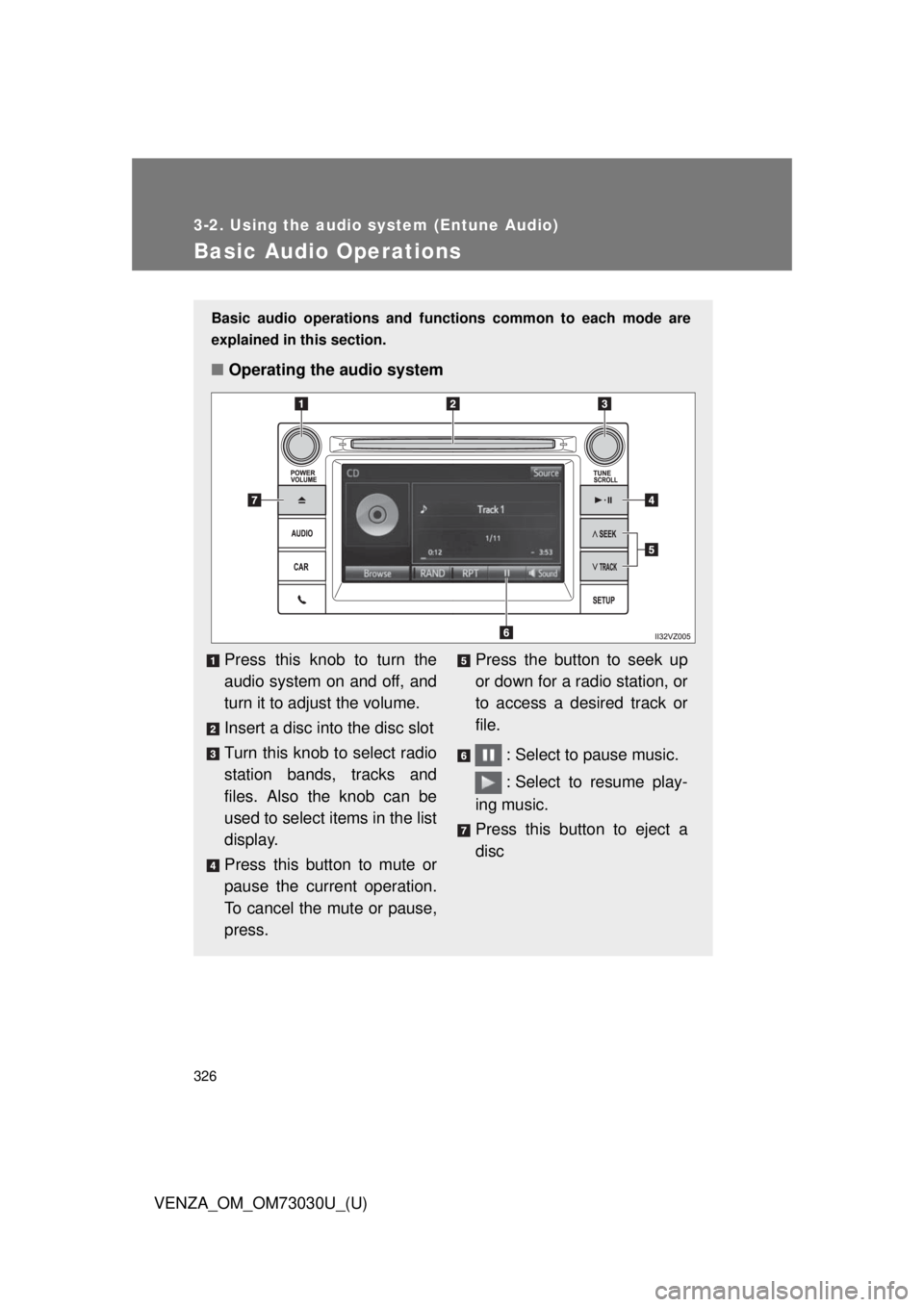
■ Operating the audio system
Press this knob to turn the
audio system on and off, and
turn it to adjust the volume.
Insert a disc into the disc slot
Turn this knob to select radio
station bands, tracks and
files. Also the knob can be
used to select items in the list
display.
Press this button to mute or
pause the current operation.
To cancel the mute or pause,
press. Press the button to seek up
or down for a radio station, or
to access a desired track or
file.
: Select to pause music.
: Select to resume play-
ing music.
Press this button to eject a
disc
Page 329 of 688
3293-2. Using the audio system (Entune Audio)
VENZA_OM_OM73030U_(U) 3
Interior features
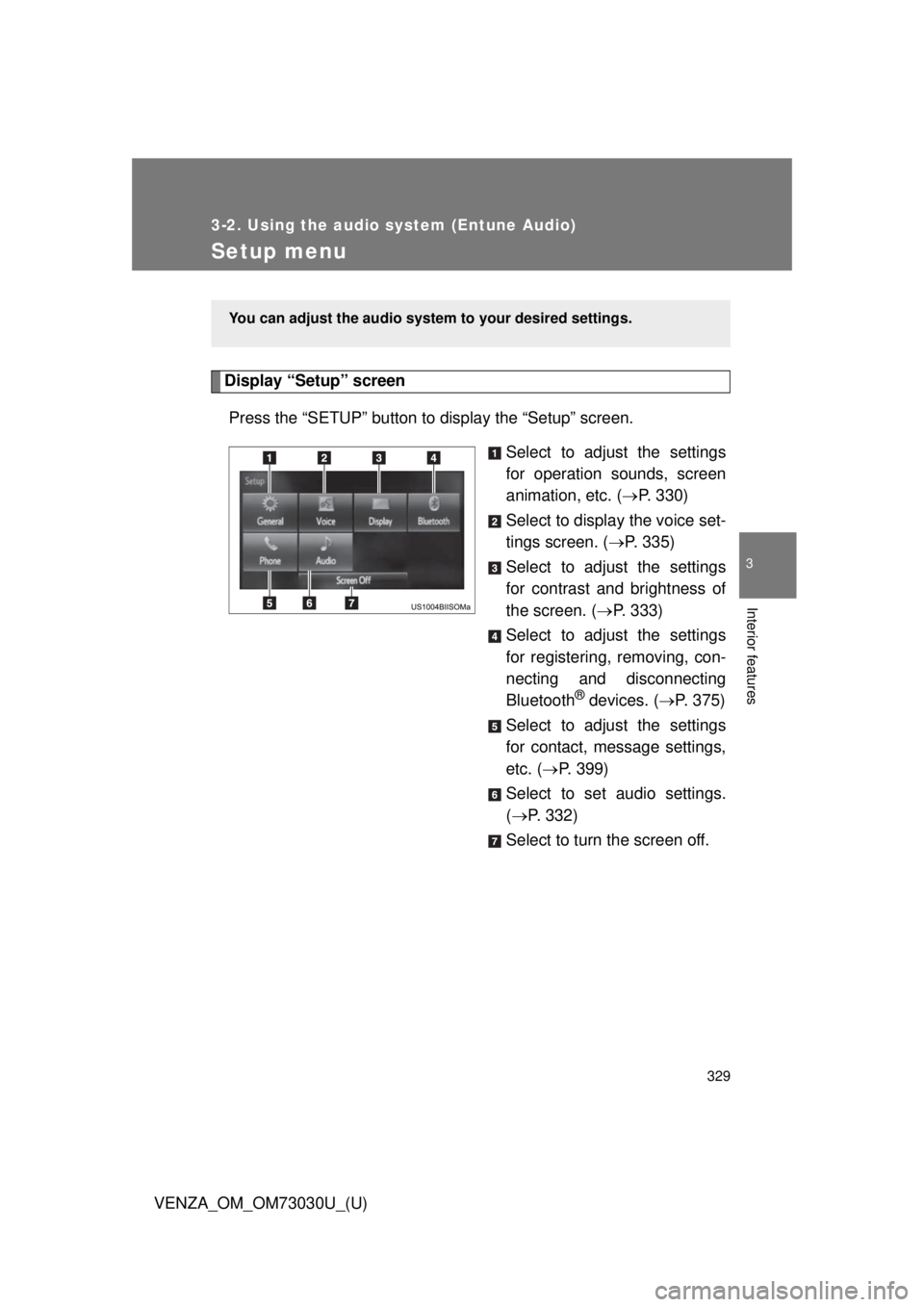
Setup menu Display “Setup” screen
Press the “SETUP” button to display the “Setup” screen.
Select to adjust the settings
for operation sounds, screen
animation, etc. ( P. 330)
Select to display the voice set-
tings screen. ( P. 335)
Select to adjust the settings
for contrast and brightness of
the screen. ( P. 333)
Select to adjust the settings
for registering, removing, con-
necting and disconnecting
Bluetooth ®
devices. ( P. 375)
Select to adjust the settings
for contact, message settings,
etc. ( P. 399)
Select to set audio settings.
( P. 332)
Select to turn the screen off. You can adjust the audio system to your desired settings.
Page 330 of 688
3303-2. Using the audio system (Entune Audio)
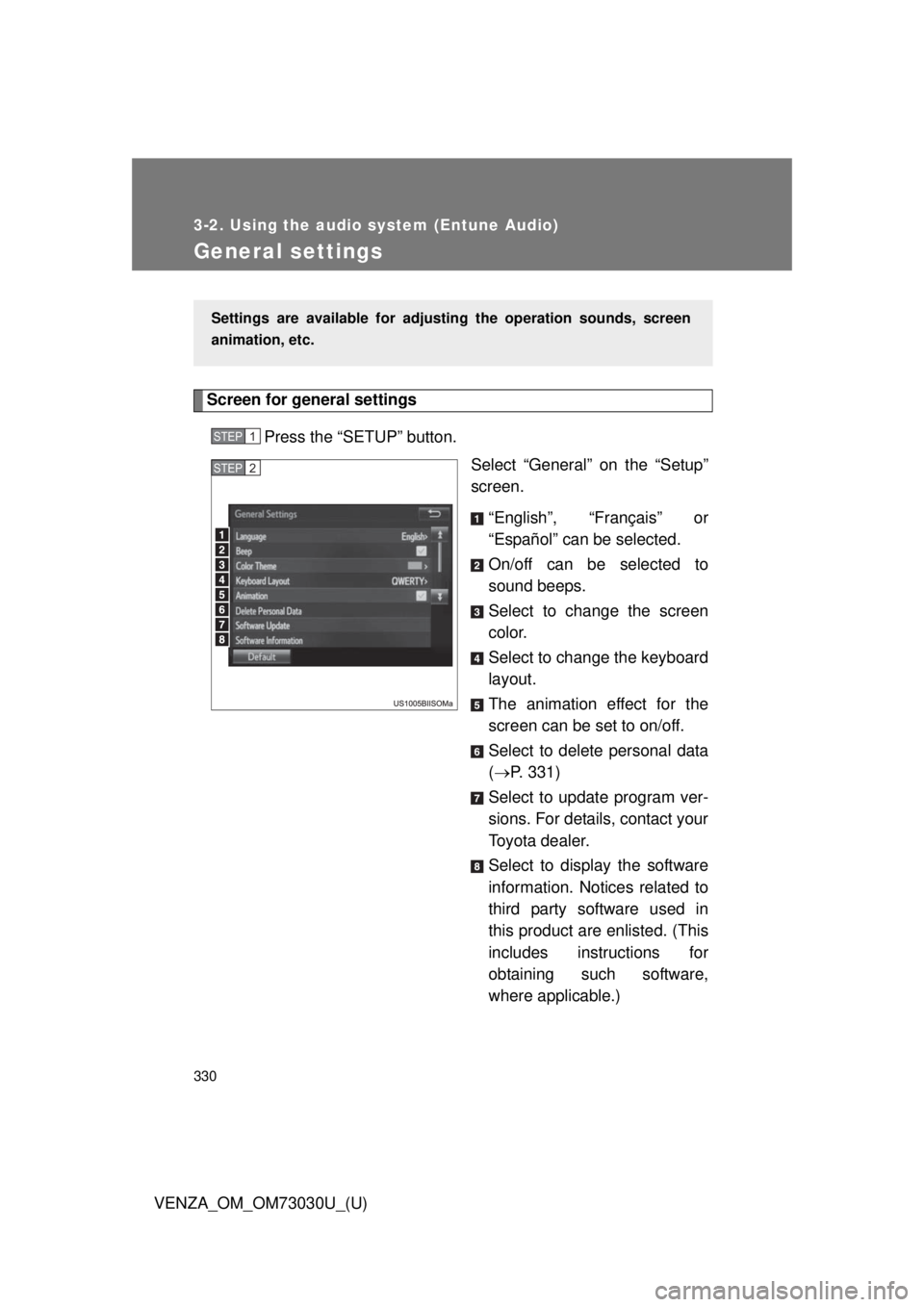
VENZA_OM_OM73030U_(U)General settings Screen for general settings
Press the “SETUP” button.
Select “General” on the “Setup”
screen.
“English”, “Français” or
“Español” can be selected.
On/off can be selected to
sound beeps.
Select to change the screen
color.
Select to change the keyboard
layout.
The animation effect for the
screen can be set to on/off.
Select to delete personal data
( P. 331)
Select to update program ver-
sions. For details, contact your
Toyota dealer.
Select to display the software
information. Notices related to
third party software used in
this product are enlisted. (This
includes instructions for
obtaining such software,
where applicable.)Settings are available for adjusting the operation sounds, screen
animation, etc. STEP 1
STEP 2
Page 331 of 688
3313-2. Using the audio system (Entune Audio)
VENZA_OM_OM73030U_(U) 3
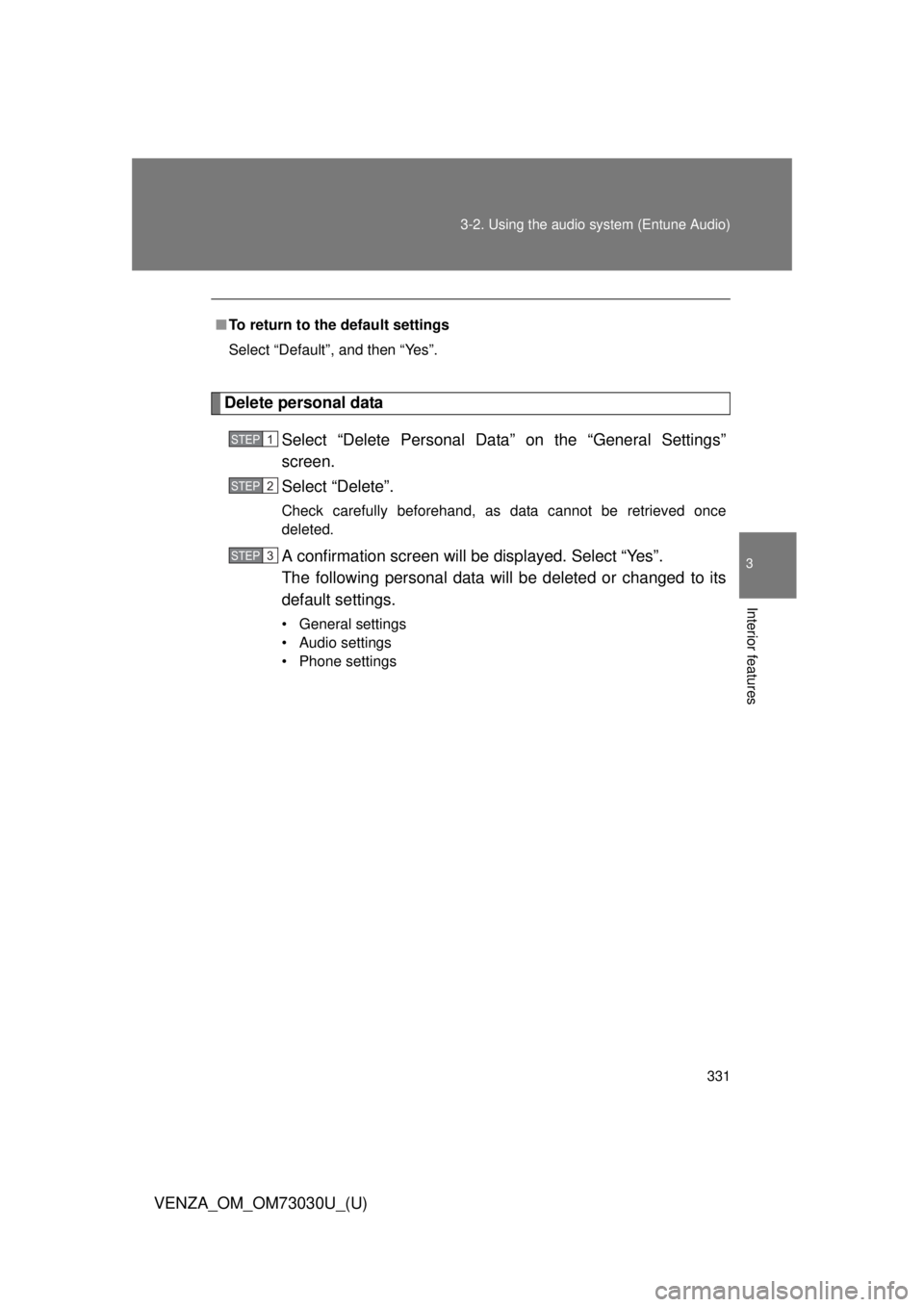
Interior features Delete personal data
Select “Delete Personal Data” on the “General Settings”
screen.
Select “Delete”. Check carefully beforehand, as data cannot be retrieved once
deleted.
A confirmation screen will be displayed. Select “Yes”.
The following personal data will be deleted or changed to its
default settings. • General settings
• Audio settings
• Phone settings■ To return to the default settings
Select “Default”, and then “Yes”. STEP 1
STEP 2
STEP 3
Page 332 of 688
3323-2. Using the audio system (Entune Audio)
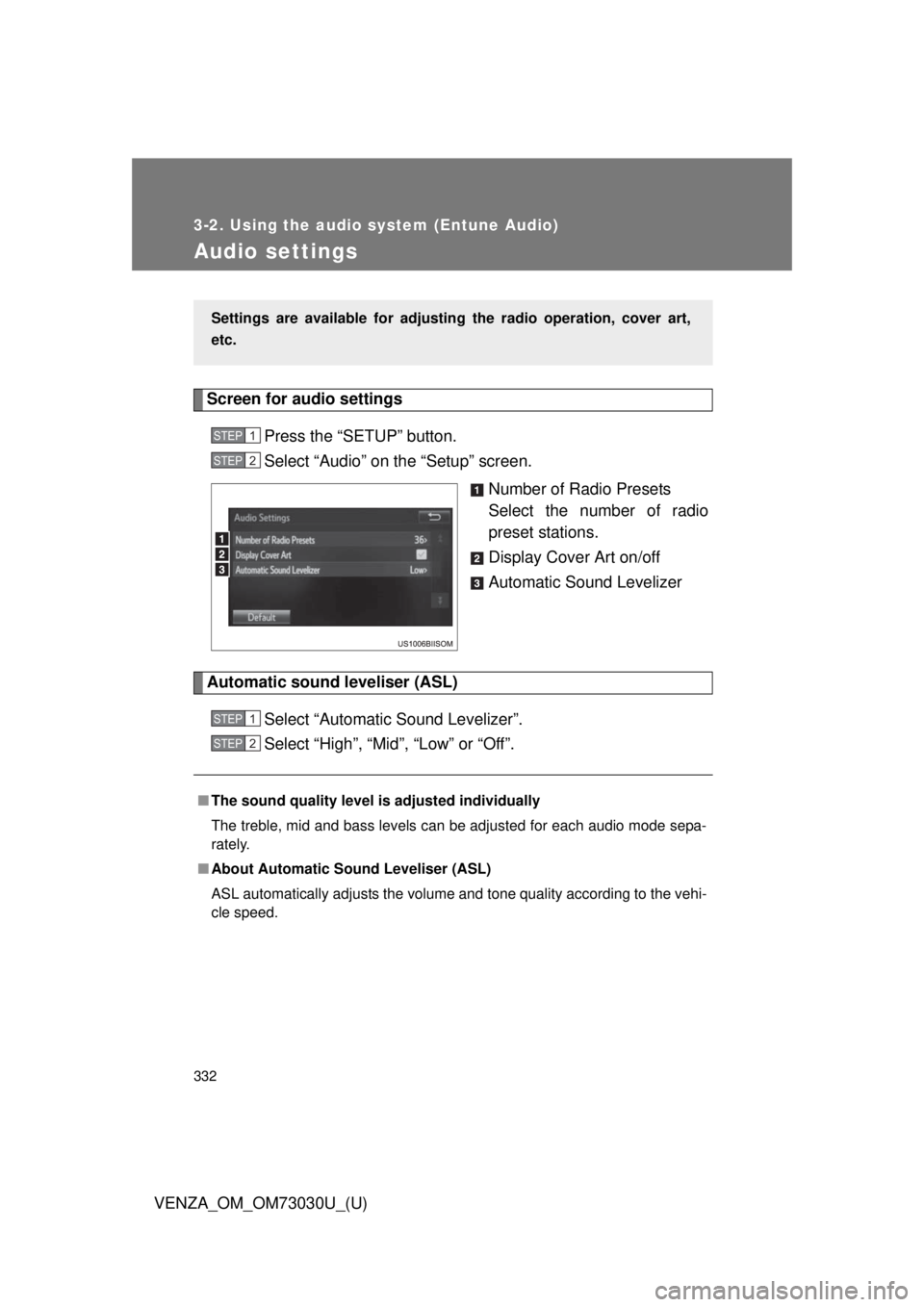
VENZA_OM_OM73030U_(U)Audio settings Screen for audio settings
Press the “SETUP” button.
Select “Audio” on the “Setup” screen.
Number of Radio Presets
Select the number of radio
preset stations.
Display Cover Art on/off
Automatic Sound Levelizer
Automatic sound leveliser (ASL)
Select “Automatic Sound Levelizer”.
Select “High”, “Mid”, “Low” or “Off”.Settings are available for adjusting the radio operation, cover art,
etc. STEP 1
STEP 2
■ The sound quality level is adjusted individually
The treble, mid and bass levels can be adjusted for each audio mode sepa-
rately.
■ About Automatic Sound Leveliser (ASL)
ASL automatically adjusts the volume and tone quality according to the vehi-
cle speed. STEP 1
STEP 2