Page 204 of 688
2042-2. Instrument cluster
VENZA_OM_OM73030U_(U) ■ If the vehicle is moved while setti ngs are being changed on the multi-
information display
■ System check display
Vehicles with smart key system
After switching the “ENGINE START STOP” switch to IGNITION ON
mode, “VENZA” is displayed while system operation is checked. When
the system check is complete, the normal screen will return.
Vehicles without smart key system
After switching the engine switch to the “ON” position, “VENZA” is dis-
played while system operation is checked. When the system check is
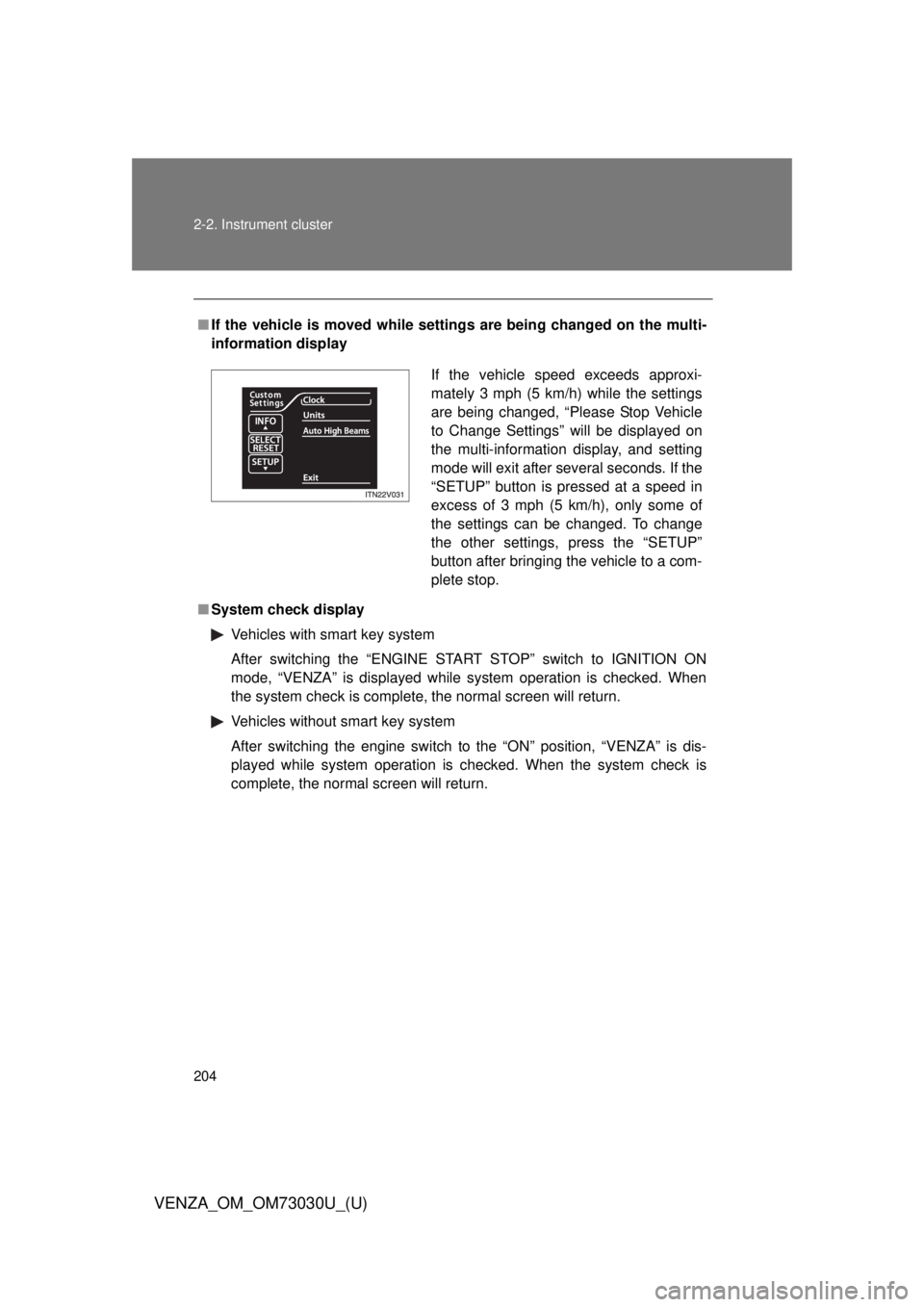
complete, the normal screen will return. If the vehicle speed exceeds approxi-
mately 3 mph (5 km/h) while the settings
are being changed, “Please Stop Vehicle
to Change Settings” will be displayed on
the multi-information display, and setting
mode will exit after several seconds. If the
“SETUP” button is pressed at a speed in
excess of 3 mph (5 km/h), only some of
the settings can be changed. To change
the other settings, press the “SETUP”
button after bringing the vehicle to a com-
plete stop.
Page 210 of 688
2102-2. Instrument cluster
VENZA_OM_OM73030U_(U)Fuel consumption information Vehicles with Entune Premium Audio with Navigation and Entune
Audio Plus
Press the “APPS” button, and t hen select “Eco” on the screen.
Vehicles with Entune Audio
Press the “CAR” button.
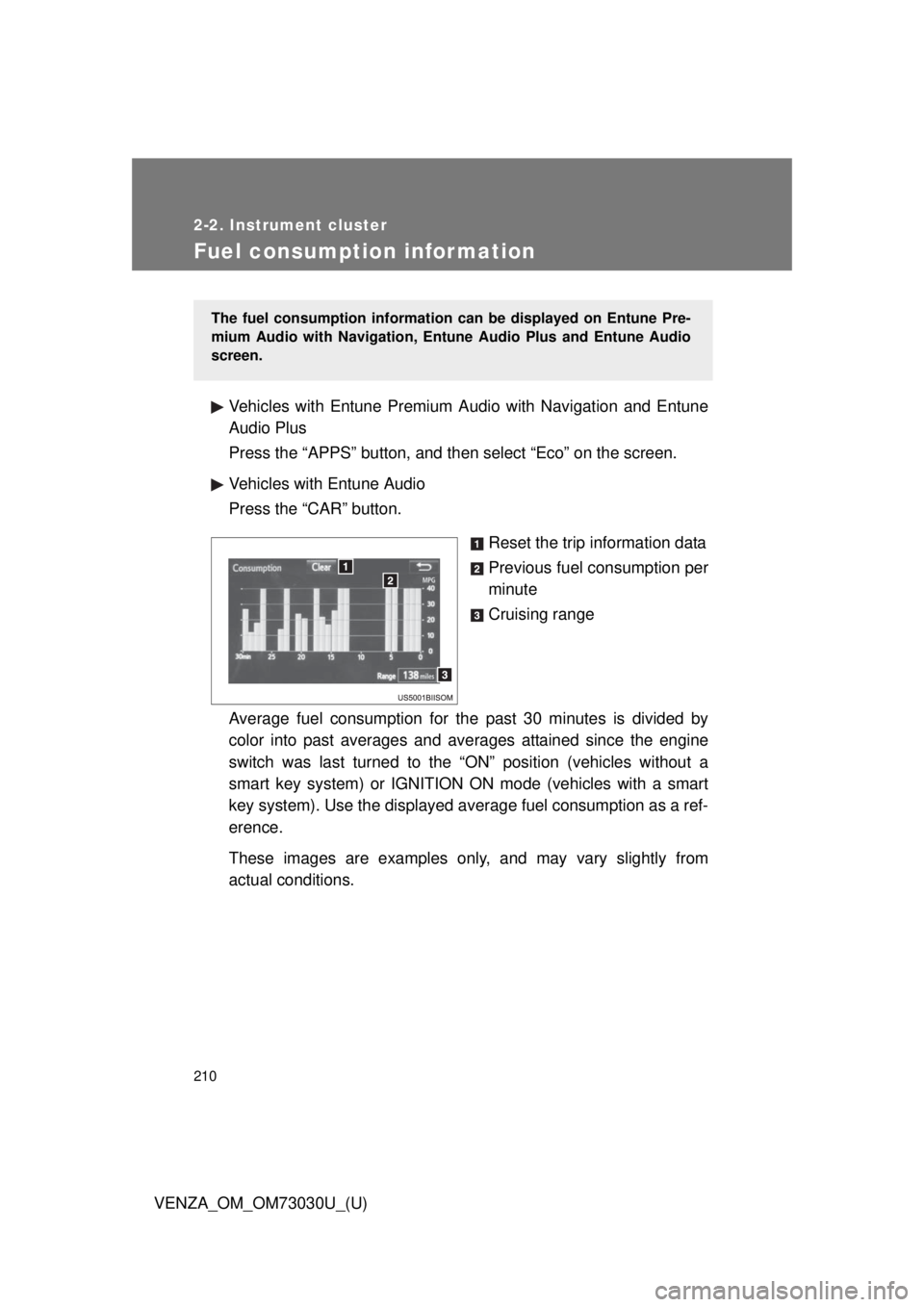
Reset the trip information data
Previous fuel consumption per
minute
Cruising range
Average fuel consumption for the past 30 minutes is divided by
color into past averages and av erages attained since the engine
switch was last turned to the “ON” position (vehicles without a
smart key system) or IGNITION ON mode (vehicles with a smart
key system). Use the displayed av erage fuel consumption as a ref-
erence.
These images are examples only , and may vary slightly from
actual conditions. The fuel consumption information can be displayed on Entune Pre-
mium Audio with Navigation, Entune Audio Plus and Entune Audio
screen.
Page 214 of 688
2142-3. Operating the lights and wipers
VENZA_OM_OM73030U_(U) ■ Daytime running light system
● To make your vehicle more visible to others, the high beam headlights
turn on automatically at a reduced intensity (vehicles with halogen head-
lights) or the LED daytime running lights turn on automatically (vehicles
with discharge headlights) whenever the engine is started and the park-
ing brake is released. Daytime running lights are not designed for use at
night.
Type A: Daytime running lights can be turned off by operating the switch.
● Compared to turning on the headlights, the daytime running light system
offers greater durability and consumes less electricity, so it can help
improve fuel economy.
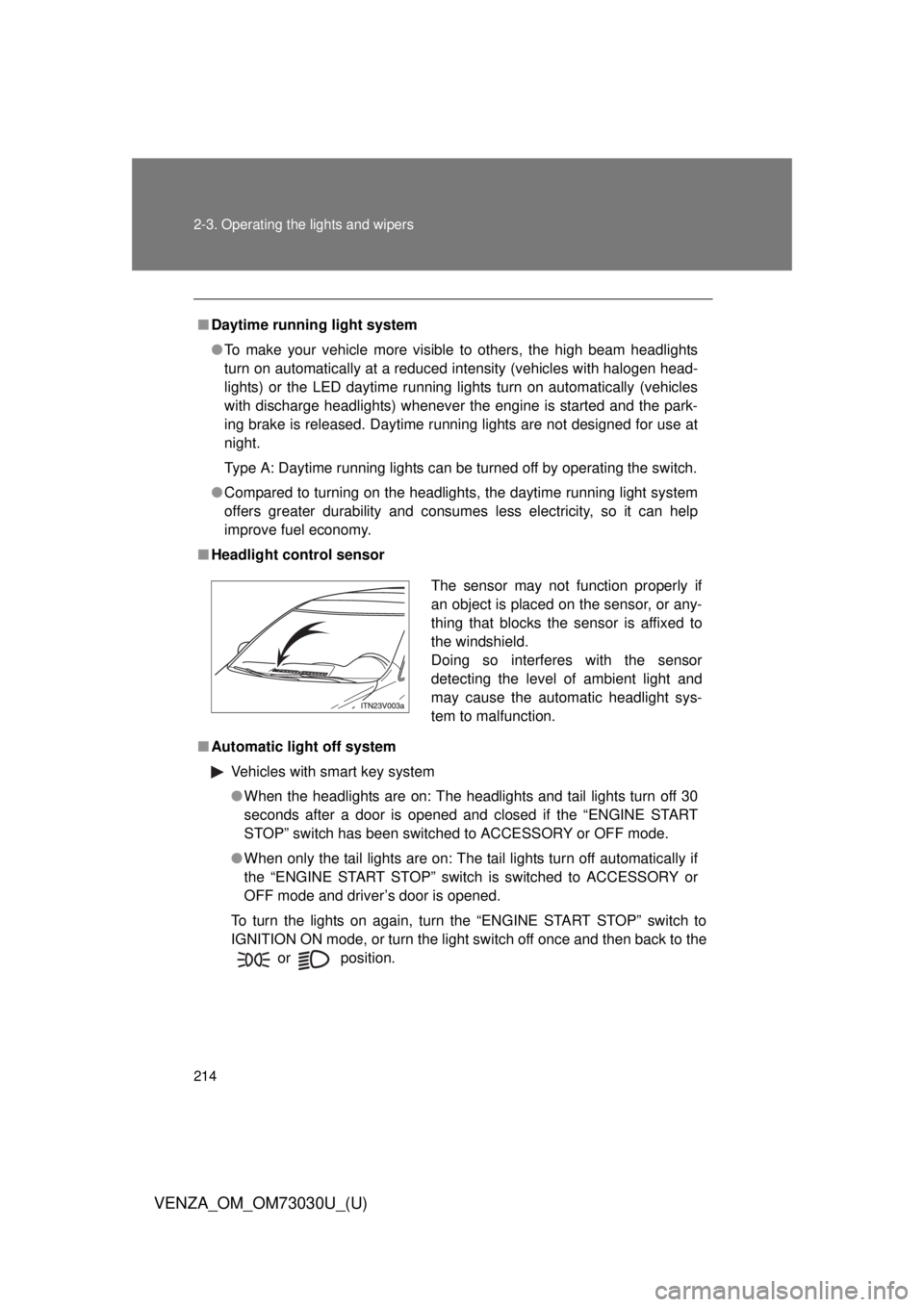
■ Headlight control sensor
■ Automatic light off system
Vehicles with smart key system
● When the headlights are on: The headlights and tail lights turn off 30
seconds after a door is opened and closed if the “ENGINE START
STOP” switch has been switched to ACCESSORY or OFF mode.
● When only the tail lights are on: The tail lights turn off automatically if
the “ENGINE START STOP” switch is switched to ACCESSORY or
OFF mode and driver’s door is opened.
To turn the lights on again, turn the “ENGINE START STOP” switch to
IGNITION ON mode, or turn the light switch off once and then back to the
or
position. The sensor may not function properly if
an object is placed on the sensor, or any-
thing that blocks the sensor is affixed to
the windshield.
Doing so interferes with the sensor
detecting the level of ambient light and
may cause the automatic headlight sys-
tem to malfunction.
Page 228 of 688
2282-3. Operating the lights and wipers
VENZA_OM_OM73030U_(U) ■ The windshield wiper and washer can be operated when
Vehicles with smart key system
The “ENGINE START STOP” switch is in IGNITION ON mode.
Vehicles without smart key system
The engine switch is in the “ON” position.
■ If no windshield washer fluid sprays
Check that the washer nozzles are not blocked if there is washer fluid in the
windshield washer fluid reservoir.
CAUTION■ Caution regarding the use of washer fluid
When it is cold, do not use the washer fluid until the windshield becomes
warm. The fluid may freeze on the windshield and cause low visibility. This
may lead to an accident, resulting in death or serious injury.
NOTICE■ When the windshield is dry
Do not use the wipers, as they may damage the windshield.
■ When there is no washer fluid spray from the nozzle
Damage to the washer fluid pump may be caused if the lever is pulled
toward you and held continually.
■ When a nozzle becomes blocked
Do not try to clear it with a pin or other object. The nozzle will be damaged.
Page 307 of 688
3073-1. Using the air condit ioning system and defogger
3
Interior features
VENZA_OM_OM73030U_(U) Multi-information display (TFT type)
The settings display will differ according to the situation. If is
pressed while in automatic mode, the status of all settings will be dis-
played for a number of seconds.
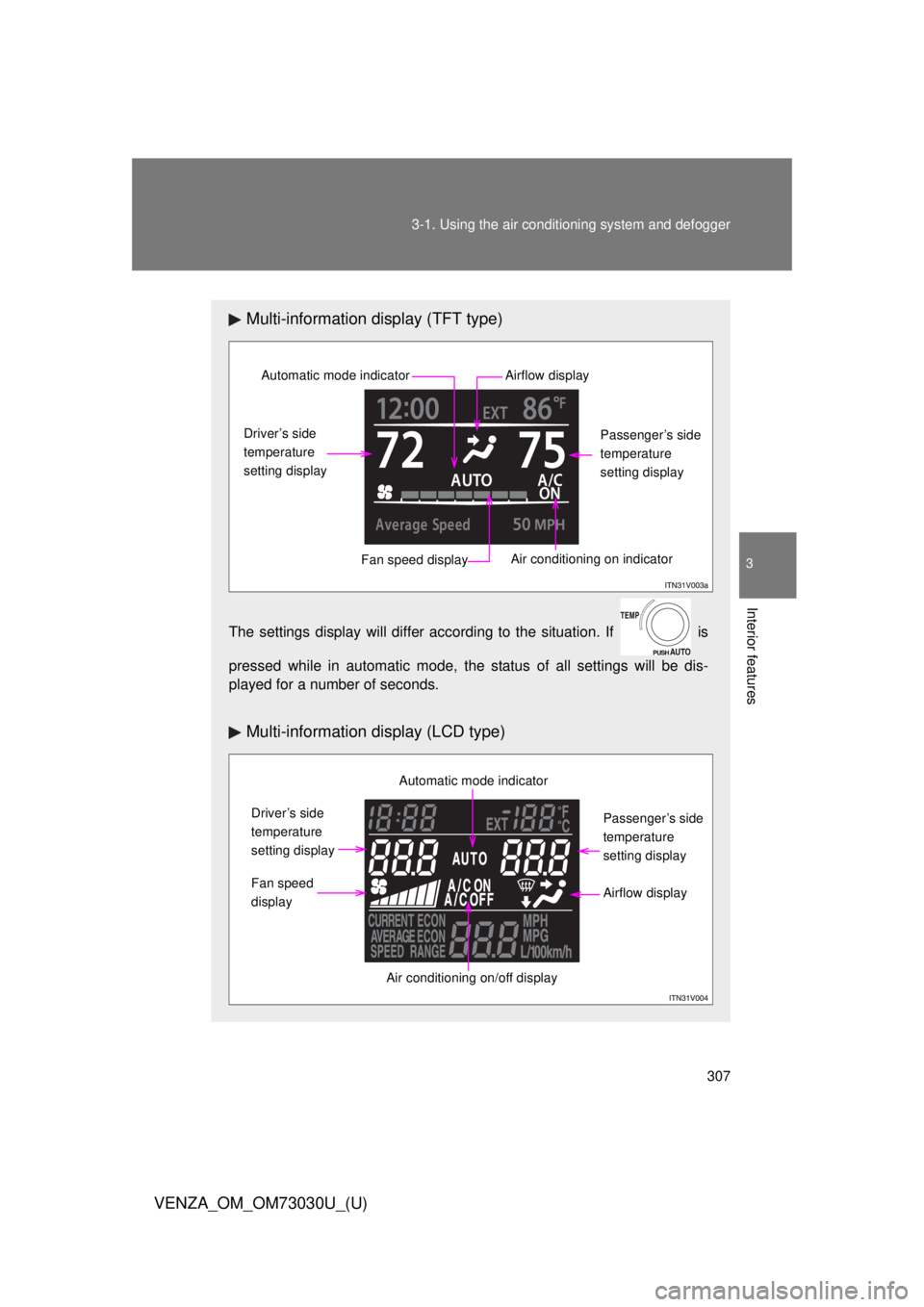
Multi-information display (LCD type)Automatic mode indicator
Driver’s side
temperature
setting display
Fan speed display Air conditioning on indicator Passenger’s side
temperature
setting displayAirflow display
Automatic mode indicator
Driver’s side
temperature
setting display
Fan speed
display
Air conditioning on/off display Passenger’s side
temperature
setting display
Airflow display
Page 308 of 688
3083-1. Using the air cond itioning system and defogger
VENZA_OM_OM73030U_(U) Using the automatic mode
Press . The air conditioning system will begin to operate. In outside air or
recirculated air mode, air outlets, fan speed and air conditioning on/
off are automatically adjusted according to the temperature setting.
“AUTO” will be displayed on the multi-information display, along with
the temperature setting. The settings that are automatically adjusted
by the system are not displayed. When only “AUTO” and the temper-
ature settings are displayed, may be pressed a second
time to temporarily display all system settings.
Turn the temperature control dial clockwise (warm) or coun-
terclockwise (cool). The temperature for the driver’s and front passenger’s seats can be
set separately.
■ Automatic mode indicator
If the fan speed setting or air fl ow modes are operated, the auto-
matic mode indicator goes off. However, automatic mode for func-
tions other than that operated is maintained. STEP 1
STEP 2
Page 315 of 688
3153-1. Using the air condit ioning system and defogger
3
Interior features
VENZA_OM_OM73030U_(U) ■ When outside temperature r eaches approximately 32°F (0°C)
The air conditioning system may not operate even when is pressed.
■ Ventilation and air conditioning odors
● To let fresh air in, set the air conditioning system to the outside air mode.
● During use, various odors from inside and outside the vehicle may enter
into and accumulate in the air conditioning system. This may then cause
odor to be emitted from the vents.
● To reduce potential odors from occurring:
• It is recommended that the air conditioning system be set to outside air
mode prior to turning the vehicle off.
• The start timing of the blower may be delayed for a short period of time
immediately after the air conditioning system is started in the automatic
mode. Air flows to the feet for a certain period of time when the air starts
to flow.
CAUTION■ To prevent the windshield from fogging up
Do not use during cool air operation in extremely humid weather. The
difference between the temperature of the outside air and that of the wind-
shield can cause the outer surface of the windshield to fog up, blocking your
vision.
NOTICE■ To prevent battery discharge
Do not leave the air conditioning system on longer than necessary when the
engine is stopped.
Page 346 of 688

3463-2. Using the audio system (Entune Audio)
VENZA_OM_OM73030U_(U) ● AAC file compatibility
• Compatible standards
MPEG4/AAC-LC
• Compatible sampling frequencies
11.025/12/16/22.05/24/32/44.1/48 (kHz)
• Compatible bit rates
16-320 (kbps)
• This system can play back AAC files encoded by iTunes.
● Compatible media
Media that can be used for MP3, WMA and AAC playback are CD-Rs and
CD-RWs.
Playback in some instances may not be possible if the CD-R or CD-RW is
not finalized. Playback may not be possible or the audio may jump if the
disc is scratched or marked with fingerprints.
● Compatible disc formats
The following disc formats can be used.
• Disc formats: CD-ROM Mode 1 and Mode 2
CD-ROM XA Mode 2, Form 1 and Form 2
• File formats: ISO9660 Level 1, Level 2, (Romeo, Joliet)
UDF (2.01 or lower)
MP3, WMA and AAC files written in any format other than those listed
above may not play correctly, and their file names and folder names may
not be displayed correctly.
Items related to standards and limitations are as follows.
• Maximum directory hierarchy: 8 levels (including the root)
• Maximum length of folder names/file names: 32 characters
• Maximum number of folders: 192 (including the root)
• Maximum number of files per disc: 255
● File names
The only files that can be recognized as MP3/WMA/AAC and played are
those with the extension .mp3, .wma or .m4a.
● Discs containing multi-session recordings
As the audio system is compatible with multi session discs, it is possible to
play discs that contain MP3, WMA and AAC files. However, only the first
session can be played.