Page 352 of 688

3523-2. Using the audio system (Entune Audio)
VENZA_OM_OM73030U_(U) ■ iPod cover art
● Depending on the iPod and songs in the iPod, iPod cover art may be dis-
played.
● This function can be changed to on/off. ( P. 332)
● It may take time to display iPod cover art, and the iPod may not be oper-
ated while the cover art display is in process.
● Only iPod cover art that is saved in JPEG format can be displayed.
■ iPod functions
● When an iPod is connected and the audio source is changed to iPod
mode, the iPod will resume play from the same point in which it was last
used.
● Depending on the iPod that is connected to the system, certain functions
may not be available. If a function is unavailable due to a malfunction (as
opposed to a system specification), disconnecting the device and recon-
necting it may resolve the problem.
● While connected to the system, the iPod cannot be operated with its own
controls. It is necessary to use the controls of the vehicle’s audio system
instead.
● When the battery level of an iPod is very low, the iPod may not operate. If
so, charge the iPod before use.
● Compatible models ( P. 354)
■ iPod problems
To resolve most problems encountered when using your iPod, disconnect
your iPod from the vehicle iPod connection and reset it. For instructions on
how to reset your iPod, refer to your iPod Owner’s Manual.
Page 359 of 688
3593-2. Using the audio system (Entune Audio)
VENZA_OM_OM73030U_(U) 3
Interior features ● MP3 file compatibility
• Compatible standards
MP3 (MPEG1 AUDIO LAYERII, III, MPEG2 AUDIO LAYERII, III,
MPEG2.5)
• Compatible sampling frequencies
MPEG1 AUDIO LAYERII, III: 32, 44.1, 48 (kHz)
MPEG2 AUDIO LAYERII, III: 16, 22.05, 24 (kHz)
• Compatible bit rates (compatible with VBR)
MPEG1 AUDIO LAYERII, III: 32-320 (kbps)
MPEG2 AUDIO LAYERII, III: 8-160 (kbps)
• Compatible channel modes: stereo, joint stereo, dual channel and
monaural
● WMA file compatibility
• Compatible standards
WMA Ver. 7, 8, 9
• Compatible sampling frequencies
HIGH PROFILE 32, 44.1, 48 (kHz)
• Compatible bit rates
HIGH PROFILE 48-320 (kbps, VBR)
● AAC file compatibility
• Compatible standards
MPEG4/AAC-LC
• Compatible sampling frequencies
11.025/12/16/22.05/24/32/44.1/48 (kHz)
• Compatible bit rates
16-320 (kbps)
• Compatible channel modes: 1 ch and 2 ch
• This system can play back AAC files encoded by iTunes.
● File names
The only files that can be recognized as MP3/WMA/AAC and played are
those with the extension .mp3 or .wma.
Page 360 of 688

3603-2. Using the audio system (Entune Audio)
VENZA_OM_OM73030U_(U) ● ID3, WMA and AAC tags
ID3 tags can be added to MP3 files, making it possible to record the track
title, artist name, etc.
The system is compatible with ID3 Ver. 1.0, 1.1, and Ver. 2.2, 2.3 ID3 tags.
(The number of characters is based on ID3 Ver. 1.0 and 1.1.)
WMA tags can be added to WMA files, making it possible to record the
track title and artist name in the same way as with ID3 tags.
AAC tags can be added to AAC files, making it possible to record the track
title and artist name in the same way as with ID3 tags.
● MP3, WMA and AAC playback
• When a device containing MP3, WMA and AAC files is connected, all
files in the USB memory device are checked. Once the file check is fin-
ished, the first MP3, WMA and AAC file is played. To make the file
check finish more quickly, we recommend that you do not include any
files other than MP3, WMA and AAC files or create any unnecessary
folders.
• When a USB memory device is connected and the audio source is
changed to USB memory mode, the USB memory device will start
playing the first file in the first folder. If the same device is removed and
reconnected (and the con- tents have not been changed), the USB
memory device will resume play from the same point in which it was
last used.
● Extensions
If the file extensions .mp3, .wma and .m4a are used for files other than
MP3, WMA and AAC files, they will be skipped (not played).
● Playback
• To play MP3 files with steady sound quality, we recommend a fixed bit
rate of at least 128 kbps and a sampling frequency of 44.1 kHz.
• There is a wide variety of freeware and other encoding software for
MP3, WMA and AAC files on the market, and depending on the status
of the encoding and the file format, poor sound quality or noise at the
start of playback may result. In some cases, playback may not be pos-
sible at all.
• Microsoft, Windows, and Windows Media are the registered trade-
marks of Microsoft Corporation in the U.S.A. and other countries.
Page 372 of 688
3723-2. Using the audio system (Entune Audio)
VENZA_OM_OM73030U_(U) ■ Reconnecting a Bluetooth ®
phone
If the system cannot connect due to poor signal strength with the engine
switch in the “ACC” or “ON” position (vehicles without a smart key system) or
ACCESSORY or IGNITION ON mode (vehicles with a smart key system),
the system will automatically attempt to reconnect.
If the phone is turned off, the system will not attempt to reconnect. In this
case, the connection must be made manually, or the phone must be rese-
lected.
Page 422 of 688

4223-2. Using the audio system (Entune Audio)
VENZA_OM_OM73030U_(U) ■ Compatible models
The Bluetooth ®
audio system supports portable audio players with the fol-
lowing specifications
● Bluetooth ®
specifications:
Ver. 1.1, or higher (Recommended: Ver. 3.0+EDR or higher)
● Profiles:
• A2DP (Advanced Audio Distribution Profile) Ver. 1.0, or higher
(Recommended: Ver. 1.2 or higher)
This is a profile to transmit stereo audio to the audio system.
• AVRCP (Audio/Video Remote Control Profile) Ver. 1.0 or higher
(Recommended: Ver. 1.4 or higher)
This is a profile to allow remote control the A/V equipment.
However, please note that some functions may be limited depending on the
type of portable audio player connected.
The hands-free system supports cellular phones with the following specifica-
tions.
● Bluetooth ®
specification:
Ver. 1.1 or higher (Recommended: Ver. 3.0+EDR or higher)
● Profiles:
• HFP (Hands Free Profile) Ver. 1.0 or higher (Recommended: Ver. 1.6
or higher)
This is a profile to allow hands-free phone calls using a cellular phone
or head set. It has outgoing and incoming call functions.
• OPP (Object Push Profile) Ver. 1. 1 or higher (Recommended: Ver. 1.2)
This is a profile to transfer contact data. When a Bluetooth ®
compatible
cellular phone has both PBAP and OPP, OPP cannot be used.
• PBAP (Phone Book Access Profile) Ver. 1.0 or higher (Recommended:
Ver. 1.1)
This is a profile to transfer contact data.
• MAP (Message Access Profile) Ver. 1.0 or higher
If the cellular phone does not support HFP, you cannot register it with the
hands-free system.
Page 424 of 688
4243-2. Using the audio system (Entune Audio)
VENZA_OM_OM73030U_(U) ■ Reconnecting the portable audio player
If the portable audio player is disconnected due to poor reception when the
engine switch is in the “ACC” or “ON” position (vehicles without a smart key
system) or ACCESSORY or IGNITION ON mode (vehicles with a smart key
system), the system automatically reconnects the portable audio player.
If you have switched off the portable audio player yourself, follow the instruc-
tions below to reconnect:
● Select the portable audio player again
● Enter the portable audio player
■ When you sell your car
Be sure to delete your personal data. ( P. 331)
CAUTION■ While driving
Do not operate the portable audio player, cellular phone or connect a device
to the Bluetooth ®
system.
■ Caution regarding interfer ence with electronic devices
● Your audio unit is fitted with Bluetooth ®
antennas. People with implantable
cardiac pacemakers, cardiac resynchronization therapy-pacemakers or
implantable cardioverter defibrillators should maintain a reasonable dis-
tance between themselves and the Bluetooth ®
antennas. The radio waves
may affect the operation of such devices.
● Before using Bluetooth ®
devices, users of any electrical medical device
other than implantable cardiac pacemakers, cardiac resynchronization
therapy-pacemakers or implantable cardioverter defibrillators should con-
sult the manufacturer of the device for information about its operation
under the influence of radio waves. Radio waves could have unexpected
effects on the operation of such medical devices.
Page 449 of 688
4493-5. Other interior features
3
Interior features
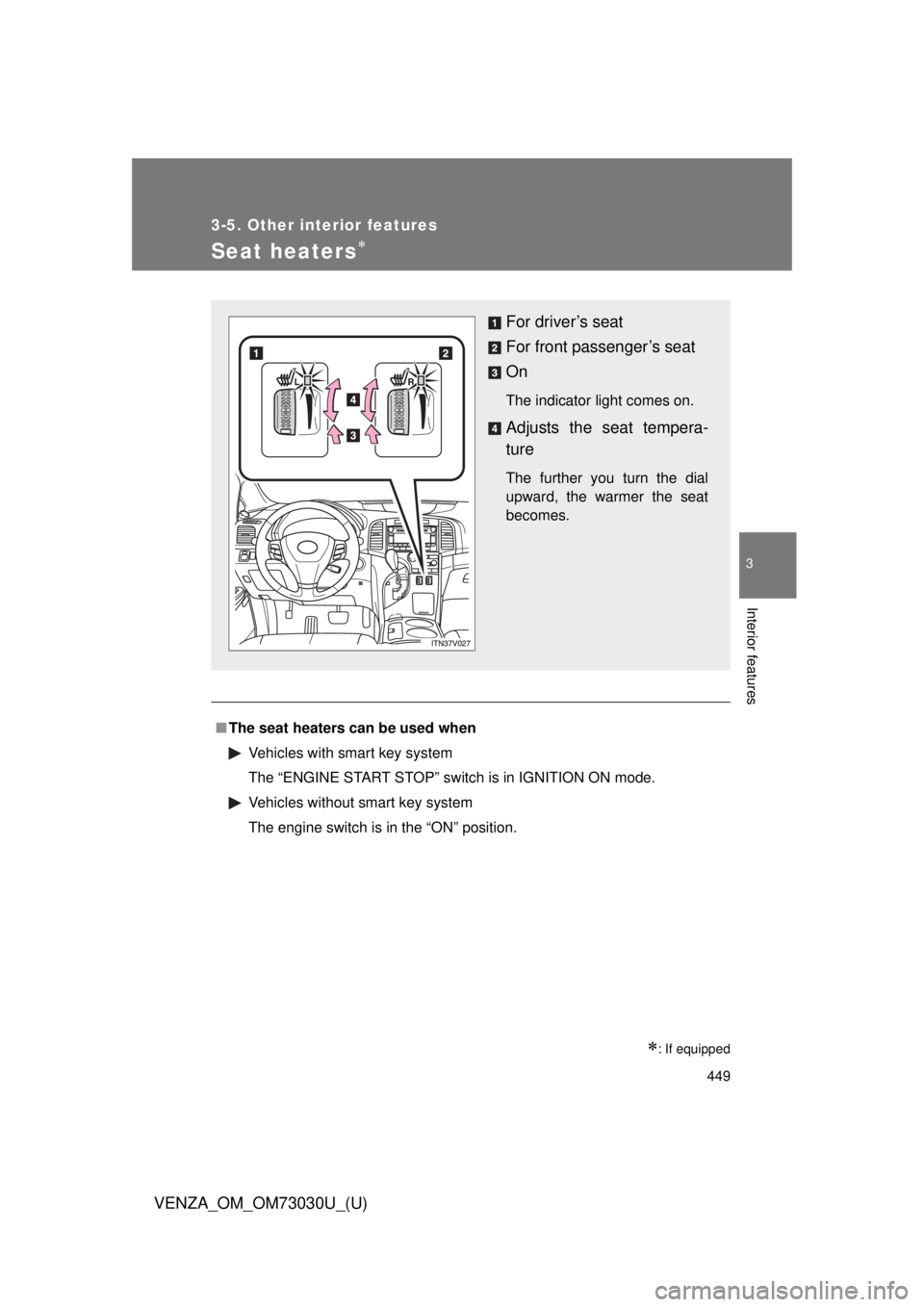
VENZA_OM_OM73030U_(U) Seat heaters
: If equipped■ The seat heaters can be used when
Vehicles with smart key system
The “ENGINE START STOP” switch is in IGNITION ON mode.
Vehicles without smart key system
The engine switch is in the “ON” position. For driver’s seat
For front passenger’s seat
On The indicator light comes on.
Adjusts the seat tempera-
ture The further you turn the dial
upward, the warmer the seat
becomes.
Page 454 of 688
4543-5. Other interior features
VENZA_OM_OM73030U_(U) CAUTIONObserve the following precautions.
Failure to do so may cause the driver’s floor mat to slip, possibly interfering
with the pedals while driving. An unexpectedly high speed may result or it may
become difficult to stop the vehicle. This could lead to an accident, resulting in
death or serious injury.
■ When installing the driver’s floor mat
● Do not use floor mats designed for other models or different model year
vehicles, even if they are Toyota Genuine floor mats.
● Only use floor mats designed for the driver’s seat.
● Always install the floor mat securely using the retaining hooks (clips) pro-
vided.
● Do not use two or more floor mats on top of each other.
● Do not place the floor mat bottom-side up or upside-down.
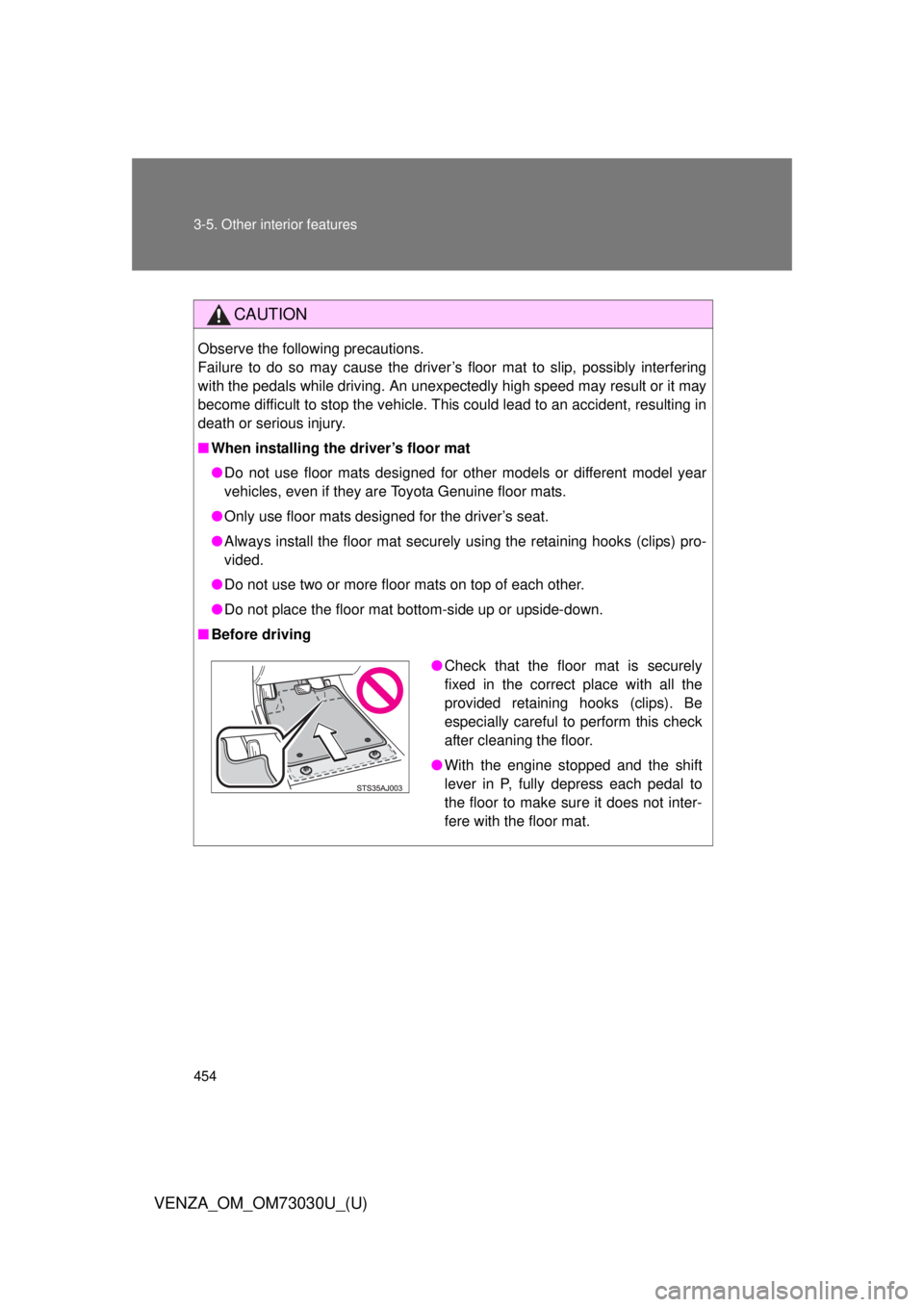
■ Before driving
● Check that the floor mat is securely
fixed in the correct place with all the
provided retaining hooks (clips). Be
especially careful to perform this check
after cleaning the floor.
● With the engine stopped and the shift
lever in P, fully depress each pedal to
the floor to make sure it does not inter-
fere with the floor mat.