Page 325 of 741

324
RAV4_OM_OM42A41U_(U)
5-1. Basic OperationsAudio system types ........... 326
Using the steering wheel audio switches ................ 329
AUX port/USB port ............ 332
5-2. Using the audio system Optimal use of the audio system ................... 334
5-3. Using the radio Radio operation ................. 336
5-4. Playing an audio CD and MP3/WMA discs
CD player operation .......... 338
5-5. Using an external device Listening to an iPod .......... 348
Listening to USB memory device................ 354
Using the AUX port ........... 360
5-6. Using Bluetooth
® devices
Bluetooth® audio/
phone .............................. 361
Using the steering wheel switches ................ 366
Register a Bluetooth
®
device.............................. 367
5-7. “SETUP” menu Using the “SETUP” menu (“Bluetooth
*” menu) ........ 368
Using the “SETUP” menu (“PHONE” menu) ............ 373 5-8. Bluetooth
® Audio
Operating a Bluetooth®
enabled portable
player .............................. 378
5-9. Bluetooth
® Phone
Making a phone call .......... 381
When receiving a phone call ....................... 383
Speaking on the phone ..... 384
5-10. Bluetooth
®
Bluetooth®......................... 386
5-11. Using the audio system (Entune Audio)
Audio system (Entune Audio) ................ 389
5-12. Basic Operations Audio system operations (Entune Audio) ................ 391
Steering wheel audio switches .......................... 393
AUX port/USB port ............ 394
Basic audio operations...... 395
5-13. Setup Setup menu....................... 397
General settings ................ 398
Audio settings ................... 400
Display settings ................. 401
Voice settings.................... 403
5-14. Using the audio system Selecting the audio source ............................. 404
List screen operation......... 405
Optimal use of the audio system ............................ 407
*: Bluetooth is a registered trademark of Bluetooth SIG, Inc.
5Audio system
Page 326 of 741

325
RAV4_OM_OM42A41U_(U)
5Audio system
5-15. Using the radioRadio operation ................. 408
5-16. Playing an audio CD and MP3/WMA/AAC discs
CD player operation .......... 410
CD player and disc information ...................... 411
5-17. Using an external device iPod player operation ........ 417
USB memory device player operation .............. 422
Using the AUX port ........... 427
5-18. Connecting Bluetooth
®
Preparations to use wireless
communication ................ 428
Registering a Bluetooth
®
audio player for the
first time .......................... 431
Registering a Bluetooth
®
phone for the
first time .......................... 432
Registering a Bluetooth
®
device.............................. 433
Connecting a Bluetooth
®
device.............................. 435
Displaying a Bluetooth
®
device details .................. 437
Detailed Bluetooth
®
settings............................ 438 5-19. Bluetooth
® Audio
Listening to Bluetooth®
Audio............................... 440
5-20. Bluetooth
® Phone
Using a Bluetooth®
Phone ............................. 442
Making a call ..................... 444
Receiving a call ................. 447
Speaking on the phone ..... 448
Bluetooth
® phone
message function ............ 451
Using the steering wheel switches ................ 456
Bluetooth
® phone
settings ........................... 457
5-21. Phonebook Contact/Call History Settings ........................... 459
5-22. Bluetooth
®
What to do if... (Troubleshooting) ............ 469
Bluetooth
®......................... 473
5-23. Other function Voice command system ............................ 478
Page 330 of 741
329
RAV4_OM_OM42A41U_(U)
5-1. Basic Operations
5
Audio system
Using the steering wheel audio switches
Vo l u m e
Radio mode:
Selects a radio station
CD mode:
Selects a track and file (MP3
and WMA)
Bluetooth
® audio mode:
Selects a track and album
iPod mode:
Selects a song
USB memory mode:
Selects a file and folder
Power on, select audio source
Some audio features can be c ontrolled using the switches on
the steering wheel.
Operation may differ depending on the type of audio system or
navigation system. For details, refer to the manual provided with
the audio system or navigation system.
1
2
3
Page 348 of 741
RAV4_OM_OM42A41U_(U)
3475-4. Playing an audio CD and MP3/WMA discs
5
Audio system
NOTICE
■CD Player precautions
Failure to follow the precautions below may result in serious damage to the
CDs or the player itself.
● Do not insert anything other than CDs into the CD slot.
● Do not apply oil to the CD player.
● Store CDs away from direct sunlight.
● Never try to disassemble any part of the CD player.
●CDs with a transparent or translucent
recording area
● CDs that have tape, stickers or CD-R
labels attached to them, or that have
had the label peeled off
Page 379 of 741
378
RAV4_OM_OM42A41U_(U)
5-8. Bluetooth® Audio
Operating a Bluetooth® enabled portable
player
∗
∗: If equipped
Power
Vo l u m e
Search playback
Next commands, random play
or back button
Repeat play
Fast-forwarding, rewinding or
selecting an album Changing the audio source/
playback
Playback/pause
Previous commands
Selecting a track
Displaying text message1
2
3
4
5
6
7
8
9
10
11
Page 394 of 741

393
RAV4_OM_OM42A41U_(U)
5-12. Basic Operations
5
Audio system
Steering wheel audio switches
Vo l u m e s w i t c h• Increases/decreases volume
• Press and hold: Continuously increases/decreases volume
Cursor switch (“ ∧” and “ ∨”)
• AM/FM Radio
Press: Preset station/chan- nel up/down
Press and hold: Seek up/down continuously
•CD/
Bluetooth® audio/iPod/USB memory
Press: Track/file up/down
Press and hold: Fast forward/rewind
“MODE/HOLD” switch • Changes audio source
• Press and hold this switch to mute or pause the current operation To cancel the mute or pause, press and hold.
Some audio features can be c ontrolled using the switches on
the steering wheel.
Operation may differ depending on the type of audio system or
navigation system. For details, refer to the manual provided with
the audio system or navigation system.
Operating the audio system using the steering wheel switches
1
2
3
WARNING
■ To reduce the risk of an accident
Exercise care when operating the audio switches on the steering wheel.
Page 417 of 741
416
RAV4_OM_OM42A41U_(U)
5-16. Playing an audio CD and MP3/WMA/AAC discs
NOTICE
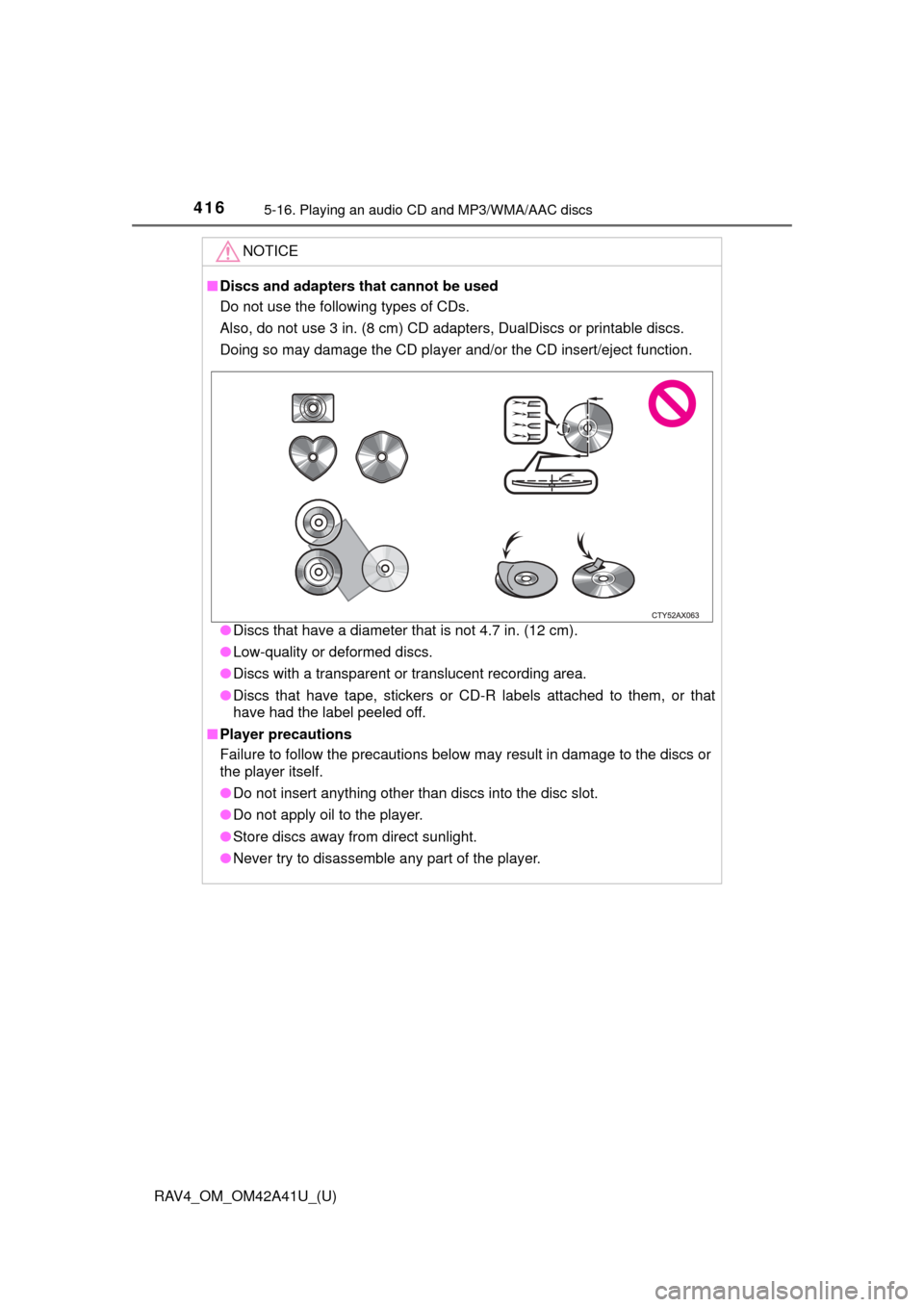
■Discs and adapters that cannot be used
Do not use the following types of CDs.
Also, do not use 3 in. (8 cm) CD adapters, DualDiscs or printable discs.
Doing so may damage the CD player and/or the CD insert/eject function.
● Discs that have a diameter that is not 4.7 in. (12 cm).
● Low-quality or deformed discs.
● Discs with a transparent or translucent recording area.
● Discs that have tape, stickers or CD-R labels attached to them, or that
have had the label peeled off.
■ Player precautions
Failure to follow the precautions below may result in damage to the discs or
the player itself.
● Do not insert anything other than discs into the disc slot.
● Do not apply oil to the player.
● Store discs away from direct sunlight.
● Never try to disassemble any part of the player.
Page 421 of 741

420
RAV4_OM_OM42A41U_(U)
5-17. Using an external device
■iPod problems
To resolve most problems encountered when using your iPod, disconnect
your iPod from the vehicle iPod connection and reset it. For instructions on
how to reset your iPod, refer to your iPod Owner’s Manual.
■ Error messages
If the following error messages appear on the screen, refer to the table and
take the appropriate measures. If the problem is not rectified, take the vehicle
to your Toyota dealer.
MessageCause/Correction procedures
“Connection error. Please
consult your Owner’s Man-
ual for instructions on how
to connect the iPod.”
This indicates a problem in the iPod or its con-
nection.
“No music files found.”This indicates that there is no music data in
the iPod.
“No videos found.”This indicates that no video files are included
in the iPod.
“Please check the iPod
firmware version.”
This indicates that the software version is not
compatible.
Please check the compatible models.
(→P. 421)
“iPod authorization unsuc-
cessful.”This indicates that the audio system failed to
authorize the iPod.
Please check your iPod.