2016 TOYOTA RAV4 Led
[x] Cancel search: LedPage 234 of 741

234
RAV4_OM_OM42A41U_(U)
4-5. Using the driving support systems
WARNING
■To avoid malfunction of the radar sensor
Observe the following precautions.
Otherwise, the radar sensor may not operate properly, possibly leading to
an accident resulting in death or serious injury.
● Keep the radar sensor and front grille emblem clean at all times.
● Do not attach accessories, stickers (including transparent stickers), or
other items to the radar sensor, front grille emblem or surrounding area.
● Do not subject the radar sensor or surrounding area to a strong impact.
If the radar sensor, front grille, or front bumper has been subjected to a
strong impact, have the vehicle inspected by your Toyota dealer.
● Do not disassemble the radar sensor.
● Do not modify or paint the radar s ensor, front grille emblem or surrounding
area.
● If the radar sensor, front grille, or front bumper needs to be removed and
installed, or replaced, contact your Toyota dealer.
● The radar sensor complies with relevant radio wave regulations, as shown
by the label attached to the sensor. Do not remove the label. Additionally,
disassembly or modification of the radar sensor may be prohibited by law\
.
Radar sensor
Front grille emblem
If the front of the radar sensor or the
front or back of the front grille emblem
is dirty or covered with water droplets,
snow, etc., clean it.
Clean the radar sensor and front grille
emblem with a soft cloth so you do not
mark or damage them.1
2
Page 235 of 741

RAV4_OM_OM42A41U_(U)
2354-5. Using the driving support systems
4
Driving
WARNING
■To avoid malfunction of the camera sensor
Observe the following precautions.
Otherwise, the camera sensor may not operate properly, possibly leading to
an accident resulting in death or serious injury.
● Keep the windshield clean at all times.
• If the windshield is dirty or covered with an oily film, water droplets,
snow, etc., clear the windshield.
• If a glass coating agent is applied to the windshield, it will still be \
neces- sary to use the windshield wipers to remove water droplets from the
area of the windshield in front of the camera sensor.
• If the inner side of the windshield where the camera sensor is installed is dirty, contact your Toyota dealer.
● If the part of the windshield in front of the camera sensor is fogged up or
covered with condensation or ice, use the windshield defogger to remove
the fog, condensation or ice. ( →P. 485, 493)
● If water droplets cannot be properly removed from the area of the wind-
shield in front of the camera sensor by the windshield wipers, replace the
wiper insert or wiper blade.
If the wiper inserts or wiper blades need to be replaced, contact your Toy-
ota dealer.
● Do not attach window tinting to the windshield.
● Replace the windshield if it is damaged or cracked.
If the windshield needs to be replaced, contact your Toyota dealer.
● Do not get the camera sensor wet.
● Do not allow bright lights to shine into the camera sensor.
● Do not dirty or damage the camera sensor.
When cleaning the inside of the windshield, do not allow glass cleaner to
contact the lens. Also, do not touch the lens. If the lens is dirty or dam-
aged, contact your Toyota dealer.
●Do not install an antenna or attach stick-
ers (including transparent stickers) or
other items to the area of the windshield
in front of the camera sensor (shaded
area in the illustration).
Page 238 of 741

238
RAV4_OM_OM42A41U_(U)
4-5. Using the driving support systems
PCS (Pre-Collision System)∗
◆Pre-collision warning
When the system determines
that the possibility of a frontal
collision is high, a buzzer will
sound and a warning message
will be displayed on the multi-
information display to urge the
driver to take evasive action.
∗: If equipped
The pre-collision system uses a radar sensor and camera sen-
sor to detect vehicles and pedestrians
*1 in front of your vehicle.
When the system determines that the possibility of a frontal col-
lision with a vehicle or pedestrian is high, a warning operates to
urge the driver to take evasive action and the potential brake
pressure is increased to help the dr iver avoid the collision. If the
system determines that the possibi lity of a frontal collision with
a vehicle or pedestrian is extremely high, the brakes are auto-
matically applied
*2 to help avoid the collision or help reduce the
impact of the collision.
The pre-collision system can be disabled/enabled and the warning
timing can be changed. ( →P. 242)
*1: Depending on the region in which the vehicle was sold, the pedestrian
detection function may not be available. Contact your Toyota dealer for
details.
*2: Depending on the region in which the vehicle was sold, the pre-collisionbraking function (automatic braking function) may not be available. Con-
tact your Toyota dealer for details.
Page 240 of 741

240
RAV4_OM_OM42A41U_(U)
4-5. Using the driving support systems
WARNING
■Limitations of the pre-collision system
● The driver is solely responsible for safe driving. Always drive safely, taking
care to observe your surroundings.
Do not use the pre-collision system instead of normal braking operations
under any circumstances. This system will not prevent collisions or lessen
collision damage or injury in every situation. Do not overly rely on this sys-
tem. Failure to do so may lead to an accident, resulting in death or serious
injury.
● Although this system is designed to help avoid a collision or help reduce
the impact of the collision, its effectiveness may change according to vari-
ous conditions, therefore the system may not always be able to achieve
the same level of performance.
Read the following conditions carefully. Do not overly rely on this system
and always drive carefully.
• Conditions under which the system may operate even if there is no pos-
sibility of a collision: →P. 247
• Conditions under which the system may not operate properly: →P. 249
● Do not attempt to test the operation of the pre-collision system yourself, as
the system may not operate properly, possibly leading to an accident.
■ Pre-collision braking
*3
● The pre-collision braking function may not operate if certain operations are
performed by the driver. If the accelerator pedal is being depressed
strongly or the steering wheel is being turned, the system may determine
that the driver is taking evasive action and possibly prevent the pre-colli-
sion braking function from operating.
● In some situations, while the pre-collision braking function is operating,
operation of the function may be canceled if the accelerator pedal is
depressed strongly or the steering wheel is turned and the system deter-
mines that the driver is taking evasive action.
● A large amount of braking force is applied while the pre-collision braking
function is operating. As the pre-collision braking function will be canceled
after the vehicle has been stopped for approximately 2 seconds, the driver
should depress the brake pedal as necessary.
● If the brake pedal is being depressed, the system may determine that the
driver is taking evasive action and possibly delay the operation timing of
the pre-collision braking function.
*3: Depending on the region in which the vehicle was sold, the pre-collision
braking function may not be available.
Page 241 of 741
RAV4_OM_OM42A41U_(U)
2414-5. Using the driving support systems
4
Driving
WARNING
■When to disable the pre-collision system
In the following situations, disable the system, as it may not operate prop-
erly, possibly leading to an accident resulting in death or serious injury:
● When the vehicle is being towed
● When your vehicle is towing another vehicle
● When transporting the vehicle via truck, boat, train or similar means of
transportation
● When the vehicle is raised on a lift with the engine running and the tires
are allowed to rotate freely
● When inspecting the vehicle using a drum tester such as a chassis dyna-
mometer or speedometer tester, or when using an on vehicle wheel bal-
ancer
● When a strong impact is applied to the front bumper or front grille, due to
an accident or other reasons
● If the vehicle cannot be driven in a stable manner, such as when the vehi-
cle has been in an accident or is malfunctioning
● When the vehicle is driven in a sporty manner or off-road
● When the tires are not properly inflated
● When the tires are very worn
● When tires of a size other than specified are installed
● When tire chains are installed
● When a compact spare tire or an emergency tire puncture repair kit is used
Page 242 of 741
242
RAV4_OM_OM42A41U_(U)
4-5. Using the driving support systems
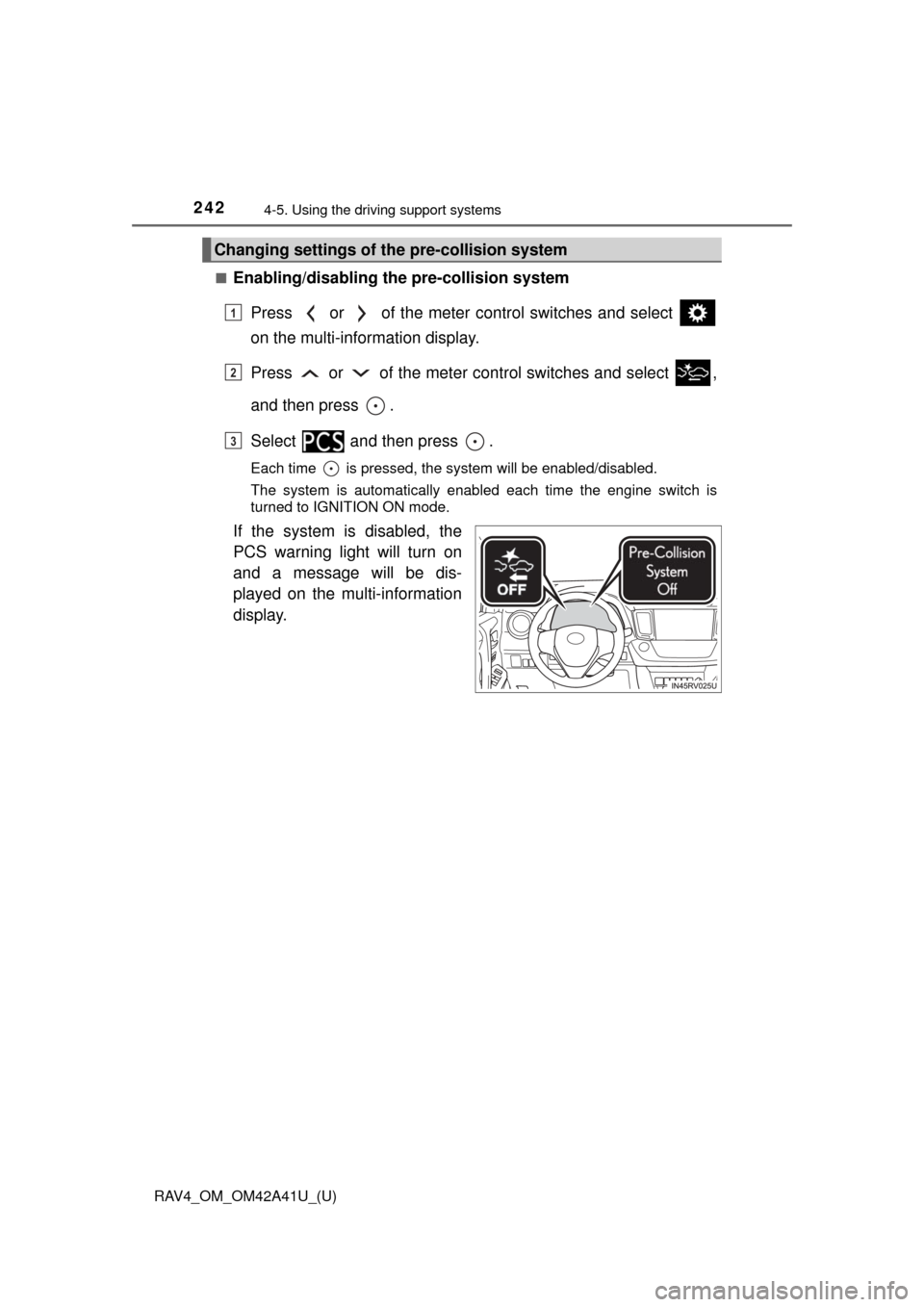
■Enabling/disabling th e pre-collision system
Press or of the meter control switches and select
on the multi-information display.
Press or of the meter co ntrol switches and select ,
and then press .
Select and then press .
Each time is pressed, the system will be enabled/disabled.
The system is automatically enabled each time the engine switch is
turned to IGNITION ON mode.
If the system is disabled, the
PCS warning light will turn on
and a message will be dis-
played on the multi-information
display.
Changing settings of th e pre-collision system
1
2
3
Page 244 of 741

244
RAV4_OM_OM42A41U_(U)
4-5. Using the driving support systems
■Operational conditions
Availability of the pedestrian detection function and pre-collision braking func-
tion depend on the region in which the vehicle was sold.
Read the following for details:
Region A
(The pedestrian detection function and pre-collision braking function are
available)
The pre-collision system is enabled and the system determines that the pos-
sibility of a frontal collision wi th a vehicle or pedestrian is high.
Each function is operational at the following speeds:
● Pre-collision warning:
• Vehicle speed is between approximately 7 and 110 mph (10 and 180 km/h).
(For detecting a pedestrian, vehicle speed is between approximately 7 and
50 mph [10 and 80 km/h].)
• The relative speed between your vehicle and the vehicle or pedestrian
ahead is approximately 7 mph (10 km/h) or more.
● Pre-collision brake assist:
• Vehicle speed is between approximately 19 and 110 mph (30 and
180 km/h). (For detecting a pedestri an, vehicle speed is between approx-
imately 19 and 50 mph [30 and 80 km/h].)
• The relative speed between your vehicle and the vehicle or pedestrian ahead is approximately 19 mph (30 km/h) or more.
● Pre-collision braking:
• Vehicle speed is between approximately 7 and 110 mph (10 and 180 km/h).
(For detecting a pedestrian, vehicle speed is between approximately 7 and
50 mph [10 and 80 km/h].)
• The relative speed between your vehicle and the vehicle or pedestrian ahead is approximately 7 mph (10 km/h) or more.
The system may not operate in the following situations:
● If a battery terminal has been disconnected and reconnected and then the
vehicle has not been driven for a certain amount of time
● If the shift lever is in R
● If VSC is disabled (only the pre-collision warning function will be opera-
tional)
● If the PCS warning light is flashing or illuminated
RegionsFunction availability
Region AThe pedestrian detection function and pre-collision
braking function are available
Region BThe pedestrian detection function is not available
and the pre-collision braking function is available
Region CThe pedestrian detection function and pre-collision
braking function are not available
Page 245 of 741

RAV4_OM_OM42A41U_(U)
2454-5. Using the driving support systems
4
Driving
Region B
(The pedestrian detection function is not available and the pre-collision
braking function is available)
The pre-collision system is enabled and the system determines that the pos-
sibility of a frontal collision with a vehicle is high.
Each function is operational at the following speeds:
● Pre-collision warning:
• Vehicle speed is between approximately 10 and 110 mph (15 and
180 km/h).
• The relative speed between your vehicle and the vehicle ahead is
approximately 7 mph (10 km/h) or more.
● Pre-collision brake assist:
• Vehicle speed is between approximately 19 and 110 mph (30 and
180 km/h).
• The relative speed between your vehicle and the vehicle ahead is approximately 19 mph (30 km/h) or more.
● Pre-collision braking:
• Vehicle speed is between approximately 10 and 110 mph (15 and
180 km/h).
• The relative speed between your vehicle and the vehicle ahead is approximately 7 mph (10 km/h) or more.
The system may not operate in the following situations:
● If a battery terminal has been disconnected and reconnected and then the
vehicle has not been driven for a certain amount of time
● If the shift lever is in R
● If VSC is disabled (only the pre-collision warning function will be opera-
tional)
● If the PCS warning light is flashing or illuminated