2016 TOYOTA RAV4 Led
[x] Cancel search: LedPage 246 of 741

246
RAV4_OM_OM42A41U_(U)
4-5. Using the driving support systems
Region C
(The pedestrian detection function and pre-collision braking function are
not available)
The pre-collision system is enabled and the system determines that the pos-
sibility of a frontal collision with a vehicle is high.
Each function is operational at the following speeds:
● Pre-collision warning:
• Vehicle speed is between approximately 10 and 110 mph (15 and
180 km/h).
• The relative speed between your vehicle and the vehicle ahead is
approximately 7 mph (10 km/h) or more.
● Pre-collision brake assist:
• Vehicle speed is between approximately 19 and 110 mph (30 and
180 km/h).
• The relative speed between your vehicle and the vehicle ahead is approximately 19 mph (30 km/h) or more.
The system may not operate in the following situations:
● If a battery terminal has been disconnected and reconnected and then the
vehicle has not been driven for a certain amount of time
● If the shift lever is in R
● If VSC is disabled (only the pre-collision warning function will be opera-
tional)
● If the PCS warning light is flashing or illuminated
■ Pedestrian detection function
*4
*4: Depending on the region in which the vehicle was sold, the pedestrian
detection function may not be available.
■ Cancelation of the pre-collision braking
*3
●If either of the following occur while the pre-collision braking function is
operating, it will be canceled:
• The accelerator pedal is depressed strongly.
• The steering wheel is turned sharply or abruptly.
● If the vehicle is stopped by the operation of the pre-collision braking func-
tion, the operation of the pre-collision braking function will be canceled after
the vehicle has been stopped for approximately 2 seconds.
*3: Depending on the region in which the vehicle was sold, the pre-collision
braking function may not be available.
The pre-collision system detects pedestri-
ans based on the size, profile, and motion
of a detected object. However, a pedes-
trian may not be detected depending on
the surrounding brightness and the
motion, posture, and angle of the
detected object, preventing the system
from operating properly. (→P. 250)
Page 251 of 741

RAV4_OM_OM42A41U_(U)
2514-5. Using the driving support systems
4
Driving
• Groups of pedestrians which are close together
• Pedestrians who are wearing white and look extremely bright
• Pedestrians in the dark, such as at night or while in a tunnel
• Pedestrians whose clothing appears to be nearly the same color or
brightness as their surroundings
• Pedestrians near walls, fences, guardrails, or large objects
• Pedestrians who are on a metal object (manhole cover, steel plate, etc.)
on the road
• Pedestrians who are walking fast
• Pedestrians who are changing speed abruptly
• Pedestrians running out from behind a vehicle or a large object
• Pedestrians who are extremely close to the side of the vehicle (outside rear view mirror, etc.)
*4: Depending on the region in which the vehicle was sold, the pedestrian
detection function may not be available.
■ If the PCS warning light flashes a nd a warning message is displayed on
the multi-information display
The pre-collision system may be tem porarily unavailable or there may be a
malfunction in the system.
● In the following situations, the warning light will turn off, the message will
disappear and the system will become operational when normal operating
conditions return:
• When the radar sensor or camera sensor or the area around either sen-
sor is hot, such as in the sun
• When the radar sensor or camera sensor or the area around either sen-
sor is cold, such as in an extremely cold environment
• When the radar sensor or front grille emblem is dirty or covered with
snow, etc.
• If the camera sensor is obstructed, such as when the hood is open or a sticker is attached to the windshield near the camera sensor
● If the PCS warning light continues to flash or the warning message does not
disappear, the system may be malfunctioning. Have the vehicle inspected
by your Toyota dealer immediately.
■ If VSC is disabled
●If VSC is disabled ( →P. 300), the pre-collision brake assist and pre-collision
braking functions are also disabled.
● The PCS warning light will turn on and “VSC Turned Off Pre-Collision Brake
System Unavailable” will be displayed on the multi-information display.
Page 256 of 741

256
RAV4_OM_OM42A41U_(U)
4-5. Using the driving support systems
LDA indicator
The illumination condition of the
indicator informs the driver of
the system operation status.
Illuminated in white:
LDA system is operating.
Illuminated in green:
Steering wheel assistance of the
steering control function is operat-
ing.
Flashing in orange:
Lane departure alert function is
operating.
Operation display of steering wheel operation support
Indicates that steering wheel assi stance of the steering control
function is operating.
Lane departure alert function display
Displayed when the multi-informatio n display is switched to the
driving assist system information screen.
Indications on multi-information display
1
2
3
Inside of displayed white lines
is whiteInside of displayed white lines
is black
Indicates that the system is recog-
nizing white (yellow) lines. When
the vehicle departs from its lane,
the white line displayed on the
side the vehicle departs from
flashes orange. Indicates that t
he system is not
able to recognize white (yellow)
lines or is temporarily canceled.
Page 257 of 741

RAV4_OM_OM42A41U_(U)
2574-5. Using the driving support systems
4
Driving
■Operation conditions of each function
●Lane departure alert function
This function operates when all of the following conditions are met.
• LDA is turned on.
• Vehicle speed is approximately 32 mph (50 km/h) or more.
• System recognizes white (yellow) lines.
• Width of traffic lane is approximately 9.8 ft. (3 m) or more.
• Turn signal lever is not operated.
• Vehicle is driven on a straight road or around a gentle curve with a radius
of more than approximately 492 ft. (150 m).
• No system malfunctions are detected. ( →P. 259)
● Steering control function
This function operates when all of the following conditions are met in addi-
tion to the operation conditions for the lane departure alert function.
• Setting for “Steering Assist” in on the multi-information display is
set to “On”. ( →P. 697)
• Vehicle is not accelerated or decelerated by a fixed amount or more.
• Steering wheel is not operated with a steering force level suitable for changing lanes.
• ABS, VSC, TRAC and PCS are not operating.
• TRAC or VSC is not turned off.
● Vehicle sway warning
This function operates when all of the following conditions are met.
• Setting for “Sway Warning” in on the multi-information display is set
to “On”. ( →P. 697)
• Vehicle speed is approximately 32 mph (50 km/h) or more.
• Width of traffic lane is approximately 9.8 ft. (3 m) or more.
• No system malfunctions are detected. ( →P. 259)
■ Temporary cancellation of functions
When operation conditions are no longer met, a function may be temporarily\
canceled. However, when the operation conditions are met again, operation
of the function is automatically restored. (→P. 257)
■ Steering control function
Depending on the vehicle speed, lane departure situation, road conditions,
etc., the operation of the functions may not be recognized or the functions
may not operate.
■ Lane departure alert function
The warning buzzer may be difficult to hear due to external noise, audio play-
back, etc.
■ Hands off steering wheel alert
When the system determines that the driver has removed their hands from
the steering wheel while the steering control function is operating, a warning
message is displayed on the multi-information display and the buzzer
sounds.
Page 267 of 741
RAV4_OM_OM42A41U_(U)
2674-5. Using the driving support systems
4
Driving
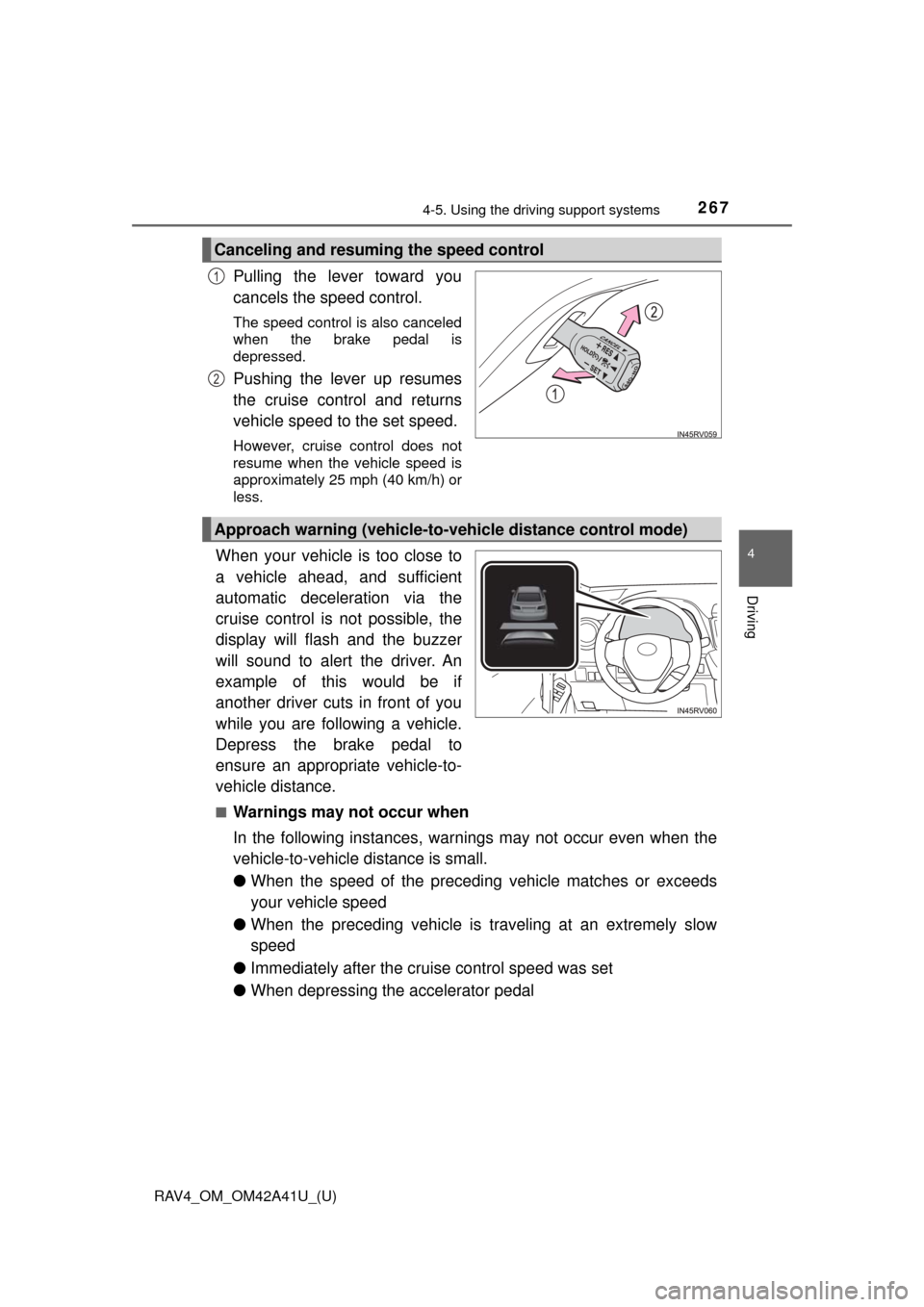
Pulling the lever toward you
cancels the speed control.
The speed control is also canceled
when the brake pedal is
depressed.
Pushing the lever up resumes
the cruise control and returns
vehicle speed to the set speed.
However, cruise control does not
resume when the vehicle speed is
approximately 25 mph (40 km/h) or
less.
When your vehicle is too close to
a vehicle ahead, and sufficient
automatic deceleration via the
cruise control is not possible, the
display will flash and the buzzer
will sound to alert the driver. An
example of this would be if
another driver cuts in front of you
while you are following a vehicle.
Depress the brake pedal to
ensure an appropriate vehicle-to-
vehicle distance.
■Warnings may not occur when
In the following instances, warnings may not occur even when the
vehicle-to-vehicle distance is small.
●When the speed of the preceding vehicle matches or exceeds
your vehicle speed
● When the preceding vehicle is traveling at an extremely slow
speed
● Immediately after the cruise control speed was set
● When depressing the accelerator pedal
Canceling and resuming the speed control
1
2
Approach warning (vehicle-to-vehicle distance control mode)
Page 269 of 741

RAV4_OM_OM42A41U_(U)
2694-5. Using the driving support systems
4
Driving
■Dynamic radar cruise control can be set when
●The shift lever is in D or range 4 or higher of S has been selected.
● Range 4 or higher of D has been selected by using the paddle shift switch.
(Vehicles with paddle shift switches)
● Vehicle speed is above approximately 30 mph (50 km/h).
■ Accelerating after setting the vehicle speed
The vehicle can be accelerated normally. After acceleration, the set speed
resumes. However, during vehicle-to-vehicle distance control mode, the vehi-
cle speed may decrease below the set speed in order to maintain the dis-
tance to the vehicle ahead.
■ Automatic cancelation of vehicle-t o-vehicle distance control mode
Vehicle-to-vehicle distance control mode is automatically canceled in the fol-
lowing situations:
● Actual vehicle speed falls below approximately 25 mph (40 km/h).
● VSC is activated.
● TRAC is activated for a period of time.
● When the VSC or TRAC system is turned off by pressing the VSC OFF
switch.
● The sensor cannot detect correctly because it is covered in some way.
● Pre-collision braking is activated.
If vehicle-to-vehicle distance control mode is automatically canceled for any
other reason, there may be a malfunction in the system. Contact your Toyota
dealer.
■ Automatic cancelation of co nstant speed control mode
Constant speed control mode is automatically canceled in the following situa-
tions:
● Actual vehicle speed is more than approximately 10 mph (16 km/h) below
the set vehicle speed.
● Actual vehicle speed falls below approximately 25 mph (40 km/h).
● VSC is activated.
● TRAC is activated for a period of time.
● When the VSC or TRAC system is turned off by pressing the VSC OFF
switch.
● Pre-collision braking is activated.
If constant speed control mode is automatically canceled for any other rea-
son, there may be a malfunction in the system. Contact your Toyota dealer.
■ Warning messages and buzzers for dynamic radar cruise control
Warning messages and buzzers are used to indicate a system malfunction or
to inform the driver of the need for caution while driving.
If a warning message is shown on the multi-information display, read the
message and follow the instructions.
Page 274 of 741

274
RAV4_OM_OM42A41U_(U)
4-5. Using the driving support systems
To change the set speed, operate the lever until the desired set speed
is obtained.
Increases the speed
Decreases the speed
Fine adjustment: Momentarily
move the lever in the desired direc-
tion.
Large adjustment: Hold the lever in
the desired direction.
The set speed will be increased or
decreased as follows:
Fine adjustment: By 1 mph (1.6 km/h)
*1 or 1 km/h (0.6 mph)*2 each time
the lever is operated.
Large adjustment: The set speed can be increased or decreased continu-
ally until the lever is released.
*1: When the set speed is shown in “MPH”
*2: When the set speed is shown in “km/h”
Pulling the lever toward you
cancels the c onstant speed
control.
The speed setting is also canceled
when the brakes are applied.
Pushing the lever up resumes
the constant speed control.
Resuming is available when the
vehicle speed is more than approx-
imately 25 mph (40 km/h).
Adjusting the set speed
1
2
Canceling and resuming the constant speed control
1
2
Page 283 of 741

RAV4_OM_OM42A41U_(U)
2834-5. Using the driving support systems
4
Driving
■Intuitive parking assist display
When an obstacle is detected while the Toyota parking assist monitor is in
use, the warning indicator will appear in the top right or left of the screen even
if the display setting has been set to off.
■ Sensor detection information
●The sensor’s detection areas are limited to the areas around the vehicle’s
bumper.
● Certain vehicle conditions and the surrounding environment may affect the
ability of a sensor to correctly detect an obstacle. Particular instances where
this may occur are listed below.
• There is dirt, snow or ice on the sensor. (Wiping the sensors will resolve
this problem.)
• The sensor is frozen. (Thawing the area will resolve this problem.) In especially cold weather, if a sensor is frozen the screen may show an
abnormal display, or obstacles may not be detected.
• The sensor is covered in any way.
• The vehicle is leaning considerably to one side.
• On an extremely bumpy road, on an incline, on gravel, or on grass.
• The vicinity of the vehicle is noisy due to vehicle horns, motorcycle engines, air brakes of large vehicles, or other loud noises producing ultra-
sonic waves.
• There is another vehicle equipped with parking assist sensors in the vicinity.
• The sensor is coated with a sheet of spray or heavy rain.
• The vehicle is equipped with a fender pole or wireless antenna.
• Towing eyelets are installed.
• The bumper or sensor receives a strong impact.
• The vehicle is approaching a tall or curved curb.
• In harsh sunlight or intense cold weather.
• The area directly under the bumpers is not detected.
• If obstacles draw too close to the sensor.
• A non-genuine Toyota suspension (lowered suspension etc.) is installed.
• People may not be detected if they are wearing certain types of clothing.
In addition to the examples above, there are instances in which, because of
their shape, signs and other objects may be judged by a sensor to be closer
than they are.
● The shape of the obstacle may prevent a sensor from detecting it. Pay par-
ticular attention to the following obstacles:
• Wires, fences, ropes, etc.
• Cotton, snow and other materials that absorb sound waves
• Sharply-angled objects
• Low obstacles
• Tall obstacles with upper sections projecting outwards in the direction of
your vehicle