Page 489 of 741

488
RAV4_OM_OM42A41U_(U)
6-1. Using the air conditioning system and defogger
■Operation of the air conditio ning system in Eco drive mode
In Eco drive mode, the air conditioning system is controlled to prioritize fuel
efficiency by regulating the engine speed and compressor operation to
restrict the heating/cooling capacity.
To improve air conditioning performance, perform the following operations:
● Adjust the fan speed
● Adjust the temperature setting
● Turn off Eco drive mode ( →P. 205)
■ Fogging up of the windows
●The windows will easily fog up when the humidity in the vehicle is high.
Turning on will dehumidify the air from the outlets and defog the wind-
shield effectively.
● If you turn off, the windows may fog up more easily.
● The windows may fog up if the recirculated air mode is used.
■ Outside/recirculated air mode
When driving on dusty roads such as tunnels or in heavy traffic, set the out-
side/recirculated air mode button to the recirculated air mode. This is effective
in preventing outside air from entering the vehicle interior. During cooling
operation, setting the recirculated air mode will also cool the vehicle interior
effectively.
■ When the outside temperature is low (vehicles with the “A/C” button)
The dehumidification function may not operate even when the “A/C” button is
pressed.
■ Ventilation and air conditioning odors
●To let fresh air in, set the air conditioning system to the outside air m\
ode.
● During use, various odors from inside and outside the vehicle may enter into
and accumulate in the air conditioning system. This may then cause odor to
be emitted from the vents.
● To reduce potential odors from occurring:
It is recommended that the air conditioning system be set to outside air
mode prior to turning the vehicle off.
■ Air conditioning filter
→P. 583
Page 496 of 741
RAV4_OM_OM42A41U_(U)
4956-1. Using the air conditioning system and defogger
6
Interior features
Front side outlets
Direct air flow to the left or right,
up or down.
Open the vent.
Close the vent.
■Operation of the air conditio ning system in Eco drive mode
In Eco drive mode, the air conditioning system is controlled as follows to pri-
oritize fuel efficiency:
● Engine speed and compressor operation controlled to restrict heating/cool-
ing capacity
● Fan speed restricted when automatic mode is selected
To improve air conditioning performance, perform the following operations:
● Adjust the fan speed
● Adjust the temperature setting
● Turn off Eco drive mode ( →P. 205)
■ Using automatic mode
Fan speed is adjusted automatically according to the temperature setting and
the ambient conditions.
Therefore, the fan may stop for a while until warm or cool air is ready to flow
immediately after is pressed.
1
2
Page 513 of 741
512
RAV4_OM_OM42A41U_(U)
6-3. Using the storage features
WARNING
●When installing/stowing the luggage cover, make sure that the luggage
cover is securely installed/stowed. Failure to do so may result in serious
injury in the event of sudden braking or a collision.
● Do not place anything on the luggage cover to avoid death or serious
injury.
● Do not allow children to climb on the luggage cover. Climbing on the lug-
gage cover could result in damage to the luggage cover, possibly causing
death or serious injury to the child.
NOTICE
●Do not put heavy items on the luggage cover.
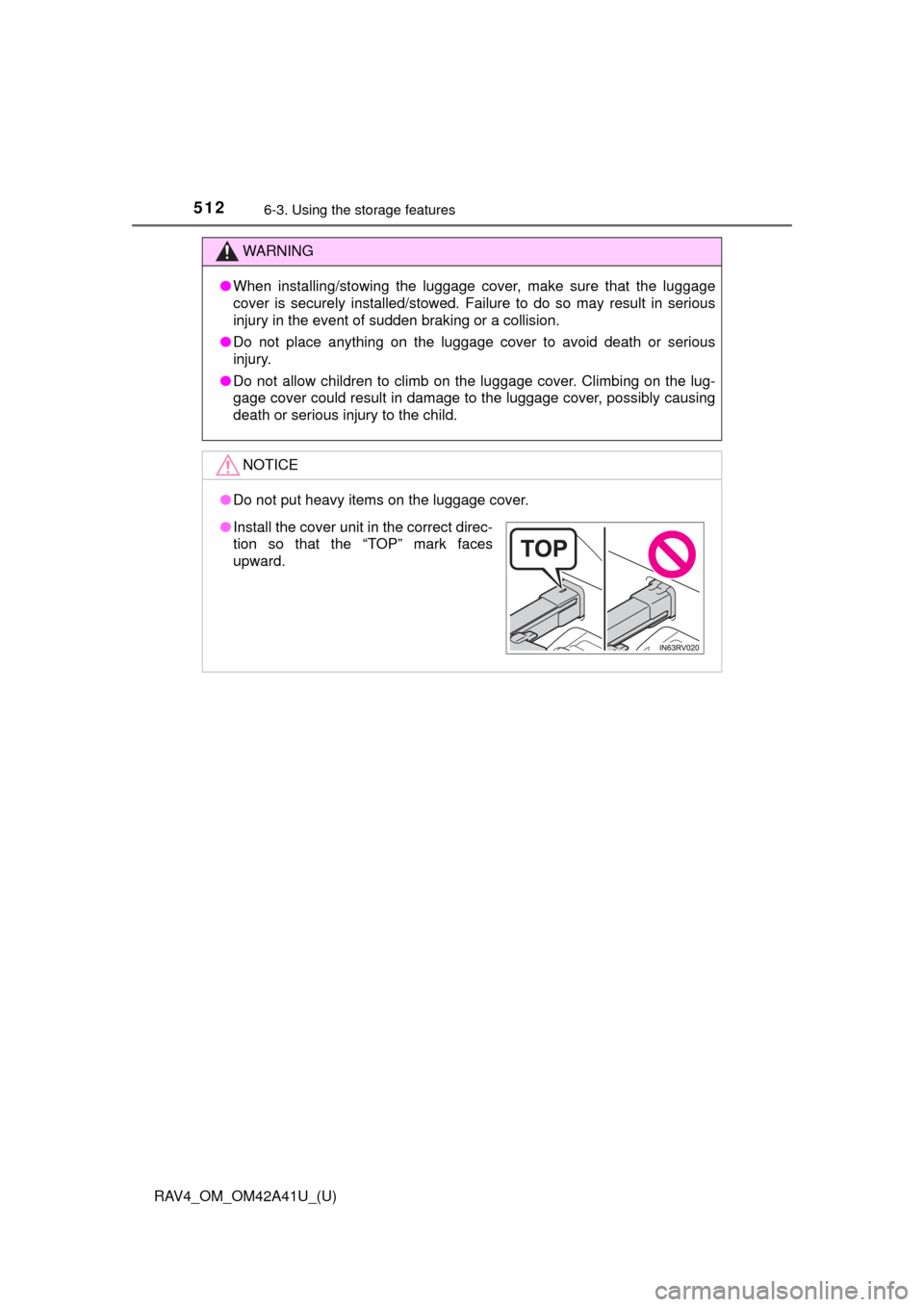
●Install the cover unit in the correct direc-
tion so that the “TOP” mark faces
upward.
Page 519 of 741

518
RAV4_OM_OM42A41U_(U)
6-3. Using the storage features
WARNING
Make sure to observe the following precautions. Failure to observe these
precautions may result in death or serious injury.
●Do not allow children to climb or ride on the rear cargo net.
● Do not load any luggage into the rear cargo net that extends beyond the
height of the pole.
● When installing the rear cargo net to the vehicle, check that both ends of
the pole are securely inserted into their fixed positions.
● When stowing the rear cargo net, securely fix it into the storage area.
NOTICE
●Do not place luggage weighing approximately 22.1 lb. (10 kg) or more
onto the rear cargo net.
● Install the pole to matching fixed positions on the left and right sides so
that the pole is straight. If the pole is installed at an angle, the rear cargo
net may come loose.
● Do not use the rear cargo net with only one pole installed. The pole may
move while the vehicle is in motion, resulting in damage to the rear cargo
net pole or other equipment in the luggage compartment.
Page 523 of 741
522
RAV4_OM_OM42A41U_(U)
6-4. Using the other interior features
An assist grip installed on the ceil-
ing can be used to support your
body while sitting on the seat.
Assist grips
WARNING
Do not use the assist grip when getting in or out of the vehicle or rising from
your seat.
Doing so could damage the assist grip, or could cause you to injure yourself
by falling over.
NOTICE
To prevent damage to the assist grip, do not hang any heavy object or put a
heavy load on the assist grip.
Page 527 of 741

526
RAV4_OM_OM42A41U_(U)
6-4. Using the other interior features
Press and hold the desired
HomeLink® button (inside the
vehicle) for 2 seconds and
release it. Repeat this
sequence (press/hold/
release) up to 3 times to
complete programming.
If the garage door opener motor
operates when the HomeLink®
button is pressed, the garage
door opener motor recognizes
the HomeLink
® signal.
■
Enabling 2-way communication with a garage door (only avail-
able for compatible devices)
When enabled, 2-way communication allows you to check the sta-
tus of the opening and closing of a garage door through indicators
in your vehicle.
2-way communication is only available if the garage door opener
motor used is a compatible device. (To check device compatibility,
refer to www.HomeLink.com.)
Within 5 seconds after programming the garage door opener has
been completed, if the garage door opener motor is trained to
HomeLink
®, both garage door operation indicators will flash rap-
idly (green) and the light on the garage door opener motor will
blink twice, indicating that 2-way communication is enabled.
If the indicators do not flash, perform
and within the first 10
presses of the HomeLink® button after programming has been
completed.
Press a programmed HomeLink
® button to operate a garage
door.
Within 1 minute of pressing the HomeLink
® button, after the
garage door operation has stopped, press the “Learn” or “Smart”
button on the garage door opener motor. Within 5 seconds of the
establishment of 2-way communication with the garage door
opener, both garage door operati on indicators in the vehicle will
flash rapidly (green) and the light on the garage door opener
motor will blink twice, indicating that 2-way communication is
enabled.
3
1
23
2
3
Page 529 of 741

528
RAV4_OM_OM42A41U_(U)
6-4. Using the other interior features
Press and hold the 2 outside but-
tons for 10 seconds until the
HomeLink
® indicator light
changes from continuously lit
(orange) to rapidly flashing
(green).
If you sell your vehicle, be sure to
erase the programs stored in the
HomeLink
® memory.
■ Codes stored in the HomeLink® memory
● The registered codes are not erased even if the battery cable is discon-
nected.
● If learning failed when registering a different code to a HomeLink
® button
that already has a code registered to it, the already registered code will not
be erased.
■ Before programming
●Install a new battery in the transmitter.
● The battery side of the transmitter must be pointed away from the Home-
Link
.
■ Certification for the garage door opener
For vehicles sold in the U.S.A.
NOTE:
This device complies with part 15 of the FCC Rules. Operation is subject to
the following two conditions: (1) This device may not cause harmful interfer-
ence, and (2) this device must accept any interference received, including
interference that may cause undesired operation.
FCC WARNING:
changes or modifications not expressly approved by the party responsible for
compliance could void the user’s authority to operate the equipment.
For vehicles sold in Canada
NOTE:
This device complies with Industry Canada licence-exempt RSS standard(s).
Operation is subject to the following two conditions: (1) this device may not
cause interference, and (2) this device must accept any interference, includ-
ing interference that may cause undesired operation of the device.
NOTE:
Le présent appareil est conforme aux CNR d’Industrie Canada applic\
ables
aux appareils radio exempts de licenc e. L’exploitation est autorisée aux deux
conditions suivantes : (1) l’appareil ne doit pas produire de brouillage, et (2)
l’utilisateur de l’appareil doit accepter tout brouillage radioélectrique subi,
même si le brouillage est susceptible d’en compromettre le fonctionnement.
Erasing the entire HomeLink® memory (all three codes)
Page 538 of 741

RAV4_OM_OM42A41U_(U)
5377-1. Maintenance and care
7
Maintenance and care
■Aluminum wheels (if equipped)
●Remove any dirt immediately by using a neutral detergent. Do not use hard
brushes or abrasive cleaners. Do not use strong or harsh chemical clean-
ers.
Use the same mild detergent and wax as used on the paint.
● Do not use detergent on the wheels when they are hot, for example after
driving for long distance in the hot weather.
● Wash detergent from the wheels immediately after use.
■ Bumpers
Do not scrub with abrasive cleaners.
WARNING
■When washing the vehicle
Do not apply water to the inside of the engine compartment. Doing so may
cause the electrical components etc. to catch fire.
■ Precautions regarding the exhaust pipes
Exhaust gases cause the exhaust pipes to become quite hot.
When washing the vehicle, be careful not to touch the pipes until they have
cooled sufficiently, as touching hot exhaust pipes can cause burns.
■ Precautions regarding the Blind Spot Monitor (if equipped)
If the paint of the rear bumper is chipped or scratched, the system may mal-
function. If this occurs, consult your Toyota dealer.