Page 208 of 620
208
PRIUS v_OM_OM47B12U_(U)
4-4. Refueling
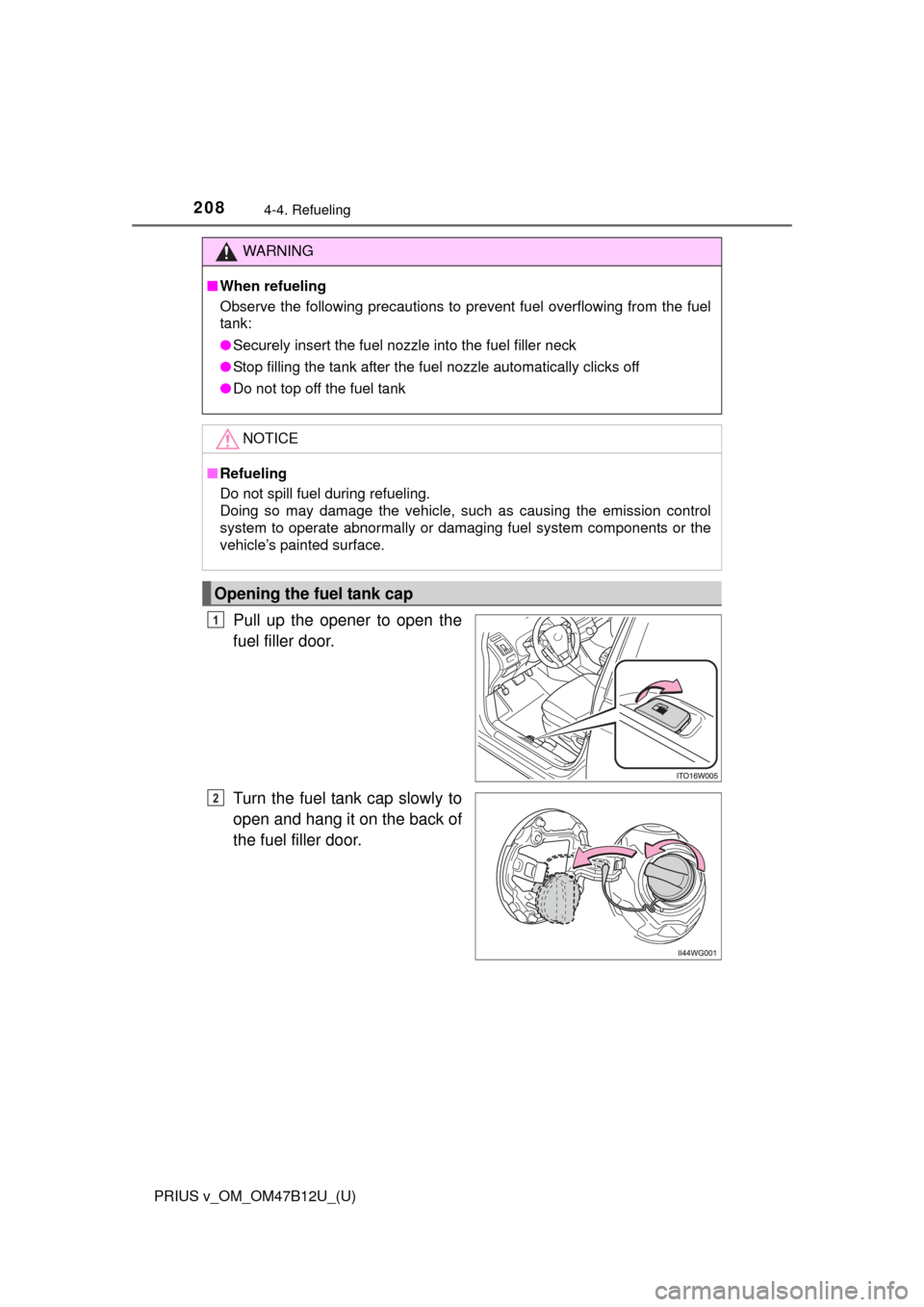
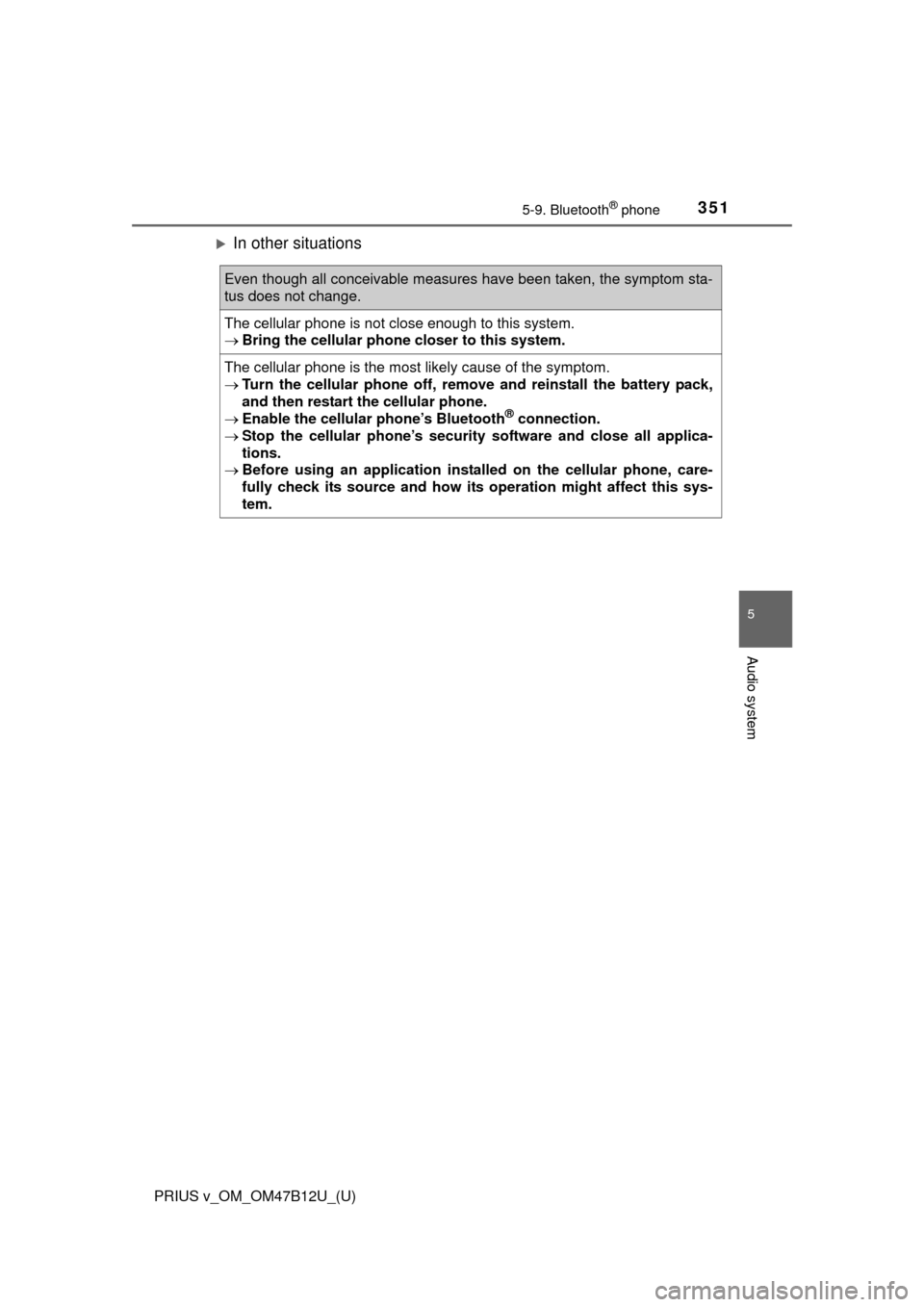
Pull up the opener to open the
fuel filler door.
Turn the fuel tank cap slowly to
open and hang it on the back of
the fuel filler door.
WARNING
■When refueling
Observe the following precautions to prevent fuel overflowing from the fuel
tank:
●Securely insert the fuel nozzle into the fuel filler neck
●Stop filling the tank after the fuel nozzle automatically clicks off
●Do not top off the fuel tank
NOTICE
■Refueling
Do not spill fuel during refueling.
Doing so may damage the vehicle, such as causing the emission control
system to operate abnormally or damaging fuel system components or the
vehicle’s painted surface.
Opening the fuel tank cap
1
2
Page 315 of 620
315
PRIUS v_OM_OM47B12U_(U)
5-7. Connecting Bluetooth®
5
Audio system
Registering a Bluetooth® device
Display the “Bluetooth* Setup” screen. (P. 312)
*: Bluetooth is a registered trademark of Bluetooth SIG, Inc.
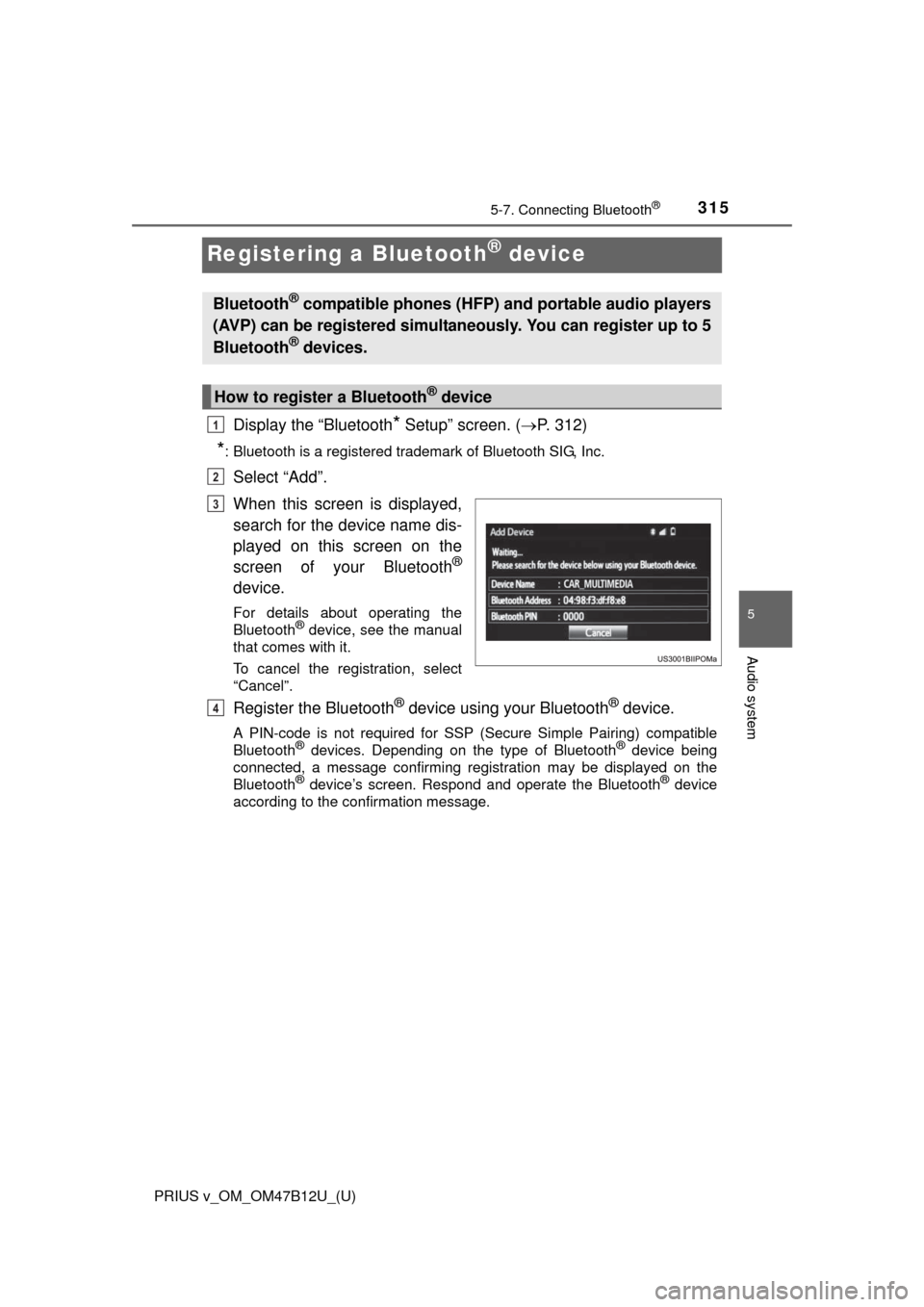
Select “Add”.
When this screen is displayed,
search for the device name dis-
played on this screen on the
screen of your Bluetooth
®
device.
For details about operating the
Bluetooth® device, see the manual
that comes with it.
To cancel the registration, select
“Cancel”.
Register the Bluetooth® device using your Bluetooth® device.
A PIN-code is not required for SSP (Secure Simple Pairing) compatible
Bluetooth® devices. Depending on the type of Bluetooth® device being
connected, a message confirming registration may be displayed on the
Bluetooth
® device’s screen. Respond and operate the Bluetooth® device
according to the confirmation message.
Bluetooth® compatible phones (HFP) and portable audio players
(AVP) can be registered simultaneously. You can register up to 5
Bluetooth
® devices.
How to register a Bluetooth® device
1
2
3
4
Page 351 of 620
PRIUS v_OM_OM47B12U_(U)
3515-9. Bluetooth® phone
5
Audio system
In other situations
Even though all conceivable measures have been taken, the symptom sta-
tus does not change.
The cellular phone is not close enough to this system.
Bring the cellular phone closer to this system.
The cellular phone is the most likely cause of the symptom.
Turn the cellular phone off, remove and reinstall the battery pack,
and then restart the cellular phone.
Enable the cellular phone’s Bluetooth
® connection.
Stop the cellular phone’s security software and close all applica-
tions.
Before using an application installed on the cellular phone, care-
fully check its source and how its operation might affect this sys-
tem.
Page 381 of 620
381
PRIUS v_OM_OM47B12U_(U)
6-3. Using the storage features
6
Interior features
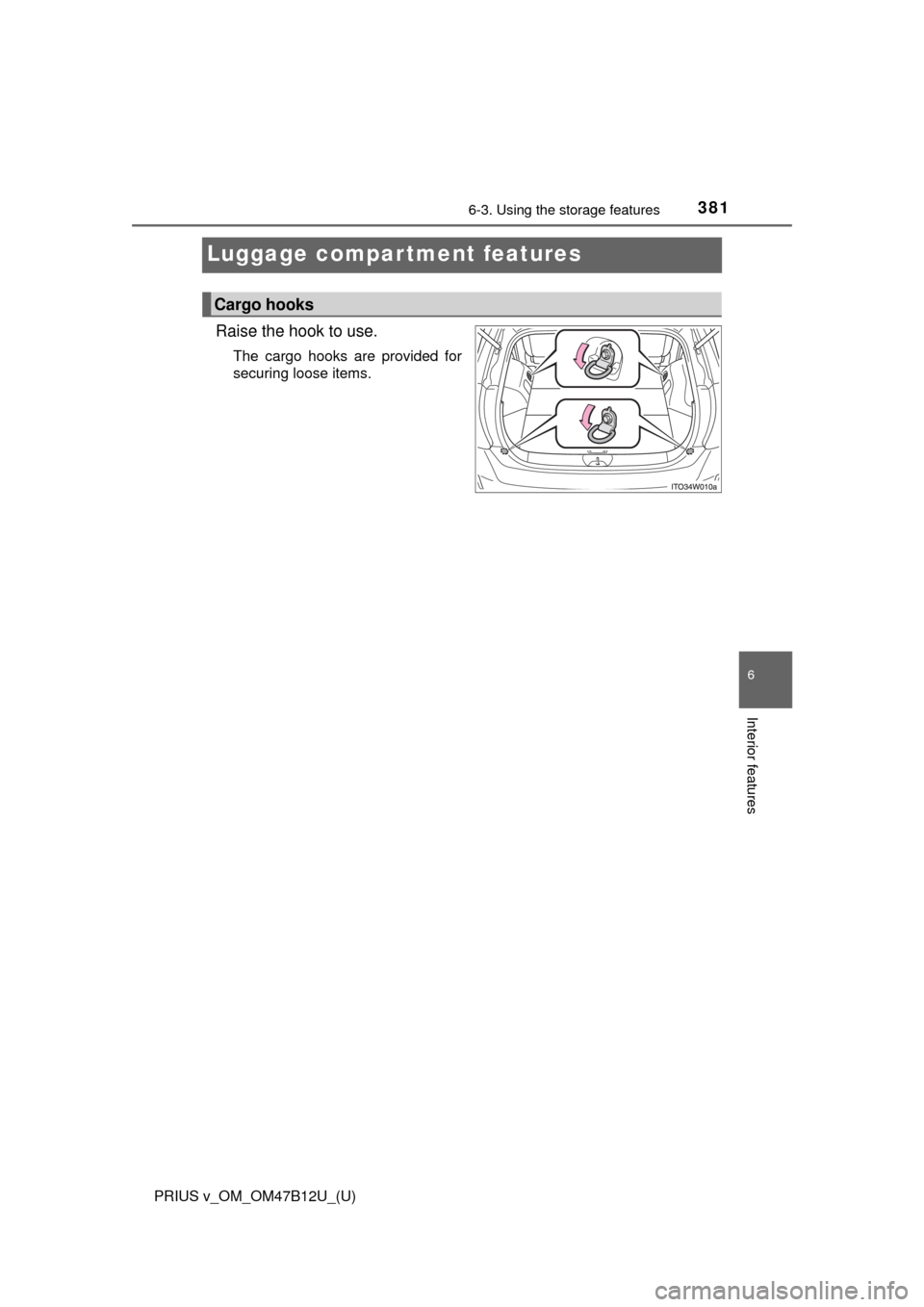
Luggage compartment features
Raise the hook to use.
The cargo hooks are provided for
securing loose items.
Cargo hooks
Page 383 of 620
PRIUS v_OM_OM47B12U_(U)
3836-3. Using the storage features
6
Interior features
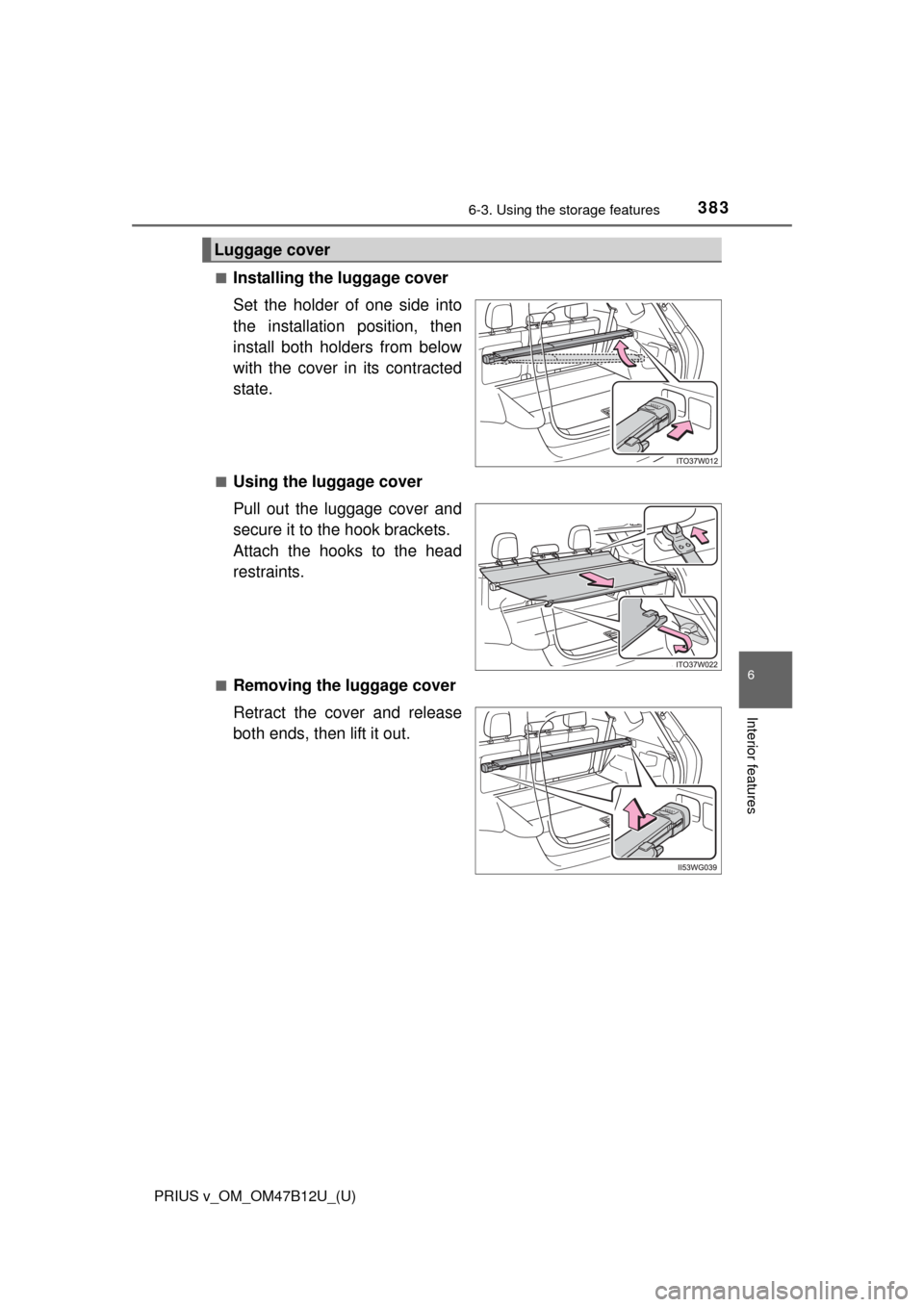
■Installing the luggage cover
Set the holder of one side into
the installation position, then
install both holders from below
with the cover in its contracted
state.
■Using the luggage cover
Pull out the luggage cover and
secure it to the hook brackets.
Attach the hooks to the head
restraints.
■Removing the luggage cover
Retract the cover and release
both ends, then lift it out.
Luggage cover
Page 384 of 620
384
PRIUS v_OM_OM47B12U_(U)
6-3. Using the storage features
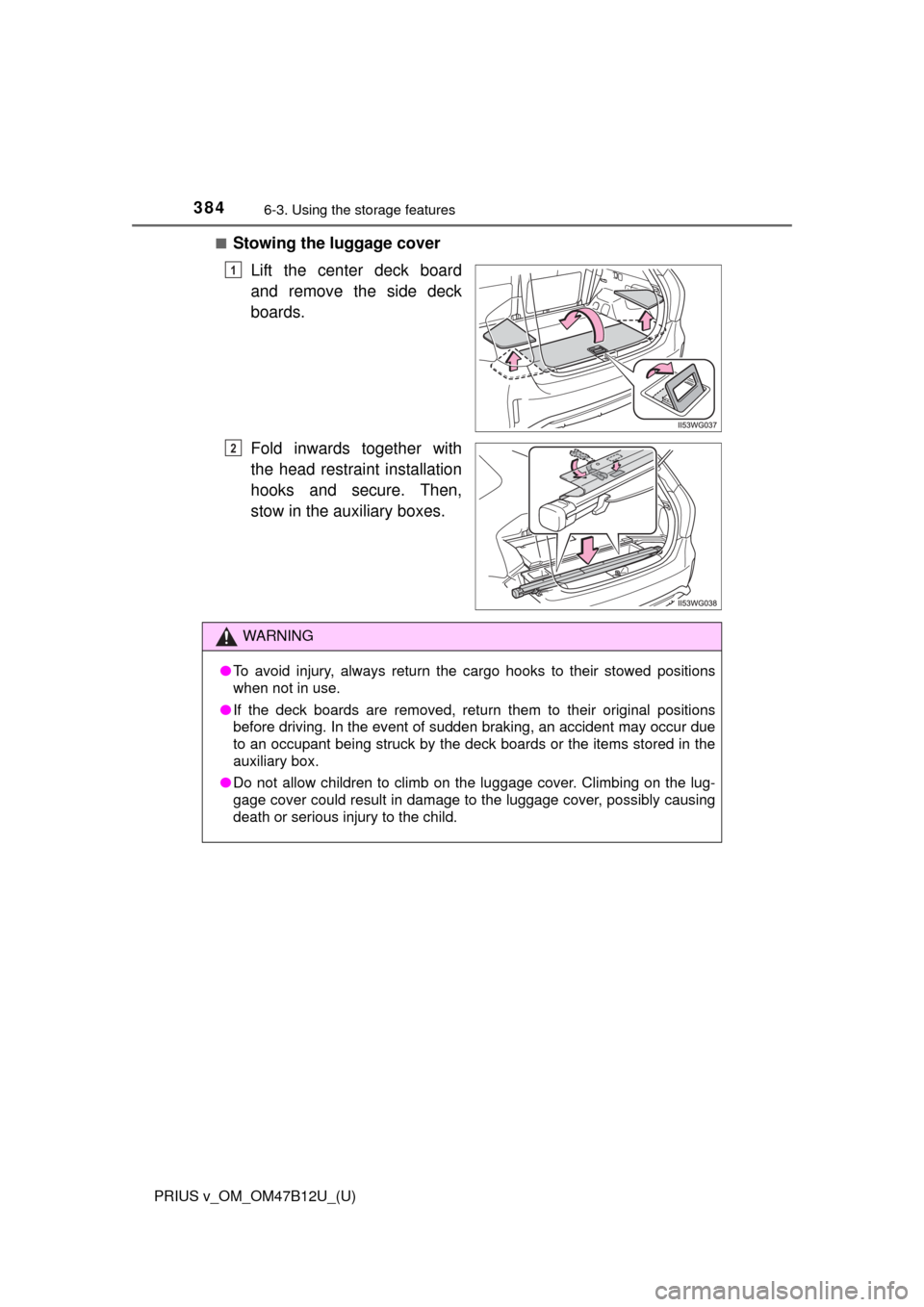
■Stowing the luggage cover
Lift the center deck board
and remove the side deck
boards.
Fold inwards together with
the head restraint installation
hooks and secure. Then,
stow in the auxiliary boxes.
1
2
WARNING
●To avoid injury, always return the cargo hooks to their stowed positions
when not in use.
●If the deck boards are removed, return them to their original positions
before driving. In the event of sudden braking, an accident may occur due
to an occupant being struck by the deck boards or the items stored in the
auxiliary box.
●Do not allow children to climb on the luggage cover. Climbing on the lug-
gage cover could result in damage to the luggage cover, possibly causing
death or serious injury to the child.
Page 391 of 620
391
PRIUS v_OM_OM47B12U_(U)
6-4. Using the other interior features
6
Interior features
Garage door opener
The garage door opener (HomeLink® Universal Transceiver) is manu-
factured under license from HomeLink®.
The HomeLink
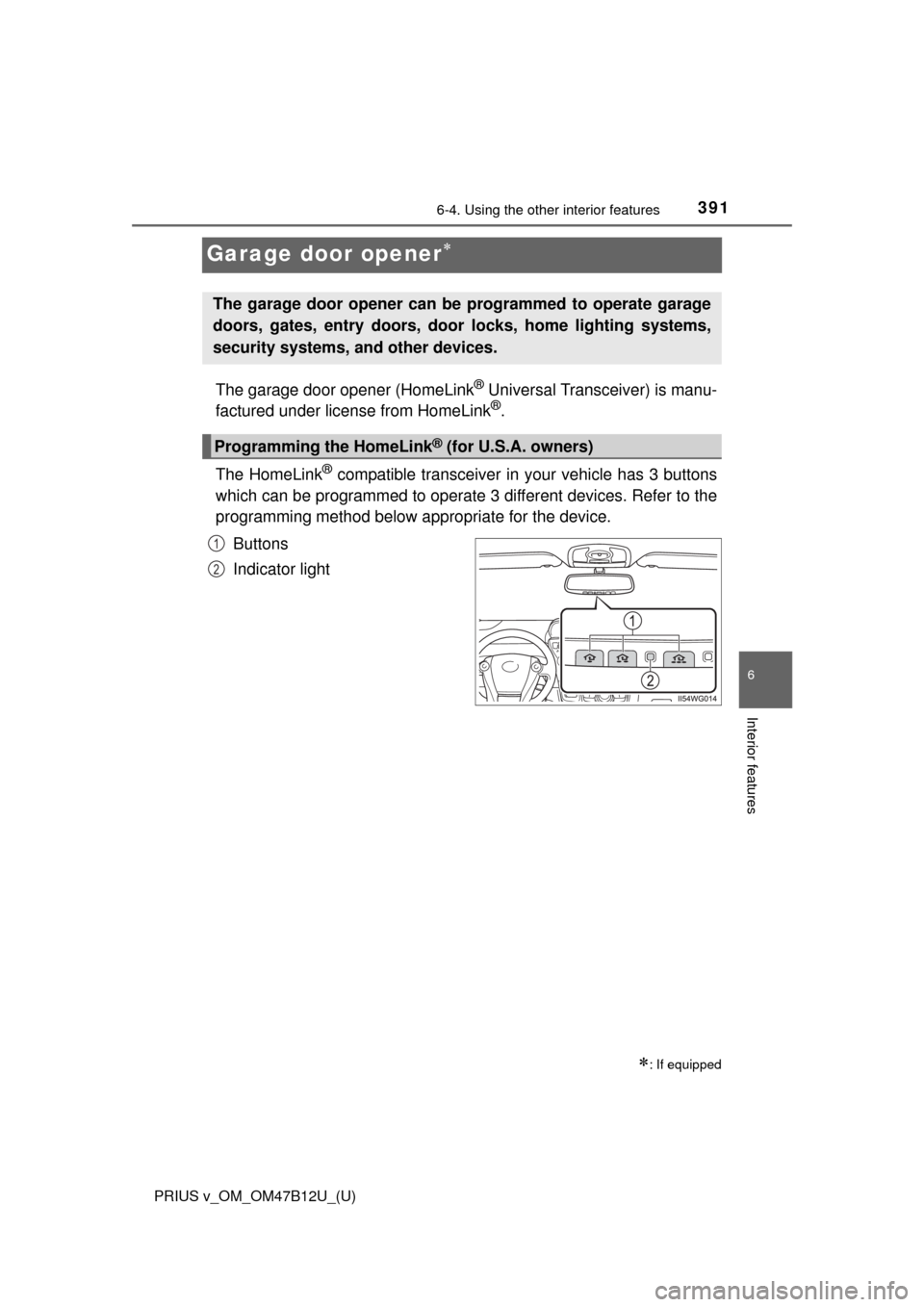
® compatible transceiver in your vehicle has 3 buttons
which can be programmed to operate 3 different devices. Refer to the
programming method below appropriate for the device.
Buttons
Indicator light
: If equipped
The garage door opener can be programmed to operate garage
doors, gates, entry doors, door locks, home lighting systems,
security systems, and other devices.
Programming the HomeLink® (for U.S.A. owners)
1
2
Page 395 of 620
PRIUS v_OM_OM47B12U_(U)
3956-4. Using the other interior features
6
Interior features
■Programming an entry gate (for U.S.A. owners)/Programming a
devices in the Canadian market
Place the remote control transmitter 1 to 3 in. (25 to 75 mm)
away from the HomeLink
® buttons.
Keep the HomeLink® indicator light in view while programming.
Press and hold the selected HomeLink® button.
Repeatedly press and release (cycle) the remote control trans-
mitter for 2 seconds each until step 4 is completed.
When the HomeLink
® indicator light starts to flash rapidly,
release the buttons.
Test the HomeLink
® operation by pressing the newly pro-
grammed button. Check to see if the gate/device operates cor-
rectly.
Repeat the steps above to program another device for any of the
remaining HomeLink
® buttons.
■Programming other devices
To program other devices such as home security systems, home
door locks and lighting, contact your Toyota dealer for assistance.
■Reprogramming a button
The individual HomeLink
® buttons cannot be erased but can be
reprogrammed. To reprogram a button, follow the “Reprogramming
a HomeLink
® button” instructions.
Press the appropriate HomeLink
® button. The HomeLink® indicator
light should come on.
The HomeLink® compatible transceiver in your vehicle continues to send a
signal for up to 20 seconds as long as the button is pressed.
Operating HomeLink®
1
2
3
4
5
6