Page 89 of 620
PRIUS v_OM_OM47B12U_(U)
892. Instrument cluster
2
Instrument cluster
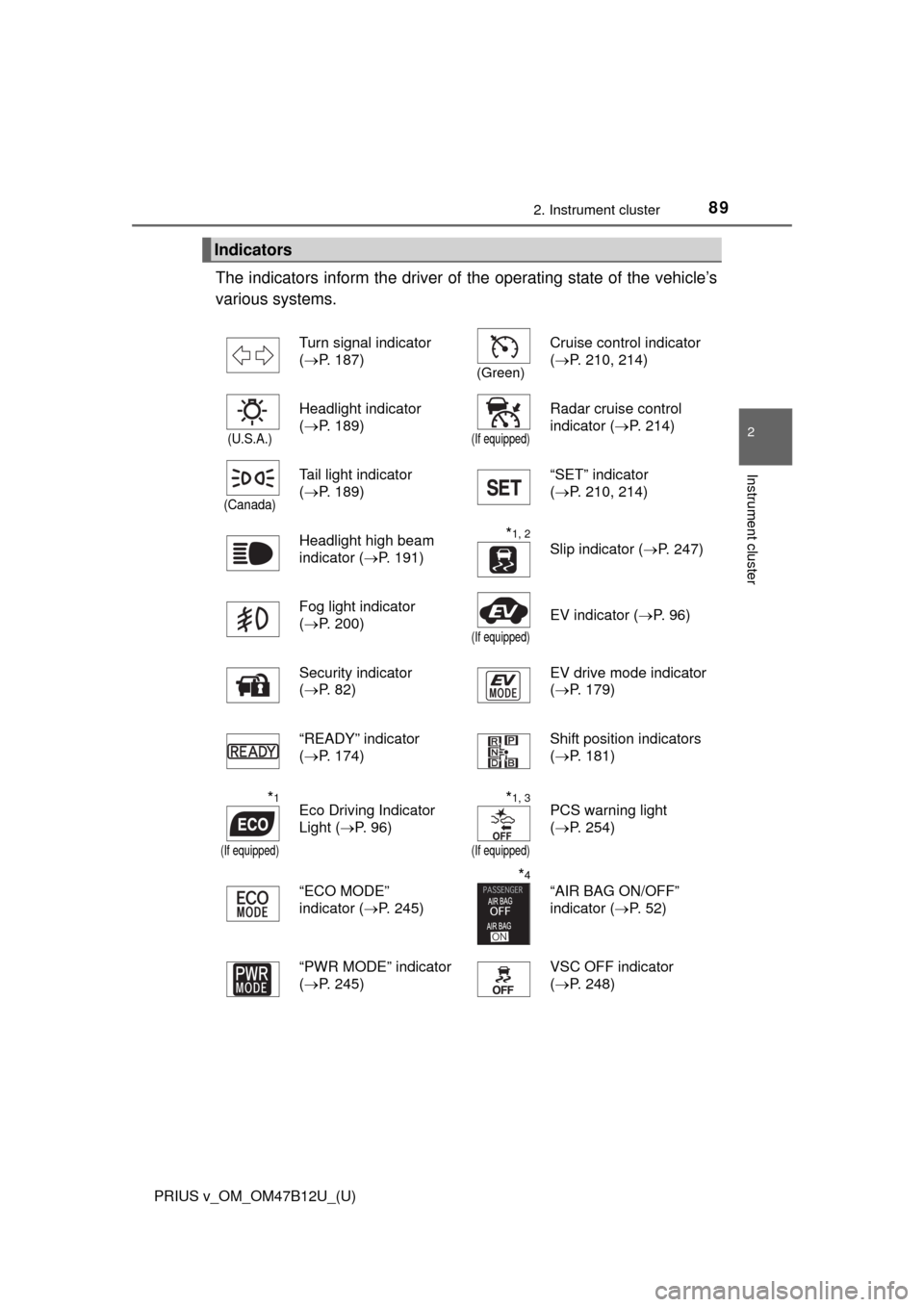
The indicators inform the driver of the operating state of the vehicle’s
various systems.
Indicators
Turn signal indicator
(P. 187)
(Green)
Cruise control indicator
(P. 210, 214)
(U.S.A.)
Headlight indicator
(P. 189)
(If equipped)
Radar cruise control
indicator (P. 214)
(Canada)
Tail light indicator
(P. 189)“SET” indicator
(P. 210, 214)
Headlight high beam
indicator (P. 191)
*1, 2
Slip indicator (P. 247)
Fog light indicator
(P. 200)
(If equipped)
EV indicator (P. 9 6 )
Security indicator
(P. 82)EV drive mode indicator
(P. 179)
“READY” indicator
(P. 174)Shift position indicators
(P. 181)
*1
(If equipped)
Eco Driving Indicator
Light (P. 96)*1, 3
(If equipped)
PCS warning light
(P. 254)
“ECO MODE”
indicator (P. 245)
*4
“AIR BAG ON/OFF”
indicator (P. 5 2 )
“PWR MODE” indicator
(P. 245)VSC OFF indicator
(P. 248)
Page 116 of 620
116
PRIUS v_OM_OM47B12U_(U)
3-1. Key information
Keys
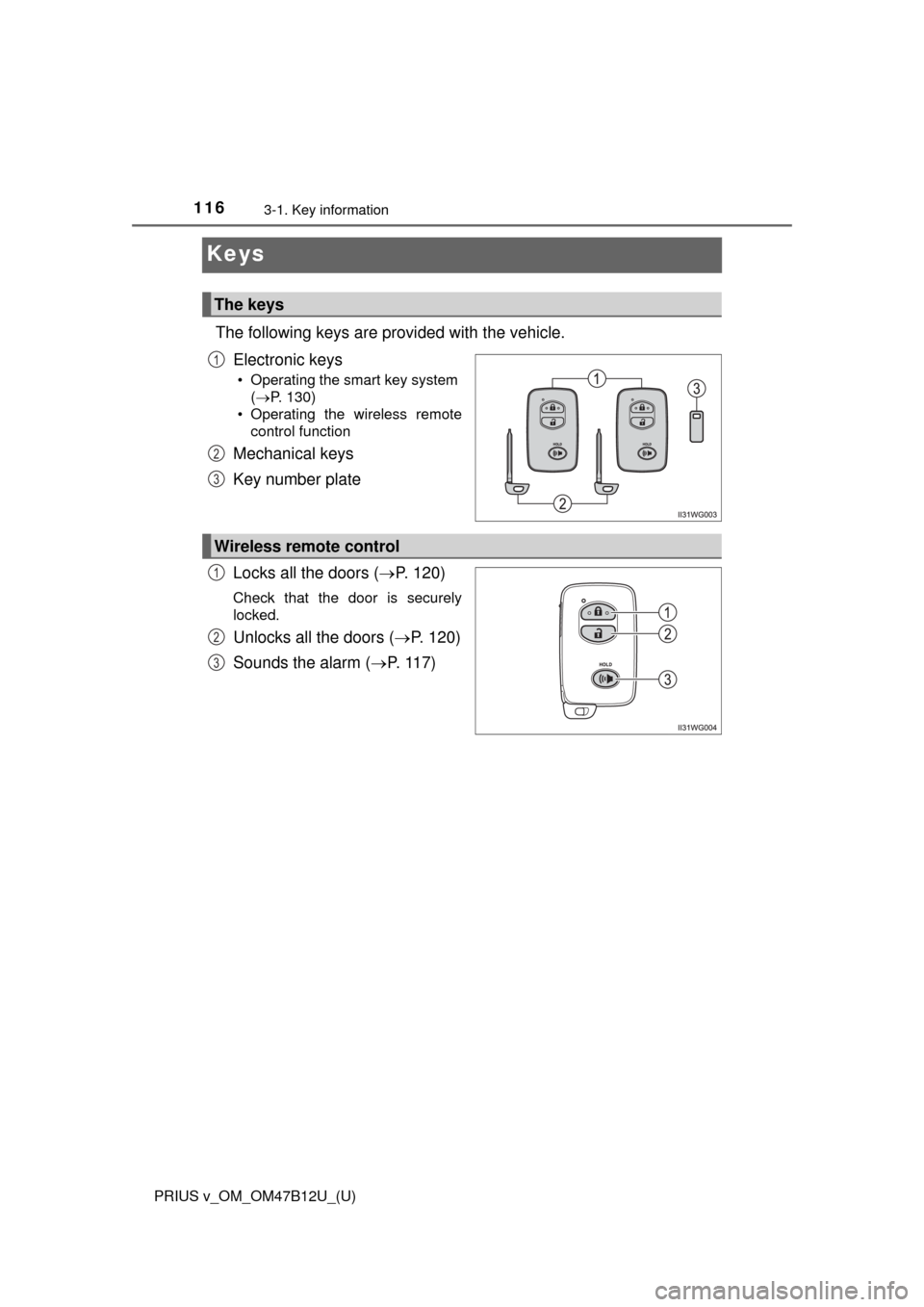
The following keys are provided with the vehicle.
Electronic keys
• Operating the smart key system
(P. 130)
• Operating the wireless remote
control function
Mechanical keys
Key number plate
Locks all the doors (P. 120)
Check that the door is securely
locked.
Unlocks all the doors (P. 120)
Sounds the alarm (P. 117)
The keys
1
2
3
Wireless remote control
1
2
3
Page 120 of 620
120
PRIUS v_OM_OM47B12U_(U)
3-2. Opening, closing and locking the doors
Side doors
◆Smart key system
Carry the electronic key to enable this function.
Grip the driver’s door handle
or front passenger door han-
dle with the sensor (if
equipped) to unlock the door.
Make sure to touch the sensor
on the back of the handle.
The doors cannot be unlocked
for 3 seconds after the doors are
locked.
Touch the lock sensor (the indentation on the upper part of the
front door handle) to lock the doors.
Check that the door is securely locked.
◆Wireless remote control
Locks all the doors
Check that the door is securely
locked.
Unlocks all the doors
Pressing the button unlocks the
driver’s door. Pressing the but-
ton again within 3 seconds
unlocks the other doors.
The vehicle can be locked and unlocked using the entry func-
tion, wireless remote control or door lock switch.
Unlocking and locking the doors from the outside
1
2
1
2
Page 121 of 620

PRIUS v_OM_OM47B12U_(U)
1213-2. Opening, closing and locking the doors
3
Operation of each component
■Operation signals
A buzzer sounds and the emergency flashers flash to indicate that the doors
have been locked/unlocked. (Locked: Once; Unlocked: Twice)
■Security feature
If a door is not opened within approximately 60 seconds after the vehicle is
unlocked, the security feature automatically locks the vehicle again.
■When the door cannot be locked by the lock sensor on the upper part of
the door handle
■Door lock buzzer
If an attempt to lock the doors is made when a door is not fully closed, a
buzzer sounds continuously for 5 seconds. Fully close the door to stop the
buzzer, and lock the vehicle once more.
■If the smart key system or the wireless remote control does not operate
properly
●Use the mechanical key to lock and open the doors. (P. 536)
●Replace the key battery with a new one if it is depleted. (P. 461) If the door will not lock even when the top-
side sensor area is touched, try touching
both the topside and underside sensor
areas at the same time.
Page 125 of 620
125
PRIUS v_OM_OM47B12U_(U)
3-2. Opening, closing and locking the doors
3
Operation of each component
Back door
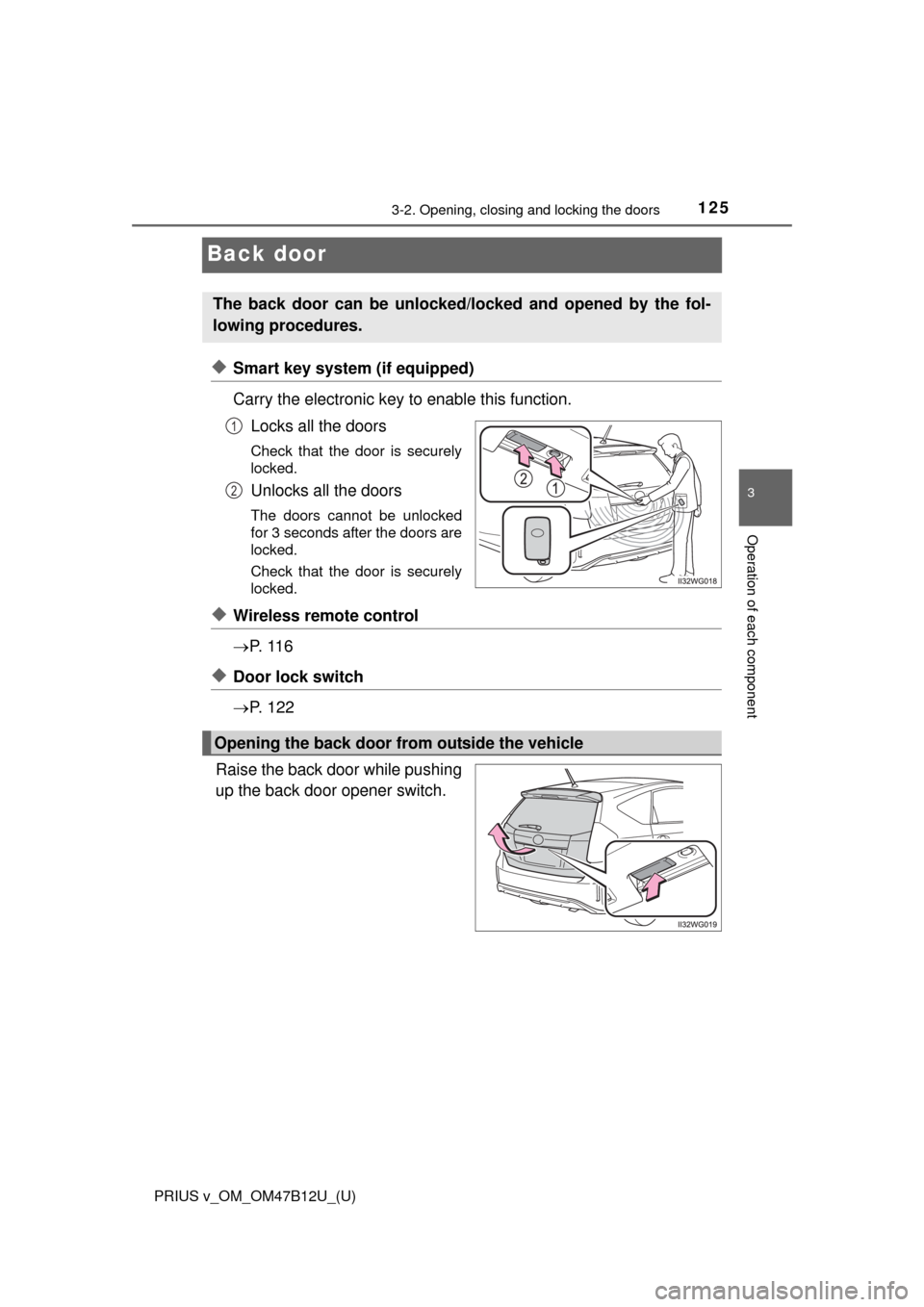
◆Smart key system (if equipped)
Carry the electronic key to enable this function.
Locks all the doors
Check that the door is securely
locked.
Unlocks all the doors
The doors cannot be unlocked
for 3 seconds after the doors are
locked.
Check that the door is securely
locked.
◆Wireless remote control
P. 1 1 6
◆Door lock switch
P. 1 2 2
Raise the back door while pushing
up the back door opener switch.
The back door can be unlocked/locked and opened by the fol-
lowing procedures.
1
2
Opening the back door from outside the vehicle
Page 128 of 620
128
PRIUS v_OM_OM47B12U_(U)
3-2. Opening, closing and locking the doors
WARNING
■Operating the back door
Observe the following precautions.
Failure to do so may cause parts of the body to be caught, resulting in death
or serious injury.
●Remove any heavy loads, such as snow and ice, from the back door
before opening it. Failure to do so may cause the back door to suddenly
shut again after it is opened.
●When opening or closing the back door, thoroughly check to make sure
the surrounding area is safe.
●If anyone is in the vicinity, make sure they are safe and let them know that
the back door is about to open or close.
●Use caution when opening or closing the back door in windy weather as it
may move abruptly in strong wind.
●Do not pull on the back door damper stay to close the back door, and do
not hang on the back door damper stay.
Doing so may cause hands to be caught or the back door damper stay to
break, causing an accident.
●If a bicycle carrier or similar heavy object is attached to the back door, it
may suddenly shut closed again after being opened, causing someone’s
hands, head or neck to be caught and injured. When installing an acces-
sory part to the back door, using a genuine Toyota part is recommended.
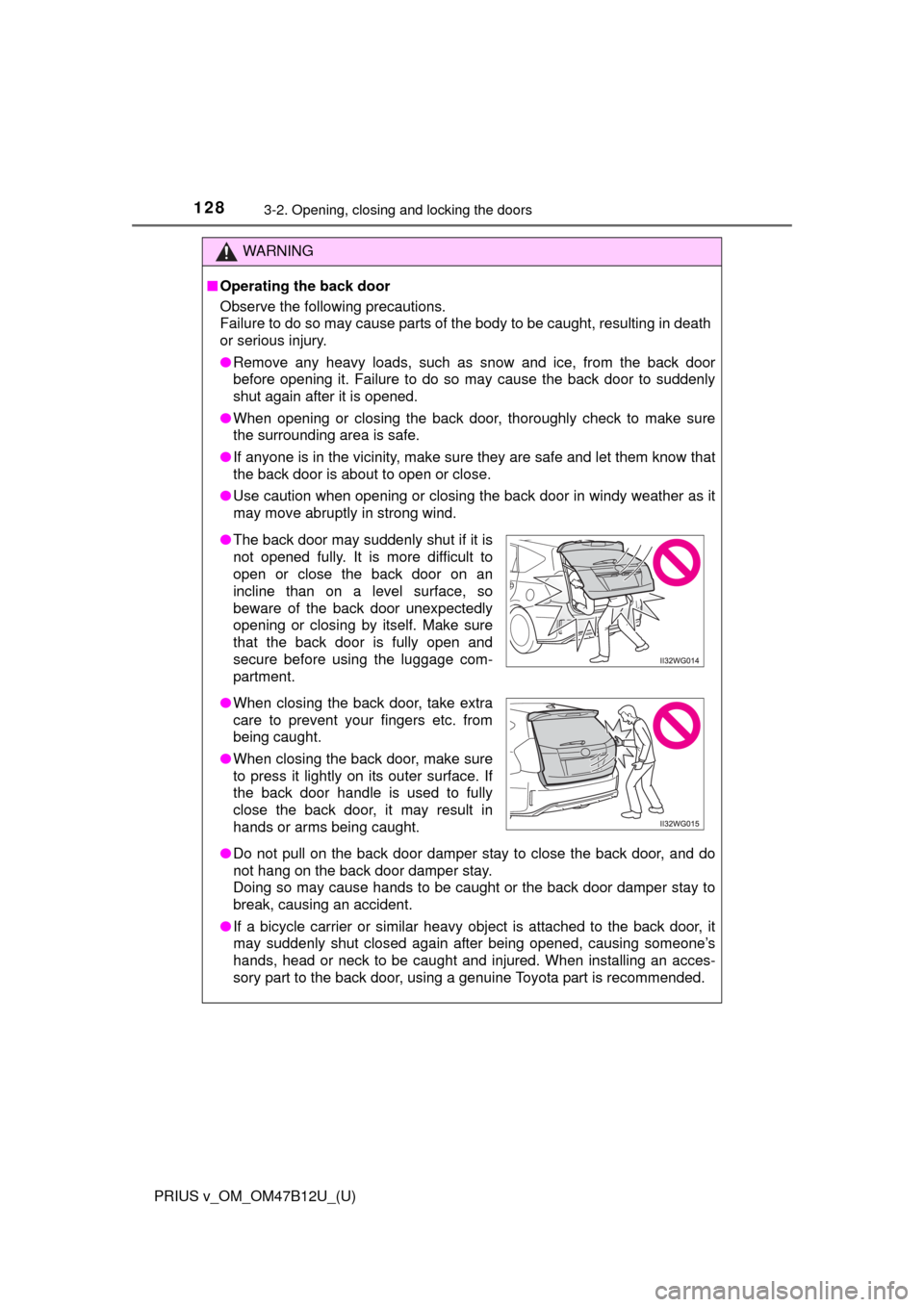
●The back door may suddenly shut if it is
not opened fully. It is more difficult to
open or close the back door on an
incline than on a level surface, so
beware of the back door unexpectedly
opening or closing by itself. Make sure
that the back door is fully open and
secure before using the luggage com-
partment.
●When closing the back door, take extra
care to prevent your fingers etc. from
being caught.
●When closing the back door, make sure
to press it lightly on its outer surface. If
the back door handle is used to fully
close the back door, it may result in
hands or arms being caught.
Page 134 of 620

134
PRIUS v_OM_OM47B12U_(U)
3-2. Opening, closing and locking the doors
■Note for the entry function
●Even when the electronic key is within the effective range (detection areas),
the system may not operate properly in the following cases:
• The electronic key is too close to the window or outside door handle, near
the ground, or in a high place when the doors are locked or unlocked.
• The electronic key is near the ground or in a high place, or too close to
the rear bumper center when the back door is opened.
• The electronic key is on the instrument panel, luggage room, floor, or in
the door pockets or glove box when the hybrid system is started or power
switch modes are changed.
●Do not leave the electronic key on top of the instrument panel or near the
door pockets when exiting the vehicle. Depending on the radio wave recep-
tion conditions, it may be detected by the antenna outside the cabin and the
door will become lockable from the outside, possibly trapping the electronic
key inside the vehicle.
●As long as the electronic key is within the effective range, the doors may be
unlocked or locked by anyone.
●Even if the electronic key is not inside the vehicle, it may be possible to start
the hybrid system if the electronic key is near the window.
●The doors may unlock if a large amount of water splashes on the door han-
dle, such as in the rain or in a car wash when the electronic key is within the
effective range. (The door will automatically be locked after approximately
60 seconds if the doors are not opened and closed.)
●If the wireless remote control is used to lock the doors when the electronic
key is near the vehicle, there is a possibility that the door may not be
unlocked by the entry function. (Use the wireless remote control to unlock
the doors.)
●Touching the door lock sensor while wearing gloves may delay or prevent
lock operation. Remove the gloves and touch the lock sensor again.
●When the lock operation is performed using the lock sensor, recognition sig-
nals will be shown up to two consecutive times. After this, no recognition
signals will be given.
●If the door handle becomes wet while the electronic key is within the effec-
tive range, the door may unlock and lock repeatedly. Place the key in a posi-
tion 6 ft. (2 m) or more separate from the vehicle while the vehicle is being
washed. (Take care to ensure that the key is not stolen.)
●If the electronic key is inside the vehicle and a door handle becomes wet
during a car wash, a message may be shown on the multi-information dis-
play (if equipped) and a buzzer will sound outside the vehicle. To turn off the
alarm, lock all the doors.
●The lock sensor may not work properly if it comes into contact with ice,
snow, mud, etc. Clean the lock sensor and attempt to operate it again, or
use the lock sensor on the lower part of the door handle.
Page 143 of 620
PRIUS v_OM_OM47B12U_(U)
1433-3. Adjusting the seats
3
Operation of each component
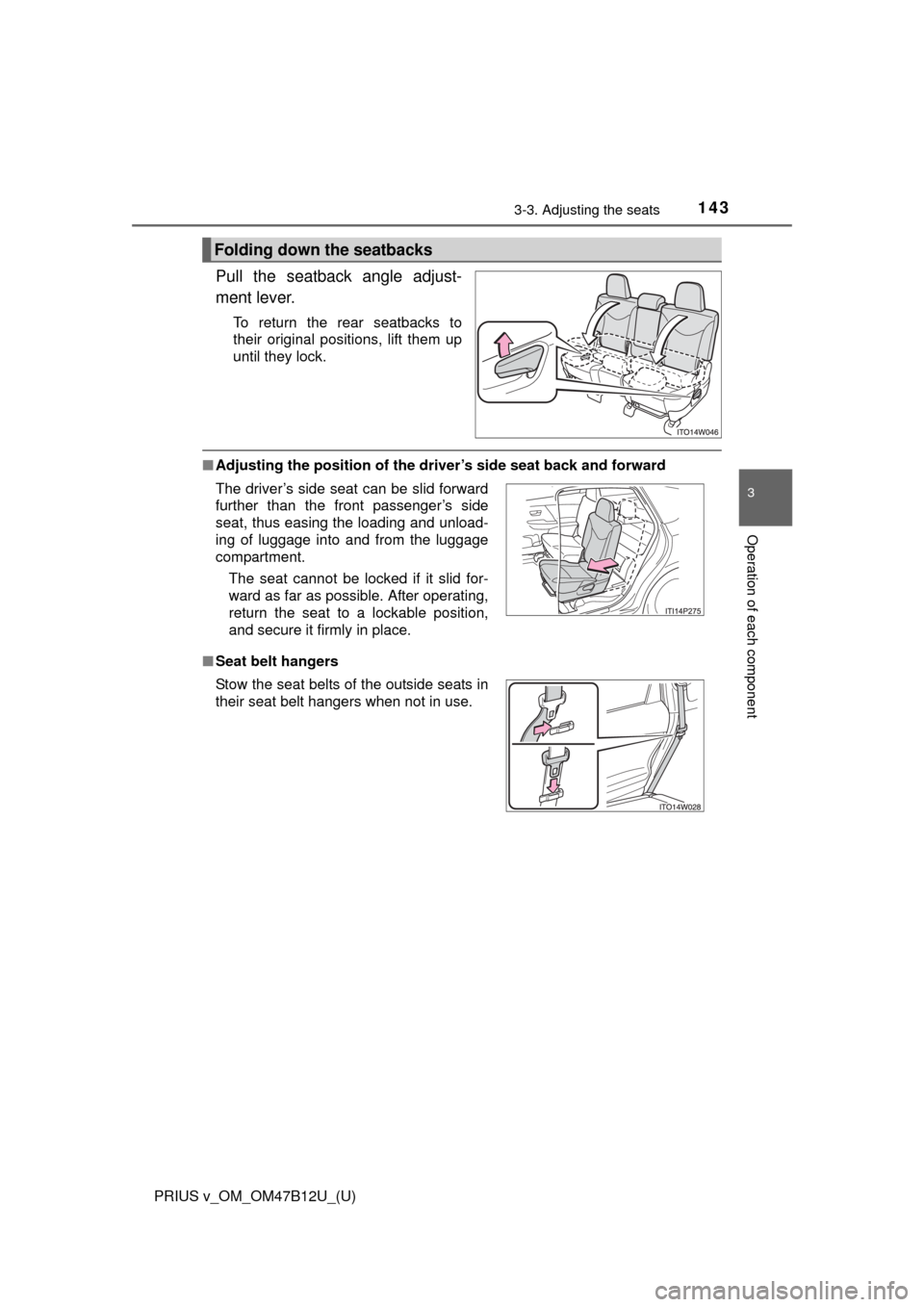
Pull the seatback angle adjust-
ment lever.
To return the rear seatbacks to
their original positions, lift them up
until they lock.
■Adjusting the position of the driver’s side seat back and forward
■Seat belt hangers
Folding down the seatbacks
The driver’s side seat can be slid forward
further than the front passenger’s side
seat, thus easing the loading and unload-
ing of luggage into and from the luggage
compartment.
The seat cannot be locked if it slid for-
ward as far as possible. After operating,
return the seat to a lockable position,
and secure it firmly in place.
Stow the seat belts of the outside seats in
their seat belt hangers when not in use.