2016 SUBARU WRX change time
[x] Cancel search: change timePage 374 of 594

When leaving the vehicle, make sure the
lights are turned off to avoid battery
discharge.
! Automatic illumination (type A map
lights)
The map lights illuminate automatically in
the following cases.
. Any of the doors is opened.
. The doors are unlocked using the
keyless access function (if equipped).
Refer to “ Locking and unlocking with
“ keyless access ” entry function ” F 2-13.
. The doors are unlocked using the
remote keyless entry transmitter.
. The ignition switch is turned from the
“ ACC ” position to the “ LOCK ” / “ OFF ” posi-
tion. & OFF delay timer The following lights have an automatic
illumination function.
. dome light (when the dome light switch
is in the “ DOOR ” position)
. map light (type A)
After being illuminated automatically,
these lights remain on for several seconds
and then gradually turn off after all doors
are closed.
While the lights are illuminated, if any of
the following operations are performed,
the lights turn off immediately.
. The ignition switch is turned from the
“ LOCK ” / “ OFF ” position to the “ ACC ” or
“ ON ” position.
. All doors are locked using the keyless
access function (if equipped).
. All doors are locked using the remote
keyless entry system.
The setting for the period of time in which
the lights remain on (OFF delay timer) can
be changed by a SUBARU dealer. Con-
tact your SUBARU dealer for details. Also,
the setting can be changed by operating
the multi function display. For details, refer
to “ Interior light off delay timer setting ” F 3-
87. Sun visors
To block out glare, swing down the visors.
To use the sun visor at a side window,
swing it down and move it sideways. Interior equipment/Sun visors
– CONTINUED –6-3
Page 399 of 594

Starting and operating/Starting and stopping the engine (models without push – button start system)
. When starting the engine, be sure
to sit in the driver ’ s seat (except
when using the remote engine
start system).
NOTE . Avoid rapid racing and rapid accel-
eration immediately after the engine
has started.
. For a short time after the engine has
started, the engine speed is kept high.
When the warm-up is completed, the
engine speed lowers automatically.
. On rare occasions, it may be difficult
to start the engine depending on the
fuel and the usage condition (repeated
driving of a distance in which the
engine has not warmed up sufficiently).
In such a case, it is recommended that
you change to a different brand of fuel.
. On rare occasions, transient knock-
ing may be heard from the engine when
the accelerator is operated rapidly
such as a rapid start-up and a rapid
acceleration. This is not a malfunction.
. The engine starts more easily when
the headlights, air conditioner and rear
window defogger are turned off.
. After the engine starts, the engine
speed will be kept high until the engine
has warmed up sufficiently. ! MT models
1. Apply the parking brake.
2. Turn off unnecessary lights and ac-
cessories.
3. Depress the clutch pedal to the floor
and shift the shift lever into neutral. Hold
the clutch pedal to the floor while starting
the engine.
The starter motor will only operate when
the clutch pedal is depressed fully to the
floor.
4. Turn the ignition switch to the “ ON ”
position and check the operation of the
warning and indicator lights. Refer to
“ Warning and indicator lights ” F 3-13.
5. Turn the ignition switch to the “ START ”
position without depressing the accelera-
tor pedal. Release the key immediately
after the engine has started.
If the engine does not start, try the
following.
(1) Turn the ignition switch to the
“ LOCK ” position and wait for at least
10 seconds. After checking that the
parking brake is firmly set, turn the
ignition switch to the “ START ” position
while depressing the accelerator pedal
slightly (approximately a quarter of the
full stroke). Release the accelerator
pedal as soon as the engine starts.
(2) If this fails to start the engine, turn the ignition switch back to the “ LOCK ”
position and wait for at least 10
seconds. Then fully depress the accel-
erator pedal and turn the ignition
switch to the “ START ” position. If the
engine starts, quickly release the
accelerator pedal.
(3) If this fails to start the engine, turn
the ignition switch again to the “ LOCK ”
position. After waiting for 10 seconds
or longer, turn the ignition switch to the
“ START ” position without depressing
the accelerator pedal.
(4) If the engine still refuses to start,
contact your nearest SUBARU dealer
for assistance.
6. Confirm that all warning and indicator
lights have turned off after the engine has
started. The fuel injection system auto-
matically lowers the idle speed as the
engine warms up.
! CVT models
1. Apply the parking brake.
2. Turn off unnecessary lights and ac-
cessories.
3. Shift the select lever to the “ P ” or
“ N ”
position
(preferably the “ P ” position).
The starter motor will only operate when
the select lever is at the “ P ” or “ N ” position.
4. Turn the ignition switch to the “ ON ”7-10
Page 405 of 594

Starting and operating/Remote engine start system (dealer option)
! Stopping the engine
Press and hold the lock button to stop the
engine with remote engine start system.
! Automatic engine shutdown
The remote engine start system will
automatically shut down or will not start
the engine under the following conditions.
. The total run-time has exceeded 20
minutes.
. Any door is opened.
. The select lever is moved to any
position other than “ P ” .
. The engine hood is opened.
. Thepush-buttonignitionswitchis
pressed.
. The brake pedal is depressed.
. The engine speed is 3,000 rpm or
more.
The time setting until the engine auto-
matically stops can be changed. To
change it, please contact your SUBARU
dealer. Note that some settings may
violate state, provincial, or local laws and
regulations. Check the laws in your area to
determine which setting is permitted. & Entering the vehicle while it
is running via remote start 1. Unlock the vehicle doors using the
keyless access function. If the vehicle ’ s
doors are unlocked manually using the
key, the vehicle ’ s alarm system will trigger
(if the alarm system is armed prior to
activating the remote engine start system)
and the engine will turn off. Perform either
of the following procedures to disarm the
alarm system. Refer to “ Alarm system ”
F 2-25.
. Switch the ignition to the “ ACC ” or
“ ON ” state by pressing the push-button
ignition switch once or twice, respec-
tively.
. Press any button on the access key/
transmitter.
2. Enter the vehicle.
3. The engine will shut down when any
door is opened.
4. Press the push-button ignition switch
while depressing the brake pedal to restart
the engine.
& Entering the vehicle follow-
ing remote engine start shut-
down
An alarm trigger may occur if the vehicle is
opened by the remote keyless entry
transmitter within a few seconds immedi- ately following remote engine start shut-
down.
& Pre-heating or pre-cooling
the interior of the vehicle Before exiting the vehicle, set the tem-
perature controls to the desired setting
and operation. After the system starts the
engine, the heater or air conditioning will
activate and heat or cool the interior to
your setting.
& System maintenance For models with “ keyless access with
push-button start system ” :
Perform the procedure described in “ Re-
placing battery of access key ” F 11-50.7-16
Page 418 of 594

. Do not keep the vehicle in a stationary
position on an uphill grade by using the
“ D ” position. Use the brake instead.
. The engine may, on rare occasions,
knock when the vehicle rapidly acceler-
ates or rapidly pulls away from a standstill.
This phenomenon does not indicate a
malfunction.
SI-DRIVE (STI) SI-DRIVE (SUBARU Intelligent Drive)
works to maximize engine performance,
control and efficiency.
This system consists of three modes:
Intelligent (I), Sport (S), and Sport Sharp
(S#). By adjusting the SI-DRIVE selector,
the character of the power unit changes.
& Intelligent (I) mode ! For smooth, efficient performance
driving
The Intelligent (I) mode provides well-
balanced performance with greater fuel
efficiency and smooth driveability without
stress. Power delivery is moderate during
acceleration for maximum fuel efficiency. This is ideal for around-town driving and
situations that do not require full power
output. It provides better control in difficult
driving conditions, such as slippery roads
or loose surfaces, due to gentler throttle
response.
When the Intelligent (I) mode is selected,
a shift-up indicator “
” on the combina-
tion meter will blink to signal the best time
to shift gears for maximum fuel efficiency. Starting and operating/SI – DRIVE (STI)
– CONTINUED –7-29
Page 419 of 594
Starting and operating/SI – DRIVE (STI)
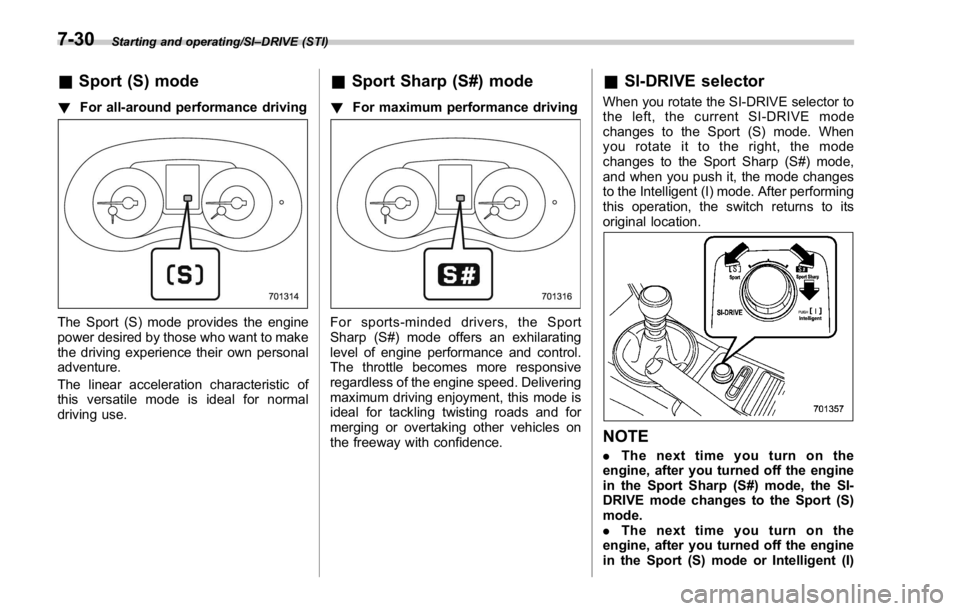
& Sport (S) mode! For all-around performance driving
The Sport (S) mode provides the engine
power desired by those who want to make
the driving experience their own personal
adventure.
The linear acceleration characteristic of
this versatile mode is ideal for normal
driving use. & Sport Sharp (S#) mode ! For maximum performance driving
For sports-minded drivers, the Sport
Sharp (S#) mode offers an exhilarating
level of engine performance and control.
The throttle becomes more responsive
regardless of the engine speed. Delivering
maximum driving enjoyment, this mode is
ideal for tackling twisting roads and for
merging or overtaking other vehicles on
the freeway with confidence. & SI-DRIVE selector When you rotate the SI-DRIVE selector to
the left, the current SI-DRIVE mode
changes to the Sport (S) mode. When
yourotateittotheright,themode
changes to the Sport Sharp (S#) mode,
and when you push it, the mode changes
to the Intelligent (I) mode. After performing
this operation, the switch returns to its
original location.
NOTE . Thenexttimeyouturnonthe
engine, after you turned off the engine
in the Sport Sharp (S#) mode, the SI-
DRIVE mode changes to the Sport (S)
mode.
. Thenexttimeyouturnonthe
engine, after you turned off the engine
in the Sport (S) mode or Intelligent (I)7-30
Page 422 of 594

other than Sport Sharp (S#) mode is
selected.
NOTE . The next time you turn on the
engine, after you turned off the engine
in the Sport Sharp (S#) mode, the SI-
DRIVE mode changes to the Sport (S)
mode.
. The next time you turn on the
engine, after you turned off the engine
in the Sport (S) mode or Intelligent (I)
mode, the SI-DRIVE mode will stay in
the same mode as when the engine
was turned off.
. While the engine is running, if the
CHECK ENGINE warning light/malfunc-
tion indicator light illuminates, the SI-
DRIVE mode changes to the Sport (S)
mode. In this case, it is not possible to
change to another mode.
. If there is a possibility that the
engine could overheat because of a
temperature increase of the engine
coolant, it is not possible to change to
the Sport Sharp (S#) mode. While the
vehicle is in the Sport Sharp (S#) mode,
it changes to the Sport (S) mode when
the engine coolant temperature in-
creases.
. While the engine is cool, you cannot
change to Sport Sharp (S#) mode. Limited slip differential (LSD)
(STI) The LSD provides optimum distribution of
power according to the difference in
revolutions between the right and left
wheels that may be caused by certain
driving conditions, thereby improving driv-
ing stability on snow-covered, muddy or
other slippery roads or when high speed
driving.
CAUTION. Never start the engine while a tire
on one side is jacked up, as the
vehicle may move.
. If one tire is spinning in mud,
avoid continued spinning at high
speed as this could adversely
affect the LSD.
. If you use a temporary spare tire
to replace a flat tire, be sure to
use the original temporary spare
tire stored in the vehicle. Using
other sizes will adversely affect
the LSD. Power steering & STI The vehicle is equipped with a hydraulic
power steering system. The power steer-
ing system operates only when the engine
is running.
If you lose power steering assist because
the engine stops or the system fails to
function, you can steer but it will take
much more effort.
CAUTIONDo not hold the steering wheel at the
fully locked position left or right for
more than 5 seconds. This may
damage the power steering pump.
NOTE Right after the engine has been started
and before it has warmed up, you may
hear a noise coming from areas adja-
cent to the power steering pump which
is located at the right-front area of the
engine compartment. This noise is
normal. It does not indicate power
steering system trouble.Starting and operating/Limited slip differential (LSD) (STI)
– CONTINUED –7-33
Page 430 of 594
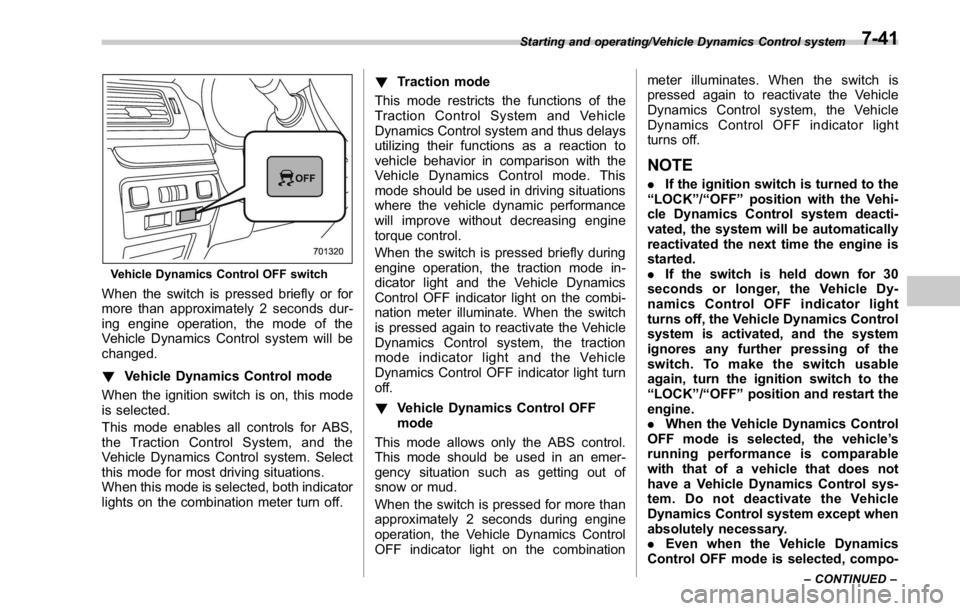
Vehicle Dynamics Control OFF switch
When the switch is pressed briefly or for
more than approximately 2 seconds dur-
ing engine operation, the mode of the
Vehicle Dynamics Control system will be
changed.
! Vehicle Dynamics Control mode
When the ignition switch is on, this mode
is selected.
This mode enables all controls for ABS,
the Traction Control System, and the
Vehicle Dynamics Control system. Select
this mode for most driving situations.
When this mode is selected, both indicator
lights on the combination meter turn off. ! Traction mode
This mode restricts the functions of the
Traction Control System and Vehicle
Dynamics Control system and thus delays
utilizing their functions as a reaction to
vehicle behavior in comparison with the
Vehicle Dynamics Control mode. This
mode should be used in driving situations
where the vehicle dynamic performance
will improve without decreasing engine
torque control.
When the switch is pressed briefly during
engine operation, the traction mode in-
dicator light and the Vehicle Dynamics
Control OFF indicator light on the combi-
nation meter illuminate. When the switch
is pressed again to reactivate the Vehicle
Dynamics Control system, the traction
mode indicator light and the Vehicle
Dynamics Control OFF indicator light turn
off.
! Vehicle Dynamics Control OFF
mode
This mode allows only the ABS control.
This mode should be used in an emer-
gency situation such as getting out of
snow or mud.
When the switch is pressed for more than
approximately 2 seconds during engine
operation, the Vehicle Dynamics Control
OFF indicator light on the combination meter illuminates. When the switch is
pressed again to reactivate the Vehicle
Dynamics Control system, the Vehicle
Dynamics Control OFF indicator light
turns off.
NOTE . If the ignition switch is turned to the
“ LOCK ” / “ OFF ” position with the Vehi-
cle Dynamics Control system deacti-
vated, the system will be automatically
reactivated the next time the engine is
started.
. If the switch is held down for 30
seconds or longer, the Vehicle Dy-
namics Control OFF indicator light
turns off, the Vehicle Dynamics Control
system is activated, and the system
ignores any further pressing of the
switch. To make the switch usable
again, turn the ignition switch to the
“ LOCK ” / “ OFF ” position and restart the
engine.
. When the Vehicle Dynamics Control
OFF mode is selected, the vehicle ’ s
running performance is comparable
with that of a vehicle that does not
have a Vehicle Dynamics Control sys-
tem. Do not deactivate the Vehicle
Dynamics Control system except when
absolutely necessary.
. Even when the Vehicle Dynamics
Control OFF mode is selected, compo-Starting and operating/Vehicle Dynamics Control system
– CONTINUED –7-41
Page 443 of 594

Starting and operating/Cruise control
(S#) mode is selected, the select lever/
gear position indicator will change
from the current gear position indica-
tion to the “ D ” indication.
& To temporarily cancel the
cruise controlThe cruise control can be temporarily
canceled in the following ways.
. Press the “ CANCEL ” button.
. Depress the brake pedal.
. Depress the clutch pedal (MT models
only).
WARNING
For CVT models, you can cancel the
cruise control by shifting the select
lever into the “ N ” position. However, do not shift the lever into the “ N ”
position while driving except in case
of emergency. If the select lever is
shifted into the “ N ” position, the
engine brake will no longer work.
This could result in an accident.
The cruise control set indicator in the
combination meter disappears when the
cruise control is canceled.
To resume the cruise control after it has
been temporarily canceled and with vehi-
cle speed of approximately 20 mph (30
km/h) or more, press the “ RES/SET ”
switch to the “ RES ” side to return to the
original cruising speed automatically.
The cruise control set indicator in the
combination meter will automatically ap-
pear at this time. & To turn off the cruise control There are two ways to turn off the cruise
control:
. Press the cruise control main button
again.
. Turn the ignition switch to the “ ACC ” or
“ LOCK ” / “ OFF ” position (but only when the
vehicle is completely stopped).
& To change the cruising speed ! To increase the speed (by the “ RES/
SET ” switch)
Press the “ RES/SET ” switch to the “ RES ”
side and hold it until the vehicle reaches
the desired speed. Then, release the
switch. The vehicle speed at that moment
will be memorized and treated as the new
set speed.7-54