Page 185 of 594

Instruments and controls/Multi function display
When the Vehicle Dynamics Control sys-
tem activates, the tires illuminate in yellow
and the Vehicle Dynamics Control system
operating indicator flashes.
1) Activation status of the ABS (Anti-lock
Brake System)
2) Vehicle Dynamics Control system oper-
ating indicator (flashing in yellow)
3) History of Vehicle Dynamics Control
system activation ! Triple meter screen
Triple meter screen (display example)
This screen displays up to three optional
pieces of information that can be selected
from the following items.
The items shown in the triple meter screen
can be changed. For details, refer to
“ Triple meter setting ” F 3-75. Item Details
Average vehicle speed (Average
vehicle speed for the entire driving
time from when the trip meter was
reset)
Lifetime fuel consumption
Engine oil temperature (except
STI)
Accelerator opening ratio
Journey distance (the distance
that has been driven since the
ignition switch was turned to the
“ ON ” position)
Average fuel consumption for the
entire driving distance from when
the ignition switch was turned to
the “ ON ” position
Boost pressure3-56
Page 191 of 594

Instruments and controls/Multi function display
& Date and time settingsThe items in the date and time settings
can be set. To change the items, operate
the “
” or “ ” switch.
NOTE . The “ Time/Date ” item must be set to
display the “ Birthday ” , “ Anniversary ”
and notifications for vehicle mainte-
nance.
. The “ Birthday ” and “ Anniversary ”
items can be entered after the “ Time/
Date ” item has been set.
. Dates that do not exist in the
Gregorian calendar cannot be set (for
example, April 31).
. If your vehicle is equipped with the
genuine SUBARU navigation system,
the clock of navigation system must be
set separately.
! Preparation for date setting
1. Turn the ignition switch to the “ ON ”
position.
2. Push and hold the
button to show
the selection screen. 3. After the selection screen is displayed,
operate the “
” or “ ” switch to show the
“ Time/Date ” item. Then, push the
button.
! Current date and time setting
1. Perform the preparation steps accord-
ing to “ Preparation for date setting ” F 3-
62. 2. Operate the “ ” or “ ” switch to
select the “ Time/Date ” item. Then push
the
button.
3. Select the item to set by operating the
“
” or “ ” switch. Then push the
button.3-62
Page 212 of 594
4. Push the button once more to
enter the setting mode.
5. The system will notify you of the place
to be selected for approximately 2 sec-
onds. 6. Select one of the registration lines by
operating the “
” or “ ” switch. Then
push the
button.
7. To overwrite the previous registration,
push the
button. When registration is
performed the first time, it is registered directly without a notification.
8. The system will notify you that the
registration is complete.
& Car settings The items in the car settings can be set.
To change the items, operate the “
” or
“
” switch, and then push the button.
! Preparation for car settings
1. Turn the ignition switch to the “ ON ”
position.
2. Push and hold the
button to show
the selection screen.
3. After the selection screen is displayed,
operate the “
” or “ ” switch to show the
“ Car Setting ” item. Then, push the
button.Instruments and controls/Multi function display
– CONTINUED –3-83
Page 226 of 594
& Daytime running light system WARNINGThe brightness of the illumination of
the high beam headlights is reduced
by the daytime running light system.
The light switch must always be
turned to the “
” position when it
is dark outside.
The high beam headlights will automati-
cally illuminate at reduced brightness
when the following conditions are fulfilled.
. The engine is running.
. The parking brake is fully released.
. The light control switch is in the
“ AUTO ” (if equipped), “
” or off position.
. For CVT models, the select lever is in a
position other than the “ P ” position.
NOTE . When the light switch is in the “ ”
position, the instrument panel illumina-
tion, front side marker lights, tail lights
and license plate lights are also illumi-
nated.
. For models with the auto on/off
headlights, while the light control
switch is in the “ AUTO ” position and
the system is activated to the auto-on
mode depending on the ambient light level, the high beam headlights that
have illuminated at reduced brightness
turn off, and the low beam headlights
turn on alternatively. At this time, the
instrument panel illumination, front
side marker lights, tail lights and
license plate lights are also illuminated.
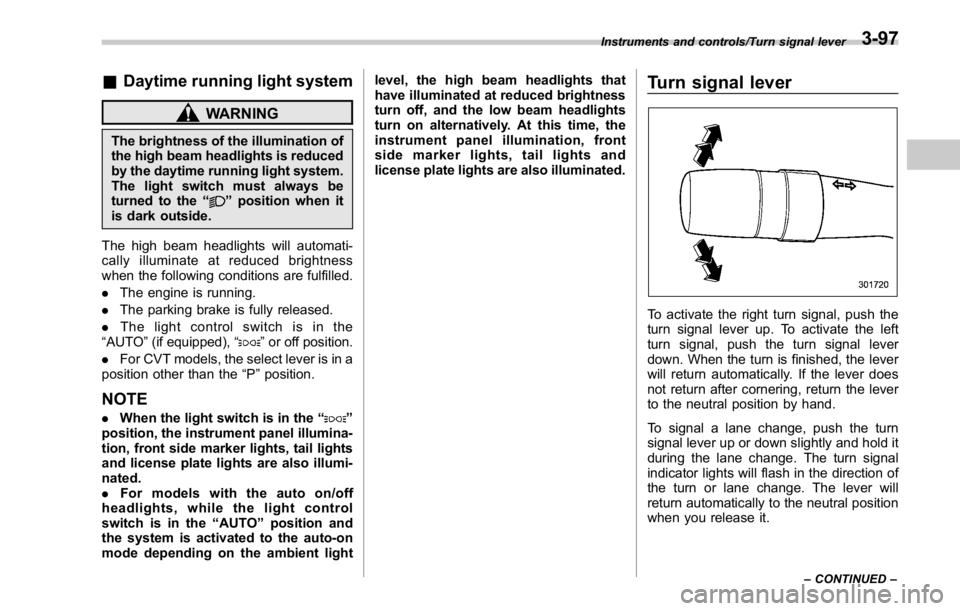
Turn signal lever
To activate the right turn signal, push the
turn signal lever up. To activate the left
turn signal, push the turn signal lever
down. When the turn is finished, the lever
will return automatically. If the lever does
not return after cornering, return the lever
to the neutral position by hand.
To signal a lane change, push the turn
signal lever up or down slightly and hold it
during the lane change. The turn signal
indicator lights will flash in the direction of
the turn or lane change. The lever will
return automatically to the neutral position
when you release it. Instruments and controls/Turn signal lever
– CONTINUED –3-97
Page 227 of 594

Instruments and controls/Illumination brightness control
& One-touch lane changerTo flash the turn signal and turn signal
indicator light three times, push the turn
signal lever up or down slightly and
immediately release it.
The operational/non-operational setting of
the one-touch lane changer ’ s can be
changed by a SUBARU dealer. Contact
the nearest SUBARU dealer for details. Illumination brightness con-
trol
You can adjust the illumination brightness
of the combination meter, the climate
control panel, etc. by turning the control
dial.
. To brighten, turn the control dial up-
ward.
. To darken, turn the control dial down-
ward.
The multi function display automatically
adjusts its brightness together with the
brightness level of the instrument panel.
To adjust the display ’ s contrast, refer to
“ Contrast setting ” F 3-69. NOTE . When the control dial is turned fully
upward, the illumination brightness
becomes the maximum and the auto-
matic dimming function does not work
at all.
. The brightness setting is not can-
celed even when the ignition switch is
turned to the “ LOCK ” / “ OFF ” position.3-98
Page 241 of 594

Instruments and controls/Defogger and deicer
Defogger and deicer
1) Rear window defogger
2) Outside mirror defogger (if equipped)
3) Windshield wiper deicer (if equipped)
The defogger and deicer system is acti- vated only when the ignition switch is in
the “ ON ” position.
To activate the defogger and deicer
system, press the control switch that is
located on the climate control panel. The
rear window defogger, outside mirror
defogger and windshield wiper deicer are
activated simultaneously. The indicator
light on the control switch illuminates while
the defogger and deicer system is acti-
vated.
To turn them off, press the control switch
again. They also turn off when the ignition
switch is turned to the “ ACC ” or “ LOCK ” /
“ OFF ” position.
The defogger and deicer system will
automatically shut off after approximately
15 minutes. If the rear window and the outside mirrors have been cleared and the
windshield wiper blades have been deiced
completely before that time, press the
control switch to turn them off. If defrost-
ing, defogging or deicing is not complete,
you have to press the control switch to
turn them on again.
It is possible for the defogger and deicer
system to be set to continuous operation
mode by a SUBARU dealer. Consult your
SUBARU dealer for details. Also, for
models with a multi function display, the
setting can be changed using the display.
For details, refer to “ Multi function display ”
F 3-48.
If the battery voltage drops below the
permissible level, continuous operation of
the defogger and deicer system is can-
celed and the system stops operating.
CAUTION
. To prevent the battery from being
discharged, do not operate the
defogger and deicer system con-
tinuously for any longer than
necessary.
. Do not use sharp instruments or
window cleaner containing abra-
sives to clean the inner surface
of the rear window. They may3-112
Page 250 of 594

both side windows to prevent fogging.)
(Heat-def): Windshield defroster outlets,
foot outlets and both side outlets of the
instrument panel (Refer to “ Defrosting ”
F 4-9.)
(Defrost): Windshield defroster outlets and both side outlets of the instrument
panel (Refer to “ Defrosting ” F 4-9.)
NOTE When the “ ” or “ ” mode is se-
lected, the air conditioner compressor
operates automatically regardless of
the position of the air conditioner
button to defrost the windshield more
quickly. However the indicator on the
air conditioner button will not illumi-
nate. At the same time, the air inlet
selection is automatically set to the
outside air mode. After defrosting the
windshield by pressing the defroster
button “
” , pressing the button again
returns the system to the setting that
had been selected before the defroster
was activated.
& Temperature control Turn the temperature control dial to set the
preferred interior temperature. With the
dial set to your preferred temperature, the
system automatically adjusts the tempera-
ture of air supplied from the outlets so that
the preferred temperature is achieved and
maintained.
If the dial is turned fully counterclockwise,
the system provides maximum cooling
performance. If the dial is turned fully
clockwise, the system provides maximum heating performance.
NOTE The controllable temperature range
may vary depending on the regional
specifications of the vehicle.
! “ DUAL ” mode (type B)
a) Front passenger ’ s side temperature
b) Driver ’ s side temperature
You can change the setting of the driver ’ s
side and front passenger ’ s side tempera-
ture independently by selecting the
“ DUAL ” mode.
You can select the “ DUAL ” mode by
performing either of the following proce-
dures.
. Press the “ DUAL ” buttonClimate control/Manual climate control operation
– CONTINUED –4-7
Page 254 of 594

Air filtration system Replace the filter element according to the
replacement schedule as follows. This
schedule should be followed to maintain
the filter ’ s dust collection ability. Under
extremely dusty conditions, the filter
should be replaced more frequently. It is
recommended that you have your filter
checked or replaced by your SUBARU
dealer. For replacement, use only a
genuine SUBARU air filter kit. For the
replacement schedule, refer to the “ War-
ranty and Maintenance Booklet ” .
CAUTIONContact your SUBARU dealer if the
following occurs, even if it is not yet
time to change the filter:
. Reduction of the airflow through
the vents.
. Windshield gets easily fogged or
misted.
NOTE The filter can influence the air condi-
tioning, heating and defroster perfor-
mance if not properly maintained. & Replacing an air filter 1. Remove the glove box.
NOTE We recommend that you take mea-
sures to protect the center console
with masking tape first, so that you
avoid scratching the center console
with the glove box.
(1) Open the glove box.
(2) Remove the damper shaft from the
glove box. 1) Stopper
(3) Push both sides of the glove box
inside to unlock the stoppers and then
pull down the glove box as far as it will
go.
(4) Pull out the glove box horizontally Climate control/Air filtration system
– CONTINUED –4-11
