Page 325 of 594
Audio/Media operation
! About the supported devices
This system supports the following devices.
For iPhone/iPod touch users Type Generation Firmware version or OS
iPhone iPhone 3G iOS 4.2.x
iPhone 3GS iOS 6.1.x
iPhone 4 iOS 7.0.x
iPhone 4S iOS 7.0.x
iPhone 5 iOS 7.0.x
iPhone 5C iOS 7.0.x
iPhone 5S iOS 7.0.x
iPod touch iPod touch iOS 3.1.x
iPod touch 2 iOS 4.2.x
iPod touch 3 iOS 5.1.x
iPod touch 4 iOS 6.1.x
iPod touch 5 iOS 7.0.x
NOTE Note that the warranty does not apply if an unsupported iPhone/iPod touch is connected.5-70
Page 327 of 594

Audio/Media operation
! Using aha application
Ifyouconnectasmartphonetothis
system after starting a supported aha
application on the smartphone, you can
display and operate the aha application
displayed on the smartphone on the
system screen.
NOTE . Connect a smartphone to the USB
port before turning the ignition switch
to the “ ACC ” or “ ON ” position.
. When it is not played back normally,
press the POWER/VOLUME knob twice
while a USB cable is connected.
1. Run the aha application on your
smartphone.
2. Connect the iPhone/iPod touch to the
USB port or connect the Android device
by utilizing the Bluetooth connection (SPP
and A2DP profile).
. For details about connecting an
iPhone/iPod touch: Refer to “ Connect-
ing and disconnecting a USB memory/
portable device ” F 5-6.
. For details about registering or con-
necting an Android device: Refer to
“ Registering/connecting Bluetooth ®
device ” F 5-81.
Press AUDIO/TUNE knob twice to switch
between iPhone and Android. 3. Select “ aha ” on the “ Select Audio
Source (Select Audio Source) ” screen.
Refer to “ Basic operation ” F 5-12.
Select “ aha ” on the “ Apps (APPS) ” screen.
Refer to “ STARLINK ” F 5-30.
4. Check that the top screen is displayed.
5. Select the desired station.
6. Check that the station operation
screen is displayed. . Main functions of the station opera-
tion screen button: Refer to “ Station
operation screen buttons ” F 5-73.
. For details on the services or the
operations, check the aha site
(http://www.aharadio.com) on the in-
ternet.
NOTE . When iPhone/iPod touch and An-
droid devices are connected at the
same time, iPhone/iPod touch is prior-
itized.
. The following operations are not
available on this system. Perform these
operations on the smartphone.
– Add/Reorder/Delete stations
– Login to Facebook/Twitter5-72
Page 328 of 594

. For the aha function, the following
touch screen gestures are not avail-
able.
– Multi-touch operation
– Double-tap ! Station operation screen buttons Button Function
Select to start playback.
Select to pause playback.
Select to stop playback.
Select to upload “ Like ” informa-
tion to the application server. To
cancel “ Like ” information that is
being uploaded to the server,
select this button again.
Select to upload “ Dislike ” infor-
mation to the application server.
To cancel “ Dislike ” information
that is being uploaded to the
server, select this button again.
Select to make a phone call to
the current content item.
Select to start the playback from
the beginning of the content in
the target station.
Select to rewind the current
content item by 15 seconds.
Select to fast forward the current
content item by 30 seconds. NOTE The button display will vary depending
on each station or content item.
& AUX ! Overview
The AUX operation screen can be
reached by the following methods:
. Connect a portable audio device. Refer
to “ Connecting and disconnecting a USB
memory/portable device ” F 5-6.
. Select
AUX (AUX) on the “ Select
Audio Source (Select Audio Source) ”
screen. Refer to “ Selecting an audio
source ” F 5-13. Audio/Media operation
– CONTINUED –5-73
Page 331 of 594

Audio/Media operation
WARNINGDo not operate the player ’ s controls
or connect the portable audio device
while driving.
CAUTION. Do not leave portable audio de-
vice in the vehicle. The tempera-
ture inside the vehicle may be-
come high, resulting in damage
to the player.
. Do not push down on or apply
unnecessary pressure to the por-
table audio device while it is
connected as this may damage
the portable audio device or its
terminal.
. Do not insert foreign objects into
the port as this may damage the
portable audio device or its term-
inal. & Pandora ®
Pandora is an application for a smart-
phone. This can automatically select and
play recommended tracks.
By rating the track currently playing, tracks
that better match your preference will be
recommended.
In order to connect to this system, use a
USB port for an iPhone or iPod touch and
Bluetooth for Android devices.
Depending on differences between mod-
els or software version etc., some models
might be incompatible with this system.
This function is not available if the
Pandora application has not been in-
stalled on the smartphone.
NOTE . Connect a smartphone to the USB
port before turning the ignition switch
to the “ ACC ” or “ ON ” position.
. When it is not played back normally,
press the POWER/VOLUME knob twice
while a USB cable is connected.
! Overview
The Pandora operation screen can be
reached by the following methods:
. Connecting a Pandora device. Refer to
“ Connecting a Bluetooth device ” F 5-85 or “ Connecting and disconnecting a USB
memory/portable device ” F 5-6.
. Select
Pandora (Pandora) on the
“ Select Audio Source (Select Audio
Source) ” screen. Refer to “ Selecting an
audio source ” F 5-13.
. Select
Pandora (Pandora) on the
“ APPS (APPS) ” screen. Refer to
“ STARLINK ” F 5-30.5-76
Page 335 of 594
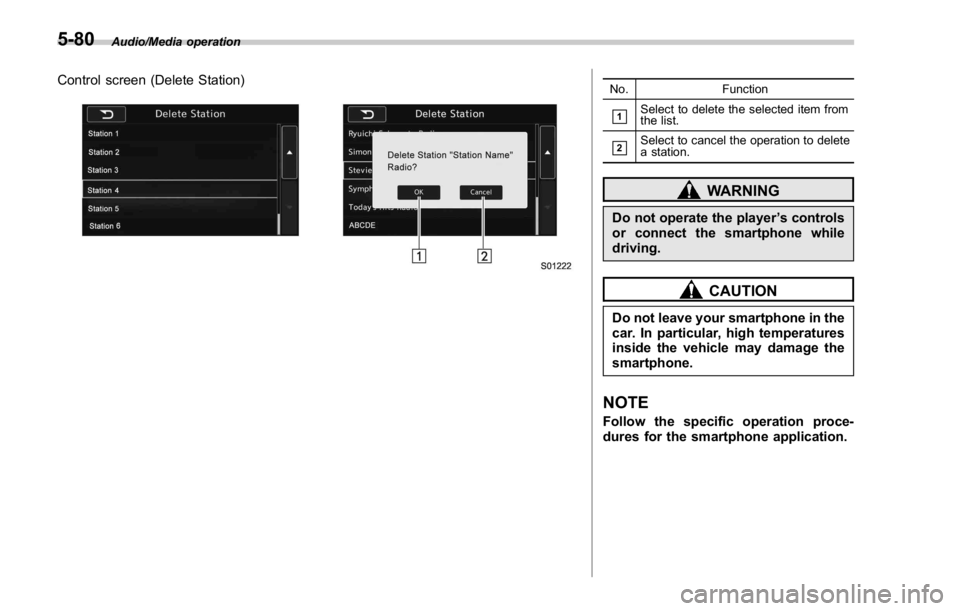
Audio/Media operation
Control screen (Delete Station) No. Function
& 1
Select to delete the selected item from
the list.
& 2
Select to cancel the operation to delete
a station.
WARNINGDo not operate the player ’ s controls
or connect the smartphone while
driving.
CAUTIONDo not leave your smartphone in the
car. In particular, high temperatures
inside the vehicle may damage the
smartphone.
NOTE Follow the specific operation proce-
dures for the smartphone application.5-80
Page 336 of 594

Bluetooth ®
settings& Registering/connecting
Bluetooth ®
deviceThe Bluetooth ®
word mark and logos are
registered trademarks owned by Bluetooth
SIG, Inc.
! Registering a Bluetooth phone for
the first time
To use the hands-free system, it is
necessary to register a Bluetooth phone
with the system.
Once the phone has been registered, it is
possible to use the hands-free system.
This operation cannot be performed while
driving.
For details about registering a Bluetooth
device: Refer to “ Registering a Bluetooth
device ” F 5-84.
1. Turn the Bluetooth connection setting
of your cellular phone on.
. This function is not available when
Bluetooth connection setting of your
cellular phone is set to off.
2. Select
and select
SETTINGS
(SETTINGS) to display the SETTINGS screen.
Settings (When selecting the “ BT ” tab)
3. To register a device, select “ Add ” on
“ BT Devices Connection ” . “ BT Devices Connection ” screen (At the
initial startup and when no device is
registered.)
4. When this screen is displayed, search
for the device name displayed on this
screen on the screen of your Bluetooth
device. Audio/Bluetooth ®
settings
– CONTINUED –5-81
Page 338 of 594

! Profiles
This system supports the following services. Bluetooth Device Spec. Function Requirements Recommendations
Bluetooth Phone/Bluetooth
Audio Device Bluetooth Specification Registering a Bluetooth de-
vice Ver. 1.1 Ver. 2.1 + EDR
Bluetooth Device Profile Function Requirements Recommendations
Bluetooth Phone HFP (Hands-Free Profile) Hands-free system Ver. 1.0 Ver. 1.5
OPP (Object Push Profile)
Transferring the contacts Ver. 1.1 Ver. 1.1
PBAP (Phone Book Access
profile) Ver. 1.0 Ver. 1.0
MAP (Message Access
Profile) Bluetooth phone message — Ver. 1.0
SPP (Serial Port Profile) Connecting a Bluetooth
phone — Ver. 1.1
Bluetooth Audio Device A2DP (Advanced Audio
Distribution Profile)
Bluetooth audio system Ver. 1.0 Ver. 1.2
AVRCP (Audio/Video Re-
mote Control Profile) Ver. 1.0 Ver. 1.4
NOTE . If your cellular phone does not support HFP, registering the Bluetooth phone or using OPP, PBAP, MAP or SPP profiles
individually will not be possible.
. If the connected Bluetooth device version is older than recommended or incompatible, the Bluetooth device function may
not work properly.
. For USA customers, please visit www.subaru.com for details. Outside of the USA customers, contact your local dealer to
arrange a demonstration in order to confirm whether or not the device can be paired with the vehicle. Audio/Bluetooth ®
settings
– CONTINUED –5-83
Page 339 of 594

Audio/Bluetooth ®
settings
& Setting Bluetooth details1. Select .
2. Select
SETTINGS (SETTINGS).
3. To register a device, select “ Add ” on
“ BT Devices Connection ” . ! BT Devices Connection screen
“ BT Devices Connection ” screen (One
device is registered.)
No. Function
& 1
“ Add ” key: Registers the device.
& 2
“ Select ” key: Makes the connection to
the registered device.
& 3
This shows the status of the device
connection profile. (The icon illuminates
while connected.)
& 4
“ Delete (Trash box) ” key: Deletes the
registered device.
& 5
Bluetooth ON/OFF key: Switches to
connect/disconnect the Bluetooth com-
munication. Function Page
Registering a Bluetooth device 5-84
Deleting a Bluetooth device 5-85
Connecting a Bluetooth device 5-85
! Registering a Bluetooth device
You can register up to five devices,
regardless of whether they are Bluetooth
phones or audio devices.
This operation cannot be performed while
driving.
1. Display the “ BT Devices Connection ”
screen. Refer to “ Registering a Bluetooth
phone for the first time ” F 5-81.
2. Select
Add (Add).
The “ Add ” button is not displayed when
five devices are already registered.
To add another device, you need to delete
one of the registered devices.
Press and hold the Trash box icon for the
device to be deleted, and then select
“ OK ” .
3. Register the Bluetooth device using
your Bluetooth device.
. A PIN-code is not required for SSP
(Secure Simple Pairing) compatible
Bluetooth devices. Depending on the
type of Bluetooth device being con-
nected, a message confirming regis-5-84