2016 SUBARU WRX warning light
[x] Cancel search: warning lightPage 441 of 594
Starting and operating/Cruise control
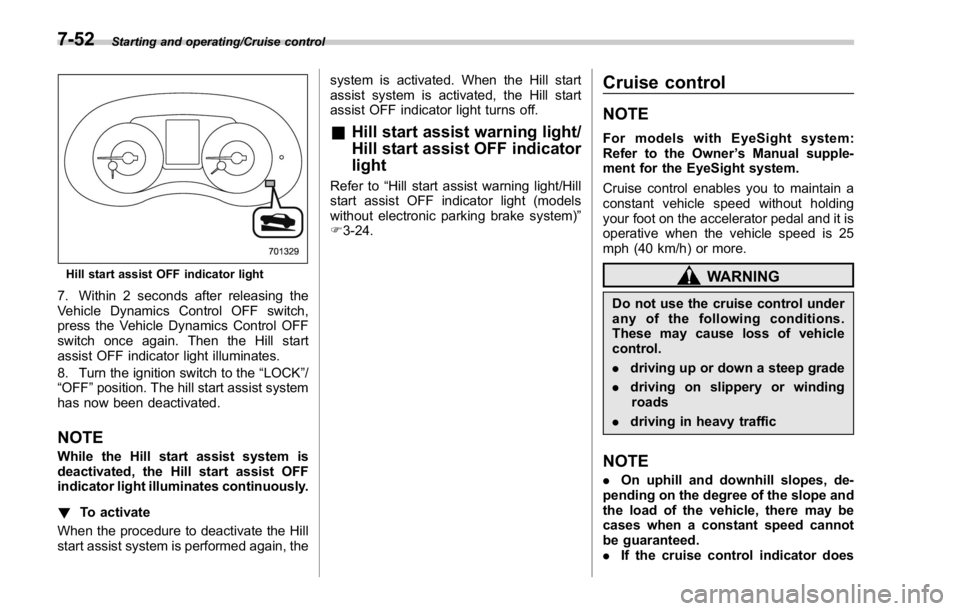
Hill start assist OFF indicator light
7. Within 2 seconds after releasing the
Vehicle Dynamics Control OFF switch,
press the Vehicle Dynamics Control OFF
switch once again. Then the Hill start
assist OFF indicator light illuminates.
8. Turn the ignition switch to the “ LOCK ” /
“ OFF ” position. The hill start assist system
has now been deactivated.
NOTE While the Hill start assist system is
deactivated, the Hill start assist OFF
indicator light illuminates continuously.
! To activate
When the procedure to deactivate the Hill
start assist system is performed again, the system is activated. When the Hill start
assist system is activated, the Hill start
assist OFF indicator light turns off.
& Hill start assist warning light/
Hill start assist OFF indicator
light Refer to “ Hill start assist warning light/Hill
start assist OFF indicator light (models
without electronic parking brake system) ”
F 3-24. Cruise control NOTE For models with EyeSight system:
Refer to the Owner ’ s Manual supple-
ment for the EyeSight system.
Cruise control enables you to maintain a
constant vehicle speed without holding
your foot on the accelerator pedal and it is
operative when the vehicle speed is 25
mph (40 km/h) or more.
WARNINGDo not use the cruise control under
any of the following conditions.
These may cause loss of vehicle
control.
. driving up or down a steep grade
. driving on slippery or winding
roads
. driving in heavy traffic
NOTE . On uphill and downhill slopes, de-
pending on the degree of the slope and
the load of the vehicle, there may be
cases when a constant speed cannot
be guaranteed.
. If the cruise control indicator does7-52
Page 445 of 594

Starting and operating/BSD/RCTA
BSD/RCTA (if equipped) The BSD/RCTA consists of rear radar with
Blind Spot Detection and Rear Cross
Traffic Alert.
These functions of BSD/RCTA are the
systems that detect objects and vehicles
to the rear and draw attention to the driver
when changing a lane or when driving in
reverse.
WARNINGThe driver is responsible for driving
safely. Always be sure to check the
surroundings with your eyes when
changing lanes or reversing the
vehicle.
The system is designed to assist the
driver by monitoring the rear and
side areas of the vehicle during a
lane change or reversing. However,
you cannot rely on this system
alone in assuring the safety during
a lane change or reversing. Over-
confidence in this system could
result in an accident and lead to
serious injury or death. Since the
system operation has various limita-
tions, the flashing or illumination of
the BSD/RCTA approach indicator
light may be delayed or it may not operate at all even when a vehicle is
present in a neighboring lane or
approaching from either side.
The driver is responsible for paying
attention to the rear and side areas
of the vehicle.
& System features BSD/RCTA has a function that detects an
invisible vehicle in a blind spot on an
adjacent lane or a vehicle approaching at
high speed while driving the vehicle (Blind
Spot Detection). It also has a function that
detects a vehicle approaching from the
right or left while driving the vehicle in
reverse (Rear Cross Traffic Alert).
The system uses radar sensors for the
following features.
NOTE The BSD/RCTA radar sensor has been
certified by the radio wave related laws
of the U.S. and Canada. When driving
in other countries, certification of the
country where the vehicle is driven
must be obtained. For certification in
the U.S. and Canada, refer to “ Certifica-
tion for the BSD/RCTA ” F 7-62. ! Blind Spot Detection (BSD)
1) Operating range
The system notifies the driver of vehicles
existing in the blind area. If the system
detects a vehicle existing in the blind area,
it warns the driver of dangers by illuminat-
ing the BSD/RCTA approach indicator
light(s) on the outside mirror(s). If the
driver operates the turn signal lever in the
direction where the BSD/RCTA approach
indicator light is illuminating, the system
warns the driver of dangers by flashing the
BSD/RCTA approach indicator light.7-56
Page 446 of 594

! Lane Change Assist (LCA)
1) Operating range
The system notifies the driver of vehicles
approaching at a high speed in the
neighboring lanes. If the system detects
a vehicle approaching at a high speed in
the neighboring lanes, it warns the driver
of dangers by illuminating the BSD/RCTA
approach indicator light(s) on the outside
mirror(s). If the driver operates the turn
signal lever in the direction where the
BSD/RCTA approach indicator light is
illuminating, the system warns the driver
of dangers by flashing the BSD/RCTA
approach indicator light. ! Rear Cross Traffic Alert (RCTA)
1) Operating range
The system notifies the driver of another
vehicle approaching from either side when
driving in reverse. This feature helps the
driver check the rear and side areas of the
vehicle when moving backward.
If the system detects a vehicle approach-
ing from either side while moving back-
ward, it warns the driver of dangers in the
following way.
. The BSD/RCTA approach indicator
light(s) on the outside mirror(s) flashes.
. A warning buzzer sounds. & System operation ! Operating conditions
The BSD/RCTA will operate when all of
the following conditions are met.
. The ignition switch is in the “ ON ”
position.
. The BSD/RCTA warning indicator and
BSD/RCTA OFF indicator are turned off.
. The vehicle is driven at speeds above
6 mph (10 km/h) (except when reversing).
. The shift lever/select lever is in the “ R ”
position (when reversing).
The BSD/RCTA will not operate in the
following situations.
. The BSD/RCTA OFF indicator ap-
pears.
. The vehicle speed is below 6 mph (10
km/h) even when the BSD/RCTA OFF
indicator does not appear (except when
reversing).
NOTE . In the following cases, the BSD/
RCTA will stop operating and the
BSD/RCTA warning indicator will ap-
pear. If the BSD/RCTA warning indica-
tor appears, have your vehicle in-
spected at a SUBARU dealer as soon
as possible.
– When a malfunction occurs in the Starting and operating/BSD/RCTA
– CONTINUED –7-57
Page 447 of 594

Starting and operating/BSD/RCTA
system, including the BSD/RCTA
approach indicator light
. In the following cases, the BSD/
RCTA will temporarily stop operating
(or may stop operating) and the BSD/
RCTA warning indicator will appear.
The BSD/RCTA will resume operation
once these conditions are corrected,
and the BSD/RCTA warning indicator
will disappear. However, if the BSD/
RCTA warning indicator has appeared
for a prolonged time, have the system
inspected at a SUBARU dealer as soon
as possible.
– When the radar sensor becomes
significantly misaligned (If the or-
ientation of the radar sensor is
shifted for any reason, readjust-
ment is required. Have the sensor
adjusted at a SUBARU dealer.)
– When a large amount of snow or
ice sticks to the rear bumper sur-
face around the radar sensors
– When the vehicle is driven on a
snow-covered road or in an envir-
onment in which there are no
objects around (such as in a desert)
for a long time
– When the temperature around
the radar sensors increased exces-
sively due to long driving on uphill
grades in summer, etc. – When the temperature around
the radar sensors becomes extre-
mely low
– When the vehicle battery voltage
lowers
– When the vehicle battery be-
comes overvoltage
. The detectability of the radar sen-
sors is restricted. The BSD/RCTA de-
tection may be impaired and the sys-
tem may not operate properly under the
following conditions.
– When the rear bumper around
the radar sensors is distorted
– When ice, snow or mud adheres
to the rear bumper surface around
the radar sensors
– When stickers, etc. are affixed on
the areas of the radar sensors on
the rear bumper
– During adverse weather condi-
tions such as rain, snow or fog
– When driving on wet roads such
as snow-covered roads and
through puddles
. The radar sensors may not detect or
may have difficulty detecting the fol-
lowing vehicles and objects.
– Small motorcycles, bicycles, pe-
destrians, stationary objects on the
road or road side and etc.
– Vehicles with body shapes that the radar may not reflect (vehicles
with lower body height such as a
trailer with no cargo and sports
cars)
– Vehicles that are not approach-
ing your vehicle even though they
are in the detection area (either on a
neighboring lane to the rear or
beside your vehicle when rever-
sing) (The system determines the
presence of approaching vehicles
based on data detected by the radar
sensors.)
– Vehicles traveling at significantly
different speeds
– Vehicles driving in parallel at
almost the same speed as your
vehicle for a prolonged time
– Oncoming vehicles
– Vehicles in a lane beyond the
neighboring lane
– Vehicles travelling at a signifi-
cantly lower speed that you are
trying to overtake
. On a road with extremely narrow
lanes, the system may detect vehicles
driving in a lane next to the neighbor-
ing lane.7-58
Page 448 of 594

& BSD/RCTA approach indica-
tor light/warning buzzer When the BSD/RCTA is active, the BSD/
RCTA approach indicator light and warn-
ing buzzer will operate to alert the driver to
the presence of the following vehicles.
. Vehicles in the neighboring lanes
. Vehicles approaching from the left or
right rear side when reversing
! BSD/RCTA approach indicator light
BSD/RCTA approach indicator light
It is mounted in each side of the outside
mirrors and will illuminate when a vehicle
approaching from behind is detected. If a
light illuminates and the turn signal lever is
operated toward the side in which this light
turned on, the indicator light flashes to warn the driver of dangers. When rever-
sing the vehicle, the indicator light flashes
when the system detects a vehicle ap-
proaching from either side.
! BSD/RCTA approach indicator
light dimming function
When the headlights are turned on, the
brightness of the BSD/RCTA approach
indicator light will be reduced.
NOTE . When affected by direct sunlight,
you may have difficulty recognizing
the BSD/RCTA approach indicator light.
. When affected by the headlight
beams from the vehicles behind, you
may have difficulty recognizing the
BSD/RCTA approach indicator light.
. While the illumination brightness
control dial is in the fully upward
position, even if the headlights are
turned on, the brightness of the BSD/
RCTA approach indicator light will not
be reduced. For details about the
illumination brightness control dial,
refer to “ Illumination brightness con-
trol ” F 3-98.
! BSD/RCTA approach warning buz-
zer (only when reversing)
A warning buzzer sounds along with
flashing of the BSD/RCTA approach in- dicator light to warn the driver of dangers.
The setting of the warning buzzer volume
can be changed by operating the multi
information display of the combination
meter. For details, refer to “ BSD/RCTA ”
F 3-48.
! Safety tips regarding the BSD/RCTA
approach indicator light/warning
buzzer
. In the following cases, operation of the
BSD/RCTA approach indicator light and
the warning buzzer may be delayed or the
system may fail to issue these warnings.
– When a vehicle moves to the
neighboring lane from a lane next to
the neighboring lane
– When driving on a steep incline or
on repeated sharp uphill and downhill
grades
– When going beyond a pass
– When both your vehicle and a
vehicle driving on a neighboring lane
are driving on the far side of each lane.
– When several narrowly-spaced ve-
hicles are approaching in a row
– In low radius bends (tight bends or
when making turns at an intersection)
– When there is a difference in height
between your lane and the neighbor-
ing lane
– Immediately after the BSD/RCTA is Starting and operating/BSD/RCTA
– CONTINUED –7-59
Page 449 of 594
Starting and operating/BSD/RCTA
activated by pressing the BSD/RCTA
OFF switch
– Immediately after the shift lever/
select lever is shifted to the “ R ”
position
– When extremely heavy cargo is
loaded in the trunk
. During reversing, operation of the BSD/
RCTA approach indicator light and the
warning buzzer may be delayed or the
system may fail to issue these warnings
under the following conditions.
– When backing out of an angled
parking space
– When a large-sized vehicle is
parked next to your vehicle (That
vehicle prevents the propagation of
radar waves.)
– When reversing on sloped roads
– When reversing at a high speed . The BSD/RCTA approach indicator
light may illuminate when driving close to
solid objects on the road or road side
(such as guardrails, tunnels and side-
walls).
. When turning at an intersection in
urban areas, or a multilane intersection,
the BSD/RCTA approach indicator light
may flash.
. If a building or a wall exists in the
reversing direction, the BSD/RCTA ap-
proach indicator light may flash and the
warning buzzer may sound.
. In the following cases, the system may
detect a vehicle driving two lanes away
from your vehicle.
– When your vehicle drives on the
near side of its lane from the corre-
sponding vehicle – When the vehicle driving two lanes
away drives on the near side of its lane
from your vehicle
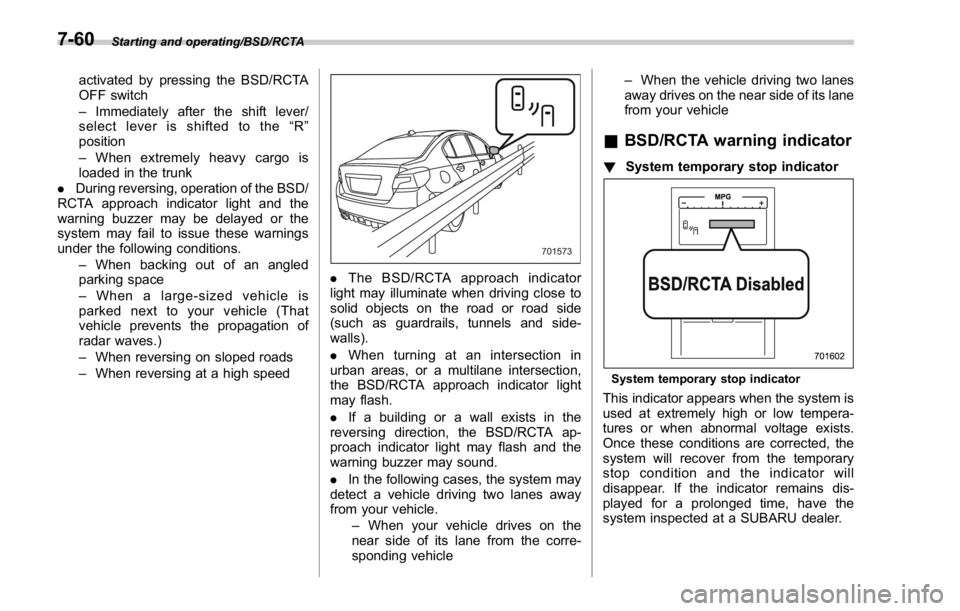
& BSD/RCTA warning indicator ! System temporary stop indicator
System temporary stop indicator
This indicator appears when the system is
used at extremely high or low tempera-
tures or when abnormal voltage exists.
Once these conditions are corrected, the
system will recover from the temporary
stop condition and the indicator will
disappear. If the indicator remains dis-
played for a prolonged time, have the
system inspected at a SUBARU dealer.7-60
Page 463 of 594

Driving tips/Loading your vehicle
& Tire chains CAUTIONTire chains cannot be used on your
vehicle because of the lack of
clearance between the tires and
vehicle body.
NOTE When tire chains cannot be used, use
of another type of traction device (such
as spring chains) may be acceptable if
use on your vehicle is recommended
by the device manufacturer, taking into
account tire size and road conditions.
Follow the device manufacturer ’ s in-
structions, especially regarding max-
imum vehicle speed.
To help avoid damage to your vehicle,
drive slowly, readjust or remove the
device if it is contacting your vehicle,
and do not spin your wheels. Damage
caused to your vehicle by use of a
traction device is not covered under
warranty.
Make certain that any traction device
you use is an SAE class S device, and
use it on the front wheels only. Always
use the utmost care when driving with
a traction device. Overconfidence be- cause you are using a traction device
could easily lead to a serious accident.
& Rocking the vehicle If you must rock the vehicle to free it from
snow, sand, or mud, depress the accel-
erator pedal slightly and move the shift
lever/select lever back and forth between
“ 1 ” / “ D ” and “ R ” repeatedly. Do not race the
engine. For the best possible traction,
avoid spinning the wheels when trying to
free the vehicle.
When the road surface is extremely
slippery, you can obtain better traction by
starting the vehicle with the transmission
in 2nd than in 1st (MT models and CVT
models).
If your vehicle is a CVT model, for
information about holding the transmission
in the 2nd position, refer to “ Selection of
manual mode ” F 7-26. Loading your vehicle WARNINGNever allow passengers to ride on a
folded rear seatback or in the trunk.
Doing so may result in serious
injury.
WARNING
. Never stack luggage or other
cargo higher than the top of the
seatback because it could tumble
forward and injure passengers in
the event of a sudden stop or
accident. Keep luggage or cargo
low, as close to the floor as8-10
Page 467 of 594

In case of emergency/If you park your vehicle in case of an emergency
If you park your vehicle in
case of an emergency
The hazard warning flasher should be
used in day or night to warn other drivers
when you have to park your vehicle under
emergency conditions.
Avoid stopping on the road. It is best to
safely pull off the road if a problem occurs.
The hazard warning flasher can be acti-
vated regardless of the ignition switch
position.
Turn on the hazard warning by pushing
the hazard warning flasher switch. Turn it
off by pushing the switch again. NOTE When the hazard warning flasher is on,
the turn signals do not work.
Temporary spare tire WARNINGWhen a spare tire is mounted or a
wheel rim is replaced without the
original pressure sensor/transmitter
being transferred, the low tire pres-
sure warning light will illuminate
steadily after blinking for approxi-
mately one minute. This indicates
the tire pressure monitoring system
(TPMS) is unable to monitor all four
road wheels. Contact your SUBARU
dealer as soon as possible for tire
and sensor replacement and/or sys-
tem resetting.
CAUTION
. Never use any temporary spare
tire other than the original. Using
other sizes may result in severe
mechanical damage to the drive
train of your vehicle.
. Always conform to the following
instructions when using the tem-
porary spare tire. Otherwise, a
seriously dangerous situation
may occur.9-2