2016 SUBARU IMPREZA stop start
[x] Cancel search: stop startPage 400 of 594
&Models with “keyless access
with push-button start sys-
tem”
NOTE
For more details, refer to the Owner ’s
Manual supplement for the remote
engine start system.
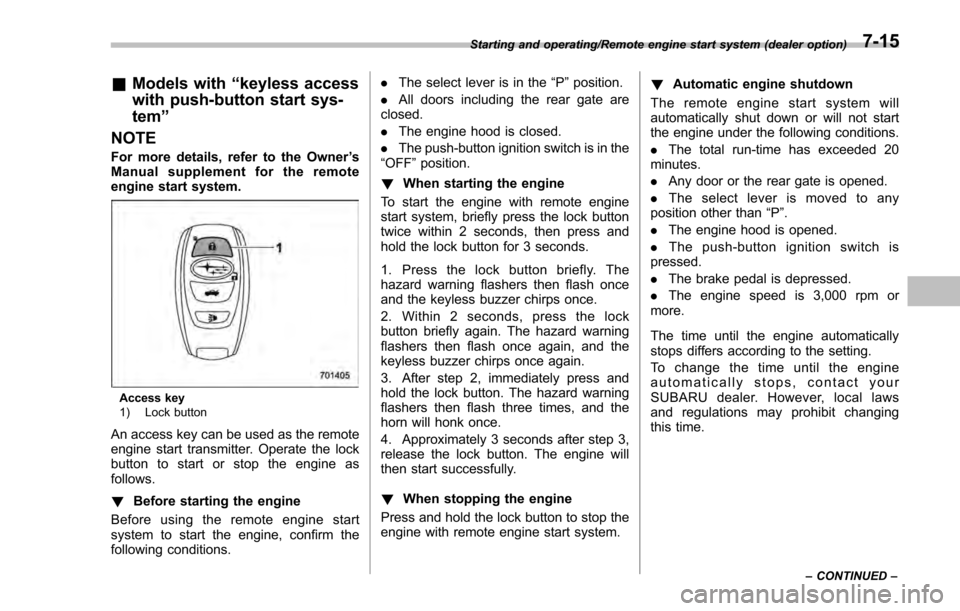
Access key
1) Lock button
An access key can be used as the remote
engine start transmitter. Operate the lock
button to start or stop the engine as
follows.
! Before starting the engine
Before using the remote engine start
system to start the engine, confirm the
following conditions. .
The select lever is in the “P ”position.
. All doors including the rear gate are
closed.
. The engine hood is closed.
. The push-button ignition switch is in the
“OFF ”position.
! When starting the engine
To start the engine with remote engine
start system, briefly press the lock button
twice within 2 seconds, then press and
hold the lock button for 3 seconds.
1. Press the lock button briefly. The
hazard warning flashers then flash once
and the keyless buzzer chirps once.
2. Within 2 seconds, press the lock
button briefly again. The hazard warning
flashers then flash once again, and the
keyless buzzer chirps once again.
3. After step 2, immediately press and
hold the lock button. The hazard warning
flashers then flash three times, and the
horn will honk once.
4. Approximately 3 seconds after step 3,
release the lock button. The engine will
then start successfully.
! When stopping the engine
Press and hold the lock button to stop the
engine with remote engine start system. !
Automatic engine shutdown
The remote engine start system will
automatically shut down or will not start
the engine under the following conditions.
. The total run-time has exceeded 20
minutes.
. Any door or the rear gate is opened.
. The select lever is moved to any
position other than “P”.
. The engine hood is opened.
. Thepush-buttonignitionswitchis
pressed.
. The brake pedal is depressed.
. The engine speed is 3,000 rpm or
more.
The time until the engine automatically
stops differs according to the setting.
To change the time until the engine
automatically stops, contact your
SUBARU dealer. However, local laws
and regulations may prohibit changing
this time.
Starting and operating/Remote engine start system (dealer option)
–CONTINUED –7-15
Page 401 of 594
Starting and operating/Remote engine start system (dealer option)
&Models without “keyless ac-
cess with push-button start
system ”
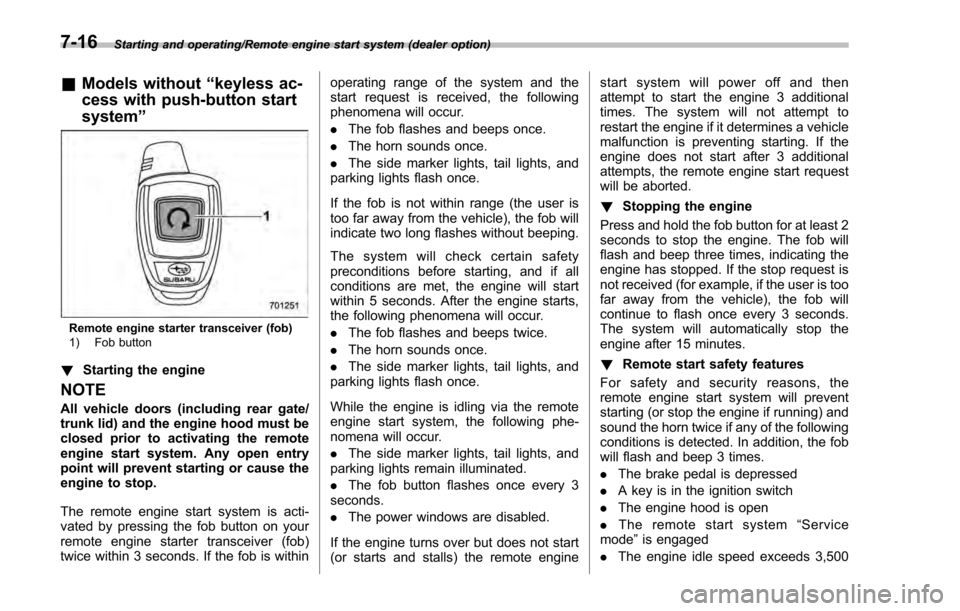
Remote engine starter transceiver (fob)
1) Fob button
!Starting the engine
NOTE
All vehicle doors (including rear gate/
trunk lid) and the engine hood must be
closed prior to activating the remote
engine start system. Any open entry
point will prevent starting or cause the
engine to stop.
The remote engine start system is acti-
vated by pressing the fob button on your
remote engine starter transceiver (fob)
twice within 3 seconds. If the fob is within operating range of the system and the
start request is received, the following
phenomena will occur.
.
The fob flashes and beeps once.
. The horn sounds once.
. The side marker lights, tail lights, and
parking lights flash once.
If the fob is not within range (the user is
too far away from the vehicle), the fob will
indicate two long flashes without beeping.
The system will check certain safety
preconditions before starting, and if all
conditions are met, the engine will start
within 5 seconds. After the engine starts,
the following phenomena will occur.
. The fob flashes and beeps twice.
. The horn sounds once.
. The side marker lights, tail lights, and
parking lights flash once.
While the engine is idling via the remote
engine start system, the following phe-
nomena will occur.
. The side marker lights, tail lights, and
parking lights remain illuminated.
. The fob button flashes once every 3
seconds.
. The power windows are disabled.
If the engine turns over but does not start
(or starts and stalls) the remote engine start system will power off and then
attempt to start the engine 3 additional
times. The system will not attempt to
restart the engine if it determines a vehicle
malfunction is preventing starting. If the
engine does not start after 3 additional
attempts, the remote engine start request
will be aborted.
!
Stopping the engine
Press and hold the fob button for at least 2
seconds to stop the engine. The fob will
flash and beep three times, indicating the
engine has stopped. If the stop request is
not received (for example, if the user is too
far away from the vehicle), the fob will
continue to flash once every 3 seconds.
The system will automatically stop the
engine after 15 minutes.
! Remote start safety features
For safety and security reasons, the
remote engine start system will prevent
starting (or stop the engine if running) and
sound the horn twice if any of the following
conditions is detected. In addition, the fob
will flash and beep 3 times.
. The brake pedal is depressed
. A key is in the ignition switch
. The engine hood is open
. The remote start system “Service
mode ”is engaged
. The engine idle speed exceeds 3,500
7-16
Page 402 of 594

RPM
.The security alarm is triggered
. The select lever is not in the “P ”
position (CVT models)
If the system detects any door (including
the rear gate/trunk lid) open during opera-
tion, it will prevent starting or stop the
engine, and sound the horn and flash side
marker lights, tail lights, and parking lights
6 times.
In addition to the items above, if the
vehicle ’s engine management system
determines there is a safety risk due to a
vehicle-related problem, the vehicle will
power down and the horn will sound 3
times.
NOTE
. If the alarm system is armed at the
time of remote engine starter activation
(the security indicator light on the
combination meter is flashing), the
alarm system will remain armed
throughout the remote start run cycle.
. If the alarm system is disarmed at
the time of remote engine starter
activation (the security indicator light
on the combination meter is not flash-
ing), the alarm system will remain
disarmed throughout the remote start
run cycle. !
Remote start operation - fob con-
firmation
Your remote engine starter fob is a
bidirectional transceiver that can confirm
system operation with several different
visual and audible indications. The fob ’s
LED-backlit button and internal piezo
buzzer will indicate status of the system
using the following flash and beep se-
quences, provided the fob is within opera-
tional range of the system.
Starting and operating/Remote engine start system (dealer option)
–CONTINUED –7-17
Page 403 of 594

Starting and operating/Remote engine start system (dealer option)
PreconditionFob Indication
Meaning
Flash Beep
Fob start button is being pressed Continuous while button is
held down—
The fob is transmitting an RF signal
User attempts to start engine by pressing fob
button twice within 3 sec 1 flash 1 beep Engine start request received
2 flashes
2 beepsEngine started successfully
1 flash every 3 sec —Engine idling
3 flashes 3 beepsVehicle is in range but engine not started
2 long flashes —Vehicle not in range (engine not started)
Engine idling by remote engine start operation 1 flash every 3 sec
—Engine idling
3 flashes 3 beepsEngine stopped by system timeout or for safety
reasons (see sections above)
User attempts to stop engine by pressing and
holding fob button for at least 2 sec. 3 flashes
3 beepsEngine stopped by user request
1 flash every 3 sec —Stop request not received. Engine still idling.
7-18
Page 407 of 594
Starting and operating/Manual transmission
Manual transmission
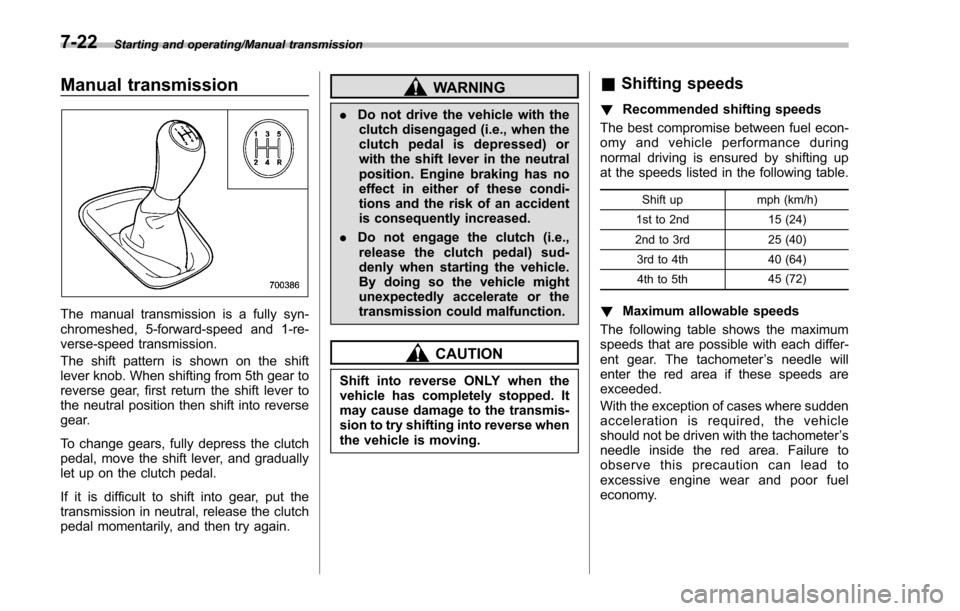
The manual transmission is a fully syn-
chromeshed, 5-forward-speed and 1-re-
verse-speed transmission.
The shift pattern is shown on the shift
lever knob. When shifting from 5th gear to
reverse gear, first return the shift lever to
the neutral position then shift into reverse
gear.
To change gears, fully depress the clutch
pedal, move the shift lever, and gradually
let up on the clutch pedal.
If it is difficult to shift into gear, put the
transmission in neutral, release the clutch
pedal momentarily, and then try again.
WARNING
.Do not drive the vehicle with the
clutch disengaged (i.e., when the
clutch pedal is depressed) or
with the shift lever in the neutral
position. Engine braking has no
effect in either of these condi-
tions and the risk of an accident
is consequently increased.
. Do not engage the clutch (i.e.,
release the clutch pedal) sud-
denly when starting the vehicle.
By doing so the vehicle might
unexpectedly accelerate or the
transmission could malfunction.
CAUTION
Shift into reverse ONLY when the
vehicle has completely stopped. It
may cause damage to the transmis-
sion to try shifting into reverse when
the vehicle is moving.
& Shifting speeds
! Recommended shifting speeds
The best compromise between fuel econ-
omy and vehicle performance during
normal driving is ensured by shifting up
at the speeds listed in the following table.
Shift up mph (km/h)
1st to 2nd 15 (24)
2nd to 3rd 25 (40)
3rd to 4th 40 (64)
4th to 5th 45 (72)
!
Maximum allowable speeds
The following table shows the maximum
speeds that are possible with each differ-
ent gear. The tachometer ’s needle will
enter the red area if these speeds are
exceeded.
With the exception of cases where sudden
acceleration is required, the vehicle
should not be driven with the tachometer ’s
needle inside the red area. Failure to
observe this precaution can lead to
excessive engine wear and poor fuel
economy.
7-22
Page 408 of 594
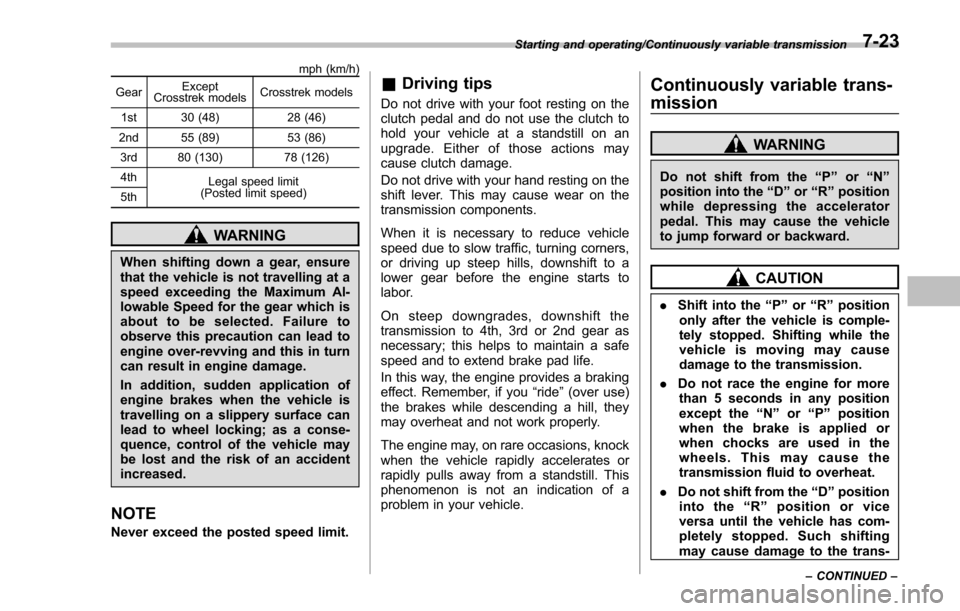
mph (km/h)
Gear Except
Crosstrek models Crosstrek models
1st 30 (48) 28 (46)
2nd 55 (89) 53 (86)
3rd 80 (130) 78 (126)
4th Legal speed limit
(Posted limit speed)
5th
WARNING
When shifting down a gear, ensure
that the vehicle is not travelling at a
speed exceeding the Maximum Al-
lowable Speed for the gear which is
about to be selected. Failure to
observe this precaution can lead to
engine over-revving and this in turn
can result in engine damage.
In addition, sudden application of
engine brakes when the vehicle is
travelling on a slippery surface can
lead to wheel locking; as a conse-
quence, control of the vehicle may
be lost and the risk of an accident
increased.
NOTE
Never exceed the posted speed limit.
& Driving tips
Do not drive with your foot resting on the
clutch pedal and do not use the clutch to
hold your vehicle at a standstill on an
upgrade. Either of those actions may
cause clutch damage.
Do not drive with your hand resting on the
shift lever. This may cause wear on the
transmission components.
When it is necessary to reduce vehicle
speed due to slow traffic, turning corners,
or driving up steep hills, downshift to a
lower gear before the engine starts to
labor.
On steep downgrades, downshift the
transmission to 4th, 3rd or 2nd gear as
necessary; this helps to maintain a safe
speed and to extend brake pad life.
In this way, the engine provides a braking
effect. Remember, if you “ride”(over use)
the brakes while descending a hill, they
may overheat and not work properly.
The engine may, on rare occasions, knock
when the vehicle rapidly accelerates or
rapidly pulls away from a standstill. This
phenomenon is not an indication of a
problem in your vehicle.
Continuously variable trans-
mission
WARNING
Do not shift from the “P”or “N”
position into the “D”or “R”position
while depressing the accelerator
pedal. This may cause the vehicle
to jump forward or backward.
CAUTION
. Shift into the “P ” or “R”position
only after the vehicle is comple-
tely stopped. Shifting while the
vehicle is moving may cause
damage to the transmission.
. Do not race the engine for more
than 5 seconds in any position
except the “N”or “P ” position
when the brake is applied or
when chocks are used in the
wheels. This may cause the
transmission fluid to overheat.
. Do not shift from the “D”position
into the “R ” position or vice
versa until the vehicle has com-
pletely stopped. Such shifting
may cause damage to the trans-
Starting and operating/Continuously variable transmission
–CONTINUED –7-23
Page 410 of 594
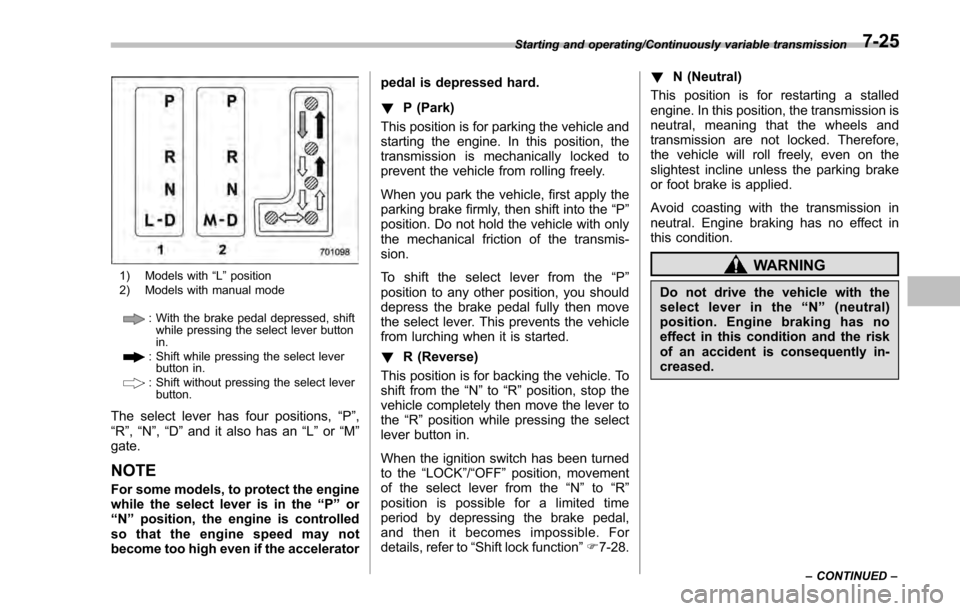
1) Models with“L ” position
2) Models with manual mode
: With the brake pedal depressed, shift while pressing the select lever button
in.
: Shift while pressing the select leverbutton in.
: Shift without pressing the select lever
button.
The select lever has four positions, “P”,
“R ”, “N ”,“D ”and it also has an “L”or “M”
gate.
NOTE
For some models, to protect the engine
while the select lever is in the “P ” or
“N ”position, the engine is controlled
so that the engine speed may not
become too high even if the accelerator pedal is depressed hard.
!
P (Park)
This position is for parking the vehicle and
starting the engine. In this position, the
transmission is mechanically locked to
prevent the vehicle from rolling freely.
When you park the vehicle, first apply the
parking brake firmly, then shift into the “P”
position. Do not hold the vehicle with only
the mechanical friction of the transmis-
sion.
To shift the select lever from the “P”
position to any other position, you should
depress the brake pedal fully then move
the select lever. This prevents the vehicle
from lurching when it is started.
! R (Reverse)
This position is for backing the vehicle. To
shift from the “N”to “R”position, stop the
vehicle completely then move the lever to
the “R”position while pressing the select
lever button in.
When the ignition switch has been turned
to the “LOCK”/“OFF ”position, movement
of the select lever from the “N ” to “R ”
position is possible for a limited time
period by depressing the brake pedal,
and then it becomes impossible. For
details, refer to “Shift lock function ”F 7-28. !
N (Neutral)
This position is for restarting a stalled
engine. In this position, the transmission is
neutral, meaning that the wheels and
transmission are not locked. Therefore,
the vehicle will roll freely, even on the
slightest incline unless the parking brake
or foot brake is applied.
Avoid coasting with the transmission in
neutral. Engine braking has no effect in
this condition.
WARNING
Do not drive the vehicle with the
select lever in the “N ” (neutral)
position. Engine braking has no
effect in this condition and the risk
of an accident is consequently in-
creased.
Starting and operating/Continuously variable transmission
–CONTINUED –7-25
Page 411 of 594
Starting and operating/Continuously variable transmission
NOTE
If the select lever is in the“N”position
when you stop the engine for parking,
you may not subsequently be able to
move it to the “R”and “P”positions. If
this happens, turn the ignition switch to
the “ON ”position. You will then be able
to move the select lever to the “P”
position.
! D (Drive)
This position is for normal driving. The
transmission shifts automatically and con-
tinuously into a suitable gear according to
the vehicle speed and the acceleration
you require. Also, while driving up and
down a hill, the transmission assists and
controls the driving performance and
engine braking while corresponding to
the road grade.
When more acceleration is required in “D”
position, depress the accelerator pedal
fully to the floor and hold that position. The
transmission will automatically downshift.
In this case, the transmission will operate
like a conventional automatic transmis-
sion. When you release the pedal, the
transmission will return to the original gear
position.
For models with manual mode, if one of
the shift paddles behind the steering wheel is operated while driving in the
“D”
position, the transmission will temporarily
switch to the manual mode. In this mode,
you can shift into any gear position using
the shift paddles. For details about the
manual mode, refer to “Selection of
manual mode” F7-26. Once the vehicle
speed stabilizes, the transmission will
switch from the manual mode back to
the “D”position for normal driving.
& Selection of manual mode (if
equipped)
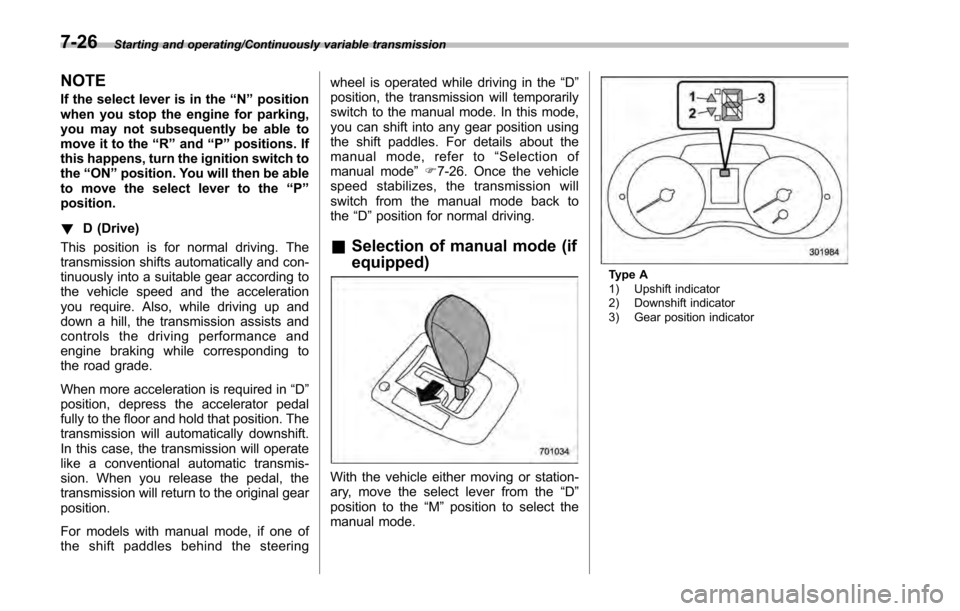
With the vehicle either moving or station-
ary, move the select lever from the “D”
position to the “M”position to select the
manual mode.
Type A
1) Upshift indicator
2) Downshift indicator
3) Gear position indicator
7-26