Page 69 of 268
67
108_en_Chap03_ergonomie-confort_ed01-2016
Rear parcel shelf
to facilitate loading of the boot, the rear parcel
shelf is fitted to the tailgate.
When closing the tailgate, check that nothing
could inter fere with the return to position of the
shelf.Do not place heavy loads on the shelf,
as they may cause the shelf to unclip.to remove the shelf:
F
o
pen the tailgate,
F
u
nclip the two cords,
F
p
ull firmly on the shelf to disengage it from
its hinges on the tailgate inner trim.
You can then stow the shelf behind the front
seats.to r efit the shelf:
F
o
pen the tailgate,
F
p
osition the underside of the shelf facing
you,
F
c
lip the shelf into the two hinges,
F
p
ass the two cords through the guides
either side of the struts,
F
c
lip the two cords in place.
3
ease of use and comfort
Page 74 of 268

72
108_en_Chap04_conduite_ed01-2016
If you use the ancillaries for a prolonged
period, the vehicle will automatically
switch to "
oFF" m
ode after about
20
minutes.
Be aware in order to avoid discharging
the battery.
Starting - switching off the engine
with the Keyless e
n
try and Starting
system
Changing the mode of the
vehicle
With the electronic key inside the
vehicle; each press on the " St
A Rt/
StoP " b
utton, with no action on the
pedals, changes the vehicle's mode:
F
F
irst press (" ACC" m o d e).
t
h
e ancillaries (radio, 12V socket...) can be
used.
F
Sec
ond press ("
oN "
m o d e).
I
gnition on.
F
t
h
ird press ("
oFF "
m o d e).
Avoid attaching heavy objects to the
key, which would weigh down on its
blade in the ignition switch and could
cause a malfunction.
F
Imm
obilise the vehicle.
Switching off
F With a manual gearbox: put the gear lever
into neutral.
F
W
ith an etg gearbox: place the selector at
position N .
F
t
u
rn the key towards you to position 2 (ACC) .
F
Press in and turn the key to position 1 (LoC K).F Remove the key from the ignition switch.
F
tu rn the steering until the steering column
locks.
Driving
Page 88 of 268

86
108_en_Chap04_conduite_ed01-2016
the speed limiter cannot, in any
circumstances, replace the need to
observe speed limits, nor can it replace the
need for vigilance on the part of the driver.
Speed limiter (Puretech 82 engine)
the speed limiter is switched on manually:
this can be done whatever the speed of the
vehicle. However, if you are driving at less than
20 mph (30 km/h), the programmed speed will
be fixed at 20 mph (30 km/h).
th
e speed limiter is paused by operation of the
control.
th
e programmed speed can be exceeded
temporarily by pressing the accelerator firmly
beyond the point of resistance.
to r
eturn to the programmed speed, simply
release the accelerator pedal until the vehicle
returns to the programmed speed limit. System which prevents the vehicle from exceeding the speed programmed by the driver.Steering mounted controls
the controls are grouped together on this
control stalk at the steering wheel.
1.
S
peed limiter on / off: by pressing the end
of the control stalk.
2.
D
ecrease the setting: by pushing the
control stalk down.
3.
I
ncrease the setting: by pushing the control
stalk up.
4.
S
peed limiter on / pause: by pulling the
control stalk towards you
Displays in the instrument panel
the information is grouped together in the
instrument panel screen.
5.
Spe
ed limiter mode selection indication.
6.
S
peed limiter on / pause indication.
7.
Spe
ed value setting.
th
e programmed speed remains in the
memory when the ignition is switched off.
Driving
Page 89 of 268

87
108_en_Chap04_conduite_ed01-2016
Switching on
F Press the end of the control stalk: the speed limiter mode is selected but is not
switched on.
F
S
witch the speed limiter on by pulling the
control stalk towards you, if the speed
displayed is suitable (by default, the last
speed programmed). Once the function is selected, you can modify
the speed setting by:
-
b
y pushing the control stalk up to increase
the setting,
-
b
y pushing the control stalk down to
decrease the setting.
A brief push on the control stalk modifies the
speed setting by + or - 1 mph (km/h).
A maintained push on the control stalk modifies
the speed setting by + or - 5 mph (km/h).
Adjusting the speed limit
setting
You do not have to switch the speed
limiter on in order to set the speed.
Pause
F You can temporarily stop the the speed limiter by pulling the control stalk towards
you again: the display confirms that it has
been stopped (Pause).
F
P
ull the control stalk towards you again to
restore the speed limiter.
4
Driving
Page 91 of 268
89
108_en_Chap04_conduite_ed01-2016
Speed limiter (Vti 68 engine)
System which prevents the vehicle from exceeding the speed programmed by the driver.
th
e speed limiter is switched on manually:
this can be done whatever the speed of the
vehicle. However, if you are driving at less than
20 mph (30 km/h), the programmed speed will
be fixed at 20 mph (30 km/h).
th
e speed limiter is paused by operation of the
control.
th
e programmed speed can be exceeded
temporarily by pressing the accelerator firmly
beyond the point of resistance.
to r
eturn to the programmed speed, simply
release the accelerator pedal until the vehicle
returns to the programmed speed limit.
th
e programmed limit speed is erased
when switching off the ignition.
Steering mounted controls
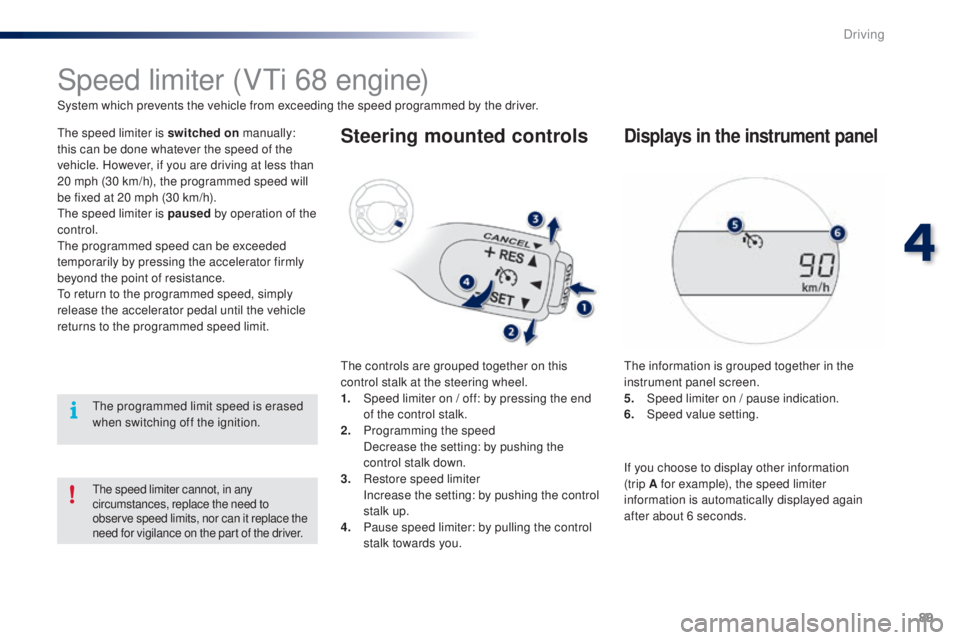
the controls are grouped together on this
control stalk at the steering wheel.
1.
S
peed limiter on / off: by pressing the end
of the control stalk.
2.
P
rogramming the speed
D
ecrease the setting: by pushing the
control stalk down.
3.
R
estore speed limiter
I
ncrease the setting: by pushing the control
stalk up.
4.
P
ause speed limiter: by pulling the control
stalk towards you.
Displays in the instrument panel
the information is grouped together in the
instrument panel screen.
5.
S
peed limiter on / pause indication.
6.
Spe
ed value setting.
the speed limiter cannot, in any
circumstances, replace the need to
observe speed limits, nor can it replace the
need for vigilance on the part of the driver.
If you choose to display other information
(trip A for example), the speed limiter
information is automatically displayed again
after about 6 seconds.
4
Driving
Page 92 of 268

90
108_en_Chap04_conduite_ed01-2016
F Press the end of the control stalk: the speed limiter is switched on.
F
A
ccelerate or decelerate to attain the
desired speed.
F
P
ush the control stalk down and release, to
programme the speed.
t
h
e speed at which the vehicle is running
at the moment when you release the
control stalk becomes the programmed
speed.
Adjusting the speed limit
setting
Once a speed is programmed, you can modify
it by pushing and releasing the control stalk:
-
u
p to increase the speed setting,
-
d
own to reduce the speed setting.
A brief push on the control stalk modifies the
speed setting by + or - 1 mph (km/h).
A maintained push on the control stalk modifies
the speed setting by + or - 5 mph (km/h).
Switching on
this indicator lamp comes on in the
instrument panel.
Pause
F You can temporarily stop the the speed limiter by pulling the control stalk towards
you.
F
P
ush the control stalk up to restore
operation of the speed limiter with the
same speed setting.
Driving
Page 101 of 268
99
108_en_Chap05_eclairage-visibilite_ed01-2016
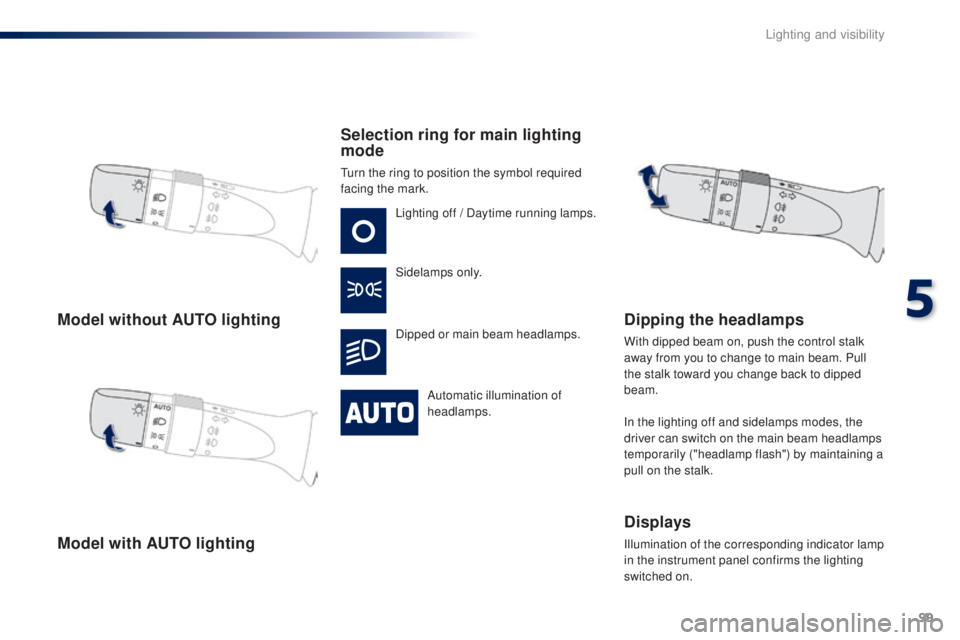
Model without Auto l ighting
Model with A
ut
o lighting Selection ring for main lighting
mode
turn the ring to position the symbol required
facing the mark.
Lighting off / Daytime running lamps.
Sidelamps only.
Dipped or main beam headlamps.
Automatic illumination of
headlamps.
Dipping the headlamps
With dipped beam on, push the control stalk
away from you to change to main beam. Pull
the stalk toward you change back to dipped
beam.
In the lighting off and sidelamps modes, the
driver can switch on the main beam headlamps
temporarily ("headlamp flash") by maintaining a
pull on the stalk.
Displays
Illumination of the corresponding indicator lamp
in the instrument panel confirms the lighting
switched on.
5
Lighting and visibility
Page 107 of 268
105
108_en_Chap05_eclairage-visibilite_ed01-2016
Rear wiperRear screenwash
Wiper off, turn the control stalk towards you to
operate the rear screenwash, accompanied by
several sweeps of the rear wiper.
Windscreen wash
turn the ring to this position for a
steady wipe.
Pushing the stalk away from you operates the
wash during wiping.
Pull the wiper stalk towards you.
th
e
windscreen wash, then the windscreen wipers,
operate for a pre-determined time.
Do not use the front or rear screenwash
when the screenwash reservoir is
empty. You risk damaging the pump.
5
Lighting and visibility