Page 159 of 268
157
108_en_Chap08_en-cas-pannes_ed01-2016
Should the pressure of one or more
tyres be adjusted, it is necessary to
reinitialise the under-inflation detection
system.
For more information on under-inflation
detection, refer to the corresponding
section.
Tyre under-inflation
detection
After repair of the tyre, the warning
lamp will remain on until the system is
reinitialised.
For more information on under-inflation
detection, refer to the corresponding
section.
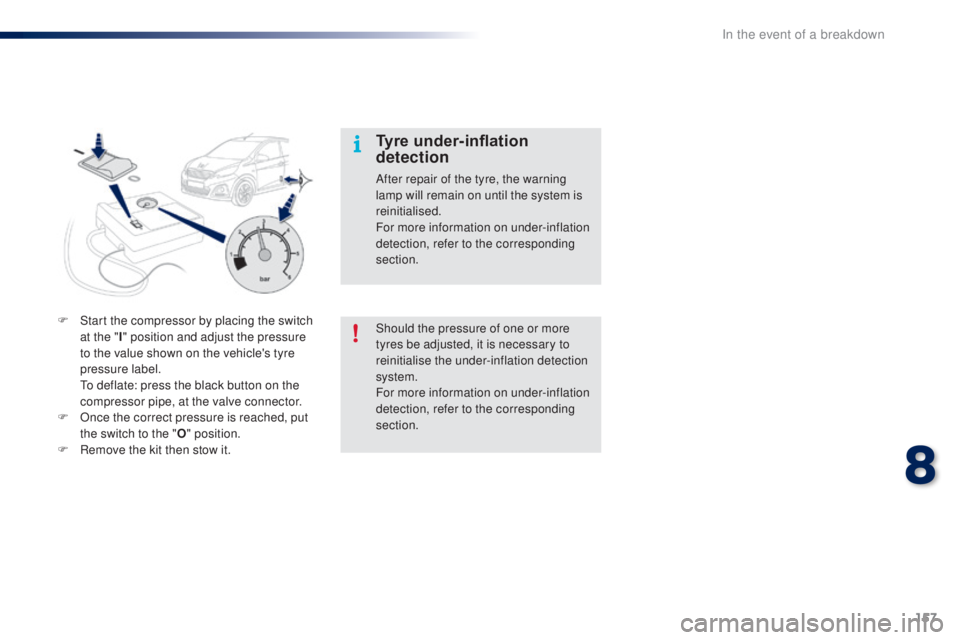
F
S
tart the compressor by placing the switch
at the " I" position and adjust the pressure
to the value shown on the vehicle's tyre
pressure label.
t
o d
eflate: press the black button on the
compressor pipe, at the valve connector.
F
O
nce the correct pressure is reached, put
the switch to the "
o"
position.
F
R
emove the kit then stow it.
8
In the event of a breakdown
Page 161 of 268

159
108_en_Chap08_en-cas-pannes_ed01-2016
Access to the spare wheel
and tools
tools provided
the following tools are installed in a carrier,
located in the centre of the spare wheel:
1.
Wheelbrace
2.
J
ack with handle
3.
R
emovable towing eye.
Refer to the "
to
wing the vehicle" section.
tyre pressures
these are indicated on the label affixed to the
middle pillar of the left door, driver's side.
Refer to the "Identification markings" section.All of these tools are specific to your
vehicle and can vary according to
equipment. Do not use them for any
other purposes.
Never go underneath a vehicle
supported only by a jack (use an axle
stand).
Never use a jack other than the one
listed by the manufacturer. If your
vehicle does not have one, contact
a P
e
uge
Ot
dealer or a qualified
workshop to obtain the correct jack for
your vehicle.
Depending on version, the spare wheel and
tools are stowed in the boot under the floor.
F
R
emove the boot carpet.
F
R
emove the tool carrier.
F
S
lacken the central wheel retaining bolt.
F
R
emove the wheel.
8
In the event of a breakdown
Page 165 of 268
163
108_en_Chap08_en-cas-pannes_ed01-2016
Changing a bulb
Front lamps
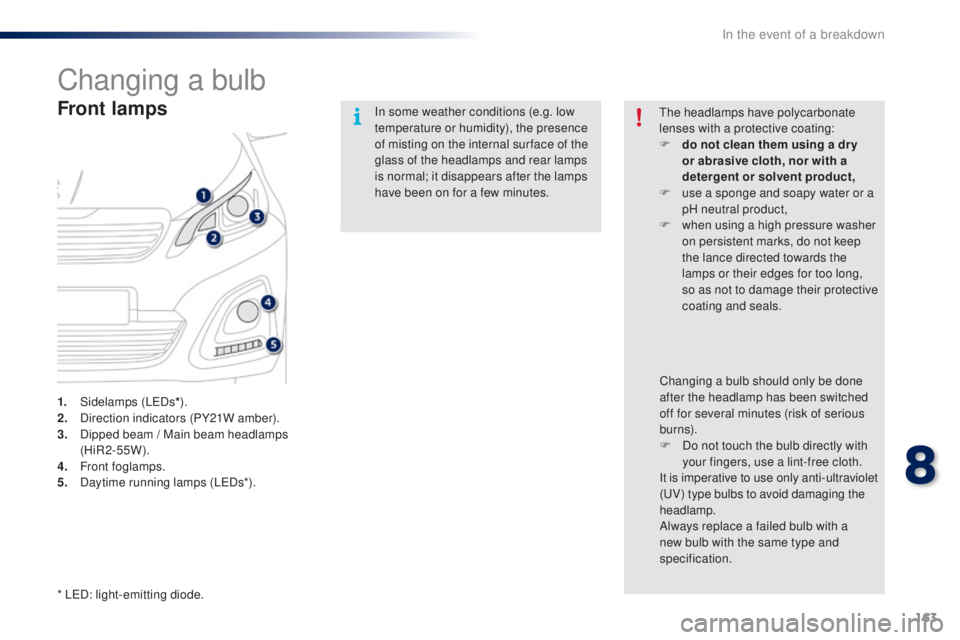
1. Sidelamps (LeDs*).
2. D irection indicators (PY21W amber).
3.
D
ipped beam / Main beam headlamps
(HiR2-55W).
4.
F
ront foglamps.
5.
D
aytime running lamps (L e
D
s*).In some weather conditions (e.g. low
temperature or humidity), the presence
of misting on the internal sur face of the
glass of the headlamps and rear lamps
is normal; it disappears after the lamps
have been on for a few minutes.
th
e headlamps have polycarbonate
lenses with a protective coating:
F
d
o not clean them using a dr y
or abrasive cloth, nor with a
detergent or solvent product,
F
u
se a sponge and soapy water or a
pH neutral product,
F
w
hen using a high pressure washer
on persistent marks, do not keep
the lance directed towards the
lamps or their edges for too long,
so as not to damage their protective
coating and seals.
Changing a bulb should only be done
after the headlamp has been switched
off for several minutes (risk of serious
burns).
F
D
o not touch the bulb directly with
your fingers, use a lint-free cloth.
It is imperative to use only anti-ultraviolet
(
uV
) type bulbs to avoid damaging the
headlamp.
Always replace a failed bulb with a
new bulb with the same type and
specification.
* L
eD
: light-emitting diode.
8
In the event of a breakdown
Page 169 of 268
167
108_en_Chap08_en-cas-pannes_ed01-2016
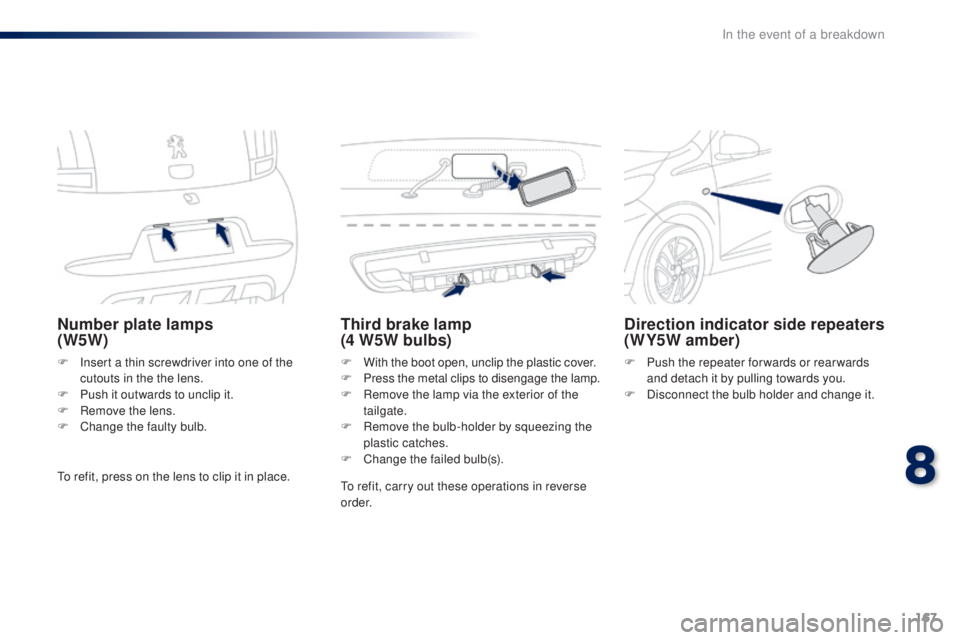
Number plate lamps
(W5W)
F Insert a thin screwdriver into one of the cutouts in the the lens.
F
P
ush it outwards to unclip it.
F
R
emove the lens.
F
C
hange the faulty bulb.
third brake lamp
(4 W5W bulbs)
F With the boot open, unclip the plastic cover.
F P ress the metal clips to disengage the lamp.
F
R
emove the lamp via the exterior of the
tailgate.
F
R
emove the bulb-holder by squeezing the
plastic catches.
F
C
hange the failed bulb(s).
Direction indicator side repeaters
(WY5W amber)
F Push the repeater for wards or rear wards and detach it by pulling towards you.
F
D
isconnect the bulb holder and change it.
to r
efit, press on the lens to clip it in place.
to r
efit, carry out these operations in reverse
o r d e r.
8
In the event of a breakdown
Page 182 of 268
180
108_en_Chap08_en-cas-pannes_ed01-2016
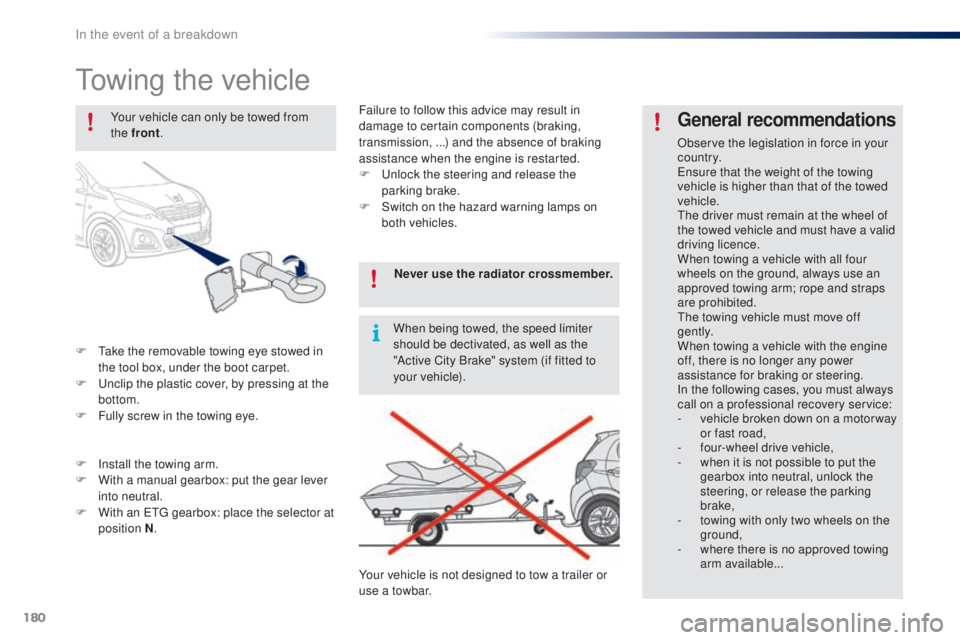
towing the vehicle
F take the removable towing eye stowed in the tool box, under the boot carpet.
F
u
n
clip the plastic cover, by pressing at the
bottom.
F
F
ully screw in the towing eye.
general recommendations
Observe the legislation in force in your
c o unt r y.
en
sure that the weight of the towing
vehicle is higher than that of the towed
vehicle.
th
e driver must remain at the wheel of
the towed vehicle and must have a valid
driving licence.
When towing a vehicle with all four
wheels on the ground, always use an
approved towing arm; rope and straps
are prohibited.
th
e towing vehicle must move off
g e nt l y.
When towing a vehicle with the engine
off, there is no longer any power
assistance for braking or steering.
In the following cases, you must always
call on a professional recovery service:
-
v
ehicle broken down on a motor way
or fast road,
-
f
our-wheel drive vehicle,
-
w
hen it is not possible to put the
gearbox into neutral, unlock the
steering, or release the parking
brake,
-
t
owing with only two wheels on the
ground,
-
w
here there is no approved towing
arm available...
Your vehicle can only be towed from
the front
.
F
I
nstall the towing arm.
F
W
ith a manual gearbox: put the gear lever
into neutral.
F
W
ith an
etg
gearbox: place the selector at
position N . Never use the radiator crossmember.
When being towed, the speed limiter
should be dectivated, as well as the
"Active City Brake" system (if fitted to
your vehicle).
Your vehicle is not designed to tow a trailer or
use a towbar. Failure to follow this advice may result in
damage to certain components (braking,
transmission, ...) and the absence of braking
assistance when the engine is restarted.
F
u
n
lock the steering and release the
parking brake.
F
S
witch on the hazard warning lamps on
both vehicles.
In the event of a breakdown
Page 184 of 268
182
108_en_Chap09_caracteristiques-techniques_ed01-2016
engineVti 6 8Vti 6 8 S&SPurete ch 82
ge
arbox Manual
(5 - speed)
e
tg electronic
(5 - speed) Manual
(5 - speed) Manual
(5 - speed)
Model code:
P... SCFBB
SCFBC ...B1A
...H1A ...P1A
...W1A SCFBB
SCFBC ...B1C
...H1C ...P1C
...W1C SCFB2
SCFB3 ...B1B
...H1B ...P1B
...W1B AHM
t
B
AHM
t
C...B1A
...H1A ...P1A
...W1A
Kerb weight 840860 855865
un
laden weiight* 915935 930940
gr
oss vehicle weight (
gV
W) 1 2401 2401 2401 240
gr
oss train weight (
g
t
W
) 1 2401 2401 2401 240
Weights (in kg)
the design of your vehicle does not permit the fitting of a towbar.
*
t
h
e unladen weight is equal to the kerb weight + driver (75 kg).
...B1
: 3 -door version.
...H1 : 5 -door version. ...P1
: 3 -door convertible version.
...W1 : 5 -door convertible version.
technical data
Page 229 of 268
227
108_en_Chap10a_Autoradio-toyota-tactile-1_ed01-2016
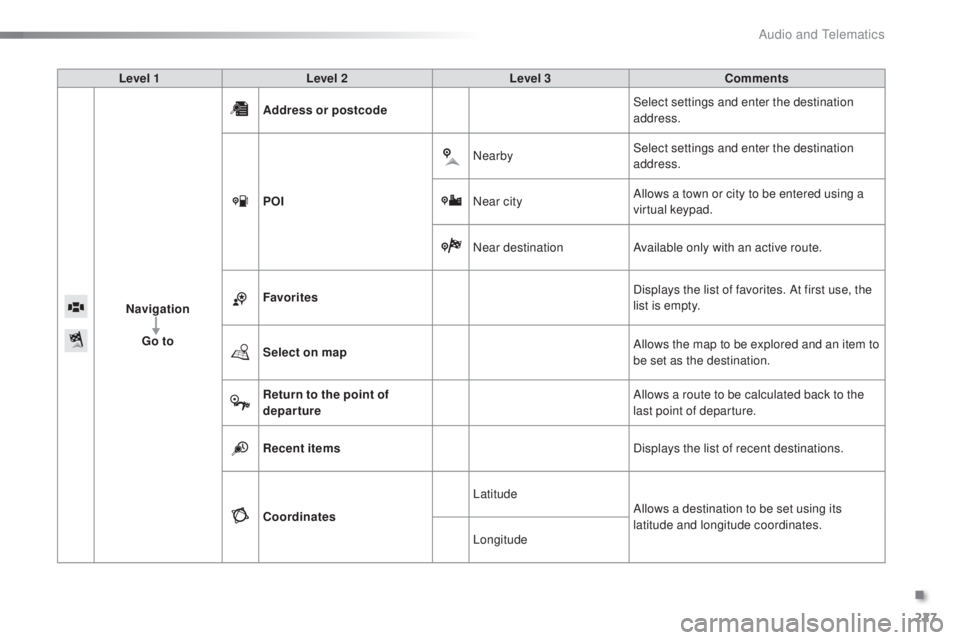
Level 1 Level 2 Level 3 Comments
Navigation
go t
o Address or postcode
Select settings and enter the destination
address.
P
o
I N
earbySelect settings and enter the destination
address.
Near city Allows a town or city to be entered using a
virtual keypad.
Near destination Available only with an active route.
Favorites Displays the list of favorites. At first use, the
list is empty.
Select on map Allows the map to be explored and an item to
be set as the destination.
Return to the point of
departure Allows a route to be calculated back to the
last point of departure.
Recent items Displays the list of recent destinations.
Coordinates Latitude
Allows a destination to be set using its
latitude and longitude coordinates.
Longitude
.
Audio and telematics
Page 230 of 268
228
108_en_Chap10a_Autoradio-toyota-tactile-1_ed01-2016
Choosing a new destination
Select "go to".
Select "go t o".
In the contextual menu, press the
"
go t
o
" button.
Select " Address or postcode ".
Select "Recent items ".
Select the "Country" from
the list offered, then in the
same way, the " City" or its
" Postcode ". Scroll through the list using
the arrows and select the
desired address.
Once the address has been entered,
press "
oK
"
to confirm.
Press "
oK " t
o start navigation.
en
ter the "
Street" and the
" House number ".
Press "
oK "
to confirm.
Select your route from the
list offered.
Press on "
Connection " in the
system.
Select " N AV I". Select "N AV I".
Press on "
Connection " from the
system.
Select " Navigation ".
Select "Navigation ".
towards a new destinationto wards a recent destination
Audio and telematics