2016 NISSAN NOTE clock
[x] Cancel search: clockPage 632 of 3641
CL-6
< PERIODIC MAINTENANCE >
CLUTCH PEDAL
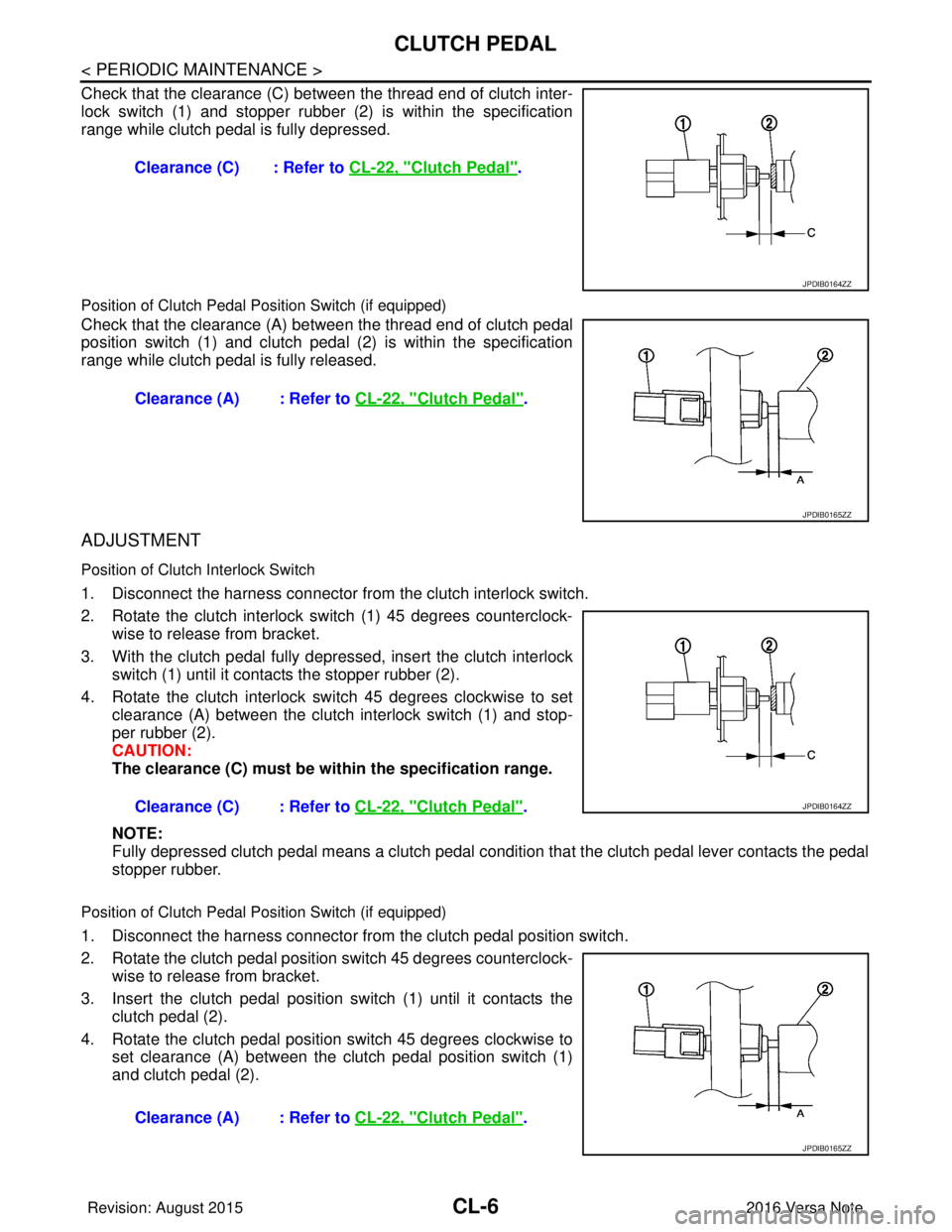
Check that the clearance (C) between the thread end of clutch inter-
lock switch (1) and stopper rubber (2) is within the specification
range while clutch pedal is fully depressed.
Position of Clutch Pedal Position Switch (if equipped)
Check that the clearance (A) between the thread end of clutch pedal
position switch (1) and clutch pedal (2) is within the specification
range while clutch pedal is fully released.
ADJUSTMENT
Position of Clutch Interlock Switch
1. Disconnect the harness connector from the clutch interlock switch.
2. Rotate the clutch interlock switch (1) 45 degrees counterclock- wise to release from bracket.
3. With the clutch pedal fully depressed, insert the clutch interlock switch (1) until it contacts the stopper rubber (2).
4. Rotate the clutch interlock switch 45 degrees clockwise to set clearance (A) between the clutch interlock switch (1) and stop-
per rubber (2).
CAUTION:
The clearance (C) must be wi thin the specification range.
NOTE:
Fully depressed clutch pedal means a clutch pedal condi tion that the clutch pedal lever contacts the pedal
stopper rubber.
Position of Clutch Pedal Position Switch (if equipped)
1. Disconnect the harness connector from the clutch pedal position switch.
2. Rotate the clutch pedal position switch 45 degrees counterclock- wise to release from bracket.
3. Insert the clutch pedal position switch (1) until it contacts the
clutch pedal (2).
4. Rotate the clutch pedal position switch 45 degrees clockwise to set clearance (A) between the clutch pedal position switch (1)
and clutch pedal (2).Clearance (C) : Refer to
CL-22, "
Clutch Pedal".
JPDIB0164ZZ
Clearance (A) : Refer to CL-22, "Clutch Pedal".
JPDIB0165ZZ
Clearance (C) : Refer to CL-22, "Clutch Pedal".JPDIB0164ZZ
Clearance (A) : Refer to CL-22, "Clutch Pedal".
JPDIB0165ZZ
Revision: August 2015 2016 Versa Note
cardiagn.com
Page 637 of 3641
CLUTCH PEDALCL-11
< REMOVAL AND INSTALLATION >
CEF
G H
I
J
K L
M A
B
CL
N
O P
REMOVAL AND INSTALLATION
CLUTCH PEDAL
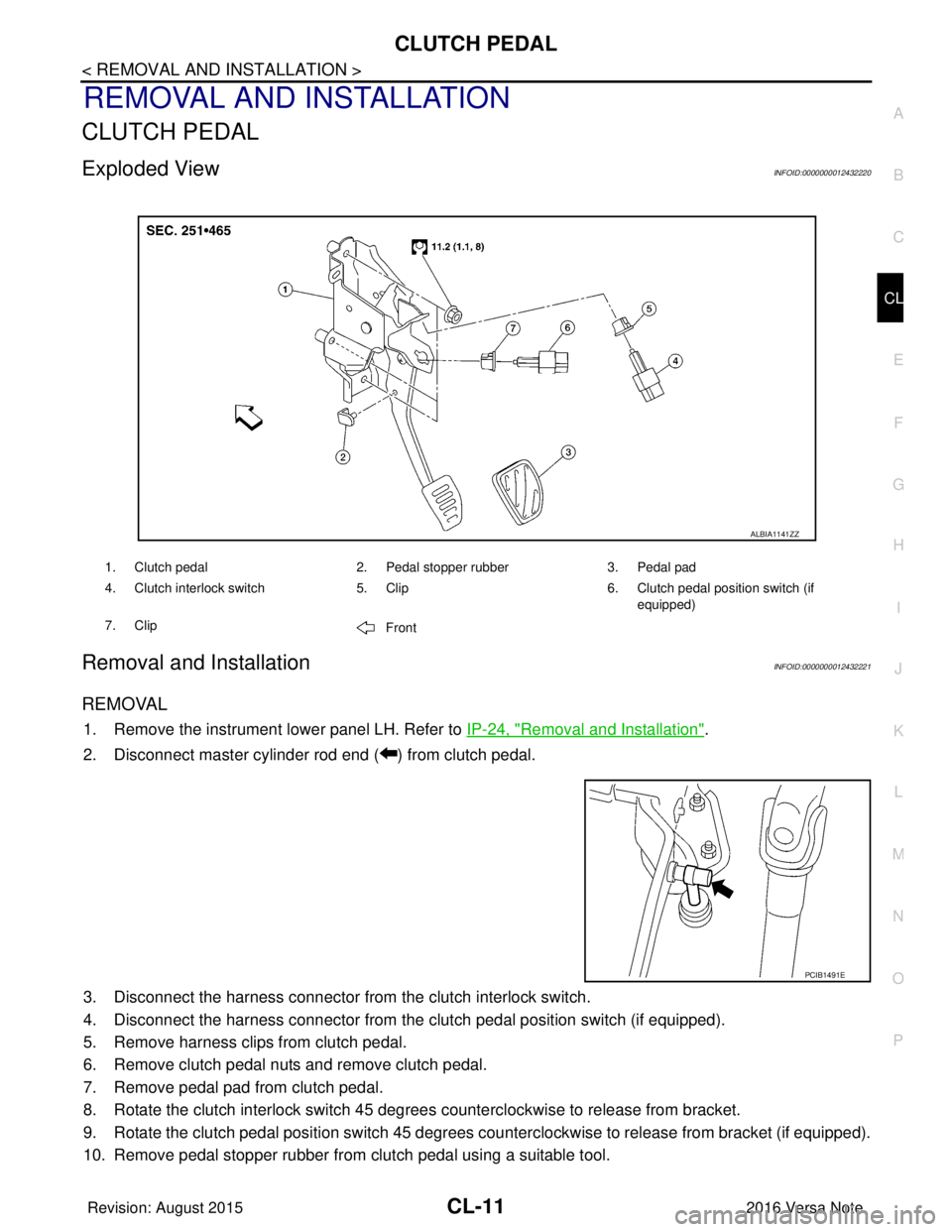
Exploded ViewINFOID:0000000012432220
Removal and InstallationINFOID:0000000012432221
REMOVAL
1. Remove the instrument lower panel LH. Refer to IP-24, "Removal and Installation".
2. Disconnect master cylinder rod end ( ) from clutch pedal.
3. Disconnect the harness connector from the clutch interlock switch.
4. Disconnect the harness connector from the clutch pedal position switch (if equipped).
5. Remove harness clips from clutch pedal.
6. Remove clutch pedal nuts and remove clutch pedal.
7. Remove pedal pad from clutch pedal.
8. Rotate the clutch interlock switch 45 degrees counterclockwise to release from bracket.
9. Rotate the clutch pedal position switch 45 degrees c ounterclockwise to release from bracket (if equipped).
10. Remove pedal stopper rubber from clutch pedal using a suitable tool.
1. Clutch pedal 2. Pedal stopper rubber3. Pedal pad
4. Clutch interlock switch 5. Clip6. Clutch pedal position switch (if
equipped)
7. Clip Front
ALBIA1141ZZ
PCIB1491E
Revision: August 2015 2016 Versa Note
cardiagn.com
Page 640 of 3641
CL-14
< REMOVAL AND INSTALLATION >
CLUTCH MASTER CYLINDER
5. Remove master cylinder rod end ( ) from clutch pedal.
6. Use one of the following methods to remove reservoir hose frommaster cylinder.
• Drain clutch fluid from reservoir tank and remove reservoirhose. Refer to CL-7, "
Draining".
• Remove hose from master cylinder.
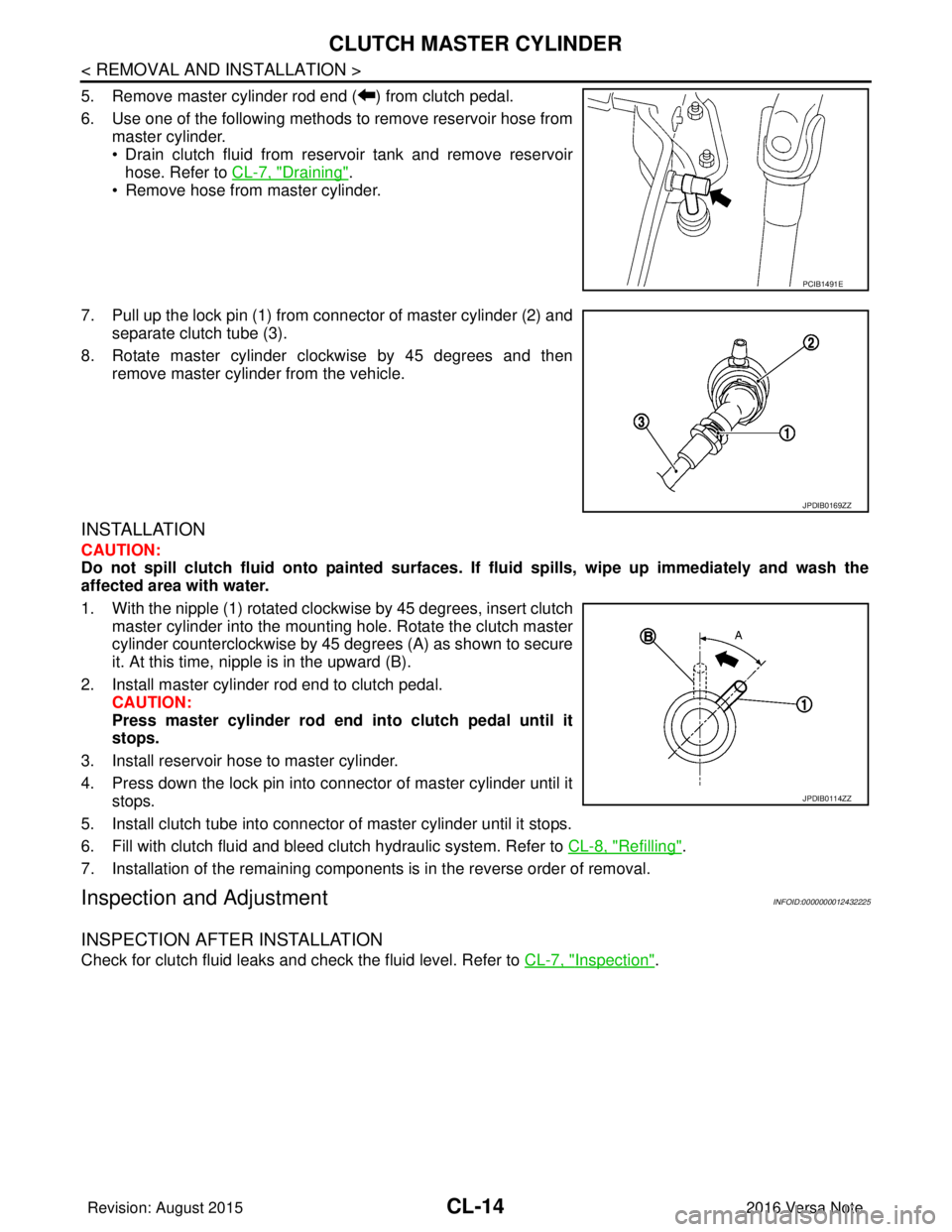
7. Pull up the lock pin (1) from connector of master cylinder (2) and separate clutch tube (3).
8. Rotate master cylinder clockwise by 45 degrees and then remove master cylinder from the vehicle.
INSTALLATION
CAUTION:
Do not spill clutch fluid onto pa inted surfaces. If fluid spills, wipe up imme diately and wash the
affected area with water.
1. With the nipple (1) rotated clockwise by 45 degrees, insert clutch master cylinder into the mounting hole. Rotate the clutch master
cylinder counterclockwise by 45 degrees (A) as shown to secure
it. At this time, nipple is in the upward (B).
2. Install master cylinder rod end to clutch pedal. CAUTION:
Press master cylinder rod end into clutch pedal until it
stops.
3. Install reservoir hose to master cylinder.
4. Press down the lock pin into connector of master cylinder until it stops.
5. Install clutch tube into connector of master cylinder until it stops.
6. Fill with clutch fluid and bleed clutch hydraulic system. Refer to CL-8, "
Refilling".
7. Installation of the remaining components is in the reverse order of removal.
Inspection and AdjustmentINFOID:0000000012432225
INSPECTION AFTER INSTALLATION
Check for clutch fluid leaks and check the fluid level. Refer to CL-7, "Inspection".
PCIB1491E
JPDIB0169ZZ
JPDIB0114ZZ
Revision: August 2015 2016 Versa Note
cardiagn.com
Page 823 of 3641
![NISSAN NOTE 2016 Service Repair Manual DLK-134
< SYMPTOM DIAGNOSIS >[WITH INTELLIGENT KEY SYSTEM]
SQUEAK AND RATTLE TROUBLE DIAGNOSES
SQUEAK AND RATTLE TROUBLE DIAGNOSES
Work FlowINFOID:0000000012430082
CUSTOMER INTERVIEW
Interview the cus](/manual-img/5/57363/w960_57363-822.png "NISSAN NOTE 2016 Service Repair Manual DLK-134
< SYMPTOM DIAGNOSIS >[WITH INTELLIGENT KEY SYSTEM]
SQUEAK AND RATTLE TROUBLE DIAGNOSES
SQUEAK AND RATTLE TROUBLE DIAGNOSES
Work FlowINFOID:0000000012430082
CUSTOMER INTERVIEW
Interview the cus")
DLK-134
< SYMPTOM DIAGNOSIS >[WITH INTELLIGENT KEY SYSTEM]
SQUEAK AND RATTLE TROUBLE DIAGNOSES
SQUEAK AND RATTLE TROUBLE DIAGNOSES
Work FlowINFOID:0000000012430082
CUSTOMER INTERVIEW
Interview the customer if possible, to determine the conditions that exist when the noise occurs. Use the Diag-
nostic Worksheet during the interview to document the facts and conditions when the noise occurs and any
customer's comments; refer to
DLK-138, "
Diagnostic Worksheet". This information is necessary to duplicate
the conditions that exist when the noise occurs.
• The customer may not be able to provide a detailed description or the location of the noise. Attempt to obtain all the facts and conditions that exist w hen the noise occurs (or does not occur).
• If there is more than one noise in the vehicle, be sure to diagnose and repair the noise that the customer is
concerned about. This can be accomplished by test driving the vehicle with the customer.
• After identifying the type of noise, isolate the noise in terms of its characteristics. The noise characteristics
are provided so the customer, service adviser and technician are all speaking the same language when
defining the noise.
• Squeak —(Like tennis shoes on a clean floor)
Squeak characteristics include the light contact/fast movement/brought on by road conditions/hard surfaces
= higher pitch noise/softer surfaces = lower pitch noises/edge to surface = chirping.
• Creak—(Like walking on an old wooden floor)
Creak characteristics include firm contact/slow mo vement/twisting with a rotational movement/pitch depen-
dent on materials/often brought on by activity.
• Rattle—(Like shaking a baby rattle)
Rattle characteristics include the fast repeated contac t/vibration or similar movement/loose parts/missing
clip or fastener/incorrect clearance.
• Knock —(Like a knock on a door)
Knock characteristics include hollow sounding/someti mes repeating/often brought on by driver action.
• Tick—(Like a clock second hand) Tick characteristics include gentle contacting of light materials/loose components/can be caused by driver
action or road conditions.
• Thump—(Heavy, muffled knock noise) Thump characteristics include softer k nock/dead sound often brought on by activity.
• Buzz—(Like a bumble bee)
Buzz characteristics include hi gh frequency rattle/firm contact.
• Often the degree of acceptable noise level will vary depending upon the person. A noise that you may judge as acceptable may be very irritating to the customer.
• Weather conditions, especially humidity and temperat ure, may have a great effect on noise level.
DUPLICATE THE NOISE AND TEST DRIVE
If possible, drive the vehicle with the customer until the noise is duplicated. Note any additional information on
the Diagnostic Worksheet regarding the conditions or lo cation of the noise. This information can be used to
duplicate the same conditions when you confirm the repair.
SBT842
Revision: August 2015 2016 Versa Note
cardiagn.com
Page 951 of 3641
![NISSAN NOTE 2016 Service Repair Manual DLK-262
< SYMPTOM DIAGNOSIS >[WITHOUT INTELLIGENT KEY SYSTEM]
SQUEAK AND RATTLE TROUBLE DIAGNOSES
SQUEAK AND RATTLE TROUBLE DIAGNOSES
Work FlowINFOID:0000000012430228
CUSTOMER INTERVIEW
Interview the](/manual-img/5/57363/w960_57363-950.png "NISSAN NOTE 2016 Service Repair Manual DLK-262
< SYMPTOM DIAGNOSIS >[WITHOUT INTELLIGENT KEY SYSTEM]
SQUEAK AND RATTLE TROUBLE DIAGNOSES
SQUEAK AND RATTLE TROUBLE DIAGNOSES
Work FlowINFOID:0000000012430228
CUSTOMER INTERVIEW
Interview the")
DLK-262
< SYMPTOM DIAGNOSIS >[WITHOUT INTELLIGENT KEY SYSTEM]
SQUEAK AND RATTLE TROUBLE DIAGNOSES
SQUEAK AND RATTLE TROUBLE DIAGNOSES
Work FlowINFOID:0000000012430228
CUSTOMER INTERVIEW
Interview the customer if possible, to determine the conditions that exist when the noise occurs. Use the Diag-
nostic Worksheet during the interview to document the facts and conditions when the noise occurs and any
customer's comments; refer to
DLK-266, "
Diagnostic Worksheet". This information is necessary to duplicate
the conditions that exist when the noise occurs.
• The customer may not be able to provide a detailed description or the location of the noise. Attempt to obtain all the facts and conditions that exist w hen the noise occurs (or does not occur).
• If there is more than one noise in the vehicle, be sure to diagnose and repair the noise that the customer is
concerned about. This can be accomplished by test driving the vehicle with the customer.
• After identifying the type of noise, isolate the noise in terms of its characteristics. The noise characteristics
are provided so the customer, service adviser and technician are all speaking the same language when
defining the noise.
• Squeak —(Like tennis shoes on a clean floor)
Squeak characteristics include the light contact/fast movement/brought on by road conditions/hard surfaces
= higher pitch noise/softer surfaces = lower pitch noises/edge to surface = chirping.
• Creak—(Like walking on an old wooden floor)
Creak characteristics include firm contact/slow mo vement/twisting with a rotational movement/pitch depen-
dent on materials/often brought on by activity.
• Rattle—(Like shaking a baby rattle)
Rattle characteristics include the fast repeated contac t/vibration or similar movement/loose parts/missing
clip or fastener/incorrect clearance.
• Knock —(Like a knock on a door)
Knock characteristics include hollow sounding/someti mes repeating/often brought on by driver action.
• Tick—(Like a clock second hand) Tick characteristics include gentle contacting of light materials/loose components/can be caused by driver
action or road conditions.
• Thump—(Heavy, muffled knock noise) Thump characteristics include softer k nock/dead sound often brought on by activity.
• Buzz—(Like a bumble bee)
Buzz characteristics include hi gh frequency rattle/firm contact.
• Often the degree of acceptable noise level will vary depending upon the person. A noise that you may judge as acceptable may be very irritating to the customer.
• Weather conditions, especially humidity and temperat ure, may have a great effect on noise level.
DUPLICATE THE NOISE AND TEST DRIVE
If possible, drive the vehicle with the customer until the noise is duplicated. Note any additional information on
the Diagnostic Worksheet regarding the conditions or lo cation of the noise. This information can be used to
duplicate the same conditions when you confirm the repair.
SBT842
Revision: August 2015 2016 Versa Note
cardiagn.com
Page 1011 of 3641
![NISSAN NOTE 2016 Service Repair Manual EM-10
< BASIC INSPECTION >[HR16DE]
CAMSHAFT VALVE CLEARANCE
BASIC INSPECTION
CAMSHAFT VALVE CLEARANCE
Inspection and AdjustmentINFOID:0000000012431690
INSPECTION
Perform inspection as follows after re](/manual-img/5/57363/w960_57363-1010.png "NISSAN NOTE 2016 Service Repair Manual EM-10
< BASIC INSPECTION >[HR16DE]
CAMSHAFT VALVE CLEARANCE
BASIC INSPECTION
CAMSHAFT VALVE CLEARANCE
Inspection and AdjustmentINFOID:0000000012431690
INSPECTION
Perform inspection as follows after re")
EM-10
< BASIC INSPECTION >[HR16DE]
CAMSHAFT VALVE CLEARANCE
BASIC INSPECTION
CAMSHAFT VALVE CLEARANCE
Inspection and AdjustmentINFOID:0000000012431690
INSPECTION
Perform inspection as follows after removal, replacement or installation of camshaft or valve-related parts, or if
there are unusual engine conditions regarding valve clearance.
1. Remove rocker cover. Refer to
EM-48, "
Removal and Installation".
2. Measure the valve clearance with the following procedure:
a. Set No. 1 cylinder at TDC of its compression stroke. • Rotate crankshaft pulley (2) clockwise and align TDC mark (no
paint) (A) to timing indicator (1) on front cover.
• At the same time, check that both intake and exhaust cam lobes of No. 1 cylinder face inside ( ) as shown.
• If the lobes do not face inside, rotate the crankshaft pulley 360 degrees to align as shown.
b. Using suitable tool (A) measure the clearance between the valve lifter and camshaft.
(B) : White paint mark (Not used for service)
PBIC3673E
(1) : Camshaft (INT)
(2) : Camshaft (EXH)
: Engine front
JPBIA4738ZZ
Valve clearance : Refer to EM-117, "Camshaft".
JPBIA4116ZZ
Revision: August 2015 2016 Versa Note
cardiagn.com
Page 1018 of 3641
![NISSAN NOTE 2016 Service Repair Manual DRIVE BELTEM-17
< PERIODIC MAINTENANCE > [HR16DE]
C
D
E
F
G H
I
J
K L
M A
EM
NP
O
4. Tighten the lock nut to final tightening specification.
5. Check that belt tension is within the specification usin](/manual-img/5/57363/w960_57363-1017.png "NISSAN NOTE 2016 Service Repair Manual DRIVE BELTEM-17
< PERIODIC MAINTENANCE > [HR16DE]
C
D
E
F
G H
I
J
K L
M A
EM
NP
O
4. Tighten the lock nut to final tightening specification.
5. Check that belt tension is within the specification usin")
DRIVE BELTEM-17
< PERIODIC MAINTENANCE > [HR16DE]
C
D
E
F
G H
I
J
K L
M A
EM
NP
O
4. Tighten the lock nut to final tightening specification.
5. Check that belt tension is within the specification using suitable tool. Refer to
EM-116, "
Drive Belt".
InspectionINFOID:0000000012431695
• Inspection should be done only when engine is cold or over 30
minutes after the engine is stopped.
• Visually check belt for wear, damage, and cracks on inside and edges.
• Turn crankshaft pulley clockwise twice, and check that the tension on all pulleys equalizes before testing.
• When measuring deflection, apply 98.1 N (10 kg, 22 lb) at the ( ) marked point.
• Measure the belt tension and frequency using suitable tool at the ( ) marked point.
CAUTION:
• When checking immediately after installation, first ad just it to the specified value. Then, after turning
crankshaft two turns or more, readjust to the specified value to avoid varia tion in deflection between
pulleys.
AdjustmentINFOID:0000000012431696
CAUTION:
• When belt is replaced with new one, adjust belt te nsion to the value for “New belt,” because new belt
will not fully seat in the pulley groove.
• When tension of the belt being used exceeds “Limit,” adjust it to the value for “After adjusted.”
• When installing a belt, check it is correctly engaged with the pulley groove.
• Do not allow engine oil or engine coolant to get on the belt.
• Do not twist or bend the belt strongly.
1. Partially remove the fender protector (RH) front side clip. Refer to EXT-38, "
Removal and Installation".
2. Loosen lock nut (A) and temporarily set to the following torque.
3. Adjust the belt tension by turning the adjusting bolt. Refer to EM-116, "
Drive Belt".
CAUTION: Lock nut (Final tightening) :
34.8 N·m (3.5 kg-m, 26 ft-lb)
(1) : Generator
(2) : Water pump
(3) : Crankshaft pulley
(4) : A/C compressor
(5) : Idler pulley
(6) : Drive belt
Belt deflection/belt tension and frequency : Refer to EM-116, "Drive Belt".
PBIC3642E
LocationLocation of adjuster and tightening method
Drive belt Adjusting bolt on idler pulley
Lock nut (A)
(Temporary tightening): 4.4 N·m (0.45 kg-m, 39 in-lb)
(1) : Generator
(2) : Water pump
(3) : Crankshaft pulley
(4) : A/C compressor
(5) : Idler pulley
(6) : Drive belt
(B) : Adjusting bolt
PBIC3643E
Revision: August 2015
2016 Versa Note
cardiagn.com
Page 1053 of 3641
![NISSAN NOTE 2016 Service Repair Manual EM-52
< REMOVAL AND INSTALLATION >[HR16DE]
TIMING CHAIN
1. Remove front wheel and tire (RH). Refer to
WT-48, "Removal and Installation".
2. Remove front fender protector (RH). Refer to EXT-38, "
Rem](/manual-img/5/57363/w960_57363-1052.png "NISSAN NOTE 2016 Service Repair Manual EM-52
< REMOVAL AND INSTALLATION >[HR16DE]
TIMING CHAIN
1. Remove front wheel and tire (RH). Refer to
WT-48, \"Removal and Installation\".
2. Remove front fender protector (RH). Refer to EXT-38, \"
Rem")
EM-52
< REMOVAL AND INSTALLATION >[HR16DE]
TIMING CHAIN
1. Remove front wheel and tire (RH). Refer to
WT-48, "Removal and Installation".
2. Remove front fender protector (RH). Refer to EXT-38, "
Removal and Installation".
3. Drain engine oil. Refer to LU-8, "
Draining".
CAUTION:
• Perform this step when engine is cold.
• Do not spill engine oil on drive belt.
4. Drain coolant. Refer to CO-8, "
Draining Engine Coolant".
5. Remove the drive belt. Refer to EM-16, "
Removal and Installation".
6. Remove the rocker cover. Refer to EM-48, "
Removal and Installation".
7. Remove the water pump pulley. Refer to CO-18, "
Removal and Installation".
8. Support the bottom surface of engine (1) using a transmission jack (2), and then remove engine mounting insulator (RH). Refer
to EM-86, "
Exploded View".
CAUTION:
• Position a suitable jack under the engine and transaxle assembly as shown.
• Do not damage the front exhaust tube or transaxle oil pan with the jack.
9. Set No. 1 cylinder at TDC of its compression stroke:
a. Rotate crankshaft pulley (2) clockwise and align TDC mark (without paint mark) (A) to timing indicator (1) on front cover.
b. Check the matching marks on each camshaft sprocket are posi- tioned as shown.
• If not, rotate crankshaft pulley one more turn to align matchingmarks to the positions.
10. Remove crankshaft pulley:
ALBIA0894GB
(B) : White paint mark (Not use for service)
PBIC3673E
(1) : Timing chain
(2) : Camshaft sprocket (EXH)
(3) : Camshaft sprocket (INT)
(A) : Matching mark (Peripheral groove)
(B) : Pink link
(C) : Matching mark (Peripheral groove)
JPBIA4138ZZ
Revision: August 2015 2016 Versa Note
cardiagn.com