2016 MITSUBISHI LANCER turn signal
[x] Cancel search: turn signalPage 93 of 392

Free-hand Advanced Security Transmit
ter (F.A.S.T.-key) (if so equipped)
Features and controls
5-31
5
1.Turn
the
ignition
switch
to
the
“LOCK”
position.
If you
started
the
engine
with
the
key
, remove
the
key
from
the
ignition
switch.2.Open
the
driver
’s door
and
turn
the
com-
bination
headlights
and
dimmer
switch
to
the “OFF” position.3.Press
the
LOCK
button
(1)
for
4 to 10
sec-
onds
and
press
the
UNLOCK
button
(2)
during this time.4.Release
in
sequence
the
UNLOCK
and
LOCK
buttons
within
10
seconds
of
pressing the UNLOCK button in step 3.
The
turn
signal
lights
answerback
function
can be set to the following seven conditions.Each
time
the
turn
signal
lights
answerback
function
is set,
a chime
will
sound
to tell
you
the condition of the answerback function.
1.Turn
the
ignition
switch
to
the
“LOCK”
position.
If you
started
the
engine
with
the
key
, remove
the
key
from
the
ignition
switch.2.Open
the
driver
’s door
and
turn
the
com-
bination
headlights
and
dimmer
switch
to
the “OFF” position.3.Press
the UNLOCK
button
(2)
for
4 to 10
seconds
and
press
the
LOCK
button
(1)
during this time.4.Release
in
sequence
the
UNLOCK
and
LOCK
buttons
within
10
seconds
of
pressing the LOCK button in step 3.
The
buzzer
answerback
function
can
be
turned ON or OFF as required.
N005446
01112
The
door
unlock
function
can
be
set
to the
following two conditions.
Each
time
the
door
unlock
function
is set,
a
chime
will
sound
to tell you
the
condition
of
the door unlock function.1.Turn
the
ignition
switch
to
the
“LOCK”
position.
If you
started
the
engine
with
the
key
, remove
the
key
from
the
ignition
switch.2.Open
the
driver
’s door
and
turn
the
com-
bination
headlights
and
dimmer
switch
to
the “OFF” position.3.Press
the
LOCK
button
(1)
for
4 to 10
sec-
onds
and
press
the
UNLOCK
button
(2)
during this time.4.Release
in
sequence
the
LOCK
and
UNLO
CK
buttons
within
10
seconds
of
pressing the LOCK button in step 3.
N00544700
015
If you
are
near
your
vehicle
and
feel
threat-
ened,
you
can
activate
the
alarm
to call
atten-
tion as follows:1.Press
the
PANIC
button
(4)
for
more
than
1 s
econd.
Changing
the
setting
of
the
turn
signal
lights answerback functionNumber of chimes
Condition
To lock
To un
lock
One chime
One flash
Two flashes
Two chimes
One flash
No flash
Three chimes
No flash
Two flashes
Four chimes
Two flashes
One flash
Five chime
s
No flash
One flash
Six chime
s
Two flashes
No flash
Seve
n
chimes
No flash
No flash
Buzzer deactivation/r
eactivation
Setting of door unlock function
Number of chimes
Condition
To lock
To un
lock
Number
of
chimes
Condition
One chim
e
All doors unlock
Two chime
s
Driver
’s door unlock only
Using the panic alarm
Page 168 of 392
Multi-information display 5-106 Features and controls
5
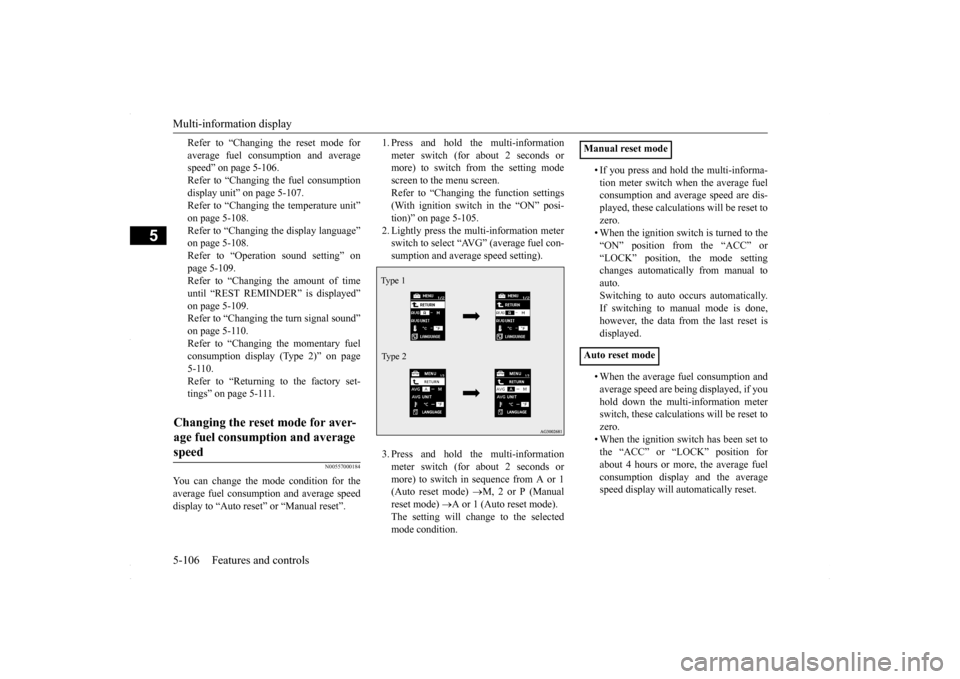
Refer to “Changing the reset mode for average fuel consum
ption and average
speed” on page 5-106. Refer to “Changing the fuel consumptiondisplay unit” on page 5-107. Refer to “Changing the temperature unit” on page 5-108.Refer to “Changing the display language” on page 5-108. Refer to “Operation sound setting” onpage 5-109.Refer to “Changing the amount of time until “REST REMINDER” is displayed” on page 5-109.Refer to “Changing the turn signal sound” on page 5-110. Refer to “Changing the momentary fuelconsumption display (Type 2)” on page 5-110. Refer to “Returning to the factory set-tings” on page 5-111.
N00557000184
You can change the mode condition for the average fuel consumption and average speed display to “Auto reset” or “Manual reset”.
1. Press and hold the multi-information meter switch (for about 2 seconds or more) to switch from the setting mode screen to the menu screen.Refer to “Changing the function settings (With ignition switch in the “ON” posi- tion)” on page 5-105.2. Lightly press the multi-information meter switch to select “AVG” (average fuel con- sumption and average speed setting). 3. Press and hold the multi-information meter switch (for about 2 seconds ormore) to switch in sequence from A or 1 (Auto reset mode)
M, 2 or P (Manual
reset mode)
A or 1 (Auto reset mode).
The setting will change to the selectedmode condition.
• If you press and hold the multi-informa- tion meter switch when the average fuel consumption and average speed are dis- played, these calculations will be reset tozero. • When the ignition switch is turned to the “ON” position from the “ACC” or“LOCK” position, the mode setting changes automatically from manual to auto.Switching to auto occurs automatically.If switching to manual mode is done, however, the data from the last reset is displayed. • When the average fuel consumption and average speed are being displayed, if you hold down the multi-information meterswitch, these calculations will be reset to zero. • When the ignition switch has been set tothe “ACC” or “LOCK” position for about 4 hours or more, the average fuel consumption display and the averagespeed display will automatically reset.
Changing the reset mode for aver- age fuel consumption and average speed
Type 1 Type 2
Manual reset mode Auto reset mode
BK0230300US.book
106 ページ 2015年7月30日 木曜日 午後8時38分
Page 172 of 392

Multi-information display 5-110 Features and controls
5
3. Press and hold the multi-information meter switch (for about 2 seconds or more) to display “ALARM” (rest time setting). 4. Lightly press the multi-information meter switch to select the amount of time untilthe display appears.5. Press and hold the multi-information meter switch (for about 2 seconds or more) to change the setting to the selectedtime.
N00563500038
It is possible to change the turn signal sound. 1. Press and hold the multi-information meter switch for about 2 seconds or moreto switch from the setting mode screen to the menu screen. Refer to “Changing the function settings(With ignition switch in the “ON” posi- tion)” on page 5-105. 2. Lightly press the multi-information meter switch to select . (changing the turn signal sound)
3. Press and hold the multi-information meter switch for about 2 seconds or more to switch in sequence from 1 (turn signal sound 1)
2 (turn signal sound 2)
1
(turn signal sound 1). The setting changes to the selected turn signal sound.
N00563600013
It is possible to change the bar graph settingof the momentary fuel consumption display. 1. Press and hold the multi-information meter switch for about 2 seconds or more to switch from the setting mode screen tothe menu screen. Refer to “Changing the function settings (With ignition switch in the “ON” posi-tion)” on page 5-105. 2. Lightly press the multi-information meter switch to select . (changing the momentary fuel consumption display)
NOTE
If the battery is disconnected, the memory of the unit setting is erased and is automatically set to the “OFF”. The drive time is reset when the ignition switch is in the “OFF” position.
Type 1
Ty p e 2
Changing the turn signal sound Type 1 Type 2
Changing the momentary fuel con- sumption display (Type 2)
BK0230300US.book
110 ページ 2015年7月30日 木曜日 午後8時38分
Page 173 of 392

Multi-information display
Features and controls 5-111
5
3. Press and hold the multi-information meter switch for about 2 seconds or more to switch in sequence from ON (with thegreen bar graph)
OFF (without the
green bar graph)
ON (with the green
bar graph).The setting changes to the selected bar graph setting.
N00557600148
All of the function settings can be returned to their factory settings. 1. Press and hold the multi-information meter switch (for about 2 seconds or more) to change from the setting modescreen to the menu screen. Refer to “Changing the function settings (With ignition switch in the “ON” posi-tion)” on page 5-105.
2. Lightly press the multi-information meter switch to select “RESET” (return to the factory settings). 3. Press and hold the multi-information meter switch (for about 5 seconds or more), the buzzer sounds and all of thefunction settings are returned to the fac- tory settings.
Returning to the factory settings
NOTE
The factory settings are as follows. • Average fuel consumption and average speed reset mode: A (Auto reset) • Fuel consumption display unit: mpg (US) or (L/100 km) • Temperature unit: °F (Fahrenheit) or {°C (Centigrade)} • Display language: ENGLISHType 1 Type 2
• Cooperative language setting: A• Operation sounds: ON (Operation sound on) • “REST REMINDER” display: OFF • Turn signal sound: Turn signal sound 1• Momentary fuel consumption with the green bar graph (Type 2): ONNOTE
BK0230300US.book
111 ページ 2015年7月30日 木曜日 午後8時38分
Page 174 of 392

Indicator light, warning light, an
d information screen display list
5-112 Features and controls
5
N00557700035 N00557801323
Indicator light, warning light, and information screen display list Indicator and warning light list Type A Type B1- Position indicator
P.5-123
2- High beam indicator
P.5-123
3- Charging system warning light
P.5-125
4- Turn signal indicator/hazard warning
light
P.5-123
5- Front fog light indicator (if so
equipped)
P.5-123
6- Anti-lock braking system warning light
P.5-74
7- Tire pressure monitoring system warn-
ing light
P.5-84
8- Brake warning light
P.5-124
9- Cruise control indicator (if so
equipped)
P.5-81
10- Seat belt reminder/warning light
P.4-10
11- Supplemental Restraint System (SRS)
warning light P.4-26
12- ECO mode indicator (if so equipped)
P.5-102
13- Engine malfunction indicator (“SER-
VICE ENGINE SOON” or “Check engine light”)
P.5-124
14- Active stability
control (ASC) OFF
indicator (if so equipped)
P. 5 - 7 8
15- Active stability control (ASC) indicator
(if so equipped)
P. 5 - 7 8
16- Information screen display list
P.5-113
BK0230300US.book
112 ページ 2015年7月30日 木曜日 午後8時38分
Page 185 of 392

Indicators
Features and controls 5-123
5
The rest time can be set.
N00519900127 N00520000216
The arrows will flash in
time with the corre-
sponding exterior turn signals when the turnsignal lever is used. Both arrows will flas
h when the hazard warn-
ing flasher switch is pressed.
N00520100086
A blue light comes on when the headlightsare on high beam.
N00520200205
This indicator comes on while the front fog lights are on.
N00551300026
This indicator light illuminates while theposition lights are on.
Screen type 1
Screen type 2
Do this
Park the vehicle in a safe place, turn off the engine, and take a rest. Use this display as rough guide for taking rests during a long drive. The interval from the start of your trip un
til this message is displayed can be set.
Refer to “Changing the function settings (With
ignition switch in the “ON” position)” on
page 5-105. The display and buzzer alert the driver when the set time is reached. If you continue to drive without having a rest, the buzzer sounds
about every 5 minutes to encourage you to
take a rest. In the following cases, the time driven is re
set and the display returns to the previous
display screen. After this, when the set time
is reached again, the display and buzzer
encourage you to take a rest. • The buzzer sounds 3 times.• The ignition switch is turned to the “OFF” position. • The multi-information meter switch is
held (for about 2 seconds or more).
Indicators Turn signal indicators/Hazard warning lights
NOTE
If the indicator flashes faster than usual or if the indicator stays on without flashing, checkfor a malfunctioning turn signal light bulb or turn signal connection.
High beam indicator
Front fog light indicator
(if so
equipped)Position indicator
BK0230300US.book
123 ページ 2015年7月30日 木曜日 午後8時38分
Page 192 of 392

Combination headlights and dimmer switch 5-130 Features and controls
5
If the combination headlights and dimmer switch is turned to the “ ” or “ ” posi- tion again after the engine is turned off, the about 3 minutes auto-cutout function described above will not work. The lights (theparking lights, tail lights and license plate lights) will stay on and will not turn off auto- matically.
N00549800196
If the driver’s door is opened with the key inthe “LOCK” or “ACC” position or removed from the ignition switch while the lights are on, the buzzer will sound to remind you toturn off the lights. If the driver’s door is opened with the ignition switch in the “LOCK” or “ACC” position, or
if the ignition switch is moved to the “LOCK” position while the lights are on, the buzzer will sound to remind you to turn off the lights. In either case, the li
ghts and buzzer will turn
off automatically. Or you can turn the combination headlights and dimmer switch to the “OFF” position tostop the buzzer.
N00549900155
To change the headlights from high beam tolow beam and vice versa, pull the turn signal lever to fully toward you (1). Switch the headlights to low beam as a courtesy when-ever there are oncoming vehicles, or when there is traffic moving ahead of you. An illu- minated blue light in the instrument clusterindicates when the headlights are on high beam.
NOTE
The light auto-cutout function can be deacti- vated. See your authorized Mitsubishi Motors dealer for details.
When you want to keep the lights on:
NOTE
When the engine is started using the key, if the driver’s door is opened and the key is removed, the headlight reminder buzzer intermittently emits a high-pitched sound. If the key is still in the ignition the keyreminder buzzer intermittently emits a low- pitched sound. The buzzer stops when the driver’s door isclosed. (A warning is also displayed in the multi-information display.)
operation function, if the driver’s door is opened and the ignition switch is in the “LOCK” position, the headlight reminder buzzer intermittently emits a high-pitchedsound. If the ignition sw
itch is in any posi-
tion other than “LOCK”, the ignition switch on reminder buzzer intermittently emits alow-pitched sound. The buzzer stops when the driver’s door is closed. (A warning is also displayed in themulti-information display.)
When using a key to start the engine When using the F.A.S.T.-key to start the engine
NOTE
Dimmer (high/low beam change)
BK0230300US.book
130 ページ 2015年7月30日 木曜日 午後8時38分
Page 194 of 392

Headlight leveling switch (if so equipped) 5-132 Features and controls
5
1. Turn the combination headlights and dim- mer switch to the “OFF” or “AUTO” automatic light control).2. Turn the ignition switch to the “LOCK” position. Also, if a key was used to start the engine, remove the key from the igni-tion switch. 3. Within 60 seconds of turning the ignition switch to the “LOCK” position, pull theturn signal lever toward you.
4. The headlights will come on in the low beam setting for about 30 seconds. After the headlights go off, the headlights can be turned on again in the low beam settingfor about 30 seconds by pulling the turn signal lever toward you within 60 seconds of turning the ignition switch to the“LOCK” position. To turn on the head- lights again after 60 seconds of turning the ignition switch to the “LOCK” posi-tion, repeat the process from step 1.
N00537100088
The direction of the headlight beam (thedirection in which the light shines) alters according to the number of people and the load in the vehicle. Lower the headlight angleif it is too high due to the number of people and/or the load in the vehicle so that the head- lights’ glare does not distract the drivers ofapproaching vehicles. First set the combina-tion headlights and dimmer switch to the “ ” position, then turn the headlight level- ing switch knob to lower the beam. The greater the number on the headlight levelingswitch knob, the lower the beam will point. Set the switch to the appropriate position so that the headlight beam is level with the road.
NOTE
While the coming home light function is operating, perform one of the following operations to cancel the function. • Pull the turn signal lever toward you. • Turn the combination headlights and dim- mer switch to the “ ” or “ ” position. • Turn the ignition switch to the “ON” posi- tion.
It is possible to modify functions as follows: • The time that the headlights remain on can be changed. • The coming home light function can be deactivated. For details, consult a Mitsubishi Motors dealer.
Headlight leveling switch
(if
so equipped)
BK0230300US.book
132 ページ 2015年7月30日 木曜日 午後8時38分