2016 MERCEDES-BENZ SL ROADSTER sport mode
[x] Cancel search: sport modePage 180 of 333
The suspension is continuously tuned to each
wheel individually and depends on:
R the road surface condition, e.g. bumps
R the vehicle load
R the drive program selected
If the ignition is switched off for less than four
hours, the previously selected drive program is
activated when the engine is next started. If the
ignition is switched off for more than four hours,
the Comfort drive program is activated when
the engine is next started.
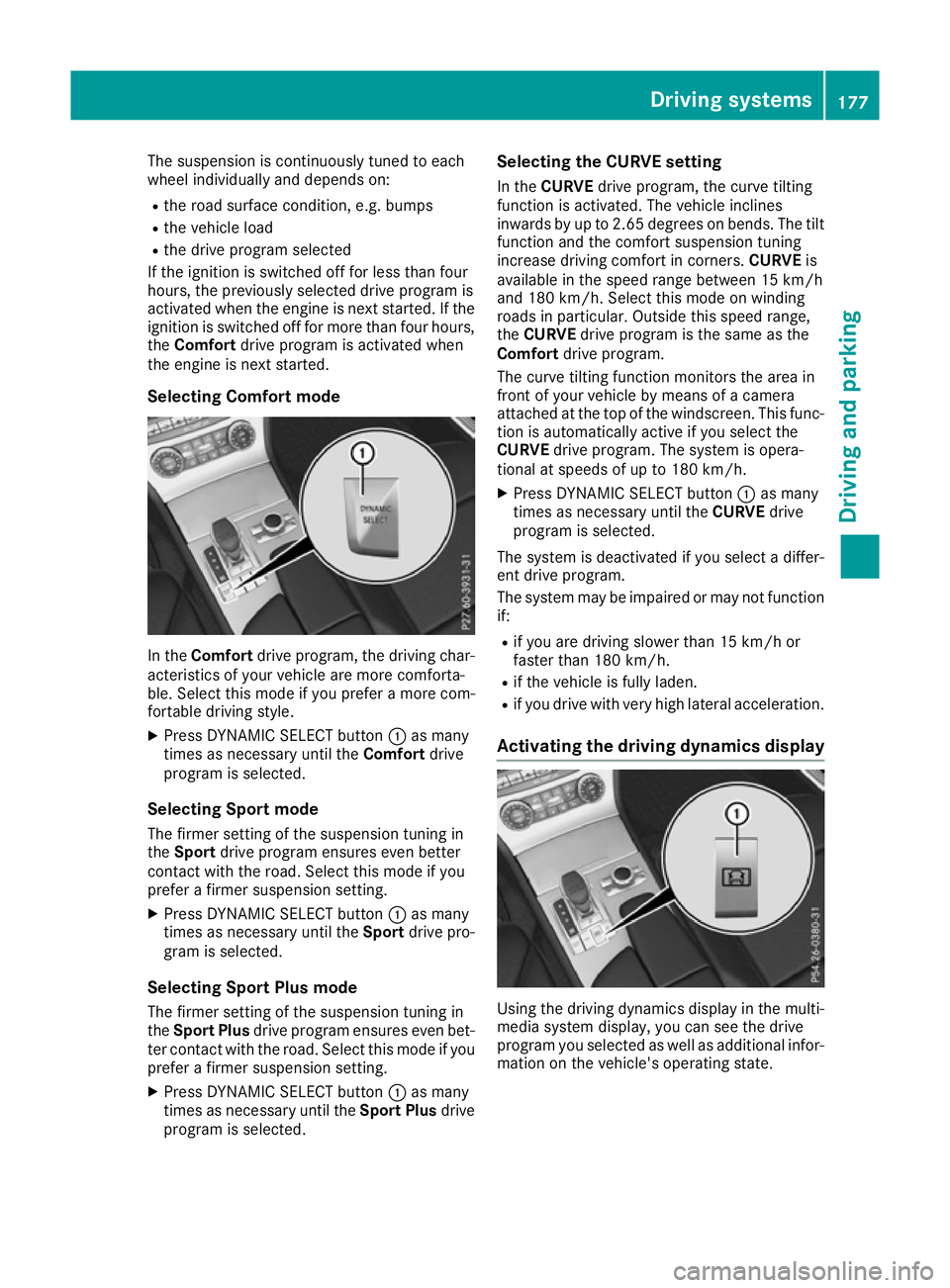
Selecting Comfort mode In the
Comfort drive program, the driving char-
acteristics of your vehicle are more comforta-
ble. Select this mode if you prefer a more com-
fortable driving style.
X Press DYNAMIC SELECT button :as many
times as necessary until the Comfortdrive
program is selected.
Selecting Sport mode The firmer setting of the suspension tuning in
the Sport drive program ensures even better
contact with the road. Select this mode if you
prefer a firmer suspension setting.
X Press DYNAMIC SELECT button :as many
times as necessary until the Sportdrive pro-
gram is selected.
Selecting Sport Plus mode
The firmer setting of the suspension tuning in
the Sport Plus drive program ensures even bet-
ter contact with the road. Select this mode if you prefer a firmer suspension setting.
X Press DYNAMIC SELECT button :as many
times as necessary until the Sport Plusdrive
program is selected. Selecting the CURVE setting
In the CURVE drive program, the curve tilting
function is activated. The vehicle inclines
inwards by up to 2.65 degrees on bends. The tilt function and the comfort suspension tuning
increase driving comfort in corners. CURVEis
available in the speed range between 15 km/h
and 180 km/h. Select this mode on winding
roads in particular. Outside this speed range,
the CURVE drive program is the same as the
Comfort drive program.
The curve tilting function monitors the area in
front of your vehicle by means of a camera
attached at the top of the windscreen. This func-
tion is automatically active if you select the
CURVE drive program. The system is opera-
tional at speeds of up to 180 km/h.
X Press DYNAMIC SELECT button :as many
times as necessary until the CURVEdrive
program is selected.
The system is deactivated if you select a differ-
ent drive program.
The system may be impaired or may not function if:
R if you are driving slower than 15 km/h or
faster than 180 km/h.
R if the vehicle is fully laden.
R if you drive with very high lateral acceleration.
Activating the driving dynamics display Using the driving dynamics display in the multi-
media system display, you can see the drive
program you selected as well as additional infor-
mation on the vehicle's operating state. Driving systems
177Driving and parking Z
Page 182 of 333

Symbol
;appears. The vehicle height is
adjusted to the raised level.
Adjusting to normal level X
Make sure that the engine is running or that it
has been switched off by the ECO start/stop
function.
X If symbol ;
; is shown: press=or;
on the steering wheel to select the Assist. Assist.
menu.
X Press the 9or: button to select
Vehicle level
Vehicle level.
X Press the abutton.
The following message appears: :Vehicle Vehicle
level Lower with OK
level Lower with OK.
X Press the abutton.
Symbol ;is faded out. The vehicle is adjus-
ted to the normal level.
The "Raised level" setting is cancelled if you:
R drive faster than approximately 120 km/h.
R drive for approximately three minutes at a
speed over 80 km/h.
R or switch to the drive program while the vehi-
cle is in motion.
Suspension settings General notes
The electro-hydraulically controlled suspension
features improved driving dynamics, driving
safety and ride comfort. You can also choose
between a particularly sporty or a comfortable
tuning.
The suspension is continuously adjusted for
each wheel individually and depends on:
R the road surface condition, e.g. bumps
R the vehicle load
R the drive program selected Your selection remains stored even if you
remove the key from the ignition lock.
If the ignition is switched off for less than four
hours, the previously selected setting is activa-
ted when the engine is next started. If the igni-
tion is switched off for more than four hours, the
comfortable setting is activated when the
engine is next started.
Selecting the sporty setting The firmer setting of the suspension tuning in
sports mode ensures even better contact with
the road. Select this mode if you prefer a firmer
suspension setting.
X Make sure that the engine is running or that it
has been switched off by the ECO start/stop
function.
X If indicator lamp ;
; is not lit: press but-
ton :.
Indicator lamp ;lights up. The sports sus-
pension setting is selected.
The AMG Ride Control SPORT AMG Ride Control SPORT message
appears in the multifunction display.
Selecting the comfort setting In comfort mode, the driving characteristics of
your vehicle are more comfortable. Select this Driving systems
179Driving and parking Z
Page 183 of 333

mode if you prefer a more comfortable driving
style.
X Make sure that the engine is running or that it
has been switched off by the ECO start/stop function.
X If indicator lamp ;
; is lit: press button :.
Indicator lamp ;goes out. The comfortable
suspension setting is selected.
The AMG Ride Control COMFORT AMG Ride Control COMFORT message
appears in the multifunction display.
Activating the driving dynamics display in the COMAND display Using the driving dynamics display in the multi-
media system display, you can see the drive
program you selected as well as additional infor-
mation on the vehicle's operating status.
X Switch on COMAND Online. You can find fur-
ther information in the separate COMAND
Online operating instructions.
The following information on the vehicle's oper- ating status is displayed in the driving dynamics display:
R Drive program selected (Y page 140)
R Accelerator pedal position shown in %
R Brake pedal position shown in %
R Steering angle
R Vehicle level display (Y page 178)
R Activity of the ABC spring struts
R Level settings animation
R G-FORCE cross to display longitudinal and lat-
eral acceleration (only available in Sport,
Sport Plus andRACE drive programs)
R Overrun mode animation PARKTRONIC
Important safety notes PARKTRONIC is an electronic parking aid with
ultrasonic sensors. It monitors the area around
your vehicle using six sensors in the front
bumper and six sensors in the rear bumper.
PARKTRONIC indicates visually and audibly the
distance between your vehicle and an object.
PARKTRONIC is only an aid. It is not a substitute
for your attention to the immediate surround-
ings. The responsibility for safe manoeuvring
and parking remains with you. Make sure that there are no persons, animals or objects in
range while manoeuvring and parking.
! When parking, pay particular attention to
objects above or below the sensors, such as
flower pots or trailer drawbars. PARKTRONIC
does not detect such objects when they are in the immediate vicinity of the vehicle. You
could damage the vehicle or the objects.
The sensors may not detect snow and objects
which absorb ultrasonic sources.
Ultrasonic sources, such as an automatic car wash, a lorry's compressed-air brakes or a
pneumatic drill, could cause PARKTRONIC to
malfunction.
PARKTRONIC may not function correctly on
uneven terrain.
PARKTRONIC is activated automatically when
you:
R switch on the ignition
R shift the transmission to position D,Ror N
R release the electric parking brake
PARKTRONIC is deactivated at speeds above
18 km/h. It is reactivated at lower speeds.
Range of the sensors General notes
PARKTRONIC does not take into account obsta- cles located:
R below the detection range, e.g. persons, ani-
mals or objects
R above the detection range, e.g. overhanging
loads, tail sections or loading ramps of goods vehicles :
Example: sensors in the front bumper, left-
hand side
The sensors must be free of dirt, ice and slush.
Otherwise, they may not function correctly. 180
Driving systemsDriving and parking
Page 216 of 333
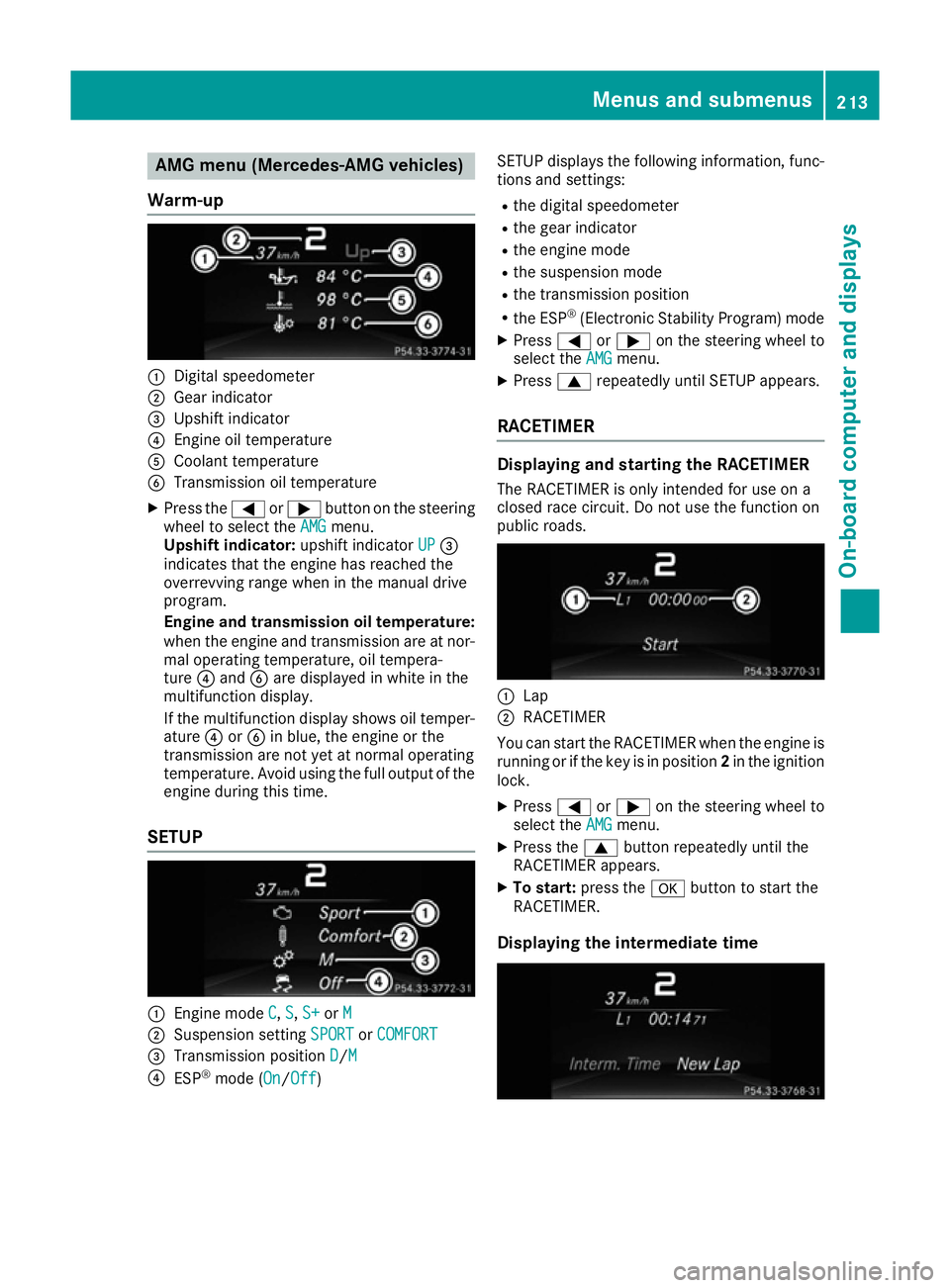
AMG menu (Mercedes-AMG vehicles)
Warm-up :
Digital speedometer
; Gear indicator
= Upshift indicator
? Engine oil temperature
A Coolant temperature
B Transmission oil temperature
X Press the =or; button on the steering
wheel to select the AMG
AMG menu.
Upshift indicator: upshift indicatorUP
UP=
indicates that the engine has reached the
overrevving range when in the manual drive
program.
Engine and transmission oil temperature:
when the engine and transmission are at nor-
mal operating temperature, oil tempera-
ture ?and Bare displayed in white in the
multifunction display.
If the multifunction display shows oil temper- ature ?orB in blue, the engine or the
transmission are not yet at normal operating
temperature. Avoid using the full output of the engine during this time.
SETUP :
Engine mode C C,S
S,S+
S+ orM
M
; Suspension setting SPORT
SPORTorCOMFORT
COMFORT
= Transmission position D
D/ M
M
? ESP ®
mode ( On
On/OffOff) SETUP displays the following information, func-
tions and settings:
R the digital speedometer
R the gear indicator
R the engine mode
R the suspension mode
R the transmission position
R the ESP ®
(Electronic Stability Program) mode
X Press =or; on the steering wheel to
select the AMG
AMG menu.
X Press 9repeatedly until SETUP appears.
RACETIMER Displaying and starting the RACETIMER
The RACETIMER is only intended for use on a
closed race circuit. Do not use the function on
public roads. :
Lap
; RACETIMER
You can start the RACETIMER when the engine is running or if the key is in position 2in the ignition
lock.
X Press =or; on the steering wheel to
select the AMG AMGmenu.
X Press the 9button repeatedly until the
RACETIMER appears.
X To start: press the abutton to start the
RACETIMER.
Displaying the intermediate time Menus and sub
menus
213On-board computer and displays Z
Page 251 of 333
Warning/
indicator
lamp
N N
Signal type
Possible causes/consequences and M
M Solutions M
N
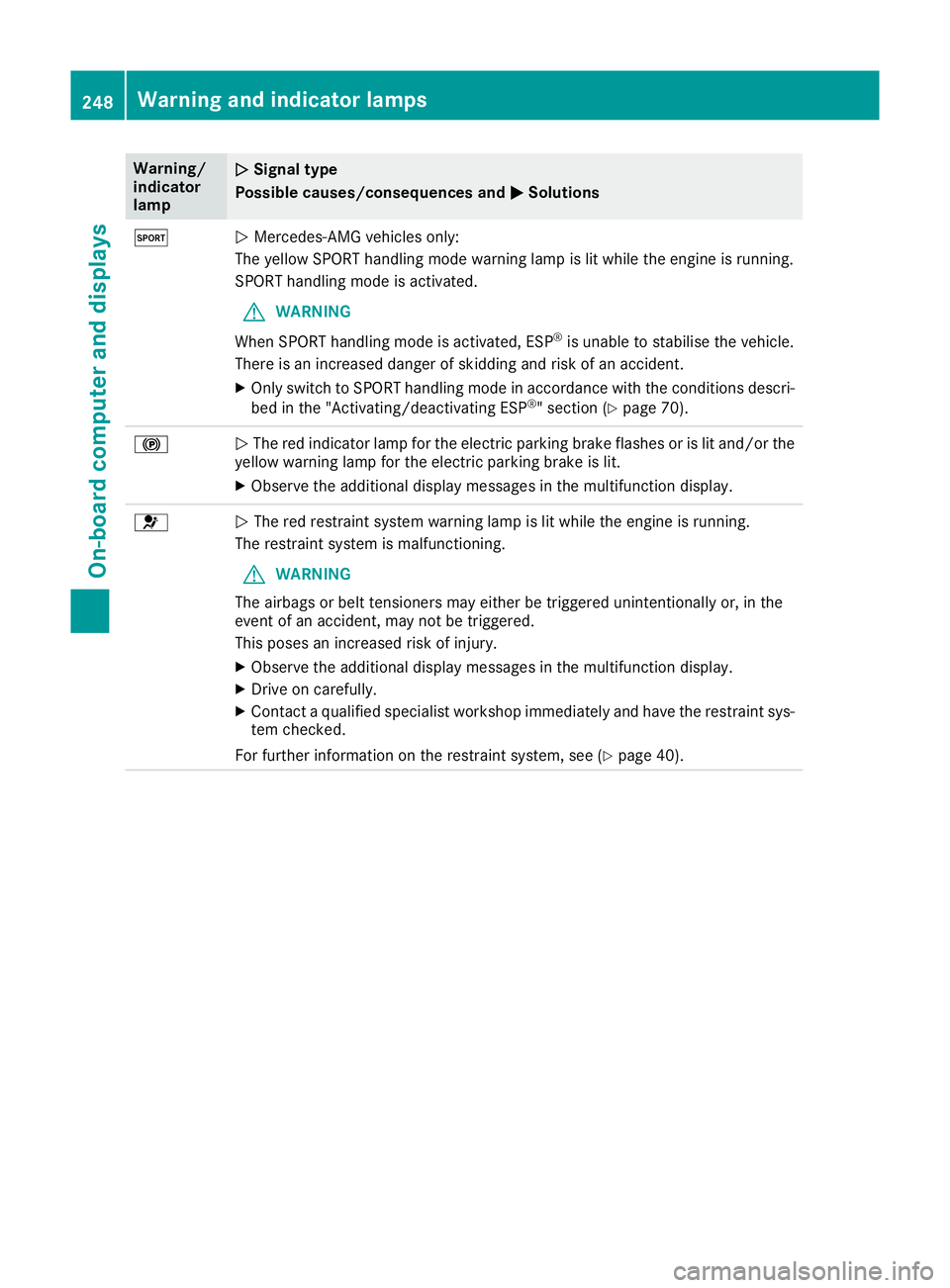
Mercedes-AMG vehicles only:
The yellow SPORT handling mode warning lamp is lit while the engine is running.
SPORT handling mode is activated.
G WARNING
When SPORT handling mode is activated, ESP ®
is unable to stabilise the vehicle.
There is an increased danger of skidding and risk of an accident.
X Only switch to SPORT handling mode in accordance with the conditions descri-
bed in the "Activating/deactivating ESP ®
" section (Y page 70). !
N
The red indicator lamp for the electric parking brake flashes or is lit and/or the
yellow warning lamp for the electric parking brake is lit.
X Observe the additional display messages in the multifunction display. 6
N
The red restraint system warning lamp is lit while the engine is running.
The restraint system is malfunctioning.
G WARNING
The airbags or belt tensioners may either be triggered unintentionally or, in the
event of an accident, may not be triggered.
This poses an increased risk of injury.
X Observe the additional display messages in the multifunction display.
X Drive on carefully.
X Contact a qualified specialist workshop immediately and have the restraint sys-
tem checked.
For further information on the restraint system, see (Y page 40).248
Warning and indicator lampsOn-board computer and displays