2016 MERCEDES-BENZ E-CLASS SALOON light
[x] Cancel search: lightPage 203 of 557
or
#
Accelerate brie fly.
Yo ur vehicle pulls away and adapts its speed
to that of theve hicle in front. If no vehicle is
de tected in front, your vehicle accelerates to
th e set speed.
Ad opting the speed limit as thesto red speed
Re quirements:
R Speed Limit Pilot is activated in the multime‐
dia sy stem (→ page 231).
R Distance Pilot DISTRONIC is acti vated.
R The sy stem de tects a traf fic sign indicating a
speed limit. #
Brie fly pull the cruise control le verto wa rds
yo u3.
The displ ayed speed limit is adop ted as the
st ored speed. Your vehicle adapts its speed
to that of theve hicle in front, but only up to
th estored speed. If Speed Limit Pilot is acti‐
va ted, any de tected changes in the speed
limit are adop tedby the sy stem. Collision
warning
If Dis tance Pilot DISTRONIC is unable tosuf fi‐
ciently decele rate theve hicle in order topreve nt
it from approa ching theve hicle in front, you will
be warned visually and acousticall y.An intermit‐
te nt wa rning tone will then sound and the dis‐
ta nce warning lamp will light up in the instru‐
ment clus ter. #
Brake immediately in order toinc rease the
dis tance from theve hicle in front.
or #
Take evasive action pr ovided it is safe todo
so. Fu
nction of DRIVE PIL OT The DRIVE PI
LOT function is available only
on vehicles with the Driving Assistance
pa ckage.
DRIVE PIL OTincludes thefo llowing driving and
driving saf ety sy stems:
R Steering Pilot with Active Lane Change Assi st
( → page 200)
R Distance Pilot DISTRONIC (→ page 193) R
Speed Limit Pilot (→ page 193) Ste
ering Pilot Fu
nction of Steering Pilot
Ste ering Pilot is only available forve hicles
with the Driving Assistance Package.
R Steering Pilot is operational at speeds up to
21 0 km/h and helps youto stay inthe cent re
of the lane bymeans of moderate steering
inter ventions.
R It uses as a refere nce theve hicle in front or
th e lane markings, depending on the driven
speed.
R Steering Pilot requ ires you as the driver, to
ke ep your hands on thesteering wheel at all
times so that you are able tointer vene at any
time tocor rect the course of theve hicle and
ke ep it in lane.
R Steering Pilot can be overridden at any time
by steering theve hicle yourself.
R Ifth e sy stem de tects that there are no lane
markings, it uses theve hicle ahead as a ref‐
erence up toa speed of 130 km/h. 200
Driving and parking
Page 204 of 557
R
When the sy stem is actively steering, the
è symbol is shown in green in the multi‐
function displa y.
St eering Pilot sy stem limits
St eering Pilot has a limited steering torque for
lateral guidance. In some cases, thesteering
inter vention is not su fficient tokeep theve hicle
in the lane.
If de tection of lane markings and vehicles ahead
is impaired, Steering Pilot switches topassive
mode. The sy stem pr ovides no support in this
case. During the transition from the active to
passive status theè symbol is shown as
enlar ged and flashes yello w. Once the sy stem is
passive theè symbol is gr eyed out in the
multifunction displa y.
The sy stem may be impaired or may not function
in thefo llowing situations:
R Ifth ere is poor visibility, e.g. due toinsuf fi‐
cient illumination of thero ad, or due tosno w,
ra in, fog or spr ay.
R Ifth ere is glare, e.g. from oncoming traf fic,
di re ct sunlight or reflection from other vehi‐
cles (e.g. if thero ad sur face is wet). R
Ifth e windscreen is dirty, mis ted up, dam‐
aged or co vered, for ins tance byast icke r,in
th e vicinity of the camera.
R If no, or se veral, unclear lane markings are
present for one lane, e.g. in a construction
area.
R Ifth e lane markings are wornaw ay, dark or
co vered up, e.g. bydirt or sno w.
R Ifth e dis tance totheve hicle in front is too
small and the lane markings thus cannot be
de tected.
R Ifth e lane markings change quickl y,e.g.
lanes branch off, cross one ano ther or
mer ge.
R Ifth ero ad is nar rowand winding.
R Ifth ere are highly variable shade conditions
on thero ad.
R Ifth ere are obs tacles su chas traf fic guid‐
ance posts on the lane or projecting out into
th e lane.
The sy stem does not pr ovide assis tance in the
fo llowing conditions:
R Onvery sharp bends. R
When towing a trailer.
R Ifyo u actively change lane without swit ching
on the turn signal indicator.
R Ifyo u swit chon the turn signal indicator and
th e conditions for activating Active Lane
Change Assi stare not fulfilled.
Note s onSteering Pilot
St eering Pilot is only an aid. You are responsible
fo rth e dis tance totheve hicle in front, forve hi‐
cle speed, for braking in good time and forst ay‐
ing in lane. Before changing lanes, make sure
th at the neighbouring lane is free (shoulder
view).
Ac tive Lane Change Assi st
% The availability of thefo llowing function is
countr y-dependent.
St eering Pilot remains active even if the turn sig‐
nal indicator is switched on. Steering Pilot then
assists the driver when changing lanes byapply‐
ing steering torques toinitiate the lane change. Driving and parking
201
Page 210 of 557
Setting
theve hicle le vel &
WARNING Risk of accident because
ve hicle le vel is too high
If yo u drive at a higher vehicle le vel,th e driv‐
ing characteristics may be impaired due to
th e higher vehicle centre of gravity.
The vehicle may tip over more quickly on a
bend, forex ample. #
Alw ays select as low a vehicle le vel as
possible and adapt your driving style
accordin gly. &
WARNING Risk of entrapment from vehi‐
cle lo wering
When lo wering theve hicle, other people
could become trapped if their limbs are
between theve hicle body and the tyres or
underneath theve hicle. #
Make sure no one is underneath the
ve hicle or in the immediate vicinity of
th e wheel ar ches when you lo werthe
ve hicle. &
WARNING Risk of entrapment from vehi‐
cle lo wering
Ve hicles with AIR BODY CONT ROL or
le ve l control sy stem: When you unload lug‐
ga ge or lea vetheve hicle, theve hicle first
ri ses slightly and then returns tothe set le vel
shortly af terw ards.
Yo u or an yone else in the vicinity of the
wheel ar ches or the underbody could thus
become trapped.
The vehicle can also be lo wered af ter being
loc ked. #
When leaving theve hicle, make sure
th at nobody is in the vicinity of the
wheel ar ches or the underbody. Re
quirements:
R The vehicle's engine must be switched on.
R The vehicle must not be moving fasterthan
60 km/h. Ra
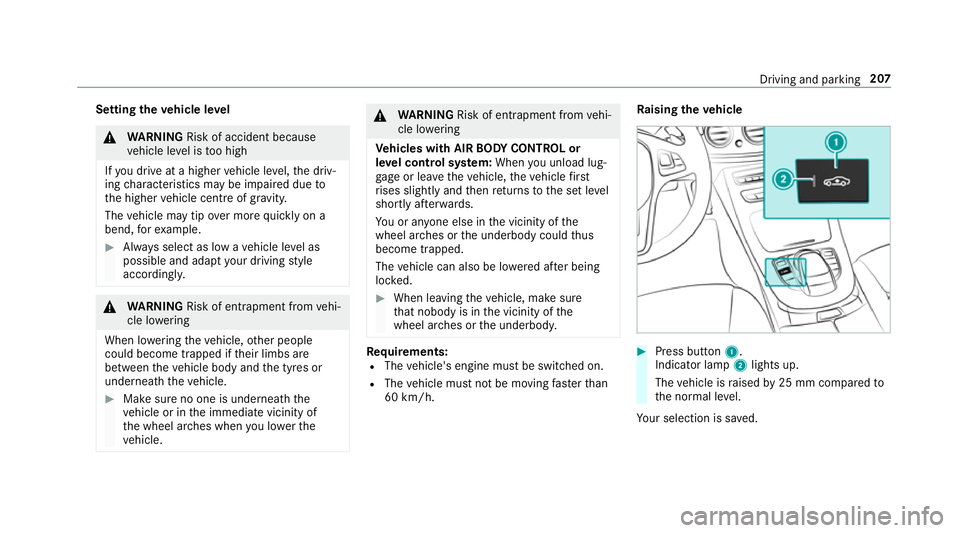
ising theve hicle #
Press button 1.
Indica tor lamp 2lights up.
The vehicle is raised by25 mm compared to
th e normal le vel.
Yo ur selection is sa ved. Driving and parking
207
Page 212 of 557

Ve
hicles with Parking Pilot and reve rsing cam‐
era Ve
hicles with Parking Pilot and 360° Camera Sy
stem limitations
Pa rking Assist PARKTRONIC does not necessa‐
ri ly take into account thefo llowing obs tacles:
R Obs tacles bel ow the detection range, e.g.
pe rsons, animals or objects.
R Obs tacles ab oveth e de tection range, e.g.
ove rhanging loads, overhangs or loading
ra mp s of lor ries.
The sensors must be free of dirt, ice and slush.
Otherwise, they may not function cor rectly.
Clean the sensors regularly, taking care not to
scratch or damage them.
Ve hicles with trailer hitch: Parking Assist
PA RKTRONIC is deacti vatedfo rth ere ar zone
when you es tablish an elect rical connection
between your vehicle and a trailer.
Pa ssive side impact pr otection
Pa ssive side impact pr otection is an additional
Pa rking Assist PARKTRONIC function which
wa rnsth e driver about obs tacles at the side of
th eve hicle. A warning is issued when obs tacles
are de tected between the front and rear de tec‐
tion range. In order for an object tobe de tected, th
e sensors in the front and rear bumper must
de tect the object while you are driving past it.
During the parking procedure or manoeuvring,
objects are de tected as theve hicle drives past.
If yo usteer in the direction of a de tected obs ta‐
cle and there is a risk of a lateral collision, a
wa rning is issued. The lateral segments light up
orange or red, depending on the dis tance tothe
obs tacle.
Colou rL ateral distance in cm
Re d< 30
Orang e3 0 - 60 In order
for lateral front or rear segments tobe
displa yed, theve hicle must firs t tr ave l a dis tance
of at least half of theve hicle length. Once the
ve hicle has tr avelled the length of theve hicle, all
of the lateral front and rear segments can be dis‐
pla yed. Driving and parking
209
Page 215 of 557
R
Ifth e light conditions are poor, e.g. at night.
R Ifth e camera lens is obstructed, dirty or mis‐
te d up. Obser vethe no tes on cleaning the
re ve rsing camera (→ page374).
R Ifth ere ar of your vehicle is damaged. In this
case, ha vethe camera position and setting
ch ecked at a qualified specialist workshop.
The field of vision and other functions of the
re ve rsing camera may be restricted due toaddi‐
tional accesso ries on there ar of theve hicle (e.g.
licence plate brac ket or bicycle rack ).
Ve hicles without Parking Pilot
The following camera vie wsare available in the
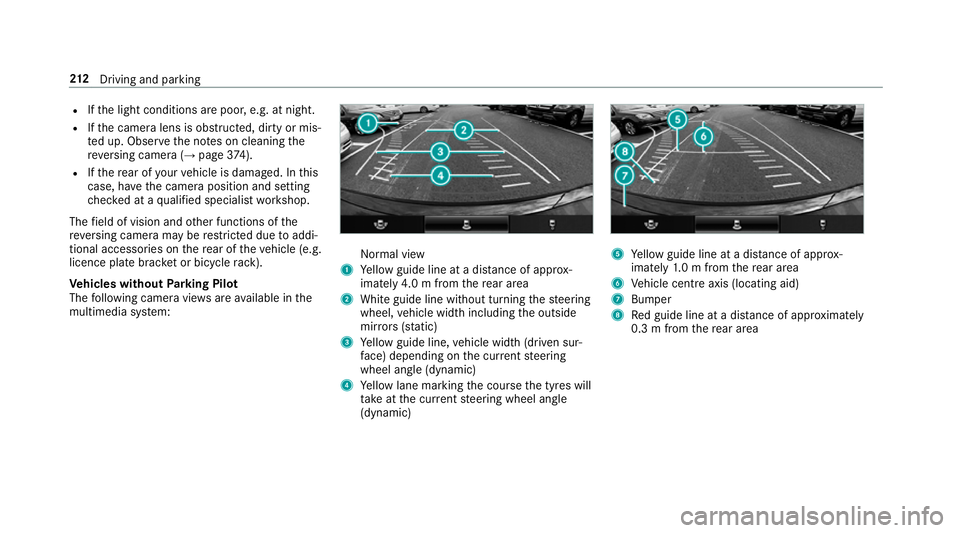
multimedia sy stem: Normal view
1 Yellow guide line at a dis tance of appr ox‐
imately 4.0 m from there ar area
2 White guide line without turning thesteering
wheel, vehicle width including the outside
mir rors (sta tic)
3 Yellow guide line, vehicle width (driven sur‐
fa ce) depending on the cur rent steering
wheel angle (dynamic)
4 Yellow lane marking the course the tyres will
ta ke atthe cur rent steering wheel angle
(dynamic) 5
Yellow guide line at a dis tance of appr ox‐
imately 1.0 m from there ar area
6 Vehicle centre axis (locating aid)
7 Bumper
8 Red guide line at a dis tance of appr oximately
0.3 m from there ar area 212
Driving and pa rking
Page 216 of 557

Wi
de-angle view Tr
ailer view
1 Yellow guide line, locating aid 2
Red guide line at a dis tance of appr oximately
0.3 m tothe ball head of the trailer hitch
3 Ball head of the trailer hitch
Ve hicles with Parking Pilot
The following camera vie wsare available in the
multimedia sy stem: Normal view
1 Yellow lane marking the course the tyres will
ta ke atthe cur rent steering wheel angle
(dynamic)
2 Yellow guide line, vehicle width (driven sur‐
fa ce) depending on the cur rent steering
wheel angle (dynamic) 3
Red guide line at a dis tance of appr oximately
0.3 m from there ar area
4 Yellow warning display of Parking Assist
PA RKTRONIC: obstacles are at a dis tance of
between appr oximately 0.6 m and 1.0 m
5 Redwa rning display of Parking Assist
PA RKTRONIC: obstacles are very close
(appr oximately 0.3 m or less)
6 Orange warning display of Parking Assist
PA RKTRONIC: obstacles are a medium dis‐
ta nce away (between appr oximately 0.3 m
and 0.6 m)
% Ifth e entire sy stem fails, the inner segments
of thewa rning display are shown in red. The
indicator lamp on thePA RKTRONIC but ton
lights up and theé symbol appears in
th e multifunction displa y.
If th e sy stem fails at there ar:
R there ar segments are shown in red when
re ve rsing.
R there ar segments are hidden when driv‐
ing forw ards. Driving and parking
213
Page 218 of 557

1
Wide-angle vie w,front
2 Top view with image from the front camera
3 Top view with images from the side cameras
in the outside mir rors
4 Wide-angle vie w,rear
5 Top view with image from there ve rsing cam‐
era
6 Top view with trailer view To
p view 1
Lane indicating thero ute theve hicle will
ta ke with thesteering wheel in its cur rent
position
2 Yellow warning display of Parking Assist
PA RKTRONIC: obstacles at a dis tance of
appr oximately 1.0 m or less
3 Your vehicle from abo ve
If th e dis tance tothe object lessens, the colour
of thewa rning display changes 2.From a dis‐
ta nce of appr oximately 0.6 m thewa rning dis‐
play is shown in orange. From a dis tance of
appr oximately 0.3 m thewa rning display is
shown in red. When
Parking Assist PARKTRONIC is operational
and no object is de tected, the segments of the
wa rning display are shown in grey.
% Ifth e entire sy stem fails, the inner segments
of thewa rning display are shown in red. The
indicator lamp on thePA RKTRONIC but ton
lights up and theé symbol appears in
th e multifunction displa y.
If th e sy stem fails at there ar:
R there ar segments are shown in red when
re ve rsing.
R there ar segments are hidden when driv‐
ing forw ards.
If Pa rking Assist PARKTRONIC is deacti vated,
th ewa rning display fades out. Driving and parking
215
Page 219 of 557

Guide lines
1
Yellow lane marking the course the tyres will
ta ke atthe cur rent steering wheel angle
(dynamic)
2 Yellow guide line, vehicle width (driven sur‐
fa ce) depending on the cur rent steering
wheel angle (dynamic)
3 Red guide line at a dis tance of appr oximately
0.3 m from there ar area
4 Mark at a distance of appr ox.1. 0 m
% When Parking Pilot is active, the lanes are
displa yed in green. The guide lines in
the multimedia sy stem dis‐
play show the dis tances toyour vehicle. The
dis tances only apply toroad le vel. In trailer
mode, the guide lines are shown at the le vel
of the trailer hitch.
Sy stem limitations
The 360° Camera will not function or will only
partially function in thefo llowing situations:
R Ifth e doors are open.
R The side mir rors are folded in.
R Ifth e boot lid or tailgate is open.
R Ifth ere is heavy rain, snow or fog.
R Ifth e light conditions are poor, e.g. at night.
R Ifth e camera lens is obstructed, dirty or mis‐
te d up.
R Ifth eve hicle components in which the cam‐
eras are fitted are dama ged. In this event,
ha ve the camera position and setting
ch ecked at a qualified specialist workshop.
Do not use the 360° Camera under such circum‐
st ances. You could otherwise injure others or
collide with objects when parking theve hicle. On
vehicles with height-adjus table suspension or
if th eve hicle is car rying a heavy load, leaving the
st andard height can result in inaccuracies in the
guide lines and in the display of thege nerated
ima ges, depending on tech nical conditions.
The field of vision and other functions of the
came rasystem may be restricted due toaddi‐
tional accesso ries on there ar of theve hicle (e.g.
licence plate brac ket, bicycle rack ).
See the no tes on cleaning the 360° Camera
(→ page 374).
Selecting a view for the 360° Camera
The Auto reversing camera function is selected
in the multimedia sy stem. #
Enga gereve rsege ar. #
Inthe multimedia sy stem, select the desired
vie w.
Switching reve rsing camera automatic mode
on/off
The reve rsing camera is only an aid. It is not a
substitute foryo ur attention tothe sur roundings.
The responsibility for safe manoeuvring and
parking remains with you. Make sure that no 216
Driving and pa rking