2016 MERCEDES-BENZ E-CLASS ESTATE battery
[x] Cancel search: batteryPage 489 of 565

Display messages
Possible causes/consequences and M
MSolutions
, Replace key See Owner's
Manual *
Ve hicles with a digital vehicle key in the sma rtphone: only afew or no authorisations remain forst arting the
engine. #
Make sure that the Internet connection is not limited bycer tain mobile phone settings. #
Open the Mercedes me connect web App http://www.mercedes.me. and call up the "digital vehicle key in the
smartphone" service. #
Deactivate the service firs t and then activate it again. #
Ifth e display message still appears, con tact the Mercedes-Benz Cus tomer Assis tance Center (C AC).
 Change key batteries *T
hekey bat tery is dischar ged. #
Change the battery .
Â
Key not detected (white
display message) *T
hekey is cur rently und etected. #
Change the location of theke y in theve hicle. #
Ifth eke y is still not recognised, start the engine with theke y in thestow age compartment . 486
Display messages and warning/indicator lamps
Page 494 of 565
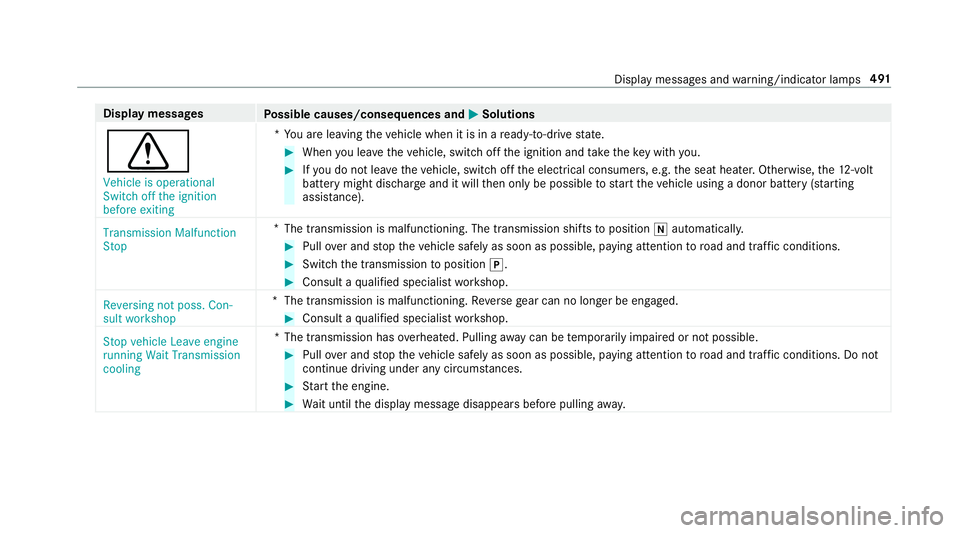
Display messages
Possible causes/consequences and M
MSolutions
d Vehicle is operational
Switch off the ignition
before exiting *Y
ou are leaving theve hicle when it is in a ready-to-drive state. #
When you lea vetheve hicle, switch off the ignition and take theke y with you. #
Ifyo u do not lea vetheve hicle, switch off the electrical consumers, e.g. the seat heater. Otherwise, the12 ‑volt
battery might discha rge and it will then only be possible tostart theve hicle using a donor battery (s tarting
assis tance).
Transmission Malfunction
Stop *
The transmission is malfunctioning. The transmission shi fts to position iautomaticall y. #
Pull over and stop theve hicle safely as soon as possible, paying attention toroad and traf fic conditions. #
Switch the transmission toposition j. #
Consult a qualified specialist workshop.
Reversing not poss. Con-
sult workshop *T
he transmission is malfunctioning. Reversege ar can no lon ger be engaged. #
Consult a qualified specialist workshop.
Stop vehicle Leave engine
running Wait Transmission
cooling *T
he transmission has overheated. Pulling away can be temp orarily impaired or not possible. #
Pull over and stop theve hicle safely as soon as possible, paying attention toroad and traf fic conditions. Do not
continue driving under any circums tances. #
Start the engine. #
Wait until the display message disappears before pulling away. Displ
aymessa ges and warning/indicator lamps 491
Page 495 of 565
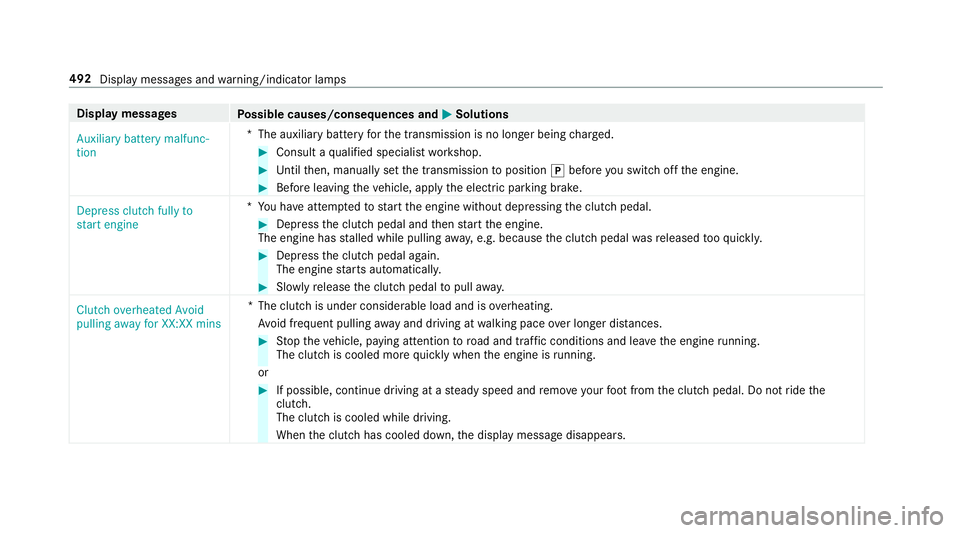
Display messages
Possible causes/consequences and M
MSolutions
Auxiliary battery malfunc-
tion *T
he auxiliary batteryforth e transmission is no longer being charge d. #
Consult a qualified specialist workshop. #
Untilthen, manually set the transmission toposition jbefore you swit choff the engine. #
Before leaving theve hicle, apply the electric parking brake.
Depress clutch fully to
start engine *Y
ou ha veattem ptedto start the engine without depressing the clutch pedal. #
Depress the clutch pedal and then start the engine.
The engine has stalled while pulling away, e.g. because the clutch pedal wasre leased tooqu ickl y. #
Dep ress the clutch pedal again.
The engine starts automaticall y. #
Slowly release the clutch pedal topull away.
Clutch overheated Avoid
pulling away for XX:XX mins *T
he clutch is under considerable load and is overheating.
Av oid frequent pulling away and driving at walking pace over longer dis tances. #
Stop theve hicle, paying attention toroad and traf fic conditions and le avethe engine running.
The clutch is cooled more quickly when the engine is running.
or #
If possible, continue driving at a steady speed and remo veyour foot from the clutch pedal. Do not ride the
clutch.
The clutch is cooled while driving.
When the clutch has cooled down, the display message disappears. 492
Display messages and warning/indicator lamps
Page 499 of 565
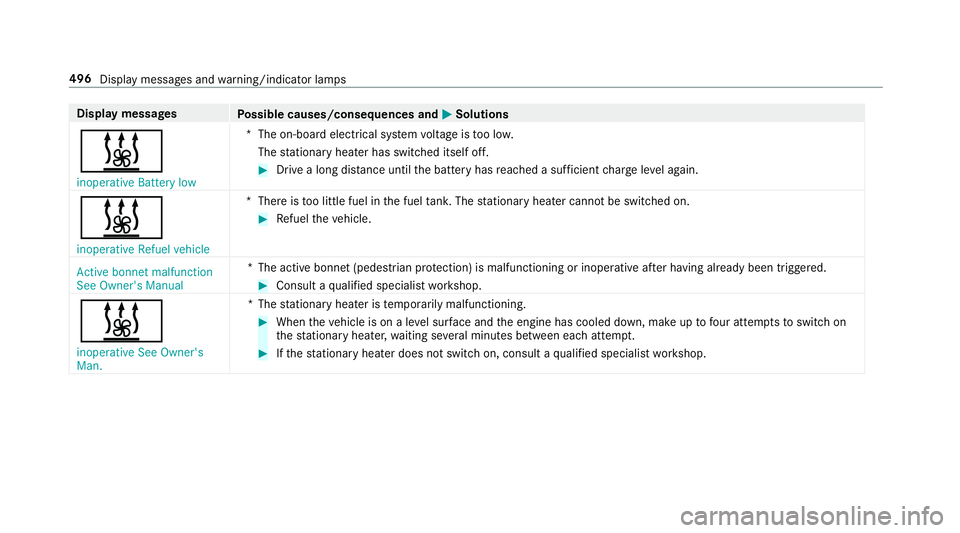
Display messages
Possible causes/consequences and M
MSolutions
& inoperative Battery low *T
he on-board electrical sy stem voltage is too lo w.
The stationary heater has swit ched itself off. #
Drive a long dis tance until the battery has reached a suf ficient charge leve l again.
& inoperative Refuel vehicle *T
here is too little fuel in the fuel tank. The stationary heater cannot be swit ched on. #
Refuel theve hicle.
Active bonnet malfunction
See Owner's Manual *T
he active bonnet (pedestrian pr otection) is malfunctioning or inoperative af ter having already been triggered. #
Consult a qualified specialist workshop.
& inoperative See Owner's
Man. *T
hestationary heater is temp orarily malfunctioning. #
When theve hicle is on a le vel sur face and the engine has cooled down, make up tofour attem ptsto switch on
th est ationary heater, waiting se veral minutes between each attem pt. #
Ifth est ationary heater does not swit chon, consult a qualified specialist workshop. 496
Display messages and warning/indicator lamps
Page 523 of 565
Immobiliser ...........................................88
Interior pr otection ................................. 89
St opping the alarm (A TA) .......................88
To w- aw ay protection ............................. 89
Anticipatory occupant pr otection .....4 3,44
Apple CarPlay™ ...................................... .336
Connecting an iPhone ®
....................... 337
Ending ................................................. 337
Overview ............................................. 336
To ne settings ....................................... 337
Tr ans ferred vehicle data ......................3 39
Ashtr ay
Fr ont centre console ........................... 12 5
Re ar .................................................... .125
Assistance graphic
Menu (on-boa rdcompu ter) .................. 258
Assistance sy stems
see Driving saf ety sy stem
ASS YST PLUS ........................................... 372
Battery disconnection periods ............. 373
Displ aying the service due date ........... 372
Fu nction/no tes ................................... 372
Re gular service work ........................... 372
Special service requirements .............. 372ATA
(anti-theft ala rmsystem)
Fu nction ................................................ 88
St opping the alarm ................................ 88
ATA (anti-theft ala rmsystem)
see Anti- theft pr otection
AT TENTION ASSI ST......................... 238, 239
Ac tivating/deactivating ...................... .239
Fu nction .............................................. 238
Sy stem limitations ...............................2 38
At tention assistant
see ATTENTION ASSIST
Au dio mode
Ac tivating media mode ........................ 348
Connecting USB devices ...................... 351
Co pyright ............................................. 348
Information .......................................... 347
Inserting/re moving an SD card .......... .348
Media sea rch ....................................... 354
Overview ............................................. 350
Pa use and playback function .............. .351
Selecting a track .................................. 351
Selecting pl ayback options .................. 351
Tr ack list .............................................. 351 Au
thorised workshop
see Qualified specialist workshop
Au tomatic distance control
see Dis tance Pilot DISTRONIC
Au tomatic driving lights .........................13 2
Au tomatic engine start (ECO start/
sto p function) .......................................... 16 6
Au tomatic engine stop (ECO start/
sto p function) .......................................... 16 6
Au tomatic front passen ger airbag
shu toff
see Front passenger airbag shutoff
Au tomatic mir rorfo lding function
Ac tivating/deactivating ...................... .147
Au tomatic transmission
DIRECT SELECT le ver ........................... 171
Drive program display .......................... 16 9
Drive programs .................................... 16 8
DY NA MIC SELECT switch .................... 16 8
Engaging drive position ........................ 173
Engaging reve rsege ar ........................ .172
Kickdown ............................................. 174
Manual gearshifting ............................ .173 520
Index
Page 524 of 565
Selecting pa
rkposition ........................ 172
Shifting toneutral ................................ 172
St eering wheel gearshift paddles ........ .173
Tr ansmission position display .............. 171
Tr ansmission positions ........................ 171
Au tomatic transmission
see Selector le ver
Axle load Perm issible .......................................... 431
Tr ailer operation .................................. 443B
Bag hook ................................................... 11 8
Ball ne ck
Extending/r etra cting ........................... 24 8
BA S (Brake Assist Sy stem) .................... .189
Battery Key ........................................................ 66
Re mo tecontrol (s tationary heater) ...... 157
Battery (vehicle) Charging .............................................. 398
Notes .................................................. 396
St arting assis tance .............................. 398 Battery (vehicle)
see Vehicle battery
Belt .............................................................32
Bic ycle rack
Tr ailer operation .................................. 251
Blind Spot Assist .................................... .242
Ac tivating/deactivating ...................... .244
Fu nction/no tes ................................... 24 2
Sy stem limits ....................................... 24 2
Blind Spot Assi st
see Active Blind Spot Assi st
Blo wer
see Climate control
BlueTEC see AdBlue ®
Blue tooth ®
Ac tivating/deactivating ...................... .288
Setting up an Internet connection ....... 340
Settings ............................................... 287
Switching profile (DUN/PAN) .............. 342
Blue tooth ®
Au dio
Ac tivating ............................................ 359 De-authorising (de-regis
tering) the
device .................................................. 359
Information .......................................... 356
Overview .............................................3 57
Sea rching for and auth orisingthe
device .................................................. 358
Switching device via NFC .................... 359
Boot lid see Tailgate
Boot load .................................................. 442
Brake Assi stSystem
see BAS (Brake Assi stSystem)
Brake fluid Notes .................................................. 439
Brake forc e distribution
EBD (Elect ronic Brake forc e Distribu‐
tion) ..................................................... 19 3
Brakes ABS (Anti-lo ckBraking Sy stem) ........... 189
Ad aptive brake lights .......................... .199
BA S (Brake Assi stSystem) .................. 189
Driving tips .......................................... 16 4
EBD (Electronic Brake forc e Distribu‐
tion) ..................................................... 19 3 Index
521
Page 526 of 565
Senso
rs............................................... 383
Ta ilpipes .............................................. 383
Tr ailer hit ch......................................... 383
Wa shing byhand ................................. 381
Wheels/rims ....................................... 383
Wi ndo ws .............................................. 383
Wi per blades .......................................3 83
Carpet (Care) .......................................... .385
Changing bulbs ........................................ 13 9
Dipped beam ....................................... 14 0
Fitting/removing co ver (front wheel
ar ch ) .................................................... 14 0
Main beam .......................................... 14 0
No tes ................................................... 13 9
Overview ............................................. 13 9
Tu rn signal light (front) ........................ 14 0
Changing hub caps .................................422
Channel tracking Setting ................................................. 362
Charging Battery (vehicle) .................................. 398
Child saf ety lock
Re ar door .............................................. .61
Re ar side wind ows................................. 63 Child seat
................................................... 45
At tach ing (no tes) ................................... 52
Fo lding bench seat suitable .................. .58
Fr ont passenger seat (no tes) ................. 50
Fr ont passenger seat (rear ward-
fa cing/for ward-facing) ........................... 51
Fr ont passenger seat (without airbag
shutoff) .................................................. 51
ISOFIX/i-Size (fitting) ............................ 48
ISOFIX/i-Size (no tes) ............................. 47
No tes ..................................................... 45
Re commended child restra int sys‐
te ms ...................................................... 59
Seats suita blefor belt-secu redch ild
re stra int sy stems ................................... 53
Seats suitable for i‑Size child
re stra int sy stems ................................... 57
Seats suitable for ISOFIX child
re stra int sy stems ................................... 55
To pTe ther ..............................................49
Child ren
Re stra int sy stems ..................................45
Chock Storage location ..................................4 21Chock
see Wheel chock
Cigar ette lighter ...................................... 12 6
City lighting ............................................ .136
Cleaning see Care
Climate control ........................................ 14 9
Ac tivating/deactivating the A/C
function (cont rol panel) ........................ 151
Ac tivating/deactivating the A/C
function (multimedia sy stem) ............... 151
Ac tivating/deactivating the synchro‐
nisation function (cont rol panel) .......... 15 2
Ac tivating/deactivating the synchro‐
nisation function (multimedia sys‐
te m) ..................................................... 15 2
Ad justing the air vents ........................ .159
Air distribution settings ........................ 151
Air-reci rculation mode ........................ .152
Au tomatic control ................................ 151
Climate style function .......................... 151
Demi sting the windo ws....................... 15 2
Demi sting the windscreen ...................1 49
Glove box air vent ................................ 15 9 Index
523
Page 529 of 565
Display (multimedia sy
stem)
Settings .............................................. .286
Display (on-board comp uter).................. 257
Display content Menu (on-boa rdcompu ter) .................. 264
Display message ..................................... 445
Calling up (on-board co mputer) .......... .445
No tes .................................................. 445
Display messages ? .......................................... .472, 497
A ...................................................4 98
C ................................................... 497
¯ .................................................... 469
Ac tive Blind Spot Assi stcur rently
una vailable See Owner's Manual .........468
Ac tive Blind Spot Assi stinope rative .... 468
Ac tive Blind Spot Assi stnot available
when towing a trailer See Owner's
Manual ................................................ .471
Ac tive bonnet malfunction See Own‐
er's Manual ......................................... 496 Ac
tive Brake Assi stFunctions cur‐
re ntly limited See Owner's Manual ...... 456
Ac tive Brake Assi stFunctions limited
See Owner's Manual ........................... 456
Ac tive Lane Keeping Assist Camera
view restricted See Owner's Manual ... 467
Ac tive Lane Keeping Assist cur rently
una vailable See Owner's Manual .........466
Ac tive Lane Keeping Assist inopera‐
tive ...................................................... 466
bAc tive Light Sy stem inoperative .. 499
Ad aptive Highbeam Assist Plus Cam‐
era view restricted See Owner's
Manual ................................................ 501
Ad aptive Highbeam Assist Plus cur‐
re ntly una vailable See Owner's Man‐
ual ...................................................... .501
Ad aptive Highbeam Assist Plus inop‐
erative ................................................ .500 4Ad
d 1 litre engine oil when next
re fuelling ............................................. 477
Air conditioning Malfunction See
Owner's Manual .................................. 493
App lybrake todeselect Park (P)
position ...............................................4 89
ÀAT TENTION ASSIST inoperative ... 462
ÀAT TENTION ASSIS T:Take a
break! .................................................. 462
bAU TOlights inope rative ............... 500
Au xilia rybattery malfunction .............. 492
_Before starting the engine, turn
th esteering wheel. .............................. 493
Blind Spot Assist cur rently una vaila‐
ble See Owner's Manual ...................... 467
Blind Spot Assist inope rative ............... 468
Blind Spot Assi stnot available when
to wing a trailer See Owner's Manual ...4 71
Brake immediately ............................... 455
ÂChange key bat teries .................. 486 526
Index