2016 MERCEDES-BENZ E-CLASS ESTATE light
[x] Cancel search: lightPage 301 of 565
#
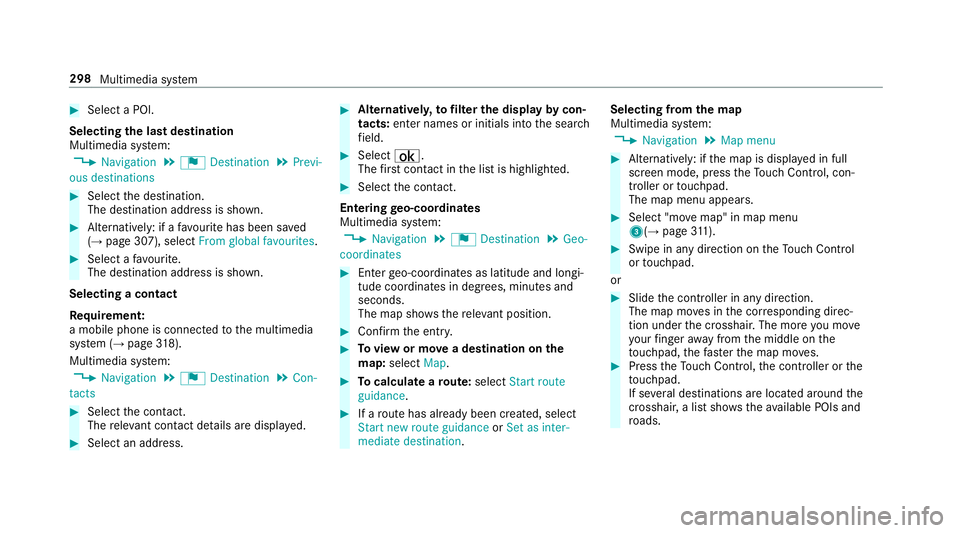
Select a POI.
Selecting the last destination
Multimedia sy stem:
, Navigation .
¬ Destination .
Previ-
ous destinations #
Select the destination.
The destination address is shown. #
Alternatively: if a favo urite has been sa ved
( → page 307), select From global favourites .#
Select a favo urite.
The destination address is shown.
Selecting a contact
Re quirement:
a mobile phone is connec tedto the multimedia
sy stem (→ page318).
Multimedia sy stem:
, Navigation .
¬ Destination .
Con-
tacts #
Select the conta ct.
The releva nt contact de tails are displa yed. #
Select an address. #
Alternativel y,to filter the display bycon‐
tacts: enter names or initials into the sear ch
fi eld. #
Select ¡.
The firs t contact in the list is highlighted. #
Select the conta ct.
En tering geo-coordina tes
Multimedia sy stem:
, Navigation .
¬ Destination .
Geo-
coordinates #
Ente rge o-coordinates as latitude and longi‐
tude coordinates in degrees, minutes and
seconds.
The map sho ws there leva nt position. #
Confirm the entry. #
Toview or mo vea destination on the
map: select Map. #
Tocalculate a route: select Start route
guidance. #
If a route has already been created, select
Start new route guidance orSet as inter-
mediate destination . Selecting from
the map
Multimedia sy stem:
, Navigation .
Map menu #
Alternatively: if the map is displa yed in full
screen mode, press theTo uch Control, con‐
troller or touchpad.
The map menu appears. #
Select "mo vemap" in map menu
3(→ page311). #
Swipe in any di rection on theTo uch Control
or touchpad.
or #
Slide the controller in any direction.
The map mo ves in the cor responding direc‐
tion under the crosshair. The more you mo ve
yo ur finger away from the middle on the
to uchpad, thefast erthe map mo ves. #
Press theTo uch Control, the controller or the
to uchpad.
If se veral destinations are located around the
crosshair, a li stsho wstheav ailable POIs and
ro ads. 298
Multimedia sy stem
Page 302 of 565
If a destination is located
exact ly on the
crosshair, the destination address is dis‐
pla yed. #
Select a destination in the list.
The destination address is shown.
Showing traf fic messages for the vicinity of
the map #
Select Traffic messages for the vicinity.
The map appears. #
Swipe le ftor right on theto uchpad.
or #
Slide the controller tothe left or right.
The pr evious or next traf fic incident is high‐
lighted on the map. Information on the tra ffic
incident is displa yed.
Showing POIs in the vicinity of the map #
Select Surrounding POIs . #
Swipe left or right on theto uchpad.
or #
Slide the controller tothe left or right.
The pr evious or next POI is highligh ted on the
map. The name or addre ss is displayed. #
Alternativel y,to filter the display byPOI
categor y:swipe down on theto uchpad.
or #
Slide the controller down. #
Select a POI categor y. #
User defined allowspersonal POI symbols to
be selected (→ page313).
Entering an in termediatedestination
Re quirement:
A destination is entered.
Multimedia sy stem:
, Navigation .
¬ Destination .
Inter-
mediate destinations #
Select Search for an intermediate destina-
tion . #
Ente r an intermedia tedestination.
The sear chresults are displa yed. #
Select an intermediate destination.
The address of the intermediate destination
appears. #
Select Set as destination.
The intermediate destination is set. #
Alternatively: select an intermediate destina‐
tion via ¬Destination duringroute guid‐
ance. #
Select Enter destination. #
Select Set as next intermediate destination
af te r entering the destination.
Calculating a route with intermediate desti‐
nations
Re quirement:
En terth e destination and at least one intermedi‐
ate destination.
Multimedia sy stem:
, Navigation .
¬ Destination .
Inter-
mediate destinations #
Select Start new route guidance.
The route is calculated with the set inter‐
mediate destinations.
Editing intermedia tedestinations
Re quirement:
A destination is entered. Multimedia sy
stem 299
Page 303 of 565
Multimedia sy
stem:
, Navigation .
¬ Destination .
Inter-
mediate destinations
Changing the order of the destinations #
Highlight the destination or intermediate des‐
tination. #
Select ¥Move. #
Movethe intermediate destination tothe
desired position. #
Press theTo uch Control, the controller or the
to uchpad.
Deleting a destination #
Highlight the destination or intermediate des‐
tination. #
Select ¥Delete.
St arting an automatic filling station sear ch
Re quirements:
The automatic filling station sear chis activated
O (→page 303).
Ro ute guidance is active. The fuel le vel in the
fuel tank reaches there ser vefuel le vel. The
Fuel tank reserve level Do you want to start
the search for filling stations? message is
shown. #
Select Yes.
The automatic filling station sear chbegins.
The available filling stations along thero ute
or in the vicinity of theve hicle's cur rent posi‐
tion are displ ayed. #
Select thefilling station.
The address of thefilling station is displa yed. #
Variant 1: if a route has not been calculated,
select Start route guidance.
The selected filling station is set as the desti‐
nation. Route guidance begins. #
Variant 2: if a route has been calculated,
select Start new route guidance orSet as
next intermediate destination.
Start new route guidance: the selected filling
st ation is set as a new destination. The pr evi‐
ous destinations and intermediate destina‐
tions are dele ted. Ro ute guidance tothefill‐
ing station begins. Set as next intermediate destination:
the
selected filling station is set as the next inter‐
mediate destination. Route guidance begins.
If th ere are already four intermediate desti‐
nations: #
Select Yesinthe prom pt.
The selected filling station is entered into
position 1 of the intermediate destinations
menu. Intermediate destination 4 is dele ted.
Ro ute guidance begins. Ro
ute Calculating a
route
Re quirement:
The destination is entered. The destination
address is shown. #
Variant 1: if a route has not been calculated,
select Start route guidance.
The route tothe destination is calculated.
The map sho ws thero ute. Route guidance
th en begins. 300
Multimedia sy stem
Page 307 of 565
If
th ere is enough time between thech anges
of direction, the multimedia sy stem prepares
yo ufo rth e upcoming change of direction. A
navigation announcement, e.g. "Prepare to
turn right", is issued.
The map appears in full-screen mode.
R Announcement phase
The multimedia sy stem announces the
upcoming change of direction, e.g. by
announcing "Turn right in 200 m".
The display is split into two parts. The map is
displa yed on the lef t;on theright, there is a
de tailed image of the junction or a 3D image
of the upcoming change of direction.
R Chan ge-of-direction phase
The multimedia sy stem announces the immi‐
nent change of direction with the announce‐
ment "Now turn right".
The display is split into two parts.
The vehicle has successfully changed direc‐
tion when the light-coloured bar on theright
drops down to0 metres and the cur rent vehi‐ cle position symbol has
reached the white
ch ange-of-direction point.
When thech ange of direction is comple te,
th e map appears in full-screen mode.
% Changes of direction are also shown in the
Instrument Displa y.
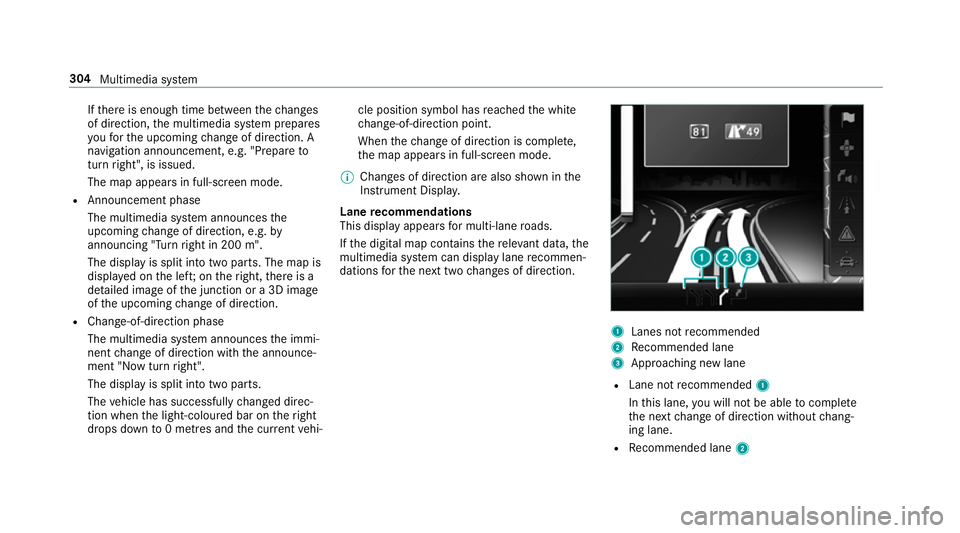
Lane recommendations
This display appears for multi-lane roads.
If th e digital map conta insthere leva nt da ta,the
multimedia sy stem can display lane recommen‐
dations forth e next two changes of direction. 1
Lanes not recommended
2 Recommended lane
3 Approa ching new lane
R Lane not recommended 1
In this lane, you will not be able tocompl ete
th e next change of direction without chang‐
ing lane.
R Recommended lane 2304
Multimedia sy stem
Page 310 of 565
Ro
ute guidance from an off-road location to
a destination
Off-road position: the cur rent vehicle position is
located within the digital map on roads that are
not available.
The following displa ysappear when route guid‐
ance begins:
R theRoad not mapped message
R a direction ar row showing the linear direction
to the POI
When theve hicle is back on a road kn ownto the
multimedia sy stem, route guidance continues as
no rm al.
Off- road status during route guidance
Due toroadwor ks,fo rex ample, there may be dif‐
fe re nces between the data on the digital map
and the actual course of thero ad. In such cases,
th e multimedia sy stem will temp orarily be
unable tolocate theve hicle's cur rent position on
th e digital map. The vehicle is off-road.
The following displa ysappear when theve hicle
is off-road:
R theRoad not mapped message R
a direction ar rowshowing the linear direction
to the POI
When theve hicle is back on a road kn ownto the
multimedia sy stem, route guidance continues as
no rm al. Destination
Saving the cur
rent vehicle position
Multimedia sy stem:
, Navigation .
Á Position #
Select Store position.
The cur rent vehicle position is sa vedto the
"Last destinations" memor y.
St oring a map position
Multimedia sy stem:
, Navigation
The map is in full-screen mode. #
Press theTo uch Control, the controller or the
to uchpad. #
Select "mo vemap" 3inthe map menu
(→ page 311). #
Select a position on the map.
A list appears if there are se veral map posi‐
tions. #
Highlight a map position. #
Select ¥Store in "Previous destinations".
The map position is sa vedto the "Last desti‐
nations" memor y.
Editing the last destinations
Multimedia sy stem:
, Navigation .
¬ Destination .
Previ-
ous destinations #
Highlight one of the last destinations. #
Tosave as a favo urite: select ¥Save as
global favourite . #
Tosave as "Home" address: select¥
Save as "Home" address . #
Tosave as "Work" address: select¥
Save as "Work" address . #
Todel ete a single or all destinations:
select ¥Delete orDelete all.
A prom ptappears. #
Select Yes. Multimedia sy
stem 307
Page 317 of 565
R
traf fic signs wi thare striction indicated
by an additional sign (e.g. in wet condi‐
tions)
Displ aying the map version
Multimedia sy stem:
, Navigation .
Z Options #
Select Map version . #
Select Details.
% Information about new versions of the digital
map can be obtained from a Mercedes-Benz
service cent re.
Av oiding an area
Yo u can define areas along a route that you
wo uld like toavoid.
Av oiding a new area
Multimedia sy stem:
, Navigation .
À Route .
Avoid
options .
Areas #
Select Avoid new area. #
Variant 1: select Using map. #
Movethe map. #
Variant 2: select Address entry. #
Enterth e address. #
Select Adopt destination.
The map appears. #
Todispl ayan area: presstheTo uch Control,
th eto uchpad or the controller.
A redre ctangle appea rs. This designates the
area that should be avoided. #
Tochange the size of the area: swipe up or
down on theTo uch Control or theto uchpad.
or #
Slide the controller up or down.
The map scale is enlar ged or reduced and
ch anges the size of the area. #
Toset the area: presstheTo uch Control,
th e controller or theto uchpad.
The area is en tere d into the list.
Changing an area
Multimedia sy stem:
, Navigation .
À Route .
Avoid
options .
Areas #
Highlight an area in the list. #
Select ¥Edit.
Moving the area on the map #
Swipe in any direction on theTo uch Control
or touchpad.
or #
Slide the controller in any direction.
Changing the size of the area #
Press theTo uch Control, theto uchpad or the
controller. #
Swipe up or down on theTo uch Control or
th eto uchpad.
or #
Slide the controller up or down. #
Press theTo uch Control, theto uchpad or the
controller.
Ta king the area for the route into account #
Avoid Oor do not avoid ªan area in the
list.
Ro ute guidance active: a new route is calcu‐
lated. 314
Multimedia sy stem
Page 318 of 565
No
route has been created: the setting is car‐
ri ed ove rto the next route guidance.
The route can include an area that is tobe
av oided in thefo llowing cases:
R the destination is located in an area that
is to be avo ided
R there is no sensible alternative route
Deleting one or all areas
Multimedia sy stem:
, Navigation .
À Route .
Avoid
options .
Areas #
Highlight an area in the list. #
Select ¥Delete or¥ Delete all. #
Confirm the prom ptwith Yes.
One or all areas are dele ted.
Up dating the map data
Up dating at the Mercedes-Benz se rvice
centre
The digital maps generated bythe map software
become outdated in the same way as co nven‐
tional road maps. Optimal route guidance can
on ly be pr ovided bythe navigation sy stem in conjunction with
the most up-to-date map data.
Information about new versions of the digital
map can be obtained from a Mercedes-Benz
service cent re. The reyou can recei veupdates to
th e digital map.
Online map update
% The online map update service is not availa‐
ble in all countries.
The online map update service from Mercedes
me connect can be used toupdate map data.
The update is per form ed:
R for one region (automatic map update)
R for se veral or all regions (manual map
update)
The service must be activated at a Mercedes-
Benz service centre in ordertouse automatic
updates.
Fu rther information on the online map update
http://www.mercedes.me.
Fu rther information on updates http://
manuals.daimle r.com/baix/cars/connectme/
de_DE/index.html. Map data
Yo
ur vehicle is supplied with map data at thefa c‐
to ry. Depending on the count ry, map data for
yo ur region is either pre-ins talled or the map
data is supplied on a data storage medium. Yo u
do not requ ire an activation code forth e map
data which is pr ovided with your vehicle.
If th e map data on your vehicle has been ins tal‐
led at thefa ctory and you wish toreins tall it, you
do not need toenter the activation code.
An activation code is requiredfor pur chased
map data.
The activation code:
R can be used in one vehicle
R is non-transferable
R has six digits
Please contact a Mercedes-Benz service centre
if yo u are experiencing thefo llowing problems:
R the multimedia sy stem does not accept the
activation code
R you ha velost the activation code Multimedia sy
stem 315
Page 323 of 565
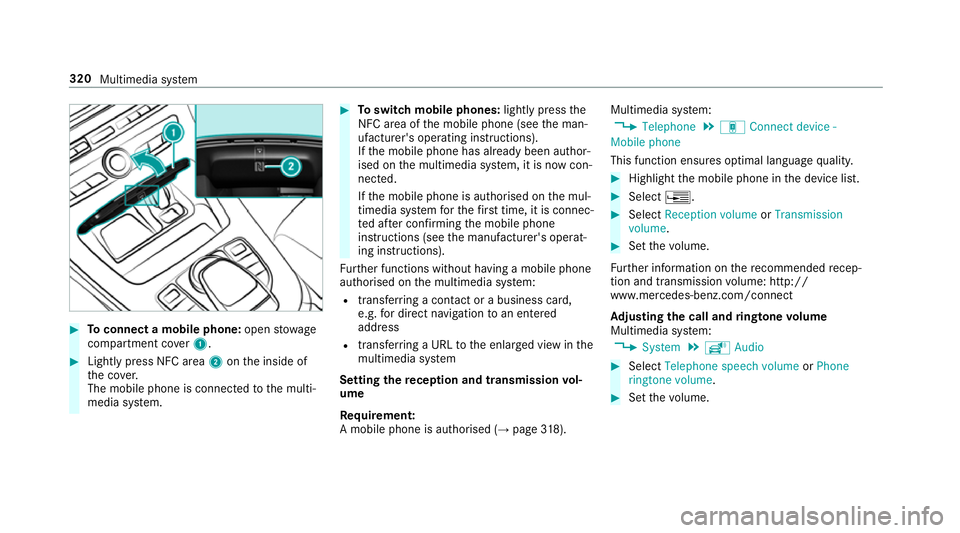
#
Toconnect a mobile phone: openstowage
compartment co ver1. #
Lightly press NFC area 2onthe inside of
th e co ver.
The mobile phone is connected tothe multi‐
media sy stem. #
Toswitch mobile phones: lightly pressthe
NFC area of the mobile phone (see the man‐
ufacturer's operating instructions).
If th e mobile phone has already been author‐
ised on the multimedia sy stem, it is now con‐
nected.
If th e mobile phone is authorised on the mul‐
timedia sy stem forth efirs t time, it is connec‐
te d af ter confirming the mobile phone
instructions (see the manufacturer's operat‐
ing instructions).
Fu rther functions without having a mobile phone
authorised on the multimedia sy stem:
R transfer ring a contact or a business card,
e.g. for direct navigation toan entered
address
R transfer ring a URL tothe enlar ged view in the
multimedia sy stem
Setting there ception and transmission vol‐
ume
Re quirement:
A mobile phone is authorised (→ page318). Mul
timedia sy stem:
, Telephone .
á Connect device -
Mobile phone
This function ensures optimal language qualit y. #
Highlight the mobile phone in the device list. #
Select ¥. #
Select Reception volume orTransmission
volume . #
Set thevo lume.
Fu rther information on there commended recep‐
tion and transmission volume: http://
www.me rcedes-benz.com/connect
Ad justing the call and ringtone volume
Multimedia sy stem:
, System .
õ Audio #
Select Telephone speech volume orPhone
ringtone volume. #
Set thevo lume. 320
Multimedia sy stem