2016 MERCEDES-BENZ CLA COUPE lane assist
[x] Cancel search: lane assistPage 12 of 345
Safety systems .............................. 217
Tyres .............................................. 239
Vehicle ........................................... 241
Distance Pilot DISTRONIC
Activating ....................................... 168
Calling up the speed ...................... 169
Cruise control lever ....................... 168
Deactivating ................................... 171
Display Message ............................ 236
Displays in the instrument cluster .. 171 Displays in the multifunction dis-
play ................................................ 171
Driving tips .................................... 172
Function/note s............................. 167
Important safety notes .................. 167
Selecting ........................................ 168
Setting a speed .............................. 170
Setting the specified minimum
distance ......................................... 170
Stopping ........................................ 170
Storing the speed .......................... 169
Distance warning function
Function/note s................................ 67
Warning lamp ................................. 257
Distance warning signal (warning
lamp) .................................................. 257
Door
Automatic locking (on-board com-
puter) ............................................. 211
Automatic locking (switch) ............... 85
Central locking/unlocking (key) ...... 76
Control panel ................................... 37
Display message ............................ 244
Emergency locking ........................... 85
Emergency unlocking ....................... 85
Important safety notes .................... 83
Opening (from the inside) ................ 83
Drive program
Display ........................................... 146
Display (DIRECT SELECT lever) ...... 144
Manual transmission ...................... 143
Drive programs
Automatic transmission ................. 148
Driver's door
see Door
Driving abroad
Mercedes-Benz Service ................. 285
Symmetrical dipped beam ............. 107 Driving on flooded roads
.................. 162
Driving safety system
Active Brake Assist .......................... 67
Braking assistance appropriate to
the situation ..................................... 68
EBD (electronic brake force distri- bution) ............................................. 72
STEER CONTROL ............................. 73
Driving safety systems
ABS (Anti-lock Braking System) ....... 66
ADAPTIVE BRAK E............................. 73
Adaptive brake lights ....................... 69
BAS (Brake Assist System) .............. 66
Distance warning function ............... 67
ESP ®
(Electronic Stability Pro-
gram) ............................................... 69
Important safety guidelines ............. 66
Overview .......................................... 65
Driving system
Distance Pilot DISTRONIC ............. 167
Parking assist PARKTRONIC .......... 177
Parking Pilo t.................................. 180
RACE START (Mercedes-AMG
vehicles) ........................................ 174
Speed limiter ................................. 165
Start-off assist ............................... 174
Driving systems
AMG RIDE CONTROL sports sus-
pension .......................................... 175
ATTENTION ASSIST ........................ 189
Blind Spot Assist ............................ 192
Cruise control ................................ 162
Display message ............................ 234
HOLD function ............................... 172
Lane Keeping Assist ...................... 193
Lane package ................................ 191
Reversing camera .......................... 184
Traffic Sign Assist .......................... 190
Driving tips
Aquaplaning ................................... 161
Automatic transmission ................. 147
Brakes ........................................... 160
Distance Pilot DISTRONIC ............. 172
Downhill gradient ........................... 160
Driving abroad ............................... 107
Driving in winter ............................. 162
Driving on flooded roads ................ 162
Driving on wet roads ...................... 161 Index
9
Page 16 of 345

ISOFIX child seat securing system
.... 55J
Jack Declaration of conformity ................ 26
Storage location ............................ 294
Using ............................................ .320
Jump starting (engine) ......................301 K
Key Changing the battery ....................... 79
Checking the battery ....................... 79
Convenience closing feature ............ 90
Convenience opening feature .......... 90
Display message ............................ 246
Door central locking/unlocking ....... 76
Emergency key element ................... 78
Important safety notes .................... 76
KEYLESS-GO start function .............. 78
Loss ................................................. 81
Modifying the programming ............. 78
Positions (ignition lock) ................. 133
Problem (malfunction) ..................... 81
Starting the engine ........................ 135
Key positions
Start/Stop button .......................... 133
Key positions (ignition lock) ............ 133
KEYLESS-GO
Convenience closing ........................ 90
Deactivation ..................................... 77
Locking ............................................ 77
Unlocking ......................................... 77
Kickdown
Driving tips ................................... .148
Manual gearshifting ....................... 152
Kneebag ............................................... 46 L
Lamps see Warning and indicator lamps
Lane Keeping Assist
Activating/deactivating (on-
board computer) ............................ 209
Display message ............................ 235
Function/informatio n.................... 193 Lane package
..................................... 191
Lap time (RACETIMER) ...................... 214
Lashing eyelets ................................. 272
Licence plate lamp (display mes-
sage) ................................................... 229
Light sensor (display message) ....... 230
Lighting
see Lights
Lights
Adaptive Highbeam Assist ............. 109
Automatic headlamp mod e............ 107
Dipped-beam headlamp s............... 108
Driving abroad ............................... 107
Hazard warning lamps ................... 109
Headlamp flashe r........................... 109
Headlamp rang e............................ 108
Light switch ................................... 107
Main-beam headlamp s................... 109
Misted up headlamp s.................... 110
Parking lamps ................................ 108
Rear foglamp ................................. 108
Setting exterior lighting ................. 107
Side lamps ..................................... 108
Switching the daytime driving
lights on/off (on-board com-
puter) ............................................. 211
Turn signals ................................... 109
LIM indicator lamp
Cruise control ................................ 163
Distance Pilot DISTRONIC ............. 168
Variable limite r.............................. 165
Limiter
Calling up the speed ...................... 166
Deactivating, variable .................... 166
Function/note s............................. 165
LIM indicator lamp ......................... 165
Permanent ..................................... 166
Setting a speed .............................. 166
Storing the current speed .............. 166
Switching to passive ...................... 166
Variabl e......................................... 165
Limiting the speed
Speed limiter ................................. 165
Loading guidelines ............................ 268
Locking
see Central locking Index
13
Page 69 of 345
Important safety notes
If you fail to adapt your driving style or if you are
inattentive, the driving safety systems can nei-
ther reduce the risk of an accident nor override the laws of physics. Driving safety systems are
merely aids designed to assist driving. You are
responsible for maintaining the distance to the
vehicle in front, for vehicle speed, for braking in
good time and for staying in lane. Always adapt your driving style to suit the prevailing road and
weather conditions and maintain a safe distance from the vehicle in front. Drive carefully.
The driving safety systems described work as
effectively as possible only when there is ade-
quate contact between the tyres and the road
surface. Please pay special attention to the
notes on tyres, recommended minimum tyre
tread depths etc. (Y page 310).
In wintry driving conditions, always use winter
tyres (M+S tyres) and, if necessary, snow
chains. Only in this way will the driving safety
systems described in this section work as effec-
tively as possible. ABS (Anti-lock Braking System)
General notes ABS regulates brake pressure in such a way that
the wheels do not lock when you brake. This
allows you to continue steering the vehicle when braking.
The ! ABS warning lamp in the instrument
cluster lights up when the ignition is switched
on. It goes out when the engine is running.
ABS works from a speed of about 8 km/h,
regardless of road-surface conditions. ABS
works on slippery surfaces, even when you only
brake gently.
Important safety notes i
Observe the "Important safety notes" sec-
tion (Y page 66). G
WARNING
If ABS is faulty, the wheels could lock when
braking. The steerability and braking charac-
teristics may be severely impaired. Addition-
ally, further driving safety systems are deac- tivated. There is an increased danger of skid-
ding and accidents.
Drive on carefully. Have ABS checked imme-
diately at a qualified specialist workshop.
If ABS is malfunctioning, other systems, includ-
ing driving safety systems, will also become
inoperative. Observe the information on the ABS warning lamp (Y page 250) and display mes-
sages which may be shown in the instrument
cluster (Y page 217).
Braking X
If ABS intervenes: continue to depress the
brake pedal with force until the braking sit-
uation is over.
X To make a full brake application: depress
the brake pedal with full force.
If ABS intervenes when braking, you will feel a
pulsing in the brake pedal.
The pulsating brake pedal can be an indication
of hazardous road conditions; this serves as a
reminder to take extra care while driving. BAS (Brake Assist)
General notes BAS operates in emergency braking situations.
If you depress the brake pedal quickly, BAS
automatically boosts the braking force, thus
shortening the stopping distance.
Important safety notes i
Read the "Important safety notes" section
(Y page 66). G
WARNING
If BAS is malfunctioning, the braking distance
in an emergency braking situation is
increased. There is a risk of accident.
In an emergency braking situation, depress
the brake pedal with full force. ABS prevents
the wheels from locking. 66
Driving safety systemsSafety
Page 170 of 345
Distance Pilot DISTRONIC
General notes Distance Pilot DISTRONIC regulates the speed
and automatically helps you maintain the dis-
tance to the vehicle detected in front. The sys-
tem detects vehicles using the radar sensor sys-
tem. Distance Pilot DISTRONIC brakes automat- ically to avoid exceeding the set speed or to
maintain the designated distance from the vehi- cle in front.
If Distance Pilot DISTRONIC detects that there is
a risk of a collision, you will be warned visually
and acoustically. Without your intervention, Dis- tance Pilot DISTRONIC cannot prevent a colli-
sion. An intermittent warning tone will then
sound and the distance warning lamp will light
up in the instrument cluster. Brake immediately
to increase the distance to the vehicle in front,
or take evasive action, provided it is safe to do
so.
Distance Pilot DISTRONIC operates in the range between 0 km/h and 200 km/h.
Shift into a lower gear in good time on long andsteep downhill gradients. Take particular note of
this when driving a laden vehicle. By doing so,
you will make use of the braking effect of the
engine. This relieves the load on the brake sys-
tem and prevents the brakes from overheating
and wearing too quickly.
Do not use Distance Pilot DISTRONIC on roads
with steep gradients.
For Distance Pilot DISTRONIC to assist you
when driving, the radar sensor system must be
operational.
Important safety notes G
WARNING
Distance Pilot DISTRONIC does not recognise
R people or animals
R stationary objects on the road, e.g. stopped
or parked vehicles
R oncoming vehicles or crossing traffic
As a result, Distance Pilot DISTRONIC may
neither give warnings nor intervene in such
situations. There is a risk of an accident.
Always pay careful attention to the traffic sit-
uation and be ready to brake. G
WARNING
Distance Pilot DISTRONIC cannot always
clearly identify other road users and complex
traffic situations.
In such cases, Distance Pilot DISTRONIC may:
R give an unnecessary warning and then
brake the vehicle
R neither give a warning nor intervene
R accelerate or brake unexpectedly
There is a risk of an accident.
Continue to drive carefully and be ready to
brake, especially if Distance Pilot DISTRONIC
warns you. G
WARNING
Distance Pilot DISTRONIC brakes your vehicle with up to 50% of the maximum possible
deceleration. If this deceleration is not suffi-
cient, Distance Pilot DISTRONIC alerts you
with a visual and acoustic warning. There is a
risk of an accident.
Apply the brakes yourself in these situations
and try to take evasive action.
! When Distance Pilot DISTRONIC or the
HOLD function is activated, the vehicle
brakes automatically in certain situations.
To avoid damage to the vehicle, deactivate
Distance Pilot DISTRONIC and the HOLD
function in the following or similar situations:
R when towing away
R in a car wash
If you fail to adapt your driving style, Distance
Pilot DISTRONIC can neither reduce the risk of
an accident nor override the laws of physics.
Distance Pilot DISTRONIC cannot take into
account road, weather or traffic conditions. Dis-
tance Pilot DISTRONIC is only an aid. You are
responsible for the distance to the vehicle in
front, for vehicle speed, for braking in good time
and for staying in lane. Driving syste
ms
167Driving an d parking Z
Page 175 of 345
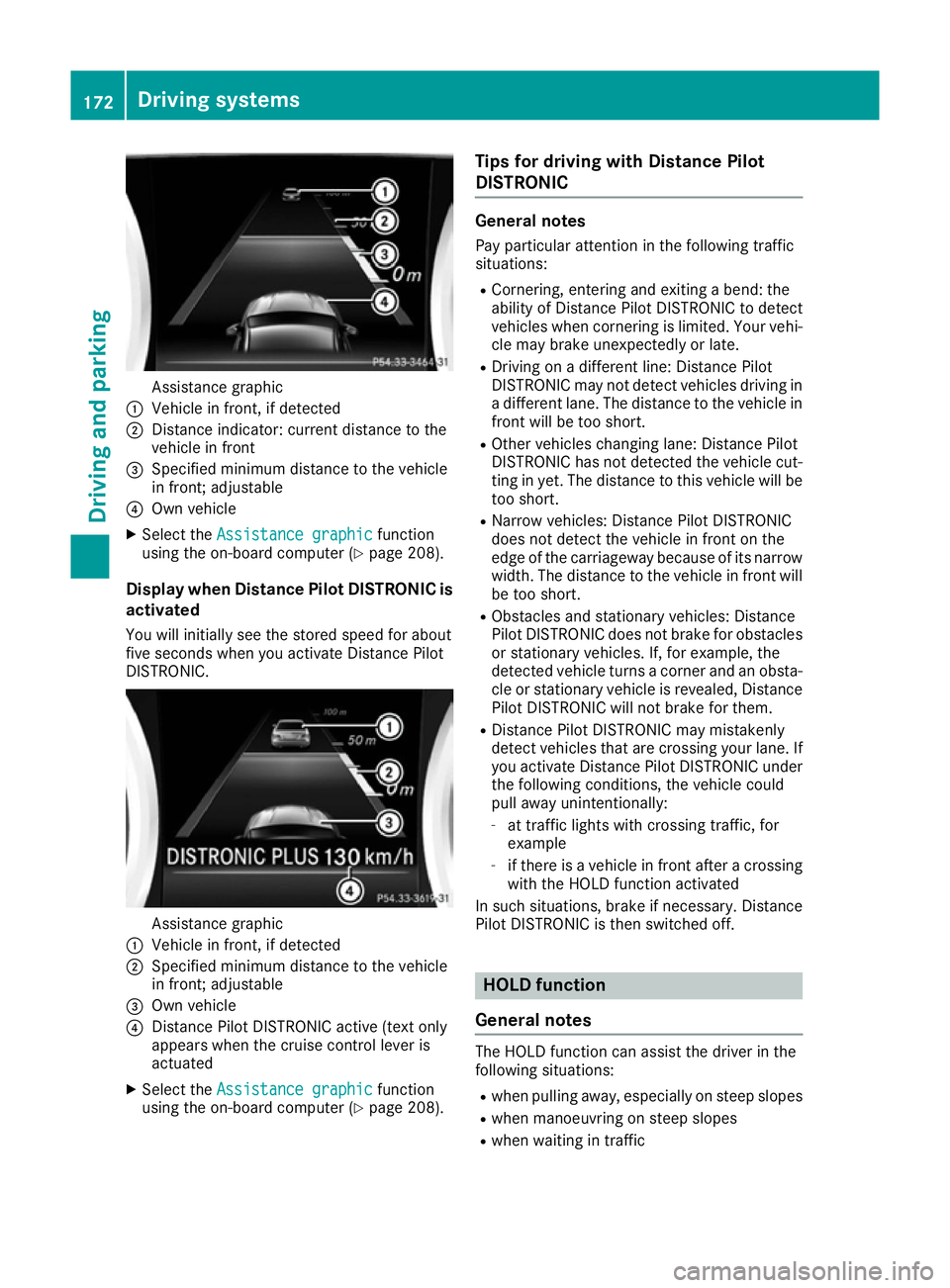
Assistance graphic
: Vehicle in front, if detected
; Distance indicator: current distance to the
vehicle in front
= Specified minimum distance to the vehicle
in front; adjustable
? Own vehicle
X Select the Assistance graphic
Assistance graphic function
using the on-board computer (Y page 208).
Display when Distance Pilot DISTRONIC is activated
You will initially see the stored speed for about
five seconds when you activate Distance Pilot
DISTRONIC. Assistance graphic
: Vehicle in front, if detected
; Specified minimum distance to the vehicle
in front; adjustable
= Own vehicle
? Distance Pilot DISTRONIC active (text only
appears when the cruise control lever is
actuated
X Select the Assistance graphic
Assistance graphic function
using the on-board computer (Y page 208).Tips for driving with Distance Pilot
DISTRONIC General notes
Pay particular attention in the following traffic
situations:
R Cornering, entering and exiting a bend: the
ability of Distance Pilot DISTRONIC to detect
vehicles when cornering is limited. Your vehi-
cle may brake unexpectedly or late.
R Driving on a different line: Distance Pilot
DISTRONIC may not detect vehicles driving in
a different lane. The distance to the vehicle in
front will be too short.
R Other vehicles changing lane: Distance Pilot
DISTRONIC has not detected the vehicle cut-
ting in yet. The distance to this vehicle will be
too short.
R Narrow vehicles: Distance Pilot DISTRONIC
does not detect the vehicle in front on the
edge of the carriageway because of its narrow
width. The distance to the vehicle in front will
be too short.
R Obstacles and stationary vehicles: Distance
Pilot DISTRONIC does not brake for obstacles
or stationary vehicles. If, for example, the
detected vehicle turns a corner and an obsta-
cle or stationary vehicle is revealed, Distance Pilot DISTRONIC will not brake for them.
R Distance Pilot DISTRONIC may mistakenly
detect vehicles that are crossing your lane. If
you activate Distance Pilot DISTRONIC under
the following conditions, the vehicle could
pull away unintentionally:
- at traffic lights with crossing traffic, for
example
- if there is a vehicle in front after a crossing
with the HOLD function activated
In such situations, brake if necessary. Distance Pilot DISTRONIC is then switched off. HOLD function
General notes The HOLD function can assist the driver in the
following situations:
R when pulling away, especially on steep slopes
R when manoeuvring on steep slopes
R when waiting in traffic 172
Driving systemsDriving an
d parking
Page 183 of 345
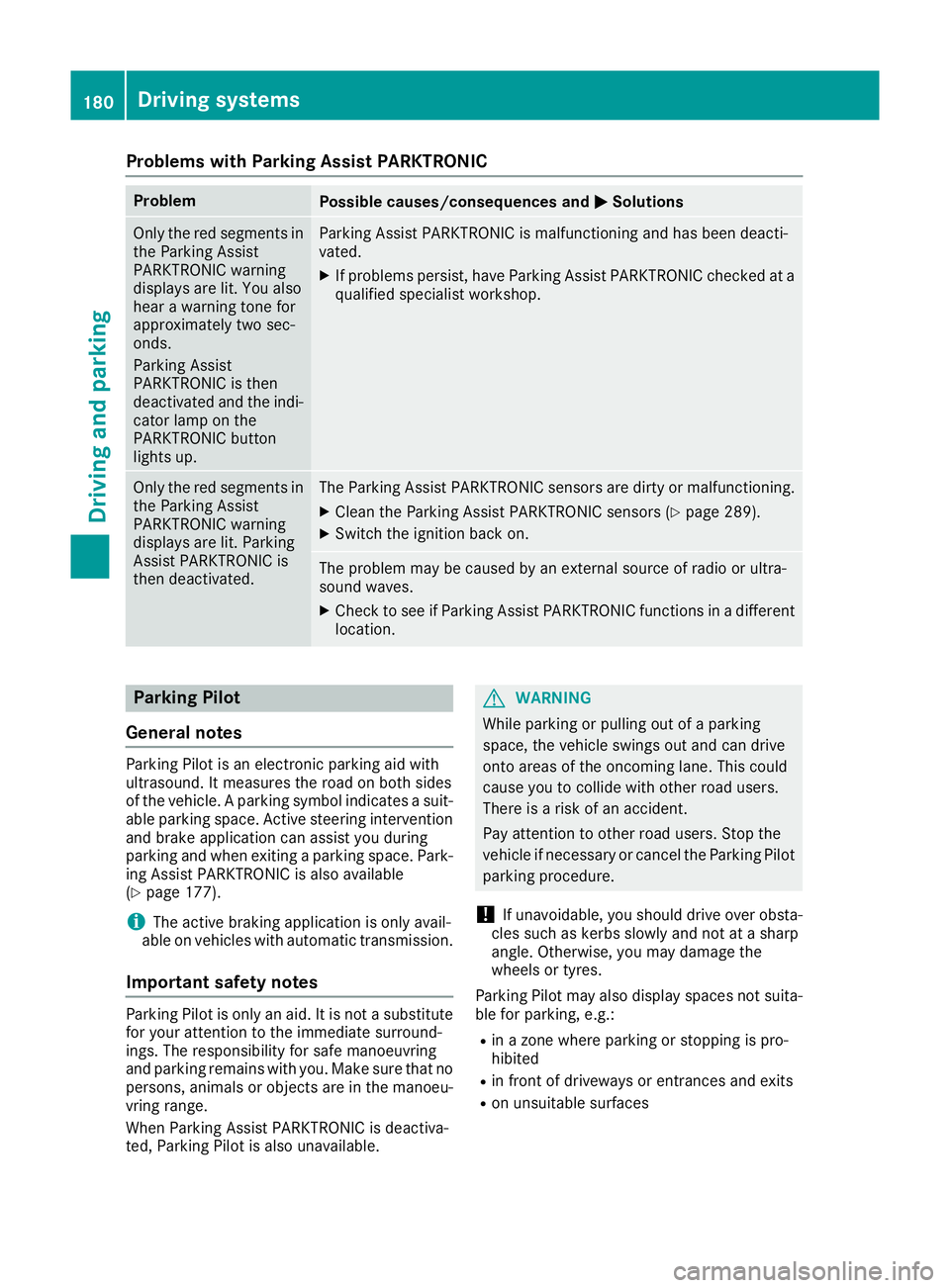
Problems with Parking Assist PARKTRONIC
Problem
Possible causes/consequences and
M
MSolutions Only the red segments in
the Parking Assist
PARKTRONIC warning
displays are lit. You also
hear a warning tone for
approximately two sec-
onds.
Parking Assist
PARKTRONIC is then
deactivated and the indi-
cator lamp on the
PARKTRONIC button
lights up. Parking Assist PARKTRONIC is malfunctioning and has been deacti-
vated.
X If problems persist, have Parking Assist PARKTRONIC checked at a
qualified specialist workshop. Only the red segments in
the Parking Assist
PARKTRONIC warning
displays are lit. Parking
Assist PARKTRONIC is
then deactivated. The Parking Assist PARKTRONIC sensors are dirty or malfunctioning.
X Clean the Parking Assist PARKTRONIC sensors (Y page 289).
X Switch the ignition back on. The problem may be caused by an external source of radio or ultra-
sound waves.
X Check to see if Parking Assist PARKTRONIC functions in a different
location. Parking Pilot
General notes Parking Pilot is an electronic parking aid with
ultrasound. It measures the road on both sides
of the vehicle. A parking symbol indicates a suit-
able parking space. Active steering intervention
and brake application can assist you during
parking and when exiting a parking space. Park- ing Assist PARKTRONIC is also available
(Y page 177).
i The active braking application is only avail-
able on vehicles with automatic transmission.
Important safety notes Parking Pilot is only an aid. It is not a substitute
for your attention to the immediate surround-
ings. The responsibility for safe manoeuvring
and parking remains with you. Make sure that no
persons, animals or objects are in the manoeu-
vring range.
When Parking Assist PARKTRONIC is deactiva-
ted, Parking Pilot is also unavailable. G
WARNING
While parking or pulling out of a parking
space, the vehicle swings out and can drive
onto areas of the oncoming lane. This could
cause you to collide with other road users.
There is a risk of an accident.
Pay attention to other road users. Stop the
vehicle if necessary or cancel the Parking Pilot parking procedure.
! If unavoidable, you should drive over obsta-
cles such as kerbs slowly and not at a sharp
angle. Otherwise, you may damage the
wheels or tyres.
Parking Pilot may also display spaces not suita- ble for parking, e.g.:
R in a zone where parking or stopping is pro-
hibited
R in front of driveways or entrances and exits
R on unsuitable surfaces 180
Driving systemsDriving and parking
Page 189 of 345
R
the ball coupling of a trailer tow hitch
R the rear section of an HGV
R a slanted post
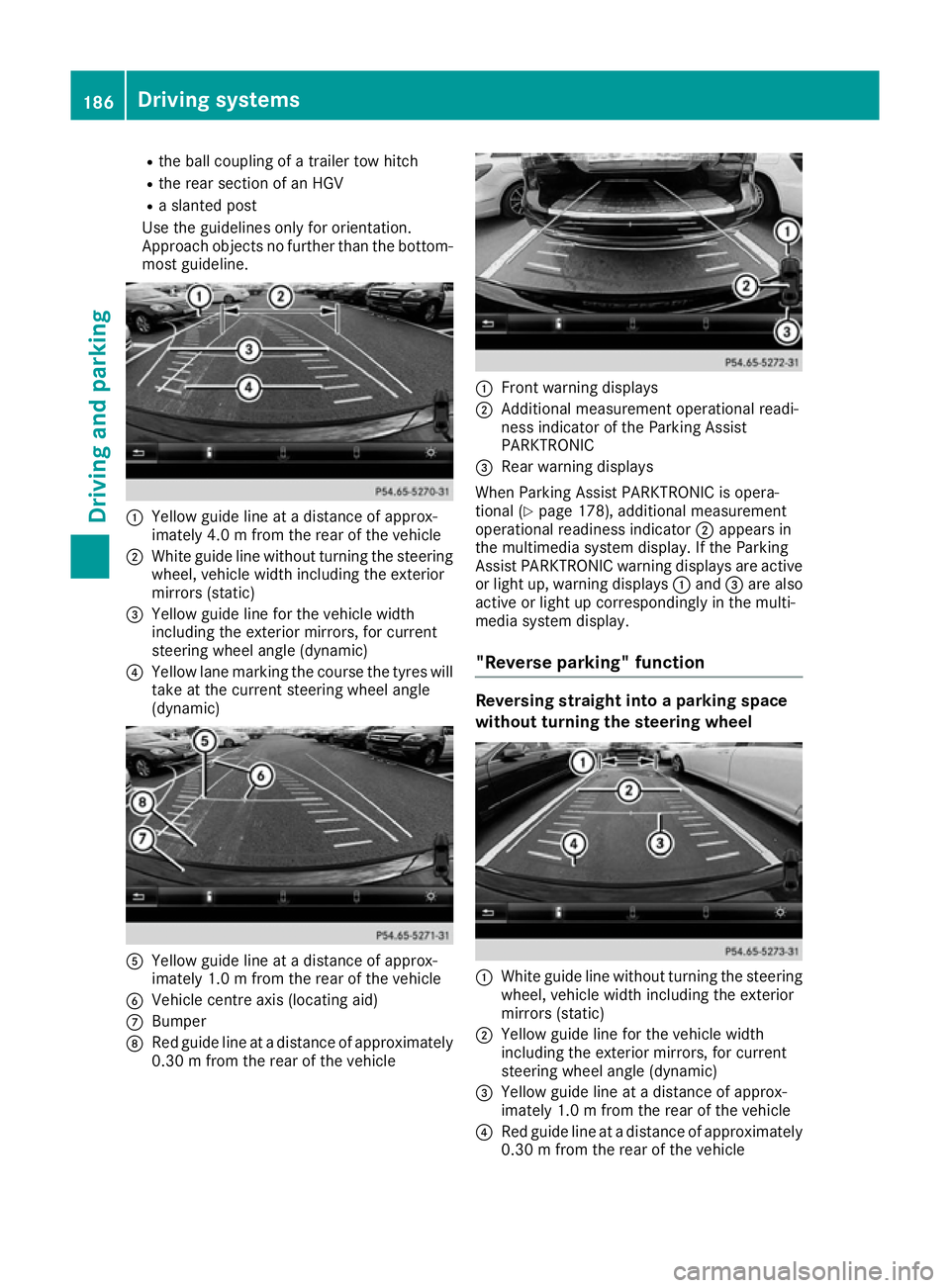
Use the guidelines only for orientation.
Approach objects no further than the bottom- most guideline. :
Yellow guide line at a distance of approx-
imately 4.0 m fromthe rear of the vehicle
; White guide line without turning the steering
wheel, vehicle width including the exterior
mirrors (static)
= Yellow guide line for the vehicle width
including the exterior mirrors, for current
steering wheel angle (dynamic)
? Yellow lane marking the course the tyres will
take at the current steering wheel angle
(dynamic) A
Yellow guide line at a distance of approx-
imately 1.0 m fromthe rear of the vehicle
B Vehicle centre axis (locating aid)
C Bumper
D Red guide line at a distance of approximately
0.30 m from the rear of the vehicle :
Front warning displays
; Additional measurement operational readi-
ness indicator of the Parking Assist
PARKTRONIC
= Rear warning displays
When Parking Assist PARKTRONIC is opera-
tional (Y page 178), additional measurement
operational readiness indicator ;appears in
the multimedia system display. If the Parking
Assist PARKTRONIC warning displays are active
or light up, warning displays :and =are also
active or light up correspondingly in the multi-
media system display.
"Reverse parking" function Reversing straight into a parking space
without turning the steering wheel :
White guide line without turning the steering
wheel, vehicle width including the exterior
mirrors (static)
; Yellow guide line for the vehicle width
including the exterior mirrors, for current
steering wheel angle (dynamic)
= Yellow guide line at a distance of approx-
imately 1.0 m fromthe rear of the vehicle
? Red guide line at a distance of approximately
0.30 m from the rear of the vehicle 186
Driving systemsDriving an
d parking
Page 192 of 345

Select this view when you are driving out of an
exit and the view of crossing traffic is restricted,
for example. ATTENTION ASSIST
General notes ATTENTION ASSIST helps you during long,
monotonous journeys such as on motorways
and trunk roads. It is active in the 60 km/h to
200 km/h speed range. If ATTENTION ASSIST
detects typical indicators of fatigue or increas-
ing lapses in concentration on the part of the
driver, it suggests taking a break.
Important safety notes ATTENTION ASSIST is only an aid. It may not
always detect fatigue or lapses in concentration
until too late, or may not detect them at all. The system is not a substitute for a well-rested and
attentive driver.
The functionality of ATTENTION ASSIST is
restricted, and warnings may be delayed or not
occur at all in the following situations:
R the length of the journey is less than approx-
imately 30 minutes
R if the road condition is poor, e.g. if the surface
is uneven or contains potholes
R in case of strong side winds
R if you have adopted a sporty driving style with
high cornering speeds or high rates of accel-
eration
R if you are predominantly driving at a speed
below 60 km/h or above 200 km/h
R if the time has been set incorrectly
R in active driving situations, such as when you
change lanes or change your speed
ATTENTION ASSIST is reset and starts assessing your tiredness again when you continue your
journey if:
R you switch off the engine
R you take off your seat belt and open the driv-
er's door, e.g. for a change of drivers or to
take a break Displaying the attention level
You can have current status information dis-
played in the Assistance menu (Y
page 208) of
the on-board computer.
X Select the assistance graphic display for
ATTENTION ASSIST using the on-board com-
puter (Y page 208).
The following information is displayed: R the length of the journey since the last break
R the attention level determined by ATTENTION
ASSIST( Attention level
Attention level), displayed in a
bar display in five levels from high to low
R if ATTENTION ASSIST is unable to calculate
the attention level and cannot output a warn-
ing, the System suspended System suspended message
appears. The bar display then changes the
display, e.g. if you are driving at a speed below 60 km/h or above 200 km/h.
Activating ATTENTION ASSIST X
Activate ATTENTION ASSIST using the on-
board computer (Y page 209).
The system determines the attention level of
the driver depending on the setting selected:
Standard Standard selected: the sensitivity with which
the system determines the attention level is set to normal.
Sensitive Sensitive selected: the sensitivity is set
higher. The attention level detected by ATTEN-
TION ASSIST is adapted accordingly and the
driver is warned earlier.
When ATTENTION ASSIST is deactivated, the
é symbol appears in the multifunction dis-
play in the assistance graphic display.
When ATTENTION ASSIST has been deactivated,
it is automatically reactivated after the engine
has been switched off. The sensitivity selected Driving systems
189Driving and parking Z