2016 LINCOLN MKZ HYBRID engine
[x] Cancel search: enginePage 222 of 543

Overriding the System
WARNING
Whenever the driver is overriding the
system by pressing the accelerator
pedal, the system will not automatically apply
the brakes to maintain separation from any
vehicle ahead. You can override the set speed and gap
distance by pressing the accelerator pedal.
When you override the system,
the green indicator light
illuminates and the lead vehicle
graphic does not show in the information
display.
The system will resume operation when you
release the accelerator pedal. The vehicle
speed will decrease to the set speed, or a
lower speed if following a slower vehicle. Changing the Set Speed
•
Press and release SET+ or SET-. The set
speed will change in approximately 1 mph
(2 km/h) increments.
• Accelerate or brake to the desired speed,
then press and release SET+.
• Press and hold
SET+ or SET- until the
desired set speed shows on the
information display. The vehicle speed
will gradually change to the selected
speed.
The system may apply the brakes to slow
the vehicle to the new set speed. The set
speed will display continuously in the
information display while the system is active.
Resuming the Set Speed
Press and release
RES. The vehicle will
return to the previously set speed. The set
speed will display continuously in the
information display while the system is active.
Note: Only use resume if you are aware of
the set speed and intend to return to it. Low Speed Automatic Cancellation
The system is not functional at vehicle
speeds below 12 mph (20 km/h). An audible
alarm will sound and the automatic braking
releases if the vehicle drops below this
speed.
Hilly Condition Usage
Note:
An audible alarm will sound and the
system will shut down if it is applying brakes
for an extended period of time. This allows
the brakes to cool down. The system will
function normally again when the brakes
have cooled down.
You should select a lower gear position
when the system is active in situations such
as prolonged downhill driving on steep
grades, for example in mountainous areas.
The system needs additional engine braking
in these situations to reduce the load on the
vehicle ’s regular brake system to prevent
them from overheating.
Switching Adaptive Cruise Control Off
Press and release
OFF when the system is
in stand by mode or switch the ignition off.
219
MKZ Hybrid (CC9) Hybrid Electric Vehicle (HEV), Canada/United States of America, enUSA, First Printing Cruise ControlE144529
Page 248 of 543
WARNING
Exceeding the Safety Compliance
Certification Label vehicle weight
rating limits could result in substandard
vehicle handling or performance, engine,
transmission and/or structural damage,
serious damage to the vehicle, loss of
control and personal injury. 245
MKZ Hybrid (CC9) Hybrid Electric Vehicle (HEV), Canada/United States of America, enUSA, First Printing Load CarryingE142524
Page 253 of 543

TOWING THE VEHICLE ON FOUR
WHEELS
Emergency Towing
In the event your vehicle becomes disabled
(without access to wheel dollies, car-hauling
trailer, or flatbed transport vehicle), it can be
flat-towed (all wheels on the ground,
regardless of the powertrain/transmission
configuration) under the following conditions:
•
The vehicle is facing forward so that it is
towed in a forward direction.
• The transmission gear shift lever is
placed in position N. If the transmission
gear shift lever cannot be moved to
position N, it may need to be overridden.
See Automatic Transmission (page 190).
• Maximum speed is 35 mph (56 km/h).
• Maximum distance is 50 miles (80
kilometers). Recreational Towing
Note:
Put your climate control system in
recirculated air mode to prevent exhaust
fumes from entering the vehicle.
See
Climate Control (page 141).
Follow these guidelines if you have a need
for recreational (RV) towing. An example of
recreational towing would be towing your
vehicle behind a motorhome. These
guidelines are designed to ensure that your
transmission is not damaged.
Your vehicle can be towed with all four
wheels on the ground using the Neutral Tow
feature, or with all four wheels off the ground
using a vehicle transport trailer. If you are
using a vehicle transport trailer, follow the
instruction specified by the equipment
provider.
Neutral Tow
If you tow your vehicle with all four wheels
on the ground:
• Tow only in the forward direction.
• Release the parking brake. •
Place the vehicle in Neutral Tow mode
by doing the following:
•Put the ignition in accessory mode
(ignition on, engine off ). See Keyless
Starting (page 166).
• Select Neutral Tow in the information
display.
• When prompted by the information
display, press the brake pedal and
select Neutral on the transmission.
Make sure the parking brake is off. If
done successfully,
Neutral Tow
Engaged appears in the display.
• Shut the ignition off.
See Keyless
Starting (page 166). If the process is
completed successfully, the N on the
transmission slowly blinks and
"Neutral tow engaged" appears in the
information display.
• Do not exceed 70 mph (113 km/h).
• Start the engine and allow it to run for
one minute at the beginning of each day.
With the engine running and your foot
on the brake, shift into position
D and
then into position R before shifting back
into position
N.
250
MKZ Hybrid (CC9) Hybrid Electric Vehicle (HEV), Canada/United States of America, enUSA, First Printing Towing
Page 254 of 543
BREAKING-IN
You need to break in new tires for
approximately 300 miles (480 kilometers).
During this time, your vehicle may exhibit
some unusual driving characteristics. The
engine also needs to break in. Avoid hard
accelerations and driving too fast for the first
1000 miles (1600 kilometers). If possible,
avoid carrying heavy loads up steep grades
during the break-in period.
ECONOMICAL DRIVING
Fuel economy is affected by several things
such as how you drive, the conditions you
drive under and how you maintain your
vehicle.
There are some things to keep in mind that
may improve your fuel economy:
•
Accelerate and slow down in a smooth,
moderate fashion.
• Drive at steady speeds.
• Anticipate stops; slowing down may
eliminate the need to stop. •
Combine errands and minimize
stop-and-go driving.
•When running errands, go to the
furthest destination first and then
work your way back home.
• Close the windows for high-speed
driving.
• Drive at reasonable speeds. (Traveling
at 65 mph/105 kph uses about 15% less
fuel than traveling at 75 mph/121 kph).
• Keep the tires properly inflated and use
only the recommended size.
• Use the recommended engine oil.
• Perform all regularly scheduled
maintenance.
There are also some things you may want to
avoid doing because they reduce your fuel
economy:
• Avoid sudden or hard accelerations.
• Avoid revving the engine before turning
off the car.
• Avoid long idle periods.
• Do not warm up your vehicle on cold
mornings. •
Reduce the use of air conditioning and
heat.
• Avoid using speed control in hilly terrain.
• Do not rest your foot on the brake pedal
while driving.
• Avoid carrying unnecessary weight
(approximately 1 mpg [0.4 kilometers/liter]
is lost for every 400 lbs [180 kilograms]
of weight carried).
• Avoid adding particular accessories to
your vehicle (e.g. bug deflectors,
rollbars/light bars, running boards, ski
racks).
• Avoid driving with the wheels out of
alignment.
DRIVING THROUGH WATER WARNING
Do not drive through flowing or deep
water as you may lose control of your
vehicle. Note:
Driving through standing water can
cause vehicle damage.
251
MKZ Hybrid (CC9) Hybrid Electric Vehicle (HEV), Canada/United States of America, enUSA, First Printing Driving Hints
Page 255 of 543

Note:
Engine damage can occur if water
enters the air filter.
Before driving through standing water, check
the depth. Never drive through water that is
higher than the bottom of the front rocker
area of your vehicle. When driving through standing water, drive
very slowly and do not stop your vehicle.
Your brake performance and traction may
be limited. After driving through water and
as soon as it is safe to do so:
•
Lightly press the brake pedal to dry the
brakes and to check that they work.
• Check that the horn works. •
Check that the exterior lights work.
• Turn the steering wheel to check that the
steering power assist works.
FLOOR MATS WARNINGS
Always use floor mats that are
designed to fit the foot well of your
vehicle. Only use floor mats that leave the
pedal area unobstructed. Only use floor mats
that are firmly secured to retention posts so
that they cannot slip out of position and
interfere with the pedals or impair safe
operation of your vehicle in other ways. Pedals that cannot move freely can
cause loss of vehicle control and
increase the risk of serious personal injury. Always make sure that the floor mats
are properly attached to the retention
posts in the carpet that are supplied with
your vehicle. Floor mats must be properly
secured to both retention posts to make sure
mats do not shift out of position. WARNINGS
Never place floor mats or any other
covering in the vehicle foot well that
cannot be properly secured to prevent them
from moving and interfering with the pedals
or the ability to control the vehicle. Never place floor mats or any other
covering on top of already installed
floor mats. Floor mats should always rest on
top of vehicle carpeting surface and not
another floor mat or other covering.
Additional floor mats or any other covering
will reduce the pedal clearance and
potentially interfere with pedal operation. Check attachment of floor mats on a
regular basis. Always properly reinstall
and secure floor mats that have been
removed for cleaning or replacement. Always make sure that objects cannot
fall into the driver foot well while the
vehicle is moving. Objects that are loose can
become trapped under the pedals causing
a loss of vehicle control.
252
MKZ Hybrid (CC9) Hybrid Electric Vehicle (HEV), Canada/United States of America, enUSA, First Printing Driving HintsE176360
Page 258 of 543

Vehicles Sold In Canada: Getting
Roadside Assistance
Canadian clients who require roadside
assistance, call 1-800-387-9333.
Sykes Assistance Services Corporation
administers the Roadside Assistance
program. You must receive covered services
in Canada or the continental United States.
Coverage extends to vehicles that use public,
non-seasonal, annually traveled roadways.
Roadside Assistance coverage does not
extend to vehicles involved in cross-country
driving, logging, autocross and any other
form of off-road use. Well maintained roads
and surfaces help ensure safe travel for the
Supplier, and allow their representatives to
perform service as per the standard
operating procedures.
In Remote Locations
If our supplier cannot take your vehicle by
road to the nearest authorized dealership,
transportation by rail or water may be
necessary. The program covers a tow to the
dock or rail terminal and also to the
dealership at the end of the trip.
For rail or water transportation, however,
contact your authorized dealer to confirm if
you are eligible for additional coverage
before you authorize or pay for the service.
Call the Lincoln Roadside Assistance at
1-800-387-9333 for additional information.
Vehicles Sold In Canada: Using
Roadside Assistance
Canadian Roadside coverage and benefits
may differ from the United States coverage.
Please refer to your warranty information or
visit our website at www.lincolncanada.com
for information on Canadian services and
benefits.
Canadian clients who need to obtain
roadside information, call 1-800-387-9333 or
visit our website at www.lincolncanada.com.
HAZARD WARNING FLASHERS
Note:
If used when the vehicle is not running,
the battery will lose charge. There may be
insufficient power to restart your vehicle. The hazard warning button is
located on the instrument panel.
Use it when your vehicle is
creating a safety hazard for other motorists.
• Press the button to turn on the hazard
warning function, and the front and rear
direction indicators will flash.
• Press the button again to turn them off.
FUEL SHUTOFF WARNING
Failure to inspect and, if necessary,
repair fuel leaks after a collision may
increase the risk of fire and serious injury.
Ford Motor Company recommends that the
fuel system be inspected by an authorized
dealer after any collision. In the event of a moderate to severe
collision, this vehicle has a fuel pump shut-off
feature that stops the flow of fuel to the
engine. Not every impact will cause a
shut-off.
255
MKZ Hybrid (CC9) Hybrid Electric Vehicle (HEV), Canada/United States of America, enUSA, First Printing Roadside Emergencies
Page 259 of 543

Should your vehicle shut off after a collision,
you may restart your vehicle.
For vehicles equipped with a key system:
1. Switch off the ignition.
2. Switch on the ignition.
3. Check the information display for the
Ready to Drive light as the gasoline
engine may not start, but the electric
motor may be running. If you do not see
the Ready to Drive light, repeat Steps 1
and 2 up to two more times.
For vehicles equipped with a push button
start system:
1. Press the push button start to switch off the ignition.
2. Press the brake pedal and press the push
button start to switch on the ignition.
3. Check the information display for the Ready to Drive light as the gasoline
engine may not start, but the electric
motor may be running. If you do not see
the Ready to Drive light, repeat Steps 1
and 2 up to two more times. Note:
When you try to restart your vehicle
after a fuel shutoff, the vehicle makes sure
that the electrical system is safe to restart.
Once your vehicle determines that the
electrical system is safe, then the vehicle will
allow you to restart.
Note: In the event that your vehicle does not
restart after your third attempt, contact an
authorized dealer.
JUMP STARTING THE VEHICLE WARNINGS
The gases around the battery can
explode if exposed to flames, sparks,
or lit cigarettes. An explosion could result in
injury or vehicle damage. Batteries contain sulfuric acid which
can burn skin, eyes and clothing, if
contacted. Do not attempt to push-start your automatic
transmission vehicle. Automatic
transmissions do not have push-start
capability. Attempting to push-start a vehicle
with an automatic transmission may cause
transmission damage.
Preparing Your Vehicle
Note:
Use only a 12-volt supply to start your
vehicle.
Note: Do not disconnect the battery of the
disabled vehicle as this could damage the
vehicle's electrical system.
1. Park the booster vehicle close to the hood of the disabled vehicle making sure
the two vehicles do not touch. Set the
parking brake on both vehicles and stay
clear of the engine cooling fan and other
moving parts.
2. Check all battery terminals and remove any excessive corrosion before you
attach the battery cables. Ensure that
vent caps are tight and level.
3. Turn the heater fan on in both vehicles to protect from any electrical surges. Turn
all other accessories off.
256
MKZ Hybrid (CC9) Hybrid Electric Vehicle (HEV), Canada/United States of America, enUSA, First Printing Roadside Emergencies
Page 261 of 543
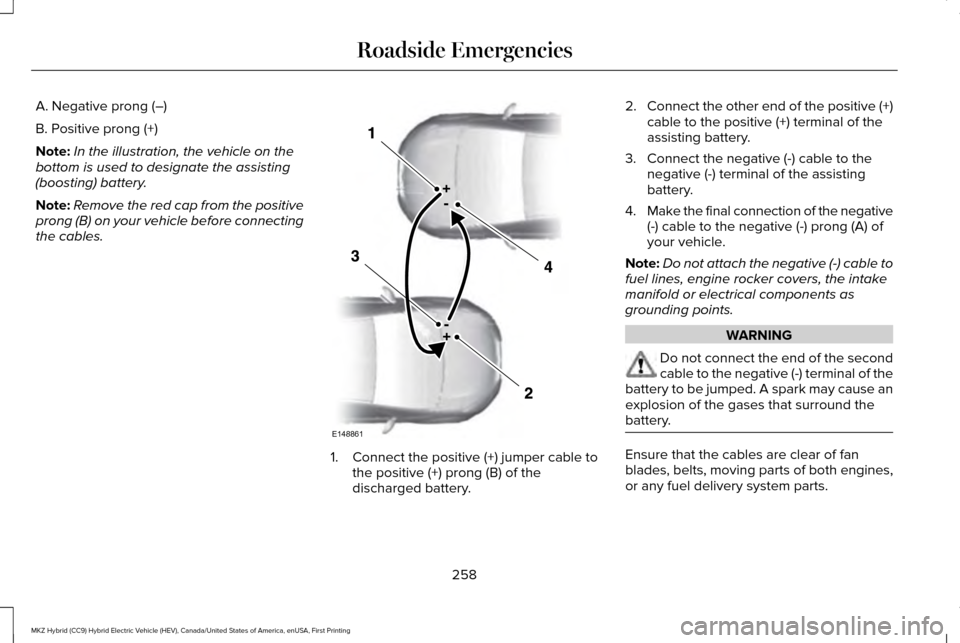
A. Negative prong (–)
B. Positive prong (+)
Note:
In the illustration, the vehicle on the
bottom is used to designate the assisting
(boosting) battery.
Note: Remove the red cap from the positive
prong (B) on your vehicle before connecting
the cables. 1. Connect the positive (+) jumper cable to
the positive (+) prong (B) of the
discharged battery. 2.
Connect the other end of the positive (+)
cable to the positive (+) terminal of the
assisting battery.
3. Connect the negative (-) cable to the negative (-) terminal of the assisting
battery.
4. Make the final connection of the negative
(-) cable to the negative (-) prong (A) of
your vehicle.
Note: Do not attach the negative (-) cable to
fuel lines, engine rocker covers, the intake
manifold or electrical components as
grounding points. WARNING
Do not connect the end of the second
cable to the negative (-) terminal of the
battery to be jumped. A spark may cause an
explosion of the gases that surround the
battery. Ensure that the cables are clear of fan
blades, belts, moving parts of both engines,
or any fuel delivery system parts.
258
MKZ Hybrid (CC9) Hybrid Electric Vehicle (HEV), Canada/United States of America, enUSA, First Printing Roadside EmergenciesE148861