2016 LINCOLN MKZ HYBRID engine
[x] Cancel search: enginePage 193 of 543
AUTOMATIC TRANSMISSION
WARNINGS
Always set the parking brake fully and
make sure your vehicle is in park (P).
Turn the ignition off whenever you leave your
vehicle. Do not apply the brake pedal and
accelerator pedal simultaneously.
Applying both pedals simultaneously for
more than three seconds will limit engine
rpm, which may result in difficulty maintaining
speed in traffic and could lead to serious
injury. Push Button Shift Transmission
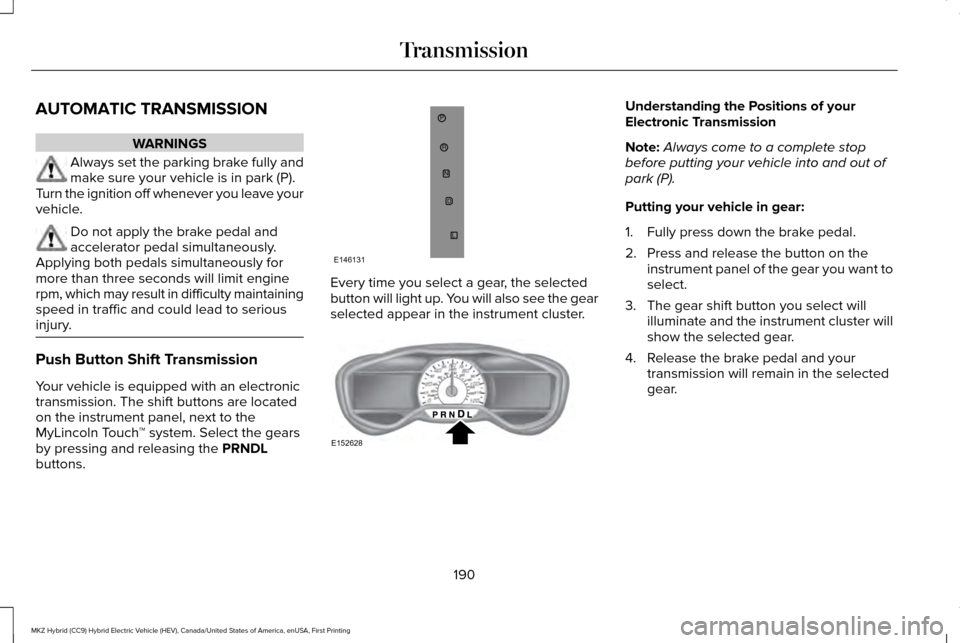
Your vehicle is equipped with an electronic
transmission. The shift buttons are located
on the instrument panel, next to the
MyLincoln Touch
™ system. Select the gears
by pressing and releasing the PRNDL
buttons. Every time you select a gear, the selected
button will light up. You will also see the gear
selected appear in the instrument cluster. Understanding the Positions of your
Electronic Transmission
Note:
Always come to a complete stop
before putting your vehicle into and out of
park (P).
Putting your vehicle in gear:
1. Fully press down the brake pedal.
2. Press and release the button on the instrument panel of the gear you want to
select.
3. The gear shift button you select will illuminate and the instrument cluster will
show the selected gear.
4. Release the brake pedal and your transmission will remain in the selected
gear.
190
MKZ Hybrid (CC9) Hybrid Electric Vehicle (HEV), Canada/United States of America, enUSA, First Printing TransmissionP
RN
D
L
E146131 E152628
Page 195 of 543

Stay in Neutral mode
Stay in Neutral mode allows your vehicle to
stay in neutral when you exit your vehicle.
Your vehicle must be stationary to enter this
mode.
To enter Stay in Neutral mode:
1.
Press the neutral (N) button on the shifter
assembly.
2. The message Select N Again to Enter
Stay in Neutral mode will appear in the
information display screen.
3. Press the neutral (N) button again to enter Stay in Neutral mode.
The message
Stay in Neutral mode
engaged will appear in the instrument cluster
when your vehicle has entered Stay in
Neutral mode.
Note: During this mode the neutral (N) button
will flash continuously and the instrument
cluster will display neutral as the selected
gear. Exiting Stay in Neutral mode
To disable Stay in Neutral mode put your
vehicle in another gear. See the Putting the
Vehicle in Gear
section for instructions on
how to do this.
Entering a Carwash
Note: Always put your vehicle in Stay in
Neutral mode when entering an automatic
car wash. Failure to do this could result in
vehicle damage that may not be covered by
warranty.
Drive (D)
The normal driving position for the best fuel
economy.
Drive (D) with Grade Assist Activate grade assist through the
information display settings menu.
See
General Information (page
110). Grade assist:
•
Provides additional grade braking with a
combination of engine motoring and
high-voltage battery charging to help
maintain vehicle speed when descending
a grade.
• As your vehicle determines the amount
of engine motoring and high-voltage
battery charging, you may notice the
engine speed increasing and decreasing
to help maintain your vehicle speed when
descending a grade. The grade assist lamp will
illuminate grey when the grade
assist feature is switched on
through the instrument display settings
menu. The lamp will change from grey to
green when grade assist is actively providing
additional grade braking.
192
MKZ Hybrid (CC9) Hybrid Electric Vehicle (HEV), Canada/United States of America, enUSA, First Printing TransmissionE144523 E144523
Page 196 of 543
Low (L)
•
Provides maximum engine braking.
• The transmission may be put into low (L)
at any vehicle speed.
• Not intended for use under extended or
normal driving conditions and results in
lower fuel economy.
Brake-Shift Interlock Override WARNINGS
Do not drive your vehicle until you
verify that the brake lamps are working.
When doing this procedure, you will
be taking your vehicle out of park
which means your vehicle can roll freely. To
avoid unwanted vehicle movement, always
fully set the parking brake prior to doing this
procedure. Use wheel chocks if appropriate. If you fully release the parking brake,
but the brake warning lamp remains
illuminated, the brakes may not be working
properly. See your authorized dealer. Note:
See your authorized dealer as soon
as possible if this procedure is used. Note:
For some markets this feature will be
disabled.
Note: This feature will only function if your
12-volt battery has power.
Use the brake-shift interlock override
procedure to put your vehicle in gear in the
event of an electrical malfunction or if your
vehicle has a dead battery. The brake shift
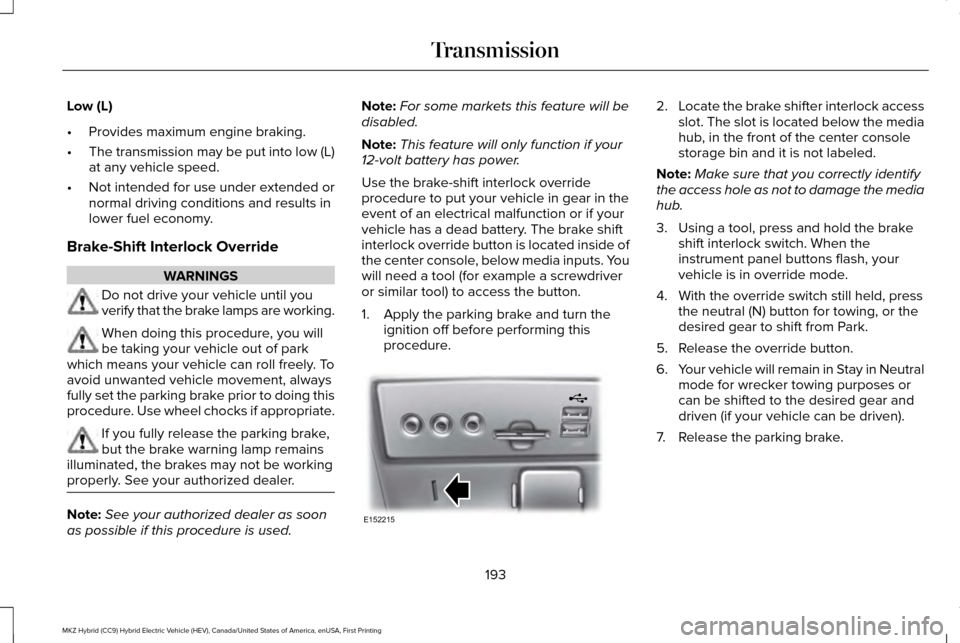
interlock override button is located inside of
the center console, below media inputs. You
will need a tool (for example a screwdriver
or similar tool) to access the button.
1. Apply the parking brake and turn the ignition off before performing this
procedure. 2.
Locate the brake shifter interlock access
slot. The slot is located below the media
hub, in the front of the center console
storage bin and it is not labeled.
Note: Make sure that you correctly identify
the access hole as not to damage the media
hub.
3. Using a tool, press and hold the brake shift interlock switch. When the
instrument panel buttons flash, your
vehicle is in override mode.
4. With the override switch still held, press the neutral (N) button for towing, or the
desired gear to shift from Park.
5. Release the override button.
6. Your vehicle will remain in Stay in Neutral
mode for wrecker towing purposes or
can be shifted to the desired gear and
driven (if your vehicle can be driven).
7. Release the parking brake.
193
MKZ Hybrid (CC9) Hybrid Electric Vehicle (HEV), Canada/United States of America, enUSA, First Printing TransmissionE152215
Page 197 of 543

If Your Vehicle Gets Stuck In Mud or
Snow
Note:
Do not rock your vehicle if the engine
is not at normal operating temperature or
damage to the transmission may occur.
Note: Do not rock your vehicle for more than
a minute or damage to the transmission and
tires may occur, or the engine may overheat.
If your vehicle gets stuck in mud or snow,
you may be able to rock it out by shifting
between forward and reverse gears,
stopping between shifts in a steady pattern.
Press lightly on the accelerator in each gear.
194
MKZ Hybrid (CC9) Hybrid Electric Vehicle (HEV), Canada/United States of America, enUSA, First Printing Transmission
Page 198 of 543

GENERAL INFORMATION
Note:
Occasional brake noise is normal. If a
metal-to-metal, continuous grinding or
continuous squeal sound is present, the
brake linings may be worn-out. Have the
system checked by an authorized dealer. If
the vehicle has continuous vibration or
shudder in the steering wheel while braking,
have it checked by an authorized dealer.
Note: Brake dust may accumulate on the
wheels, even under normal driving
conditions. Some dust is inevitable as the
brakes wear and does not contribute to
brake noise. See Cleaning the Alloy Wheels
(page 311). See
Warning Lamps and
Indicators (page 105).
Wet brakes result in reduced braking
efficiency. Gently press the brake pedal a
few times when driving from a car wash or
standing water to dry the brakes. Brake Over Accelerator
In the event the accelerator pedal becomes
stuck or entrapped, apply steady and firm
pressure to the brake pedal to slow the
vehicle and reduce engine power. If you
experience this condition, apply the brakes
and bring your vehicle to a safe stop. Move
the transmission to park (P), switch the
engine off and apply the parking brake.
Inspect the accelerator pedal for any
interference. If none are found and the
condition persists, have your vehicle towed
to the nearest authorized dealer.
Brake Assist
Brake assist detects when you brake heavily
by measuring the rate at which you press the
brake pedal. It provides maximum braking
efficiency as long as you press the pedal.
Brake assist can reduce stopping distances
in critical situations.
Anti-lock Brake System
This system helps you maintain steering
control during emergency stops by keeping
the brakes from locking. This lamp momentarily illuminates
when you switch the ignition on. If
the light does not illuminate during
start up, remains on or flashes, the anti-lock
braking system may be disabled. Have the
system checked by an authorized dealer. If
the anti-lock brake system is disabled,
normal braking is still effective. If the brake warning lamp
illuminates when you release the
parking brake, have your system
checked by an authorized dealer.
Regenerative Braking System
This feature is used to simulate the engine
braking of an internal combustion engine
and assist the standard brake system while
recovering some of the energy of motion and
storing it in the battery to improve fuel
economy. The standard brake system is
designed to fully stop the car if regenerative
braking is not available. During regenerative
195
MKZ Hybrid (CC9) Hybrid Electric Vehicle (HEV), Canada/United States of America, enUSA, First Printing BrakesE144522 E144522
Page 202 of 543

WARNINGS
The system will turn off if a malfunction
is apparent or if you rev the engine
excessively. Failure to take care may result
in the loss of control of your vehicle, serious
personal injury or death. The system makes it easier to pull away
when your vehicle is on a slope without the
need to use the parking brake.
When the system is active, your vehicle
remains stationary on the slope for two to
three seconds after you release the brake
pedal. This allows time to move your foot
from the brake to the accelerator pedal. The
system releases the brakes automatically
once the engine has developed sufficient
drive to prevent your vehicle from rolling
down the slope. This is an advantage when
pulling away on a slope, for example from a
car park ramp, traffic lights or when reversing
uphill into a parking space.
Note:
The system only functions when you
bring your vehicle to a complete standstill
with the vehicle in an uphill gear (for
example, second (2) when facing uphill or
reverse (R) when facing downhill).
Note: There is no warning light to indicate
the system is either on or off.
Using Hill Start Assist
1. Press the brake pedal to bring your vehicle to a complete standstill. Keep the
brake pedal pressed.
2. If the sensors detect that your vehicle is on a slope, the system activates
automatically.
3. When you remove your foot from the brake pedal, your vehicle remains on the
slope without rolling away for about two
to three seconds. This hold time
automatically extends if you are in the
process of driving off.
4. Drive off in the normal manner. The system releases the brakes automatically. Note:
When you remove your foot from the
brake pedal and press the pedal again when
the system is active, you will experience
significantly reduced brake pedal travel. This
is normal.
Switching the System On and Off
Vehicles with Manual Transmission
You can switch this feature on or off in the
information display. The system remembers
the last setting when you start your vehicle.
Vehicles with Automatic Transmission
You cannot turn the system on or off. When
you switch the ignition on, the system
automatically turns on.
199
MKZ Hybrid (CC9) Hybrid Electric Vehicle (HEV), Canada/United States of America, enUSA, First Printing Brakes
Page 203 of 543

PRINCIPLE OF OPERATION
The traction control system helps avoid drive
wheel spin and loss of traction.
If your vehicle begins to slide, the system
applies the brakes to individual wheels and,
when needed, reduces engine power at the
same time. If the wheels spin when
accelerating on slippery or loose surfaces,
the system reduces engine power in order
to increase traction.
USING TRACTION CONTROL
In certain situations for example, stuck in
snow or mud, turning the traction control off
may be beneficial as this allows the wheels
to spin with full engine power. Depending
on the type of system you have on your
vehicle, you can either turn the system off
using the information display or by pressing
the button.
Switching the System Off Using the
Information Display Controls (If Equipped)
Your vehicle comes with this feature already
enabled. If required, you can switch this
feature off using the information display
controls.
See (page 110).
Switching the System Off Using a
Switch
(If Equipped)
The button is located in the instrument panel.
Press the button. You will see a message in
conjunction with an illuminated icon in the
display. Press the button again to return the
system to normal mode.
When you switch the traction control system
off, stability control remains fully active. System Indicator Lights and Messages WARNING
If a failure has been detected within
the AdvanceTrac system, the stability
control light will illuminate steadily. Verify
that the AdvanceTrac system was not
manually disabled through the information
display. If the stability control light still
illuminates steadily, have the system serviced
by an authorized dealer immediately.
Operating your vehicle with AdvanceTrac
disabled could lead to an increased risk of
loss of vehicle control, vehicle rollover,
personal injury and death. The stability control light
temporarily illuminates on engine
start-up and flashes when a driving
condition activates the stability system. The stability control off light
temporarily illuminates on engine
start-up and stays on when you
turn the traction control system off.
200
MKZ Hybrid (CC9) Hybrid Electric Vehicle (HEV), Canada/United States of America, enUSA, First Printing Traction ControlE138639
Page 217 of 543

PRINCIPLE OF OPERATION
Cruise control lets you maintain a set speed
without keeping your foot on the accelerator
pedal. You can use cruise control when your
vehicle speed is greater than 20 mph
(30 km/h).
USING CRUISE CONTROL WARNINGS
Do not use cruise control on winding
roads, in heavy traffic or when the road
surface is slippery. This could result in loss
of vehicle control, serious injury or death. When you are going downhill, your
vehicle speed may increase above the
set speed. The system will not apply the
brakes but a warning displays. When you are going downhill while
using cruise control, your battery
charging system and engine work together
to help maintain your set speed. Engine
noise may increase or decrease under these
conditions. Note:
Cruise control will disengage if the
vehicle speed decreases more than 10 mph
(16 km/h)
below the set speed while driving
uphill. The cruise controls are on the steering
wheel.
Switching Cruise Control On
Note:
Using cruise control with ECO Cruise
switched on may change the operation of
the system. This feature saves vehicle
energy by relaxing acceleration compared
to standard cruise control. For example, your
vehicle may temporarily lose speed when
going uphill. ECO Cruise is included in EcoSelect which
is turned on or off using the ECO button on
the center console.
For additional information, refer to EcoSelect.
See
Hybrid Electric Vehicle (page 171).
Press and release
ON. The indicator displays in the
instrument cluster.
Setting the Cruise Speed
1. Drive to desired speed.
2. Press and release
SET+.
3. Take your foot off the accelerator pedal.
The indicator changes color in the instrument
cluster.
Changing the Set Speed
Note: If you accelerate by pressing the
accelerator pedal, the set speed will not
change. When you release the accelerator
pedal, your vehicle returns to the speed that
you previously set.
214
MKZ Hybrid (CC9) Hybrid Electric Vehicle (HEV), Canada/United States of America, enUSA, First Printing Cruise ControlE145976 E71340