2016 HONDA PILOT ECO mode
[x] Cancel search: ECO modePage 517 of 661
uuWhen Driving uVehicle Stability Assist (VSA® ), aka Electronic Stability Control (ESC), System
516
Driving
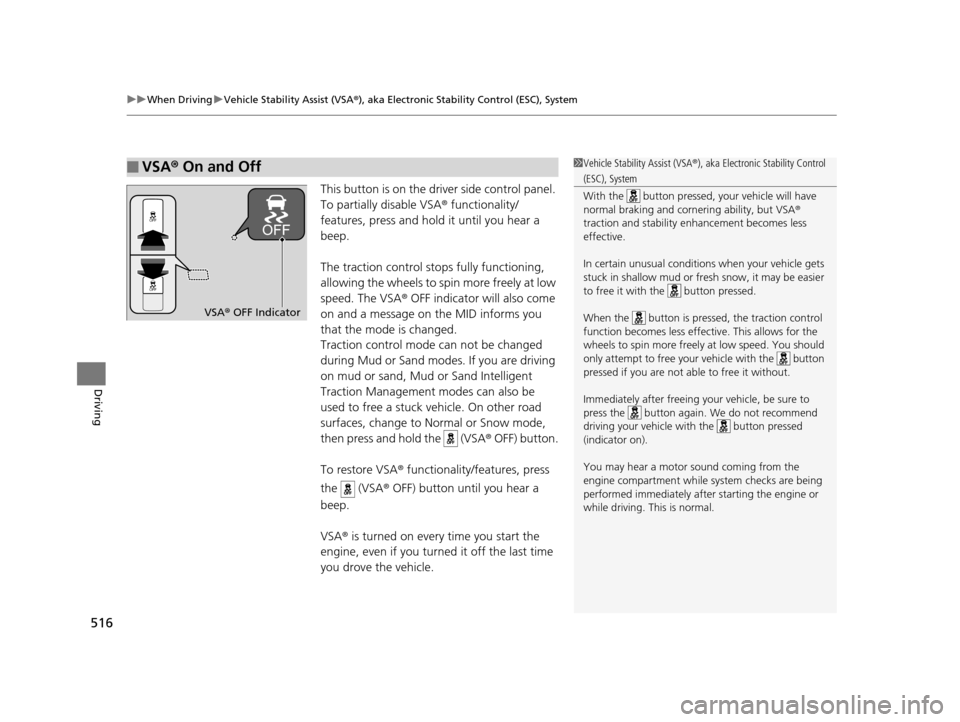
This button is on the driver side control panel.
To partially disable VSA ® functionality/
features, press and hold it until you hear a
beep.
The traction control stops fully functioning,
allowing the wheels to sp in more freely at low
speed. The VSA ® OFF indicator will also come
on and a message on the MID informs you
that the mode is changed.
Traction control mode can not be changed
during Mud or Sand modes. If you are driving
on mud or sand, Mud or Sand Intelligent
Traction Management modes can also be
used to free a stuck vehicle. On other road
surfaces, change to No rmal or Snow mode,
then press and hold the (VSA ® OFF) button.
To restore VSA ® functionality/features, press
the (VSA ® OFF) button until you hear a
beep.
VSA ® is turned on every time you start the
engine, even if you turned it off the last time
you drove the vehicle.
■VSA ® On and Off1 Vehicle Stability Assist (VSA ®), aka Electronic Stability Control
(ESC), System
With the button pressed, your vehicle will have
normal braking and corn ering ability, but VSA®
traction and stability enhancement becomes less
effective.
In certain unusual conditions when your vehicle gets
stuck in shallow mud or fr esh snow, it may be easier
to free it with the button pressed.
When the button is pressed, the traction control
function becomes less effective. This allows for the
wheels to spin more freely at low speed. You should
only attempt to free your vehicle with the button
pressed if you are not able to free it without.
Immediately after freeing your vehicle, be sure to
press the button again. We do not recommend
driving your vehicle wi th the button pressed
(indicator on).
You may hear a motor sound coming from the
engine compartment while system checks are being
performed immediately after starting the engine or
while driving. This is normal.
VSA ® OFF Indicator
16 PILOT-31TG76000.book 516 ページ 2015年6月15日 月曜日 午前11時30分
Page 519 of 661

518
uuWhen Driving uBlind spot information (BSI) System*
Driving
Blind spot information (BSI) System*
Is designed to detect vehicl es in specified alert zones adjacent to your vehicle,
particularly in harder to see areas commonly known as “blind spots.”
When the system detects vehi cles approaching from behind in adjacent lanes, the
appropriate indicator comes on for a few se conds, providing assistance when you
change lanes.
■How the system works
1 Blind spot inform ation (BSI) System*
Important Safety Reminder
Like all assistance systems, BSI has limitations. Over
reliance on BSI may result in a collision.
The system is for your convenience only. Even if an
object is within the alert zone, the following
situations may occur.
•The BSI alert indicator may not come on due to
obstruction (splashes, et c.) even without the Blind
Spot Info Not Available MID appearing.
•The BSI alert indicator may come on even with the
message appearing.
The BSI alert i ndicator may not come on under the
following conditions:
•A vehicle does not stay in the alert zone for more
than two seconds.
•A vehicle is parked in a side lane.•The speed difference betw een your vehicle and the
vehicle you are passing is greater than 6 mph (10
km/h).
•An object not detected by the radar sensors
approaches or passes your vehicle.
3WARNING
Failure to visually confirm that it is safe to
change lanes before doing so may result in
a crash and serious injury or death.
Do not rely only on the blind spot
information system wh en changing lanes.
Always look in your mirrors, to either side
of your vehicle, and behind you for other
vehicles before changing lanes.
Alert zone range
A: Approx. 1.6 ft. (0.5 m)
B: Approx. 10 ft. (3 m)
C: Approx. 10 ft. (3 m) Radar Sensors:
underneath the
rear bumper
corners
Alert ZoneA
B
C
●The transmission is in (D.●Your vehicle speed is
between 20 mph (32 km/h)
and 100 mph (160 km/h)
* Not available on all models
16 PILOT-31TG76000.book 518 ページ 2015年6月15日 月曜日 午前11時30分
Page 525 of 661
uuWhen Driving uTPMS with Tire Fill Assist
524
Driving
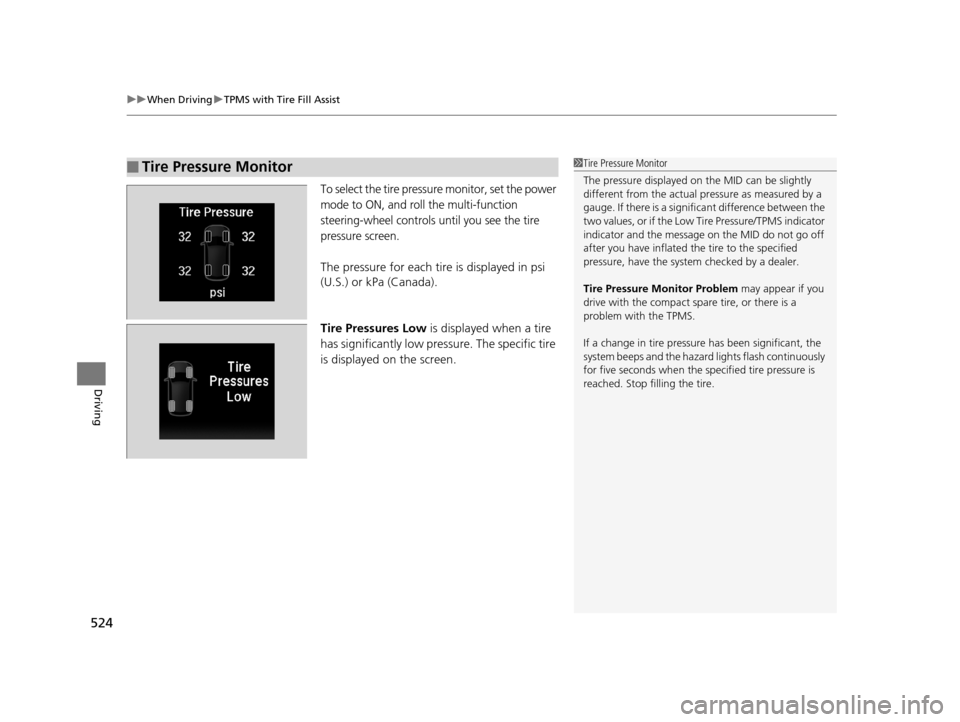
To select the tire pressure monitor, set the power
mode to ON, and roll the multi-function
steering-wheel controls until you see the tire
pressure screen.
The pressure for each tire is displayed in psi
(U.S.) or kPa (Canada).
Tire Pressures Low is displayed when a tire
has significantly low pressure. The specific tire
is displayed on the screen.
■Tire Pressure Monitor1Tire Pressure Monitor
The pressure displayed on the MID can be slightly
different from the actual pr essure as measured by a
gauge. If there is a signifi cant difference between the
two values, or if the Low Tire Pressure/TPMS indicator
indicator and the message on the MID do not go off
after you have inflated the tire to the specified
pressure, have the system checked by a dealer.
Tire Pressure Monitor Problem may appear if you
drive with the compact spare tire, or there is a
problem with the TPMS.
If a change in tire pressure has been significant, the
system beeps and the hazard lights flash continuously
for five seconds when the specified tire pressure is
reached. Stop filling the tire.
16 PILOT-31TG76000.book 524 ページ 2015年6月15日 月曜日 午前11時30分
Page 532 of 661

531
uuBraking uCollision Mitigation Braking SystemTM (CMBSTM)*
Continued
Driving
Collision Mitigation Braking SystemTM (CMBSTM)*
Can assist you when there is a possibility of your vehicle colliding with a vehicle or a
pedestrian detected in front of yours. The CMBSTM is designed to alert you when a
potential collision is determined, as well as to reduce your vehicle speed to help
minimize collision severity when a collision is deemed unavoidable.
■How the system works
1 Collision Mitigation Braking SystemTM (CMBSTM)*
Important Safety Reminder
The CMBSTM is designed to reduce the severity of an
unavoidable collision. It does not prevent collision nor
stop the vehicle automatically. It is still your
responsibility to operate the brake pedal and steering
wheel appropriately acco rding to the driving
conditions.
The CMBS
TM may not activate or may not detect a
vehicle in front of y our vehicle under certain
conditions:
2 CMBS
TM Conditions and Limitations P. 535
You can read about handling information for the
camera equipped with this system. 2 Front Sensor Camera
* P. 489
1How the system works
Rapid vibrations on the steering wheel alert you
when the your vehicle speed is between 19 and 62
mph (30 and 100 km/h) with an oncoming vehicle
detected in front of you.
The system starts monitoring the roadway ah ead when your vehicle speed is about
3 mph (5 km/h) and there is a vehicle in front of you. The radar sensor is
in the front grille.
The CMBS
TM activates when:●The speed difference between your vehicle and a vehicle or pedestrian
detected in front of you becomes about 3 mph (5 km/h) and over with a chance
of a collision.
●Your vehicle speed is about 62 mph (100 km/h) or less and there is a chance of a
collision with an oncoming detected vehicle or a pedestrian in front of you. The camera is
located behind the
rearview mirror.
When to use
* Not available on all models
16 PILOT-31TG76000.book 531 ページ 2015年6月15日 月曜日 午前11時30分
Page 544 of 661

543
uuParking Your Vehicle uParking Sensor System*
Continued
Driving
■When the distance between your vehicle and obstacles behind becomes shorter
*1: At this stage, only the center sensors detect obstacles.
Length of the
intermittent beepDistance between the Bumper and ObstacleIndicatorAudio/information screenCorner SensorsCenter Sensors
Moderate—Rear: About 43-24 in
(110-60 cm) Blinks in Yellow*1
ShortAbout 24-18 in (60-45 cm) About 24-18 in (60-45 cm)
Blinks in Amber
Very shortAbout 18-14 in
(45-35 cm) About 18-14 in (45-35 cm)
ContinuousAbout 14 in
(35 cm) or lessAbout 14 in
(35 cm) or lessBlinks in Red
Indicators light where the
sensor detects an obstacle
16 PILOT-31TG76000.book 543 ページ 2015年6月15日 月曜日 午前11時30分
Page 545 of 661

uuParking Your Vehicle uParking Sensor System*
544
Driving
1. Make sure that the parking sensor system is not activated. Set the power mode to
VEHICLE OFF (LOCK).
2. Press and hold the parking sensor system button, and set the power mode to ON.
3. Keep pressing the button for 10 seconds. Release the button when the indicator
in the button flashes.
4. Press the button again. The indi cator in the button goes off.
u The beeper sounds twice. The re ar sensors are now turned off.
To turn the rear sensors on again, follow the above procedure. The beeper sounds
three times when the rear sensors come back on.
■Turning off All Rear Sensors1 Turning off All Rear Sensors
When you set the gear position to
(R, the indicator
in the parking sensor system button blinks as a
reminder that the rear sens ors have been turned off.
16 PILOT-31TG76000.book 544 ページ 2015年6月15日 月曜日 午前11時30分
Page 556 of 661

555
Maintenance
This chapter discusses basic maintenance.
Before Performing MaintenanceInspection and Maintenance ............ 556
Safety When Performing Maintenance ..557
Parts and Fluids Used in Maintenance Service ........................................... 558
Maintenance Minder
TM..................... 559
Maintenance Under the Hood Maintenance Items Under the Hood .. 563
Opening the Hood ........................... 564
Engine Compartment Cover ............. 565
Recommended Engine Oil ................ 566
Oil Check ......................................... 567
Adding Engine Oil ............................ 568
Changing the Engine Oil and Oil Filter ...569 Engine Coolant ................................ 571
Transmission Fluid ............................ 573
Brake Fluid ....................................... 574
Refilling Window Washer Fluid......... 574
Replacing Light Bulbs ....................... 575Checking and Maintaining Wiper Blades... 581Checking and Maintaining Tires
Checking Tires ................................. 585
Tire and Loading Information Label .. 586
Tire Labeling .................................... 586
DOT Tire Quality Grading (U.S. Vehicles).. 588Wear Indicators................................ 590
Tire Service Life ................................ 590 Tire and Wheel Replacement ........... 591
Tire Rotation .................................... 592
Winter Tires ..................................... 593
Battery ............................................... 594
Remote Transmitter Care Replacing the Button Battery ........... 596
Remote Control and Wireless Headphone Care
*........................... 597Heating and Cooling System*/Climate
Control System* Maintenance............. 599Cleaning Interior Care .................................... 600
Exterior Care.................................... 602
* Not available on all models
16 PILOT-31TG76000.book 555 ページ 2015年6月15日 月曜日 午前11時30分
Page 557 of 661
556
Maintenance
Before Performing Maintenance
Inspection and Maintenance
For your safety, perform all listed inspections and maintenance to keep your vehicle
in good condition. If you become aware of any abnormality (noise, smell, insufficient
brake fluid, oil residue on the ground, etc.), have your vehicle inspected by a dealer.
(Note, however, that service at a dealer is not mandatory to keep your warranties in
effect.)
■Daily inspections
Perform inspections before long distance trips, when washing the vehicle, or when
refueling.
■Periodic inspections
• Check the brake fluid level monthly.
2 Checking the Brake Fluid P. 574
•Check the tire pressure monthly. Examin e the tread for wear and foreign objects.
2Checking and Maintaining Tires P. 585
•Check the operation of the exterior lights monthly.
2 Replacing Light Bulbs P. 575
•Check the condition of the wiper bl ades at least every six months.
2Checking and Maintaining Wiper Blades P. 581
■Types of Inspection and Maintenance
1Inspection and Maintenance
Maintenance, replacement, or repair of
emissions control devices and systems may be
done by any automotive repair establishment or
individuals using parts that are “certified” to
EPA standards.
According to state and fede ral regulations, failure to
perform maintenance on the maintenance main
items marked with # will not void your emissions
warranties. However, all maintenance services should
be performed in accordan ce with the intervals
indicated by the multi-information display (MID).
2 Maintenance Service Items P. 561
If you want to perform complex maintenance tasks
that require more skills a nd tools, you can purchase a
subscription to the Service Express website at
www.techinfo.honda.com .
2 Authorized Manuals P. 647
If you want to perform ma intenance yourself, make
sure that you have the necessary tools and skills first.
After performing ma intenance, update the records in
the separate maintenance booklet.
U.S. models
16 PILOT-31TG76000.book 556 ページ 2015年6月15日 月曜日 午前11時30分