Page 380 of 661
379
uuHomeLink ® Universal Transceiver*u Training HomeLink
Continued
Features
Training HomeLink
If it is necessary to er ase a previously entered
learned code:
• Press and hold the two outside buttons for
about 20 seconds, until the red indicator
blinks. Release the bu ttons, and proceed to
step 1.
• If you are training the second or third
button, go directly to step 1.
The instructions on the next page should work for most gate or garage openers, but
may not work for all. For detailed instru ctions about your specific remote opener,
visit http://www.homelink.com or call (800)355-3515.
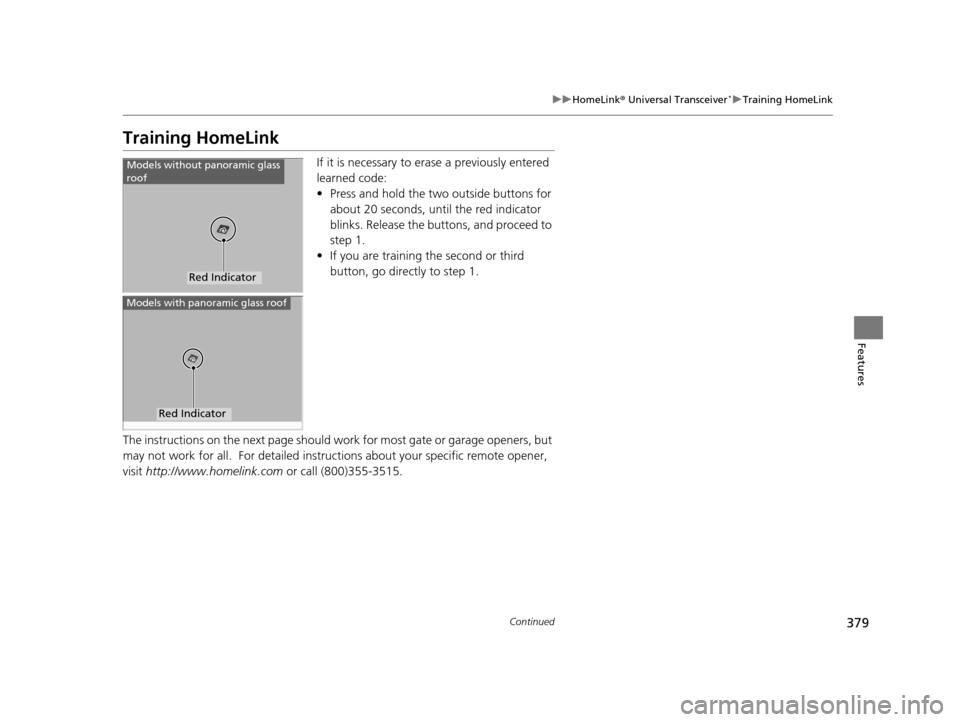
Red Indicator
Models without panoramic glass
roof
Red Indicator
Models with panoramic glass roof
16 PILOT-31TG76000.book 379 ページ 2015年6月15日 月曜日 午前11時30分
Page 410 of 661
409
uuBluetooth ® HandsFreeLink ®u HFL Menus
Continued
Features
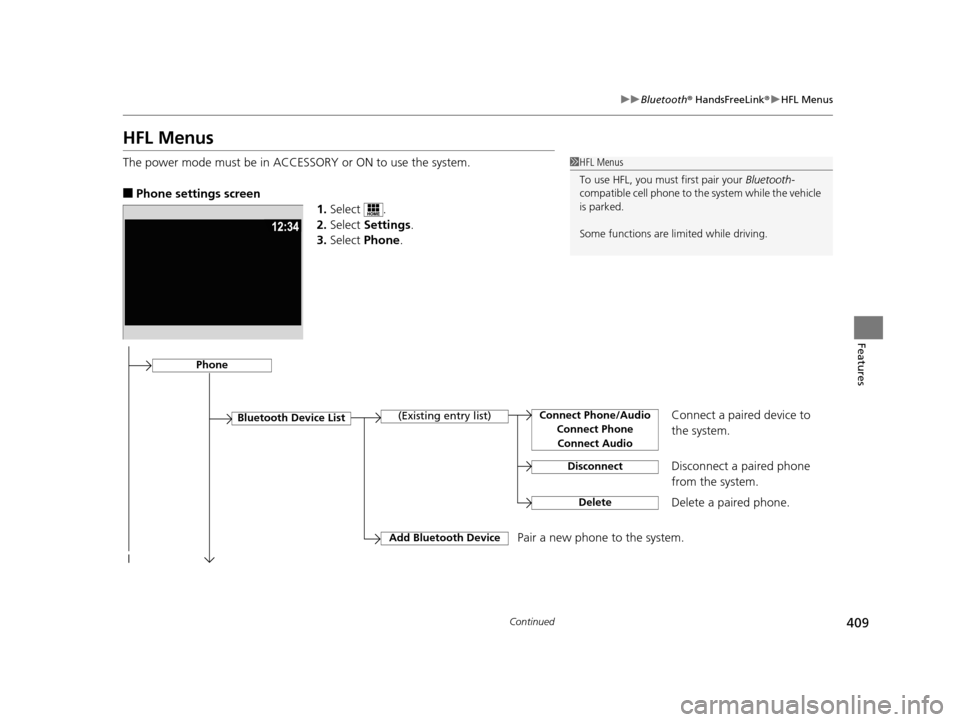
HFL Menus
The power mode must be in ACCESSO RY or ON to use the system.
■Phone settings screen
1.Select .
2. Select Settings .
3. Select Phone.
1HFL Menus
To use HFL, you must first pair your Bluetooth-
compatible cell phone to th e system while the vehicle
is parked.
Some functions are li mited while driving.
Disconnect a paired phone
from the system.
Bluetooth Device List(Existing entry list)
Disconnect
DeleteDelete a paired phone.
Add Bluetooth DevicePair a new phone to the system.
Phone
Connect a paired device to
the system.Connect Phone/Audio
Connect PhoneConnect Audio
16 PILOT-31TG76000.book 409 ページ 2015年6月15日 月曜日 午前11時30分
Page 440 of 661
439
Features
Compass*
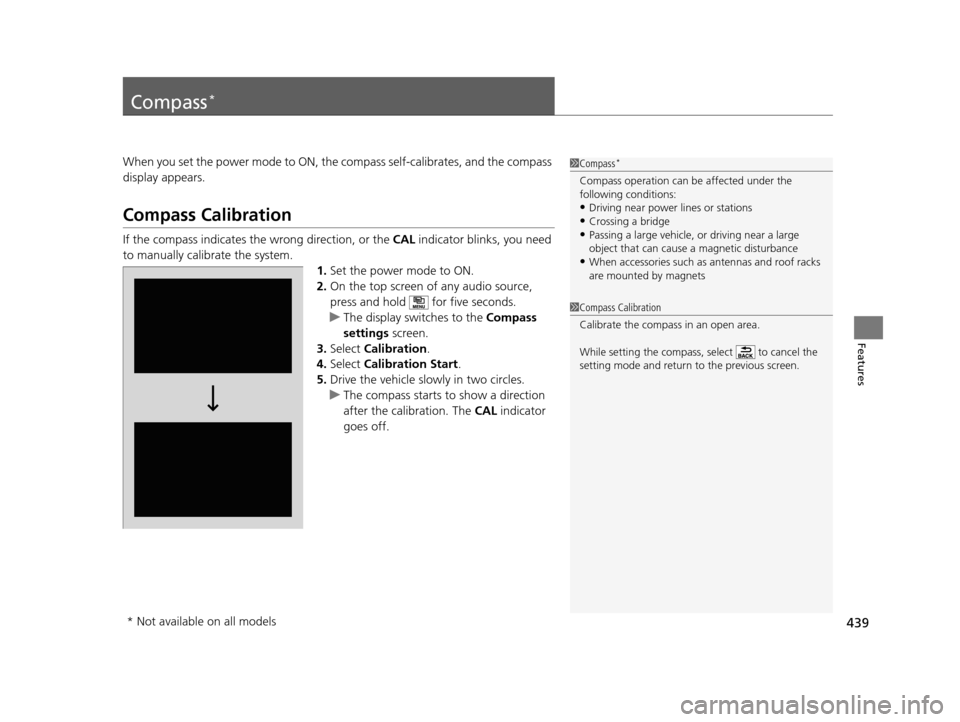
When you set the power mode to ON, the compass self-calibrates, and the compass
display appears.
Compass Calibration
If the compass indicates the wrong direction, or the CAL indicator blinks, you need
to manually calibrate the system.
1.Set the power mode to ON.
2. On the top screen of any audio source,
press and hold for five seconds.
u The display swit ches to the Compass
settings screen.
3. Select Calibration .
4. Select Calibration Start .
5. Drive the vehicle slow ly in two circles.
u The compass starts to show a direction
after the calibration. The CAL indicator
goes off.
1 Compass*
Compass operation can be affected under the
following conditions:
•Driving near power lines or stations•Crossing a bridge
•Passing a large vehicle, or driving near a large
object that can cause a magnetic disturbance
•When accessories such as antennas and roof racks
are mounted by magnets
1 Compass Calibration
Calibrate the compass in an open area.
While setting the compass, select to cancel the
setting mode and return to the previous screen.
* Not available on all models
16 PILOT-31TG76000.book 439 ページ 2015年6月15日 月曜日 午前11時30分
Page 441 of 661
440
uuCompass*uCompass Zone Selection
Features
Compass Zone Selection
1. Set the power mode to ON.
2. On the top screen of any audio source,
press and hold for five seconds.
u The display switches to the Compass
settings screen.
3. Select Zone Adjust .
u The display shows the current zone
number the system is set to.
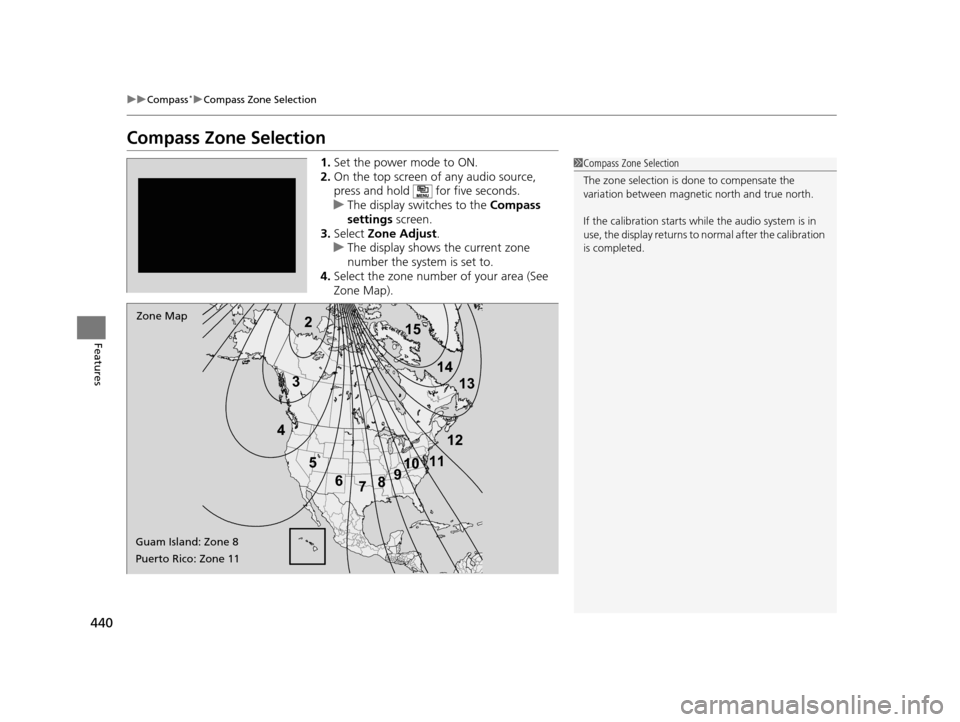
4. Select the zone number of your area (See
Zone Map).1Compass Zone Selection
The zone selection is done to compensate the
variation between magneti c north and true north.
If the calibration starts while the audio system is in
use, the display returns to normal after the calibration
is completed.
2
3
4 5678910
111213
14
15Zone Map
Guam Island: Zone 8
Puerto Rico: Zone 11
16 PILOT-31TG76000.book 440 ページ 2015年6月15日 月曜日 午前11時30分
Page 442 of 661

441
Driving
This chapter discusses driving, refueling, and information on items such as accessories.
Before Driving................................... 442
Towing a Trailer ................................ 448
Off-Highway Driving Guidelines ..... 459
When Driving Starting the Engine .......................... 461
Automatic Transmission ................... 468
Shifting ............................................ 469
Auto Idle-stop
*................................ 479
Intelligent Traction Management*.... 484
Cruise Control ................................. 486
Front Sensor Camera
*...................... 489
Adaptive Cruise Control (ACC)*....... 491Road Departure Mi tigation (RDM)
System*...................................... 502Lane Keeping Assist System (LKAS)*.. 507
Vehicle Stability Assist (VSA ®), aka Electronic
Stability Control (ESC), System ............. 515
Agile Handling Assist System............ 517
Blind spot inform ation (BSI) System*.... 518
LaneWatchTM*.................................. 520Intelligent VTM4 (i-VTM4)*................. 522Tire Pressure Monitoring System (TPMS) - Required Federal Explanation ......... 525
Braking
Brake System ................................... 527
Anti-lock Brake System (ABS) ........... 529
Brake Assist System.......................... 530
Collision Mitigati on Braking System
TM
(CMBSTM)*..................................... 531 Parking Your Vehicle
When Stopped ................................ 540
Parking Sensor System
*................... 541
Cross Traffic Monitor*..................... 545
Multi-view rear camera*.................. 549
Refueling
Fuel Information .............................. 550
How to Refuel ................................. 551
Fuel Economy .................................... 552
Accessories and Modifications ........ 553
* Not available on all models
16 PILOT-31TG76000.book 441 ページ 2015年6月15日 月曜日 午前11時30分
Page 449 of 661
448
Driving
Towing a Trailer
Towing Preparation
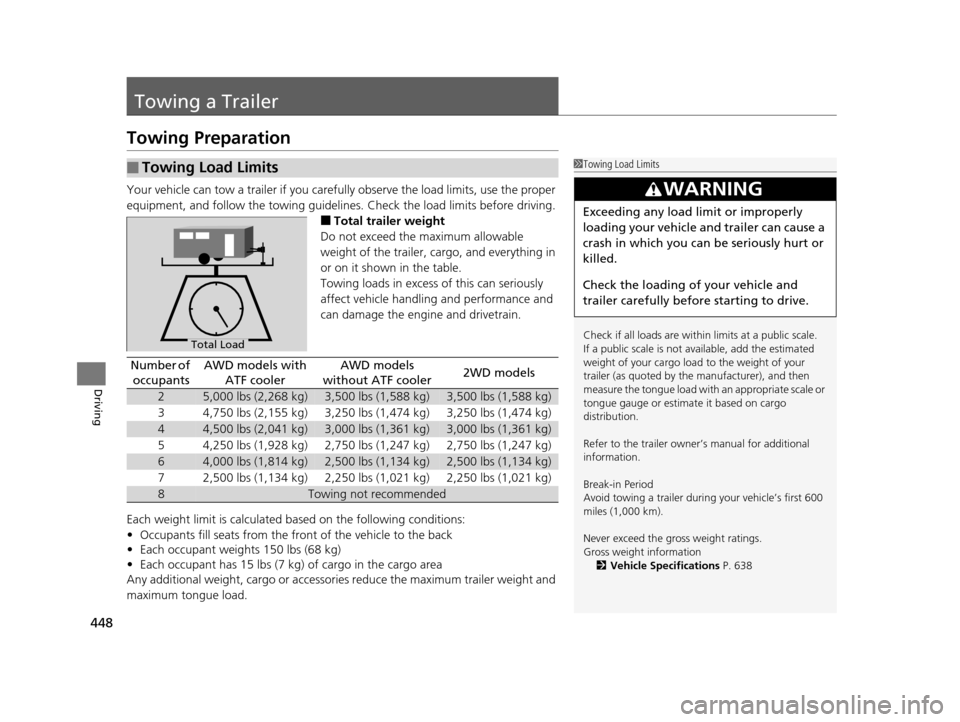
Your vehicle can tow a trailer if you carefully observe the load limits, use the proper
equipment, and follow the towing guidelin es. Check the load limits before driving.
■Total trailer weight
Do not exceed the maximum allowable
weight of the trailer, cargo, and everything in
or on it shown in the table.
Towing loads in excess of this can seriously
affect vehicle handling and performance and
can damage the engine and drivetrain.
Each weight limit is calculated based on the following conditions:
• Occupants fill seats from the front of the vehicle to the back
• Each occupant weights 150 lbs (68 kg)
• Each occupant has 15 lbs (7 kg) of cargo in the cargo area
Any additional weight, cargo or accessori es reduce the maximum trailer weight and
maximum tongue load.
■Towing Load Limits1 Towing Load Limits
Check if all loads are within limits at a public scale.
If a public scale is not available, add the estimated
weight of your cargo load to the weight of your
trailer (as quoted by the manufacturer), and then
measure the tongue load with an appropriate scale or
tongue gauge or estima te it based on cargo
distribution.
Refer to the trailer owner’s manual for additional
information.
Break-in Period
Avoid towing a trailer duri ng your vehicle’s first 600
miles (1,000 km).
Never exceed the gross weight ratings.
Gross weight information 2 Vehicle Specifications P. 638
3WARNING
Exceeding any load limit or improperly
loading your vehicle and trailer can cause a
crash in which you can be seriously hurt or
killed.
Check the loading of your vehicle and
trailer carefully before starting to drive.
Total Load
Number of
occupantsAWD models with ATF coolerAWD models
without ATF cooler2WD models
25,000 lbs (2,268 kg)3,500 lbs (1,588 kg)3,500 lbs (1,588 kg)
34,750 lbs (2,155 kg)3,250 lbs (1,474 kg)3,250 lbs (1,474 kg)
44,500 lbs (2,041 kg)3,000 lbs (1,361 kg)3,000 lbs (1,361 kg)
54,250 lbs (1,928 kg)2,750 lbs (1,247 kg)2,750 lbs (1,247 kg)
64,000 lbs (1,814 kg)2,500 lbs (1,134 kg)2,500 lbs (1,134 kg)
72,500 lbs (1,134 kg)2,250 lbs (1,021 kg)2,250 lbs (1,021 kg)
8Towing not recommended
16 PILOT-31TG76000.book 448 ページ 2015年6月15日 月曜日 午前11時30分
Page 450 of 661
449
uuTowing a Trailer uTowing Preparation
Continued
Driving
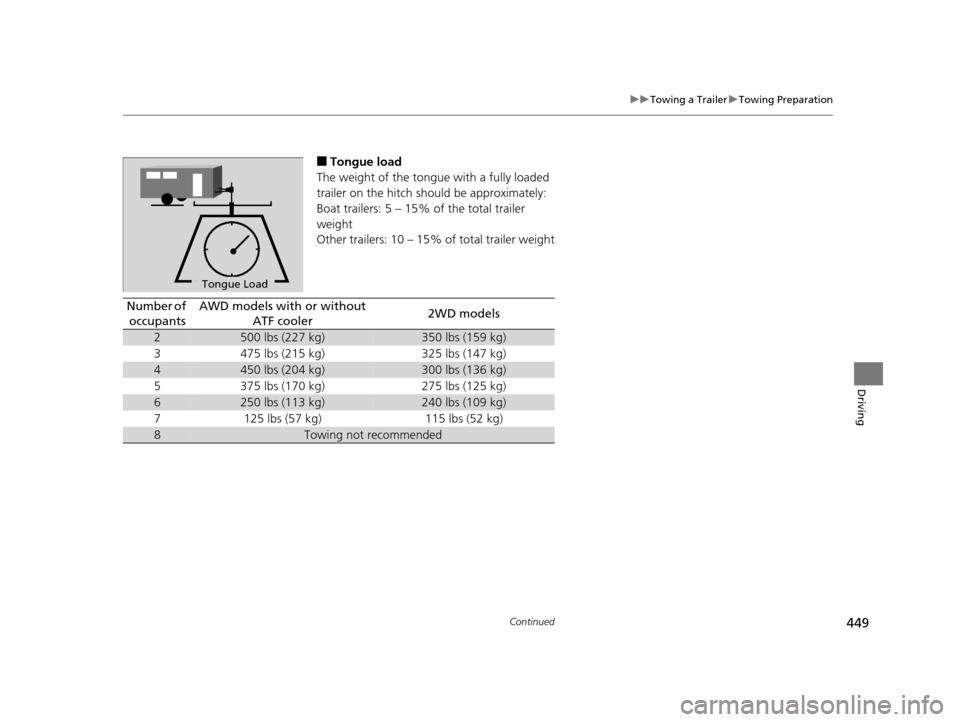
■Tongue load
The weight of the tongue with a fully loaded
trailer on the hitch should be approximately:
Boat trailers: 5 – 15% of the total trailer
weight
Other trailers: 10 – 15% of total trailer weight
To n gue LoadTongue Load
Number of
occupantsAWD models with or without ATF cooler2WD models
2500 lbs (227 kg)350 lbs (159 kg)
3475 lbs (215 kg)325 lbs (147 kg)
4450 lbs (204 kg)300 lbs (136 kg)
5375 lbs (170 kg)275 lbs (125 kg)
6250 lbs (113 kg)240 lbs (109 kg)
7125 lbs (57 kg)115 lbs (52 kg)
8Towing not recommended
16 PILOT-31TG76000.book 449 ページ 2015年6月15日 月曜日 午前11時30分
Page 451 of 661
450
uuTowing a Trailer uTowing Preparation
Driving
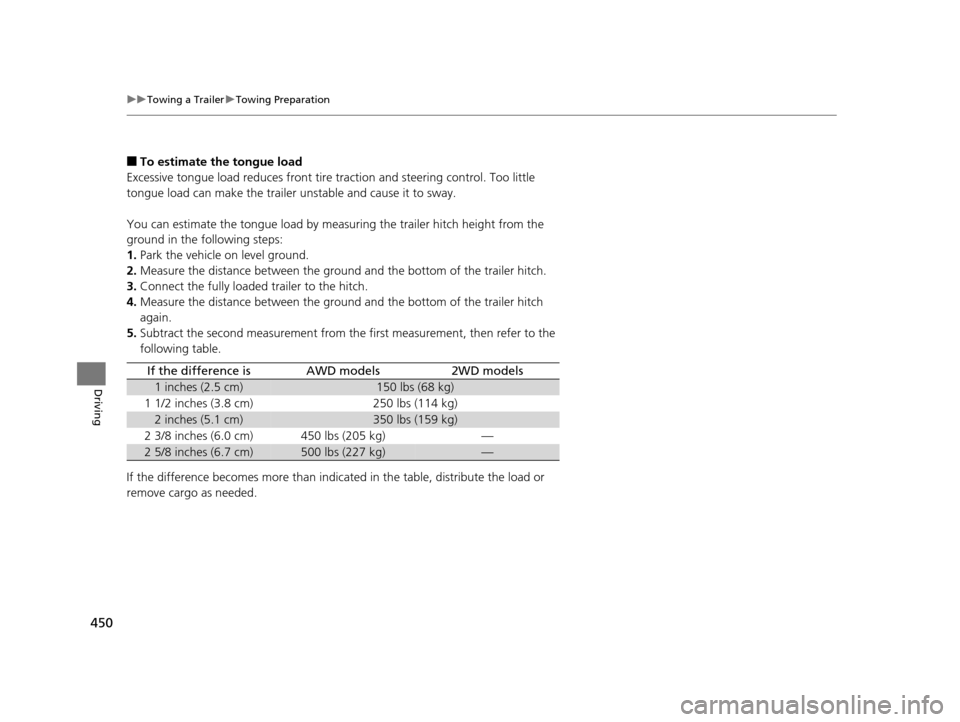
■To estimate the tongue load
Excessive tongue load reduces front tire traction and steering control. Too little
tongue load can make the trailer unstable and cause it to sway.
You can estimate the tongue load by meas uring the trailer hitch height from the
ground in the following steps:
1. Park the vehicle on level ground.
2. Measure the distance between the ground and the bottom of the trailer hitch.
3. Connect the fully loaded trailer to the hitch.
4. Measure the distance between the ground and the bottom of the trailer hitch
again.
5. Subtract the second measurement from th e first measurement, then refer to the
following table.
If the difference becomes more than indicated in the table, distribute the load or
remove cargo as needed.
If the difference isAWD models2WD models
1 inches (2.5 cm)150 lbs (68 kg)
1 1/2 inches (3.8 cm)250 lbs (114 kg)
2 inches (5.1 cm)350 lbs (159 kg)
2 3/8 inches (6.0 cm)450 lbs (205 kg)—
2 5/8 inches (6.7 cm)500 lbs (227 kg)—
16 PILOT-31TG76000.book 450 ページ 2015年6月15日 月曜日 午前11時30分