2016 HONDA PILOT ECO mode
[x] Cancel search: ECO modePage 558 of 661
557
uuBefore Performing Maintenance uSafety When Performing Maintenance
Maintenance
Safety When Performing Maintenance
Some of the most important safe ty precautions are given here.
However, we cannot warn you of every conceivable hazard that can arise in
performing maintenance. Only you can decide whether or not you should perform
a given task.
• To reduce the possibility of fire or explos ion, keep cigarettes, sparks, and flames
away from the battery and all fuel related parts.
• Never leave rags, towels, or other flammable objects under the hood.
u Heat from the engine and exhaust can ignite them causing a fire.
• To clean parts, use a co mmercially available degreaser or parts cleaner, not
gasoline.
• Wear eye protection and prot ective clothing when working with the battery or
compressed air.
• Engine exhaust contains carbon monoxide, which is poisonous and can kill you.
u Only operate the engine if th ere is sufficient ventilation.
• The vehicle must be in a stationary condition.
u Make sure your vehicle is parked on le vel ground, the parking brake is set, and
the engine is off.
• Be aware that hot parts can burn you.
u Make sure to let the engine and exhaust system cool thoroughly before
touching vehicle parts.
• Be aware that moving parts can injure you.
u Do not start the engine unless instruct ed, and keep your hands and limbs away
from moving parts.
u Do not open the hood while the Auto Idle-stop function
* is activated.
■Maintenance Safety
■Vehicle Safety
1Safety When Performing Maintenance
3WARNING
Improperly maintaining this vehicle or
failing to correct a pr oblem before driving
can cause a crash in which you can be
seriously hurt or killed.
Always follow the inspection and
maintenance recommendations according
to the schedules in this owner’s manual.
3WARNING
Failure to properly follow maintenance
instructions and prec autions can cause you
to be seriously hurt or killed.
Always follow the procedures and
precautions in this owner’s manual.
* Not available on all models
16 PILOT-31TG76000.book 557 ページ 2015年6月15日 月曜日 午前11時30分
Page 562 of 661

561
uuMaintenance MinderTMuTo Use Maintenance MinderTM
Continued
Maintenance
■Maintenance Service Items1Maintenance Service Items
•Independent of the Maintenance Minderinf
ormation, replace the brake fluid every 3 years.
•Inspect idle speed every 160,000 miles (256,000
km).•Adjust the valves during services A, B, 1, 2, or 3 if
t
hey are noisy.
Maintenance Minder MessageSystem Message
Indicator
Sub Items
Main
Item
*1: If the message
Maintenance Due Now does not appear more than 12 months after the display
is reset, change the engine oil every year.
# : See information on maintenance and emissions warranty in the first column on page 645.
*2: If you drive in dusty conditions, replace the air cleaner element every 15,000 miles (24,000 km).
*3: If you drive primarily in urban areas that have high concentrations of soot in the air from industry and from diesel-powered vehicles, replace every 15,000 miles (24,000 km).
CODEMaintenance Main Items
A
●Replace engine oil*1
B●Replace engine oil*1 and oil filter●Inspect front and rear brakes●Check parking brake adjustment●Inspect tie rod ends, steering gearbox, and boots●Inspect suspension components●Inspect driveshaft boots●Inspect brake hoses and li nes (Including ABS/VSA)●Inspect all fluid levels and condition of fluids●Inspect exhaust system#
●Inspect fuel lines and connections#
*4: If you drive regularly in very high temperatures (over 110°F, 43°C), in very low temperatures (under
-20°F, -29°C), or towing a trailer, replace every 60,000 miles/100,000 km.
*5: Driving in mountainous areas at very low vehicle speeds or trailer towing results in higher level of mechanical (Shear) stress to fluid. This requires differential fluid changes more frequently than
recommended by the Maintenance Minder. If you regularly drive your vehicle under these conditions,
have the differential fluid changed at 7,500 miles (12,000 km), then every 15,000 miles (24,000 km).
CODEMaintenance Sub Items
1
●Rotate tires
2●Replace air cleaner element*2
●Replace dust and pollen filter*3
●Inspect drive belt
3
●
Replace transmission fluid,
transfer fluid
*
4●Replace spark plugs●Replace timing belt and inspect water pump*4
●Inspect valve clearance
5
●Replace engine coolant
6●Replace rear differential fluid*, *5
*Not available on all models
16 PILOT-31TG76000.book 561 ページ 2015年6月15日 月曜日 午前11時30分
Page 600 of 661
599
Maintenance
Heating and Cooling System*/Climate Control System* Maintenance
Air Conditioning
To ensure proper and safe operation, the Society of Automotive Engineers (SAE
J2845) recommends that the refrigerant system only be serviced by trained and
certified technicians.
Never repair or replace the air conditio ning evaporator (cooling coil) with one
removed from a used or salvaged vehicle.
New replacement mobile air conditioning evaporators must be certified (and
labeled) as meeting SAE Standard J2842.
Dust and Pollen Filter
The climate control system is equipped with a dust and pollen filter that collects
pollen, dust, and other debris in the air. The Maintenance MinderTM messages will let
you know when to replace the filter.
We recommend that you replace the dust an d pollen filter sooner when using your
vehicle in areas with high concentrations of dust.
1 Heating and Cooling System*/Climate Control System*
Maintenance
NOTICE
Vented refrigerant is harmful to the environment.
To avoid refrigerant from venting, never replace the
evaporator with one re moved from a used or
salvaged vehicle.
Refrigerant in your vehicle’s air conditioning system is
flammable and can be igni ted during servicing if
proper procedures are not followed.
Air Conditioner label is found under the hood: 2 Safety Labels P. 75
2 Specifications P. 638
1Dust and Pollen Filter
If the airflow from the climate control system
deteriorates noticeably, and the windows fog up
easily, the filter may need to be replaced. Please
contact a dealer for replacement.
* Not available on all models
16 PILOT-31TG76000.book 599 ページ 2015年6月15日 月曜日 午前11時30分
Page 602 of 661
601
uuCleaning uInterior Care
Maintenance
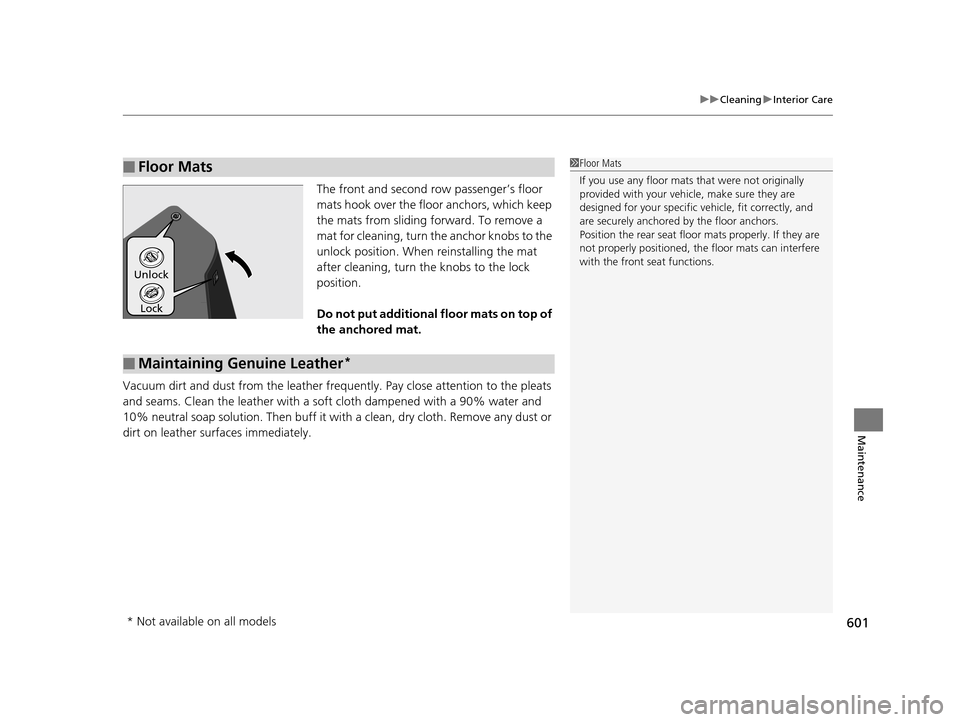
The front and second row passenger’s floor
mats hook over the floo r anchors, which keep
the mats from sliding fo rward. To remove a
mat for cleaning, turn th e anchor knobs to the
unlock position. When reinstalling the mat
after cleaning, turn the knobs to the lock
position.
Do not put additional floor mats on top of
the anchored mat.
Vacuum dirt and dust from the leather frequ ently. Pay close attention to the pleats
and seams. Clean the leather with a so ft cloth dampened with a 90% water and
10% neutral soap solution. Then buff it with a clean, dry cloth. Remove any dust or
dirt on leather surfaces immediately.
■Floor Mats1 Floor Mats
If you use any floor mats that were not originally
provided with your vehicle, make sure they are
designed for your specific ve hicle, fit correctly, and
are securely anchored by the floor anchors.
Position the rear seat floor mats properly. If they are
not properly positioned, the floor mats can interfere
with the front seat functions.
Lock
Unlock
■Maintaining Genuine Leather*
* Not available on all models
16 PILOT-31TG76000.book 601 ページ 2015年6月15日 月曜日 午前11時30分
Page 617 of 661

616
uuEngine Does Not Start uIf the Smart Entry Remote Battery is Weak
Handling the Unexpected
If the Smart Entry Remote Battery is Weak
If the beeper sounds, the To Start, Hold Remote Near Start Button message
appears on the MID, the ENGINE START/STOP button flashes, and the engine
won’t start, start the engine as follows.
1.Touch the center of the ENGINE START/
STOP button with the H logo on the smart
entry remote while the ENGINE START/
STOP button is flashing. The buttons on
the smart entry remote should be facing
you.
u The ENGINE START/STOP button
flashes for about 30 seconds.
2. Depress the brake pedal and press the
ENGINE START/STOP button within 10
seconds after the beeper sounds and the
ENGINE START/STOP button changes
from flashing to on.
u If you don’t depress the pedal, the mode
will change to ACCESSORY.
16 PILOT-31TG76000.book 616 ページ 2015年6月15日 月曜日 午前11時30分
Page 618 of 661

617
uuEngine Does Not Start uEmergency Engine Stop
Handling the Unexpected
Emergency Engine Stop
The ENGINE START/STOP button may be used to stop the engine due to an
emergency situation even while driving. If you must stop the engine, do either of the
following operations:
• Press and hold the ENGINE START/STOP button for about two seconds.
• Firmly press the ENGINE START/STOP button twice.
The steering wheel will not lock. However, because turning off the engine disables
the power assist the engine provides to the steering and braking systems, it will
require significantly more physical effort an d time to steer and slow the vehicle. Use
both feet on the brake pedal to slow down the vehicle and stop immediately in a
safe place.
The gear position auto matically changes to
(P after the vehicle comes to a complete
stop. Then, the power mode changes to VEHICLE OFF.
The gear position auto matically changes to
(P after the vehicle comes to a complete
stop. Then press the ENGINE START/STOP button twice without depressing the
brake pedal to change the mode VEHICLE OFF.
The power mode is in ACCESSORY when the engine is stopped.
To change the mode to VEHICLE OF F, change the gear position to
(P after the
vehicle comes to a complete stop.
Then press the ENGINE START/STOP button twice without depressing the brake
pedal.
1 Emergency Engine Stop
Do not press the button while driving unless it is
absolutely necessary for th e engine to be switched
off.
Automatic transmission models with electronic gear selector for U.S. models
Automatic transmission models with elec tronic gear selector for Canadian models
Automatic transmission models with shift lever
Automatic transmission models with shift lever for Canadian models
16 PILOT-31TG76000.book 617 ページ 2015年6月15日 月曜日 午前11時30分
Page 628 of 661

627
uuIndicator, Coming On/Blinking uIf the Low Tire Pressure/Tire Pressure Monitoring System (TPMS) Indicator Comes On or Blinks
Handling the Unexpected
If the Low Tire Pressure/T ire Pressure Monitoring
System (TPMS) Indicator Comes On or Blinks
■Reasons for the indicator to come on or blink
A tire pressure is significantly low. If there is a problem with the TPMS
with Tire Fill Assist or the compact spare tire
* is installed, the indicator
blinks for about one minute, and then stays on.
■What to do when th e indicator comes on
Stop your vehicle in a safe place. Ch eck the tire pressure and adjust the
pressure to the specified level. The spec ified tire pressure is on a label on
the driver side doorjamb.
■What to do when the indicator blinks
Have the tire inspected by a dealer as soon as possible. If the compact
spare tire
* causes the indicator to blink, ch ange the tire to a full-size tire.
The indicator goes off after driving for a few miles (kilometers).
If the Transmission Indicator Blinks along with the
Warning Message*
■Reasons for the indicator to blink
There is a problem with the transmission.
■What to do when the indicator blinks
• Immediately have your vehicle inspected by a dealer.
• Select
(N after starting the engine.
u Check if the
(N position in the instrume nt panel and the indicator
on the
(N button light/blink.
u The engine cannot be turned on unless the parking brake is set.
2 Starting the Engine P. 461
1If the Low Tire Pressure/Tire Pressure Monitoring System (TPMS)
Indicator Comes On or Blinks
NOTICE
Driving on an extremely unde rinflated tire can cause
it to overheat. An overheated tire can fail. Always
inflate your tires to the prescribed level.
TPMS with Tire Fill Assist provides visual and audible
assistance during tire pre ssure adjustment. With the
power mode in ON, while y ou adjust tire pressure up
or down, the system alerts you as follows:
Below recommended pressure: The beeper
sounds and exterior lights flash once every five
seconds.
At recommended pressure: The beeper sounds
and exterior lights flash ra pidly for ~ five seconds.
Above recommended pressure: The beeper
sounds and lights flash twice every three seconds.
1 If the Transmission Indicator Blinks along with the Warning
Message*
You may not be able to start the engine.
Make sure to set the pa rking brake when parking
your vehicle.
Call a professional towing service if you need to tow
your vehicle. 2 Emergency Towing P. 633
* Not available on all models
16 PILOT-31TG76000.book 627 ページ 2015年6月15日 月曜日 午前11時30分
Page 639 of 661
638
Information
Specifications
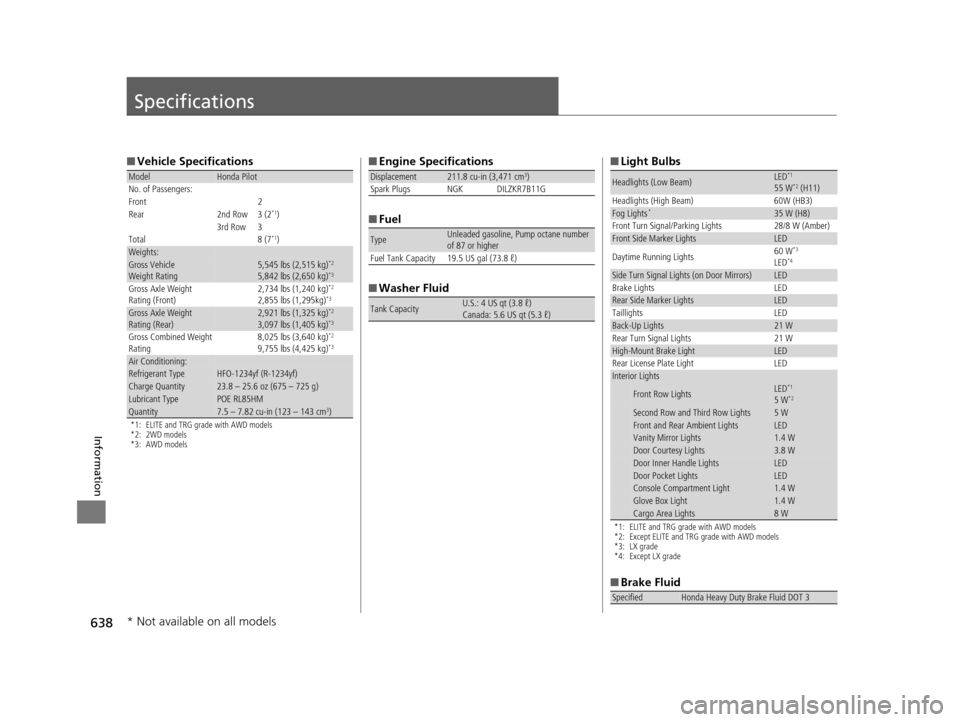
■Vehicle Specifications
*1: ELITE and TRG grade with AWD models
*2: 2WD models
*3: AWD models
ModelHonda Pilot
No. of Passengers:
Front 2
Rear 2nd Row 3 (2
*1)
3rd Row 3
Total 8 (7
*1)Weights:Gross Vehicle
Weight Rating5,545 lbs (2,515 kg)*2
5,842 lbs (2,650 kg)*3
Gross Axle Weight
Rating (Front)2,734 lbs (1,240 kg)*2
2,855 lbs (1,295kg)*3
Gross Axle Weight
Rating (Rear)2,921 lbs (1,325 kg)*2
3,097 lbs (1,405 kg)*3
Gross Combined Weight
Rating 8,025 lbs (3,640 kg)*2
9,755 lbs (4,425 kg)*3
Air Conditioning:Refrigerant TypeHFO-1234yf (R-1234yf)Charge Quantity23.8 – 25.6 oz (675 – 725 g)Lubricant TypePOE RL85HMQuantity7.5 – 7.82 cu-in (123 – 143 cm3)
■
Engine Specifications
■ Fuel
■ Washer Fluid
Displacement211.8 cu-in (3,471 cm3)
Spark Plugs NGK DILZKR7B11G
TypeUnleaded gasoline, Pump octane number
of 87 or higher
Fuel Tank Capacity 19.5 US gal (73.8 ℓ)
Tank CapacityU.S.: 4 US qt (3.8 ℓ)
Canada: 5.6 US qt (5.3 ℓ)
■ Light Bulbs
*1: ELITE and TRG grade with AWD models
*2: Except ELITE and TRG grade with AWD models
*3: LX grade
*4: Except LX grade
■Brake Fluid
Headlights (Low Beam)LED*1
55 W*2 (H11)
Headlights (High Beam) 60W (HB3)
Fog Lights*35 W (H8)
Front Turn Signal/Parking Lights 28/8 W (Amber)
Front Side Marker LightsLED
Daytime Running Lights 60 W*3
LED*4
Side Turn Signal Lights (on Door Mirrors)LED
Brake Lights LED
Rear Side Marker LightsLED
Taillights LED
Back-Up Lights21 W
Rear Turn Signal Lights 21 W
High-Mount Brake LightLED
Rear License Plate Light LED
Interior Lights
Front Row LightsLED*1
5 W*2
Second Row and Third Row Lights5 WFront and Rear Ambient LightsLEDVanity Mirror Lights 1.4 WDoor Courtesy Lights3.8 WDoor Inner Handle LightsLEDDoor Pocket LightsLEDConsole Compartment Light1.4 WGlove Box Light1.4 WCargo Area Lights8 W
SpecifiedHonda Heavy Duty Brake Fluid DOT 3
* Not available on all models
16 PILOT-31TG76000.book 638 ページ 2015年6月15日 月曜日 午前11時30分