2016 FORD C MAX ENERGI instrument cluster
[x] Cancel search: instrument clusterPage 165 of 395
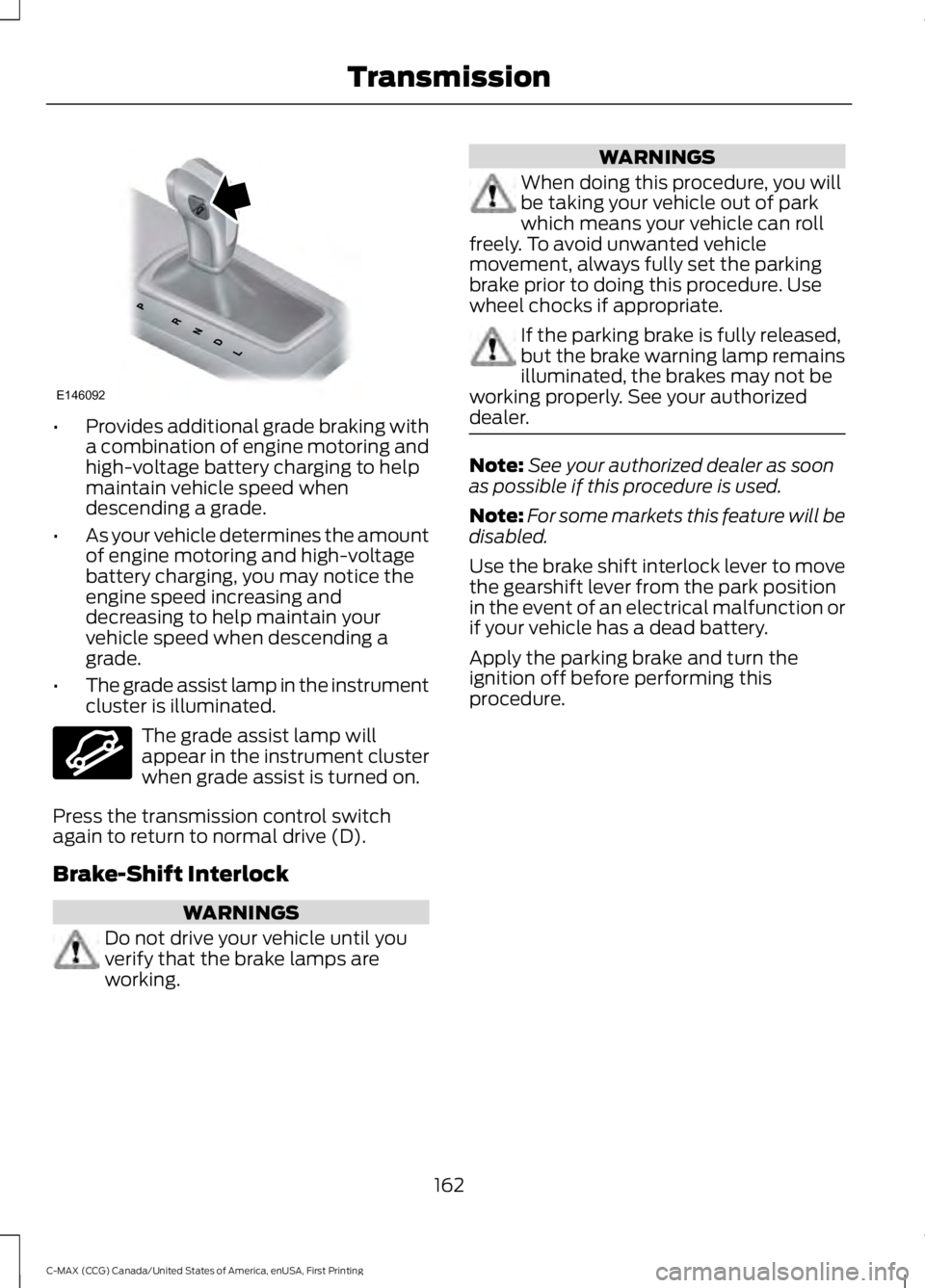
•Provides additional grade braking witha combination of engine motoring andhigh-voltage battery charging to helpmaintain vehicle speed whendescending a grade.
•As your vehicle determines the amountof engine motoring and high-voltagebattery charging, you may notice theengine speed increasing anddecreasing to help maintain yourvehicle speed when descending agrade.
•The grade assist lamp in the instrumentcluster is illuminated.
The grade assist lamp willappear in the instrument clusterwhen grade assist is turned on.
Press the transmission control switchagain to return to normal drive (D).
Brake-Shift Interlock
WARNINGS
Do not drive your vehicle until youverify that the brake lamps areworking.
WARNINGS
When doing this procedure, you willbe taking your vehicle out of parkwhich means your vehicle can rollfreely. To avoid unwanted vehiclemovement, always fully set the parkingbrake prior to doing this procedure. Usewheel chocks if appropriate.
If the parking brake is fully released,but the brake warning lamp remainsilluminated, the brakes may not beworking properly. See your authorizeddealer.
Note:See your authorized dealer as soonas possible if this procedure is used.
Note:For some markets this feature will bedisabled.
Use the brake shift interlock lever to movethe gearshift lever from the park positionin the event of an electrical malfunction orif your vehicle has a dead battery.
Apply the parking brake and turn theignition off before performing thisprocedure.
162
C-MAX (CCG) Canada/United States of America, enUSA, First Printing
TransmissionE146092 E144523
Page 182 of 395

PRINCIPLE OF OPERATION
Cruise control lets you maintain a setspeed without keeping your foot on theaccelerator pedal. You can use cruisecontrol when your vehicle speed is greaterthan 20 mph (30 km/h).
USING CRUISE CONTROL
WARNINGS
Do not use cruise control on windingroads, in heavy traffic or when theroad surface is slippery. This couldresult in loss of vehicle control, seriousinjury or death.
When you are going downhill, yourvehicle speed may increase abovethe set speed. The system will notapply the brakes but a warning displays.Failure to follow this warning could resultin serious personal injury or death.
Note:Cruise control will disengage if thevehicle speed decreases more than 10 mph(16 km/h) below the set speed while drivinguphill.
The cruise controls are on the steeringwheel.
Switching Cruise Control On
Press and release ON.
The indicator appears in theinstrument cluster.
Note:Using cruise control with ECO Cruiseswitched on may change the operation ofthe system. This feature saves vehicleenergy by relaxing acceleration comparedto standard cruise control. For example, yourvehicle may temporarily lose speed whengoing uphill.
Energi vehicles: ECO Cruise can be turnedon or off through the information display.See Information Displays (page 93).
Hybrid vehicles: ECO Cruise is included inEcoSelect which is turned on or off usingthe ECO button on the center console.
For additional information, refer to ECOCruise and EcoSelect. See Unique DrivingCharacteristics (page 135).
Note:When you are going downhill whileusing cruise control, the battery chargingsystem and engine work together to helpmaintain your set speed. Engine noise mayincrease or decrease under these conditions.
Setting the Cruise Speed
1. Drive to desired speed.
2. Press and release SET+ or SET-.
3. Take your foot off the acceleratorpedal.
179
C-MAX (CCG) Canada/United States of America, enUSA, First Printing
Cruise ControlE142437 E71340
Page 194 of 395

•Maximum speed is 35 mph (56 km/h).
•Maximum distance is 50 miles (80kilometers).
Recreational Towing
Note: Put your climate control system inrecirculated air mode to prevent exhaustfumes from entering the vehicle. SeeClimate Control (page 108).
Follow these guidelines if you have a needfor recreational (RV) towing. An exampleof recreational towing would be towingyour vehicle behind a motorhome. Wedesigned these guidelines to preventdamage to your transmission.
You can tow your vehicle with all fourwheels on the ground or with the frontwheels off the ground by using a tow dolly.If you are using a tow dolly follow theinstructions specified by the equipmentprovider.
If you tow your vehicle with all four wheelson the ground:
•Tow only in the forward direction.
•Release the parking brake.
Vehicles with Push Button Start
1. Start the vehicle by pressing the brakepedal, and then pressing the ENGINESTART/STOP button until the vehiclestarts.
2. Press the brake pedal and shift thetransmission into position N.
3. Turn the vehicle off by pressing theENGINE START/STOP button once.(Trip Summary appears in the leftinstrument cluster screen when thevehicle is off.)
Note:You can remove the key fob from thevehicle while towing.
Vehicles with Ignition Key
1. Start the vehicle by pressing the brakepedal, and then turning the ignition keyuntil the vehicle starts.
2. Press the brake pedal and shift thetransmission into position N.
3. Turn the vehicle off by turning theignition key past the accessory position.The key position is between theaccessory and off positions. SeeIgnition Switch (page 129). (TripSummary appears in the leftinstrument cluster screen when thevehicle is off.)
Note:If your vehicle is equipped with anignition key, you cannot remove the key fromthe ignition cylinder when the transmissionis in position N and the vehicle is off.
All Vehicles
•Do not exceed 70 mph (113 km/h).
•Place the transmission in position P,start the vehicle, and allow the engineto run for one minute at the beginningof each day (you may need to press theaccelerator pedal in order to start theengine). After allowing the vehicle torun, place the transmission back intoposition N and the ignition in the offposition.
Note:A SHIFT TO PARK orTRANSMISSION NOT IN PARK messagemay appear in the information display whenthe transmission is in position N and theignition is in the off position.
191
C-MAX (CCG) Canada/United States of America, enUSA, First Printing
Towing
Page 201 of 395

1.Connect the positive (+) jumper cableto the positive (+) prong (A) of thedischarged battery.
2. Connect the other end of the positive(+) cable to the positive (+) terminalof the assisting battery.
3. Connect the negative (-) cable to thenegative (-) terminal of the assistingbattery.
4. Make the final connection of thenegative (-) cable to the negative (-)prong (B) of your vehicle.
Note:Do not attach the negative (-) cableto fuel lines, engine rocker covers, the intakemanifold or electrical components. Theseitems should not be considered groundingpoints.
WARNING
Never connect the negative end ofthe cable to the negative (-) terminalof the discharged battery. A sparkmay cause an explosion of the gases thatsurround the battery. Always use thenegative prong as a grounding point.
Make sure that the cables are clear of fanblades, belts, the moving parts of bothengines, or any fuel delivery system parts.
Jump Starting
1.Start the booster vehicle and press theaccelerator pedal moderately.
2. Start the disabled vehicle. Check theinstrument cluster for the Ready toDrive light as the gasoline engine maynot start, but the electric motor maybe running.
3.Once you start the disabled vehicle, runboth vehicles for an additional threeminutes before disconnecting thejumper cables.
Removing the Jumper Cables
Remove the jumper cables in the reverseorder that they were connected.
Note:In the illustration, the vehicle on thebottom is used to designate the assisting(boosting) battery.
198
C-MAX (CCG) Canada/United States of America, enUSA, First Printing
Roadside EmergenciesE148861
Page 216 of 395
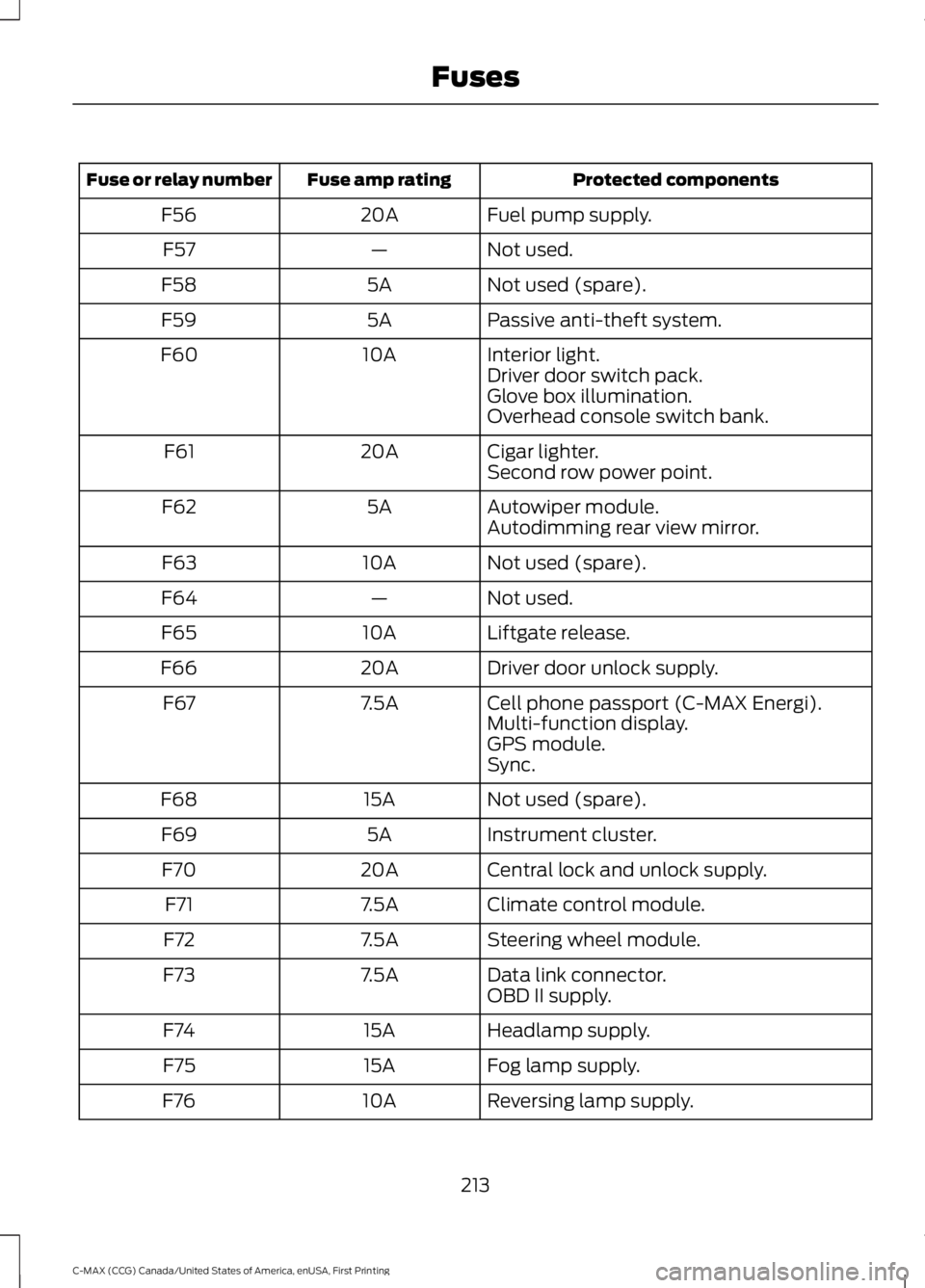
Protected componentsFuse amp ratingFuse or relay number
Fuel pump supply.20AF56
Not used.—F57
Not used (spare).5AF58
Passive anti-theft system.5AF59
Interior light.10AF60Driver door switch pack.Glove box illumination.Overhead console switch bank.
Cigar lighter.20AF61Second row power point.
Autowiper module.5AF62Autodimming rear view mirror.
Not used (spare).10AF63
Not used.—F64
Liftgate release.10AF65
Driver door unlock supply.20AF66
Cell phone passport (C-MAX Energi).7.5AF67Multi-function display.GPS module.Sync.
Not used (spare).15AF68
Instrument cluster.5AF69
Central lock and unlock supply.20AF70
Climate control module.7.5AF71
Steering wheel module.7.5AF72
Data link connector.7.5AF73OBD II supply.
Headlamp supply.15AF74
Fog lamp supply.15AF75
Reversing lamp supply.10AF76
213
C-MAX (CCG) Canada/United States of America, enUSA, First Printing
Fuses
Page 247 of 395

CLEANING THE INTERIOR
WARNINGS
Do not use cleaning solvents, bleachor dye on the vehicle’s safety belts,as these actions may weaken thebelt webbing.
On vehicles equipped withseat-mounted airbags, do not usechemical solvents or strongdetergents. Such products couldcontaminate the side airbag system andaffect performance of the side airbag in acollision.
For fabric, carpets, cloth seats, safety beltsand seats equipped with side airbags:
•Remove dust and loose dirt with avacuum cleaner.
•Remove light stains and soil withMotorcraft Professional StrengthCarpet & Upholstery Cleaner.
•If grease or tar is present on thematerial, spot-clean the area first withMotorcraft Spot and Stain Remover. InCanada, use Motorcraft Multi-PurposeCleaner.
•If a ring forms on the fabric after spotcleaning, clean the entire areaimmediately (but do not oversaturate)or the ring will set.
•Do not use household cleaningproducts or glass cleaners, which canstain and discolor the fabric and affectthe flame retardant abilities of the seatmaterials.
CLEANING THE INSTRUMENT
PANEL AND INSTRUMENT
CLUSTER LENS
WARNING
Do not use chemical solvents orstrong detergents when cleaning thesteering wheel or instrument panelto avoid contamination of the airbagsystem.
Note:Follow the same procedure ascleaning leather seats for cleaning leatherinstrument panels and leather interior trimsurfaces. See Cleaning Leather Seats(page 245).
Clean the instrument panel and clusterlens with a clean, damp and soft cloth,then use a clean, dry and soft cloth to drythese areas.
•Avoid cleaners or polishes that increasethe gloss of the upper portion of theinstrument panel. The dull finish in thisarea helps protect you fromundesirable windshield reflection.
•Do not use any household cleaningproducts or glass cleaners as thesemay damage the finish of theinstrument panel, interior trim andcluster lens.
•Wash or wipe your hands clean if youhave been in contact with certainproducts such as insect repellent andsuntan lotion to avoid possible damageto the interior painted surfaces.
•Do not allow air fresheners and handsanitizers to spill onto interior surfaces.If a spill occurs, wipe off immediately.Your warranty may not cover thesedamages.
If a staining liquid like coffee or juice hasbeen spilled on the instrument panel or oninterior trim surfaces:
244
C-MAX (CCG) Canada/United States of America, enUSA, First Printing
Vehicle Care
Page 387 of 395

Capacities and Specifications...............280Specifications.....................................................280Car WashSee: Cleaning the Exterior...............................241Center Console..............................................128Changing a Bulb...........................................232Replacing Fog, Park and Direction IndicatorBulbs..................................................................234Replacing Headlamp Bulbs...........................232Replacing License Plate Lamp Bulb...........236Replacing Reverse Lamp and Tail LampBulbs..................................................................235Replacing Tail, Brake and DirectionIndicator Bulbs...............................................234Replacing the Center High Mounted BrakeLamp Bulbs.....................................................236Changing a Fuse............................................217Fuses........................................................................217Changing the 12V Battery.........................228Changing the Engine Air Filter................238Air Cleaner Assembly Components...........238Installing the Engine Air FilterElement............................................................240Removing the Engine Air FilterElement............................................................239Changing the Wiper Blades.....................229Changing the Rear Window WiperBlade.................................................................230Changing the Windshield WiperBlades...............................................................230Service Position..................................................229Charging the High Voltage Battery........155Charge Port...........................................................158Charging.................................................................158Charging Equipment.........................................155Disconnecting the Charging Coupler..........160Locking the Charging Coupler.......................159Waiting to Charge...............................................159Checking MyKey System Status...............54MyKey Distance....................................................54Number of Admin Keys......................................54Number of MyKeys..............................................54Checking the Wiper Blades......................229Child Restraint and SeatbeltMaintenance.................................................33Child Restraint Positioning.........................24Child Safety.......................................................15General Information.............................................15
Child Safety Locks..........................................25Left-Hand Side......................................................26Right-Hand Side...................................................26Cleaning Leather Seats.............................245Cleaning Products........................................241Cleaning the Alloy Wheels.......................245Cleaning the Engine....................................243Cleaning the Exterior...................................241Exterior Chrome Parts......................................242Exterior Plastic Parts........................................242Stripes or Graphics............................................242Underbody............................................................242Cleaning the Instrument Panel andInstrument Cluster Lens........................244Cleaning the Interior...................................244Cleaning the Windows and WiperBlades...........................................................243Clearing All MyKeys.......................................52Climate Control............................................108Collision, Damage or Fire Event..............199Guidance for Ford Motor Company Electricand Hybrid-Electric Vehicles EquippedWith High Voltage Batteries......................199Coolant CheckSee: Engine Coolant Check............................223Crash Sensors and Airbag Indicator........42Creating a MyKey............................................52Programming/Changing ConfigurableSettings...............................................................52Cruise Control.................................................68Principle of Operation.......................................179Cruise controlSee: Using Cruise Control................................179Customer Assistance.................................202
D
Data Recording..................................................9Event Data Recording...........................................9Service Data Recording........................................9Daytime Running Lamps..............................77Type 1 - Conventional(Non-Configurable)........................................77Type 2 - Configurable..........................................77Digital Radio...................................................291HD Radio Reception and StationTroubleshooting............................................292Direction Indicators........................................78
384
C-MAX (CCG) Canada/United States of America, enUSA, First Printing
Index
Page 390 of 395

Information Messages.................................101AdvanceTrac®.....................................................102Alarm.......................................................................102Battery and Charging System (HighVoltage)............................................................102Doors.......................................................................103Fuel..........................................................................103Hill Start Assist....................................................103Keys and Intelligent Access............................104Maintenance........................................................105MyKey.....................................................................105Park Aid..................................................................106Park Brake.............................................................106Power Steering....................................................107Remote Start........................................................107Tire Pressure Monitoring System..................107Transmission........................................................107Installing Child Restraints............................16Child Seats...............................................................16Using Lap and Shoulder Belts..........................17Using Lower Anchors and Tethers forCHildren (LATCH)............................................19Using Tether Straps..............................................21Instrument Cluster........................................85Instrument Lighting Dimmer......................76Vehicles With Front Fog Lamps......................76Vehicles Without Front Fog Lamps...............76Interior Lamps.................................................78Front Interior Lamp..............................................78Front Interior Lamp - With PanoramaRoof......................................................................78Rear Interior Lamp...............................................79Interior Mirror...................................................83Auto-Dimming Mirror..........................................83Introduction.........................................................7
J
Jump Starting the Vehicle.........................197Connecting the Jumper Cables.....................197Jump Starting......................................................198Preparing Your Vehicle......................................197Removing the Jumper Cables........................198
K
Keyless Starting............................................129Ignition Modes.....................................................130
Keys and Remote Controls.........................44
L
Lighting Control...............................................74Headlamp Flasher................................................75High Beams.............................................................74Lighting...............................................................74General Information............................................74Load Carrying.................................................182Load Limit.......................................................183Vehicle Loading - with and without aTrailer..................................................................183Locking and Unlocking.................................56Activating Intelligent Access ...........................57Autolock..................................................................59Battery Saver.........................................................60Illuminated Entry..................................................59Illuminated Exit.....................................................59Mechanical Key.....................................................57Opening a Rear Door from Inside...................57Power Door Locks................................................56Remote Control....................................................56Smart Unlocks For Integrated KeyheadTransmitter........................................................58Smart Unlocks For Intelligent Access Keys................................................................................58Locks...................................................................56Luggage Covers.............................................182Removing the Shade.........................................182
M
Maintenance..................................................218General Information..........................................218Manual Liftgate..............................................60Closing the Liftgate..............................................61Opening the Liftgate..........................................60Manual Seats..................................................115Adjusting the Height of the Driver'sSeat......................................................................116Lumbar Adjustment (If Equipped)................117Moving the Seat Backward andForward..............................................................116Recline Adjustment............................................116Media Hub......................................................296Message CenterSee: Information Displays.................................93
387
C-MAX (CCG) Canada/United States of America, enUSA, First Printing
Index