Page 194 of 476
Start Of Trip Procedure
With the ignition on, push and hold theTRIPbutton for
over one second to reset.
Exit Trip
To exit the Trip function, wait until all the values have
been displayed or hold the MENUbutton for longer than
one second.
Briefly push and release the MENUbutton to go back to
the menu screen or push and hold the MENU(approxi-
mately one second) to go back to the main screen without
storing settings.
Trip Functions
Both trip functions are resettable (reset — start of new
trip).
“Trip A” can be used to display the figures relating to:
• Outside Temperature •
Range
• Trip distance A
• Average Economy A
• Instant Economy
• Average speed A
• Travel time A (driving time).
“Trip B” can be used to display the figures relating to:
• Trip distance B
• Average Economy B
• Average speed B
• Travel time B (driving time).
NOTE: “Trip B” functions may be excluded (see “Trip B
Data”). “Range” and “Instantaneous consumption” can-
not be reset.
192 UNDERSTANDING YOUR INSTRUMENT PANEL
Page 195 of 476
Values Displayed
Range
This indicates the distance which may be traveled with
the fuel remaining in the tank, assuming that driving
conditions will not change. The message “----” will
appear on the display in the following cases:
•Distance less than 30 miles (or 50 km).
• The vehicle is parked for a long time with the engine
running.
NOTE: The range depends on several factors: driving
style, type of route (freeway, residential, mountain roads,
etc.), and conditions of use of the vehicle (load, tire
pressure, etc.). Trip planning must take into account the
above notes.
Distance Traveled
This value shows the distance covered since the last reset.
Average Economy
This value shows the approximate average consumption
since the last reset.
Instantaneous Economy
This indicates the fuel consumption. The value is con-
stantly updated. The message “----” will appear on the
display if the vehicle is parked with the engine running.
Average Speed
This value shows the vehicle’s average speed as a func-
tion of the overall time elapsed since the last reset.
Travel Time
This value shows the time elapsed since the last reset.
4
UNDERSTANDING YOUR INSTRUMENT PANEL 193
Page 207 of 476
NOTE:The “Scheduled Servicing Plan” includes car
maintenance at fixed intervals. This is displayed auto-
matically, with ignition key at MAR/ON, 2000 km (or
equivalent value in miles) before servicing or, where
provided, 30 days before servicing. It is also displayed
each time the key is turned to MAR/ON or every 200 km
(or equivalent value in miles). Below this threshold
servicing indications are more frequent. The display will
be in km or miles according to the unit of measurement
set. When the next scheduled service is approaching, the
word “Service” will appear on the display, followed by
the number of kilometres/miles or days left, when the
key is turned to MAR/ON. Go to a Fiat Dealership,
where the �Scheduled Servicing Plan� operations will be
performed and the message will be reset.
When the service interval is reached and for about
1000 km/600 mi or 30 days, a service due message is
displayed.Airbag/Passenger Bag (Activation/Deactivation Of
Passenger Side Front Airbag And Side Bag For
Pelvis, Chest And Shoulder Protection)
This function allows the passenger airbag to be activated /
deactivated.
Proceed as follows:
• Push the MENUbutton and, after the message �Bag
pass: Off� (to deactivate) or �Bag pass: On�(to activate)
is displayed by pushing UPand DOWN buttons, push
the MENU button again;
• A confirmation request message will appear on the
display;
• By pushing the UPorDOWN buttons select �Ye s�(to
confirm activation/deactivation) or �No�(to cancel);4
UNDERSTANDING YOUR INSTRUMENT PANEL 205
Page 209 of 476

2. Push and release the UPor DOWNbutton for
setting.
3. Briefly push and release the MENUbutton to go back
to the menu screen, or push and hold the button
(approximately one second) to go back to the main
screen without storing the settings.
City Brake Control (Collision Mitigation)
This function allows to activate (�On�) or deactivate
(�Off�) the City Brake Control - �Collision Mitigation�
system.
To adjust proceed as follows:
• Push MENU button briefly. �On�or�Off� will flash on
the display, according to what has been previously set;
• A confirmation request message will appear on the
display; •
By pushing the UPorDOWN buttons, select �Ye s�(to
confirm activation/deactivation) or �No�(to cancel);
• Push the MENUbutton briefly; a message confirming
the selection is displayed and you return to the menu
screen; Hold down the button to return to the standard
screen without storing.
When the system is deactivated, the dedicated warning
light in the instrument panel switches on.
Tire Reset
With this function, it is possible to reset the TPMS.
To reset, proceed as follows:
• Briefly push the MENUbutton. The display will show
Reset.
• Push the UPorDOWN buttons to select “Yes” or
“No.”
4
UNDERSTANDING YOUR INSTRUMENT PANEL 207
Page 210 of 476
•Briefly push the MENUbutton. The display will show
�Confirm.�
• Push the UPorDOWN buttons to select �Ye s�to reset
or �No� to exit the page.
• Hold the MENUbutton down again to return to the
standard screen or to the main menu.
Exit Menu
This function closes the initial menu screen.
Briefly push and release the MENUbutton to go back to
the main screen.
Push and release the
button to return to the first
menu option (Speed Beep).
Push and release thebutton to return to the last
menu option (Daylights). CYBERSECURITY
Your vehicle may be a connected vehicle and may be
equipped with both wired and wireless networks. These
networks allow your vehicle to send and receive infor-
mation. This information allows systems and features in
your vehicle to function properly.
Your vehicle may be equipped with certain security
features to reduce the risk of unauthorized and unlawful
access to vehicle systems and wireless communications.
Vehicle software technology continues to evolve over
time and FCA US LLC, working with its suppliers,
evaluates and takes appropriate steps as needed. Similar
to a computer or other devices, your vehicle may require
software updates to improve the usability and perfor-
mance of your systems or to reduce the potential risk of
unauthorized and unlawful access to your vehicle sys-
tems.
208 UNDERSTANDING YOUR INSTRUMENT PANEL
Page 225 of 476
•Radio Off Delay
When this feature is selected, the radio will stay on for a
preset time after the ignition key is turned to STOP. To
change the Radio Off Delay status, press the “0 MIN” or
“20 MIN” button on the touchscreen to select your
desired time interval.
Audio
After pressing the “Audio” button on the touchscreen the
following settings will be available:
• Balance/Fade
When in this display you may adjust the Balance and
Fade settings. Press and drag the speaker icon, use the
arrows to adjust, or tap the speaker icon to readjust to the
center. •
Equalizer
When in this display you may adjust the Bass, Mid and
Treble settings. Adjust the settings with the “+” and “–”
buttons on the touchscreen or by selecting any point on
the scale between the “+” and “–” buttons on the
touchscreen.
NOTE: Bass/Mid/Treble allow you to simply slide your
finger up or down to change the setting as well as press
directly on the desired setting.
• Speed Adjusted Volume
This feature increases or decreases volume relative to
vehicle speed. To change the Speed Adjusted Volume
press the “Off,” “1,” “2” or ”3” button on the touchscreen.
• Surround Sound — If Equipped
This feature provides simulated surround sound mode.
To make your selection, press the “Surround Sound”
button on the touchscreen, select On or Off.
4
UNDERSTANDING YOUR INSTRUMENT PANEL 223
Page 227 of 476

SiriusXM Setup — If Equipped
After pressing the “SiriusXM Setup” button on the touch-
screen, the following settings will be available:
•Channel Skip
SiriusXM can be programmed to designate a group of
channels that are the most desirable to listen to or to
exclude undesirable channels while scanning. To make
your selection, press the “Channel Skip” button on the
touchscreen, select the channels you would like to skip.
• Subscription Information
New vehicle purchasers or lessees will receive a free
limited time subscription to SiriusXM Satellite Radio
with your radio. Following the expiration of the free
services, it will be necessary to access the information on
the Subscription Information screen to re-subscribe.
Press the “Subscription Info” button on the touchscreen
to access the Subscription Information screen. Write down the SIRIUS ID numbers for your receiver. To
reactivate your service, either call the number listed on
the screen or visit the provider online.
NOTE:
SiriusXM Travel Link is a separate subscription
and is available for U.S. residents only.
Restore Settings
After pressing the “Restore Settings” button on the
touchscreen the following settings will be available:
• Restore Settings
When this feature is selected it will reset Display, Clock,
Audio, and Radio Settings to their default. To restore the
settings to their default setting press the “Yes” or “No”
button on the touchscreen.
4
UNDERSTANDING YOUR INSTRUMENT PANEL 225
Page 228 of 476
Clear Personal Data
After pressing the “Clear Personal Data Settings” button
on the touchscreen the following settings will be avail-
able:
•Clear Personal Data
When this feature is selected it will remove personal data
including Bluetooth devices and presets. To Clear Per-
sonal Data press the “Yes” or “No” button on the
touchscreen.
UCONNECT RADIOS
For detailed information about your Uconnect radio,
refer to your Uconnect Supplement Manual.
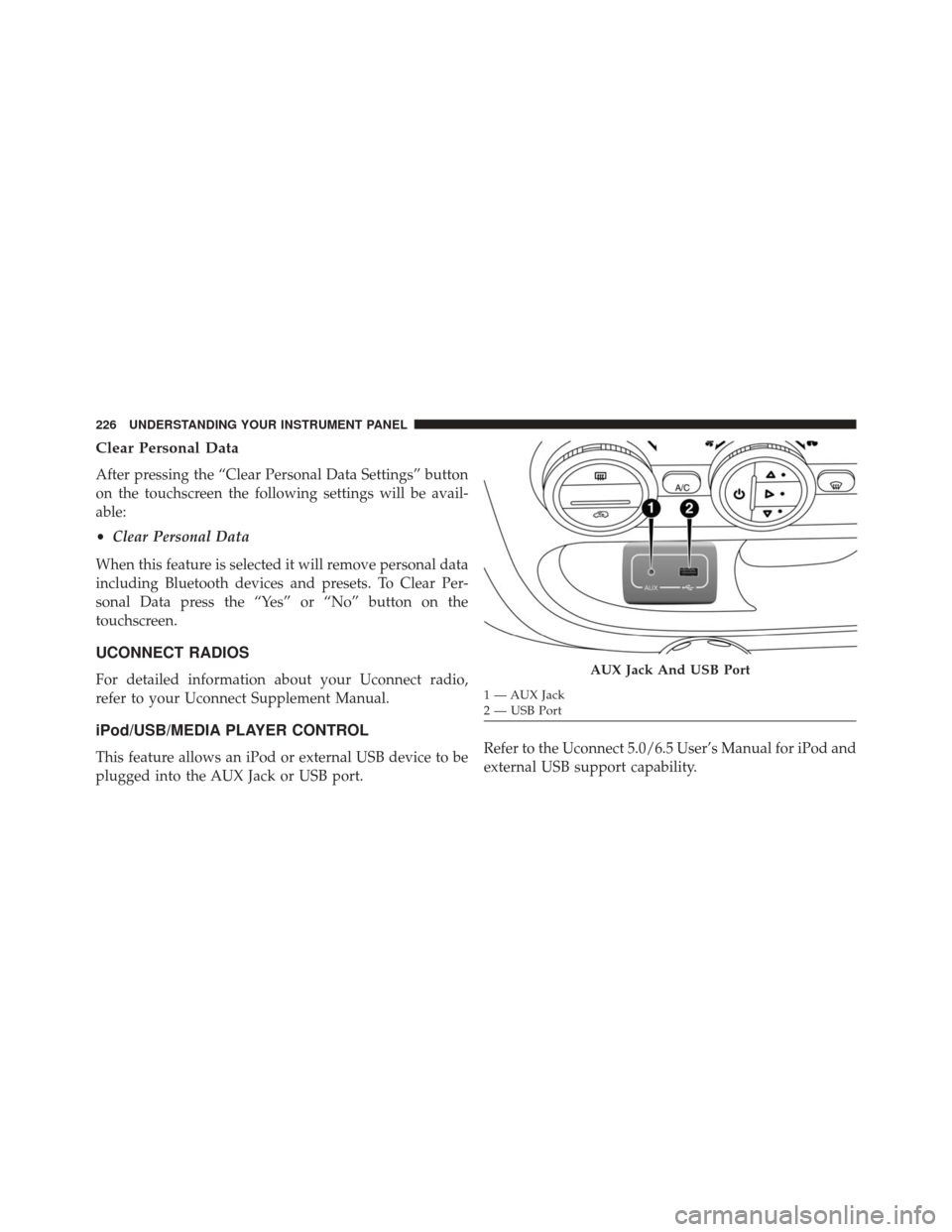
iPod/USB/MEDIA PLAYER CONTROL
This feature allows an iPod or external USB device to be
plugged into the AUX Jack or USB port. Refer to the Uconnect 5.0/6.5 User’s Manual for iPod and
external USB support capability.
AUX Jack And USB Port
1 — AUX Jack
2 — USB Port
226 UNDERSTANDING YOUR INSTRUMENT PANEL