Page 183 of 276
181
jumper_en_Chap09_Caracteristiques-Techniques_ed01-2015
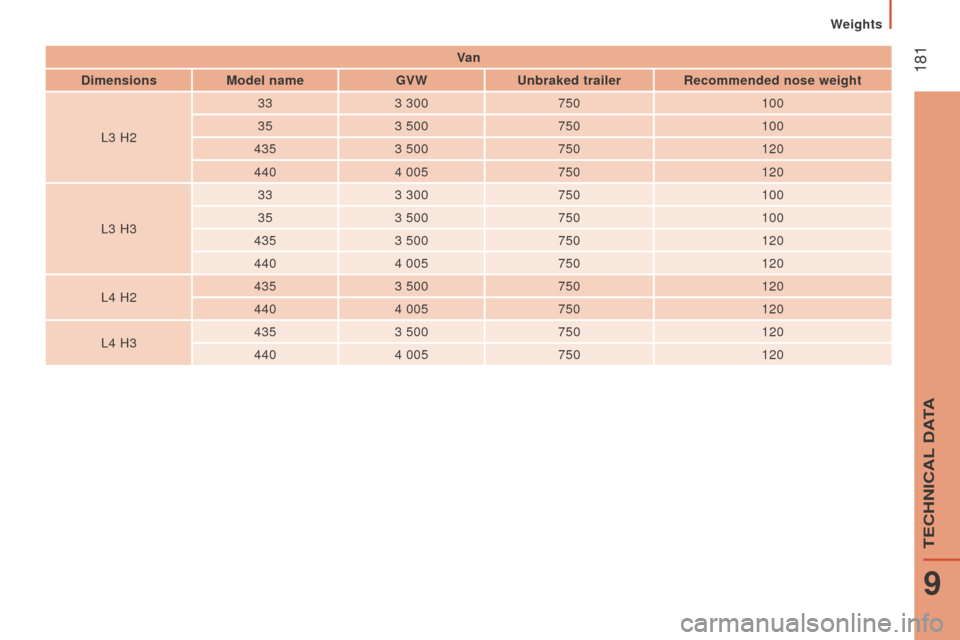
Va n
d
imensions Model name GVW
u
nbraked trailer
r
ecommended nose weight
L3 H2 33
3 300 750 100
35 3 500 750 100
435 3 500 750 120
440 4 005 750 120
L3 H3 33
3 300 750 100
35 3 500 750 100
435 3 500 750 120
440 4 005 750 120
L4 H2 435
3 500 750 120
440 4 005 750 120
L4 H3 435
3 500 750 120
440 4 005 750 120
Weights
9
TECHniCAL DATA
Page 185 of 276
183
jumper_en_Chap10a_Autoradio-Fiat-tactile-1_ed01-2015
Touch screen Audio-Telematic system
Multimedia audio system - Bluetooth® telephone - GPS navigation
Contents
First steps
1 84
Glossary
185
Steering mounted controls
1
86
Menus
187
ra
dio
188
DAB (Digital Audio Broadcasting) radio
1
92
Media
19 4
na
vigation
2
02
Telephone
206
Vehicle information
2
10
Settings
212
Voice commands
2
22
The system is protected in such a way that it will only operate in
your vehicle. As as safety measure, the driver must only carry out operations
which require prolonged attention while the vehicle is stationary.
When the engine is switched off and to prevent discharging of
the battery, the system switches off following the activation of
the energy economy mode.
Touch Screen Audio - Telematic System
AUDio and TELEMATiCS
10
Page 201 of 276

199
jumper_en_Chap10a_Autoradio-Fiat-tactile-1_ed01-2015
Selection of source
Select the source.
Select the "
Source" tab to display
the carousel of audio sources. Press on " MEd
I
A
".
Use the play settings in the screen.
Press the "
ra
ndom " and/or "
rep
eat" button to
activate them, press again to deactivate them. The audio system plays audio files with ".wav,
.wma, .mp3" extensions and bit rate between
32 Kbps and 320 Kbps.
With audio files .aac, .m4a, .m4b, .mp4
extensions, the sampling rates supported
are 8 - 96 KHz.
it a
lso supports .m3u and .wpl mode.
Use only USB memory sticks formatted FAT32
(File Allocation Table).
The system does not manage devices with a
capacity greater than 64 GB.
it i
s advisable to restrict file names to
20
characters, without using of special
characters (e.g.: " " ?
; ù) to avoid any playing
and displaying problems.
Information and advice
The system supports USB mass
storage devices, BlackBerry® devices
or Apple® players via USB ports. The
adaptor cable is not supplied.
Control of the peripheral device is with
the audio system controls.
ot
her peripherals, not recognised on
connection, must be connected to the
auxiliary socket using a Jack cable (not
supplied).
it i
s recommended that official Apple
®
USB cables are used to ensure correct
operation. The system does not support two
identical devices connected at the
same time (two memory sticks, two
Apple
® players) but it is possible to
c
onnect one memory stick and one
Apple
® player at the same time.
Touch Screen Audio - Telematic System
AUDio and TELEMATiCS
10
Page 207 of 276

205
jumper_en_Chap10a_Autoradio-Fiat-tactile-1_ed01-2015
Level 1Level 2 Level 3co mment
nAVSpeed limit (if known).
To see the difference between the desired time of arrival
and estimated time of arrival.
Touch this par t of the status bar to switch between 3D and
2D map.
nAVG o to...When the navigation system star ts up for the first time,
the "Driving mode" and detailed information on the
current position are displayed.
Touch the middle of the screen to open the main menu.
display map
P lan a route
Services
Settings
Help
End
nAV
de
tails Display instructions
The route over view gives a preview of the route, the
remaining distance to the destination and an estimate of
the remaining travelling time.
With
r
D
S-TMC data, the route over view also shows
traffic information related to delays on the route.Display the map of the route
Display demo of the route
ro
ute overview
Display the destination
Display traffic on the route
Modify route Modify the destination
The navigation system helps in arriving at the destination
as quickly as possible by displaying an faster alternative
route when available.Avoid roadblocks
Calculate alt route...
Go via...
Avoid part of the route
Minimise delays
End
nAV
navigation instructions for the rest of the route and
distance to the next instruction. if t he second instruction
is less than 150 metres from the first, its is displayed
immediately instead of the distance.
Touch this par t of the status bar to repeat the last voice
instruction.
Touch Screen Audio - Telematic System
AUDio and TELEMATiCS
10
Page 210 of 276

208
jumper_en_Chap10a_Autoradio-Fiat-tactile-1_ed01-2015
Pairing a Bluetooth®
telephone
For reasons of safety and because they
require prolonged attention on the part
of the driver, the operations for pairing
a Bluetooth mobile telephone to the
hands-free system of the audio system
must be carried out with the vehicle
stationary .
Switch on the Bluetooth function of your
telephone and ensure that it is "visible to all"
(telephone configuration).
Select "Yes" to start the pairing procedure,
and search for the name of the system in the
telephone (otherwise selecting "
no
", the main
Telephone screen page is displayed). When the pairing procedure has
finished successfully, a screen page
appears:
-
r
eply "Yes" to the question, the
mobile phone is saved as the
favourite (this telephone will have
priority over other telephones
paired subsequently).
-
i
f no other device has been
paired, the system considers
the first device paired to be the
favourite.
When pairing, a screen page is displayed
showing progress in the operation.
The services available depend on the network,
the SiM c
ard and the compatibility of the
Bluetooth device used. Check the instructions
for your telephone and with your service
provider for the services to which you have
access.
Select the name of the system and, depending
on the telephone, using the telephone's
keypad, enter the P
i
n displayed in the screen
of the system or confirm in the telephone the
P
i
n
displayed. Press "
PHO
nE".if n
o telephone has yet been paired
in the system, a special page is
displayed in the screen.
if t
he operation fails, we recommend
switching the Bluetooth function of
your telephone off and then on again.
For telephones not set as favourite, the
order of priority is determined in the
order of connection. The last telephone
connected has the highest priority. The profiles compatible with the system are:
H F P,
o
P
P, P B A P, A 2 D P, A V
rC
P, M A P.
When you return to your vehicle, the last
telephone connected reconnects automatically,
within around 30 seconds of switching on the
ignition (with Bluetooth switched on).
To modify the automatic connection profile,
select the telephone in the list then select the
desired setting.
Automatic reconnection
When the ignition is switched on, the telephone
connected when the ignition was last switched
off reconnects automatically, if this connection
mode had been set during the pairing
procedure (see previous pages).
Connection is conformed by the display of a
message and the name of the telephone.
Touch Screen Audio - Telematic System
Page 215 of 276
213
jumper_en_Chap10a_Autoradio-Fiat-tactile-1_ed01-2015
Level 1Level 2 Level 3co mment
Settings
d
isplay Brightness
Set the brightness of the screen.
d
isplay mode Manual
Set the display mode.
Auto
Language Deutsch
Choose the desired language.
English
Español
Français
it
aliano
ne
derlands
Polski
Português
Türkçe
un
its of measurement Fuel consumption
Set the units used for the display of fuel
consumption, distance and temperature.
Distances
Temperature
to
uch screen sound
o
nActivate or deactivate the audible signal when
touching a screen button.
of
f
di
splay trip B
o
nDisplay Trip B in the driver's screen.
of
f
Touch Screen Audio - Telematic System
AUDio and TELEMATiCS
10
Page 217 of 276
215
jumper_en_Chap10a_Autoradio-Fiat-tactile-1_ed01-2015
Level 1Level 2 Level 3co mment
Settings Voice
commands Voice response time
Brief
Set the response time for the voice system.
Long
d
isplay command list
nev
erDisplay suggestions with the different options
during a voice session.
With help
Always
Settings
clo
ck and d
at
eSet time and format
Set the time.
d
isplay time mode
o
nActivate or deactivate display of the digital clock
in the status bar.
of
f
Sync time
o
nActivate or deactivate the automatic display of
time.
of
f
Set date Set the date.
Touch Screen Audio - Telematic System
AUDio and TELEMATiCS
10
Page 224 of 276

222
jumper_en_Chap10a_Autoradio-Fiat-tactile-1_ed01-2015
Voice commands
Steering mounted controls
Information - using the system
instead of touching the screen, you can
use your voice to issue commands to
the system. Voice interaction can be quickly used
if these buttons are pressed during
a voice message from the system;
i
t
a
llows a voice command to be issued
di r e c t l y.
For example, if the system is speaking
a voice help message and if you want
to know the command to give the
system, by pressing these buttons, the
voice message is interrupted and the
desired voice command can be spoken
directly (so avoiding the need to listed
to the complete voice help message).
When the system is waiting for a voice
command from the user, pressing these
buttons closes the voice session.
To ensure that your voice commands
are always recognised by the system,
we recommend that you follow the
advice below:
-
s
peak with a normal tone of voice,
-
b
efore speaking, always wait for
the "beep" (audible signal),
-
t
he system is able to recognise
the voice commands delivered,
independent off gender, tone and
inflexion of the voice of the person
speaking,
-
k
eep the noise level inside the
vehicle as low as possible,
-
b
efore speaking a voice command,
ask other passengers not to speak.
As the system recognizes voice
commands whatever is said, when
more than one person speaks
at the same time, it is possible
that the system will recognise
commands different or additional to
the one intended, Every time a button is pressed, a
"beep" (audible signal) is produced
and the screen displays a page of
suggestions asking the user to speak a
command.
-
f or best operation, it is
recommended that the windows
and opening roof (for versions/
markets where it is available) be
closed to avoid inter ference from
extraneous noises.
This button switches on the
"Telephone" voice recognition mode,
which makes it possible to start calls,
view the log of recent /received/made,
display contacts, etc.
This button switches on the "Radio/
Media" voice recognition mode,
which makes it possible to tune to a
specific radio station radio or specific
AM/FM radio frequency, play a track
or an album on a USB memory stick /
iPod/MP3 CD.
Touch Screen Audio - Telematic System