Page 15 of 527

13
C4-Picasso-II_en_Chap01_instruments-bord_ed01-2016
Driving menu
Settings tab
The functions are grouped into 4 families:
- L ighting .
-
V
ehicle access .
-
C
omfort .
-
D
riving assistance . Button
Comments
Lighting -
" Directional headlamps": activation/deactivation of cornering lighting /
d
irectional
l
ighting.
-
"
LED daytime running lamps" (depending on the country of sale).
Vehicle
access -
"
Driver plip action": activation/deactivation of selective unlocking of the
d
river's
do
or.
-
"
Unlock boot only": activation/deactivation of unlocking at the tailgate.
-
"
Motorized tailgate": activation/deactivation of motorized operation of the
t
ailgate.
-
"
Hands-Free Tailgate Access": activation/deactivation of the hands-free
t
ailgate access system.
Comfort -
"
Rear wiper in reverse": activation/deactivation of the rear wiper coupled
w
ith reverse gear.
-
"
Guide-me-home lighting": activation/deactivation of automatic guide-me-
home
lighting.
-
"
Welcome lighting": activation/deactivation of exterior welcome lighting.
-
"
Mood lighting": activation/deactivation of mood lighting.
-
"
Auto mirror dipping in reverse": activation/deactivation of automatic dipping
o
f door mirrors in reverse gear.
Driving
assistance -
"
Collision risk alert and automatic braking": activation/deactivation of
c
ollision risk alert.
-
"
Recommended speed display": activation/deactivation of the speed limit
r
ecognition system.
-
"
Fatigue Detection System": activation/deactivation of the driver fatigue
d
etection system.
For more information on one of these
functions,
refer to the corresponding
s
ection.
1
Instruments
Page 19 of 527
17
C4-Picasso-II_en_Chap01_instruments-bord_ed01-2016
Monochrome digital instrument panel (type 1)
1. Rev counter (x 1 000 rpm or tr/min), g
raduation according to engine (petrol or
D
iesel).
2.
G
ear shift indicator, selector position and
gear
for an automatic gearbox.
3.
D
igital speedometer (mph or km/h).
4.
C
ruise control or speed limiter settings.
Dials and screens
5. Fuel gauge.
6. S ervice indicator, then total mileage
r
ecorder (miles or km).
T
hese functions are displayed in turn when
the
ignition is switched on.
7.
T
rip mileage recorder (miles or km).
8.
R
epeat of air conditioning settings.A. M
ain lighting dimmer buttons.
B. R ecall servicing information.
R
eset the function selected to zero (service
indicator
or trip recorder).
Control buttons
1
Instruments
Page 24 of 527
22
C4-Picasso-II_en_Chap01_instruments-bord_ed01-2016
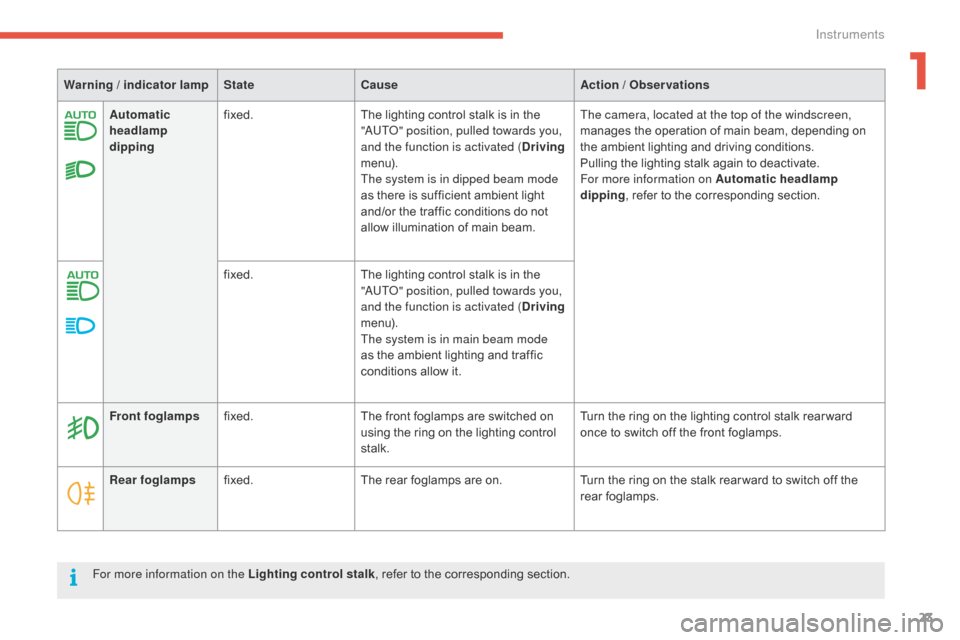
Operation indicator lamps
If one of the following indicator lamps comes on in the instrument panel, this confirms that the corresponding system has come into operation.
W arning / indicator lamp StateCause Action / Observations
Left-hand
direction indicatorflashing with buzzer.The lighting stalk is pushed down.
Right-hand
direction indicatorflashing with buzzer.The lighting stalk is pushed up.
Sidelamps fixed. The
lighting stalk is in the
"
Sidelamps"
p
osition.
Dipped beam
headlamps fixed.
The
lighting stalk is in the "Dipped
b
eam headlamps" position.
Main beam
headlamps fixed.
The
lighting stalk is pulled towards
yo
u. Pull
the stalk to return to dipped beam headlamps.
Instruments
Page 25 of 527
23
C4-Picasso-II_en_Chap01_instruments-bord_ed01-2016
Automatic
headlamp
dippingfixed.
The lighting control stalk is in the "
AUTO" position, pulled towards you,
and the function is activated ( Driving
m e n u).
The system is in dipped beam mode
as
there is sufficient ambient light
a
nd/or the traffic conditions do not
a
llow illumination of main beam.The camera, located at the top of the windscreen,
manages
the operation of main beam, depending on
t
he ambient lighting and driving conditions.
Pulling
the lighting stalk again to deactivate.
For more information on Automatic headlamp
dipping ,
refer to the corresponding section.
fixed. The
lighting control stalk is in the
"
AUTO" position, pulled towards you,
and the function is activated ( Driving
m e n u).
The system is in main beam mode
as
the ambient lighting and traffic
c
onditions allow it.
Warning / indicator lamp
StateCause Action / Observations
Rear foglamps fixed. The
rear foglamps are on.Turn
the ring on the stalk rear ward to switch off the
r
ear
fo
glamps.
Front foglamps
fixed. The
front foglamps are switched on
u
sing the ring on the lighting control
st
alk.Turn
the ring on the lighting control stalk rear ward
o
nce to switch off the front foglamps.
For more information on the Lighting control stalk ,
refer to the corresponding section.
1
Instruments
Page 27 of 527

25
C4-Picasso-II_en_Chap01_instruments-bord_ed01-2016
Warning / indicator lampStateCause Action / Observations
Automatic
wiping fixed.
The wiper control is pushed
downwards. Automatic
front wiping is activated.
To
deactivate automatic wiping, operate the control
s
talk downwards or put the stalk into another position.
Passenger
airbag system fixed.
The control switch, located at the
passenger's
end of the dashboard, is in t
he "ON "
p
osition.
The
p
assenger's
f
ront
a
irbag
i
s
a
ctivated.
In this case, do not install a rear ward
facing
child seat on the front passenger
sea
t.Turn the control switch to the "OFF " position to
deactivate the passenger's front airbag.
You
can install a rear ward facing child seat, unless there
i
s a fault with the airbags (airbag warning lamp on).
Stop & Star t fixed. When
the
vehicle
stops
(red
lights,
t
raffic
jams,
...)
the
Stop
&
Start
system
h
as
put
the
engine
into
STOP
mode. The
warning lamp goes off and the engine restarts
a
utomatically in START mode, as soon as you want to
move
off.
flashes for a few
seconds,
then
goes
off. STOP mode is temporarily
unavailable,
or
START
mode
is
invoked
au
tomatically. For more information on Stop & Star t
, refer to the
corresponding
s
ection.
1
Instruments
Page 42 of 527
40
C4-Picasso-II_en_Chap01_instruments-bord_ed01-2016
* Only with the type 2 instrument panel.
Coolant temperature gauge*
After driving for a few minutes, the temperature and pressure in the cooling system increase.
To
top-up the level:
F
w
ait for the engine to cool,
F
u
nscrew the cap slightly to allow the
p
ressure to drop,
F
w
hen the pressure has dropped, remove
the cap,
F
t
op-up the level to the "MA X" mark.
With
the
engine
running,
when
the
needle
is:
-
i
n zone A , the temperature is correct,
-
i
n zone B,
the
temperature
is
too
high;
t
he
maximum
temperature
and
the
c
entral STOP
warning
lamps
come
on,
a
ccompanied
by
an
audible
signal
and
a
w
arning
m
essage. Be
aware of the risk of burns when
t
opping-up the cooling system. Do not
f
ill above the maximum level (indicated
o
n the header tank).
You MUST stop as soon as it is safe
to do so.
Wait
a
few
minutes
before
switching
off
the
e
ngine.
Contact a CITROËN dealer or a qualified
workshop.
Instruments
Page 48 of 527
46
C4-Picasso-II_en_Chap01_instruments-bord_ed01-2016
Lighting dimmer control
Allows the manual adjustment of the brightness of the instrument panel and touch screen tablet to suit the ambient light level.
Operates
only when the vehicle lighting is on, with the exception of the daytime running lamps.
Tw o b u t t o n s
With the exterior lighting on, press button A
t o increase the brightness of the instruments
a
nd controls and the interior mood lighting or
b
utton B to reduce it.
As
soon as the lighting reaches the required
l
evel of brightness, release the button.
Touch screen tablet
F In the Configuration menu, select
" Brightness ".
F
A
djust the brightness using the arrows or
b
y moving the cursor.
Instruments
Page 49 of 527
47
C4-Picasso-II_en_Chap01_instruments-bord_ed01-2016
When driving at night, this function allows certain displays in the instrument panel to be
switched
off to avoid visual fatigue for the driver.
The essential information, such as the speed of
the vehicle or the cruise control or speed limiter
indications remains displayed in the instrument
panel.
Using the steering mounted
control
F With the vehicle lighting on, press this b
utton again to activate the black panel.
F
P
ress this button again to deactivate it.
Black screen (touch screen
tablet)
Black panel (comfortable
night driving display)
F In the Configuration
menu, select "Dark". T
he screen of the touch screen tablet goes
o
f f.
F
P
ress the screen again (anywhere on its
s
ur face) to switch it on again.
1
Instruments


