2016 Citroen C4 PICASSO light
[x] Cancel search: lightPage 53 of 527

51
C4-Picasso-II_en_Chap02_ouvertures_ed01-2016
Electronic key - remote control
System which permits remote locking or unlocking of the vehicle as well as opening the boot and, d
epending on version, operation of the alarm.
It
also allows the location and starting of the
v
ehicle as well as providing protection against
t
heft.Unlocking the vehicle
F Press this button.
Unlocking the vehicle and
opening the boot
The direction indicators flash for a few
seconds.
The door mirror spot lamps
c
ome on. Depending on version, the
d
oor mirrors unfold, the welcome
lighting
comes on and the alarm is
d
eactivated. F
M
ake a long press on this
b
utton to unlock the vehicle
a
nd, depending on version,
r
elease the tailgate or open the
m
otorised
t
ailgate.
F
T
o
unlock
the
other
doors
and
the
boot,
p
ress
this
button
again.
The
setting
of
selective
unlocking
is
done
in
t
he
Driving
menu.
Select " Driver plip action ".
Complete
unlocking
is
activated
by
default.
Complete unlocking
F To unlock only the driver's door, p
ress this button once.
Selective unlockingSettings for the motorised tailgate can be adjusted in the Driving menu.
Motorised
operation is activated by default.
A.
U
nlocking
the
vehicle.
B.
C
entral
locking
the
vehicle.
C.
U
nlocking
the
vehicle
and,
depending
on
v
ersion,
release
of
the
tailgate
or
opening
t
he
motorised
tailgate.
The
electronic
key
includes
an
integral
back-up
em
ergency
k
ey.
2
Access
Page 54 of 527

52
C4-Picasso-II_en_Chap02_ouvertures_ed01-2016
Deadlocking renders the interior door controls i noperative.
It also deactivates the manual central
locking
button.
Therefore, never leave anyone inside
the
vehicle when it is deadlocked.
Deadlocking
F With the vehicle unlocked, press t
his button.
F
W
ithin five seconds, press this button
again
to deadlock the vehicle.
This function allows you to identify your vehicle
from
a
distance, particularly in poor light. Your
v
ehicle
must be locked.
Locating your vehicle
F Press this button.
This will switch on the courtesy lamps and
the direction indicators will flash for about
10 seconds.
F
P
ress
this
button.
H
olding
the
button
allows
the
w
indows to be raised to the
desired
p
osition.
Normal locking
If one of the doors or the boot is not
properly
closed, locking does not take
p
lace.
Nevertheless, the alarm (if fitted) will be
fully
activated after around 45 seconds.
If
the vehicle is unlocked by mistake
a
nd no action is taken on the doors or
b
oot, the vehicle will lock itself again
a
utomatically after about thirty seconds.
If fitted to your vehicle and the alarm is
reactivated
a
utomatically.
The direction indicators come on for a
few
seconds.
Depending
on
your
version,
the
door
m
irrors
fold,
the
alarm
is
activated.
Locking the vehicle
Ensure that nothing could prevent the c orrect closing of the windows.
Be
aware of children when operating
t
he
w
indows.
The
automatic folding and unfolding
o
f the door mirrors can be deactivated
by a CITROËN dealer or a qualified
workshop.
Access
Page 55 of 527

53
C4-Picasso-II_en_Chap02_ouvertures_ed01-2016
System that allows the unlocking, locking and starting of the vehicle while keeping the
e
lectronic key on your person.
For reasons of safety and theft protection,
do
not leave your electronic key in the
v
ehicle, even when you are close to it.
It
is recommended that you keep it on
y
our person.
The
electronic key can also be used as
a
remote control.
For more information on the Electronic
key - remote control , refer to the
corresponding
s
ection.
Keyless Entry and Starting
Unlocking the vehicle
Complete unlocking
F With the electronic key on your person and i
n the recognition zone A, pass your hand
behind the door handle of one of the front
doors
to unlock the vehicle or press the
t
ailgate opening control (located centrally).
Selective unlocking
F To unlock only the driver's door, with the e
lectronic key on your person, pass your
h
and behind the driver's door handle.
F
T
o unlock the complete vehicle, pass your
h
and behind the front passenger door
h
andle with the electronic key close to
t
he passenger door, or press the tailgate
o
pening control with the electronic key
c
lose to the rear of the vehicle.
Activation
or deactivation of selective unlocking
i
s done in the Driving
menu.
Select " Driver plip action ".
By
default, complete unlocking is activated.
The direction indicators flash for a
few
seconds.
Depending
on version, the door mirrors
u
nfold, the alarm is deactivated and the
welcome
lighting comes on.
2
Access
Page 59 of 527

57
C4-Picasso-II_en_Chap02_ouvertures_ed01-2016
Normal locking
F Turn the key towards the rear of the vehicle t
o lock the vehicle completely.
Deadlocking
F Turn the key towards the rear in the driver's d
oor lock to lock the vehicle completely.
F
T
urn the key towards the rear again within
f
ive seconds to deadlock the vehicle.
Depending
on version, the direction
i
ndicators flash for a few seconds, the
door
mirrors fold.
For
versions
with
alarm:
it
is
not
deactivated
/
activated when unlocking / locking the vehicle
w
ith
the
integral
key.
The
siren
will
sound
on
opening
the
door
with
the key (integral with the remote control). It
s
tops
when
the
ignition
is
switched
on.
Emergency p rocedure
The integral key is used to lock and unlock the v
ehicle when the electronic key cannot operate
a
nd in the event of a fault with the Keyless
Entry
and Starting system:
-
c
ell battery flat, vehicle battery discharged
o
r disconnected, ...
-
v
ehicle located in an area with strong
e
lectromagnetic
si
gnals.
F
T
o extract the emergency mechanical key
f
rom the electronic key, press button 1 and
guide
the key 2 out.
The
integral key is also used to deactivate/
reactivate
t
he
p
assenger's
a
irbag.
It
provides a backup means of locking the
p
assenger
do
ors.
It
also allows locking of the vehicle without
a
ctivation of the alarm.
Emergency unlocking/locking
using the integral key
Unlocking
F Turn the key towards the front of the v
ehicle to unlock the vehicle.
Depending
on version, the direction
i
ndicators flash for a few seconds, the
door mirrors unfold and the welcome
lighting
comes on.
For
versions with alarm: the siren will
s
ound on opening the door with the key
(
in the remote control). It stops when
t
he ignition is switched on.
2
Access
Page 86 of 527

84
C4-Picasso-II_en_Chap03_ergonomie-confort_ed01-2016
Flat floor
Folding a seat
From the outside
F P ull firmly upwards on strap C , as indicated
by
the arrow, to release the seat; keep
p
ulling until the seat is fully folded.
P
ush the seat backrest gently for wards
s
o that the backrest folds onto the seat
c
ushion. The assembly lowers onto the
f
l o o r. From the boot, when loading
for example
You can fold the second-row seats from the
boot,
after first folding the third-row seats.
F
P
ull on the strap D to release the seat in
question
then push for wards lightly on the
b
ackrest.
T
o avoid any damage to the mechanism,
t
he strap D unclips if too much force is
applied.
Simply clip it in place again for the
s
ystem to be operational again.
F
P
lace
the
seats
in
the
fully
back
position.
Each seat can be folded onto the floor to vary
the
space
available
in
the
boot.
Ease of use and comfort
Page 94 of 527

92
C4-Picasso-II_en_Chap03_ergonomie-confort_ed01-2016
Ventilation
Air intake
The air circulating in the passenger compartment is filtered and originates either
f
rom the outside via the grille located at the
b
ase of the windscreen or from the inside in air
recirculation
m
ode.
Air treatment
The incoming air follows various routes depending on the controls selected by the
d
river:
-
d
irect arrival in the passenger
c
ompartment (air intake),
-
p
assage through a heating circuit (heating),
-
p
assage through a cooling circuit (air
c
onditioning).
Control panel
The controls of this system are accessible in
the Air conditioning menu of the touch screen
tablet A .
The
demisting/defrosting controls for the
w
indscreen and rear screen are located on the
left
of the touch screen tablet. 1. W
indscreen d emisting-defrosting v ents.
2. F ront quarter light demisting-defrosting
ve
nts.
3.
F
ront side window demisting-defrosting
ve
nts.
A
djustable side air vents.4. C
entral adjustable air vents.
5. A ir outlets for the front footwells.
6.
S
ide vents for the 2
nd row.
7. A
ir outlets for 2nd row footwells.
8. S
unshine s
ensor.
Air distribution
Ease of use and comfort
Page 108 of 527

106
C4-Picasso-II_en_Chap03_ergonomie-confort_ed01-2016
Sliding sun visor
Sliding blinds are provided for your protection against bright sunlight. They can be adjusted
m
anually.
F
S
lide the blind to the desired position by
pushing
at A.
Sun visor rails
Glove box
Depending on equipment, it may contain a CD p
l aye r.
F
T
o open the glove box, raise the handle.
It
is illuminated when the lid is opened.
It is cooled by a manual directional ventilation
nozzle.
It
is connected directly to your vehicle's air
c
onditioning system and is supplied with cool
a
ir whatever the temperature setting for the
p
assenger
c
ompartment.
The
refrigeration of your glove box operates
o
nly with the engine running and the air
c
onditioning
on
.
The
blinds
are
extended
on
the
sun
visor
rails.
Fold
the
visor
downwards,
to
protect
against
d
azzle
to
the
face.
If
dazzle
is
coming
from
the
side
windows,
d
etach
the
visor
from
its
housing
above
the
c
entre
of
the
windscreen
and
pivot
it
to
the side.
The
visors
are
fitted
with
a
locking
system
on
t
heir
central
housing
when
the
blind
is
reeled
i
n.
To
detach
the
visor
or
to
reposition
it,
it
must
b
e
in
a
vertical
position.
Sliding blinds
Do not attach or suspend heavy objects o n the slide rail of the sun blind.
Ease of use and comfort
Page 110 of 527
108
C4-Picasso-II_en_Chap03_ergonomie-confort_ed01-2016
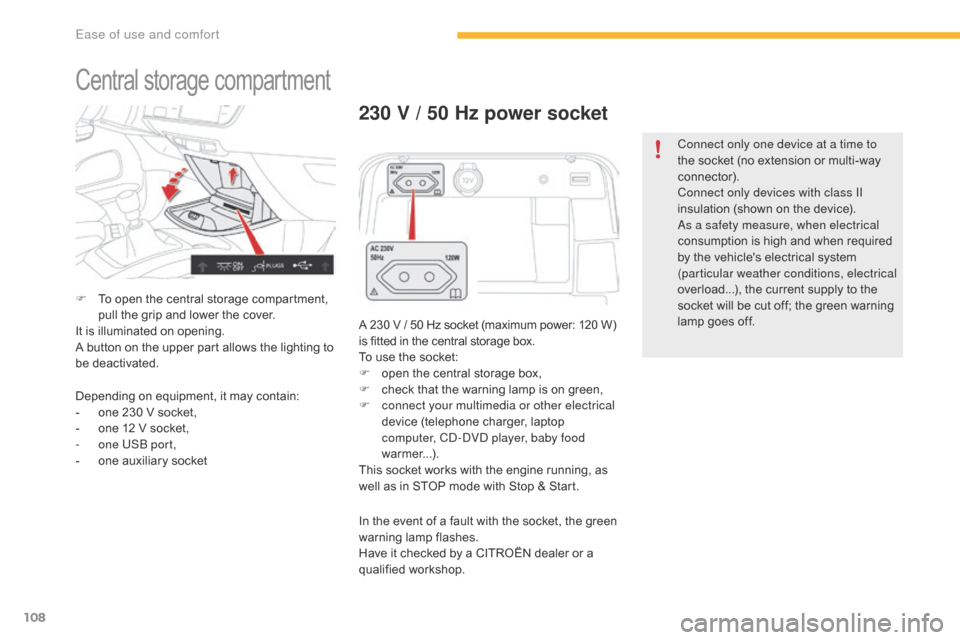
Central storage compartment
F To open the central storage compartment, p
ull the grip and lower the cover.
It
is illuminated on opening.
A
button on the upper part allows the lighting to
b
e deactivated.
230 V / 50 Hz power socket
A 230 V / 50 Hz socket (maximum power: 120 W) is fitted in the central storage box.
To
use the socket:
F
o
pen the central storage box,
F
c
heck that the warning lamp is on green,
F
c
onnect your multimedia or other electrical
device
(telephone charger, laptop
c
omputer, CD-DVD player, baby food
warmer...).
This
socket works with the engine running, as
w
ell as in STOP mode with Stop & Start.
Depending
on
equipment,
it
may
contain:
-
o
ne
230
V
socket,
-
o
ne
12
V
socket,
-
o
ne USB port,
-
o
ne
auxiliary
socket In
the event of a fault with the socket, the green
w
arning
lam
p
f
lashes.
Have
it checked by a CITROËN dealer or a
q
ualified
w
orkshop. Connect only one device at a time to
the
socket (no extension or multi-way
c
onnector).
Connect only devices with class II
insulation (shown on the device).
As a safety measure, when electrical
consumption is high and when required
b
y the vehicle's electrical system
(
particular weather conditions, electrical
overload...), the current supply to the
s
ocket will be cut off; the green warning l
amp goes off.
Ease of use and comfort