2016 BMW M4 steering wheel
[x] Cancel search: steering wheelPage 142 of 228
situation and the area around the vehicle and
intervene actively in the corresponding situa‐
tions.◀1.Switch on the Park Assistant and activate,
if applicable.
Status of the parking space search is dis‐
played on the Control Display.2.Follow the instructions on the Control Dis‐
play.
To achieve an optimum parking position,
wait for the automatic steering process af‐
ter changing gear at standstill.
The end of the parking process is dis‐
played on the Control Display.3.Straighten up the parking position, if appli‐
cable.
Cancelling manually
You can cancel the Park Assistant at any time:
▷ "Park Assist" Select the symbol on the
Control Display.▷Press the button.
Cancelling automatically
The system automatically cancels in the
following situations:
▷When holding firmly onto the steering
wheel or even if steering is done.▷When selecting gear, which does not cor‐
respond to the information on the Control
Display.▷At speeds over approx. 10 km/h, approx.
6 mph.▷Possibly on snow-covered or slippery road
surfaces.▷Any obstacles difficult to get over, for ex‐
ample kerbstones.▷With obstacles that suddenly arise.▷If the Park Distance Control PDC shows
gaps are too small.▷When a maximum number of parking at‐
tempts or parking time is exceeded.▷If turn indicator is set opposite to desired
parking side.▷When changing to other functions on the
Control Display.
A Check Control message is shown.
Flashing display on selector lever of
double clutch transmission
In some situations, the actually engaged gear‐
box setting may be different from the selector
lever position after a cancellation of function,
and the display in the selector lever flashes.
In these cases, refer to the display in the in‐
strument cluster, see page 75.
Continuing
You can continue a cancelled parking process,
if applicable.
For this purpose, follow the instructions on the
Control Display.
System limits
No parking support The Park Assistant does not support in the
following situations:
▷On sharp bends.
Restrictions of the function
The function can be restricted, for example in
the following situations:
▷When on uneven road surfaces, for exam‐
ple gravel roads.▷On slippery ground.▷On steep upward or downward gradients.▷If leaves have collected or snow has drifted
or been piled up in the parking space.Seite 142ControlsDriving comfort142
Online Edition for Part no. 01 40 2 964 013 - VI/15
Page 164 of 228
Applying the brakes fully is the most effective
way of braking in situations in which this is
necessary.
The vehicle can be steered. Any obstacles can
be avoided with steering wheel movements
that are as calm as possible.
A pulsing of the brake pedal shows that ABS is
regulating.
In certain braking situations, the perforated
brake disks can cause functional noise. How‐
ever, this has no effect on the efficiency and
operational safety of the brakes.
Objects in the range of movement of
the pedals and in the footwell
WARNING
Objects in the driver's footwell can re‐
strict the pedal travel, or block a pedal that has
been pressed. Danger of accidents. Stow
items in the vehicle so that they are secure and
cannot get into the driver's footwell. Only use
floor mats that have been categorised as ap‐
propriate for the vehicle and that can be fas‐
tened accordingly. Do not use any loose floor
mats, and do not place several floor mats on
top of one another. Make sure that there is suf‐
ficient space for the pedals. Ensure that the
floor mats are securely reattached after having
been removed, for example for cleaning.◀
Wet roads
In damp weather, if road grit has been spread
or there is heavy rain, apply the brakes lightly
every few kilometres/miles.
In doing so, do not obstruct other road users.
The resulting heat dries the brake discs and
pads.
The braking force will be available immediately
if needed.Downhill gradients
WARNING
Even slight, continuous pressure on the
brake pedal can cause overheating, brake pad
wear or even brake system failure. Danger of
accidents. Avoid excessive loads on the
brake.◀
WARNING
When idling or with the engine switched
off, safety-relevant functions are restricted or
no longer available, for example the braking ef‐
fect of the engine or power assistance for the
braking force and steering. Danger of acci‐
dents. Do not drive at idle speed or with the
engine switched off.◀
When driving on long or steep downhill
stretches, use the gear in which the least brak‐
ing is required. Otherwise the brake system
can overheat and braking action is reduced.
Manual gearbox:
The braking effect can be additionally in‐
creased by shifting down, even into first gear, if
applicable.
M double clutch transmission:
The braking action of the engine can be boos‐
ted further by shifting down in sequential
mode, see page 75.
Corrosion of the brake disc Corrosion of the brake discs and contamina‐
tion of the brake pads increase with the
following circumstances:▷Low mileage.▷Extended periods when the vehicle is not
used.▷Infrequent use of the brakes.
Corrosion occurs when the minimum pressure
that must be exerted by the pads during brake
applications to clean the discs is not reached.
Seite 164Driving hintsDriving precautions164
Online Edition for Part no. 01 40 2 964 013 - VI/15
Page 175 of 228
Wheels and tyresVehicle equipment
This chapter describes all standard, national
and special equipment provided in the model
series. Equipment not available in the vehicle is
therefore also described, for example the se‐
lected special equipment or national version.
This also applies to safety-relevant functions
and systems. Comply with the relevant na‐
tional regulations when using the correspond‐
ing functions and systems.
Tyre pressures Information for your safety
A tyre’s condition and pressure influence the
following:▷Operating life of the tyre.▷Driving safety.▷Driving comfort.
Checking tyre pressures
WARNING
A tyre with inadequate or missing tyre in‐
flation pressure impairs driving properties, for example steering and braking. Danger of acci‐
dents. Check tyre inflation pressure regularly
and adjust as necessary, for example twice a
month or before any long journey.◀
Tyres have a natural, uniform tyre pressure
loss.
Tyres heat up when driving and with the tem‐
perature of the tyre, the tyre filling pressure in‐
creases. The tyre filling pressure data relate to
cold tyres or tyres at ambient temperature.
Only check the tyre pressure when the tyres
are cold. In other words, after driving for a max‐
imum of 2 km or if the vehicle has been parked
for at least 2 hours.
Inflating devices can display a pressure as
much as 0.1 bar too low.
With runflat indicator: reinitialise the runflat in‐
dicator after adjusting tyre pressures.
With tyre pressure monitor: reset the tyre pres‐
sure monitor after adjusting the tyre pressure
to a new value.
Tyre inflation pressures
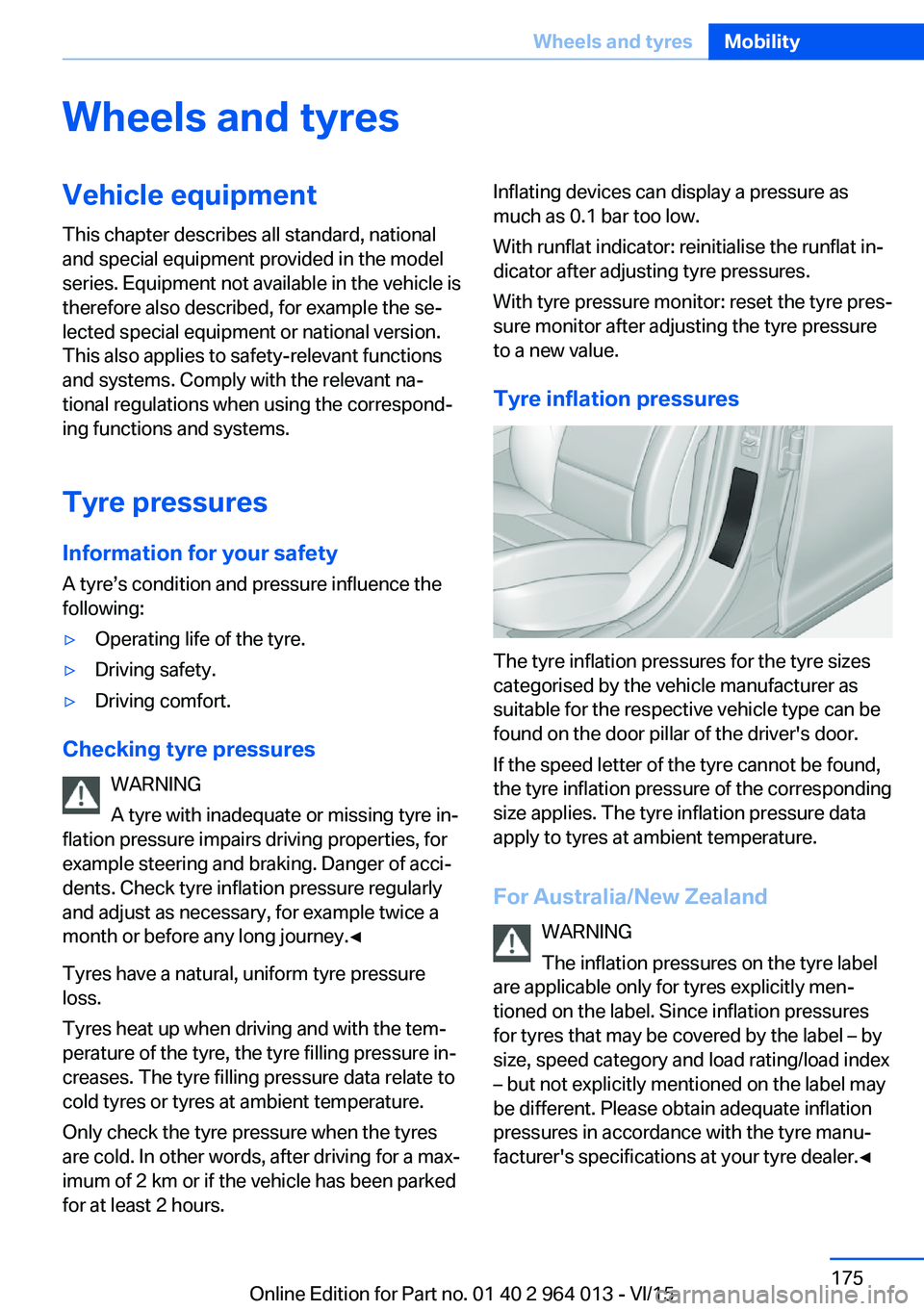
The tyre inflation pressures for the tyre sizes
categorised by the vehicle manufacturer as
suitable for the respective vehicle type can be
found on the door pillar of the driver's door.
If the speed letter of the tyre cannot be found,
the tyre inflation pressure of the corresponding
size applies. The tyre inflation pressure data
apply to tyres at ambient temperature.
For Australia/New Zealand WARNING
The inflation pressures on the tyre label
are applicable only for tyres explicitly men‐
tioned on the label. Since inflation pressures
for tyres that may be covered by the label – by
size, speed category and load rating/load index
– but not explicitly mentioned on the label may
be different. Please obtain adequate inflation
pressures in accordance with the tyre manu‐
facturer's specifications at your tyre dealer.◀
Seite 175Wheels and tyresMobility175
Online Edition for Part no. 01 40 2 964 013 - VI/15
Page 178 of 228
ted speed for the tyres fitted must be dis‐
played in the driver's field of view. The sticker
is available from a Service Partner or a qualified
specialist workshop.
If winter tyres are fitted, observe and comply
with the respectively permitted maximum
speed.
Interchanging front and rear wheels
The manufacturer of your vehicle advises
against interchanging the front and rear
wheels. This could impair vehicle handling
Such a change is not permitted in vehicles with
different tyre or rim dimensions on the front
and rear axles.
Tyre storage
Store wheels and tyres in a cool, dry and pref‐
erably dark place when not in use.
Protect tyres against contamination from oil,
grease and fuel.
Do not exceed the maximum tyre pressure in‐
dicated on the tyre's side wall.
Remedying flat tyres Safety measures▷Park the vehicle on a solid surface and as
far away from moving traffic as possible.▷Switch on hazard warning lights.▷Protect the vehicle against rolling, by ap‐
plying the parking brake.▷Engage the steering wheel lock in the
straight ahead position of the wheels.▷Allow all vehicle occupants get out of the
vehicle and guide them out of the danger
area, for example behind the crash barrier.▷Set up warning triangle an appropriate dis‐
tance away.Mobility system
Principle With the mobility system, minor tyre damage
can be quickly sealed, to allow you to drive on.
To do that, liquid sealant is pumped into the
tyres which encloses the damage from the in‐ side when it hardens.
The compressor can be used to check the tyre
inflation pressure.
Notes▷Please observe the notes on the applica‐
tion of the Mobility system which are on
the compressor and the sealant container.▷Applying the Mobility system can be inef‐
fective for tyre damage as from a size of
approximately 4 mm.▷Contact a Service Partner or a qualified
specialist workshop if you are unable to put
the tyre back in operation.▷If possible, foreign matter that has penetra‐
ted the tyre should remain inside the tyre.▷Remove the speed limit sticker from the
sealant container and attach to the steer‐
ing wheel.▷Using sealants can damage the TPM wheel
electronics. If sealant is used, check the
electronics as soon as you get an opportu‐
nity and have them replaced if necessary.
DANGER
A blocked exhaust pipe or inadequate
ventilation can allow harmful exhaust fumes to
penetrate the vehicle. The exhaust gas con‐
tains carbon monoxide, which is colourless and
odourless, but highly toxic. In enclosed spaces,
the exhaust fumes can also build up outside
the vehicle. Danger of fatal injury. Keep the ex‐
haust pipe clear and ensure sufficient ventila‐
tion.◀
Storage
Mobility system is located under boot floor.
Seite 178MobilityWheels and tyres178
Online Edition for Part no. 01 40 2 964 013 - VI/15
Page 205 of 228
Systems, for example approach control warn‐
ing with light braking function. Danger of acci‐
dents. Switch off all Intelligent Safety Systems
before tow-starting/towing.◀
Manual gearboxGearshift lever in idle position.
Being towed Observe the following information:▷Make sure that the ignition is switched on,
otherwise low-beam headlights, rear lights,
turn indicators and wipers would not be
available.▷Do not tow the vehicle with the rear axle
raised, otherwise the steering can turn.▷When the engine is not running, there is no
power assistance and the brake servo is
out of action. The steering and brakes will
require extra effort to operate.▷Greater steering wheel movements are
necessary.▷The towing vehicle must not be lighter
than the towed vehicle, otherwise it may be
unable to keep the towed vehicle reliably
under control.▷Do not exceed a towing speed of on
50 km/h, 30 mph.▷Do not exceed a towing distance of 50 km,
30 miles.Towing truck
With driven rear axle
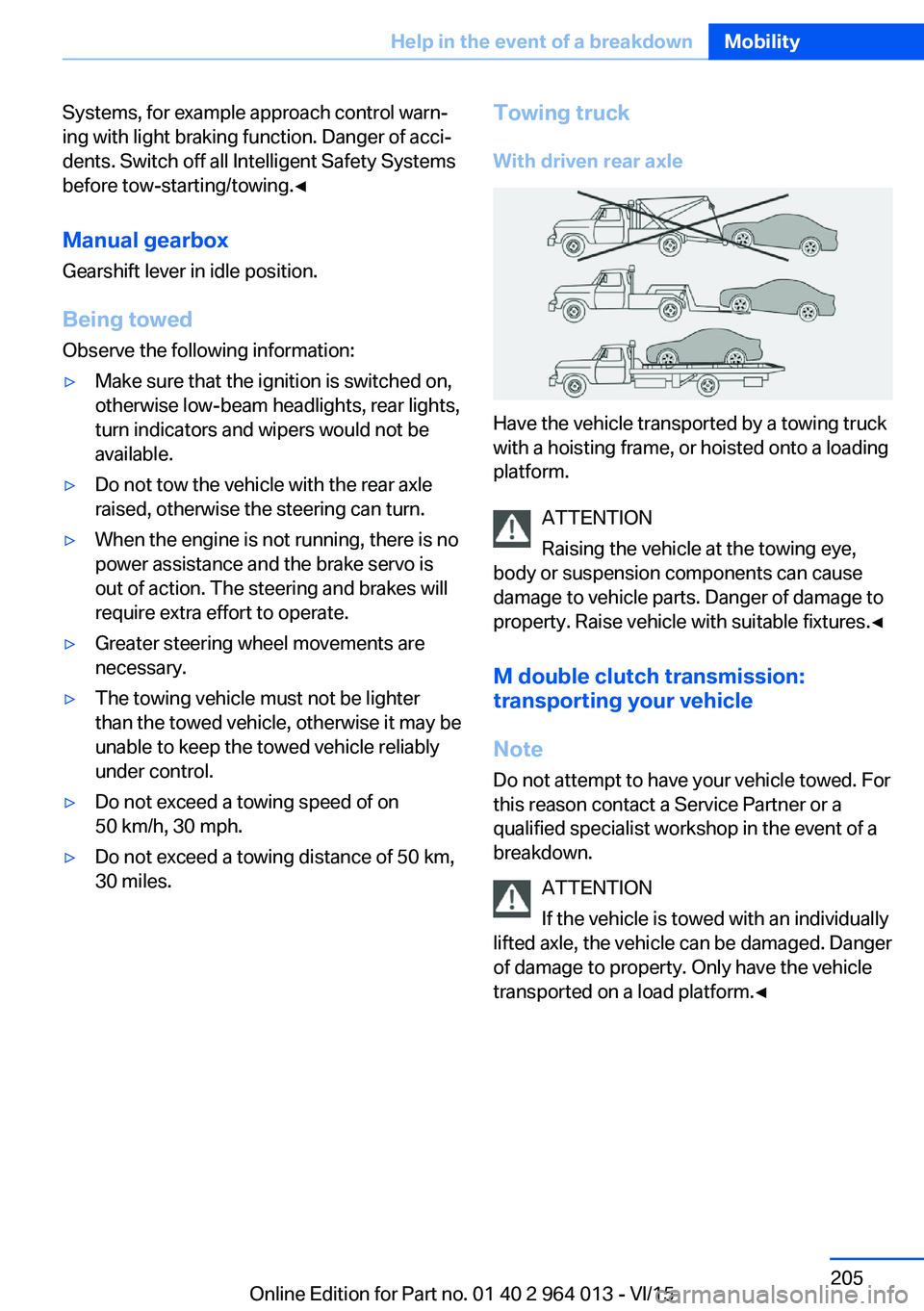
Have the vehicle transported by a towing truck
with a hoisting frame, or hoisted onto a loading
platform.
ATTENTION
Raising the vehicle at the towing eye,
body or suspension components can cause
damage to vehicle parts. Danger of damage to
property. Raise vehicle with suitable fixtures.◀
M double clutch transmission:
transporting your vehicle
Note
Do not attempt to have your vehicle towed. For
this reason contact a Service Partner or a
qualified specialist workshop in the event of a
breakdown.
ATTENTION
If the vehicle is towed with an individually
lifted axle, the vehicle can be damaged. Danger
of damage to property. Only have the vehicle
transported on a load platform.◀
Seite 205Help in the event of a breakdownMobility205
Online Edition for Part no. 01 40 2 964 013 - VI/15
Page 218 of 228
Everything from A to Z
IndexA ABS, anti-lock braking sys‐ tem 123
Acceleration assistant, see Launch Control 77
Accessories and parts 8
Activation, airbags 106
Active M differential 126
Active Protection 120
Adaptive brake light, see Dy‐ namic brake lights 120
Adaptive Headlights 100
Adaptive M chassis 126
Additives, oil 187
Adjust headlights 102
After washing the car 209
Age of tyres 176
Airbags 104
Airbags, indicator/warning lamp 105
Airbag switch, see Key switch for front passenger air‐
bags 106
Air conditioning 144
Air distribution, manual 146
Air flow, automatic air condi‐ tioning 146
Air outlets, see Ventila‐ tion 147
Air pressure, tyres 175
Alarm, false 43
Alarm system 42
All-season tyres, see Winter tyres 177
Alternative oil grades 187
Ambient lighting 103
Anti-freeze protection, washer fluid 73
Anti-lock braking system, ABS 123 Anti-theft alarm system, see
Alarm system 42
Anti-theft system, wheel studs 199
Anti-trap mechanism, glass Roof 46
Anti-trap mechanism, win‐ dows 44
Approved engine oils, see Suitable engine oil
grades 187
Aquaplaning 163
Around the centre con‐ sole 14
Around the headlining 15
Around the steering wheel 12
Arrival time 92
Ashtray 149
Attentiveness assistant 121
AUC, automatic air recircula‐ tion control 146
AUTO intensity 145
Automatic air condition‐ ing 144
Automatic air recirculation control, AUC 146
Automatic anti-glare control, see High-beam assis‐
tance 100
Automatic driving lights con‐ trol 99
Automatic locking 42
Automatic parking func‐ tion 56
AUTO program, automatic air conditioning 145
AUTO program, intensity 145
Auto Start Stop function 67
Average fuel consumption 91
Average speed 91
Axle load limit 215 Axle loads, weight 215
B Backrest contour, see Lum‐ bar support 50
Backrest width 50
Bar for tow-starting/ towing 206
Battery, vehicle 199
Being towed, see Tow-start‐ ing/towing 204
Belt holder 54
Belts, seat belts 52
Black ice, see Outside tem‐ perature warning 84
Blower, see Air flow 146
BMW Driver's Guide App 6
BMW homepage 6
BMW internet site 6
BMW Maintenance Sys‐ tem 191
BMW M Technology 160
BMW Services 6
Bonnet 183
Boot lid closing 38
Boot lid, contactless open‐ ing 40
Boot lid, emergency re‐ lease 39
Boot lid via remote control 36
Boot, storage space 156
Bottle holder, see Cu‐ pholder 155
Brake assist 123
Brake lights, adaptive 120
Brake lights, dynamic 120
Braking, information 163
Braking safely 163
Breakdown Assist 202 Seite 218ReferenceEverything from A to Z218
Online Edition for Part no. 01 40 2 964 013 - VI/15
Page 219 of 228

Breakdown, wheelchange 199
Brightness of the Control Dis‐ play 94
Bulb change, rear 196
Bulb change, xenon head‐ light 194
Buttons on the steering wheel 12
Button, start/stop 65
C
Camera, rear-view cam‐ era 134
Camera, Side View 136
Camera, Top View 138
Carbon ceramic brakes M 160
Car care 209
Care, displays 211
Care products 209
Care, vehicle 209
Car jack 199
Car key, see Remote con‐ trol 32
Carpet, care 211
Carrying children safely 58
Car washes 208
Catalytic converter, see Hot exhaust system 163
CBS, Condition Based Serv‐ ice 191
Central key, see Remote con‐ trol 32
Central locking system 38
Central screen, see Control Display 16
Centre armrest 154
Centre console 14
Ceramic brakes 160
Changes, technical, see Your own safety 7
Changing bulb, rear 196
Charcoal canister 146
Chassis, electronic 126 Chassis number, see Vehicle
identification number 9
Check control 80
Checking the oil level elec‐ tronically 185
Child's seats 58
Children, carrying 58
Child restraints 58
Child seat classes, ISOFIX 61
Child seat mounting 59
Child seat mountings, ISO‐ FIX 61
Chrome parts, care 210
Cigarette lighter 149
Cleaning displays 211
Clock 85
Closing/opening using door lock 37
Closing/opening with remote control 35
Coat hooks 155
Cockpit 12
Comfort Access 39
Comfort closing with the re‐ mote control 36
Comfort opening with the re‐ mote control 36
Compound brakes 160
Compressor 178
Computer, see on-board computer 90
Condensate under the vehi‐ cle 165
Condensation on win‐ dows 146
Condition Based Service, CBS 191
Confirmation signals 42
ConnectedDrive 6
ConnectedDrive services 6
Connecting electrical applian‐ ces 150
Contactless opening of boot lid 40
Control Display 16
Control display, settings 93 Controller 17
Control systems, driving sta‐ bility 123
Coolant 189
Coolant temperature 84
Cooling effect, maximum 145
Cooling function 145
Cooling system 189
Cornering light 100
Corrosion of brake discs 164
Courtesy light when unlock‐ ing 35
Courtesy light with the vehi‐ cle locked 36
Cruise Control 129
Cupholder 155
Current fuel consumption 86
D
Damage, tyres 176
Damper control 126
Data, technical 214
Date 85
Daytime driving lights 100
Deactivation, airbags 106
Defrosting, see Defrosting windows 146
Defrosting windows 146
Defrost, see Defrosting win‐ dows 146
Deleting personal data 23
Differential lock 126
Digital clock 85
Digital speed 85
Digital speedometer 85
Dimensions 214
Dimmable exterior mirrors 56
Dimming rear-view mirror 56
Dipping headlights, see High- beam assistance 100
Display in windscreen 94
Display lighting, see Instru‐ ment lighting 102
Displays, cleaning 211 Seite 219Everything from A to ZReference219
Online Edition for Part no. 01 40 2 964 013 - VI/15
Page 220 of 228

Displays, electronic, instru‐ment cluster 79
Disposal, coolant 190
Disposal, vehicle battery 200
Distance to destination 91
Distance warning, see PDC 131
Door key, see Remote con‐ trol 32
Door lock 37
Double clutch transmis‐ sion 74
Downhill gradients 164
Drinks holder, see Cu‐ pholder 155
Drivelogic 76
Drive Mode 75
Drive-off assistant 127
Drive programs, see Drive‐ logic 76
Driving Assistant, see Intelli‐ gent Safety 110
Driving dynamics, system states 86
Driving dynamic systems 86
Driving hints 163
Driving information, gen‐ eral 163
Driving information, running in 162
Driving into a car wash 208
Driving lane lines, rear-view camera 135
Driving lights control, auto‐ matic 99
Driving on racing tracks 161
Driving stability control sys‐ tems 123
Drying air, see Cooling func‐ tion 145
DSC Dynamic Stability Con‐ trol 124
Dynamic brake lights 120
Dynamic Stability Control, DSC 124 E
EfficientDynamics 86
EfficientDynamics display 86
EfficientDynamics menu 86
Electrical Glass Roof 45
Electrical power windows 43
Electric steering wheel lock 57
Electronic displays, instru‐ ment cluster 79
Electronic oil measure‐ ment 185
Electronic Stability Program, ESP, see DSC 124
Emergency call 202
Emergency release, boot lid 39
Emergency release, fuel filler flap 172
Emergency start function, en‐ gine start 33
Energy Control 86
Energy recuperation 86
Engine, automatic shut- off 67
Engine, automatic start-stop function 67
Engine compartment 182
Engine coolant 189
Engine Dynamics Control 78
Engine oil 185
Engine oil additives 187
Engine oil change 187
Engine oil filler neck 186
Engine oil grades, alterna‐ tive 187
Engine oil grades, suita‐ ble 187
Engine oil level, checking electronically 185
Engine oil temperature 84
Engine start 66
Engine start with malfunc‐ tion 33
Engine temperature 84 Entering letters and digits 23
ESP, Electronic Stability Pro‐ gram, see DSC 124
Exhaust system 163
Expanding the boot 151
Extended BMW Online serv‐ ices 6
Exterior mirror, automatically dimming 56
Exterior mirrors 55
External starting 203
Eye for towing, see Towing eye 206
Eyes for securing load 166
F Failure message, see Check control 80
False alarm 43
Fastening seat belts, see Seat belts 52
Fault displays, see Check control 80
Favourites buttons, iDrive 22
Filler neck for engine oil 186
Fine wood, care 210
First-aid kit 203
Flat tyre, warning lamp 108, 109
Flooding 163
Floor carpet, care 211
Fold-out position, windscreen wiper 72
Foot brake 163
Foot mats, care 211
Front airbags 104
Front-end collision warning with city braking func‐
tion 111
Front head restraints 54
Front lights 194
Front neck supports, see Head restraints 54
Front passenger airbags, de‐ activating/activating 106 Seite 220ReferenceEverything from A to Z220
Online Edition for Part no. 01 40 2 964 013 - VI/15