2016 BMW M4 lock
[x] Cancel search: lockPage 65 of 228

DrivingVehicle equipment
This chapter describes all standard, national
and special equipment provided in the model
series. Equipment not available in the vehicle is
therefore also described, for example the se‐
lected special equipment or national version.
This also applies to safety-relevant functions
and systems. Comply with the relevant na‐
tional regulations when using the correspond‐
ing functions and systems.
Start/stop button
Principle The ignition is switched on or offand the engine is started by
pressing the start/stop button.
M double clutch transmission:
The engine starts if the brakes
are applied when the start-stop button is
pressed.
Manual gearbox: The engine starts if the clutch
pedal is pressed when pressing the start/stop
button.
Ignition on M double clutch transmission: Press the start/
stop button without applying the brakes.
Manual gearbox: Press the start/stop button,
do not press the clutch pedal.
All systems are operational.
Most of the indicator and warning lamps in the
instrument cluster are illuminated for different
lengths of time.
To save battery power when the engine is off,
switch off the ignition and any unnecessary
electronic systems.Ignition off
M double clutch transmission: Press the start/
stop button again without applying the brakes.
Manual gearbox: Press the start/stop button
again, do not press the clutch pedal.
All indicator lights in the instrument cluster ex‐
tinguish.
To save battery power when the engine is off,
switch off the ignition and any unnecessary
electronic systems.
Notes
When the ignition is switched off, selector
lever position P will be automatically engaged,
if selector lever position D or R is engaged.
With the vehicle stationary and the engine shut
down, the ignition is switched off automatically
under the following circumstances:▷When locking, even with the low-beam
headlights switched on.▷Shortly before the battery is discharged so
that an engine start remains possible.▷When opening or closing the driver's door,
if the driver's belt is unfastened and the
low-beam headlights are switched off.▷When the driver's belt is unfastened, if the
driver's door is opened and the low-beam
headlights switched off.
After about 15 minutes without further opera‐
tion, low-beam headlights are changed over to
side lights.
Radio ready state
Activate radio ready state: when the engine is
running, press the start/stop button.
Individual electrical systems remain opera‐
tional.
The radio ready sate is automatically switched
off in the following situations:
Seite 65DrivingControls65
Online Edition for Part no. 01 40 2 964 013 - VI/15
Page 66 of 228

▷After approximately eight minutes.▷When locking via the central locking sys‐
tem.▷Shortly before the battery is discharged so
that an engine start remains possible.
Radio readiness remains active when ignition
is switched off automatically, such as for
following reasons:
▷Opening or closing driver's door.▷Unfastening driver's seat belt.▷When low-beam headlights are automati‐
cally changed to side lights.
If engine is switched off and ignition is
switched on, radio ready state will be automati‐
cally activated when door is opened if light is
switched off or daytime driving lights are
switched on, when corresponding equipment
is fitted.
Engine start Notes DANGER
A blocked exhaust pipe or inadequate
ventilation can allow harmful exhaust fumes to
penetrate the vehicle. The exhaust gas con‐
tains carbon monoxide, which is colourless and
odourless, but highly toxic. In enclosed spaces,
the exhaust fumes can also build up outside
the vehicle. Danger of fatal injury. Keep the ex‐
haust pipe clear and ensure sufficient ventila‐
tion.◀
WARNING
An unsecured vehicle can start moving
and rolling away. Danger of accidents. Before
leaving the vehicle, secure it to prevent rolling
away.
Observe the following to ensure that the vehi‐
cle is secured against rolling away:
▷Engage the parking brake.▷Turn the front wheels into the direction of
the kerb on upward or downward gradi‐
ents.▷Additionally secure the vehicle on upward
or downward gradients, e.g. using a
wedge.◀
ATTENTION
Repeated start attempts or starting sev‐
eral times in quick succession means that fuel
is not combusted, or insufficiently so. The cat‐
alytic converter can overheat. Danger of dam‐
age to property. Avoid starting more than once
in quick succession.◀
M double clutch transmission
Starting the engine
1.Press the brake.2.Press the start/stop button.
Starting proceeds for a certain time automati‐
cally and stops as soon as the engine is star‐
ted.
Manual gearbox
Starting the engine
1.Press the brake.2.Depress the clutch and engage idle posi‐
tion.3.Press the start/stop button.
Starting proceeds for a certain time automati‐
cally and stops as soon as the engine is star‐
ted.
Seite 66ControlsDriving66
Online Edition for Part no. 01 40 2 964 013 - VI/15
Page 67 of 228

Stopping the engine
Notes WARNING
Unsupervised children or animals in the
vehicle can set the vehicle in motion and en‐
danger themselves or other road users, for ex‐
ample by the following actions:▷Pressing the start/stop button.▷Releasing the parking brake.▷Opening and closing doors or windows.▷Setting the selector lever to neutral.▷Operating vehicle equipment.
Risk of accident or injury. Do not leave children
or animals unsupervised in the vehicle. When
leaving the vehicle, take the remote control
with you and lock it.◀
WARNING
An unsecured vehicle can start moving
and rolling away. Danger of accidents. Before
leaving the vehicle, secure it to prevent rolling
away.
Observe the following to ensure that the vehi‐
cle is secured against rolling away:
▷Engage the parking brake.▷Turn the front wheels into the direction of
the kerb on upward or downward gradi‐
ents.▷Additionally secure the vehicle on upward
or downward gradients, e.g. using a
wedge.◀
Before entering the car wash
So that the vehicle can roll into the vehicle
wash, follow the information on washing in au‐
tomatic vehicle washes, see page 208.
M double clutch transmission
Stopping the engine
1.Brake the vehicle until it comes to a stop.2.Press the start/stop button.
The engine is switched off.
The radio ready state is switched on.3.Apply the parking brake.
Manual gearbox
Stopping the engine
1.Press the Start/Stop button when the vehi‐
cle is at standstill.2.Engage first gear or reverse.3.Apply the parking brake.
Auto Start Stop function
Principle The Auto Start Stop function helps you to save
fuel. by stopping the engine when stationary,
for example, in a traffic jam or at traffic lights.
The ignition remains switched on. For driving
off, the engine starts automatically.
Automatic operation
After each time the engine is started using the
start/stop button, the Auto Start Stop function
is ready to operate.
The function is activated from 5 km/h,
3 mph3 mph, km/h.
Stopping the engine The engine is automatically shut down whenstationary under the following conditions:
M double clutch transmission:
▷Selector lever in selector lever position D.▷Brake pedal remains depressed while the
vehicle is at a standstill.▷Driver's seat belt buckled or driver's door
closed.
Manual gearbox:
▷Transmission in neutral and clutch pedal
not pressed.Seite 67DrivingControls67
Online Edition for Part no. 01 40 2 964 013 - VI/15
Page 68 of 228

▷Driver's seat belt buckled or driver's door
closed.
The air flow rate of the air conditioning system
is reduced when the engine is not running.
Displays in the instrument cluster The display READY in the revo‐
lution counter indicates that the
Auto Start Stop function is
ready for automatic engine
starting.
The display indicates that the preconditions for an automatic
engine stop are not met.
Restrictions of the function The engine is not shut down automatically in
the following situations:
▷Outside temperature too low.▷High outside temperature and operation of
the automatic air conditioning.▷Interior not heated or cooled to the desired
temperature.▷Engine is not yet at operating temperature.▷Sharp steering angle or steering operation.▷After reversing.▷Condensation when the automatic air con‐
ditioning is switched on.▷Vehicle battery is heavily discharged.▷At high altitudes.▷Bonnet is unlocked.▷Parking assistant is activated.▷Stop-and-go traffic.▷Use of fuel with high ethanol content.
Engine start
For driving off, the engine automatically starts
under the following conditions:
▷M double clutch transmission:
By releasing the brake pedal.▷Manual gearbox:
Clutch pedal is depressed.
After starting the engine, accelerate as normal.
Safety function After an automatic shut down, the engine will
not restart automatically if one of the following
conditions is satisfied:
▷Driver's seat belt unbuckled and driver's
door open.▷Bonnet has been unlocked.
Several indicator lights illuminate for various
lengths of time.
The engine can only be started using the start/
stop button.
Restrictions of the function
Even if you do not want to drive off, the engine
restarts automatically in the following situa‐
tions:
▷Very high temperature inside the passen‐
ger compartment, if the cooling function is
on.▷The driver applies lock to the steering
wheel.▷M double clutch transmission: Shift from
selector lever position D to N, R or D/S.▷M double clutch transmission: Depress the
accelerator and the brake at the same time.▷Vehicle starts to roll.▷Condensation when the automatic air con‐
ditioning is switched on.▷Vehicle battery is very low.▷Very low temperature inside the passenger
compartment, if the heating is on.▷Low brake vacuum, for example because
the brake pedal has been depressed a
number of times in succession.Seite 68ControlsDriving68
Online Edition for Part no. 01 40 2 964 013 - VI/15
Page 73 of 228
WARNING
If the wipers start moving when they are
folded away from the windscreen, this can
damage parts of the vehicle, or trap body parts.
Danger of injury or damage to property. Make
sure that the vehicle is switched off when the
wipers are folded away from the windscreen,
and that the wipers are in contact with the
windscreen when switching on.◀1.Switch ignition on and back off again.2.If there is a risk of frost, make sure that the
wiper blades are not frozen.3.Press the wiper lever upwards beyond the
resistance point and hold it there for ap‐
proximately three seconds until the wipers
come to a standstill in a nearly vertical po‐
sition.
After folding the wipers in, the wiper system
must be reactivated.
1.Switch on ignition.2.Press the wiper lever downwards. The wip‐
ers move to the rest position and are op‐
erational once again.
Washer fluid
Information WARNING
Some anti-freezes can contain toxic sub‐
stances, and are flammable. Risk of fire and fa‐
tal injury. Comply with the notes on the con‐
tainers. Keep anti-freezes away from sources
of combustion. Do not pour service products
into other bottles. Keep service products out of
the reach of children.◀
WARNING
Work performed incorrectly under the
bonnet can damage components and lead to a
safety risk. Danger of accident or damage to
property. Have work under the bonnet carried
out by a Service Partner or a qualified special‐
ist workshop.◀
Reservoir for washer fluid
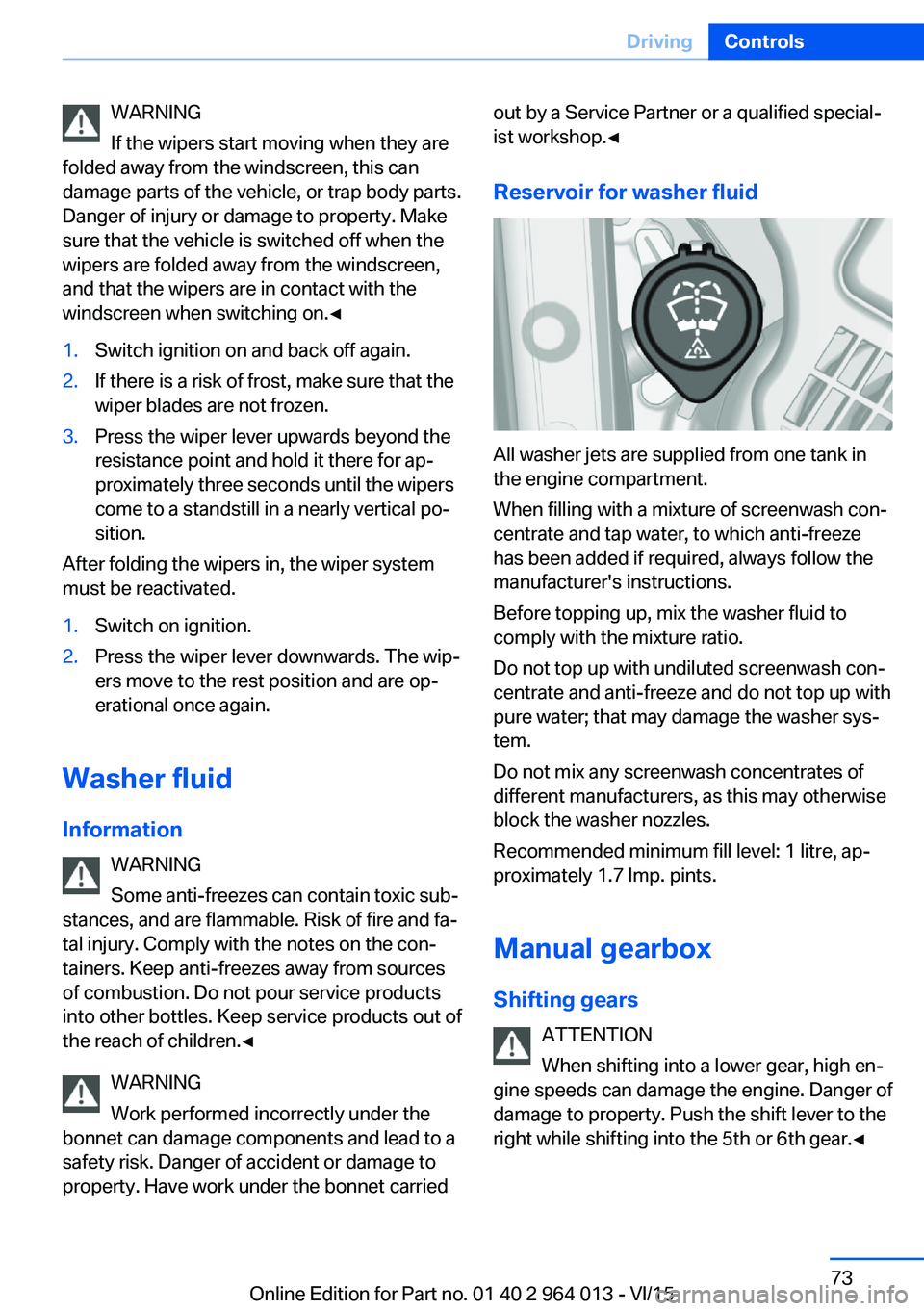
All washer jets are supplied from one tank in
the engine compartment.
When filling with a mixture of screenwash con‐
centrate and tap water, to which anti-freeze
has been added if required, always follow the
manufacturer's instructions.
Before topping up, mix the washer fluid to
comply with the mixture ratio.
Do not top up with undiluted screenwash con‐
centrate and anti-freeze and do not top up with
pure water; that may damage the washer sys‐
tem.
Do not mix any screenwash concentrates of
different manufacturers, as this may otherwise
block the washer nozzles.
Recommended minimum fill level: 1 litre, ap‐
proximately 1.7 Imp. pints.
Manual gearbox
Shifting gears ATTENTION
When shifting into a lower gear, high en‐
gine speeds can damage the engine. Danger of
damage to property. Push the shift lever to the
right while shifting into the 5th or 6th gear.◀
Seite 73DrivingControls73
Online Edition for Part no. 01 40 2 964 013 - VI/15
Page 75 of 228
Activating1.Engage a drive position.2.Briefly tap on the accelerator pedal.
The vehicle rolls at minimum speed.
This is possible in 1st and 2nd gear and in re‐
verse.
Deactivating
Brake the vehicle until it comes to a stop.
Flashing display on selector lever of
double clutch transmission
In some situations, the actually engaged gear‐
box setting may be different from the selector
lever position, and the display in the selector
lever flashes.
In these cases, refer to the display in the in‐
strument cluster, see page 75.
D Drive mode
In drive mode, all forward gears are automati‐ cally changed.
Kick-down: for maximum acceleration, for ex‐
ample, when overtaking. To do that, depress
the accelerator pedal beyond the resistance
point.
Change to sequential mode: shift using the
shift paddles or push the selector lever in the
D/S direction.
S sequential mode Change up or change down using the shift
paddle or selector lever without coming off the
gas.
▷Shortly before a minimum speed depend‐
ing on the gear, it automatically down‐
shifts.▷The gears are only shifted up or down with
the appropriate engine speed and road
speed.
For example, there is no downshift at too
high an engine speed.▷Kick-down: by operating the kick-down
and the left shift paddle or selector lever at
the same time, you can change down to
the lowest possible gear.▷Driving off is possible even in 2nd gear on a
level carriageway, for example, when it is
smooth.
To change to Drive mode: press selector lever
in the D/S direction.
R Reverse Engage this position only when the vehicle is
stationary.
For rocking out, even up to 10 km/h, approxi‐
mately 6 mph is possible. To do that, shift be‐
tween forward and reverse gear without apply‐
ing the brakes.
N Neutral, idling Select this in a car wash, for example. The ve‐
hicle will then be able to move, see page 208.
P Park The driven wheels are locked.
Transmission position P is engaged automati‐
cally:
▷After stopping the engine in the radio
ready state, see page 65, or ignition off,
see page 65, when position R or D is en‐
gaged.▷Position N is engaged and ignition is off.
Displays in the instrument cluster
Drive mode
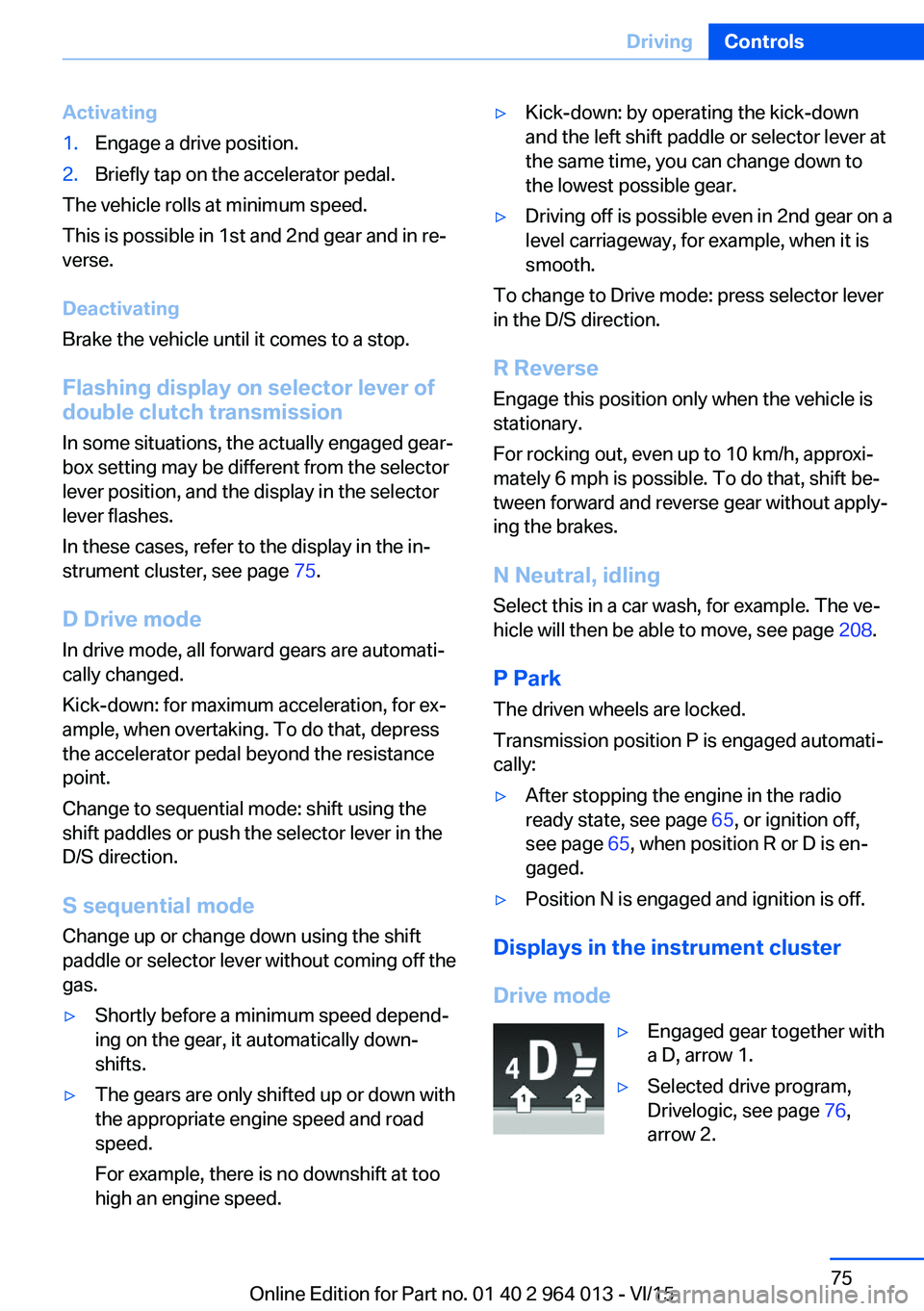
▷Engaged gear together with
a D, arrow 1.▷Selected drive program,
Drivelogic, see page 76,
arrow 2.Seite 75DrivingControls75
Online Edition for Part no. 01 40 2 964 013 - VI/15
Page 81 of 228

there is a very short distance to a vehicle
ahead.
Increase distance.
Flashing: acute warning in the event of an im‐
mediate collision if the vehicle approaches an‐
other vehicle with relatively high differential
speed.
Engage by braking and swerving as required.
Person warning Symbol in the instrument cluster.If there is a risk of collision with a de‐
tected person, the symbol lights up and
a signal sounds.
Yellow lights
Anti-lock Brake System, ABS Avoid abrupt braking if possible. Brak‐
ing force reinforcement faulty. Con‐
sider longer braking distance. Have this
immediately checked by a Service Centre or a
qualified specialist workshop.
Dynamic Stability Control DSC Flashing: DSC is regulating the accel‐
eration and braking forces. The vehicle
is stabilised. Decrease speed and ad‐
just driving style to the road conditions.
Illuminating: DSC has failed. Have system
checked by a Service Centre or a qualified
specialist workshop.
For further information see Dynamic Stability
Control, DSC, see page 124.
Dynamic Stability Control DSC deactivated Dynamic Stability Control DSC is
switched off.
For further information see Dynamic
Stability Control DSC, see page 124.M Dynamic Mode
M Dynamic Mode MDM is switched on.
For more information, see M Dynamic
Mode, see page 125.
Also flashing: MDM regulates accelera‐
tion and braking forces. The vehicle is
stabilised.
Illuminated: MDM has failed. Have sys‐
tem checked by a Service Centre or a
qualified specialist workshop.
For more information, see M Dynamic
Mode, see page 125.
Runflat indicator RPA The runflat indicator reports a pressure
loss in a tyre.
Reduce your speed and carefully stop
the vehicle. Avoid violent or sudden braking
and steering manoeuvres.
For more information, see Runflat indicator,
see page 109.
Tyre Pressure Monitor TPM Illuminating: the Tyre Pressure Monitor
reports a pressure loss in a tyre.
Reduce your speed and carefully stop
the vehicle. Avoid violent or sudden braking
and steering manoeuvres.
Flashing and then illuminating continuously: no
flat tyres or loss of tyre pressure can be detec‐
ted.▷Fault due to systems or devices with the
same frequency: the system is automati‐
cally reactivated upon leaving the field of
interference.▷TPM could not shut down the reset: exe‐
cute a reset of the system again.Seite 81DisplaysControls81
Online Edition for Part no. 01 40 2 964 013 - VI/15
Page 99 of 228
Parking lights
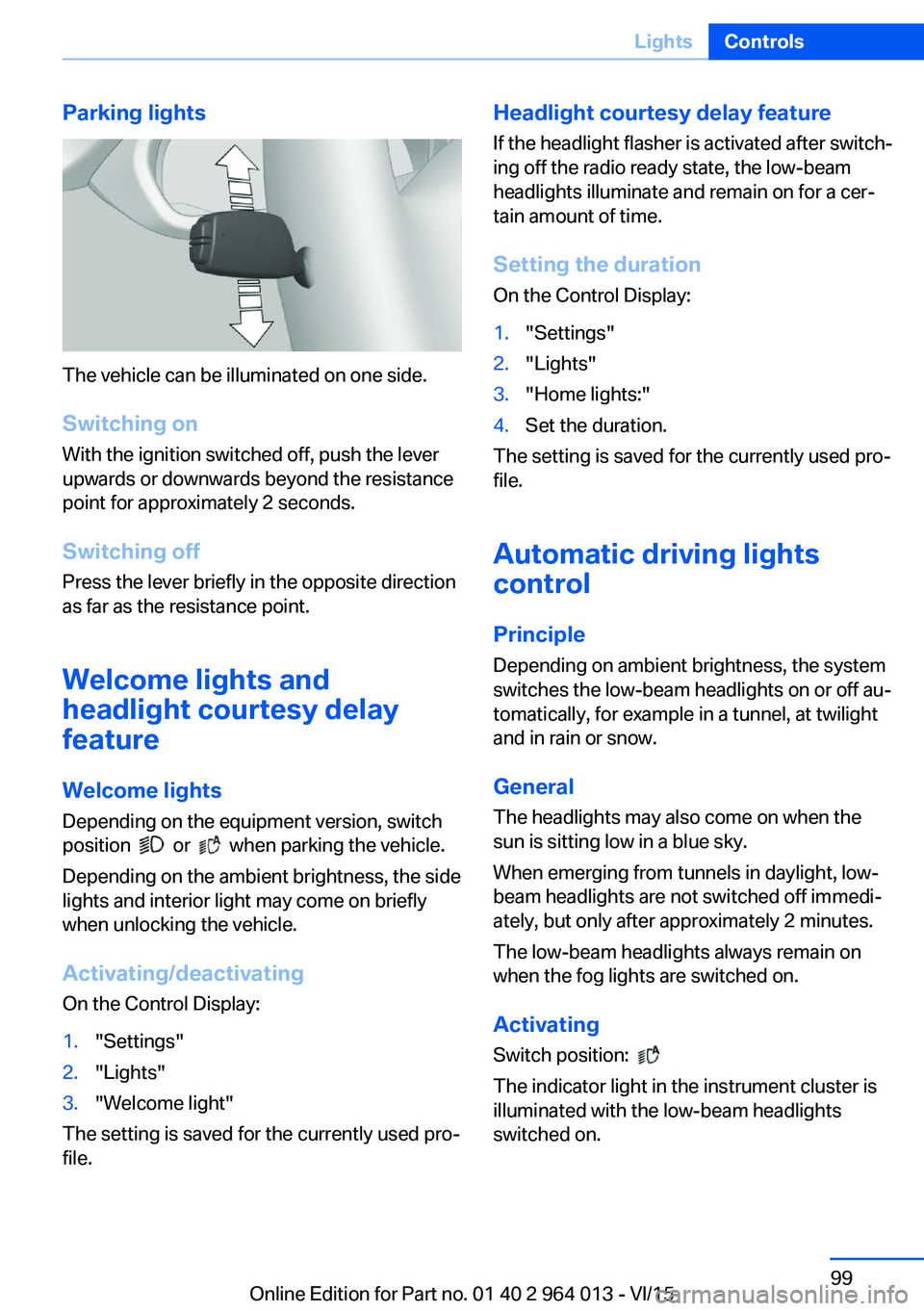
The vehicle can be illuminated on one side.
Switching on With the ignition switched off, push the lever
upwards or downwards beyond the resistance
point for approximately 2 seconds.
Switching off Press the lever briefly in the opposite direction
as far as the resistance point.
Welcome lights and
headlight courtesy delay
feature
Welcome lights Depending on the equipment version, switch
position
or when parking the vehicle.
Depending on the ambient brightness, the side
lights and interior light may come on briefly
when unlocking the vehicle.
Activating/deactivating
On the Control Display:
1."Settings"2."Lights"3."Welcome light"
The setting is saved for the currently used pro‐
file.
Headlight courtesy delay feature
If the headlight flasher is activated after switch‐
ing off the radio ready state, the low-beam
headlights illuminate and remain on for a cer‐
tain amount of time.
Setting the duration
On the Control Display:1."Settings"2."Lights"3."Home lights:"4.Set the duration.
The setting is saved for the currently used pro‐
file.
Automatic driving lightscontrol
Principle Depending on ambient brightness, the system
switches the low-beam headlights on or off au‐
tomatically, for example in a tunnel, at twilight
and in rain or snow.
General The headlights may also come on when the
sun is sitting low in a blue sky.
When emerging from tunnels in daylight, low-
beam headlights are not switched off immedi‐
ately, but only after approximately 2 minutes.
The low-beam headlights always remain on
when the fog lights are switched on.
Activating Switch position:
The indicator light in the instrument cluster is
illuminated with the low-beam headlights
switched on.
Seite 99LightsControls99
Online Edition for Part no. 01 40 2 964 013 - VI/15