2016 BMW M4 wheel
[x] Cancel search: wheelPage 76 of 228
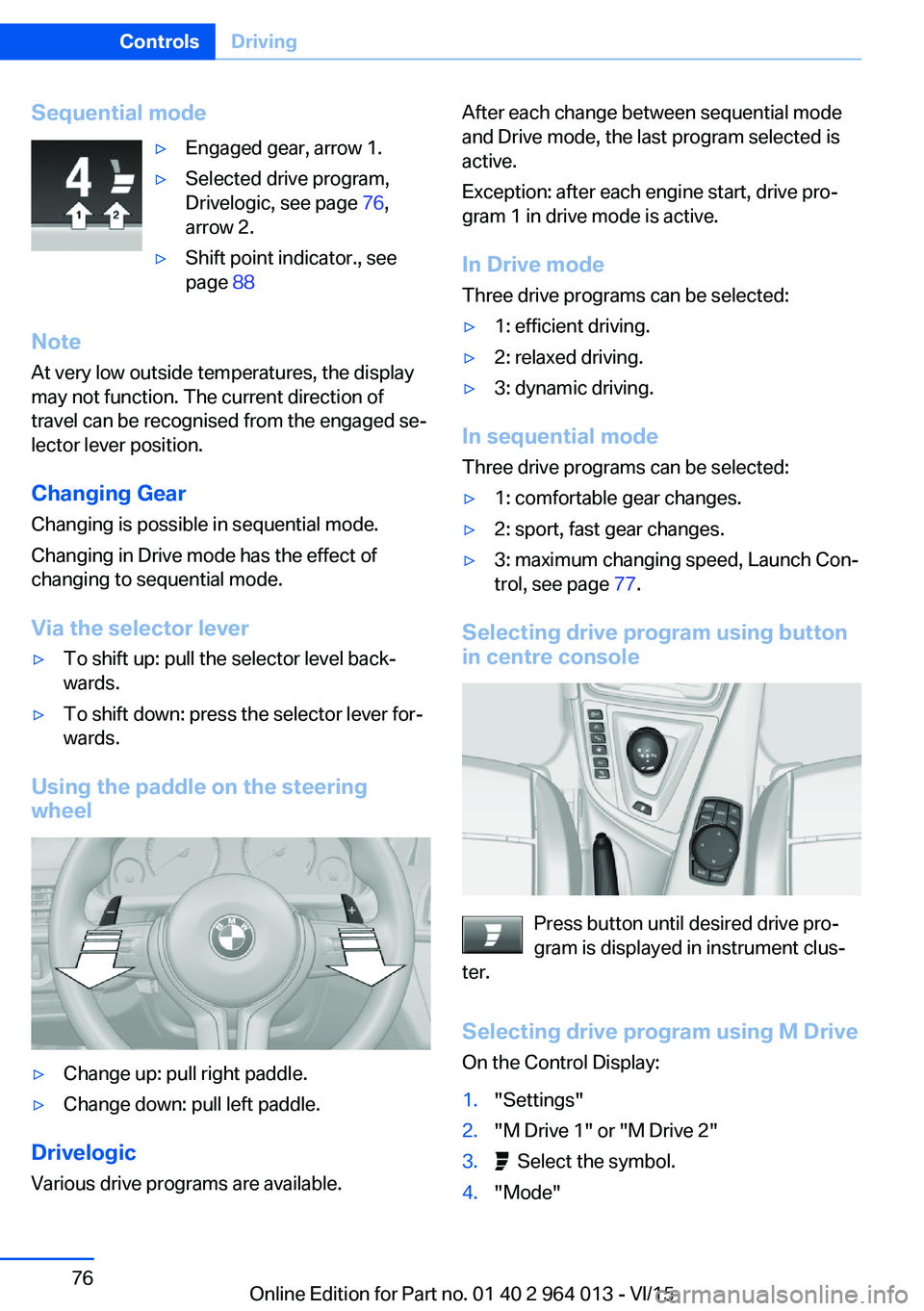
Sequential mode▷Engaged gear, arrow 1.▷Selected drive program,
Drivelogic, see page 76,
arrow 2.▷Shift point indicator., see
page 88
Note
At very low outside temperatures, the display
may not function. The current direction of
travel can be recognised from the engaged se‐
lector lever position.
Changing Gear
Changing is possible in sequential mode.
Changing in Drive mode has the effect of
changing to sequential mode.
Via the selector lever
▷To shift up: pull the selector level back‐
wards.▷To shift down: press the selector lever for‐
wards.
Using the paddle on the steering
wheel
▷Change up: pull right paddle.▷Change down: pull left paddle.
Drivelogic
Various drive programs are available.
After each change between sequential mode
and Drive mode, the last program selected is
active.
Exception: after each engine start, drive pro‐
gram 1 in drive mode is active.
In Drive mode Three drive programs can be selected:▷1: efficient driving.▷2: relaxed driving.▷3: dynamic driving.
In sequential modeThree drive programs can be selected:
▷1: comfortable gear changes.▷2: sport, fast gear changes.▷3: maximum changing speed, Launch Con‐
trol, see page 77.
Selecting drive program using button
in centre console
Press button until desired drive pro‐
gram is displayed in instrument clus‐
ter.
Selecting drive program using M Drive
On the Control Display:
1."Settings"2."M Drive 1" or "M Drive 2"3. Select the symbol.4."Mode"Seite 76ControlsDriving76
Online Edition for Part no. 01 40 2 964 013 - VI/15
Page 77 of 228
5.Turn the Controller until the desired set‐
ting is reached and press the Controller.▷"D"Drive Mode.▷"S"Sequential mode.6."Gear position"7.Turn the Controller until the desired set‐
ting is reached and press the Controller.8.Set other drive programs as necessary.
Setting is immediately accepted with ac‐
tive M Drive.
To activate the desired M Drive with the selec‐
ted settings, press the corresponding button
on the steering wheel:
▷▷
WARNING
Depending on the settings, DSC may
only be available to a limited extent or not at all.
Danger of accident or damage to property. Ob‐
serve the settings for DSC in M Drive and react
actively if necessary. Adjust the driving style
and react if necessary.◀
Display in the instrument cluster Selected drive program corre‐
sponds to the number of illumi‐
nated fields.
Launch Control
Principle
Launch Control allows optimum acceleration
when driving off on a non-slip road surface.
General
Using Launch Control leads to preliminary component wear, as this function represents a
very heavy load for the vehicle.
Do not use Launch Control when running in,
see page 162.
Requirements
Launch Control is available with an engine at
operating temperature, so after an uninterrup‐
ted drive of at least 10 km, approximately
6 miles.
To start with Launch Control, do not engage
the steering wheel.
Activating Launch Control1.Deactivate Dynamic Stability Control, see
page 124.2.Select sequential mode with gear 1 and
drive program 3.3.With the engine running, depress the brake
with the left foot.4.Depress accelerator pedal fully.
The engine speed when driving off is regu‐
lated.
The flag symbol appears in the instrument
cluster.5.Using the Cruise Control, change the en‐
gine speed when driving off by 500 rpm.6.Release brake, vehicle accelerates. Con‐
tinue to press accelerator pedal.
Upshifting happens automatically as long
as the accelerator pedal is fully depressed.
Launch Control is only available again after a
certain distance has been travelled.
System limits
This gearbox has overheat protection, which
protects the clutch against extreme loads.
▷Indicator light illuminates yellow:
gearbox too hot.
Avoid high engine load and fre‐
quent driving off.▷Indicator light illuminates red: gearbox
overheated.Seite 77DrivingControls77
Online Edition for Part no. 01 40 2 964 013 - VI/15
Page 78 of 228
Moderate continued driving possible. Stop
at the next opportunity, stop the engine
and allow the gearbox to cool.
Avoid frequent, heavy driving off and on up‐
ward inclines, do not hold the vehicle by
slightly giving gas with sliding clutch, other‐
wise the gearbox may overheat.
In traffic queues or at very low speeds, use the
Low Speed Assistant, see page 74.
M Engine Dynamics Control
Principle The M Engine Dynamics Control affects the
response of the vehicle to movements of the
accelerator pedal.
Programs Possibilities for adjusting the responsiveness:
▷"Efficient": efficient, comfortable. Mini‐
mised consumption
Ideal, for example, in city traffic or on snow▷"Sport": sporty, dynamic.▷"Sport Plus": spontaneous, direct. Maxi‐
mum dynamics
Selecting program
Via M Drive On the Control Display:
1."Settings"2."M Drive 1" or "M Drive 2"3. Select the symbol.4.Select the desired channel.
Setting is immediately accepted with ac‐
tive M Drive.
To activate the desired M Drive with the selec‐
ted settings, press the corresponding button
on the steering wheel:
▷▷
Using the button
Press button until the desired program is
displayed in the instrument cluster.
Display in the instrument cluster Engine dynamics control with selected
programs with activated display of the
system states of the driving dynamics,
see page 86.
Seite 78ControlsDriving78
Online Edition for Part no. 01 40 2 964 013 - VI/15
Page 82 of 228

▷Wheel without TPM electronics is fitted:
have the vehicle checked by a Service
Partner or a qualified specialist workshop if
necessary.▷Malfunction: have the system checked by a
Service Partner or a qualified specialist
workshop.
For more information, see Tyre Pressure Moni‐
tor, see page 107.
Steering system Steering system faulty.
Have steering system checked by a
Service Centre or a qualified specialist
workshop.
Engine functions Have vehicle checked by a Service
Centre or a qualified specialist work‐
shop.
For further information see socket for on-
board diagnosis, see page 192.
Lane departure warning System is switched on and warns you
under certain conditions if you leave a
detected lane without indicating first.
For further information see Lane Departure
Warning, see page 115.
Manual speed limiter Illuminating: the system is switched on.
Flashing: set speed limit exceeded. An
acoustic signal may sound.
Reduce speed or deactivate system.
Rear fog lights Rear fog lights are switched on.
For further information see rear fog lights, see
page 102.
Green lights Turn indicator Turn signal is switched on.If the indicator light flashes more rap‐
idly than usual, a turn signal light has
failed.
For further information see turn indicator, see
page 70.
Side lights, driving lights Side lights or driving lights are
switched on.
For further information see side lights/
low-beam headlights, low-beam headlight
control, see page 98.
High-beam assistance High-beam assistance is switched on.
High-beam headlights are switched on
and off automatically depending on the
traffic situation.
For further information see high beam assis‐
tance, see page 100.
Cruise Control The system is switched on. The speed
set using the control functions on the
steering wheel is maintained.
Blue lights
High-beam headlights High-beam headlights are switched on.
For further information see high-beam
headlights, see page 70.Seite 82ControlsDisplays82
Online Edition for Part no. 01 40 2 964 013 - VI/15
Page 90 of 228
System limits
The function may be disabled or inaccurate
under certain conditions, for example:▷In thick fog and heavy rain or snow.▷If road signs are obscured by objects.▷If the vehicle is moving too close to the ve‐
hicle ahead.▷With bright oncoming light.▷When the windscreen in front of the rear-
view mirror is covered with condensation,
dirt, stickers, etc.▷Due to possible wrong detections of the
camera.▷If the speed limits saved in the navigation
system are wrong.▷In areas not covered by the navigation sys‐
tem.▷If there are deviations in relation to the nav‐
igation, for example due to changes in the
road routing.▷On overtaking buses or trucks with speed
stickers.▷If traffic signs do not correspond to the
standard.▷During the calibration process of the cam‐
era immediately after the vehicle is sup‐
plied.
Selection lists in the
instrument cluster
Principle Depending on equipment, the following can be
displayed or operated via the buttons and the
knurled wheel on the steering wheel and using
the displays in the instrument cluster and
Head-Up Display:
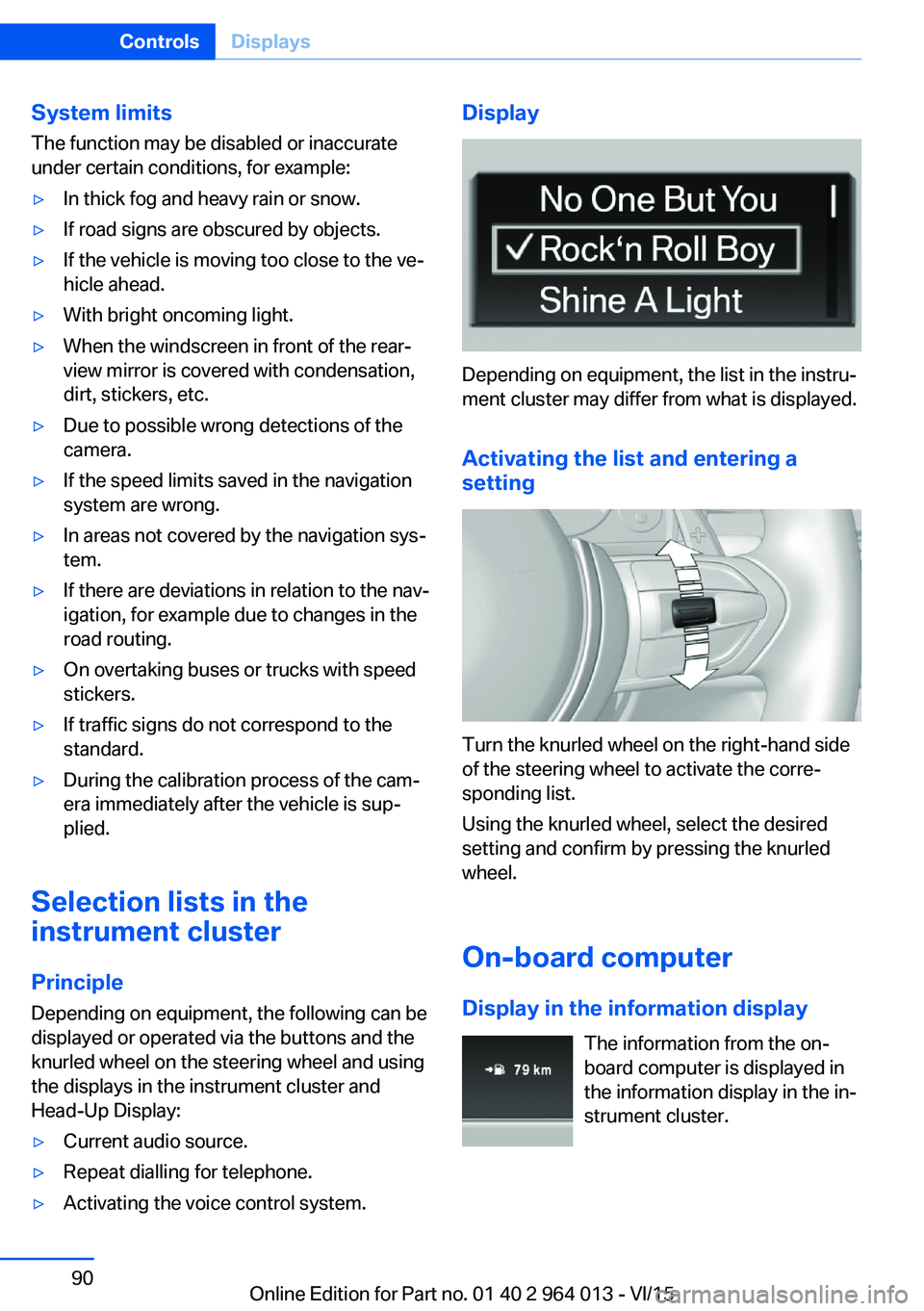
▷Current audio source.▷Repeat dialling for telephone.▷Activating the voice control system.Display
Depending on equipment, the list in the instru‐
ment cluster may differ from what is displayed.
Activating the list and entering a
setting
Turn the knurled wheel on the right-hand side
of the steering wheel to activate the corre‐
sponding list.
Using the knurled wheel, select the desired
setting and confirm by pressing the knurled
wheel.
On-board computer
Display in the information display The information from the on-
board computer is displayed in
the information display in the in‐
strument cluster.
Seite 90ControlsDisplays90
Online Edition for Part no. 01 40 2 964 013 - VI/15
Page 98 of 228
LightsVehicle equipmentThis chapter describes all standard, national
and special equipment provided in the model
series. Equipment not available in the vehicle is
therefore also described, for example the se‐
lected special equipment or national version.
This also applies to safety-relevant functions
and systems. Comply with the relevant na‐
tional regulations when using the correspond‐
ing functions and systems.
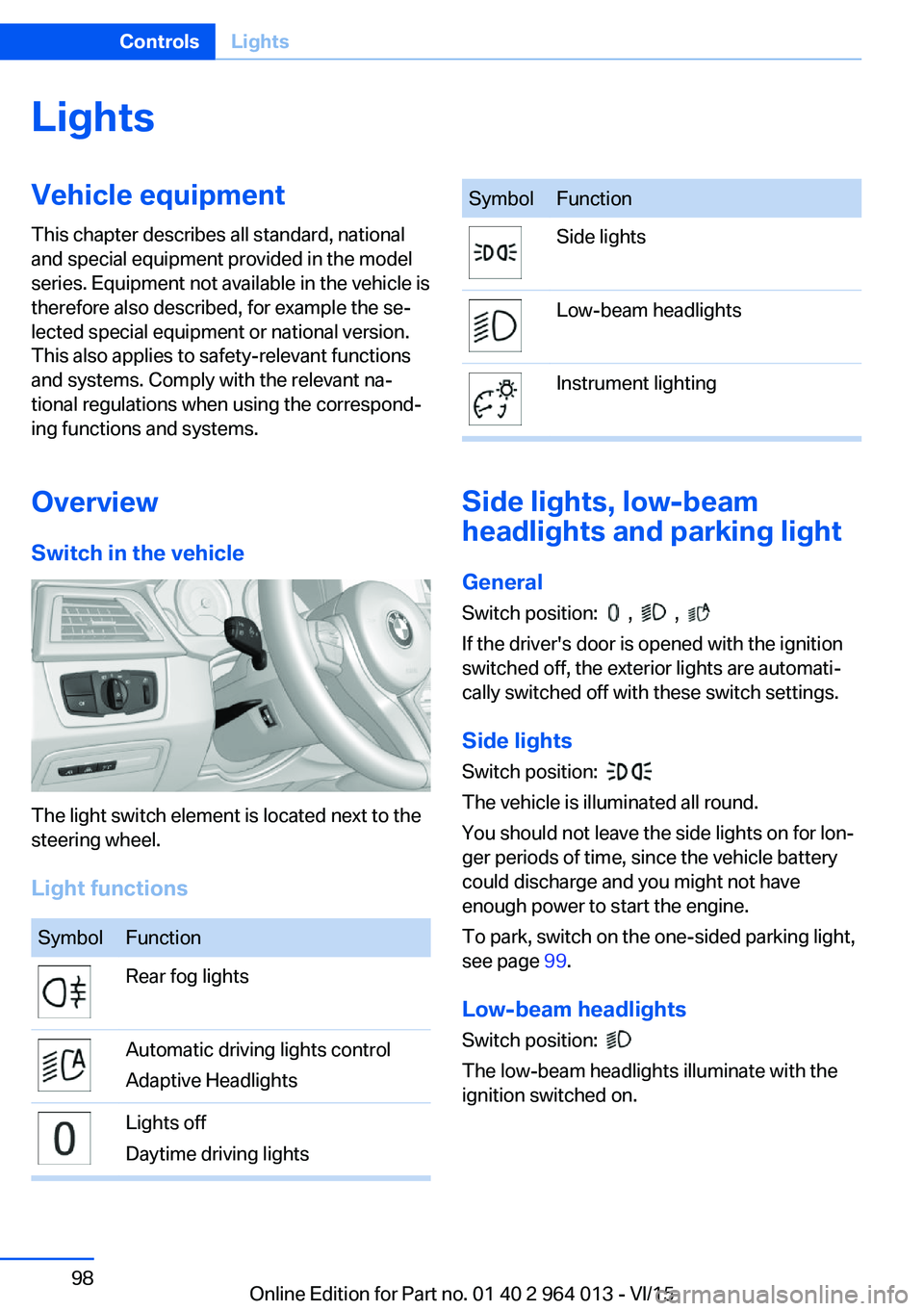
Overview Switch in the vehicle
The light switch element is located next to the
steering wheel.
Light functions
SymbolFunctionRear fog lightsAutomatic driving lights control
Adaptive HeadlightsLights off
Daytime driving lightsSymbolFunctionSide lightsLow-beam headlightsInstrument lighting
Side lights, low-beam
headlights and parking light
General
Switch position:
, ,
If the driver's door is opened with the ignition
switched off, the exterior lights are automati‐
cally switched off with these switch settings.
Side lights
Switch position:
The vehicle is illuminated all round.
You should not leave the side lights on for lon‐
ger periods of time, since the vehicle battery
could discharge and you might not have
enough power to start the engine.
To park, switch on the one-sided parking light,
see page 99.
Low-beam headlights Switch position:
The low-beam headlights illuminate with the
ignition switched on.
Seite 98ControlsLights98
Online Edition for Part no. 01 40 2 964 013 - VI/15
Page 102 of 228
▷When the windscreen in front of the rear-
view mirror is covered with condensation,
dirt, stickers, labels, etc.
Fog lights
Rear fog lights
The low-beam headlights must be switched
on.
Press the button. The yellow indicator
light is illuminated.
If automatic driving lights control, see page 99,
has been activated, the low-beam headlights
come on automatically when the rear fog lights
are switched on.
Left-hand/right-hand traffic GeneralWhen driving in countries where the opposite
rule of the road applies, you need to prevent
your headlights from dazzling oncoming vehi‐
cles.
Xenon headlight
Light distribution of the headlights avoids daz‐
zling of the low-beam headlights when driving
in a country in which the traffic drives on the
opposite side.
Adaptive Headlights
When driving in a country where you drive on
the opposite side of the road from the country
the vehicle is licensed, do not drive with the
setting, otherwise this could cause a daz‐
zling effect from the variable light distribution.
LED headlights The Service Partner or a qualified specialist
workshop has light benders available. Proceed
in accordance with the enclosed information
when affixing the light benders to the head‐
lights.
Adaptive Headlights
When driving in a country where you drive on
the opposite side of the road from the country
the vehicle is licensed, do not drive with the
setting, otherwise this could cause a daz‐
zling effect from the variable light distribution.
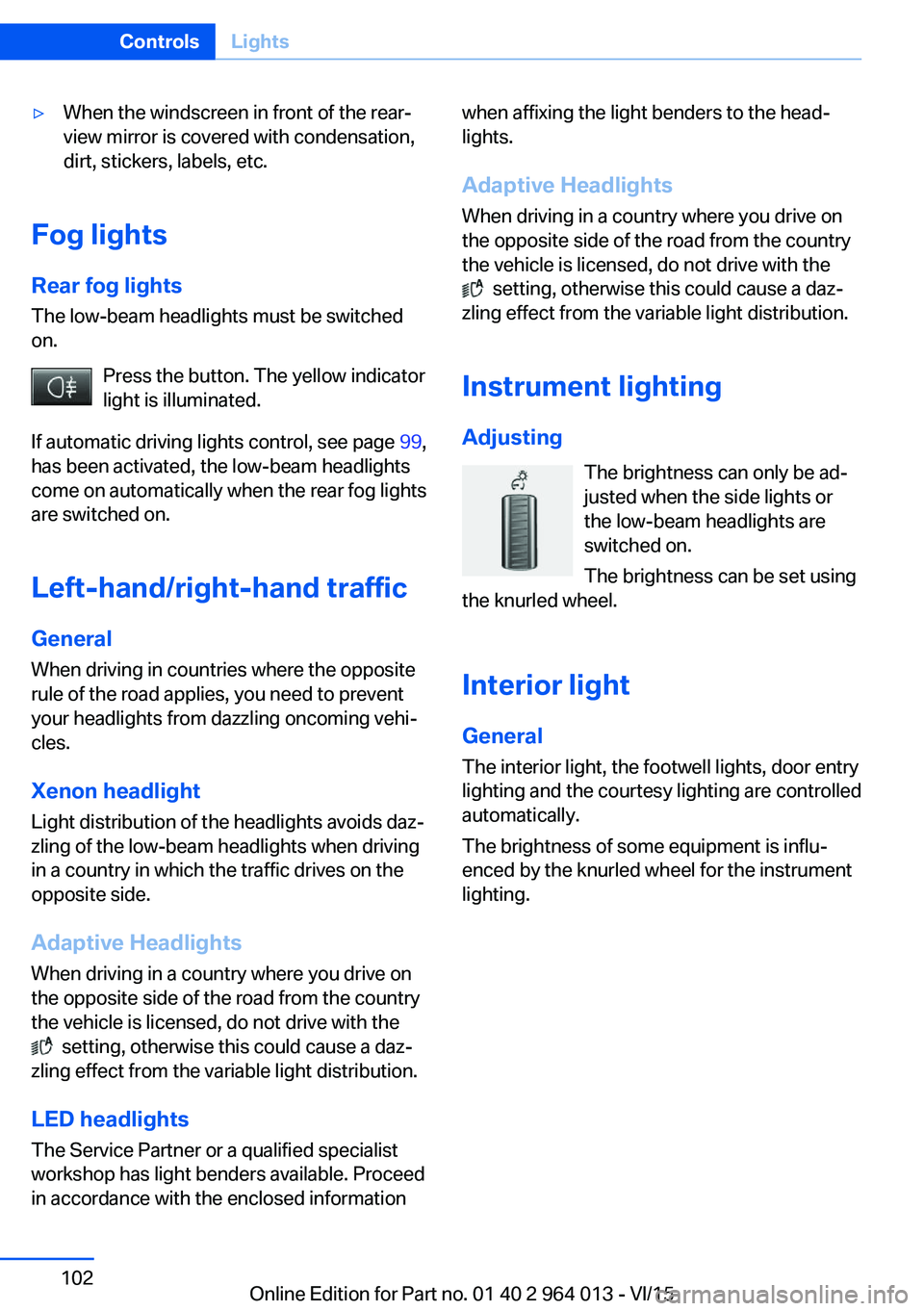
Instrument lightingAdjusting The brightness can only be ad‐justed when the side lights or
the low-beam headlights are
switched on.
The brightness can be set using
the knurled wheel.
Interior light GeneralThe interior light, the footwell lights, door entry
lighting and the courtesy lighting are controlled
automatically.
The brightness of some equipment is influ‐
enced by the knurled wheel for the instrument
lighting.
Seite 102ControlsLights102
Online Edition for Part no. 01 40 2 964 013 - VI/15
Page 103 of 228
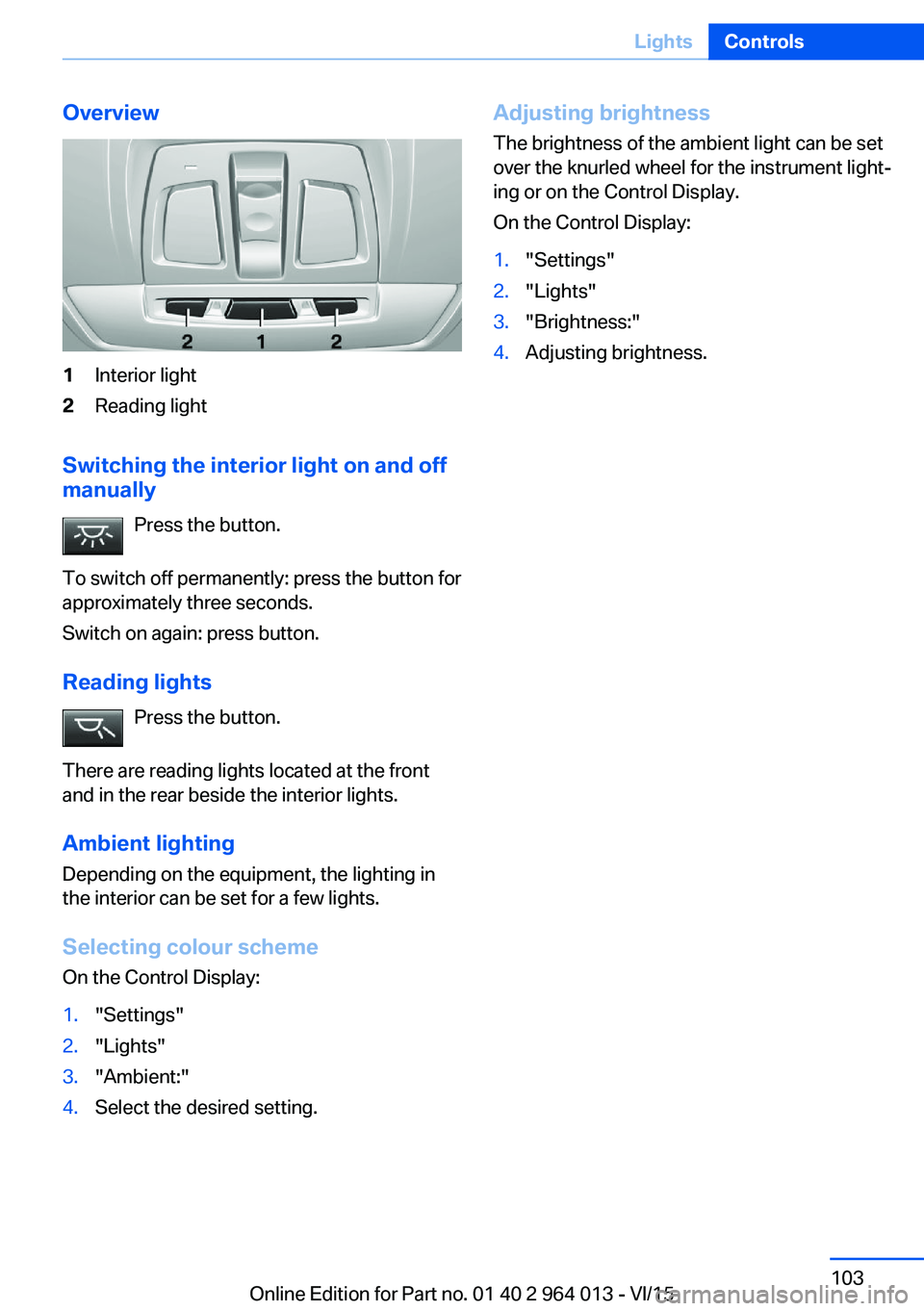
Overview1Interior light2Reading light
Switching the interior light on and off
manually
Press the button.
To switch off permanently: press the button for
approximately three seconds.
Switch on again: press button.
Reading lights Press the button.
There are reading lights located at the front
and in the rear beside the interior lights.
Ambient lighting
Depending on the equipment, the lighting in
the interior can be set for a few lights.
Selecting colour scheme
On the Control Display:
1."Settings"2."Lights"3."Ambient:"4.Select the desired setting.Adjusting brightness
The brightness of the ambient light can be set
over the knurled wheel for the instrument light‐
ing or on the Control Display.
On the Control Display:1."Settings"2."Lights"3."Brightness:"4.Adjusting brightness.Seite 103LightsControls103
Online Edition for Part no. 01 40 2 964 013 - VI/15