2016 BMW M4 wheel
[x] Cancel search: wheelPage 130 of 228
▷When interrupted: press once.
The indicators turn off. The saved desired
speed is deleted.
Interrupting When the system is activated, press
the button on the steering wheel.
The system interrupts automatically in the
following situations:
▷If the brake is applied.▷If the clutch is depressed for a few seconds
or released with no gear engaged.▷If too high a gear has been engaged for the
speed.▷If MDM is activated or DSC is deactivated.▷If DSC intervenes.
Maintaining, saving, changing speed
Notes WARNING
The desired speed can be inadvertently
set incorrectly or called up. Danger of acci‐
dents. Adapt the desired speed to the driving
conditions. Observe the traffic situation and in‐
tervene actively if the situation warrants it.◀
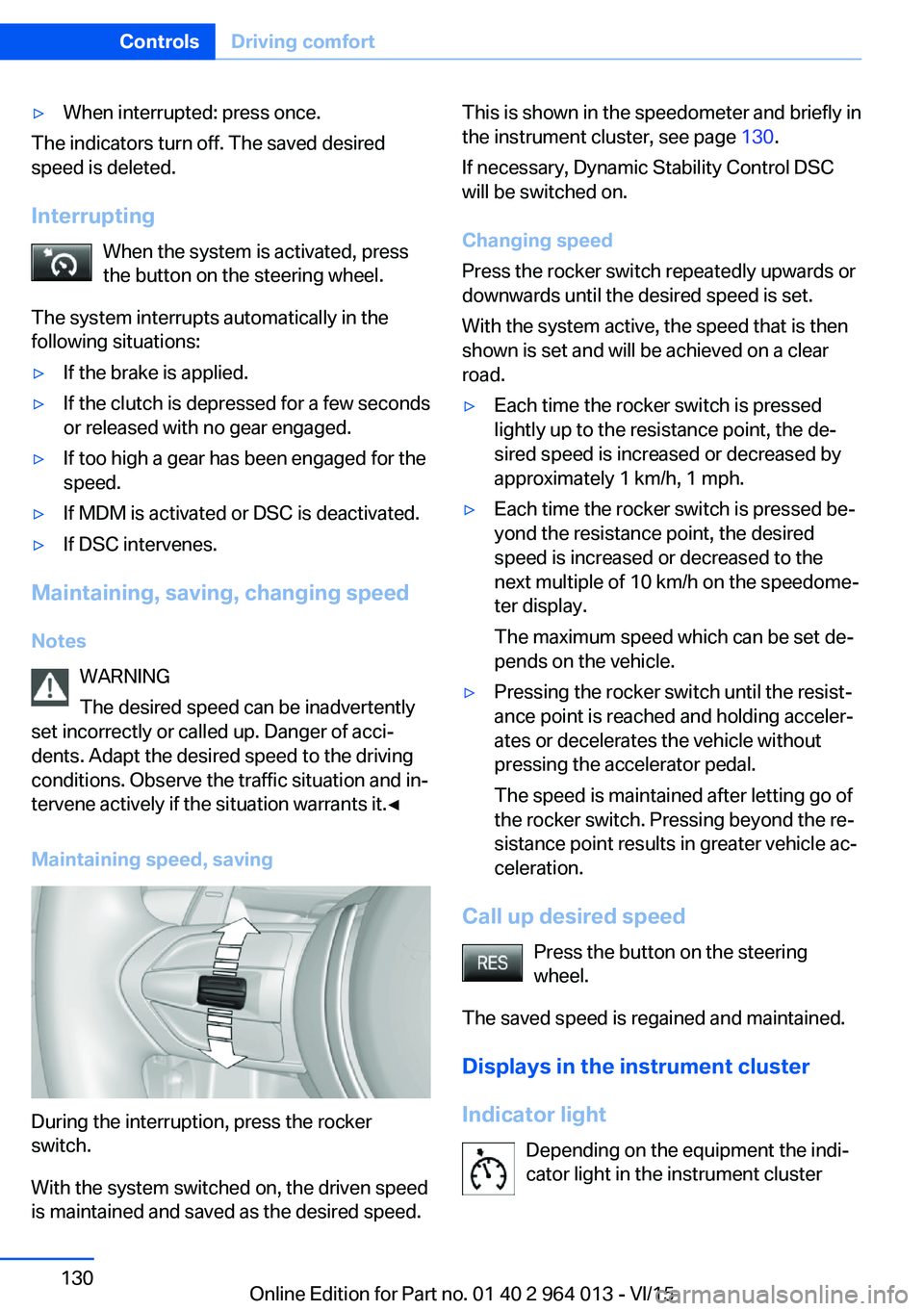
Maintaining speed, saving
During the interruption, press the rocker
switch.
With the system switched on, the driven speed
is maintained and saved as the desired speed.
This is shown in the speedometer and briefly in
the instrument cluster, see page 130.
If necessary, Dynamic Stability Control DSC
will be switched on.
Changing speed
Press the rocker switch repeatedly upwards or
downwards until the desired speed is set.
With the system active, the speed that is then
shown is set and will be achieved on a clear
road.▷Each time the rocker switch is pressed
lightly up to the resistance point, the de‐
sired speed is increased or decreased by
approximately 1 km/h, 1 mph.▷Each time the rocker switch is pressed be‐
yond the resistance point, the desired
speed is increased or decreased to the
next multiple of 10 km/h on the speedome‐
ter display.
The maximum speed which can be set de‐
pends on the vehicle.▷Pressing the rocker switch until the resist‐
ance point is reached and holding acceler‐
ates or decelerates the vehicle without
pressing the accelerator pedal.
The speed is maintained after letting go of
the rocker switch. Pressing beyond the re‐
sistance point results in greater vehicle ac‐
celeration.
Call up desired speed
Press the button on the steering
wheel.
The saved speed is regained and maintained.
Displays in the instrument cluster
Indicator light Depending on the equipment the indi‐
cator light in the instrument cluster
Seite 130ControlsDriving comfort130
Online Edition for Part no. 01 40 2 964 013 - VI/15
Page 135 of 228
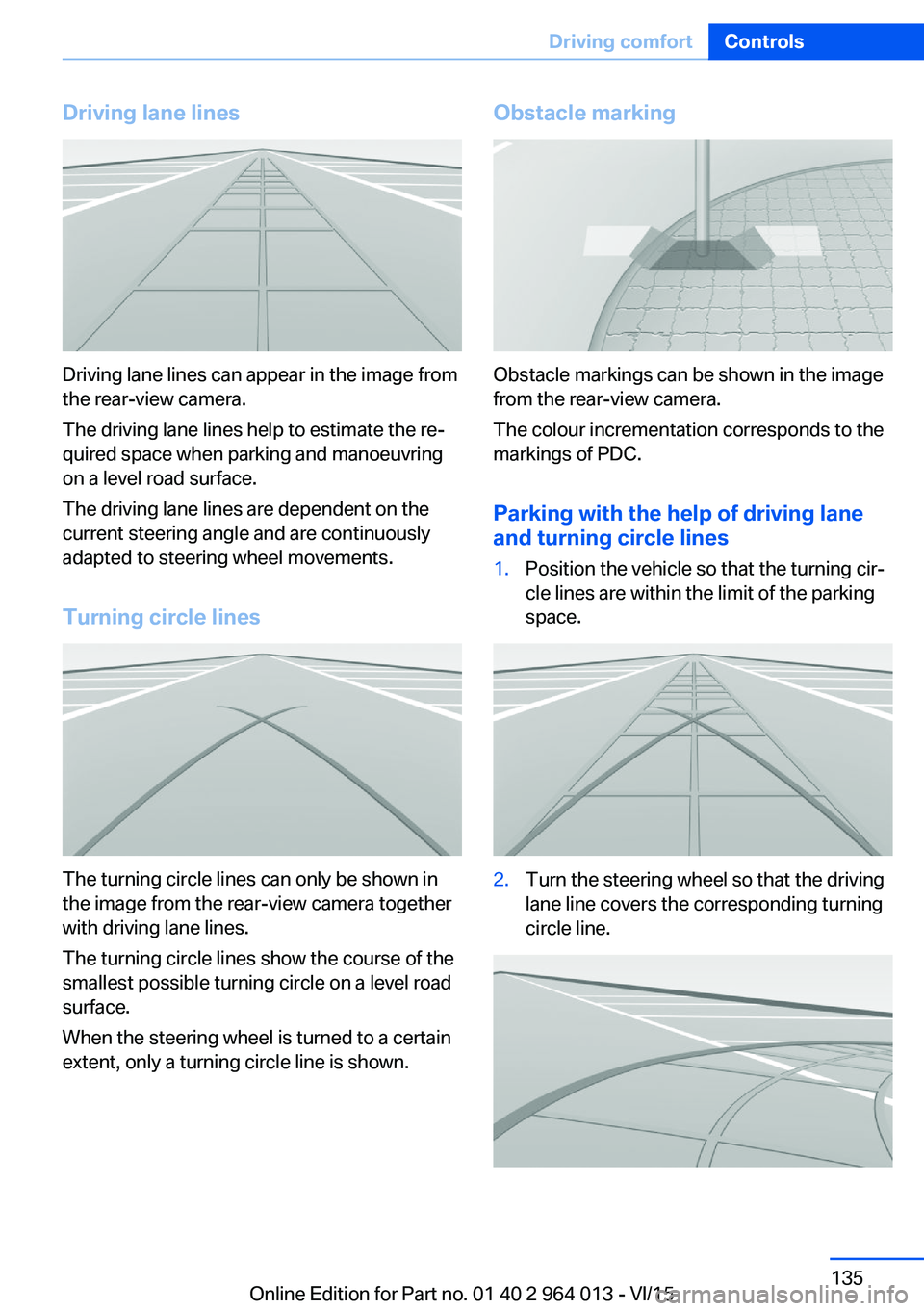
Driving lane lines
Driving lane lines can appear in the image from
the rear-view camera.
The driving lane lines help to estimate the re‐
quired space when parking and manoeuvring
on a level road surface.
The driving lane lines are dependent on the
current steering angle and are continuously
adapted to steering wheel movements.
Turning circle lines
The turning circle lines can only be shown in
the image from the rear-view camera together
with driving lane lines.
The turning circle lines show the course of the
smallest possible turning circle on a level road
surface.
When the steering wheel is turned to a certain
extent, only a turning circle line is shown.
Obstacle marking
Obstacle markings can be shown in the image
from the rear-view camera.
The colour incrementation corresponds to the
markings of PDC.
Parking with the help of driving lane
and turning circle lines
1.Position the vehicle so that the turning cir‐
cle lines are within the limit of the parking
space.2.Turn the steering wheel so that the driving
lane line covers the corresponding turning
circle line.Seite 135Driving comfortControls135
Online Edition for Part no. 01 40 2 964 013 - VI/15
Page 139 of 228

2.Turn the controller until the desired setting
is reached and press the controller.
Displaying the turning circle and
driving lane line
▷The static red turning circle line indicates
the space requirement to the side with full
steering angle.▷The variable green driving lane line helps to
estimate the actual space requirement to
the side.
The lane line depends on the engaged
gear and the current steering angle. The
lane line is continuously adjusted by the
steering wheel movement.
"Parking guidance lines"
The turning circle and driving lane lines are
displayed.
System limits
Top View cannot be used in the following sit‐
uations:
▷With a door open.▷With the boot lid open.▷With an exterior mirror folded in.▷In poor light conditions.
In some of these situations a Check Control
message is displayed.
Park Assistant
Principle
The system supports you when parking in par‐
allel to the road.
Ultrasonic sensors measure parking spaces on
both sides of the vehicle.
The park assistant calculates the ideal parking
line and takes over steering during the process
of parking.
When parking up, also follow the visual and au‐
dible information and notes of the PDC, the
Park Assistant and the rear-view camera, and
respond accordingly.
The park assistant incorporates Park Distance
Control, PDC, see page 131.
Notes WARNING
The system does not take your personal
responsibility from you when you are estimat‐
ing the traffic situation. Due to limits of the sys‐
tem, it cannot respond independently in a rea‐
sonable way in all traffic conditions. Danger of
accidents. Adapt driving style to the driving
conditions. Observe the traffic situation and in‐
tervene actively if the situation warrants it.◀
ATTENTION
The Park Assistant may steer across
curbs or up onto curbs. Danger of damage to
property. Observe the traffic situation and in‐
tervene actively if the situation warrants it.◀
An engine stopped by the Auto Start Stop
function is automatically started by activating
the Park Assistant.Seite 139Driving comfortControls139
Online Edition for Part no. 01 40 2 964 013 - VI/15
Page 142 of 228
situation and the area around the vehicle and
intervene actively in the corresponding situa‐
tions.◀1.Switch on the Park Assistant and activate,
if applicable.
Status of the parking space search is dis‐
played on the Control Display.2.Follow the instructions on the Control Dis‐
play.
To achieve an optimum parking position,
wait for the automatic steering process af‐
ter changing gear at standstill.
The end of the parking process is dis‐
played on the Control Display.3.Straighten up the parking position, if appli‐
cable.
Cancelling manually
You can cancel the Park Assistant at any time:
▷ "Park Assist" Select the symbol on the
Control Display.▷Press the button.
Cancelling automatically
The system automatically cancels in the
following situations:
▷When holding firmly onto the steering
wheel or even if steering is done.▷When selecting gear, which does not cor‐
respond to the information on the Control
Display.▷At speeds over approx. 10 km/h, approx.
6 mph.▷Possibly on snow-covered or slippery road
surfaces.▷Any obstacles difficult to get over, for ex‐
ample kerbstones.▷With obstacles that suddenly arise.▷If the Park Distance Control PDC shows
gaps are too small.▷When a maximum number of parking at‐
tempts or parking time is exceeded.▷If turn indicator is set opposite to desired
parking side.▷When changing to other functions on the
Control Display.
A Check Control message is shown.
Flashing display on selector lever of
double clutch transmission
In some situations, the actually engaged gear‐
box setting may be different from the selector
lever position after a cancellation of function,
and the display in the selector lever flashes.
In these cases, refer to the display in the in‐
strument cluster, see page 75.
Continuing
You can continue a cancelled parking process,
if applicable.
For this purpose, follow the instructions on the
Control Display.
System limits
No parking support The Park Assistant does not support in the
following situations:
▷On sharp bends.
Restrictions of the function
The function can be restricted, for example in
the following situations:
▷When on uneven road surfaces, for exam‐
ple gravel roads.▷On slippery ground.▷On steep upward or downward gradients.▷If leaves have collected or snow has drifted
or been piled up in the parking space.Seite 142ControlsDriving comfort142
Online Edition for Part no. 01 40 2 964 013 - VI/15
Page 145 of 228

Air conditioning functions in detailSwitching system on/off
Switching on
Press any key, except▷Heated rear window.▷Seat heating
Switching off
In the lowest setting, press the left of
the button.
Temperature Turn the wheel to select the de‐
sired temperature.
The automatic air conditioning sets this tem‐ perature as quickly as possible, using higher
cooling or heating power if necessary. The
temperature is then maintained.
Avoid switching between different temperature
settings in rapid succession. The automatic air
conditioning will not then have sufficient time
to establish the temperature selected.
Cooling function
The interior can only be cooled when the en‐
gine is running.
Press the button.
Air is cooled and dried, then reheated
to suit the temperature setting.
Depending on weather conditions, the wind‐
screen and side windows may mist over mo‐
mentarily when the engine is started.
The cooling function is switched on automati‐
cally in the AUTO program.
When using the automatic air conditioning,
condensation water, see page 165, develops
that exits underneath the vehicle.
Maximum cooling effect Press the button.
System is set to lowest temperature,
optimum air flow and recirculated-air mode.
The air flows from the outlets for the upper
body area. Therefore open the ventilation vents.
The function is available through an outside
temperature of approximately 0 ℃/32 ℉ and
with the engine running.
The air flow can be adapted when the program
is active.
AUTO program Press the button.
The air flow, air distribution and tem‐
perature are automatically regulated.
Depending on the selected temperature, inten‐
sity AUTO program and external influences,
the air is directed towards the windscreen, side
windows, upper body, and into the footwell.
The cooling function, see page 145, is
switched on automatically in the AUTO pro‐
gram.
A condensation sensor also controls the pro‐
gram so that condensation is avoided as much
as possible.
Intensity of AUTO program
When AUTO program is switched on, auto‐
matic control of the intensity can be changed.
Pressing the button on the left or right
reduces or increases intensity.
The selected intensity is shown on the display
for automatic air conditioning.Seite 145ClimateControls145
Online Edition for Part no. 01 40 2 964 013 - VI/15
Page 147 of 228
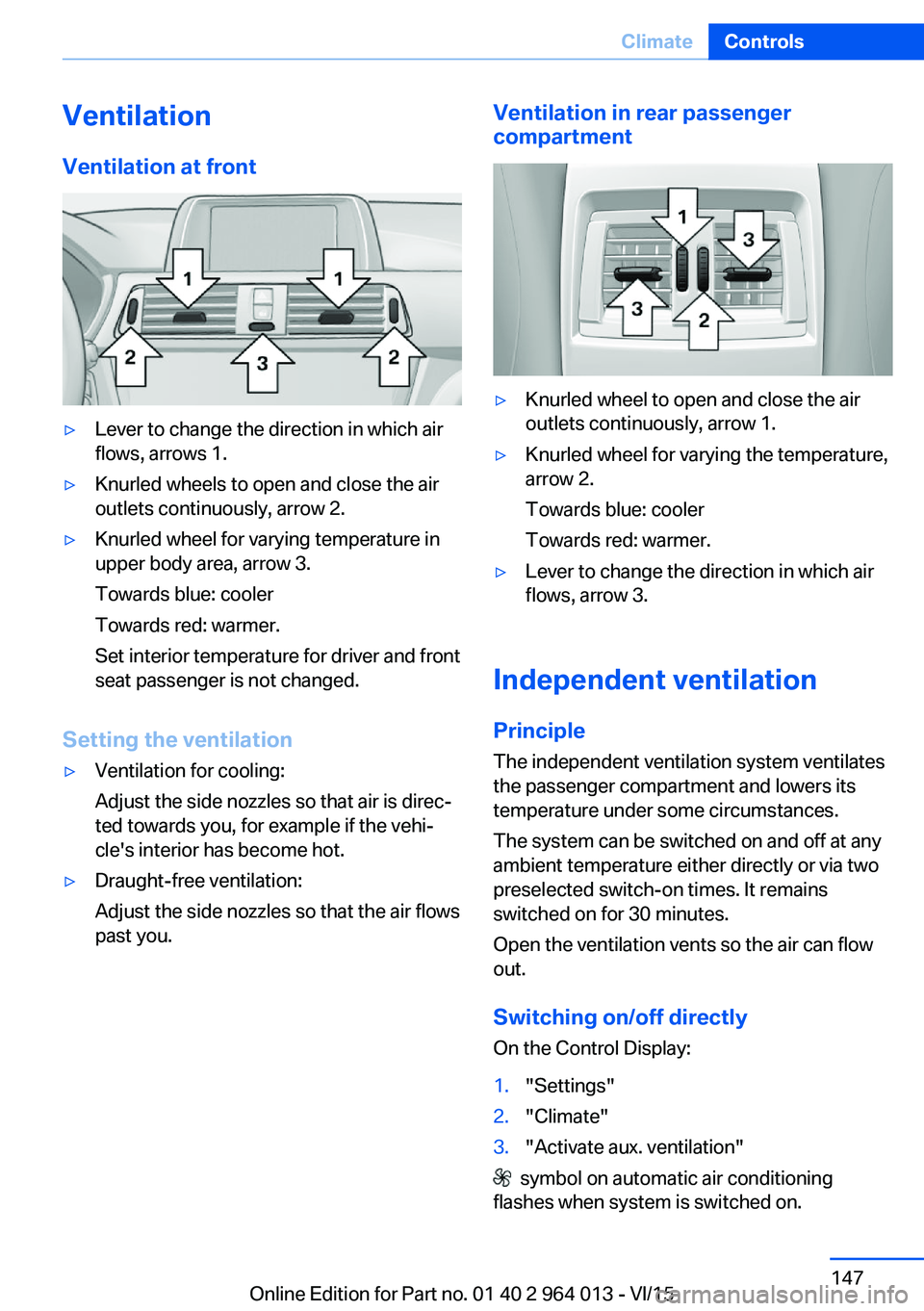
VentilationVentilation at front▷Lever to change the direction in which air
flows, arrows 1.▷Knurled wheels to open and close the air
outlets continuously, arrow 2.▷Knurled wheel for varying temperature in
upper body area, arrow 3.
Towards blue: cooler
Towards red: warmer.
Set interior temperature for driver and front
seat passenger is not changed.
Setting the ventilation
▷Ventilation for cooling:
Adjust the side nozzles so that air is direc‐
ted towards you, for example if the vehi‐
cle's interior has become hot.▷Draught-free ventilation:
Adjust the side nozzles so that the air flows
past you.Ventilation in rear passenger
compartment▷Knurled wheel to open and close the air
outlets continuously, arrow 1.▷Knurled wheel for varying the temperature,
arrow 2.
Towards blue: cooler
Towards red: warmer.▷Lever to change the direction in which air
flows, arrow 3.
Independent ventilation
Principle The independent ventilation system ventilates
the passenger compartment and lowers its
temperature under some circumstances.
The system can be switched on and off at any
ambient temperature either directly or via two
preselected switch-on times. It remains
switched on for 30 minutes.
Open the ventilation vents so the air can flow
out.
Switching on/off directly
On the Control Display:
1."Settings"2."Climate"3."Activate aux. ventilation"
symbol on automatic air conditioning
flashes when system is switched on.
Seite 147ClimateControls147
Online Edition for Part no. 01 40 2 964 013 - VI/15
Page 160 of 228
BMW M4 TechnologyVehicle equipment
This chapter describes all standard, national
and special equipment provided in the model
series. Equipment not available in the vehicle is
therefore also described, for example the se‐
lected special equipment or national version.
This also applies to safety-relevant functions
and systems. Comply with the relevant na‐
tional regulations when using the correspond‐
ing functions and systems.
High performance engine The high performance engine generates a
maximum power of 317 kW and a maximum
torque of 550 Nm from 3 litres of capacity.
With its spontaneous responsiveness, a very
broad usable engine speed range is produced.
The maximum engine speed is electronically regulated at 7,600 rpm. Due to the powerful
engine dynamics, the maximum engine speed
is limited when the vehicle is stationary.
Driving hot During the engine warm-up phase, the high
performance engine runs slightly more roughly
due to the emission control.
When the engine is cold, the exhaust has a
slightly metallic undertone, depending on the
system.
Other information for hot driving: engine speed
counter, see page 84, and engine oil tempera‐
ture, see page 84.
M compound brakes The high performance brake system has venti‐
lated compound brake discs.
Depending on design requirements, function
noises may occur when braking. However, thishas no effect on the performance, operational
safety and stability of the brakes.
Braking correctly
To keep the brake system in optimum condi‐
tion, it is desirable to load them at regular inter‐
vals depending on the nature of the vehicle.
M Carbon ceramic brakes
The high performance braking system has per‐
forated carbon ceramic brake disks and is de‐
signed for racetrack operation.
Depending on the material-specific properties, there can be increased functional noises when
braking, particularly when it is wet, shortly be‐
fore the vehicle comes to a stop. This has no
effect on performance, operational safety and
endurance of the brakes.
Due to the effect of wet and salt spray, for ex‐
ample, after using a car wash, condensation
overnight etc., the braking effect may corre‐
spond to a conventional braking system. This
can be detected as reduced braking effect and
compensated for by higher pedal pressure, as
needed.
Clean brake discs and brake calliper before
washing in an automatic car wash with a steam
sprayer or high pressure cleaner to avoid en‐
crustations and caking, for example, due to salt
crystals with a related stationary period. The cleaning effect of automatic car washes gener‐
ally not sufficient for this in the wheel area.
Also follow the information on this under vehi‐
cle washing, see page 208, and safe braking,
see page 163.Seite 160Driving hintsBMW M4 Technology160
Online Edition for Part no. 01 40 2 964 013 - VI/15
Page 164 of 228
Applying the brakes fully is the most effective
way of braking in situations in which this is
necessary.
The vehicle can be steered. Any obstacles can
be avoided with steering wheel movements
that are as calm as possible.
A pulsing of the brake pedal shows that ABS is
regulating.
In certain braking situations, the perforated
brake disks can cause functional noise. How‐
ever, this has no effect on the efficiency and
operational safety of the brakes.
Objects in the range of movement of
the pedals and in the footwell
WARNING
Objects in the driver's footwell can re‐
strict the pedal travel, or block a pedal that has
been pressed. Danger of accidents. Stow
items in the vehicle so that they are secure and
cannot get into the driver's footwell. Only use
floor mats that have been categorised as ap‐
propriate for the vehicle and that can be fas‐
tened accordingly. Do not use any loose floor
mats, and do not place several floor mats on
top of one another. Make sure that there is suf‐
ficient space for the pedals. Ensure that the
floor mats are securely reattached after having
been removed, for example for cleaning.◀
Wet roads
In damp weather, if road grit has been spread
or there is heavy rain, apply the brakes lightly
every few kilometres/miles.
In doing so, do not obstruct other road users.
The resulting heat dries the brake discs and
pads.
The braking force will be available immediately
if needed.Downhill gradients
WARNING
Even slight, continuous pressure on the
brake pedal can cause overheating, brake pad
wear or even brake system failure. Danger of
accidents. Avoid excessive loads on the
brake.◀
WARNING
When idling or with the engine switched
off, safety-relevant functions are restricted or
no longer available, for example the braking ef‐
fect of the engine or power assistance for the
braking force and steering. Danger of acci‐
dents. Do not drive at idle speed or with the
engine switched off.◀
When driving on long or steep downhill
stretches, use the gear in which the least brak‐
ing is required. Otherwise the brake system
can overheat and braking action is reduced.
Manual gearbox:
The braking effect can be additionally in‐
creased by shifting down, even into first gear, if
applicable.
M double clutch transmission:
The braking action of the engine can be boos‐
ted further by shifting down in sequential
mode, see page 75.
Corrosion of the brake disc Corrosion of the brake discs and contamina‐
tion of the brake pads increase with the
following circumstances:▷Low mileage.▷Extended periods when the vehicle is not
used.▷Infrequent use of the brakes.
Corrosion occurs when the minimum pressure
that must be exerted by the pads during brake
applications to clean the discs is not reached.
Seite 164Driving hintsDriving precautions164
Online Edition for Part no. 01 40 2 964 013 - VI/15