2016 BMW M4 air condition
[x] Cancel search: air conditionPage 136 of 228
Display settings
Brightness
With rear-view camera switched on:1. Select the symbol.2.Turn the controller until the desired setting
is reached and press the controller.
Contrast
With rear-view camera switched on:
1. Select the symbol.2.Turn the controller until the desired setting
is reached and press the controller.
System limits
Detection of objects
Very low obstacles and higher, protruding ob‐
jects such as ledges cannot be detected by
the system.
Assistance functions also consider data from
the PDC.
Follow notes in the PDC chapter, see
page 131.
The objects shown on the Control Display may
be closer than they appear. Do not estimate
the distance to objects on the display.
Side View
Principle Side View provides you with an advance view
of crossing traffic at blind entrances. Road users hidden by obstacles at the side are only
detected very late from the driver's seat. In or‐
der to improve the view, two cameras in the
front area of the vehicle scan the area to the
side.
Notes
The camera pictures are shown simultane‐ ously on the Control Display.
WARNING
The system does not take your personal
responsibility from you when you are estimat‐
ing the traffic situation. Danger of accidents. Adapt driving style to the driving conditions.
Additionally, look directly to check the traffic
situation and the area around the vehicle and
intervene actively in the corresponding situa‐ tions.◀
Overview
Button in the vehicle
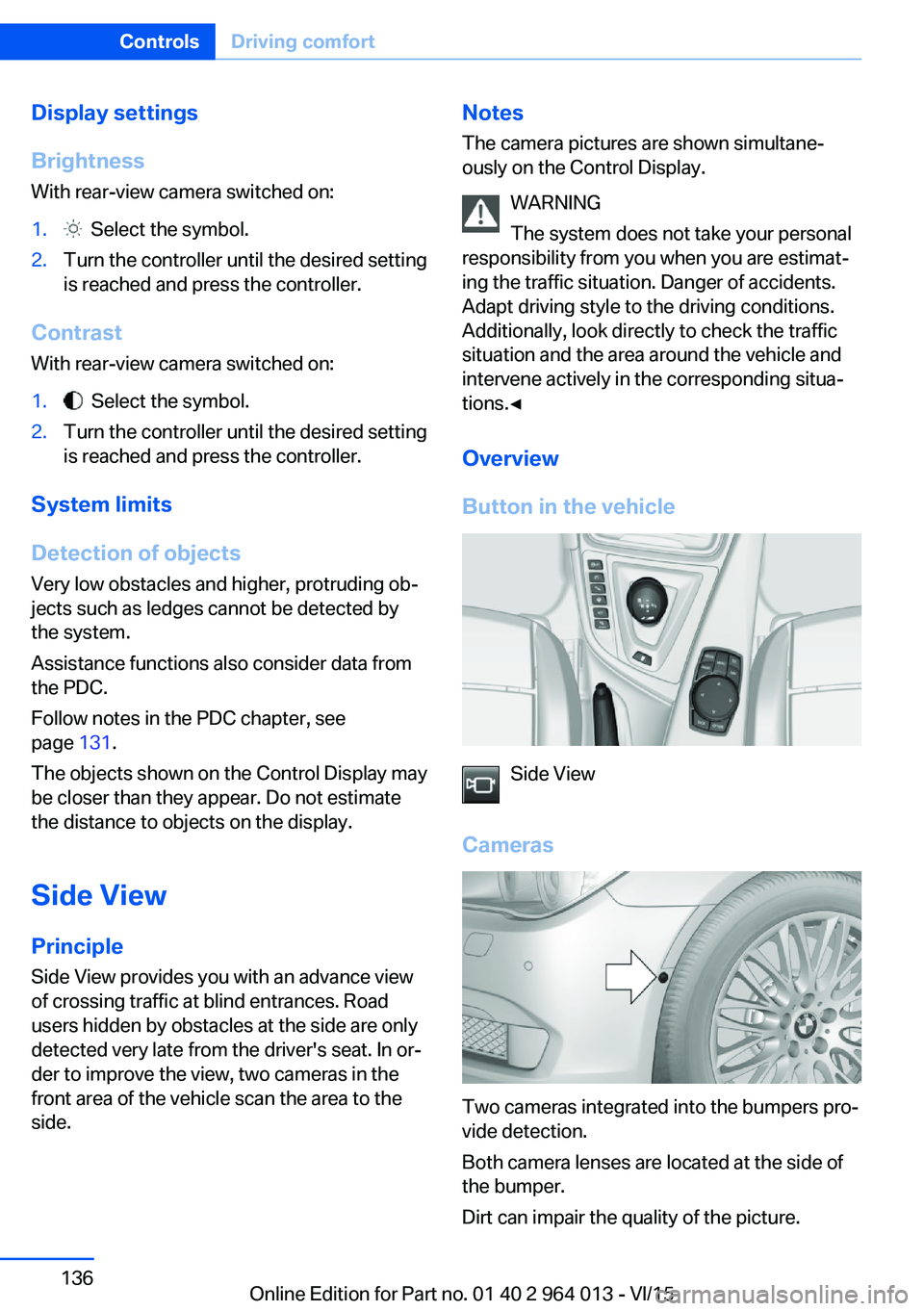
Side View
Cameras
Two cameras integrated into the bumpers pro‐
vide detection.
Both camera lenses are located at the side of
the bumper.
Dirt can impair the quality of the picture.
Seite 136ControlsDriving comfort136
Online Edition for Part no. 01 40 2 964 013 - VI/15
Page 144 of 228

ClimateVehicle equipmentThis chapter describes all standard, national
and special equipment provided in the model
series. Equipment not available in the vehicle is
therefore also described, for example the se‐lected special equipment or national version.
This also applies to safety-relevant functions
and systems. Comply with the relevant na‐
tional regulations when using the correspond‐
ing functions and systems.
Automatic air conditioning
1Seat heating, left 502Temperature, left3AUTO program4Display5Maximum cooling effect6Temperature, right7Seat heating, right 508Cooling function9AUC/recirculated-air mode10Air distribution, right11Air flow, AUTO intensity12Air distribution, left13Heated rear window14Interior temperature sensor — never cover15Defrosting windows and removing conden‐
sationSeite 144ControlsClimate144
Online Edition for Part no. 01 40 2 964 013 - VI/15
Page 145 of 228

Air conditioning functions in detailSwitching system on/off
Switching on
Press any key, except▷Heated rear window.▷Seat heating
Switching off
In the lowest setting, press the left of
the button.
Temperature Turn the wheel to select the de‐
sired temperature.
The automatic air conditioning sets this tem‐ perature as quickly as possible, using higher
cooling or heating power if necessary. The
temperature is then maintained.
Avoid switching between different temperature
settings in rapid succession. The automatic air
conditioning will not then have sufficient time
to establish the temperature selected.
Cooling function
The interior can only be cooled when the en‐
gine is running.
Press the button.
Air is cooled and dried, then reheated
to suit the temperature setting.
Depending on weather conditions, the wind‐
screen and side windows may mist over mo‐
mentarily when the engine is started.
The cooling function is switched on automati‐
cally in the AUTO program.
When using the automatic air conditioning,
condensation water, see page 165, develops
that exits underneath the vehicle.
Maximum cooling effect Press the button.
System is set to lowest temperature,
optimum air flow and recirculated-air mode.
The air flows from the outlets for the upper
body area. Therefore open the ventilation vents.
The function is available through an outside
temperature of approximately 0 ℃/32 ℉ and
with the engine running.
The air flow can be adapted when the program
is active.
AUTO program Press the button.
The air flow, air distribution and tem‐
perature are automatically regulated.
Depending on the selected temperature, inten‐
sity AUTO program and external influences,
the air is directed towards the windscreen, side
windows, upper body, and into the footwell.
The cooling function, see page 145, is
switched on automatically in the AUTO pro‐
gram.
A condensation sensor also controls the pro‐
gram so that condensation is avoided as much
as possible.
Intensity of AUTO program
When AUTO program is switched on, auto‐
matic control of the intensity can be changed.
Pressing the button on the left or right
reduces or increases intensity.
The selected intensity is shown on the display
for automatic air conditioning.Seite 145ClimateControls145
Online Edition for Part no. 01 40 2 964 013 - VI/15
Page 146 of 228

Automatic air recirculation control,
AUC/recirculated-air mode
If the air outside the vehicle has an unpleasant
odour or contains pollutants, the supply to the
interior of the vehicle can be shut off. The air
inside the vehicle is then recirculated.
Press button repeatedly to call up an
operating mode:▷LEDs off: ambient air is constantly entering
the car.▷Left-hand LED on, AUC mode: a sensor
detects pollutants in the outside air and
shuts it out automatically.▷Right-hand LED on, recirculated-air mode:
the ambient air supply is permanently shut
off.
The recirculated-air mode automatically
switches off at low outside temperatures after
a given time, to avoid condensation.
Continuous recirculated-air mode deteriorates
the air quality in the interior and condensation
on the windows increases.
If there is condensation on the window, switch
off recirculated-air mode and press the AUTO
button to use the condensation sensor. Ensure
that air can flow towards the windscreen.
Adjusting the air flow manually To be able to adjust the air flow manually, first
switch off the AUTO program.
Pressing the button on the left or right
reduces or increases the air flow.
The selected air flow is shown on the display
for automatic air conditioning.
In order to protect the battery the air flow rate
of the automatic air conditioning is reduced, if
necessary.
Adjusting the air distribution manually Press button repeatedly to select a
program:
▷Upper body area.▷Upper body area and footwell.▷Footwell.▷Windows and footwell: only on the driver's
side.▷Windows, upper body area and footwell:
only on the driver's side.
If there is condensation on the window, press
the AUTO button in order to use the conden‐
sation sensor.
Defrosting windows and removing
condensation
Press the button.
This removes ice and condensation
quickly from the windscreen and the front side
windows.
To do this, point the side nozzles at the side
windows if necessary.
The air flow can be adapted when the program
is active.
If there is condensation on the window, switch
on the cooling function as well or press the AUTO button to use the condensation sensor.
Heated rear window Press the button.
The heated rear window is switched
off automatically after a certain period of time.
Microfilter/activated charcoal filter
In outside and recirculated-air mode, the mi‐
crofilter/activated carbon filter filters dust, pol‐ len and harmful gases from the air.
This filter should be changed during mainte‐
nance on your vehicle, see page 191.
Seite 146ControlsClimate146
Online Edition for Part no. 01 40 2 964 013 - VI/15
Page 147 of 228
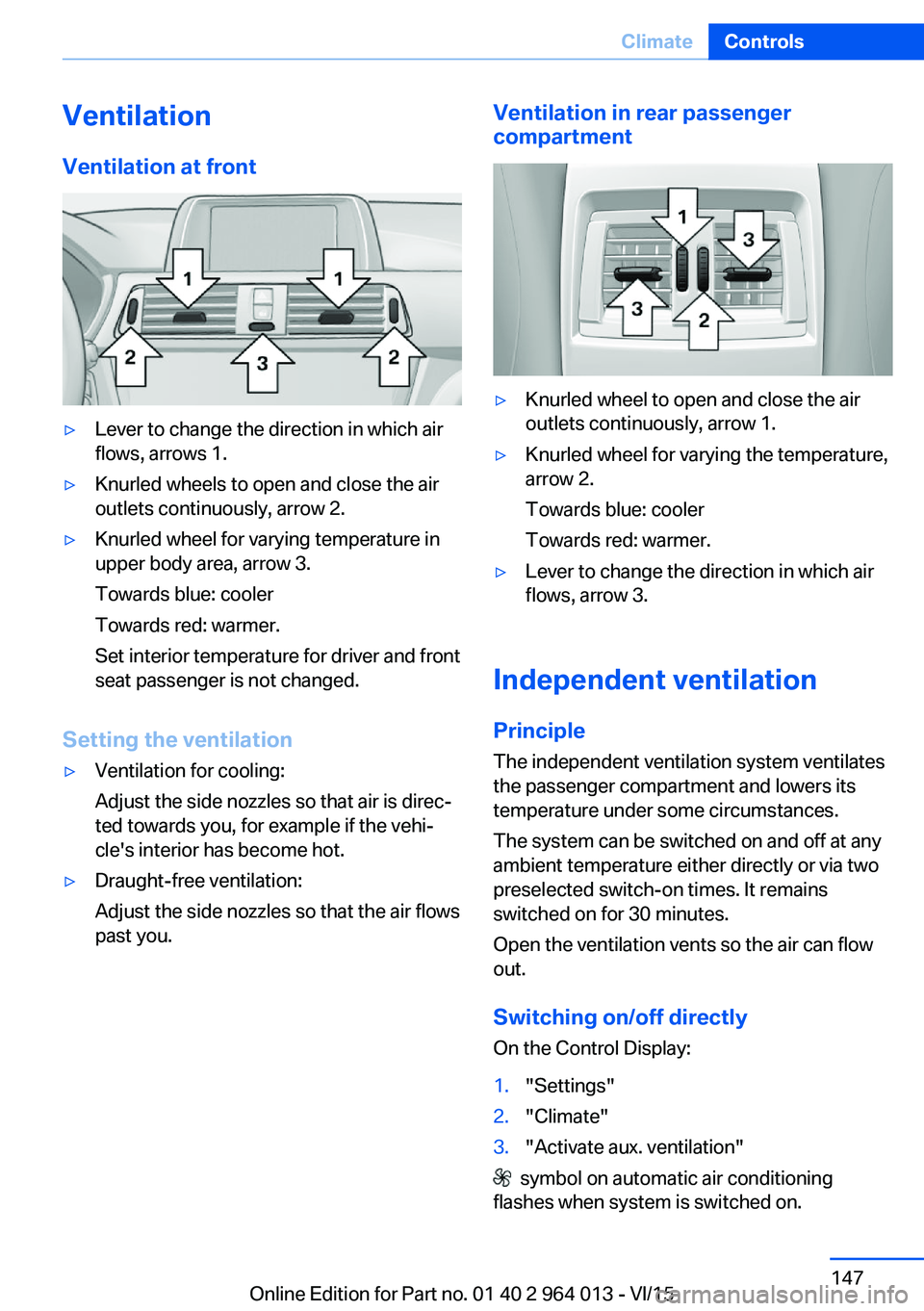
VentilationVentilation at front▷Lever to change the direction in which air
flows, arrows 1.▷Knurled wheels to open and close the air
outlets continuously, arrow 2.▷Knurled wheel for varying temperature in
upper body area, arrow 3.
Towards blue: cooler
Towards red: warmer.
Set interior temperature for driver and front
seat passenger is not changed.
Setting the ventilation
▷Ventilation for cooling:
Adjust the side nozzles so that air is direc‐
ted towards you, for example if the vehi‐
cle's interior has become hot.▷Draught-free ventilation:
Adjust the side nozzles so that the air flows
past you.Ventilation in rear passenger
compartment▷Knurled wheel to open and close the air
outlets continuously, arrow 1.▷Knurled wheel for varying the temperature,
arrow 2.
Towards blue: cooler
Towards red: warmer.▷Lever to change the direction in which air
flows, arrow 3.
Independent ventilation
Principle The independent ventilation system ventilates
the passenger compartment and lowers its
temperature under some circumstances.
The system can be switched on and off at any
ambient temperature either directly or via two
preselected switch-on times. It remains
switched on for 30 minutes.
Open the ventilation vents so the air can flow
out.
Switching on/off directly
On the Control Display:
1."Settings"2."Climate"3."Activate aux. ventilation"
symbol on automatic air conditioning
flashes when system is switched on.
Seite 147ClimateControls147
Online Edition for Part no. 01 40 2 964 013 - VI/15
Page 148 of 228
Preselecting the switch-on time
On the Control Display:1."Settings"2."Climate"3."Start time 1:" or "Start time 2:"4.Set desired time.
Activating the switch-on time
On the Control Display:
1."Settings"2."Climate"3."Activate start time 1" or "Activate start time 2"
Symbol on the automatic air conditioning
system is illuminated when the switch-on time
is active.
Symbol on the automatic air conditioning
system flashes when the system has cut in.
The system switches on within the next
24 hours only. Afterwards, it must be reactiva‐
ted.
Seite 148ControlsClimate148
Online Edition for Part no. 01 40 2 964 013 - VI/15
Page 165 of 228
Should corrosion form on the brake discs, the
brakes will tend to respond with a pulsating ef‐
fect that generally cannot be corrected.
Condensate when vehicle is parked
When using the automatic air conditioning,
condensation water develops that exits under‐
neath the vehicle.
Traces of water on the ground are normal.
Ground clearance ATTENTION
If there is insufficient ground clearance,
the front or rear spoiler can touch the ground,
for example at curb edges or when driving into
underground car parks. Danger of damage to
property. Make sure that there is sufficient
ground clearance.◀
When driving down from kerb edges, select
the following program with the adaptive M sus‐
pension, see page 126, to keep the ground
clearance as uniform as possible: "Sport Plus"
M Driver's Package: driving in
maximum speed range
WARNING
At high speeds, damage to vehicle parts
can unfavourably influence driving properties.
These include tyres, underbody and parts for
improving aerodynamics. Danger of accidents.
Have damage rectified by a Service Partner or
a qualified specialist workshop. Do not drive at
high speed until the damage has been re‐
paired.◀Seite 165Driving precautionsDriving hints165
Online Edition for Part no. 01 40 2 964 013 - VI/15
Page 174 of 228

FuelVehicle equipmentThis chapter describes all standard, national
and special equipment provided in the model
series. Equipment not available in the vehicle is
therefore also described, for example the se‐
lected special equipment or national version.
This also applies to safety-relevant functions
and systems. Comply with the relevant na‐
tional regulations when using the correspond‐
ing functions and systems.
Fuel quality
General Depending on the region, many filling stations
sell fuel that is adapted to the conditions in
winter or summer. Fuel that is sold in winter fa‐
cilitates cold starting, for example.
Note ATTENTION
Even fuels corresponding to the specifi‐
cations may be of low quality. Engine problems
can arise, for example poor engine starting, im‐
paired driving properties or reduced perform‐
ance. Danger of damage to property. In the
case of engine problems, use a different filling
station or refuel with a higher octane fuel from
a brand maufacturer.◀
Petrol
For optimal fuel consumption, the petrol
should be sulphur-free or as low in sulphur
content as possible.
Fuels labelled on the pump as containing metal
must not be used.ATTENTION
Even small quantities of the wrong fuel or
wrong fuel additives can damage the fuel sys‐
tem and engine. In addition, the catalytic con‐
verter will be permanently damaged. Danger of
damage to property. Do not use the following
fuel or additives with petrol engines:▷Leaded petrol.▷Metallic additives, for example manganese
or iron.
After filling the wrong fuel, do not press the
start/stop button. Contact a Service Partner or
a qualified specialist workshop.◀
You can fill up with fuels with a maximum pro‐
portion of ethanol of 10 %, in other words E10.
ATTENTION
Incorrect fuels can damage the fuel sys‐
tem and engine. Danger of damage to prop‐
erty. Do not fill with any fuels that either have a
higher ethanol content than recommended or
that contain methanol, for example M5 to
M100.◀
The engine has anti-knock control. This means
that different petrol grades can be used.
Petrol grade Super Plus, with RON 98.
Fill up this fuel so that the nominal perform‐
ance data values and consumption is achieved.
Minimum grade Super with RON 95.
ATTENTION
Fuel below the specified minimum qual‐
ity can impact the engine function or lead to
engine damage. Danger of damage to prop‐
erty. Do not refuel petrol below the specified
minimum quality.◀
Seite 174MobilityFuel174
Online Edition for Part no. 01 40 2 964 013 - VI/15