2016 AUDI TT COUPE ignition
[x] Cancel search: ignitionPage 62 of 322

Downloaded from www.Manualslib.com manuals search engine Driving
Messages
Turn off ignition before leaving vehicle. Battery
is discharging
This message appears and a warning tone sounds
if you open the driver's door when the ignition is
switched on. Switch
the ignition off so that the
battery will not discharge.
Pressing start/stop b utton again will switch off
engine.
This
message appears when you press the
I START ENGINE STOPI button while driving .
Engine
start system: malfunction! Please con
tact Service
The engine automatic start system has a mal
function. Drive
to an authorized Audi dealer or
authorized Audi Service Facility immediately to
have the malfunction corrected. To start the en
gine,
press and hold the I START ENGINE STOPI
button.
II Remote control key : hold back of key
against the designated area. See owner's man
ual
This message appears if there is no convenience
key inside
the vehicle or ifthe system does not
recognize the key. The convenience key may not
be recognized, for example, if it is covered by an
object that disrupts the signal (such as a brief
case), or if
the key battery is weak. Electronic de
vices su ch as cell phones can also interfere with
the signal.
To still be able to start or stop the engine, refer
to "Correct ing a malfunction" Q page 60.
ml Remote control key : key not recognized . Is
the key still in the vehicle?
The
ml indicator light turns on and this message
appears if the convenience key was removed from
the vehicle when the engine was running. If the
convenience key is no longer in the vehicle, you
cannot switch the ignition on or start the engine
once you stop it. In addition, you cannot lock the
vehicle from the outside.
Please press brake pedal
60
This message appears if you do not press the
brake pedal when starting the engine.
Please select N or P
This
message appears when starting or stopping
the engine if the selector lever is not in the N or P
posi tion. The engine will not start/stop.
Shift to P, otherwise vehicle can roll away.
Doors
can be locked only in P
This
message appears for safety reasons along
with a warning
tone. It appears if the selector
lever for the automatic transmission is not in the
P position when switch ing the ignition off w ith
the I START ENGIN E STOPI button. Sh ift these
lector lever to the P pos ition. Otherwise, the vehi
cl e could roll.
You also cannot lock the ve hicl e us
ing
the loc kin g sensor on the door hand le or us
ing
the convenience key.
Starting the engine when there is a
malfunction
It may not be possible to start the engine under
certain circumstances, for example
if the battery
in the vehicle key is drained , if interference is af
fected
the key or if there is a system malfunc
tion .
Fig. 61 Steering column/remote control key: starting the
engine if there is a ma lfunction
As long as the message fi)) Remote control key:
hold back of key against the designated area.
See owner' s manual is displayed, you can emer
gency start your vehicle .
... Press the brake pedal~ A in Starting the en
gine on page
59 .
... Press the~, S~T~A~R~T~E_N _G ~l-N~E-S_T_ O_P~I button. ....
Page 63 of 322

Downloaded from www.Manualslib.com manuals search engine ..... N
G: CX)
.....
"' U"I
.....
"' .....
.,.. Hold the master key in the location indicated as
shown in the illustration y») ¢fig. 61. The en
gine will
start.
.. If the engine does not automatically start,
press the I START ENGINE STOP! button again.
{!) Tips
You can view the message again by pressing
the I START ENGINE STOPI button.
Electromechanical
parking brake
Operating
The electromechanical parking brake replaces
the hand brake.
Fig. 62 Center console: park ing brake
.,.. Pull the switch ¢ fig. 62 to set the parking
brake. The . (USA models) I. (Canada
model s) indicator lights turn on in the button
and in the Info tainment system display.
.,.. To release the parking brake, press th e b rake or
acce le rator pedal while the ignition is switched
on and p ress the button at the same time. The
• (USA models) I. (Canada models) indi
cator lights turn on in the button and in the dis
play .
Your vehicle is equipped with an electromechani
cal parking brake. T
he parking brake is designed
to prevent the vehicle from rolling unintentional
ly and replaces the hand brake.
In addition to the normal functions of a tradi
tional hand brake, the electromechanical parking
brake provides various convenience
and safety
functions .
Driving
When starting from rest
-The integral hill start assist helps you when
driving by automatically releasing the parking
brake¢ page 62, Starting from a stop.
-When starting on inclines, the hill start assist
prevents the veh icle from un intentionally roll
ing back . The braking force
of the parking brake
is
not re leased unti l sufficient driving force has
been built up at the wheels.
Emergen cy brake function
An emergency braking fu nction ensures that the
vehicle can be slowed down even if the normal
brakes fail¢ page 62, Emergency braking
functi on.
Indicator lights
- If the parking brake is set when th e ignit io n is
switched on , the. indicator lights in the dis
play
and in the button tur n on .
- I f
the parking brak e is set when the ignit io n is
switched off, the. indicator lights in the dis
play
and in the b utton turn on for approximate
ly 20 seconds.
A WARNING
t-==
-Do not press the acce lerator pedal inadver-
tently if the vehicle is stationary but the en
gine is ru nning and a gear is selected. Oth
erwise the vehicle will start to move imme
diately and co uld result in a crash.
-
If the power supply fails, the released park
ing brake
can no longer engage. In this
case, park t he vehicle on level ground and
secure it by plac ing the selector l eve r in the
P position. See an authorized Audi deale r o r
authorized A udi Service Facil ity for assis
tance.
©Tips
-If the park ing brak e is set while the igni tion
is swi tc h
ed off, the((@)) indi cator light in the
button and in the ins trument cluster dis
play .
(USA models) I. (Canada mod
els) will turn off after a certain amount of
time.
61
Page 64 of 322

Downloaded from www.Manualslib.com manuals search engine Driving
-If driver's door is opened while the ignition
is
switched on, the parking brake sets auto
matically. This prevents unintended rolling
of the vehicle.
- Occasional noises
when the parking brake is
applied
and released are normal and are not
a cause for concern.
-
When the vehicle is parked, the parking
brake goes through a self-test cycle at regu
lar intervals. Any noises associated with this
are normal.
-If the. (USA models) I. (Cana-
da models) indicator lights or llJ indicator
lig ht
turn on, there could be a malfunction
in the park ing brake ~page 11.
-If there is a power failure, the parking brake
will not set if it is released, and it will not
release if it is set~.&.. See an authorized
Audi dealer or authorized Audi Service Fa
cility for
assistance.
Parking
.... Press the brake pedal to stop the vehicle.
.... Pull the switch~ to set the parking brake .
.... Place the selector lever in the P position.
.... Turn the engine off~,&.
.... Turn the steering wheel when parking on in
clines
so that the wheels will roll into the curb
if the vehicle starts moving .
A WARNING
-Always take the vehicle key with you when
leaving the vehicle, even for a short period
of time. This applies particularly when chi l
dren remai n in the vehicle. Otherwise the
children could start the engine, release the
parking brake or operate electrical equip
ment (e.g. power windows). There is the risk
of an accident.
-
When the vehicle is locked, no one -particu
larly
not children should remain in the vehi
cle. Locked
doors make it more difficult for
emergency workers to get into the vehicle,
which
puts lives at risk.
62
Starting from a stop
The start assist function ensures that the park
ing brake
is released automatically upon start
mg.
Stopping and applying parking brake
.... Pull the switch~ to set the parking brake.
Starting and automatically releasing the
parking brake
Requirement: the driver's door must be closed
and the driver's safety belt must be fastened.
.... When you press the accelerator pedal, the
parking brake is automatically released and
your vehicle begins to move.
When stopping at a traffic signal or stopping in
city traffic, the park ing brake can be applied. The
vehicle
does not have to be held with the brake
pedal. The parking brake eliminates the tendency
to creep when a selector lever position is engag
ed. As soon as you press the accelerator pedal,
the parking brake releases automatically and the
vehicle starts to move .
Starting on slope s
When starting on inclines, the hill start assist
prevents the vehicle from unintentionally rolling
back. The braking force
of the parking brake is
not released until sufficient driving force has
been built up at the wheels.
(0 Tips
For safety reasons, the parking brake is re
l
eased automatically onl y when the driver's
safety be lt is fastened and the driver's door is
l ocked.
Emergency braking function
In the event that the conventional brake system
fails or locks.
.... To brake your vehicle in an emergency, pull the
~switch and hold it pulled.
.... As soon as you release the button or accelerate,
the braking stops. .,..
Page 66 of 322
Downloaded from www.Manualslib.com manuals search engine Automatic transmission
Automatic transmission
S tronic
Introduction
Your vehicle is equipped with an electronically
controlled DSG transmission called S tronic. Two
independent clutches transfer the power be
tween the engine and transmission. It allows the
vehicle to accelerate without a noticeable inter
ruption in traction.
The transmission upshifts or downshifts auto
matically. The driving style continuously influen
ces the selection of the driving program.
When a moderate driving style is used, the
transmission selects the most economical driving
mode. The transmission upshifts at a lower RPM
and downshifts at a higher RPM to improve fuel
efficiency.
The
transmi ssion switches to a sporty mode after
a kick-down or when the driver uses a sporty
driving style
characterized by quick accelerator
pedal movements, heavy acceleration, frequent
changes in speed and traveling at the maximum
speed.
If desired, the driver can also select the gears
manually (tiptronic mode).
Selector lever positions
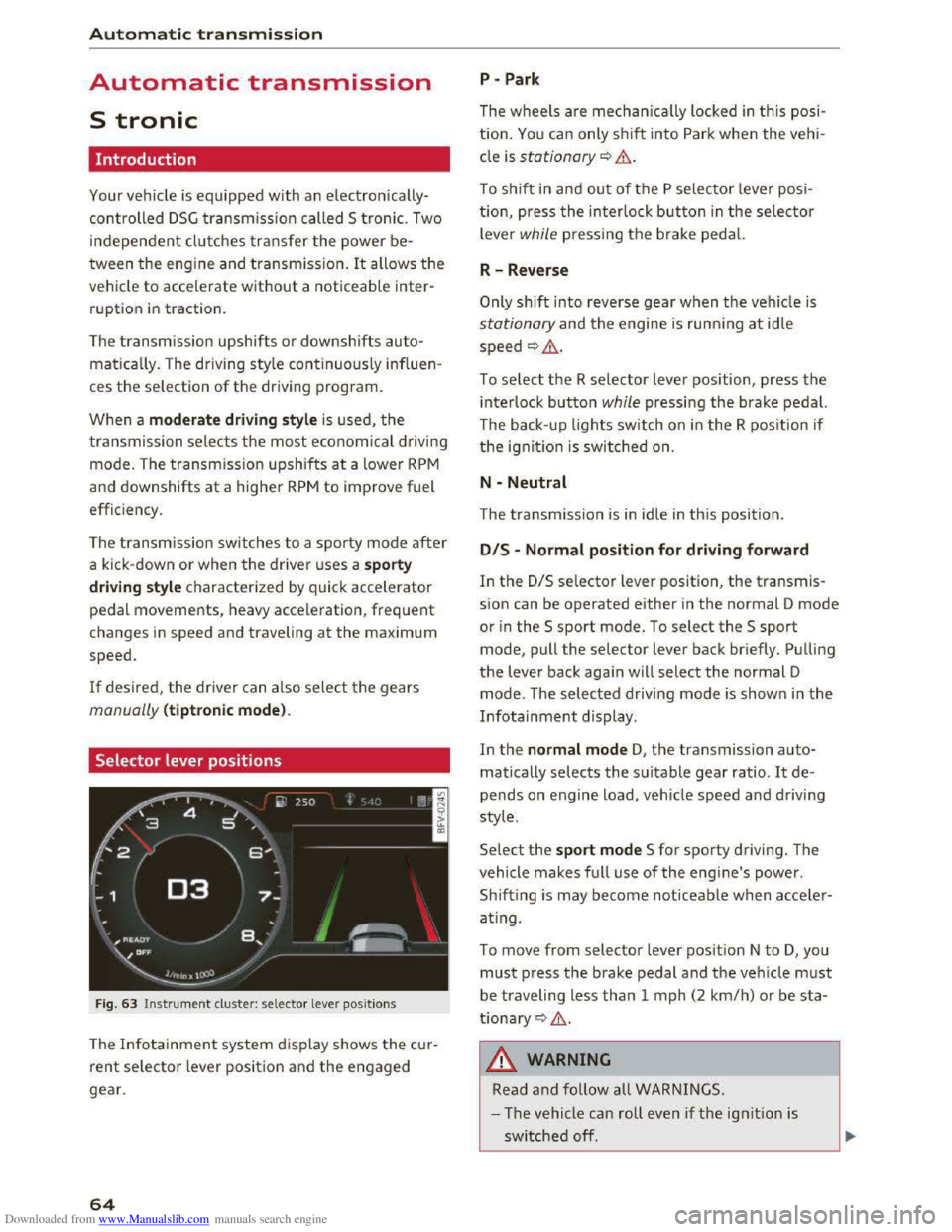
Fig. 63 Instrument cluster: selector lever positions
The Infotainment system d isplay shows the cur
rent selector lever position and the engaged
gear.
64
P -Park
The wheels are mechanica lly locked in this posi
tion. You can only shift into Park when the vehi
cle is stationary¢&.
To shift in and out of the P selector lever posi
tion, press the interlock button in the selector
lever while pressing the brake pedal.
R-Reverse
Only shift into reverse gear when the vehicle is
stationary and the engine is running at idle
speed ¢,6.
To select the R selector lever position, press the
interlock button while pressing the brake pedal.
The back- up
lights switch on in the R position if
the ignition is switched on.
N -Neutral
The transmission is in idle in this position.
DIS -Normal position for driving forward
In the D/S selector lever position, the transmis
sion can be operated either in the normal D mode
or in the S sport mode. To select the S sport
mode, pull the selector lever back briefly. Pulling
the lever back again will select the normal D
mode. The selected driving mode is shown in the
Infotainment display.
In
the normal mode D, the transmission auto
matically selects the suitable gear ratio. It de
pends on engine load, vehicle speed and driving
style.
Select the sport mode S for sporty driving. The
vehicle
makes full use of the engine's power.
Sh i
fting is may become noticeable when acce ler
ating.
To move from selector lever position N to D, you
must press the brake pedal and the vehicle must
be traveling less than 1 mph (2 km/h) or be sta
tionary ¢,6.
A WARNING
Read and follow all WARNINGS.
- The vehicle can roll
even if the ignition is
switched off.
Page 67 of 322

Downloaded from www.Manualslib.com manuals search engine ..... N
G: CX)
.....
"' U"I
.....
"' .....
-Never select R or P while driving, because
this increases the risk of an accident.
- Power
is still transmitted to the wheels
when
the engine is running at idle. To pre
vent
the vehicle from "creeping", you must
keep your foot on the brake in all selector
lever positions (except
P) when the engine is
runn ing. Otherwise,
this increases the risk
of an accident.
-
Do not i nadvertently press the accelerator
peda l when
the veh icle is stopped if a gear is
engaged. Otherwise the vehicle will start to
move immediately, even if the par king brake
is set. This coul d result in a crash.
-
Do not press the accelerator pedal when
changing
the selector lever position while
the vehicle is stationary and the engine is
running.
- Never leave
your vehicle with t he engine
running wh
ile in gear. If you must leave
your vehicle when
the engine is running, set
the parking brake and move the selector lev
er to the P position.
- Before opening
the hood and working on a
running engine, select
the P position with
the selector lever and activate the parking
brake. Always read and
follow the applica
ble warnings
c> page 236, Working in the
engine compartment.
CD Note
Never let the vehicle roll downhill with engine
off and the selector lever in the N position,
because
this could damage the automatic
transmission and cata l
ytic converter .
@ Tips
-Drive select: sporty shifting character istics
can
be selected using the Dynamic driving
mode. The
Infotainment display shows Sas
the selector lever position instead of D.
-If you accidentally select N while driving,
take your
foot off the accelerator pedal im
mediately and
wait for the engine to slow
down
to idle before selecting D or S.
-If there is a powe r failure, the sel ector lever
will not move out of the P position. The
Automatic tran smission
emergency release can be used if this hap
pens. Left-hand drive vehicles
c> page 71.
Selector lever lock
The selector lever lock prevents you from select
ing
o gear occidentally, causing the vehicle to
roll.
F ig . 64 Selector lever lock
To release the selector lever lock:
... Switch on the ignition.
... Press the brake pedal while pressing the inter
lock button.
Automatic shift lock (ASL)
The selector lever is locked in the P and N posi
tions when
the ignition is switched on. You must
press the brake pedal to select another position.
You must also press the interlock button if you
are moving
from the P position. The following
message appears in
the display when the selector
lever
is i n the P or N position to rem ind the driv
er:
To sel e ct a g ear, pl ease pr ess brake pedal and
pre
ss lock button on selector le ver
The automatic shift lock only functions when the
vehicle is stationary or at speeds below 1 mph
(2
km/h). At higher speeds, th e lock is automati
cally deactivated in
the N pos ition.
The selector lever
is not locked when shifting
quickly through N, for example from R to D. This
makes
it possible to free the veh icle when it is
stuck by "rocking" it . The selector lever lock en
gages
if the leve r stays in the N posit ion longer
than approx imately 2 seconds when t
he brake
peda l
is not pressed.
65
Page 75 of 322

Downloaded from www.Manualslib.com manuals search engine The speed is kept constant by modifying engine
power or through an active brake intervention.
A WARNING
-Always pay attention to the traffic around
you when the cruise control is in operation.
You are always responsible for your speed
and the distance between your vehicle and
other vehicles.
- For
reasons of safety, cruise control should
not be used in the city, in stop-and-go traf
fic, on winding roads and when road condi
tions are poor (such as ice, fog, gravel,
heavy rain
and hydroplaning) -you could
have
an accident.
- Switch
the cruise control off temporarily
when driving in turning lanes, highway exits
or in construction zones.
-Please note that unconsciously "resting"
your foot on the accelerator pedal prevents
the cruise control from braking. This is due
to the control system being overridden by
the driver's acceleration.
-If a brake system malfunction such as over
heating occurs when the cruise control sys
tem is switched on, the braking function in
the system may be switched off. The rest of
the cruise control system functions remain
active as long as the (1!;(1)~14 (USA models) I
B (Canada models) indicator light is on.
@ Tips
The brake lights illuminate as soon as the
brakes apply automatically.
Changing speed
Applies to: vehicles with cruise control system
.. To increase/decrease the speed in xx mph (1
km/h) increments, briefly tap the lever up/
down in the 0 10 ¢ page 72, fig. 70 direction
to the first level.
.. To increase/decrease the speed in xx mph (10
km/h) increments, briefly tap the lever up/
down in the 010 ¢page 72, fig. 70 direction
to the second level.
Assist
.. To increase or decrease the speed quickly, hold
the lever in the 0 I 0 direction until the de
sired speed is reached.
Overriding the speed
Applies to: vehicles with cruise control system
You can press the accelerator pedal down to in
crease your speed, for example if you want to
pass someone. The speed you saved earlier will
resume as soon as you let off of the accelerator
pedal.
However, if you are exceeding the stored speed
by a considerable amount for a long time, the
cruise control system will temporarily switch off.
The
lij;lil~14 (USA model s) !Iii (Canada models) in
dicator light in the instrument cluster turns off
and the stored speed is maintained.
Preselecting the speed
Applies to: vehicles with cruise control system
You can pre-select your desired speed while the
vehicle is not moving.
.. Switch on the ignition .
.. Pull the lever into position@¢ page 72,
fig. 70.
.. To increase or decrease the speed, tap the lever
in the 010 direction.
This
function makes i t possible, for example, to
save the speed you want before driving on the
highway. Once on the exp ressway, activate the
cruise control by pulling the lever into position
@.
Switching off
Applies to: vehicles with cruise control system
Temporary deactivation
.. Step on the brake pedal, or
.. Press the lever in direction @ (not locked into
place) 9page 72, fig. 70 .
Switching off completely
.. Press the lever into position @(clicked into
place), or
.. switch the ignition off.
73
Page 76 of 322

Downloaded from www.Manualslib.com manuals search engine Assist
The speed you saved will be retained ifthe cruise
control has been switched off temporarily. To re
sume the stored speed, release the brake or
clutch pedal and pull the lever to position(!).
Switching the ignition off will erase the stored
speed.
A WARNING
-You should only resume the saved speed if it
is not too high for existing traffic conditions.
Otherwise you risk an accident.
Audi active lane assist
Description
App lies to: ve h icles with Audi active lane assis t
Active lane assist detects lane marker lines with
in the limits of the system using a camera in the
windshield. If you are approaching a detected
lane marker line and it appears likely that you
will leave
the lane, the system will warn you with
corrective
steering. You can override this steering
at any time. If you pass over a line, the steering
wheel will vibrate lightly. In order for this warn
ing vibration to occur, it must first be switched
on in the Infotainment system. Active lane assist
is operable when the lane marker line is detected
on at least one side of the vehicle.
The
system is designed for driving on express
ways and highways and
therefore only activates
at speeds above approximately 40 mph (65 km/
h) (depending on the market).
Appl i
es to vehicles with side assist*: if you acti
vate a turn s ignal when active lane assist is ready
and it classifies a lane change as critical because
of vehicles traveling alongside you or approach
ing you, there will be noticeable corrective steer
ing
shortly before you leave the lane. This will at
tempt to keep your vehicle in the lane.
Applies
to vehicles without side assist*: the sys
tem does not warn when it is ready if you activate
the turn signal before crossing the lane marker
ll The co rrective steering function is not a va ilable in all mar
kets.
7 4
line. In this case, it assumes that you are chang
ing lanes intentionally.
A WARNING
!-="' -
-The system warns the driver that the vehicle
is leaving the lane using corrective steering.
The driver is always responsible for keeping
the vehicle within the lane.
- The
system can help you keep the vehicle in
the lane, but it does not drive by itself. Al
ways keep your hands on the steering
wheel.
- Corrective
steering may not occur in certain
situations, such as during heavy braking.
- There
may be cases where the camera does
not recognize all lane marker lines. Correc
tive steering can only take place on the side
of the vehicle where lane marker lines are
detected.
-Other road structures or objects could possi
bly be identified unintentionally as lane
marker lines. As a result, corrective steering
may be
unexpected or may not occur.
- The
camera view can be restricted, for ex
ample by vehicles driving ahead or by rain,
snow, heavy spray light shining into the
camera or by dirt on the window. This can
result in active lane assist not detecting the
lane marker lines or detecting them incor
rectly.
- In
certain situations where visibility is low,
the vehicle may switch internally from "ear
ly" to "late" steering correction ll.
-Under certain cond itions such as ruts in the
road, an inclined roadway or crosswinds, the
corrective steering alone may not be enough
to keep the vehicle in the middle of the lane.
- For
safety reasons, active lane assist must
not be used when there are poor road and/
or weather conditions such as slippery
roads, fog, gravel, heavy rain,
snow and the
potential for hydroplaning . Using active lane
assist under these conditions may increase
the risk of a crash.
Page 77 of 322

Downloaded from www.Manualslib.com manuals search engine Switching on and off
Applies to: vehicles with Audi active lane assist
F ig.
71 Turn signal lever: button for active lane assist
Fig. 72 Windshield : camera window for active lane assist
... Press the¢ fig. 71 button to switch the system
on and off. The . or rl1 indicator light in the
instrument cluster turns on or off.
Indicator lights
• Ready: the indicator light turns on when the
system is ready for use. The system can now be
operated.
rl1 Not ready: the indicator light turns on if the
system is switched on but is inoperable. This may
be
due to the following reasons:
- There
is no lane boundary line.
-
The relevant lane marker lines are not detected
(for example, markings in a construction zone
or because they
are obstructed by snow, dirt,
water or lighting).
- The vehicle
speed is below the activation speed
of approximately 40 mph (65 km/h) (the speed
may vary depending on your country).
- The lane
is narrower than approximately 8 ft
(2.5 m) or wider than approximately 18 ft
(5.5 m).
- The curve
is too narrow.
Assist
-The driver's hands are not on the steering
wheel.
{!) Tips
- Make sure the camera's field of view
¢fig. 72 is not obstructed by stickers or
anything else. For information on cleaning,
refer
to ¢ page 2 70.
- Market-specific: in certain countries: if the
system is switched on, it will remain opera
ble each time the ignition is switched on.
Indicator in Infotainment display
Applies to: vehicles with Audi active lane assist
Fig.
73 Instrument clu ster: active lane assist is switched
on and providing warnings
You can call up the active lane assist display us
ing the buttons in the multifunction steering
wheel ¢page 19 .
Green Li ne(s) Active lane assist is activated
and ready to provide warnings.
Red line(s) Active lane assist warns you
(left or right) before leav ing a lane
¢ fig. 73 .
In addit ion, the steering wheel
vibrates lightly.
Gray line(s)
lane assist is activated, but not
ready to give warning
Messages in Infotainment display
If the active lane assist switches off automatical
ly, the indicator light in the display turns off and
one of the following messages appears:
Audi active lane assist: currently unavailable.
Camera view restricted. See owner's manual
This message appears if the camera is unable to
detect the lines. This could happen if: ..,.
75